UTM Tracking for Customer.io: How to Build and Validate Campaign Links
UTM tracking for Customer.io has a naming decision that trips up almost every SaaS team at setup: utm_source=customerio (no hyphen) or utm_source=customer-io (hyphenated)? The answer matters because GA4 treats them as different sources, and whatever you choose locks in your source row for every future Customer.io report. Use customer-io — hyphenated, matching Customer.io's own brand styling — for readability in GA4 filter dropdowns and consistency with a lowercase-hyphenated UTM taxonomy. Customer.io does not auto-append UTM parameters to links in emails or other channels the way some platforms do, but the absence of auto-appending creates a different problem: each team member building Customer.io campaign messages builds links manually, which means inconsistent casing, missing parameters, and utm_campaign values that drift between NewUserActivation, new_user_activation, and new-user-activation — three separate rows in GA4 for one campaign. Customer.io's multi-channel Campaigns (email, push, SMS, and in-app from a single workflow) compound this by requiring a different utm_medium per channel delivery type. Use mlz build to generate normalised tracked URLs before editing any Customer.io message template, and paste the complete URL as the link destination.
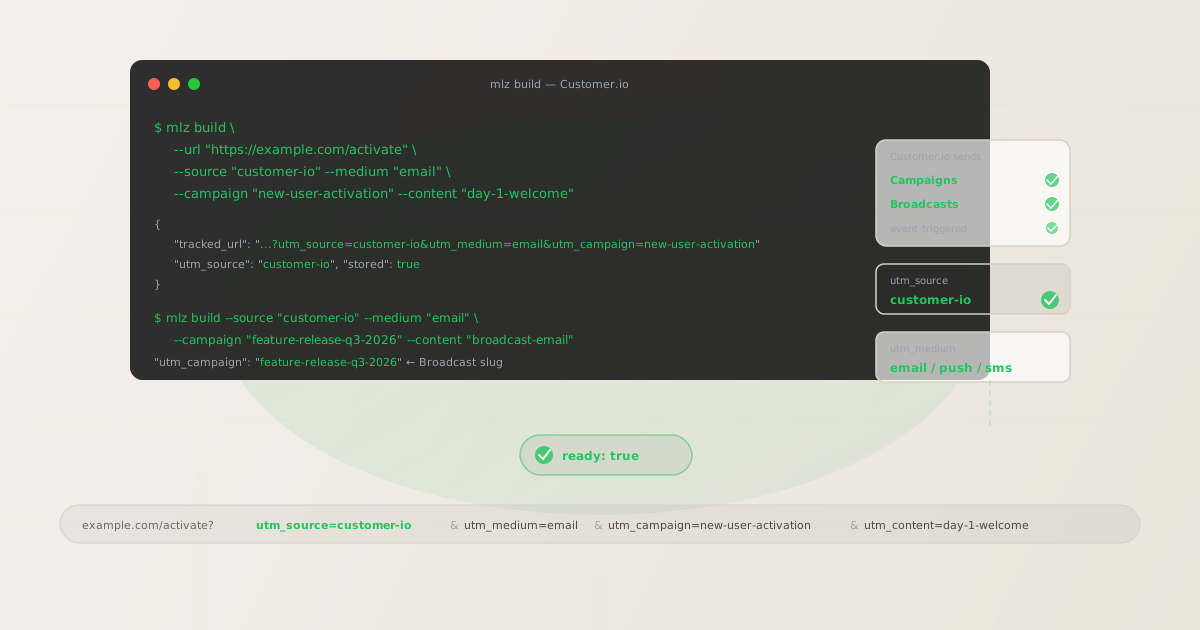
The correct utm_source and utm_medium for Customer.io
Use utm_source=customer-io — lowercase, hyphenated — for all sends from Customer.io. The hyphen matches Customer.io's own brand name styling (the platform is styled "Customer.io" not "CustomerIO" or "Customerio") and keeps the source value readable in GA4 without requiring institutional knowledge. Avoid customerio without the hyphen (reads as one word in GA4 dropdowns, harder to scan when filtering), customer_io with an underscore (inconsistent with a hyphenated taxonomy), and cio as an abbreviation (ambiguous — could refer to any tool with those initials).
The utm_medium for Customer.io varies by the channel the message is delivered through. Customer.io Campaigns support email, push notifications, SMS, in-app messages, and Slack messages from a single campaign workflow:
| Customer.io channel | utm_source | utm_medium | GA4 default channel |
|---|---|---|---|
| Email (Campaign or Broadcast) | customer-io |
email |
|
| Push notification (mobile or web) | customer-io |
push |
Other |
| SMS | customer-io |
sms |
SMS |
| In-app message | customer-io |
in-app |
Other |
GA4 maps utm_medium=email to the Email default channel group and utm_medium=sms to SMS automatically. Push and in-app land in Other unless you configure a custom channel group in GA4's Admin settings. For SaaS and PLG companies using Customer.io's full multi-channel capabilities, this custom channel group is worth creating — push-driven conversions are typically higher-intent than email-driven ones, and they're invisible in the default GA4 acquisition reports without it.
utm_campaign naming for Campaigns and Broadcasts
Customer.io organises messaging into two primary delivery patterns, each with a different attribution lifecycle.
Customer.io Campaigns are the core automation mechanism: multi-step, event-triggered or segment-triggered workflows that send messages to users as they meet entry conditions. A Campaign is "always on" — new users enter the Campaign when they match the trigger condition (a signed up event, a trial started attribute, a churn risk segment) and progress through the message steps at the defined cadence. Because Campaigns run continuously with new users entering over weeks or months, utm_campaign slugs for Campaign messages must be stable and evergreen. Never date-stamp a Campaign slug. Use utm_content per message step to distinguish individual messages within the Campaign.
Customer.io Broadcasts are one-time sends to a segment or query — the Customer.io equivalent of a traditional email blast. Broadcasts fire once to everyone who meets the targeting criteria at the time of send. Because Broadcasts are discrete, time-bounded sends, use campaign slugs that include a date stamp or version identifier: product-launch-q3-2026, feature-release-june-2026, black-friday-2026. This makes it straightforward to compare one Broadcast's performance against a subsequent one in GA4.
# Campaign — always-on trial activation, stable evergreen slug
$ mlz build --url "https://example.com/activate" \
  --source "customer-io" --medium "email" \
  --campaign "new-user-activation" --content "day-1-welcome"

{
  "tracked_url": "https://example.com/activate?utm_source=customer-io&utm_medium=email&utm_campaign=new-user-activation&utm_content=day-1-welcome",
  "params": {
    "utm_source": "customer-io",
    "utm_medium": "email",
    "utm_campaign": "new-user-activation",
    "utm_content": "day-1-welcome"
  },
  "link_id": "lnk_cio4r2m8",
  "stored": true
}

# Broadcast — one-time feature release, date-stamped slug
$ mlz build --url "https://example.com/new-features" \
  --source "customer-io" --medium "email" \
  --campaign "feature-release-q3-2026" --content "broadcast-email"
Copy the tracked_url from the JSON output and paste it as the destination URL for any link or button in the Customer.io message editor. Customer.io's click-tracking wraps the destination URL in a redirect that records the click in Customer.io analytics before forwarding users — your UTM query string is preserved through that redirect.
Building multi-step Campaign links with mlz build
A Customer.io Campaign that sends an email on Day 1, a follow-up email on Day 3, and a push notification on Day 7 requires separate tracked links for each message step — one per step per channel — with the same stable utm_campaign slug but different utm_content and (for push) different utm_medium values.
# Day 1 — welcome email
$ mlz build \
  --url "https://example.com/getting-started" \
  --source "customer-io" \
  --medium "email" \
  --campaign "new-user-activation" \
  --content "day-1-welcome" \
  --validate

{
  "tracked_url": "https://example.com/getting-started?utm_source=customer-io&utm_medium=email&utm_campaign=new-user-activation&utm_content=day-1-welcome",
  "validation": {
    "valid": true,
    "checks": [
      { "check": "ssl", "status": "pass" },
      { "check": "resolution", "status": "pass", "details": { "response_time_ms": 138 } },
      { "check": "redirects", "status": "pass" }
    ]
  },
  "stored": true
}

# Day 3 — follow-up email
$ mlz build \
  --url "https://example.com/key-features" \
  --source "customer-io" --medium "email" \
  --campaign "new-user-activation" --content "day-3-features"

# Day 7 — push notification (different utm_medium)
$ mlz build \
  --url "https://example.com/dashboard" \
  --source "customer-io" --medium "push" \
  --campaign "new-user-activation" --content "push-day-7"
In GA4's Traffic Acquisition report, filtering by utm_campaign=new-user-activation shows email and push as separate medium rows — you can see which channel in the activation Campaign drove more conversions without needing separate campaign slugs or post-hoc data manipulation. The Campaign slug stays constant across all steps; only utm_content and utm_medium change per step and channel.
Using utm_term for lifecycle stage attribution in SaaS and PLG
Customer.io's behavioral segmentation is particularly powerful in product-led growth (PLG) contexts where the same campaign type runs across users at different lifecycle stages simultaneously. A re-engagement Campaign might run for churned users and at-risk users using the same message template but different entry conditions. If both segments use the same tracked URL, GA4 cannot separate their conversion data. Use utm_term to carry the lifecycle stage into GA4 as a dimension:
# At-risk segment — re-engagement Campaign
$ mlz build \
  --url "https://example.com/re-engage" \
  --source "customer-io" \
  --medium "email" \
  --campaign "re-engagement" \
  --content "win-back-offer" \
  --term "at-risk"

{
  "tracked_url": "https://example.com/re-engage?utm_source=customer-io&utm_medium=email&utm_campaign=re-engagement&utm_content=win-back-offer&utm_term=at-risk",
  "params": {
    "utm_source": "customer-io",
    "utm_medium": "email",
    "utm_campaign": "re-engagement",
    "utm_content": "win-back-offer",
    "utm_term": "at-risk"
  },
  "stored": true
}

# Churned segment — same Campaign, different utm_term
$ mlz build \
  --url "https://example.com/re-engage" \
  --source "customer-io" --medium "email" \
  --campaign "re-engagement" --content "win-back-offer" \
  --term "churned"
In GA4's Explore report, add utm_term as a dimension and filter by utm_campaign=re-engagement to compare conversion rates between the at-risk and churned segments. This lifecycle-stage data is available without creating separate Campaigns or separate utm_campaign slugs — one Campaign, two entry conditions, two tracked URLs with distinct utm_term values, clean attribution in GA4.
Validating Customer.io destination URLs before activating Campaigns
Customer.io Campaigns run continuously for the lifetime of the campaign — a new-user activation Campaign in a SaaS product may run for years, processing every new signup through the same message sequence. Destination URLs embedded in Campaign messages are set at campaign build time and remain static until someone manually edits them. A product page that gets archived, a pricing page that gets restructured, or a feature landing page that gets redirected during a rebrand continues to receive traffic from the Campaign until an engineer or marketer notices broken links in GA4 or error logs.
Use mlz build --validate to confirm destination URLs resolve before activating a Campaign. Use mlz check to spot-check Campaign destinations after major web infrastructure changes:
$ mlz check "https://example.com/getting-started?utm_source=customer-io&utm_medium=email&utm_campaign=new-user-activation&utm_content=day-1-welcome"

{
  "url": "https://example.com/getting-started?utm_source=customer-io&utm_medium=email&utm_campaign=new-user-activation&utm_content=day-1-welcome",
  "valid": true,
  "checks": [
    { "check": "ssl", "status": "pass" },
    { "check": "resolution", "status": "pass", "details": { "response_time_ms": 127 } },
    { "check": "redirects", "status": "pass", "message": "No redirects detected." }
  ]
}
Use mlz links list --campaign "new-user-activation" to pull all stored tracked URLs for a specific campaign slug and systematically verify them after any website restructure or product release. For large SaaS products with many active Campaigns and a high rate of product page changes, this programmatic check is the only scalable alternative to manually opening every link in every Campaign message.
Customer.io UTM tracking gotchas
- customerio vs customer-io — lock in the hyphenated version from the start
- Both
customerioandcustomer-ioare in use across teams. GA4 treats them as different sources — once you have historical data under one version, switching creates a split in your Traffic Acquisition report. Decide oncustomer-io(hyphenated) before your first Customer.io Campaign goes live and enforce it withmlz build. If you have existing data undercustomerio, create a custom channel group in GA4 to consolidate the old value while transitioning all new sends tocustomer-io. - Liquid templates can create UTM parameter drift if UTM strings are hardcoded
- Customer.io's email and SMS editors support Liquid templating for personalization. Teams that embed UTM parameters directly in message HTML —
href="https://example.com?utm_campaign=New User Activation"— bypass naming governance entirely. The result is spaces encoded as+or%20, mixed casing, and no destination URL validation. Build tracked URLs withmlz buildbefore editing any Customer.io message template. Paste the complete tracked URL as the link destination in the editor — the template renders it as a static value with no Liquid interpolation required for the UTM parameters. - Multi-channel Campaigns need separate tracked URLs per channel
- Customer.io Campaigns can send email, push, SMS, and in-app messages from the same workflow. Reusing a single tracked URL — built with
utm_medium=email— across push and SMS steps attributes all conversions to the Email channel in GA4, making cross-channel performance comparison impossible. Build a separate tracked URL for each channel variant:utm_medium=pushfor push steps,utm_medium=smsfor SMS steps,utm_medium=in-appfor in-app steps. The extra build step takes seconds; the attribution clarity in GA4 is permanent. - utm_source in Customer.io Broadcasts must match Campaigns — don't drift
- Broadcasts are one-time sends, and it's tempting to use a different utm_source for them —
customer-io-broadcastor just the campaign name — to distinguish them from Campaign sends in GA4. Don't. Keeputm_source=customer-iofor all Customer.io sends, both Campaign and Broadcast. Useutm_campaignto distinguish them: evergreen slugs for Campaigns, dated slugs for Broadcasts. Combining source and send type in utm_source fragments your total Customer.io attribution across multiple source rows in GA4 and makes platform-level performance analysis difficult.
Customer.io UTM naming conventions
Recommended UTM parameter values for Customer.io, aligned with GA4 default channel groupings and SaaS lifecycle attribution requirements:
- utm_source:
customer-io— lowercase, hyphenated, for all Customer.io sends regardless of send type or channel. Consistent across Campaigns and Broadcasts. - utm_medium:
emailfor email steps;pushfor mobile and web push notifications;smsfor SMS messages;in-appfor in-app messages. Each channel in a multi-channel Campaign gets its own tracked URL with the matching medium value. - utm_campaign: For Campaigns (always-on, event-triggered):
new-user-activation,churn-prevention,re-engagement,trial-upgrade. Never date-stamp a Campaign slug. For Broadcasts (one-time sends):feature-release-q3-2026,product-launch-june-2026,black-friday-2026. Date-stamp Broadcast slugs. - utm_content: Use to distinguish individual messages within a Campaign:
day-1-welcome,day-3-features,push-day-7,sms-day-10. Build one tracked URL per distinct link per message step per channel. - utm_term: Use for lifecycle stage or segment labeling in PLG contexts:
trial-user,power-user,at-risk,churned,paid-user. Particularly valuable when the same Campaign type runs across users at different lifecycle stages simultaneously and you need separate conversion rows in GA4 without creating separate Campaigns.
See the UTM naming conventions guide for the full cross-platform reference and the UTM tracking for developers guide for programmatic generation and validation at scale.
FAQ
- Should I use utm_source=customerio or utm_source=customer-io?
- Use
customer-io(hyphenated). It matches Customer.io's own brand styling, is more readable in GA4 filter dropdowns, and is consistent with a lowercase-hyphenated UTM taxonomy convention. Either version works technically, but pick one before your first Campaign goes live and enforce it. GA4 treatscustomerioandcustomer-ioas different sources — historical data split between both values is difficult to consolidate. If you already have data undercustomerio, create a GA4 custom channel group to consolidate the old value while transitioning new sends tocustomer-io. - How should I name utm_campaign for Customer.io Campaigns vs Broadcasts?
- For Campaigns (always-on, event-triggered): use stable evergreen slugs that describe the Campaign's purpose —
new-user-activation,churn-prevention,trial-upgrade. Never date-stamp a Campaign slug — Campaigns run continuously with new users entering over months, and you want attribution to accumulate under a single stable slug for the full reporting period. For Broadcasts (one-time sends to a segment): use dated slugs —feature-release-q3-2026,product-launch-june-2026. This makes it straightforward to compare one Broadcast's performance against a subsequent one in GA4. - How do I track a Customer.io Campaign that sends both email and push?
- Build separate tracked links for each channel step with the matching
utm_medium. For the email step:mlz build --source "customer-io" --medium "email" --campaign "new-user-activation" --content "day-1-welcome". For the push step:mlz build --source "customer-io" --medium "push" --campaign "new-user-activation" --content "push-day-7". Paste each tracked URL into the corresponding Customer.io message step. In GA4, both sessions attribute toutm_campaign=new-user-activationand appear as separate rows for Email and Other channels, giving you cross-channel performance data within the same Campaign workflow. - Can I use utm_term to separate lifecycle segments in Customer.io?
- Yes —
utm_termis particularly effective in SaaS and PLG contexts where the same Campaign type runs across users at different lifecycle stages simultaneously. Add--term "at-risk"or--term "churned"tomlz buildwhen building tracked URLs for Customer.io Campaign messages targeting different user segments. In GA4's Explore report,utm_termappears as the Keyword dimension — add it as a secondary breakdown alongsideutm_campaignto compare conversion rates across lifecycle stages without needing separate Campaigns or separateutm_campaignslugs. - How do I validate all destination URLs in a Customer.io Campaign before going live?
- Build all Campaign message links with
mlz build --validateto run SSL, resolution, and redirect checks at build time. Usemlz links list --campaign "<campaign-slug>"to retrieve all stored tracked URLs for the Campaign. For active Campaigns, runmlz check <url>spot-checks on Campaign destinations after any website restructure or product release — Campaign emails fire continuously as new users enter the sequence, and destination pages change. This is especially important for long-running activation or re-engagement Campaigns that have been live for more than a quarter without a destination URL review.
Recommended posts
Build Customer.io links from the terminal
Pass --source "customer-io" --medium "email" (or push, sms, in-app) to mlz build and get a normalised, validated tracked URL ready to paste into any Customer.io message template — customer-io hyphenated consistently, the right medium per channel, stable evergreen slugs for Campaigns and dated slugs for Broadcasts. Add --validate to confirm destination URLs resolve before activating a Campaign, and run mlz check periodically on Campaign destinations to catch broken links before they affect months of lifecycle attribution data.
1,000 links/month free. No credit card.
Your API key
Save this now — it won't be shown again.
npm install -g missinglinkz
Free plan: 1,000 links/month. No credit card. See the UTM tracking for developers guide for the full programmatic workflow.