CLI Marketing Automation for Developers: What Actually Belongs in Your Terminal
CLI marketing automation for developers is a real category in 2026 — there are active tools for social post scheduling, AI content generation, and analytics querying from the terminal. MissingLinkz fills the layer most roundups miss: what you run in the terminal before a campaign link goes live. Generating a UTM URL is three seconds of work. Verifying that the destination actually resolves, has the right OG tags, and won’t silently drop tracking through a redirect chain — that’s the work that prevents wasted ad spend. This article maps the full CLI marketing automation landscape and shows exactly where MissingLinkz’s campaign link validation fits in.
Why CLI marketing automation matters to developers
Marketing workflows increasingly live in the same engineering surface as software deployments. Campaigns are triggered by code, links are generated in scripts, and AI agents are being asked to handle end-to-end campaign operations. When your marketing infrastructure behaves like software infrastructure — version-controlled, CI/CD-gated, agent-callable — you need tools that live in the terminal.
The reasons developers reach for CLI marketing tools fall into three patterns:
- Scripting and automation
- Web dashboards require a human in a browser. A CLI can be called from a shell script, a Makefile, a GitHub Actions workflow, or a cron job. Any repeatable marketing task — generating 50 campaign links from a spreadsheet, checking OG tags on a batch of landing pages before a product launch — becomes trivially automatable with a CLI that produces structured output.
- CI/CD integration as a build gate
- The most powerful use of marketing CLI tools is as pre-deploy gates. Run link validation before your campaign landing page goes live. If a check fails, the CLI exits non-zero and the pipeline stops. This is the same pattern developers use for linting and testing — applied to marketing quality control.
- AI agent tooling
- AI agents (Claude Code, Cursor, n8n agents) can call CLI tools via subprocess or MCP. A marketing CLI that outputs structured JSON is directly usable by an agent without any additional integration work. A web dashboard with a click-based interface is completely invisible to an agent. See UTM tracking for developers for the full picture of why agent-native tooling matters.
The CLI marketing automation landscape in 2026
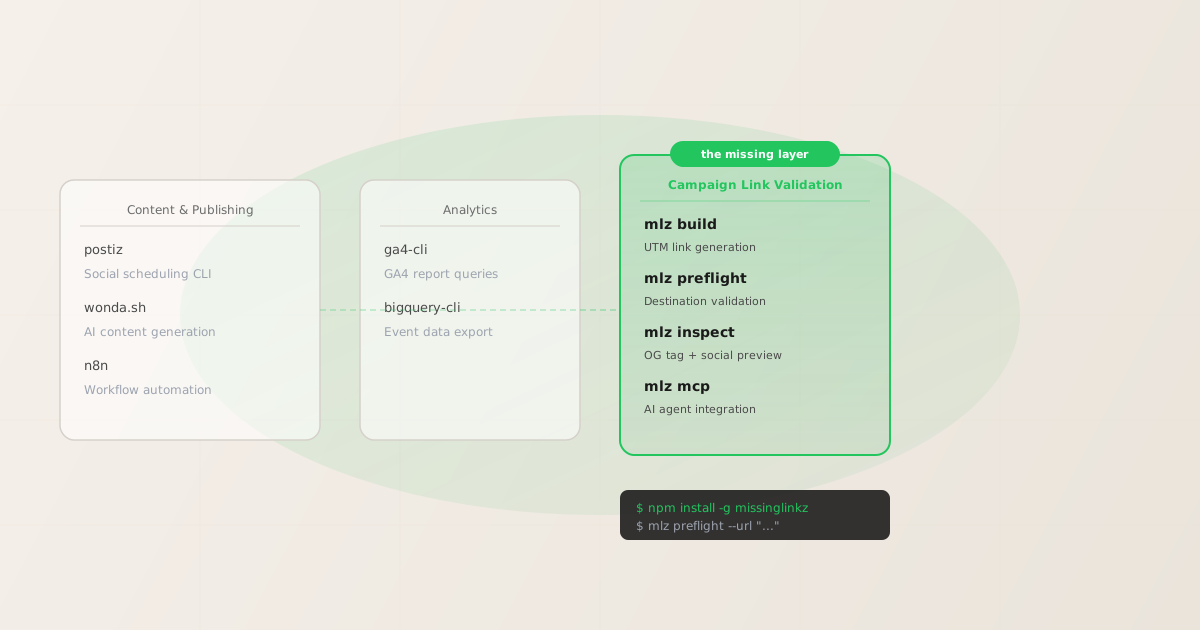
There are four meaningful categories of CLI tools for marketing engineers. Understanding the category boundaries tells you what each tool is for — and what you still need after installing it.
Category 1: Content creation and scheduling
Tools in this category generate copy, create social posts, and schedule publishing across platforms. They focus on what goes into a campaign, not the links inside it.
- Postiz
- An open-source social media scheduling tool with API access. Manages post queues across LinkedIn, X, Instagram, and other platforms. Developer-friendly: you can schedule posts programmatically via its API instead of clicking through a dashboard. It does not build or validate the campaign links inside those posts.
- wonda.sh
- AI-powered CLI for generating marketing content — social copy, ad variants, email subject lines. Covers content generation and video editing workflows from the terminal. As with Postiz, it handles the content layer but has no concept of UTM parameters or destination validation.
- n8n
- Workflow automation platform with CLI tooling. Can orchestrate multi-step marketing workflows: pull data, generate content, publish posts, trigger notifications. n8n is the glue between marketing systems, not the source of truth for link quality.
Category 2: Analytics querying
Once campaigns are live, developers need to pull data from analytics platforms without loading a dashboard in a browser.
- GA4 CLI tooling
- Google Analytics 4 has a Data API that can be queried from the terminal via the Google Cloud SDK or community CLI wrappers. Pull session data, campaign attribution reports, and conversion metrics into JSON for downstream processing. This tells you what happened after the click, not whether the link was ready before it went live.
- BigQuery CLI
- GA4 exports raw event data to BigQuery. The
bqCLI lets you query that data directly. Essential for attribution analysis at scale, but operates entirely in the post-publish, after-the-fact direction.
Category 3: Campaign link validation — the missing layer
Here is where most CLI marketing automation stacks have a gap. Content tools handle what you publish. Analytics tools analyse what happened. Neither handles the validation that needs to happen in between: confirming that the links inside your campaigns are actually ready to receive traffic.
When a campaign link fails silently — a redirect strips the UTM parameters, the landing page returns a 500, the og:image is missing so LinkedIn shows a blank preview — you lose attribution data and degrade the campaign experience before the first click. These failures are preventable with a pre-publish check, but they require a tool that specifically inspects the destination URL. Content tools and analytics tools don’t do this.
MissingLinkz fills this gap with three commands:
mlz build— UTM link generation with normalisation- Generates a UTM-tagged URL from source, medium, and campaign parameters. Automatically normalises values to lowercase-hyphenated format, preventing the GA4 fragmentation that happens when different team members type the same source differently. Add
--validateto verify the destination before the URL is returned. mlz preflight— full pre-publish destination check- The all-in-one command for campaign link validation. Builds the UTM URL, validates the destination (SSL, HTTP status, redirect chain, UTM parameter preservation), and inspects the landing page for social sharing readiness (OG tags, Twitter Cards, viewport, canonical URL, favicon). Returns a single
ready: true/falseboolean that scripts and CI pipelines can gate on. mlz inspect— OG tag and social preview inspection- Focused check for landing page social readiness without building a UTM link. Use this when the URL already has tracking parameters and you need to verify the OG tags before a re-share or retargeting push.
Category 4: AI agent marketing integration
As AI coding assistants (Claude Code, Cursor, custom LangChain agents) become part of marketing engineering workflows, they need campaign tools they can call programmatically. mlz mcp starts a stdio MCP server that exposes all MissingLinkz commands as MCP tools, making them directly callable by any MCP-compatible agent without subprocess overhead.
mlz mcp
Add to your MCP client config:
{
  "mcpServers": {
    "missinglinkz": {
      "command": "mlz",
      "args": ["mcp"]
    }
  }
}
What a complete CLI marketing automation stack looks like
The tools above don’t compete — they cover different stages of the campaign lifecycle. A complete CLI stack for a developer-run marketing function looks like this:
| Stage | CLI Tool | What it does |
|---|---|---|
| Content creation | wonda.sh, Postiz | Generate copy, schedule social posts |
| Link building | mlz build |
Generate validated UTM-tagged URLs |
| Pre-publish validation | mlz preflight |
SSL, OG tags, redirect chain, UTM integrity |
| Campaign launch | Postiz, n8n | Publish posts, trigger ad campaigns |
| Attribution analysis | GA4 CLI, BigQuery bq | Pull campaign performance data |
The validation layer sits between link building and campaign launch. Without it, you’re generating links and publishing campaigns with no programmatic assurance that the destination is ready to receive traffic. That’s the gap tools like Postiz and wonda.sh explicitly don’t fill — and why most CLI marketing stacks are incomplete.
The mlz CLI in practice
Here’s how the validation layer works in a real pre-launch workflow. You’ve generated copy with wonda.sh and are about to schedule distribution with Postiz. Before the campaign goes live, you run:
mlz preflight --url "https://acme.com/spring-launch" --source "linkedin" --medium "social" --campaign "spring-2026"
The output is a JSON object with a ready boolean and a detailed checks array:
{
  "ready": true,
  "tracked_url": "https://acme.com/spring-launch?utm_source=linkedin&utm_medium=social&utm_campaign=spring-2026",
  "checks": [
    { "check": "ssl",          "status": "pass", "message": "URL uses HTTPS." },
    { "check": "resolution",   "status": "pass", "message": "Destination responded with 200." },
    { "check": "og_tags",      "status": "pass", "message": "All essential OG tags present." },
    { "check": "twitter_card", "status": "pass", "message": "Twitter Card tags configured." },
    { "check": "redirects",    "status": "pass", "message": "No redirects detected." }
  ],
  "summary": { "total": 12, "passed": 12, "warnings": 0, "failed": 0 },
  "recommendation": "All checks passed. Campaign link is ready to publish."
}
If any check fails, ready is false and the CLI exits non-zero. In a GitHub Actions workflow, that exits the step and fails the pipeline before the campaign link is handed to the scheduling tool. See campaign link validation in GitHub Actions for the full YAML template.
For bulk pre-launch checks across multiple campaign URLs, run mlz preflight in a loop and collect results into a single JSON report. Pipe through jq to filter for failures only:
#!/bin/bash
# Check all campaign URLs — fail fast if any are not ready
URLS=("https://acme.com/lp-linkedin" "https://acme.com/lp-google" "https://acme.com/lp-email")
for url in "${URLS[@]}"; do
  result=$(mlz preflight --url "$url" --source "multi" --medium "paid" --campaign "spring-2026" --format json)
  ready=$(echo "$result" | jq -r '.ready')
  if [ "$ready" != "true" ]; then
    echo "FAIL: $url is not ready"
    echo "$result" | jq '.checks[] | select(.status != "pass")'
    exit 1
  fi
  echo "PASS: $url"
done
Where MissingLinkz fits relative to content and scheduling tools
A common question when evaluating CLI marketing automation tools: “wonda.sh published a list of 5 AI marketing CLI tools for developers — why isn’t MissingLinkz on it?”
The answer is category. wonda.sh and similar roundups focus on content generation and publishing automation — tools that produce and distribute marketing content. Campaign link validation is a separate concern that sits between content creation and campaign launch. It’s closer to a QA or pre-deploy check than to a content tool.
The way to think about it: Postiz tells you where your content goes. wonda.sh helps you write what the content says. MissingLinkz verifies whether the URL inside that content is actually ready to receive the traffic you’re about to send it. All three belong in a complete developer CLI marketing stack. None of them replaces the others.
For the full directory of command-line tools that make up a marketing automation stack — deployment, CMS, cloud, and link validation CLIs — see the marketing automation CLI tools guide. For a deeper look at the programmatic link building side of the stack, see how to build UTM links programmatically. For CI/CD integration specifically, see automating campaign link validation in CI/CD pipelines.
Recommended posts
FAQ
- What is CLI marketing automation for developers?
- CLI marketing automation for developers is the practice of managing campaign operations from the terminal rather than web dashboards — scripting link generation, running pre-publish validation checks, and wiring marketing quality gates into CI/CD pipelines. MissingLinkz is the campaign link validation layer in this stack:
mlz buildgenerates UTM-tagged links,mlz preflightvalidates the destination, andmlz mcpconnects the whole toolchain to AI agents. - What CLI tools are there for marketing automation in 2026?
- The main categories: content and scheduling (Postiz, wonda.sh, n8n), analytics querying (GA4 CLI, BigQuery bq), and campaign link validation (MissingLinkz mlz). These categories cover different stages of the campaign lifecycle and don’t replace each other.
- Does MissingLinkz compete with Postiz or wonda.sh?
- No. Postiz handles social scheduling and wonda.sh handles content generation. MissingLinkz validates the campaign links inside that content before they go live. They’re different layers of the same stack.
- Why do developers need a CLI for campaign link validation specifically?
- Validation needs to happen programmatically, at scale, and as a CI/CD gate. A web-based tool (Facebook Sharing Debugger, LinkedIn Post Inspector) requires a human in a browser and can’t be scripted.
mlz preflightcan be called from a script, a GitHub Actions step, or an AI agent — and exits non-zero on failure, making it usable as a build gate. - Can I use MissingLinkz with an AI agent via MCP?
- Yes. Run
mlz mcpto start the stdio MCP server, then add the config block to your Claude Code or Cursor settings. The agent can then callmlz_preflight,mlz_build_link, andmlz_inspect_destinationas MCP tools directly. - What’s the minimum I need to add campaign link validation to my existing marketing CLI stack?
- Install with
npm install -g missinglinkz. Then addmlz preflight --url "$URL" --source "$SOURCE" --medium "$MEDIUM" --campaign "$CAMPAIGN"as a step before any campaign link is handed to your scheduling or publishing tool. The command exits non-zero if the link isn’t ready, stopping the pipeline before the campaign goes live with a broken URL.
Add the validation layer to your CLI marketing stack
MissingLinkz is the campaign link validation layer your CLI marketing stack is missing. Install it once, gate every campaign launch.
1,000 links/month free. No credit card.
Your API key
Save this now — it won't be shown again.
npm install -g missinglinkz
The validation layer for your CLI marketing automation stack. Works standalone or alongside Postiz, wonda.sh, and n8n.