UTM Builder with an API for CI/CD: Generate and Validate Tracking Links in Your Pipeline
Yes — MissingLinkz is a UTM builder with a REST API you call from a CI/CD pipeline. POST /v1/preflight builds a UTM-tracked link and validates the destination in a single API call, returning ready: true or ready: false so any pipeline can gate on one flag. The CLI equivalent is mlz build --validate for a quick check or mlz preflight for the full pre-publish validation. Both exit non-zero on failure — wiring them into GitHub Actions, GitLab CI, or any shell-based pipeline takes three lines. Here is exactly how it works and where the gap is with every other UTM builder API.
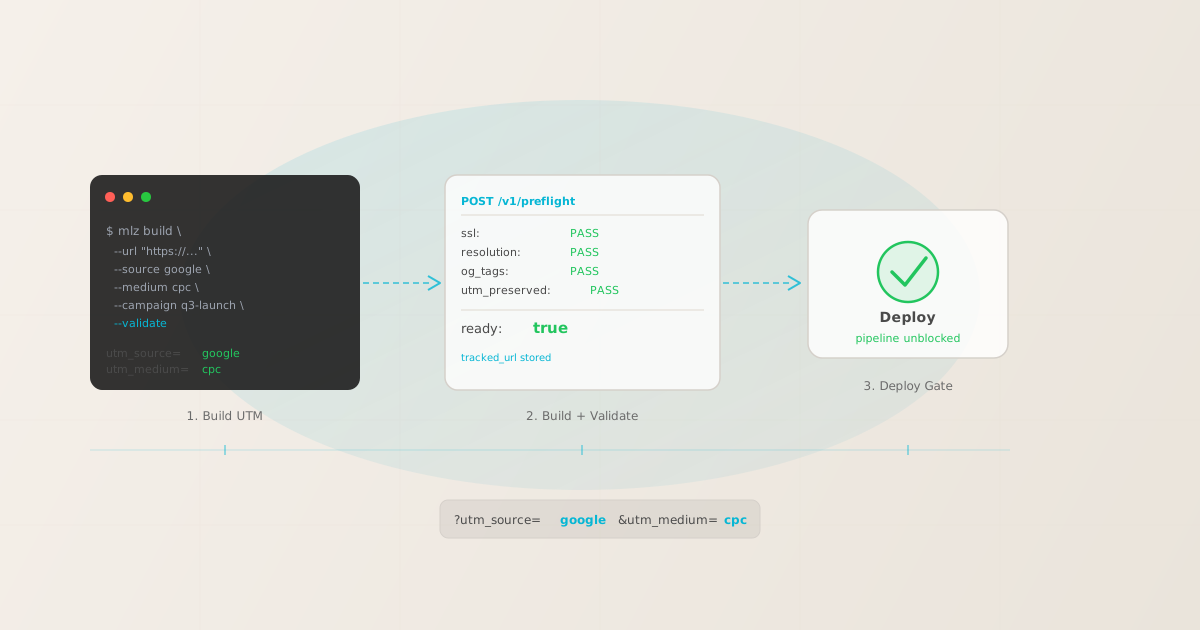
The gap in every other UTM builder API
Every other "UTM builder with an API" — whether it's a Google Campaign URL Builder alternative, a UTM.io API endpoint, or an npm library like utm-cli — does the same thing: parameter assembly. It constructs a URL string with ?utm_source=google&utm_medium=cpc&utm_campaign=q3 and returns it. That's the entire surface area.
What none of them check:
- Is the destination actually reachable?
- A build-only API generates a UTM URL pointing to whatever you give it. If the landing page is a 404, if the server is down, if SSL expired yesterday — the build API returns success and your pipeline deploys a broken campaign link. You won't find out until the campaign is live and someone clicks.
- Do UTM parameters survive the redirect chain?
- URL shorteners, landing page builders, and CDN rewrite rules commonly strip query parameters on redirect. A build-only API doesn't follow the redirect chain. It returns the UTM-tagged URL you constructed — not the final URL users actually land on. If
utm_source=googledoesn't survive the redirect, GA4 attributes the session to "direct (none)" instead. The build-only API will never flag this. - Is the landing page ready for social sharing?
- Missing
og:imagemeans LinkedIn and Facebook render no visual preview for the campaign link. Missingtwitter:cardmeans X renders a bare URL. A build-only API has no awareness of destination metadata. You can generate 1,000 perfectly formatted UTM links pointing to a page with no OG tags — the API exits 0 every time.
This is the wedge between parameter generation and destination validation. MissingLinkz does both in the same pipeline step.
Two API endpoints: build and build+validate
MissingLinkz exposes two REST endpoints for UTM link generation from a pipeline. Auth is a Bearer token: set MLZ_API_KEY as an environment variable or CI secret.
POST /v1/links — build and store a UTM link
Use this when you only need to generate and store the tracked URL without running destination checks:
$ curl -s -X POST https://api.missinglinkz.io/v1/links \
  -H "Authorization: Bearer $MLZ_API_KEY" \
  -H "Content-Type: application/json" \
-d '{"url":"https://example.com/landing","source":"google","medium":"cpc","campaign":"q3-launch"}'{
"tracked_url": "https://example.com/landing?utm_source=google&utm_medium=cpc&utm_campaign=q3-launch",
"params": {
"utm_source": "google",
"utm_medium": "cpc",
"utm_campaign": "q3-launch"
},
"link_id": "lnk_9wlvd9qi",
"campaign_id": "cmp_kbcht77d",
"stored": true
}This returns a tracked URL and stores the link record. It does not check whether the destination works. Use it for bulk link generation when you're validating separately, or when you want to build and store links without the overhead of a full preflight check.
POST /v1/preflight — build, validate, and store (the one you want in CI/CD)
Same request body as /v1/links. Builds the tracked URL, runs the full pre-publish check against the destination, and returns a ready boolean alongside the complete check report:
$ curl -s -X POST https://api.missinglinkz.io/v1/preflight \
  -H "Authorization: Bearer $MLZ_API_KEY" \
  -H "Content-Type: application/json" \
-d '{"url":"https://example.com/landing","source":"google","medium":"cpc","campaign":"q3-launch"}'{
"ready": true,
"tracked_url": "https://example.com/landing?utm_source=google&utm_medium=cpc&utm_campaign=q3-launch",
"checks": [
{ "check": "ssl", "status": "pass", "message": "URL uses HTTPS." },
{ "check": "resolution", "status": "pass", "message": "Destination responded with 200." },
{ "check": "redirects", "status": "pass", "message": "No redirect chain detected." },
{ "check": "utm_preserved", "status": "pass", "message": "All UTM parameters present at destination." },
{ "check": "og_tags", "status": "pass", "message": "og:title, og:description, og:image present." },
{ "check": "twitter_card", "status": "pass", "message": "Twitter Card present (summary_large_image)." }
],
"summary": {
"total": 8, "passed": 8, "warnings": 0, "failed": 0
},
"recommendation": "All checks passed. Campaign link is ready to publish."
}The ready boolean is your pipeline gate. Any failed check — broken destination, missing OG tags, UTM parameters stripped by a redirect — sets ready: false. The summary.failed count and the checks array tell you exactly what went wrong and why.
CLI equivalent: mlz build --validate and mlz preflight
For shell-based pipelines, the CLI surface mirrors the REST API. mlz build --validate builds a UTM link and runs the destination check. mlz preflight runs the full pre-publish check including OG tags, Twitter Cards, and UTM survival. Both exit non-zero on failure — which is how any CI/CD job knows to fail the step.
mlz build --url "https://example.com/landing" --source google --medium cpc --campaign q3-launch --validate
For the full all-in-one check including SSL, OG tags, Twitter Cards, and UTM integrity, use mlz preflight:
mlz preflight --url "https://example.com/landing" --source google --medium cpc --campaign q3-launch
Pass --format json to get structured JSON output you can parse with jq for more granular pipeline logic.
GitHub Actions CI/CD pipeline
This is the pattern from the GitHub Actions campaign link validation template adapted for UTM link generation. The step builds a UTM link, validates the destination, and fails the job if ready is not true. Store your API key as a GitHub Actions secret (MLZ_API_KEY).
name: Campaign link preflight
on:
  push:
    branches: [main]

jobs:
  preflight:
    runs-on: ubuntu-latest
    steps:
      - uses: actions/checkout@v4

      - name: Install MissingLinkz
        run: npm install -g missinglinkz

      - name: Build and validate campaign link
        run: |
          result=$(mlz preflight \
            --url "https://example.com/landing" \
            --source google \
            --medium cpc \
            --campaign q3-launch \
            --format json)
          echo "$result" | jq .
          ready=$(echo "$result" | jq -r '.ready')
          if [ "$ready" != "true" ]; then
            echo "Preflight failed — aborting deploy"
            echo "$result" | jq '.checks[] | select(.status == "fail")'
            exit 1
          fi
        env:
          MLZ_API_KEY: ${{ secrets.MLZ_API_KEY }}
The final jq line before exit 1 prints only the failing checks, so the GitHub Actions log immediately shows why the preflight failed rather than a wall of JSON. Adjust the --url, --source, --medium, and --campaign values to your actual campaign parameters, or pull them from a config file or environment variable.
GitLab CI equivalent
The same pattern works in GitLab CI. Store your key in Settings → CI/CD → Variables as MLZ_API_KEY:
campaign-preflight:
  image: node:20
  stage: validate
  script:
    - npm install -g missinglinkz
    - |
        result=$(mlz preflight \
          --url "$CAMPAIGN_URL" \
          --source google --medium cpc --campaign q3 \
          --format json)
        [ "$(echo "$result" | jq -r '.ready')" = "true" ] || (echo "$result" | jq . && exit 1)
  variables:
    MLZ_API_KEY: $MLZ_API_KEY
Replace $CAMPAIGN_URL with the destination URL from your pipeline variables, or hardcode it for a fixed campaign landing page. The same pattern applies to Azure DevOps, CircleCI, Bitbucket Pipelines, and any other CI platform that supports shell steps.
Build-only API vs build+validate API
The table below maps what a build-only UTM library gives you (utm-cli, utm-manager, any parameter-assembly library) against what MissingLinkz's POST /v1/preflight gives you:
| Feature | Build-only library | MissingLinkz API |
|---|---|---|
| Generate UTM-tagged URL | ✓ Yes | ✓ Yes |
| Validate destination SSL | ✗ No | ✓ Yes |
| Check destination HTTP status | ✗ No | ✓ Yes |
| Verify UTM survival through redirects | ✗ No | ✓ Yes |
| Check OG tags and Twitter Card | ✗ No | ✓ Yes |
| Exit non-zero on destination failure | ✗ No | ✓ Yes |
| Single ready flag for pipeline gates | ✗ No | ✓ Yes |
| Store link record and campaign history | ✗ No | ✓ Yes |
| REST API + CLI + MCP server | ✗ CLI only | ✓ All three |
Web UTM builders cannot be called from a pipeline
Google's Campaign URL Builder, UTM.io, and UTMMind's web app require a browser. There is no REST API to call from a shell script. They are manual tools: you open the page, fill in the form, copy the URL. That workflow does not scale to a CI/CD pipeline, a batch job, or an AI agent building 100 campaign links.
If your UTM link generation needs to run in a pipeline, you need one of:
- CLI (interactive development, shell scripts)
mlz build --url ... --validateormlz preflight— runs in any terminal, exits non-zero on failure, outputs JSON for downstream parsing.- REST API (server-side scripts, custom dashboards)
POST /v1/preflightorPOST /v1/links— call from Node.js, Python, Ruby, or any HTTP client. The same engine runs behind the CLI and the API, so results are identical.- MCP server (AI agents, Cursor, Claude Code)
mlz mcpexposesmlz_build_linkandmlz_preflightas tools to any MCP-compatible agent. The agent calls the tool, readsready, and decides whether to proceed without a browser or manual step.
All three surfaces are available on the free plan (1,000 links/month). The programmatic UTM link generation guide covers the full API surface. For a complete comparison of developer UTM tools, see Best UTM Tools for Developers in 2026.
Related reading
FAQ
- What is the difference between POST /v1/links and POST /v1/preflight?
POST /v1/linksbuilds a UTM-tagged URL and stores the link record — no destination check.POST /v1/preflightbuilds the same link, stores it, and also validates the destination (SSL, resolution, redirect chain, UTM survival, OG tags, Twitter Card). Use/v1/linksfor bulk generation when you validate separately; use/v1/preflightin CI/CD pipelines where you need thereadygate.- Can I call the MissingLinkz API from any CI/CD platform?
- Yes. Both endpoints are standard REST over HTTPS — callable from any environment that can run
curl,node,python, or any HTTP client. GitHub Actions, GitLab CI, CircleCI, Azure DevOps, Bitbucket Pipelines, and Jenkins all work. Store your API key as an encrypted secret (MLZ_API_KEY) and reference it in your pipeline config. - Does the API require an API key for every request?
- Yes, all authenticated endpoints require
Authorization: Bearer <key>. Get a free API key withmlz auth register --email [email protected]— the free tier includes 1,000 links/month with no credit card. For CI/CD pipelines with high volume, the Team plan removes per-month limits. - What happens when preflight fails in a pipeline?
- The API returns HTTP 200 with
"ready": falseand achecksarray identifying the failing check (e.g.,"check": "og_tags", "status": "fail", "message": "og:image is missing."). The CLI exits with a non-zero exit code. In your pipeline script, testjq -r '.ready'against the API response and callexit 1onfalse— or use the CLI directly, since it exits non-zero automatically. - Can I validate existing campaign links without building new ones?
- Use
POST /v1/inspectto check OG tags and social preview metadata for any URL without building a tracked link. Usemlz inspect <url>from the CLI. For SSL and redirect chain checks without building a link, usemlz check <url>.POST /v1/preflightandmlz preflightalways build a new tracked link — if you want inspection only, use the inspect or check surfaces.
Wire UTM link generation and validation into your pipeline in minutes
One API call: build a UTM link, validate the destination, get ready: true before your deploy proceeds. No browser, no manual steps.
1,000 links/month free. No credit card.
Your API key
Save this now — it won't be shown again.
npm install -g missinglinkz
See the full developer guide in UTM Tracking for Developers.