Salesforce Marketing Cloud MCP vs Campaign Link Validation: What SFMC's MCP Does (And What You Still Need)
Salesforce Marketing Cloud's MCP server went GA in April 2026, giving developers a programmatic interface to manage journeys, automations, data extensions, and audience segmentation inside SFMC. That is genuinely useful. But there is one thing the SFMC MCP does not do: it does not validate what the links inside those journeys actually point to. Before you activate a journey, run mlz preflight against every CTA URL. Here is why that step matters — and what happens when you skip it.
The scenario: SFMC MCP activates the journey, the redirect strips your UTMs
You are a marketing ops developer. You have wired up the SFMC MCP server to your AI coding assistant — Claude Code or Cursor — so you can configure email journeys, set audience entry criteria, and schedule sends without leaving your editor. The journey looks correct inside SFMC. The CTA URL is in the content block. You activate.
What SFMC MCP cannot tell you is whether the destination URL at https://example.com/q3-landing redirects through a path that strips your utm_source, utm_medium, and utm_campaign parameters. That is not an SFMC problem — it is a destination infrastructure problem. But it is your attribution problem. Every click from that email sends anonymous traffic to your analytics platform with no source, no medium, no campaign. The journey fires perfectly; the data is gone.
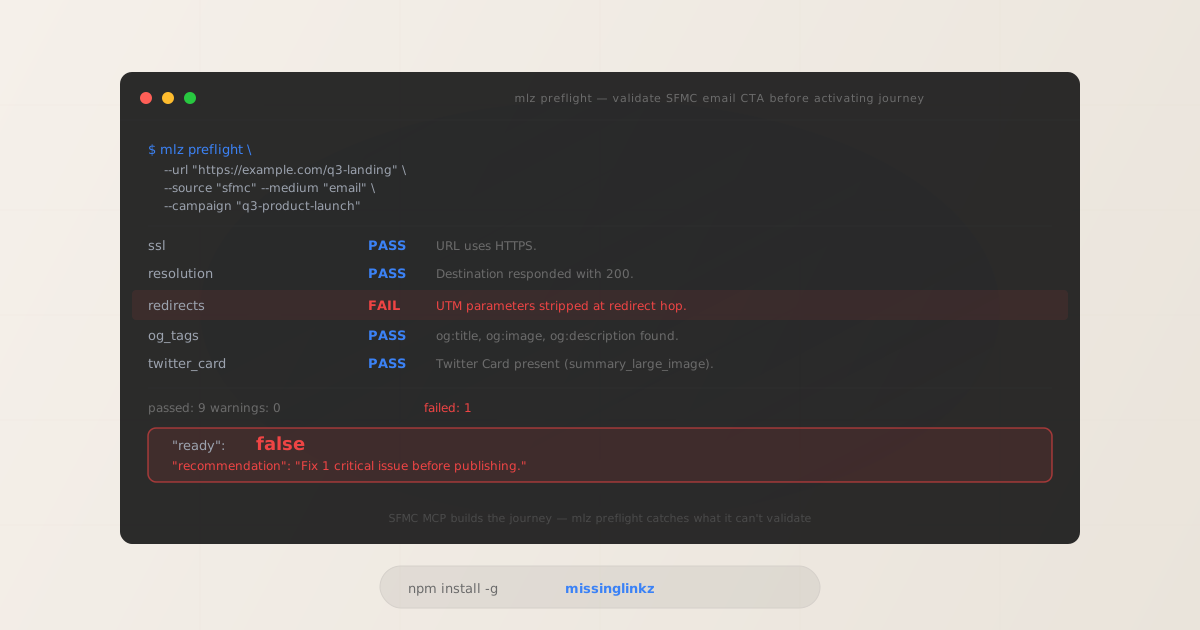
Running mlz preflight before activating catches this in under two seconds:
mlz preflight --url "https://example.com/q3-landing" --source "sfmc" --medium "email" --campaign "q3-product-launch"
$ mlz preflight \
  --url "https://example.com/q3-landing" \
  --source "sfmc" \
  --medium "email" \
  --campaign "q3-product-launch"

ssl            PASS  URL uses HTTPS.
resolution     PASS  Destination responded with 200.
redirects      FAIL  UTM parameters stripped at redirect hop.
og_tags        PASS  og:title, og:image, og:description found.
twitter_card   PASS  Twitter Card present (type: summary_large_image).

"ready": false
"recommendation": "Fix 1 critical issue before publishing."
The SFMC MCP would have sent that journey live. mlz preflight stops it before a single email goes out. That is the boundary between what these two tools are responsible for.
What Salesforce Marketing Cloud MCP actually does
The SFMC MCP server exposes the Marketing Cloud REST API as a set of MCP tools that AI coding assistants can call natively. When it went GA in April 2026, it covered the core SFMC operational surfaces:
- Journey Builder management — create, configure, and activate journeys programmatically without the SFMC UI
- Email campaign creation — draft and deploy content blocks, configure send definitions
- Audience segmentation — query and define entry audiences using data extensions
- Data extensions — read and write subscriber data, configure field mappings
- Automation scheduling — trigger and manage automations via MCP tool calls
For developers who manage SFMC programmatically, this is a material productivity improvement. Instead of navigating the SFMC UI to activate a journey, you describe the intent to your AI assistant and the MCP server executes it. The operational benefit is real.
What falls outside the SFMC MCP's scope — by design, not by omission — is anything that happens after a subscriber clicks a link. The destination URL is just a string value in a content block. SFMC treats it as a configuration parameter, not a system resource it is responsible for validating. Whether that URL resolves, whether it redirects cleanly, whether it preserves attribution parameters, whether its landing page has the OG tags it needs for social previews: none of that is SFMC's responsibility, and none of it is checked by the SFMC MCP.
The full preflight JSON response
When you run mlz preflight against an SFMC email CTA, you get a structured JSON report you can act on programmatically — either in a pre-activation script or via the REST API in a CI/CD pipeline step:
$ curl -s -X POST https://api.missinglinkz.io/v1/preflight \
  -H "Authorization: Bearer $MLZ_API_KEY" \
  -H "Content-Type: application/json" \
  -d '{"url":"https://example.com/q3-landing","source":"sfmc","medium":"email","campaign":"q3-product-launch"}'

{
  "ready": false,
  "tracked_url": "https://example.com/q3-landing?utm_source=sfmc&utm_medium=email&utm_campaign=q3-product-launch",
  "checks": [
    { "check": "ssl", "status": "pass", "message": "URL uses HTTPS." },
    { "check": "resolution", "status": "pass", "message": "Destination responded with 200." },
    { "check": "redirects", "status": "fail", "message": "UTM parameters stripped at redirect hop." },
    { "check": "og_tags", "status": "pass", "message": "og:title, og:image, og:description found." },
    { "check": "twitter_card", "status": "pass", "message": "Twitter Card present (type: summary_large_image)." }
  ],
  "summary": { "total": 10, "passed": 9, "warnings": 0, "failed": 1 },
  "recommendation": "Fix 1 critical issue before publishing."
}
The ready: false boolean is the decision gate. In a CI/CD pipeline or a pre-activation script, you check this field and block the journey activation if it is false. The checks array tells you exactly which validation failed and why — no string parsing of error messages required.
Running both MCP servers together: SFMC MCP + MissingLinkz MCP
If you are using Claude Code or Cursor as your SFMC development environment, you can run both MCP servers simultaneously. SFMC MCP handles journey configuration; MissingLinkz MCP handles destination validation. The MissingLinkz MCP config is a single JSON block:
{
  "mcpServers": {
    "salesforce-marketing-cloud": {
      "command": "sfmc-mcp",
      "args": ["--org-id", "YOUR_ORG_ID"]
    },
    "missinglinkz": {
      "command": "mlz",
      "args": ["mcp"]
    }
  }
}
Once both servers are running, your AI assistant has access to SFMC journey management tools (createJourney, activateJourney, etc.) alongside MissingLinkz validation tools (mlz_preflight, mlz_build_link, mlz_inspect_destination). A workflow prompt like "configure the Q3 email journey and validate all CTA links before activating" becomes a single, end-to-end operation the assistant can execute without switching context.
You can also run mlz inspect to examine destination metadata independently of a full preflight — useful when you want to check what OG tags a page is serving before attaching it to a journey:
mlz inspect --url "https://example.com/q3-landing"
See the MCP tools for marketing campaigns guide for full setup instructions and tool schemas for both servers.
Capability comparison: SFMC MCP vs MissingLinkz MCP
These tools operate at different layers of the campaign stack. They are not substitutes for each other — they are complementary. The table below shows which capabilities belong to which tool:
| Feature | SFMC MCP | MissingLinkz MCP |
|---|---|---|
| Journey & automation management | ✓ Full Journey Builder API | ✗ Not in scope |
| Email campaign creation | ✓ Content blocks, send definitions | ✗ Not in scope |
| Audience segmentation | ✓ Entry audiences, filters | ✗ Not in scope |
| Data extensions | ✓ Read/write subscriber data | ✗ Not in scope |
| Destination URL validation | ✗ Not validated | ✓ Full preflight check |
| SSL / HTTPS verification | ✗ Not checked | ✓ Checked on every run |
| OG tag verification | ✗ Not checked | ✓ og:title, og:image, og:description |
| UTM survival through redirects | ✗ Not checked | ✓ Traces every redirect hop |
| CI/CD pipeline gate | ✗ No structured output | ✓ ready: true/false boolean |
| Structured JSON output | ✗ Journey API responses only | ✓ Full check report per URL |
The SFMC MCP column is not a criticism — those limitations are architectural boundaries, not gaps. SFMC manages what happens inside the platform. MissingLinkz validates what the links point to outside it. The gap between these two responsibilities is where attribution errors, broken social previews, and dead-end landing pages slip through in production.
When to run mlz preflight in an SFMC workflow
There are three practical integration points where mlz preflight adds deterministic validation to an SFMC email workflow:
- Before journey activation (manual or scripted)
- Run
mlz preflightagainst every CTA URL in the journey before callingactivateJourneyvia the SFMC MCP. If any URL returnsready: false, block activation and surface the failing checks. This is the simplest integration point and requires no infrastructure beyond installingmissinglinkz. - In a CI/CD pipeline step before SFMC deployment
- Add a preflight step to your deployment pipeline that validates all campaign URLs from a config file before pushing journey definitions to SFMC. The
POST /v1/preflightREST endpoint accepts the same parameters as the CLI and returns the same JSON schema — use it in any pipeline tool that can make HTTP requests. Exit non-zero ifreadyisfalseto block the pipeline. See the SFMC UTM builder guide for pipeline examples. - As an MCP tool call in your AI assistant workflow
- If you are using Claude Code or Cursor with both the SFMC MCP and MissingLinkz MCP running, you can instruct your assistant to validate all CTA links as part of the journey configuration workflow. The assistant calls
mlz_preflightnatively as a tool call — no subprocess, no HTTP client wiring, no credential management beyond the initialmlz mcpstartup. Compare this approach to others in the MCP server comparison for campaign link validation.
How this compares to other platform MCP servers
The pattern here — a platform MCP that manages what happens inside the tool, but does not validate destination link integrity — is not unique to Salesforce Marketing Cloud. It appears consistently across marketing platform integrations.
Meta's Ads MCP manages ad sets, creatives, and campaign budgets inside Meta's ad platform. It does not validate the destination URLs those ads point to — UTM survival through Meta's redirect layer, OG tag correctness for the preview that appears in the ad unit, SSL validity of the landing page. The Meta Ads MCP vs campaign link validation comparison covers that boundary in detail.
Third-party MCP servers like Synter Media's follow the same pattern: they manage what happens inside their platform, not what the links point to. The Synter Media MCP alternative comparison documents where the validation gap falls in that context.
The consistent answer across all of these platform integrations is the same: mlz preflight covers the destination validation layer that no platform MCP is built to handle, because destination infrastructure is not the platform's responsibility — it is yours.
FAQ: SFMC MCP and campaign link validation
- Does Salesforce Marketing Cloud's MCP server validate destination URLs?
- No. The SFMC MCP server manages journey configuration, email content, audience segmentation, and automations inside Marketing Cloud. Destination URL validation — checking SSL, following redirects, verifying UTM survival, and inspecting OG tags — falls outside its scope. You need a separate validation step, such as
mlz preflight, before activating a journey. - Can I run both the SFMC MCP and MissingLinkz MCP at the same time?
- Yes. MCP servers are additive — your AI assistant aggregates tools from all running servers. Add both
salesforce-marketing-cloudandmissinglinkzentries to yourmcpServersconfig block. The assistant will have access to SFMC journey management tools alongside MissingLinkz validation tools in the same session. See the MCP marketing tools guide for full configuration details. - What does "UTM parameters stripped at redirect hop" mean?
- It means a redirect in the destination URL's path is dropping the
utm_source,utm_medium, andutm_campaignparameters before the user reaches the final landing page. Common causes: a URL shortener that does not forward query parameters, a CMS redirect rule that strips them, or a marketing platform's click-tracking wrapper. The result is traffic that arrives at your destination with no attribution data.mlz preflightcatches this by following the full redirect chain and checking parameter survival at each hop. - Can I use mlz preflight in a GitHub Actions workflow that deploys to SFMC?
- Yes. Install
missinglinkzin your pipeline runner (npm install -g missinglinkz), then callmlz preflightagainst your campaign URLs before the step that pushes journey definitions to SFMC. SetMLZ_API_KEYas a repository secret. The CLI exits with a non-zero code if any URL returnsready: false, which blocks the pipeline step automatically. The best MCP server for campaign link validation article covers CI/CD integration patterns in more depth. - Does mlz preflight work with SFMC's email click tracking or link wrapping?
- Yes — validate the original destination URL (the one you put in the content block), not the SFMC-wrapped click-tracking version. SFMC applies its own link wrapping at send time;
mlz preflightvalidates the final destination the subscriber ends up on. If the original URL's redirect chain strips UTM parameters, those parameters will be missing when the subscriber arrives — whether or not SFMC wraps the link.
Related reading
Add MissingLinkz validation to your SFMC MCP workflow
SFMC MCP configures your journeys and automations. MissingLinkz validates the destination URLs those journeys point to — catching broken redirects, missing OG tags, and UTM parameter stripping before any email sends.
1,000 links/month free. No credit card.
Your API key
Save this now — it won't be shown again.
npm install -g missinglinkz
Then run: mlz mcp to add the MissingLinkz MCP server to your AI coding assistant alongside SFMC MCP. See MCP tools for marketing campaigns for the complete setup guide.