utm_term Parameter: How to Track Paid Search Keywords in GA4
The utm_term parameter is the UTM parameter for paid search keyword tracking. When a visitor clicks a Google Ads or Bing Ads link, utm_term records which keyword triggered the ad — so GA4 can show you not just that a session came from google / cpc, but that the specific keyword campaign link validator drove that session. It's optional for most channels and only adds value for campaigns where keyword-level attribution matters, primarily paid search and sometimes contextual display.
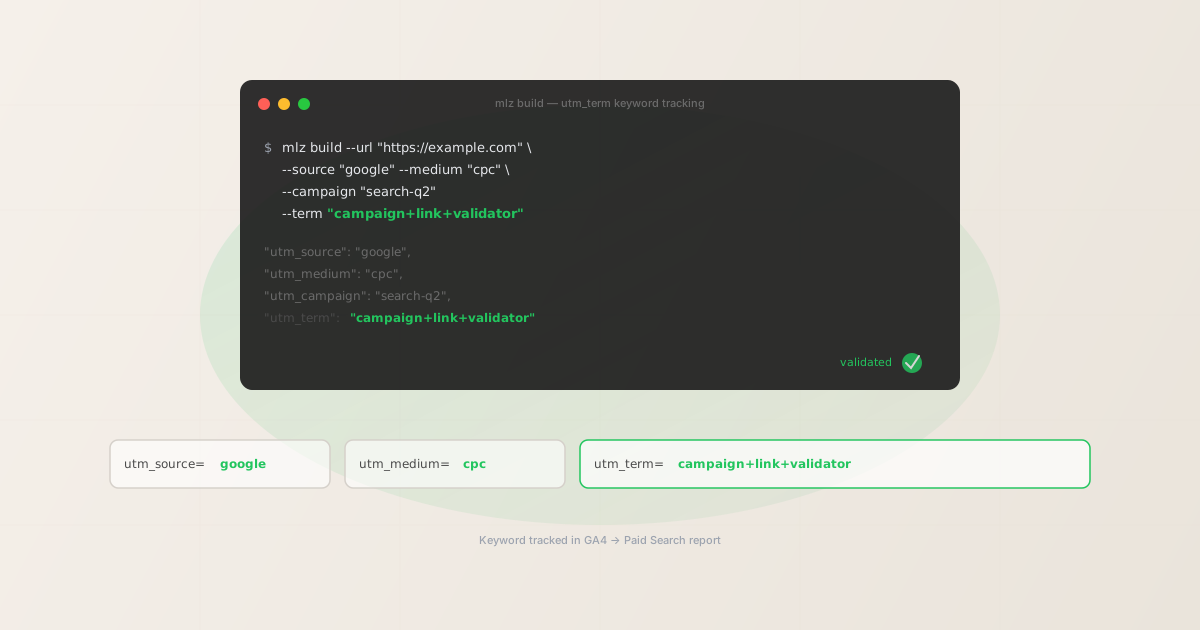
What utm_term is for
utm_term was originally designed to capture the paid search keyword that triggered an ad. In Google Ads, this maps to the actual search term the user typed (or the keyword from your ad group that matched the query). In GA4, utm_term appears as the Manual keyword or Session manual term dimension, which feeds into the Paid Search channel reporting.
The typical paid search workflow without utm_term: GA4 shows you that google / cpc drove 500 sessions this week. You'd then need to cross-reference that with Google Ads' own keyword reports to understand which keywords drove those sessions. With utm_term, keyword-level attribution lives in GA4 directly, alongside your conversion data, without requiring a platform pivot.
The secondary use case is contextual display advertising, where utm_term can capture the topic or content category of the page where the ad appeared. This is less common and less standardised than the paid search use case.
Auto-tagging vs. manual utm_term: which to use
If you're running Google Ads with auto-tagging enabled, Google appends a gclid parameter to every click and GA4 uses it to import keyword data directly from the Ads platform — no utm_term required. The gclid approach gives more complete keyword data including match type and quality score, so for Google Ads specifically, auto-tagging is generally preferred over manual UTM tagging.
Manual utm_term is the right choice when:
- Running Bing/Microsoft Ads — Bing doesn't integrate with GA4 the same way Google Ads does. Manual UTM tagging (including
utm_term) is how you get keyword attribution into GA4 from Bing campaigns. - Using a third-party ad platform — Any paid search platform other than Google Ads that doesn't have native GA4 integration.
- Mixing attribution sources — If you want all channel data in one GA4 property with consistent dimension names rather than relying on different platform imports.
- Testing or auditing attribution — When you're building a tracking pipeline and need to verify that keyword data flows through correctly end-to-end.
How to format utm_term values
Unlike utm_source and utm_medium, utm_term doesn't have a fixed set of standard values. It holds whatever keyword you're targeting. The conventions to follow:
- Use + for spaces
- Keyword phrases with spaces are typically encoded as
utm_term=campaign+link+validatorrather thanutm_term=campaign%20link%20validator. The+encoding is the historical convention for UTM parameters and is more readable in dashboards and exports. Most analytics platforms decode both forms correctly, but+is what Google Ads generates natively when building destination URLs. - Match the ad group keyword, not the search query
- For Google Ads,
utm_termtypically holds the ad group keyword (e.g.campaign+link+validator) rather than the actual search query the user typed. The actual query is available via thegclidimport but not through manual UTM parameters. If you want exact query tracking, use auto-tagging + GA4's Google Ads linking instead. - Lowercase, consistent
- GA4 treats
utm_termvalues as case-sensitive strings like all other UTM parameters.Campaign Link Validatorandcampaign+link+validatorare two separate rows. Standardise on lowercase and encode spaces with+.mlz buildnormalises values to lowercase automatically when you pass them via--term.
Building utm_term links from the CLI
The mlz build command accepts a --term flag that maps directly to utm_term. The value is normalised to lowercase and appended in the correct parameter order.
# Google Ads keyword: "campaign link validator"
$ mlz build \
  --url "https://missinglinkz.io" \
  --source "google" \
  --medium "cpc" \
  --campaign "search-brand-q2" \
  --term "campaign+link+validator"

{
  "tracked_url": "https://missinglinkz.io?utm_source=google&utm_medium=cpc&utm_campaign=search-brand-q2&utm_term=campaign%2Blink%2Bvalidator",
  "params": {
    "utm_source": "google",
    "utm_medium": "cpc",
    "utm_campaign": "search-brand-q2",
    "utm_term": "campaign+link+validator"
  },
  "created_at": "2026-05-03T09:00:00.000Z"
}

# Bing Ads keyword: "utm tracking tool"
$ mlz build \
  --url "https://missinglinkz.io" \
  --source "bing" \
  --medium "cpc" \
  --campaign "search-generic-q2" \
  --term "utm+tracking+tool"

"tracked_url": "https://missinglinkz.io?utm_source=bing&utm_medium=cpc&utm_campaign=search-generic-q2&utm_term=utm%2Btracking%2Btool"
Note that the + characters in the utm_term value are URL-encoded as %2B in the output URL — this is correct behaviour. When GA4 parses the URL, it decodes %2B back to + and displays the keyword as campaign+link+validator in reports. If you want spaces instead of plus signs in reports, pass the term with spaces and mlz build will handle the encoding: --term "campaign link validator".
Building links for multiple keywords at once
A typical paid search campaign targets multiple keywords. Rather than running mlz build separately for each one, you can loop over a keyword list in a shell script to generate all tracked URLs at once:
#!/bin/bash
# Build one tracked URL per keyword in the ad group
KEYWORDS=(
  "campaign+link+validator"
  "utm+tracking+tool"
  "utm+link+builder"
  "validate+utm+links"
)

for KEYWORD in "${KEYWORDS[@]}"; do
  mlz build \
    --url "https://missinglinkz.io" \
    --source "google" \
    --medium "cpc" \
    --campaign "search-q2" \
    --term "$KEYWORD" \
    --format json \
  | jq -r '.tracked_url'
done
The output is one URL per line — ready to paste into your ad platform's destination URL field for each keyword. Add --validate to the mlz build call to verify the destination resolves before using each URL in production. For the full scripted workflow, see how to build UTM links programmatically.
How GA4 reports utm_term
In GA4, utm_term maps to the Session manual term dimension (also accessible as "Manual keyword" in some report configurations). To see it:
- Go to Reports → Acquisition → Traffic acquisition
- Set the primary dimension to Session source / medium
- Add a secondary dimension: search for "Session manual term"
This shows you each keyword alongside the sessions and conversions it drove, giving you keyword-level ROI attribution directly in GA4 without needing to open the ad platform dashboard.
GA4 also uses utm_term as an input to its Paid Search channel grouping rule. The rule requires utm_medium to be cpc, ppc, or paidsearch — the presence of utm_term alone is not sufficient to classify a session as Paid Search. Make sure both parameters are set correctly.
| Channel | utm_source | utm_medium | utm_term |
|---|---|---|---|
| Google paid search | google |
cpc |
campaign+link+validator |
| Bing paid search | bing |
cpc |
utm+tracking+tool |
| Contextual display | gdn |
display |
marketing-software |
| Organic social post | linkedin |
social |
omit — no keyword |
| Email newsletter | weekly-digest |
email |
omit — no keyword |
utm_term with Google Ads ValueTrack parameters
Google Ads supports ValueTrack parameters — dynamic placeholders that Google fills in at click time. The most common is {keyword}, which inserts the matched keyword into the URL automatically. In Google Ads, you'd set the destination URL suffix to:
# Google Ads final URL suffix (set in Ads campaign settings)
utm_source=google&utm_medium=cpc&utm_campaign=search-q2&utm_term={keyword}

# At click time, Google replaces {keyword} with the matched term:
utm_term=campaign+link+validator

# Other useful ValueTrack options for utm_term:
{keyword}         # matched keyword from ad group
{matchtype}       # e stands for exact, b=broad, p=phrase
{adposition}      # position on page (e.g. 1t1)
ValueTrack parameters are set in Google Ads directly, not through mlz build. Use mlz build when you need a specific, fixed utm_term value — for example, when generating landing page URLs for Bing Ads, or when building test links to verify that keyword data flows through to GA4 correctly. See the Google Ads UTM guide for the complete setup walkthrough including ValueTrack.
FAQ
- Is utm_term required?
- No. It's the most optional of the five UTM parameters. If you're running social, email, or organic traffic campaigns, there's no keyword to track and
utm_termshould be omitted. Only include it when you genuinely have a paid search keyword to attribute. Adding a placeholder value likeutm_term=nonecreates noise in GA4 reports. - Does utm_term affect GA4 channel groupings?
- Indirectly. GA4's Paid Search channel rule matches on
utm_mediumvalues likecpcandppc. The presence ofutm_termalone does not change the channel classification. However, ifutm_medium=cpcis set andutm_termis populated, GA4 will show keyword-level data in the Paid Search reports. The channel is assigned byutm_medium; the keyword dimension is populated byutm_term. - What's the difference between utm_term and utm_content?
utm_termrecords the keyword that triggered a paid search click — it answers "which keyword?".utm_contentrecords which specific creative or link variant was clicked — it answers "which ad version or placement?". They serve different purposes:utm_termis for paid search keyword attribution;utm_contentis for A/B testing and placement tracking. Both are optional. See the utm_content parameter guide for the full creative tracking walkthrough.- Can I use utm_term for organic keywords?
- Technically you can, but it's not useful. GA4 doesn't show organic search keywords from Google (they're "(not provided)") for privacy reasons — and setting
utm_termmanually on links from organic search would mean tagging every link on the SERP, which is not practical.utm_termis only useful when you control both the link and the keyword it represents — which only applies to paid placements. - Do I need utm_term if I'm using Google Ads auto-tagging?
- No. With auto-tagging enabled, Google appends
gclidto every click, and GA4's Google Ads integration imports keyword data automatically. Manualutm_termis redundant when auto-tagging is active and can sometimes cause attribution conflicts. Disable auto-tagging only if you prefer consistent UTM-based attribution across all ad platforms and are comfortable getting keyword data through manual tagging only.
Recommended posts
Build utm_term links from the terminal
Pass --term "keyword+phrase" to mlz build to add utm_term to any campaign link. The value is normalised and encoded correctly. Add --validate to check the destination resolves before using the URL in production.
1,000 links/month free. No credit card.
Your API key
Save this now — it won't be shown again.
npm install -g missinglinkz
Free plan: 1,000 links/month. No credit card. See UTM parameters explained for the complete five-parameter reference.