How to Set Up UTM Tracking in GA4: Parameters, Channel Groupings, and Case Rules
UTM tracking in GA4 is more exacting than in Universal Analytics. GA4 attributes sessions based on exact UTM parameter values, and its default channel groupings require specific lowercase utm_medium values. One inconsistency — "Social" instead of "social" — silently fragments your traffic data across multiple unrelated rows in your reports. This guide explains how GA4 processes UTM parameters, which medium values map to which channels, and how to enforce the naming rules at link-generation time so fragmentation never reaches your analytics.
How GA4 reads UTM parameters
When a visitor arrives at your site via a UTM-tagged URL, GA4 reads the query string parameters and attributes the session to those values. The attribution is session-scoped: all activity within the session is attributed to the UTM parameters from the entry URL. If the same user arrives again via a different UTM link in a new session, GA4 attributes the new session to the new parameters.
GA4 uses UTM parameters in two ways simultaneously:
- Direct attribution — the raw source, medium, and campaign values appear in your Traffic Acquisition and User Acquisition reports, exactly as written in the URL.
- Channel grouping — GA4 evaluates
utm_sourceandutm_mediumagainst its default channel definitions to assign the session to a named channel like "Organic Social," "Paid Search," or "Email."
The critical detail: both mechanisms are case-sensitive. "linkedin" and "LinkedIn" are different values. "social" and "Social" are different values. The channel grouping rules use exact string matching — a mixed-case value that doesn't match any rule lands in "Unassigned."
GA4 default channel groupings — which utm_medium values matter
GA4 evaluates utm_medium (and sometimes utm_source) against a set of built-in channel grouping rules. These rules use case-insensitive matching for some channels, but treating all values as lowercase is the only way to guarantee correct attribution in every report. Here are the key medium values for common channels:
- Email channel
- Use
email(lowercase). Values likee-mail,e_mail, andnewsletteralso match in most configurations. Avoid capitalized variants likeEmail— the safe, universal choice is the plain lowercase stringemail. For more on email UTM conventions, see UTM Tracking for Email Marketing. - Organic Social channel
- Use
social. Valuessocial-media,social-network,sm, andsocial media(with space) also match. The traffic source must be a recognized social platform (linkedin, facebook, twitter, instagram, etc.) for the Organic Social rule to fully apply. Mixed-case variants likeSocialorSOCIALmay fall through to "Unassigned." - Paid Search channel
- Use
cpcorppc. The source should be a search engine.paidsearchalso matches in some configurations. This channel grouping is particularly important for Google and Bing paid campaigns where you want traffic separated from organic search. - Display channel
- Use
displayorbanner. Display traffic represents programmatic or direct banner ad placements. Without this medium value, display traffic may be misattributed. - Affiliates channel
- Use
affiliate. This maps affiliate referral traffic cleanly in GA4's acquisition reports, separate from direct referral links. - Everything else → Unassigned
- Any
utm_mediumvalue that doesn't match a channel grouping rule lands in "Unassigned" in your channel reports. This is the cost of typos, case inconsistency, or custom values that haven't been mapped in a custom channel grouping.
The case sensitivity problem: how data fragmentation happens
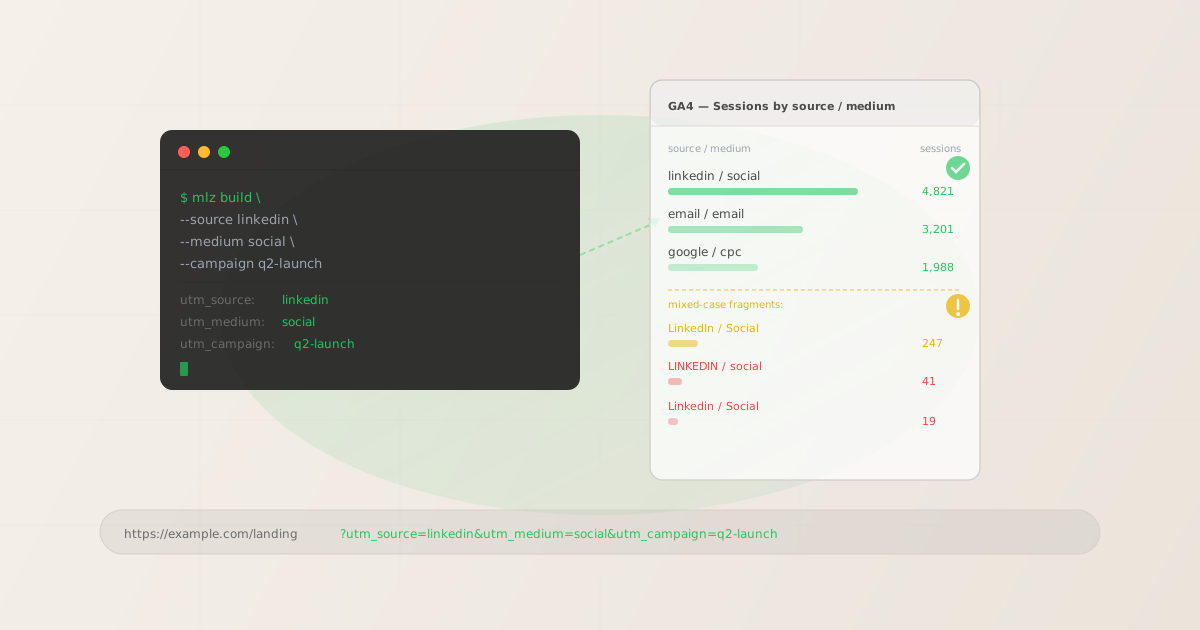
Fragmentation happens when the same traffic source is spelled differently across campaigns. Each spelling creates a separate row in GA4's source/medium report. A team of three marketers building links independently, without a shared naming convention and without tooling to enforce it, will produce something like this within a quarter:
linkedin / social          4,821   → Organic Social
email / email              3,201   → Email
LinkedIn / Social            247   → Unassigned
LINKEDIN / social             41   → Unassigned
Linkedin / Social             19   → Unassigned
The four LinkedIn rows represent the same channel. They should aggregate into a single 5,128-session row attributed to Organic Social. Instead, 307 sessions — 6% of that channel's traffic — are fragmented into "Unassigned" and invisible in your channel performance report. Multiplied across a year of campaigns, the data quality impact is significant. You can't retroactively fix session data already in GA4, which is why enforcement at link-generation time is the only reliable solution.
Building GA4-compatible UTM links with mlz build
The mlz build command enforces lowercase for all UTM parameter values. Pass any capitalization variant and the CLI normalizes it to lowercase before building the URL. This means the link is already correct before it's used in any campaign.
mlz build --url "https://example.com/landing" --source "linkedin" --medium "social" --campaign "q2-2026-launch"
{
  "tracked_url": "https://example.com/landing?utm_source=linkedin&utm_medium=social&utm_campaign=q2-2026-launch",
  "params": {
    "utm_source": "linkedin",
    "utm_medium": "social",
    "utm_campaign": "q2-2026-launch"
  },
  "destination_url": "https://example.com/landing",
  "link_id": "lnk_7rx4p2mn",
  "stored": true
}
The tracked_url field is the link you use in the campaign. All parameter values are lowercase and hyphenated — exactly the format GA4 expects for clean channel grouping attribution. You can also ask the CLI for naming suggestions for a given source to check what conventions look like before you build:
mlz campaigns suggest --source linkedin
Add --validate to confirm the destination is reachable before saving the link. For teams building multiple GA4-tracked links at once, the shell loop pattern — reading from a CSV and calling mlz build for each row — keeps naming consistent across the entire campaign. See UTM Tracking for Developers & Automation for bulk generation patterns and full automation examples.
FAQ
- Are UTM parameters case sensitive in GA4?
- Yes. GA4 treats "linkedin" and "LinkedIn" as different source values and displays them as separate rows in your source/medium reports. The same applies to
utm_medium: "social" matches the Organic Social channel grouping rule, but "Social" may not. Always use lowercase for all UTM parameter values to prevent data fragmentation. For a detailed breakdown of the case sensitivity mechanics, see the UTM naming convention guide. - What utm_medium value should I use for social media traffic?
- Use
social(all lowercase). This maps to GA4's default Organic Social channel grouping when combined with a recognized social platform as the source (linkedin, facebook, twitter, instagram, tiktok, etc.). Some teams usesocial-mediawhich also matches the rule, butsocialis the most portable and widely supported value. AvoidSocial,SOCIAL, or platform-specific values likelinkedin-social— these won't match the default channel rule and will land in Unassigned. - How do I fix fragmented UTM data that's already in GA4?
- You can't retroactively correct session data already recorded in GA4 — the attribution is permanent once the session is stored. Your options going forward: enforce lowercase naming on all new campaigns using a tool that normalizes case automatically, and optionally create a custom channel grouping in GA4 that maps the mixed-case variants (LinkedIn/Social, LINKEDIN/social) to the correct channel. The custom grouping won't fix historical data but will correctly classify future sessions if any mixed-case links remain in circulation.
- Does GA4 care about utm_source values for channel grouping?
- For some channels, yes. The Paid Social channel grouping, for example, requires the source to be a recognized social platform combined with a paid medium. The Organic Social rule evaluates both source and medium. For most channels, however, it's primarily
utm_mediumthat drives the grouping assignment. Either way, both source and medium are case-sensitive in raw reports, so use lowercase throughout. - Can I validate my UTM links before publishing to prevent GA4 fragmentation?
- Yes. The
mlz buildcommand enforces lowercase naming and generates a structured JSON output you can inspect before using the link. Add--validateto also check that the destination is reachable and SSL is configured. For pre-publish validation of the full destination including OG tags and redirect chains, usemlz preflightwhich runs all checks in one command.
Recommended posts
Build GA4-compatible UTM links from the terminal
Install MissingLinkz and generate lowercase, correctly formatted UTM links in one command. No browser, no spreadsheet, no manual normalization.
1,000 links/month free. No credit card.
Your API key
Save this now — it won't be shown again.
npm install -g missinglinkz
Free plan: 1,000 links/month. No credit card. See all commands in the SKILL.md reference.