utm_medium Parameter: How to Categorize Traffic Channels in GA4
The utm_medium parameter is the channel category — the how of your traffic. Where utm_source names who sent the traffic (linkedin, google), utm_medium classifies the mechanism: cpc, email, social, referral. GA4 uses utm_medium — in combination with utm_source — to route sessions into its default channel groups (Paid Search, Email, Organic Social, etc.). A wrong medium value doesn't just misclassify one session: it shifts all of that channel's traffic into the wrong bucket in every acquisition report, inflating some channels and deflating others.
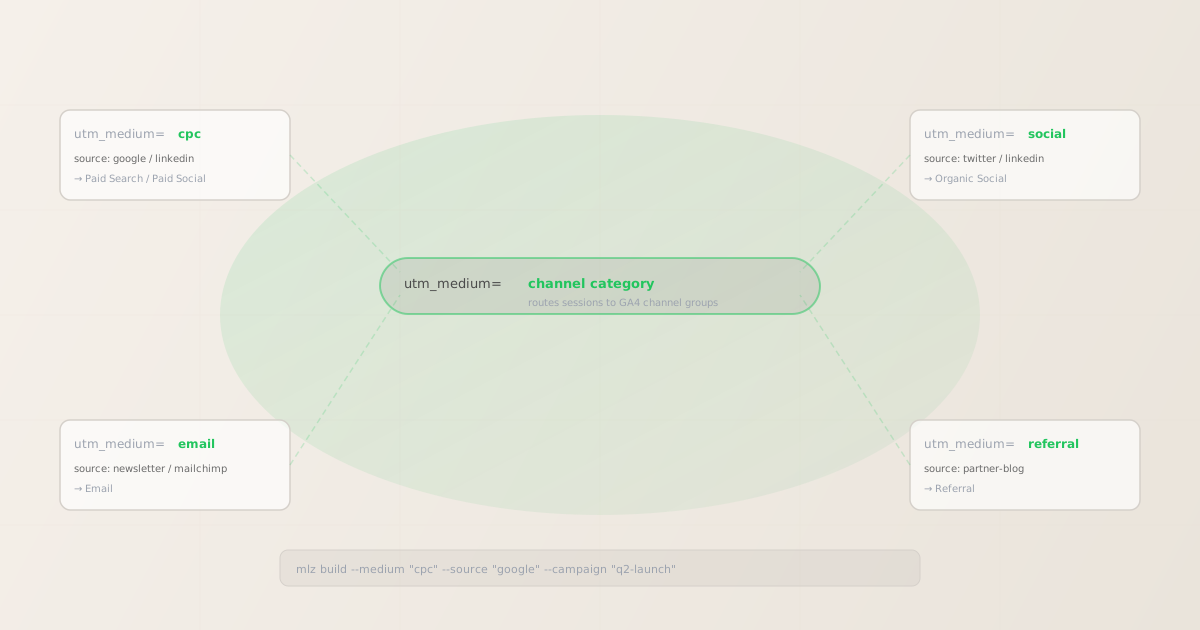
What utm_medium is for
utm_medium classifies the marketing channel type — the category of how a link was distributed. It answers: "what kind of channel is this?" It's the second parameter GA4 evaluates when assigning channel groups, after utm_source. Getting it right is what makes GA4's Traffic Acquisition report actually reflect your real channel mix.
The three required UTM parameters each occupy a different level of specificity:
- utm_source — who sent it (specific)
- Names the exact referring platform or publisher:
linkedin,google,newsletter. See the utm_source parameter guide for the full breakdown. - utm_medium — how it was sent (categorical)
- Names the channel category:
cpc,email,social,referral. This is the classification that GA4 uses for channel group routing. Multiple sources can share the same medium (bothgoogleandlinkedincan haveutm_medium=cpc). - utm_campaign — why it was sent (initiative)
- Names the marketing initiative the link belongs to. Shared across all channels in a campaign. See the utm_campaign parameter guide.
A useful mental model: utm_source=linkedin + utm_medium=cpc tells GA4 "this was a paid ad on LinkedIn." Either parameter alone is ambiguous — LinkedIn also has organic posts and InMail, and cpc could be Google or Bing. The combination is what makes the attribution specific enough to route correctly.
utm_medium values and GA4 channel groups
GA4's default channel groups use a set of conditions based on utm_source and utm_medium to classify sessions. These are the medium values that map cleanly to each standard channel group:
| utm_medium value | Example utm_source | GA4 default channel group |
|---|---|---|
cpc |
google, bing |
Paid Search |
cpc or paid-social |
linkedin, facebook, tiktok |
Paid Social |
email |
newsletter, mailchimp |
|
social |
twitter, linkedin, reddit |
Organic Social |
referral |
Partner site, blog name | Referral |
affiliate |
Affiliate network name | Affiliates |
display |
google, ad network name |
Display |
GA4 evaluates these conditions in priority order — Paid Search is evaluated before Organic Search, for example. If utm_medium doesn't match any condition for a given source, the session may fall into "Unassigned." This is why using non-standard values like utm_medium=paid or utm_medium=ad can lead to misclassified sessions even when the source is correct.
Common utm_medium mistakes
- Using "paid" instead of "cpc"
utm_medium=paidis intuitive but not a standard value GA4 recognises for Paid Search or Paid Social channel routing. Usecpcfor cost-per-click paid channels (Google Ads, LinkedIn Ads, Facebook Ads). Some teams also usepaid-socialspecifically for social ad campaigns — this is increasingly common and GA4's channel conditions have been updated to recognise it alongsidecpcfor social sources.- Using the platform name as the medium
utm_medium=linkedinconfuses source and medium. The medium should classify the channel type, not name the platform.utm_source=linkedin&utm_medium=socialfor organic LinkedIn posts, orutm_source=linkedin&utm_medium=cpcfor LinkedIn Ads, is correct. Putting the platform in both parameters causes GA4 to misclassify the channel group.- Leaving utm_medium blank on email sends
- Email clicks without UTM parameters show up as "Direct" in GA4 — the email client strips the HTTP referrer. Email is one of the highest-volume UTM use cases precisely because the referrer is unreliable. Always tag email links with
utm_medium=email. - Inconsistent paid social medium values
- Teams often mix
utm_medium=cpcandutm_medium=paid-socialacross different campaigns or team members. Both can work for Paid Social routing in GA4 when paired with a social source, but mixing them produces two separate rows in reports for what is effectively the same channel. Pick one and enforce it across the team.
Building utm_medium links from the CLI
The mlz build command takes a --medium flag. It normalises the value to lowercase and appends it correctly in the output URL. Here are examples for the four most common channel types:
# Paid search (Google Ads)
$ mlz build \
  --url "https://example.com/landing" \
  --source "google" \
  --medium "cpc" \
  --campaign "q2-launch-2026"

{
  "tracked_url": "https://example.com/landing?utm_source=google&utm_medium=cpc&utm_campaign=q2-launch-2026",
  "params": {
    "utm_source": "google",
    "utm_medium": "cpc",
    "utm_campaign": "q2-launch-2026"
  }
}

# Email newsletter
$ mlz build \
  --url "https://example.com/landing" \
  --source "newsletter" \
  --medium "email" \
  --campaign "q2-launch-2026"
"tracked_url": "...?utm_source=newsletter&utm_medium=email&utm_campaign=q2-launch-2026"

# Organic LinkedIn post
$ mlz build \
  --url "https://example.com/landing" \
  --source "linkedin" \
  --medium "social" \
  --campaign "q2-launch-2026"
"tracked_url": "...?utm_source=linkedin&utm_medium=social&utm_campaign=q2-launch-2026"

# Partner blog referral
$ mlz build \
  --url "https://example.com/landing" \
  --source "partner-blog" \
  --medium "referral" \
  --campaign "q2-launch-2026"
"tracked_url": "...?utm_source=partner-blog&utm_medium=referral&utm_campaign=q2-launch-2026"
Each combination maps to a different GA4 default channel group. You can validate that the destination is ready for traffic from each channel by adding --validate to any of these commands — it checks SSL, resolution, and redirect chain at build time.
How GA4 evaluates utm_medium for channel grouping
GA4's default channel group conditions check utm_medium against a set of regex-style rules. The conditions run in priority order — if a session matches multiple groups, the first match wins. A simplified view of the most common conditions:
- Paid Search:
utm_mediummatchescpc,ppc,paidsearch— andutm_sourcematches a known search engine (google, bing, yahoo, etc.) - Paid Social:
utm_mediummatchescpc,paid-social,paid_social— andutm_sourcematches a known social platform (linkedin, facebook, tiktok, twitter, etc.) - Email:
utm_mediummatchesemail,e-mail,e_mail,newsletter - Organic Social:
utm_mediummatchessocial,social-network,social_network— andutm_sourcematches a known social platform - Referral:
utm_mediummatchesreferral,app,link - Affiliates:
utm_mediummatchesaffiliate,affiliates - Display:
utm_mediummatchesdisplay,banner,cpm
Sessions that don't match any condition are assigned to "Unassigned." If you see unexpected "Unassigned" sessions in your GA4 acquisition reports, the most common cause is a non-standard utm_medium value that doesn't match any channel group condition.
You can define custom channel groups in GA4 to handle non-standard mediums — but it's simpler to use standard values from the start. The mlz build CLI doesn't restrict your input, but a documented taxonomy that enforces standard medium values prevents this problem entirely.
FAQ
- Is utm_medium required?
- GA4 only strictly requires
utm_sourcefor basic attribution, but withoututm_medium, GA4 cannot route the session to the correct channel group. Sessions without a medium value are typically assigned to "Unassigned" or attributed to "Direct." For any campaign link, include bothutm_sourceandutm_medium. - Should I use "cpc" or "paid-social" for LinkedIn Ads?
- Either can work for routing sessions to the Paid Social channel group in GA4 when paired with
utm_source=linkedin. "cpc" is the original standard; "paid-social" is more descriptive and increasingly preferred for paid social campaigns to distinguish them from paid search in the same medium column. Pick one and use it consistently across your team. If you're just starting out, "cpc" has the longest track record with GA4's channel conditions. - Can utm_medium be the same for different sources?
- Yes — multiple sources can share the same medium.
utm_source=google&utm_medium=cpcandutm_source=linkedin&utm_medium=cpcare both valid. GA4 evaluates the source-medium combination together when assigning channel groups — the same medium routes to different channels depending on which source accompanies it. - What medium value should I use for SMS campaigns?
- GA4 doesn't have a built-in "SMS" channel group, but you can use
utm_medium=smsand it will appear as a recognisable value in reports. If you want it to route to a specific channel, you'll need to create a custom channel group in GA4 that matchesutm_medium=sms. Some teams route SMS traffic to "Email" usingutm_medium=emailsince both are direct push channels — but this muddies the channel split. Better to track SMS distinctly and add a custom channel group. - Does utm_medium affect landing page experience?
- Not directly —
utm_mediumis a tracking parameter and has no effect on page rendering or routing. However, some landing page tools and CMS platforms read UTM parameters to personalise content (e.g., showing different copy to visitors arriving from email vs. paid social). Check your landing page tool's documentation if you're doing UTM-based personalisation.
Recommended posts
Build utm_medium links from the terminal
Pass --medium "cpc" (or email, social, referral) to mlz build and get a normalised, validated URL in one command. Values are lowercased automatically so GA4 receives consistent channel category data every time.
1,000 links/month free. No credit card.
Your API key
Save this now — it won't be shown again.
npm install -g missinglinkz
Free plan: 1,000 links/month. No credit card. See the UTM tracking for developers guide for the full programmatic workflow.