utm_campaign Parameter: How to Name and Track Marketing Campaigns in GA4
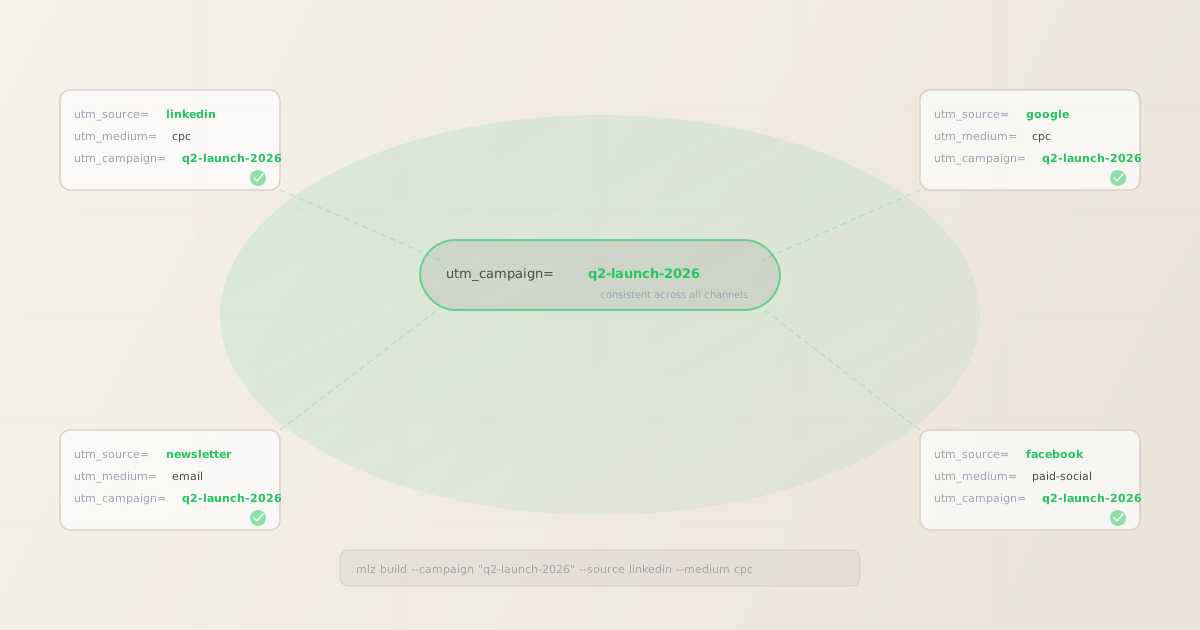
The utm_campaign parameter is the one UTM value that should appear identically on every link in a marketing initiative — the LinkedIn ad, the email send, the Google Ads campaign, and the organic social post. It answers the question: which campaign drove this traffic? When it's consistent, GA4 can aggregate cross-channel performance for a single initiative. When it's inconsistent — Q2-Launch on one channel and q2launch on another — the data fragments into unconnected rows and cross-channel attribution breaks entirely.
What utm_campaign is for
utm_campaign is the campaign identifier — the name of the marketing initiative that the link belongs to. It's the third most-parsed UTM parameter in GA4 after utm_source and utm_medium, and it's the one you use to answer questions like "how did our Q2 product launch perform across all channels?"
The key distinction from the other parameters:
- utm_source names who sent the traffic (linkedin, google, newsletter)
- utm_medium names how it was sent (cpc, email, organic)
- utm_campaign names why it was sent — the initiative, promotion, or theme
Where utm_source and utm_medium vary per channel, utm_campaign stays the same across all channels for a single initiative. That's what lets GA4 roll up a Q2 launch's LinkedIn ad spend, email opens, and organic social clicks into one campaign view.
How to name utm_campaign values
GA4 is case-sensitive: Q2-Launch and q2-launch appear as two separate campaigns. The most common cause of campaign fragmentation in GA4 is inconsistent capitalisation across team members. Follow these rules and you won't have to clean up the data later:
- Lowercase, hyphens only
- Use
q2-product-launch, notQ2 Product Launch,Q2_product_launch, orq2ProductLaunch.mlz buildnormalises your input to lowercase automatically, but consistent input prevents the error entirely. Hyphens are more readable in URLs than underscores and less likely to be confused with spaces. - Date-scoped where useful
- Including the year or quarter prevents two similarly-named campaigns from colliding in GA4 reports.
spring-sale-2026is unambiguous;spring-saleused year after year creates a single row that aggregates data from multiple campaigns. Useq2-2026-launchormay-2026-newsletterfor campaigns that repeat seasonally. - Initiative-scoped, not creative-scoped
- The campaign name should describe the marketing initiative, not the specific ad creative or audience segment. If you're running five ad variations in a campaign, they all share the same
utm_campaignvalue and useutm_contentto differentiate the creative. If you're targeting two different audiences, they still share the sameutm_campaign— audience segmentation belongs in ad platform reporting, not UTM parameters. - Agreed across the team
- Document your campaign taxonomy. A shared naming sheet (or better, a programmatic taxonomy file) prevents the situation where the paid team tags a campaign as
q2-launchand the email team tags it asq2-email-campaign. They'll appear as two separate campaigns in GA4.
| Campaign type | Poor utm_campaign value | Better utm_campaign value |
|---|---|---|
| Seasonal sale | Spring Sale |
spring-sale-2026 |
| Product launch | newProduct_Launch_Q2 |
q2-2026-product-launch |
| Newsletter | MayNewsletter |
newsletter-may-2026 |
| Retargeting | retarget |
q2-2026-retargeting |
| Brand awareness | brand |
brand-awareness-q2-2026 |
Building utm_campaign links from the CLI
The mlz build command takes a --campaign flag. It normalises the value to lowercase and appends it correctly in the output URL. Run the same command with different --source values to generate the cross-channel link set for a single campaign — the --campaign value stays identical across all of them.
# LinkedIn paid social
$ mlz build \
  --url "https://example.com/landing" \
  --source "linkedin" \
  --medium "cpc" \
  --campaign "q2-launch-2026"

{
  "tracked_url": "https://example.com/landing?utm_source=linkedin&utm_medium=cpc&utm_campaign=q2-launch-2026",
  "params": {
    "utm_source": "linkedin",
    "utm_medium": "cpc",
    "utm_campaign": "q2-launch-2026"
  }
}

# Google Ads — same campaign name
$ mlz build \
  --url "https://example.com/landing" \
  --source "google" \
  --medium "cpc" \
  --campaign "q2-launch-2026"
"tracked_url": "...?utm_source=google&utm_medium=cpc&utm_campaign=q2-launch-2026"

# Email newsletter — same campaign name
$ mlz build \
  --url "https://example.com/landing" \
  --source "newsletter" \
  --medium "email" \
  --campaign "q2-launch-2026"
"tracked_url": "...?utm_source=newsletter&utm_medium=email&utm_campaign=q2-launch-2026"
All three links share utm_campaign=q2-launch-2026. In GA4's traffic acquisition report, you can filter by campaign name to see the total sessions from the Q2 launch across all three channels in a single view — LinkedIn CPC, Google CPC, and email side by side.
utm_campaign vs utm_content vs utm_term
The three optional-ish UTM parameters get confused because they all add detail below the source/medium level. Here's how they differ:
- utm_campaign — the initiative
- Names the marketing initiative the link belongs to. Shared across all channels, creatives, and audience segments in that initiative. Use it to answer: "how did this campaign do overall?"
- utm_content — the creative or placement
- Differentiates individual elements within a single source/medium/campaign combination. Use it for A/B testing ad creatives or tracking which placement in an email was clicked. See utm_content parameter guide for full examples.
- utm_term — the keyword
- Records the paid search keyword that triggered the ad click. Specific to paid search channels where keyword-level attribution matters. See utm_term parameter guide for how it works with Google Ads and GA4.
A common mistake is encoding campaign details that belong in utm_content inside utm_campaign — for example, naming the campaign q2-launch-linkedin-blue-cta to track both the channel and creative variant. This prevents cross-channel aggregation (the Google Ads version would need a different campaign name) and inflates the campaign list in GA4. Keep campaign names at the initiative level and push variant details into utm_content.
How GA4 reports utm_campaign
In GA4, utm_campaign is mapped to the Session campaign dimension (also called Manual campaign name in some report views). To see campaign performance:
- Go to Reports → Acquisition → Traffic acquisition
- Change the primary dimension from "Session default channel group" to Session campaign
This shows each unique utm_campaign value as a row, with sessions, engaged sessions, and conversion data alongside. From here you can add a secondary dimension of Session source / medium to break down how each channel contributed to the campaign total.
If you see the same campaign appearing under multiple names (e.g., q2-launch and Q2-Launch as separate rows), you have a case consistency issue. Fix it at the source — in the links themselves — not by trying to merge the data in GA4. The mlz build --campaign flag automatically lowercases the value, preventing this class of error when link generation goes through the CLI.
Validating campaign links before publishing
UTM parameter naming consistency is one concern; destination readiness is another. A campaign link with a perfect utm_campaign value can still fail if the landing page returns a 404, the SSL cert has expired, or a redirect chain strips the UTM parameters before GA4 records the session. The --validate flag on mlz build runs these checks at build time:
$ mlz build \
  --url "https://example.com/landing" \
  --source "linkedin" \
  --medium "cpc" \
  --campaign "q2-launch-2026" \
  --validate

{
  "tracked_url": "https://example.com/landing?utm_source=linkedin&utm_medium=cpc&utm_campaign=q2-launch-2026",
  "params": {
    "utm_source": "linkedin",
    "utm_medium": "cpc",
    "utm_campaign": "q2-launch-2026"
  },
  "validation": {
    "valid": true,
    "checks": [
      { "check": "ssl", "status": "pass", "message": "URL uses HTTPS." },
      { "check": "resolution", "status": "pass", "message": "Destination responded with 200." },
      { "check": "redirects", "status": "pass", "message": "No redirects detected." }
    ]
  }
}
For multi-channel campaign launches where you're generating links for LinkedIn, Google, and email simultaneously, run --validate on all of them before distributing to ad platforms and email systems. A broken landing page caught at link-build time is far cheaper than discovering it after a campaign has been running for 24 hours. See how to validate UTM links before publishing for the full pre-launch checklist.
FAQ
- Is utm_campaign required?
- Technically no — GA4 only requires
utm_sourceandutm_mediumfor channel attribution. But withoututm_campaign, you lose campaign-level aggregation entirely. You can see that LinkedIn CPC traffic came in but not which campaign it belonged to. For any campaign with more than one link,utm_campaignis effectively required for useful reporting. - Can two different campaigns share the same utm_campaign value?
- Not intentionally. If two different marketing initiatives use the same
utm_campaignvalue, GA4 will aggregate their traffic into a single row and you'll lose the ability to measure each initiative separately. Use distinct, initiative-specific names for every campaign — include the date or quarter if needed to ensure uniqueness. - Does utm_campaign affect GA4 channel groupings?
- Not directly. GA4's default channel groupings are determined by
utm_medium(and sometimesutm_source). A link withutm_medium=cpcmaps to "Paid Search" or "Paid Social" regardless of what's inutm_campaign. The campaign name is a reporting dimension, not a routing rule. - What happens if utm_campaign has spaces or special characters?
- Spaces and most special characters in UTM parameter values get percent-encoded in the URL (
q2 launchbecomesq2%20launch). GA4 decodes them for display, so you'll see "q2 launch" in reports, but the encoded form can cause issues in some ad platforms that parse URLs differently. Using hyphens avoids encoding entirely.mlz buildvalidates the format before generating the URL. - How is utm_campaign different from the campaign name in Google Ads or LinkedIn Campaign Manager?
- Ad platform campaign names are internal labels that live only in the ad platform.
utm_campaignis the value that gets passed to your analytics tool via the URL. They don't have to match — but for clarity, most teams use the same value in both places. If your Google Ads campaign is named "Q2 2026 Product Launch," setutm_campaign=q2-2026-product-launch(lowercase, hyphens) for the corresponding UTM links.
Recommended posts
Build utm_campaign links from the terminal
Pass --campaign "your-campaign-name" to mlz build and get a normalised, validated URL in one command. Values are automatically lowercased and hyphen-formatted so GA4 receives consistent campaign names every time.
1,000 links/month free. No credit card.
Your API key
Save this now — it won't be shown again.
npm install -g missinglinkz
Free plan: 1,000 links/month. No credit card. See the UTM tracking for developers guide for the full programmatic workflow.