UTM Tracking for Zoho Campaigns: How to Build and Validate Email Campaign Links
UTM tracking for Zoho Campaigns starts with one naming decision: use utm_source=zoho-campaigns — not zoho, not ZohoCampaigns, not the default auto-generated value. Zoho is an entire product ecosystem (CRM, Analytics, Social, Desk, SalesIQ) and a bare utm_source=zoho will collide with traffic from other Zoho products if your team ever uses more than one of them. The zoho-campaigns value is unambiguous, follows the lowercase-hyphenated convention GA4 reads cleanly, and makes the sending platform immediately identifiable in any attribution report. The automation problem surfaces as soon as a second team member creates a campaign: Zoho Campaigns has a built-in "Add UTM parameters" feature under advanced campaign settings that auto-populates utm_campaign from your campaign display name. Display names like "Spring Launch 2026" become utm_campaign=Spring+Launch+2026 or utm_campaign=Spring%20Launch%202026 — percent-encoded strings that create ugly, hard-to-filter rows in GA4. Different team members setting different display-name formats for the same product launch produce multiple separate campaign rows in GA4. Use mlz build to generate normalised, validated tracked URLs outside Zoho's auto-UTM — then paste the tracked_url into the Zoho Campaigns link editor as the destination.
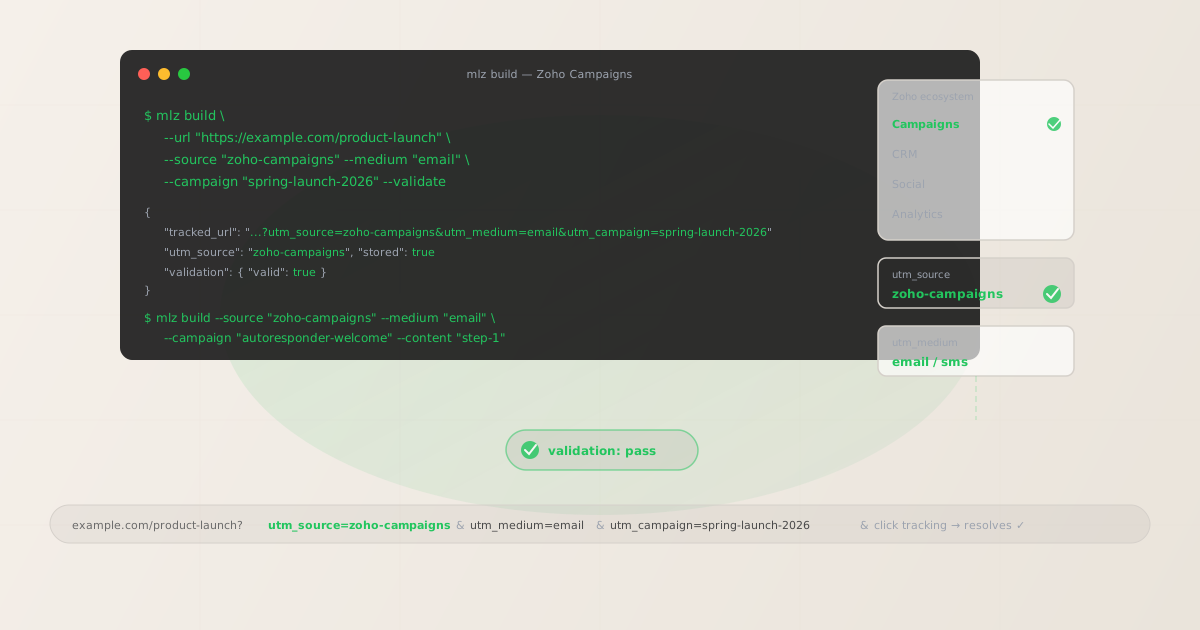
The correct utm_source and utm_medium for Zoho Campaigns
Use utm_source=zoho-campaigns for all sends that originate from the Zoho Campaigns platform. The hyphenated value distinguishes Zoho Campaigns from other Zoho products and from any future integrations your team adds. The medium is straightforward: Zoho Campaigns primarily sends email, so utm_medium=email is the correct value for campaigns, autoresponders, and automated workflows. Zoho Campaigns also supports SMS sends — use utm_medium=sms for those, never reuse an email tracked URL for SMS sends.
Never use utm_source=zoho (ambiguous across the Zoho product suite), utm_source=ZohoCampaigns (mixed case fragments attribution), or whatever value Zoho's auto-UTM feature fills in by default. If Zoho's auto-UTM is enabled, disable it under Advanced Settings for each campaign — then set your own UTM values by replacing the CTA link destination with a tracked URL built by mlz build.
| Campaign type | utm_source | utm_medium | GA4 default channel |
|---|---|---|---|
| Regular email campaigns | zoho-campaigns |
email |
|
| Autoresponders | zoho-campaigns |
email |
|
| Workflow automation emails | zoho-campaigns |
email |
|
| SMS campaigns | zoho-campaigns |
sms |
Other (configure custom channel) |
GA4 maps utm_medium=email to the Email default channel group automatically. If your team uses Zoho Campaigns for SMS, utm_medium=sms lands in GA4's Other channel group by default. Add a custom channel group in GA4 Admin — a "SMS Marketing" rule matching utm_medium exactly contains sms — so SMS-attributed sessions appear as a distinct row rather than disappearing into Other.
Zoho Campaigns auto-UTM: why to disable it and what to use instead
Zoho Campaigns includes a built-in UTM tracking feature under Advanced Settings for each campaign. When enabled, it auto-fills UTM parameters using your campaign display name as the utm_campaign value. The outcome is predictable: a campaign named "Spring Launch 2026" produces utm_campaign=Spring+Launch+2026 in GA4 — a plus-encoded or percent-encoded string depending on browser and redirect behaviour. A different team member who names their campaign "spring launch 2026" (lowercase) produces a separate utm_campaign=spring+launch+2026 row. A third campaign named "Spring Launch — April 2026" produces utm_campaign=Spring+Launch+%E2%80%94+April+2026. All three are the same product launch, split across three separate campaign rows in GA4.
Disable Zoho Campaigns' auto-UTM in the Advanced Settings panel for each campaign. Then build a tracked URL with mlz build using a consistent, lowercase-hyphenated --campaign slug, and paste the tracked_url output as the link destination in the Zoho Campaigns template editor. The UTM parameters are embedded in the URL itself — Zoho's click tracking wraps the whole URL, preserving your parameter values intact.
$ mlz build \
  --url "https://example.com/spring-launch" \
  --source "zoho-campaigns" \
  --medium "email" \
  --campaign "spring-launch-2026" \
  --validate

{
  "tracked_url": "https://example.com/spring-launch?utm_source=zoho-campaigns&utm_medium=email&utm_campaign=spring-launch-2026",
  "params": {
    "utm_source": "zoho-campaigns",
    "utm_medium": "email",
    "utm_campaign": "spring-launch-2026"
  },
  "validation": {
    "valid": true,
    "checks": [
      { "check": "ssl", "status": "pass" },
      { "check": "resolution", "status": "pass", "details": { "response_time_ms": 142 } },
      { "check": "redirects", "status": "pass" }
    ]
  },
  "link_id": "lnk_zc8p3m1v",
  "stored": true
}
Paste the tracked_url value into the Zoho Campaigns link editor for each CTA. With Zoho's auto-UTM disabled, your manually built tracked URL passes through Zoho's click tracking redirect to GA4 with the correct, normalised parameter values intact.
Autoresponders, workflows, and A/B campaigns — UTM naming per send type
Zoho Campaigns supports three main send types beyond regular campaigns, each requiring a distinct UTM naming approach.
Autoresponders are time-triggered email sequences — the Zoho Campaigns equivalent of a drip series. Each email in the autoresponder should use a unique utm_content value to distinguish which message in the sequence drove a given session. Use a utm_campaign slug that identifies the autoresponder: autoresponder-welcome, autoresponder-onboarding. A single utm_campaign value across all emails in the sequence means GA4 shows all autoresponder-attributed sessions under one row — you cannot see which email in the sequence is converting.
Workflow automations (Zoho Campaigns' behaviour-triggered email sequences) work the same way. Each workflow step that links to a landing page should carry a unique utm_content value: workflow-step-1, workflow-step-2. The campaign slug identifies the workflow: workflow-post-signup, workflow-cart-recovery.
A/B test campaigns need a separate tracked URL per variant if you want to see variant-level performance in GA4. Use utm_content to identify the variant: subject-a, subject-b. Zoho Campaigns' own A/B reporting shows opens and clicks at the variant level; GA4 shows session-level attribution. If both variants use the same tracked URL, GA4 cannot distinguish which variant drove any given session.
# Autoresponder step 1 — welcome email
$ mlz build \
  --url "https://example.com/getting-started" \
  --source "zoho-campaigns" \
  --medium "email" \
  --campaign "autoresponder-welcome" \
  --content "step-1" \
  --validate

{ "tracked_url": "https://example.com/getting-started?utm_source=zoho-campaigns&utm_medium=email&utm_campaign=autoresponder-welcome&utm_content=step-1", "validation": { "valid": true } }

# Autoresponder step 2 — follow-up after 3 days
$ mlz build \
  --url "https://example.com/getting-started" \
  --source "zoho-campaigns" \
  --medium "email" \
  --campaign "autoresponder-welcome" \
  --content "step-2" \
  --validate

{ "tracked_url": "https://example.com/getting-started?utm_source=zoho-campaigns&utm_medium=email&utm_campaign=autoresponder-welcome&utm_content=step-2", "validation": { "valid": true } }
Each tracked URL in the autoresponder sequence goes into the corresponding Zoho Campaigns email template. The same destination URL gets a different utm_content value per step — GA4 shows which step in the sequence drives conversions.
Zoho Campaigns click tracking and UTM preservation
Zoho Campaigns wraps email links in its own click tracking redirect. UTM parameters embedded in the destination URL are preserved through this redirect — when a recipient clicks, Zoho records the click and forwards the browser to your destination URL with all UTM query parameters intact.
The important distinction: Zoho Campaigns records clicks at the redirect level, not at the destination. A broken destination — a 404 page, a certificate error, or a redirect that strips the query string — shows as a click in Zoho Campaigns' analytics but generates no session in GA4. The click count in Zoho and the session count in GA4 diverge, and the discrepancy is invisible from inside Zoho's reporting interface. Run mlz build --validate to confirm the destination URL resolves correctly before embedding any link in a Zoho Campaigns template.
Zoho Campaigns also integrates with Zoho CRM — if your CRM is configured to capture UTM parameters from form submissions or landing page visits, the utm_source, utm_medium, and utm_campaign values from your email links can populate the Lead Source and campaign fields on CRM contacts. Inconsistent UTM values at the email send level produce inconsistent CRM attribution data. A single mlz build call per campaign keeps both GA4 and Zoho CRM reporting clean.
Zoho Campaigns UTM tracking gotchas
- Auto-UTM produces display names, not analytics slugs
- Zoho Campaigns' built-in UTM feature uses your campaign display name as-is for
utm_campaign. A campaign named "May Newsletter — Subscribers" becomesutm_campaign=May+Newsletter+%E2%80%94+Subscribersin GA4 — en-dash percent-encoded, spaces plus-encoded, mixed case. Disable auto-UTM in campaign Advanced Settings and build your own tracked URLs withmlz build --campaign "may-newsletter-2026". The difference in GA4 is night and day: one clean, filterable campaign slug vs. dozens of encoded display-name variants. - zoho vs zoho-campaigns — name the product, not the company
- GA4 treats
zohoandzoho-campaignsas separate traffic sources. If your team ever sends email via Zoho Campaigns and also uses Zoho Social, Zoho SalesIQ, or any other Zoho marketing product, usingutm_source=zohofor all of them collapses attribution across all Zoho products into a single source row. Use the specific product name:zoho-campaignsfor email sends from Zoho Campaigns. Enforce it withmlz build --source "zoho-campaigns"so the value is never set manually by individual team members. - Autoresponder and workflow emails need per-step utm_content
- If every email in a Zoho Campaigns autoresponder or workflow uses the same tracked URL, GA4 shows all attributed sessions in one campaign row — you cannot tell which step in the sequence is converting. Build a tracked URL per step with a unique
--contentvalue:step-1,step-2,step-3. Each step's CTA link destination in the Zoho Campaigns template gets its own tracked URL. Runmlz links list --campaign "autoresponder-welcome"after building to confirm every step has a stored tracked URL before activating the sequence. - A/B test variants need per-variant UTM content if you want GA4 parity
- Zoho Campaigns' A/B test reporting shows opens and clicks per variant within the platform. GA4 cannot report at the variant level unless each variant uses a different tracked URL. If both variants share the same link destination, GA4 sees one campaign row — useful for overall campaign reporting but useless for variant-level attribution. Build variant-specific tracked URLs:
mlz build --content "subject-a"andmlz build --content "subject-b". Use the corresponding tracked URL in each variant's template. - Zoho CRM integration amplifies UTM inconsistency
- If you use Zoho CRM alongside Zoho Campaigns and have configured your landing pages to capture UTM parameters into CRM lead records, every UTM inconsistency in your email sends appears as a data quality issue in your CRM. A contact who clicked
utm_source=ZohoCampaignsfrom one campaign andutm_source=zoho-campaignsfrom another has two conflicting source values in their CRM history. Building tracked URLs withmlz build --source "zoho-campaigns"enforces consistent source values at generation time — clean CRM attribution starts with clean UTM construction.
Zoho Campaigns UTM naming conventions
Recommended UTM parameter values for Zoho Campaigns, aligned with GA4 default channel groupings and a lowercase-hyphenated taxonomy:
- utm_source:
zoho-campaigns— always, for all email and SMS sends from the Zoho Campaigns platform. Never usezoho,ZohoCampaigns, or the auto-generated value from Zoho's built-in UTM feature. - utm_medium:
emailfor all email sends (regular campaigns, autoresponders, workflow automations, A/B tests).smsfor SMS sends via Zoho Campaigns. Never reuse an email tracked URL for SMS sends — the medium in the URL will be wrong. - utm_campaign: Lowercase, hyphenated, specific to the campaign or sequence type. Regular campaigns:
spring-launch-2026,may-newsletter-2026. Autoresponders:autoresponder-welcome,autoresponder-onboarding. Workflows:workflow-post-signup,workflow-cart-recovery. Never use display names or Zoho's auto-generated values. - utm_content: Per CTA in a campaign:
hero-cta,body-link. Per step in an autoresponder or workflow:step-1,step-2. Per A/B variant:subject-a,subject-b. Every distinct CTA or sequence step linking to a landing page should have a uniqueutm_contentvalue. - utm_term: Optional. Use for audience segment or list identifier when the same campaign sends to multiple segments:
subscribers-active,leads-warm,customers-lapsed-90d. Useful for comparing segment performance within a single campaign in GA4.
See the UTM naming conventions guide for the full cross-platform reference and the UTM tracking for developers guide for programmatic generation and validation at scale.
FAQ
- Should I use utm_source=zoho or utm_source=zoho-campaigns?
- Use
zoho-campaigns. Thezohovalue is ambiguous if you ever use other Zoho marketing products — Zoho Social, Zoho SalesIQ, Zoho CRM email integrations — because each of them would also appear aszohoin GA4. Using the specific product name makes GA4 source rows scannable and correctly attributed. Pickzoho-campaignsbefore your first campaign and enforce it withmlz build --source "zoho-campaigns". GA4 treatszohoandzoho-campaignsas different sources — any historical data underzohowould require a custom channel group to consolidate. - Does Zoho Campaigns' click tracking preserve UTM parameters?
- Yes — Zoho Campaigns wraps email links in a click tracking redirect that encodes the full destination URL including UTM parameters. When a recipient clicks, Zoho records the click and forwards the browser to the destination with UTM parameters intact. The caveat: Zoho records clicks at the redirect level. A broken destination (404, certificate error, redirect that strips query strings) shows as a click in Zoho analytics but generates no session in GA4. Use
mlz build --validateto confirm destination URLs resolve before embedding them in any Zoho Campaigns template. - Should I disable Zoho Campaigns' built-in UTM tracking?
- Yes, if you want clean, filterable GA4 data. Zoho's auto-UTM uses your campaign display name as-is for
utm_campaign— producing mixed-case, space-encoded values that create messy GA4 rows. Disable it in each campaign's Advanced Settings, then build your own tracked URLs withmlz buildusing a lowercase-hyphenated campaign slug. You get full control over every parameter value, consistent naming across campaigns, and the ability to search and filter in GA4 without decoding percent-encoded strings. - How do I track Zoho Campaigns autoresponder sequences in GA4?
- Build a separate tracked URL per autoresponder step with a unique
utm_contentvalue for each step:mlz build --campaign "autoresponder-welcome" --content "step-1"for the first email,--content "step-2"for the second, and so on. Each step's CTA destination in the Zoho Campaigns template gets the corresponding tracked URL. GA4 can then show which step in the autoresponder sequence drives sessions and conversions — not just that sessions came from the autoresponder as a whole. - Can Zoho Campaigns UTM parameters feed into Zoho CRM?
- Yes — if your landing pages are configured to capture UTM parameters into form fields that map to Zoho CRM lead source and campaign fields, or if you use a Zoho Forms / Zoho CRM integration that passes URL parameters to contact records, the UTM values from your email links can populate CRM attribution data. Consistent UTM source and campaign values at send time are a prerequisite for clean CRM attribution. Build all tracked URLs with
mlz build --source "zoho-campaigns"to ensure the CRM receives the same normalised source value across every email send.
Recommended posts
Build Zoho Campaigns links from the terminal
Pass --source "zoho-campaigns" and --medium "email" to mlz build to get a normalised, validated tracked URL ready to paste into any Zoho Campaigns template, autoresponder, or workflow. Disable Zoho's auto-UTM in Advanced Settings for each campaign, build your tracked URLs with a consistent lowercase-hyphenated --campaign slug, and run --validate to confirm destination URLs resolve correctly before the send goes live. UTM parameter values are fixed at build time — never derived from display names inside the Zoho Campaigns editor where they can drift with each campaign name a team member sets.
1,000 links/month free. No credit card.
Your API key
Save this now — it won't be shown again.
npm install -g missinglinkz
Free plan: 1,000 links/month. No credit card. See the UTM tracking for developers guide for the full programmatic workflow including API and MCP integration.