UTM Tracking for ActiveCampaign: How to Build and Validate Email Automation Campaign Links
ActiveCampaign has a UTM tracking conflict that catches teams off guard: ActiveCampaign's built-in link tracking wraps every email link in its own redirect, and when ActiveCampaign's "UTM tagging" feature is enabled, it appends UTM parameters after the redirect resolves — which means ActiveCampaign's auto-UTM values can overwrite the custom UTM parameters you already added to your links. If you have utm_source=activecampaign in your link and ActiveCampaign's auto-UTM also appends utm_source=activecampaign, the parameters are duplicated. If you have a different utm_campaign value in your link and ActiveCampaign appends its own campaign name, the last value written wins — and which value that is depends on redirect behaviour. The reliable approach is to either disable ActiveCampaign's auto-UTM entirely and manage all UTM parameters yourself, or ensure ActiveCampaign's UTM settings match your taxonomy exactly. This article covers the correct UTM conventions for ActiveCampaign, how to avoid the auto-UTM conflict, how to build consistent links with mlz build, and how to validate destination URLs before each send.
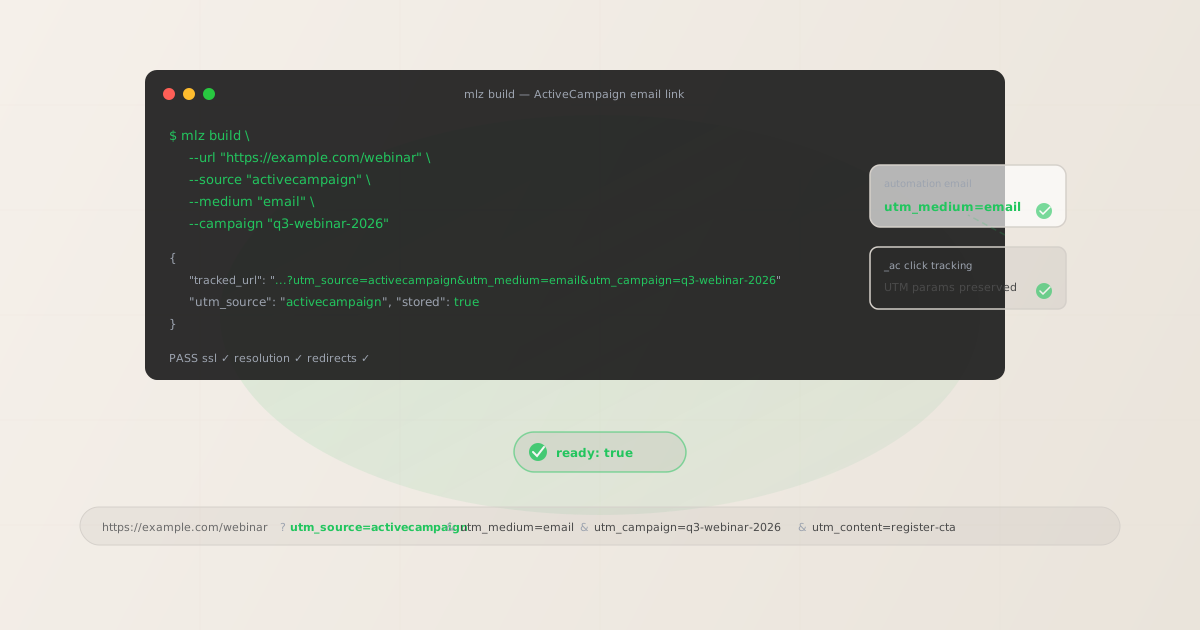
The ActiveCampaign UTM conflict explained
ActiveCampaign's email delivery system wraps all links in marketing emails with its own click-tracking redirect. The redirect records the click for ActiveCampaign's analytics, then forwards the recipient to the destination URL. This is standard for email marketing platforms. The conflict arises when both ActiveCampaign's auto-UTM feature and your own custom UTM parameters are active at the same time.
When ActiveCampaign's UTM auto-tagging is enabled, it appends UTM parameters to the destination URL as part of the redirect resolution. If the destination URL you entered in the email template already has UTM parameters, the result can be a URL with duplicate parameter keys — the browser or GA4 typically reads the last instance of a duplicate key, so the order in which parameters appear in the query string determines which value GA4 sees.
# What you entered in the ActiveCampaign email template
https://example.com/webinar
  ?utm_source=activecampaign
  &utm_medium=email
  &utm_campaign=q3-webinar-2026

# What ActiveCampaign's auto-UTM appends after the redirect
?utm_source=Email&utm_medium=Email&utm_campaign=Q3+Webinar+Signup

# Resulting URL the recipient's browser sees
https://example.com/webinar
  ?utm_source=activecampaign
  &utm_medium=email
  &utm_campaign=q3-webinar-2026
  &utm_source=Email         # duplicate — GA4 reads this last value
  &utm_medium=Email         # duplicate — overwrites lowercase email
  &utm_campaign=Q3+Webinar+Signup  # duplicate — overwrites your slug
In this example, GA4 would attribute the session to Email / Email (mixed case, not matching GA4's standard Email channel grouping) rather than your intended activecampaign / email. The clean fix is to disable ActiveCampaign's auto-UTM entirely and manage all UTM parameters yourself using mlz build.
The correct utm_source and utm_medium for ActiveCampaign
For all ActiveCampaign email sends — campaigns, automations, sequences, and broadcast emails — use utm_source=activecampaign and utm_medium=email. This is consistent with the platform naming convention used for other email marketing platforms (klaviyo, mailchimp, hubspot) and maps to GA4's default Email channel grouping.
| ActiveCampaign send type | utm_source | utm_medium | GA4 default channel |
|---|---|---|---|
| Campaign (broadcast email) | activecampaign |
email |
|
| Automation email (sequence step) | activecampaign |
email |
|
| Transactional email (via API) | activecampaign |
email |
|
| Conditional content email | activecampaign |
email |
|
| SMS (ActiveCampaign SMS add-on) | activecampaign |
sms |
Unassigned (custom group) |
Some teams use utm_source=active-campaign (with a hyphen) instead of utm_source=activecampaign. Both are valid, but you must be consistent — if half your automations use the hyphenated form and half don't, GA4 creates two separate rows for the same platform in its Traffic Acquisition report. Pick one form and document it in your UTM taxonomy. activecampaign without a hyphen is the most common convention and matches the brand name as written.
For utm_campaign, use lowercase hyphen-separated slugs that identify the campaign purpose — not the email subject line. For ActiveCampaign automations, use stable slugs that don't include time-specific dates since automations run continuously. For broadcast campaigns, include the time period: q3-newsletter-2026, product-launch-may-2026.
Building ActiveCampaign campaign links with mlz build
mlz build generates the tracked URL with normalised lowercase parameters and stores the link for auditing. For an ActiveCampaign broadcast campaign with multiple CTAs:
# Primary CTA in an ActiveCampaign broadcast campaign
$ mlz build \
  --url "https://example.com/webinar" \
  --source "activecampaign" \
  --medium "email" \
  --campaign "q3-webinar-2026" \
  --content "register-cta"

{
  "tracked_url": "https://example.com/webinar?utm_source=activecampaign&utm_medium=email&utm_campaign=q3-webinar-2026&utm_content=register-cta",
  "params": {
    "utm_source": "activecampaign",
    "utm_medium": "email",
    "utm_campaign": "q3-webinar-2026",
    "utm_content": "register-cta"
  },
  "link_id": "lnk_ac4n7r2v",
  "stored": true
}
Paste the tracked_url value directly into the link field in ActiveCampaign's email editor. With ActiveCampaign's auto-UTM disabled (see below), this URL passes through ActiveCampaign's click-tracking redirect unchanged — your UTM parameters arrive at the destination exactly as built.
For ActiveCampaign automations — welcome sequences, lead nurture flows, re-engagement series — use stable campaign slugs that remain valid for the lifetime of the automation:
# Email 3 in an ActiveCampaign onboarding automation
$ mlz build \
  --url "https://example.com/feature-tour" \
  --source "activecampaign" \
  --medium "email" \
  --campaign "onboarding-series" \
  --content "email-3-feature-tour"

{
  "tracked_url": "https://example.com/feature-tour?utm_source=activecampaign&utm_medium=email&utm_campaign=onboarding-series&utm_content=email-3-feature-tour",
  "params": {
    "utm_source": "activecampaign",
    "utm_medium": "email",
    "utm_campaign": "onboarding-series",
    "utm_content": "email-3-feature-tour"
  },
  "link_id": "lnk_ac6p9w4x",
  "stored": true
}
The utm_content value email-3-feature-tour identifies both the email number in the sequence and the destination — making GA4 attribution reports readable without needing to cross-reference the automation in ActiveCampaign. Use a consistent numbering scheme across all automation steps (email-1, email-2, email-3) so you can see step-by-step attribution for the full automation in GA4.
How to disable ActiveCampaign's auto-UTM and manage parameters yourself
ActiveCampaign's UTM tracking settings are configured at the account level and can be overridden per campaign. The key setting to look for:
- Account-level UTM tracking: In ActiveCampaign, go to Settings › Tracking. Under "Google Analytics Settings," you'll find the option to enable or disable automatic UTM tracking for all campaigns. Disabling this account-wide means no campaign automatically appends ActiveCampaign's UTM parameters to links — you manage all UTM parameters yourself via the tracked URLs you paste into the email editor.
- Per-campaign tracking override: Individual campaigns can override the account-level setting. When editing a campaign in ActiveCampaign, look for a "Tracking" or "Google Analytics" section in the campaign settings panel. Per-campaign overrides let you test the impact of disabling auto-UTM on specific campaigns before rolling out the change account-wide.
- Site tracking and event tracking: ActiveCampaign also offers site tracking (a JavaScript tracking snippet similar to GA4) and event tracking (for recording custom events on your website). These are separate from UTM tracking and don't interfere with your UTM parameters. You can leave site tracking and event tracking enabled while disabling UTM auto-tagging.
Once auto-UTM is disabled, ActiveCampaign's click-tracking redirect still wraps all links for its own analytics — but it passes the full query string (including your UTM parameters) through the redirect unchanged. The behaviour is similar to how Mailchimp, HubSpot, and Klaviyo handle click tracking: the platform's redirect preserves the parameters you set.
If you cannot disable auto-UTM for operational reasons — for example, if another team relies on ActiveCampaign's auto-generated UTM data for internal attribution — ensure that ActiveCampaign's UTM settings match your taxonomy exactly: utm_source=activecampaign (lowercase), utm_medium=email (lowercase). Set the utm_campaign field in ActiveCampaign's UTM settings to a custom value rather than letting it use the campaign name. Then do not add UTM parameters to the links themselves in the email template — let ActiveCampaign's auto-UTM be the only source of parameters to avoid duplicates.
Validating ActiveCampaign destination URLs before sending
For ActiveCampaign broadcasts sent to large lists, validate destination URLs before finalising the campaign. Use mlz build --validate to confirm each destination responds correctly:
$ mlz build \
  --url "https://example.com/webinar" \
  --source "activecampaign" \
  --medium "email" \
  --campaign "q3-webinar-2026" \
  --content "register-cta" \
  --validate

{
  "tracked_url": "https://example.com/webinar?utm_source=activecampaign&utm_medium=email&utm_campaign=q3-webinar-2026&utm_content=register-cta",
  "validation": {
    "valid": true,
    "checks": [
      { "check": "url_format", "status": "pass", "message": "URL format is valid." },
      { "check": "ssl", "status": "pass", "message": "URL uses HTTPS." },
      { "check": "resolution", "status": "pass", "message": "Destination responded with 200.", "details": { "response_time_ms": 224 } },
      { "check": "redirects", "status": "pass", "message": "No redirects detected." }
    ]
  },
  "link_id": "lnk_ac4n7r2v",
  "stored": true
}
For ActiveCampaign automations that run continuously, periodically re-validate destination URLs — especially after website redesigns, CMS migrations, or landing page rebuilds. An automation email pointing to a webinar registration page that was taken offline after the event ends will silently send contacts to a 404 page or a redirect to the home page. Depending on how that redirect is configured, UTM parameters may or may not be preserved. Build a regular audit process: run mlz build --validate for each active automation's links at least once per quarter.
ActiveCampaign UTM tracking gotchas
- Auto-UTM and custom UTM parameters create duplicates
- ActiveCampaign's auto-UTM appends parameters after the click-tracking redirect resolves. If your link template already contains UTM parameters and auto-UTM is also enabled, GA4 receives a URL with duplicate parameter keys. Which value GA4 uses depends on its URL parsing implementation — typically the last value of a duplicated key — but this is inconsistent and should not be relied upon. Disable auto-UTM entirely if you are managing UTM parameters yourself.
- ActiveCampaign's click tracking redirect preserves UTM parameters
- When auto-UTM is disabled, ActiveCampaign's click-tracking redirect (through ActiveCampaign's own domain) passes the full query string including your UTM parameters through to the destination URL unchanged. This is the same behaviour as Mailchimp, HubSpot, and Klaviyo's click tracking — the platform records the click for its own analytics without interfering with your UTM parameters. Confirm this is working correctly by sending a test email, clicking a link, and verifying the UTM parameters in the browser address bar after the redirect resolves.
- Mixed-case UTM values from ActiveCampaign's auto-UTM
- ActiveCampaign's auto-UTM generates values with mixed case by default — for example,
utm_source=Emailorutm_medium=Emailrather than lowercase. GA4 is case-sensitive for UTM parameter values:Emailandemailcreate two separate rows in GA4's Traffic Acquisition report. Usingmlz buildto generate your UTM parameters enforces lowercase normalisation automatically — any uppercase input is normalised to lowercase before the URL is built, preventing case-fragmentation in GA4 reports. - ActiveCampaign CRM deals and pipelines are separate from UTM attribution
- ActiveCampaign is also a CRM with deal pipelines and contact scoring. Contact-level deal attribution within ActiveCampaign (tracking which contacts opened emails, clicked links, and converted to deals) is separate from GA4 UTM attribution (tracking which sessions arrived with campaign parameters). Both systems measure real behaviour, but they answer different questions — ActiveCampaign tells you which contact clicked which email, while GA4 tells you which channel and campaign drove sessions and conversions. The two systems are complementary; use UTM parameters to ensure GA4 accurately attributes revenue to your ActiveCampaign sends.
- Conditional content in ActiveCampaign may need different tracked URLs per segment
- ActiveCampaign's conditional content feature lets you show different content blocks to different contact segments within the same campaign. If different content blocks contain links to different destination URLs (for example, a pricing page for one segment and a demo page for another), you need separate tracked URLs for each destination — each with its own
utm_contentvalue identifying the segment variant. Build all tracked URLs before creating the campaign to ensure every content variant's links are built with consistent parameters.
ActiveCampaign UTM naming conventions
Recommended conventions for ActiveCampaign UTM parameters, aligned with GA4 channel groupings and cross-platform attribution standards:
- utm_source:
activecampaign— lowercase, no hyphen, for all sends from ActiveCampaign (campaigns, automations, transactional emails) - utm_medium:
emailfor all email channels;smsif using ActiveCampaign's SMS add-on - utm_campaign: lowercase hyphen-separated slug — e.g.
q3-newsletter-2026,product-launch-may-2026,onboarding-series,re-engagement-2026. For one-time broadcasts, include the time period. For automations, use stable slugs without dates. - utm_content: CTA or step identifier — e.g.
register-cta,demo-cta,email-1-welcome,email-3-feature-tour,variant-a. For conditional content:segment-enterprise,segment-smb. - utm_term: Contact segment or list identifier if relevant — e.g.
trial-users,enterprise-prospects,inactive-90-days.
If your team uses multiple email platforms alongside ActiveCampaign — for example, Klaviyo for eCommerce email and ActiveCampaign for B2B automation — keep the same cross-channel naming conventions: platform name as utm_source, channel type as utm_medium, and your campaign taxonomy as utm_campaign. This lets you compare performance across platforms in GA4 by filtering on utm_medium=email and grouping by source. See the UTM naming conventions guide for the full cross-channel reference and the UTM tracking best practices guide for governance at scale.
FAQ
- What utm_source should I use for ActiveCampaign?
- Use
utm_source=activecampaign— lowercase, no hyphen — for all emails sent from ActiveCampaign. This is the most widely used convention and matches the brand name as written. Some teams useutm_source=active-campaign(with a hyphen), which is also acceptable, but you must be consistent: mixing the two forms creates separate rows in GA4's Traffic Acquisition report as if they were different platforms. Pick one form, document it in your UTM taxonomy, and enforce it across all campaigns and automations. - How do I fix the duplicate UTM parameter problem in ActiveCampaign?
- Disable ActiveCampaign's auto-UTM tagging in your account settings under Settings › Tracking › Google Analytics Settings. Once disabled, ActiveCampaign's click-tracking redirect passes your URLs unchanged — no auto-generated parameters are appended. Build all tracked URLs with
mlz buildand paste thetracked_urlvalues into the link fields in ActiveCampaign's email editor. The UTM parameters you set in the URL are the only ones that reach the destination. - Does ActiveCampaign's link tracking redirect strip UTM parameters?
- No. ActiveCampaign's click-tracking redirect (used to record link clicks for ActiveCampaign's own analytics) preserves the full query string including UTM parameters. The recipient's click goes through ActiveCampaign's redirect domain, which records the click, then forwards to your destination URL with all parameters intact. If your destination URL itself redirects again — through a link shortener, a CMS redirect, or a landing page builder redirect — the combined redirect chain may or may not preserve UTM parameters depending on how each hop is configured. Use
mlz build --validateto confirm the full chain resolves correctly. - How do I track ActiveCampaign automation emails separately from broadcast campaigns in GA4?
- Use different
utm_campaignvalues: stable flow-based slugs for automations (onboarding-series,re-engagement,trial-to-paid) and time-stamped slugs for broadcast campaigns (q3-newsletter-2026,product-launch-may-2026). In GA4, filter byutm_source=activecampaignand then segment byutm_campaignto see automation versus broadcast performance separately. You can also useutm_contentto add a type identifier:automation-email-3versusbroadcast-cta. - Do I need UTM parameters for ActiveCampaign site tracking events?
- ActiveCampaign site tracking (a JavaScript snippet that records page visits by known contacts) is independent of UTM parameters. Site tracking enriches contact records in ActiveCampaign with page visit data for segmentation and automation triggers — it does not affect GA4 attribution. You can have ActiveCampaign site tracking and GA4 running on the same page simultaneously. UTM parameters are read by GA4 at session start and attributed to the session regardless of whether ActiveCampaign site tracking is also active on the page.
Recommended posts
Build ActiveCampaign campaign links from the terminal
Pass --source "activecampaign" --medium "email" to mlz build and get a normalised, validated URL ready to paste into ActiveCampaign's email editor — no duplicate parameters, no mixed-case values, no subject-line slugs in GA4 reports. Add --content to identify CTAs and automation steps, and --validate to confirm the destination resolves cleanly before your campaign sends.
1,000 links/month free. No credit card.
Your API key
Save this now — it won't be shown again.
npm install -g missinglinkz
Free plan: 1,000 links/month. No credit card. See the UTM tracking for developers guide for the full programmatic workflow.