UTM Tracking for Yotpo: How to Build and Validate Campaign Links
UTM tracking for Yotpo requires two distinct source values — utm_source=yotpo-email for Yotpo Email campaigns and utm_source=yotpo-sms for Yotpo SMS sends — because Yotpo is a multi-channel platform that runs both email and SMS marketing from a single interface. Using a single utm_source=yotpo value for both channels merges email and SMS session data into one row in GA4's source report, making it impossible to evaluate the two channels independently. Yotpo Email uses utm_medium=email for GA4 Email channel attribution; Yotpo SMS uses utm_medium=sms. The critical operational difference: Yotpo SMS shortens every link it sends, which means UTM parameters must be present on the destination URL before you hand the URL to Yotpo — adding parameters after shortening does nothing, because the short URL is already generated. Build all tracked URLs with mlz build before creating Yotpo campaigns, and run mlz check to confirm the Yotpo short link resolves correctly and preserves the query string through any redirect chain.
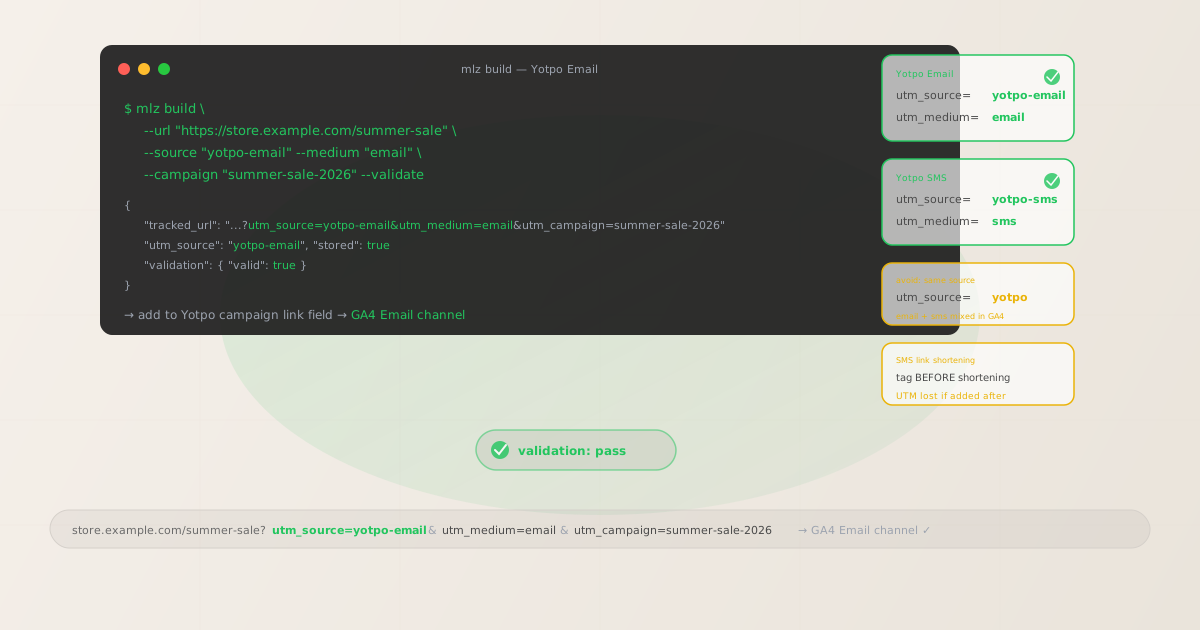
The correct utm_source for Yotpo Email vs Yotpo SMS
Yotpo consolidates email and SMS marketing into one platform — Yotpo Email for newsletters and automated email flows, and Yotpo SMS & Email (which includes SMS functionality built from the SMSBump acquisition) for text message campaigns. Because these are two separate marketing channels with different delivery mechanisms, cost structures, and audience expectations, they should have distinct utm_source values so GA4 can attribute sessions to the specific channel that drove them.
The recommended convention is utm_source=yotpo-email for Yotpo Email sends and utm_source=yotpo-sms for Yotpo SMS sends. Both use the platform brand as the identifier and a channel suffix to distinguish them. An alternative approach is utm_source=yotpo for both, relying on utm_medium to provide channel context — but this approach makes it impossible to filter GA4 source reports to show only Yotpo Email or only Yotpo SMS traffic without combining the medium dimension. The two-source convention is cleaner for long-term reporting and is consistent with how teams that run multiple platforms (Klaviyo for email, Attentive for SMS) typically tag their traffic.
| Yotpo channel | utm_source | utm_medium | GA4 channel |
|---|---|---|---|
| Yotpo Email — campaign | yotpo-email |
email |
|
| Yotpo Email — flow | yotpo-email |
email |
|
| Yotpo SMS — campaign | yotpo-sms |
sms |
✓ SMS |
| Yotpo SMS — flow | yotpo-sms |
sms |
✓ SMS |
| Either channel | yotpo |
email or sms |
✗ Cannot filter by channel in GA4 source report |
For GA4 channel grouping: the Email channel requires utm_medium to match "email" — Yotpo Email with utm_medium=email routes correctly. GA4 does not have a default "SMS" channel definition; sessions with utm_medium=sms typically land in "Other channels" unless you add a custom channel grouping rule (Admin > Data Display > Channel Groups) that classifies utm_medium exactly matches sms as SMS. Adding this rule ensures Yotpo SMS sessions appear under a dedicated SMS channel in your channel performance report, not mixed with other traffic in "Other channels."
Building tracked Yotpo Email campaign links
Yotpo Email provides UTM tracking configuration within the campaign builder — you can set utm_source, utm_medium, and utm_campaign values in the campaign settings. However, Yotpo Email's built-in UTM field may default to utm_source=yotpo without a channel suffix, and the campaign name it auto-generates may not match the lowercase-hyphenated taxonomy your GA4 reports rely on. The safer approach is to disable Yotpo's auto-UTM for individual links and build tracked URLs manually using mlz build, then insert those URLs into the Yotpo campaign builder.
# Build a tracked URL for a Yotpo Email campaign
$ mlz build \
  --url "https://store.example.com/summer-sale" \
  --source "yotpo-email" \
  --medium "email" \
  --campaign "summer-sale-2026" \
  --validate

{
  "tracked_url": "https://store.example.com/summer-sale?utm_source=yotpo-email&utm_medium=email&utm_campaign=summer-sale-2026",
  "params": {
    "utm_source": "yotpo-email",
    "utm_medium": "email",
    "utm_campaign": "summer-sale-2026"
  },
  "destination_url": "https://store.example.com/summer-sale",
  "created_at": "2026-06-06T09:00:00.000Z",
  "link_id": "lnk_yt12345a",
  "stored": true
}

# Paste the tracked_url into Yotpo Email's link field when building the campaign
For automated email flows (Yotpo Email's equivalent of sequences or drip campaigns), use a dedicated utm_campaign slug per flow rather than per send — for example, utm_campaign=abandoned-cart-flow or utm_campaign=post-purchase-flow. This keeps each automated sequence's performance in a separate GA4 campaign row, making it easy to compare the contribution of abandoned cart emails versus welcome series emails versus post-purchase follow-ups.
Use utm_content when a Yotpo Email campaign template contains multiple CTAs to different product pages. Without utm_content, GA4 cannot tell whether a sale was driven by the hero CTA, a secondary product feature, or a footer promotion — all three appear as the same campaign in GA4's campaign dimension report.
Building tracked Yotpo SMS links — tag before shortening
Yotpo SMS shortens every outbound link it sends. When a subscriber taps a Yotpo SMS, the click goes through Yotpo's link shortener before reaching your destination URL. This shortening happens when the message is created — not when it is sent. The implication: you must build a tracked URL with all UTM parameters present and then enter that complete tracked URL into Yotpo SMS. Yotpo short-links the full tracked URL, preserving the query string. If you enter a destination URL without UTM parameters into Yotpo and try to add parameters later, the short link is already generated and cannot be retroactively modified.
# Build a tracked URL for a Yotpo SMS campaign — BEFORE entering in Yotpo
$ mlz build \
  --url "https://store.example.com/flash-sale" \
  --source "yotpo-sms" \
  --medium "sms" \
  --campaign "flash-sale-jun-2026" \
  --validate

{
  "tracked_url": "https://store.example.com/flash-sale?utm_source=yotpo-sms&utm_medium=sms&utm_campaign=flash-sale-jun-2026",
  "params": {
    "utm_source": "yotpo-sms",
    "utm_medium": "sms",
    "utm_campaign": "flash-sale-jun-2026"
  },
  "stored": true
}

# Enter this tracked_url into Yotpo SMS — Yotpo then shortens the full URL including UTM params
# Run mlz check on the Yotpo short link after creation to verify UTM params are preserved
$ mlz check "https://ys.yotpo.com/abc123"

{
  "url": "https://ys.yotpo.com/abc123",
  "valid": true,
  "checks": [
    { "check": "ssl", "status": "pass" },
    { "check": "redirects", "status": "pass", "message": "Redirect chain preserves UTM parameters." },
    { "check": "resolution", "status": "pass" }
  ]
}
For Yotpo SMS flows — automated sequences triggered by subscriber behavior such as abandoned cart, post-purchase, or win-back — the tracked URL is configured once when building the flow step, not per send. Use dedicated utm_campaign slugs per flow step so GA4 can distinguish an abandoned cart reminder from a post-purchase upsell: utm_campaign=abandoned-cart-sms-step-1, utm_campaign=post-purchase-sms-day-3. For promotional SMS campaigns sent to segments, use a campaign-specific slug: utm_campaign=summer-sale-sms-jun-2026.
Yotpo SMS also supports image links in MMS messages. If your MMS includes a CTA image with a clickable URL, build a tracked URL for that image's destination using the same convention, and add --content "mms-image" to distinguish image clicks from text link clicks within the same campaign.
UTM tracking for Yotpo Loyalty and Reviews emails
Yotpo's platform includes Loyalty & Referrals (points, rewards, referral program) and Reviews (product review requests, review digest emails). Both features send transactional-style emails that may include links back to your store. These emails are sent from the Yotpo platform but serve different purposes from promotional campaigns — they are triggered by specific customer actions and have distinct engagement patterns.
Use utm_source=yotpo-loyalty for links in Loyalty program emails (points balance updates, reward availability notices, referral program invitations) and utm_source=yotpo-reviews for links in review request emails and review digest notifications. Keeping these distinct from yotpo-email ensures that loyalty-driven sessions and review-engagement sessions appear as separate sources in GA4, rather than inflating or diluting your promotional email campaign metrics.
- Loyalty program emails:
utm_source=yotpo-loyalty,utm_medium=email,utm_campaign=loyalty-points-notificationorutm_campaign=referral-invite - Review request emails:
utm_source=yotpo-reviews,utm_medium=email,utm_campaign=review-request - Review digest or UGC digest:
utm_source=yotpo-reviews,utm_medium=email,utm_campaign=review-digest
The granularity of these source values depends on your GA4 reporting needs. If you do not need to separate loyalty emails from review emails from promotional emails in source reports, you can consolidate to utm_source=yotpo-email across all three. The key decision is whether you need per-product-line attribution in your source dimension, which only matters if you are actively optimizing each Yotpo product independently.
Yotpo UTM tracking gotchas
- Using utm_source=yotpo for both email and SMS merges attribution in GA4
- Yotpo's multi-channel nature is the primary source of UTM confusion. If both Yotpo Email and Yotpo SMS campaigns use
utm_source=yotpo, every session from either channel appears under a single "yotpo" row in GA4's source dimension. You cannot separate email-driven revenue from SMS-driven revenue without pivoting to the medium dimension — and even then, the source is ambiguous if any other tool also usesutm_source=yotpofor a different channel. The fix is to useutm_source=yotpo-emailandutm_source=yotpo-smsfrom the start, before your campaign history grows too large to retroactively retag. - Yotpo SMS link shortening means UTM parameters must be added before URL entry
- Every SMS link in Yotpo is shortened via Yotpo's link shortener at message creation time. This is a hard constraint: the short link is a snapshot of the destination URL at the time you entered it. If you enter a bare destination URL without UTM parameters into Yotpo's message builder, the short link is generated without those parameters. Adding UTM parameters to the destination URL later does not update the short link already associated with that message. Build tracked URLs with
mlz buildbefore opening Yotpo's SMS campaign or flow builder, copy thetracked_urloutput, and paste it into Yotpo's link field. Verify the Yotpo short link resolves correctly by runningmlz checkagainst it after the campaign or flow is saved. - Shopify and Yotpo redirect chains can strip UTM parameters
- Yotpo is primarily used by Shopify stores. Shopify product URLs with variants, discount codes, and collection filters sometimes involve redirects between URL formats. If your tracked Yotpo link destination is a Shopify product URL that redirects to a canonical URL, confirm the redirect preserves the query string before sending the campaign. Run
mlz check "https://store.example.com/products/item?utm_source=yotpo-sms&utm_medium=sms&utm_campaign=sale"to verify the full chain — including any Shopify-side redirects — resolves correctly and the UTM parameters survive to the final destination URL that GA4 records. - Yotpo Loyalty referral links use a different attribution model
- When a Yotpo Loyalty subscriber shares a referral link, new customers who click that link and convert are attributed to the referral program, not to a UTM-tracked campaign. Yotpo Loyalty tracks referral attribution internally through its own referral token parameters — separate from UTM attribution. Do not add UTM parameters to referral sharing links, as this may interfere with Yotpo's referral attribution tracking. The distinction: Loyalty program emails you send to existing subscribers (points updates, reward notices) are appropriate for UTM tracking; the referral links those subscribers share outward are tracked by Yotpo's referral system, not UTM.
- Yotpo Email auto-UTM may use non-standard campaign name formats
- Yotpo Email's built-in UTM settings may auto-populate
utm_campaignwith values derived from the campaign's internal name — which may contain spaces, title case, or other formatting that creates case-sensitivity fragmentation in GA4. GA4 treatsSummer Saleandsummer-saleas different campaign values, splitting what should be one campaign across two rows in your campaign dimension report. When you control the tracked URL viamlz build, you control the campaign slug format and can enforce lowercase-hyphenated values consistently across all channels.
Yotpo UTM naming conventions
Recommended UTM parameter values for Yotpo, aligned with GA4 default channel groupings and a lowercase-hyphenated taxonomy:
- utm_source:
yotpo-emailfor Yotpo Email campaigns and flows;yotpo-smsfor Yotpo SMS campaigns and flows;yotpo-loyaltyfor Loyalty program notification emails;yotpo-reviewsfor review request and review digest emails. Never use bareyotpoas the source value for both email and SMS channels. - utm_medium:
emailfor all Yotpo Email sends — this routes sessions to GA4's Email channel. Usesmsfor Yotpo SMS sends — add a GA4 custom channel grouping rule if you need Yotpo SMS sessions to appear under a dedicated SMS channel rather than "Other channels." - utm_campaign: Lowercase, hyphenated slug per campaign or flow. For one-off campaigns:
summer-sale-2026,flash-sale-jun-6. For automated flows:abandoned-cart-email-step-1,abandoned-cart-sms-step-2,post-purchase-flow-day-3,win-back-sms-60-days. Keep email and SMS flow slugs distinct even for the same customer journey step, so GA4 can differentiate the email and SMS legs of the same automation. - utm_content: Per-link identifier when a campaign template contains multiple CTAs to different destinations. Use:
hero-cta,product-feature-a,product-feature-b,footer-cta. For SMS, where a single message rarely has more than one link,utm_contentis typically omitted unless you run A/B variant testing (in which case:utm_content=variant-a,utm_content=variant-b). - utm_term: Rarely needed for Yotpo sends. Consider using
utm_termif segmenting Yotpo SMS campaigns by subscriber list type and needing to isolate those segments in GA4 — for example,utm_term=vip-subscribersvs.utm_term=standard-subscribers.
See the UTM naming conventions guide for the full cross-platform reference and the UTM tracking for developers guide for programmatic generation and validation at scale.
FAQ
- Should I use utm_source=yotpo or utm_source=yotpo-email for Yotpo Email?
- Use
utm_source=yotpo-email. If you also use Yotpo SMS and tag those sends withutm_source=yotpo-sms, using bareyotpofor email creates an immediate attribution split in GA4: some Yotpo-platform traffic appears as "yotpo" (email), some as "yotpo-sms" (SMS), and you cannot aggregate all Yotpo-origin sessions with a single source filter. The two-source convention (yotpo-emailandyotpo-sms) is slightly more verbose but gives you clean separation. If you only use Yotpo Email and have no SMS product,utm_source=yotpois acceptable — but add-emailnow if there is any chance of adding Yotpo SMS later, because retroactively retagging historical campaigns is painful. - Why does Yotpo SMS require UTM parameters to be added before shortening?
- Yotpo SMS generates short links at the time you enter a destination URL into the message builder, not at send time. The short link encodes the full destination URL — including whatever query parameters are present when you enter the URL. Once the short link exists in your Yotpo message template, modifying the underlying destination URL does not update the short link. This is a common implementation pattern for SMS link shorteners because the short link must be a fixed token in the message text. The consequence: building tracked URLs with
mlz buildbefore entering them in Yotpo is not optional — it is the only way to ensure UTM parameters are present when the short link is created. After creating the Yotpo message, verify the short link withmlz checkby running it against the Yotpo-shortened URL before the campaign goes live. - How do I track the email vs. SMS leg of the same Yotpo customer journey?
- Use distinct
utm_sourceandutm_campaignvalues per channel. If your abandoned cart automation sends an email (step 1) and an SMS (step 2) to the same subscriber, tag the email CTA withutm_source=yotpo-email, utm_campaign=abandoned-cart-email-step-1and the SMS link withutm_source=yotpo-sms, utm_campaign=abandoned-cart-sms-step-2. In GA4, you can then see whether the email or the SMS leg was the final touch that drove the conversion, and compare the conversion rate of each channel for the same automation goal. Without distinct source and campaign values, both sessions appear in the same GA4 campaign row and you cannot isolate the email or SMS contribution. - Does Yotpo's link shortener preserve UTM parameters through the redirect?
- Yes, in normal operation. Yotpo's SMS link shortener stores the full destination URL — including the query string — and forwards the recipient to that complete URL when they click. The redirect is a standard 301 or 302 redirect that passes the query string intact. However, if your destination page has its own redirects (Shopify variant redirects, discount code redirect chains, CDN rewriting), UTM parameters may be lost at one of those intermediate hops. Run
mlz check "https://ys.yotpo.com/your-short-link"to trace the full redirect chain and confirm UTM parameters are present at the final destination URL. - Can I automate Yotpo UTM link generation for large campaigns?
- Yes. For campaigns with many destination URLs, use
mlz buildin a shell loop reading from a CSV or JSON file with your product URLs and campaign metadata. Each call tomlz buildreturns a JSON response containingtracked_url— extract those values and compile them into a reference sheet for your Yotpo campaign builder. For Yotpo SMS, this is especially valuable because you can build and validate all tracked URLs in a single pass before opening Yotpo, ensuring every link is correctly tagged before the Yotpo short links are generated. See the programmatic UTM link guide for bulk generation patterns usingmlz build --format json.
Recommended posts
Build Yotpo campaign links from the terminal
Use mlz build --source "yotpo-email" --medium "email" for Yotpo Email campaigns and --source "yotpo-sms" --medium "sms" for Yotpo SMS sends. Build every tracked URL before entering it in Yotpo — especially for SMS, where Yotpo shortens the link at creation time and UTM parameters cannot be added retroactively. Run mlz check against Yotpo SMS short links after creation to verify the redirect chain preserves your UTM query string. For Yotpo Loyalty and Reviews emails, use dedicated source values (yotpo-loyalty, yotpo-reviews) to keep each Yotpo product's sessions separate in GA4 source reports.
1,000 links/month free. No credit card.
Your API key
Save this now — it won't be shown again.
npm install -g missinglinkz
Free plan: 1,000 links/month. No credit card. See the UTM tracking for developers guide for the full programmatic workflow including API and MCP integration.