UTM Tracking for Attentive: How to Build and Validate Campaign Links
UTM tracking for Attentive uses utm_source=attentive for all sends from the platform, with utm_medium=sms for SMS Campaigns and Journeys and utm_medium=email for Attentive Email sends. Attentive is a leading SMS and email marketing platform built for ecommerce and direct-to-consumer brands — it is SMS-first: every link included in an Attentive SMS message is automatically shortened via Attentive's own short link domain, attn.tv. This creates a critical constraint you must understand before configuring any UTM tracking: the attn.tv short link is generated from the destination URL you enter in Attentive's link composer at the time the message is built. Once the short link exists, its destination is fixed. You cannot append UTM parameters to an attn.tv short URL after it has been created. This means every tracked URL — with all UTM parameters already attached — must be built and validated before it is entered into Attentive's link field. The mlz build command generates validated, normalised tracked URLs in one step, giving you a clean destination URL to paste into Attentive before the link shortening occurs.
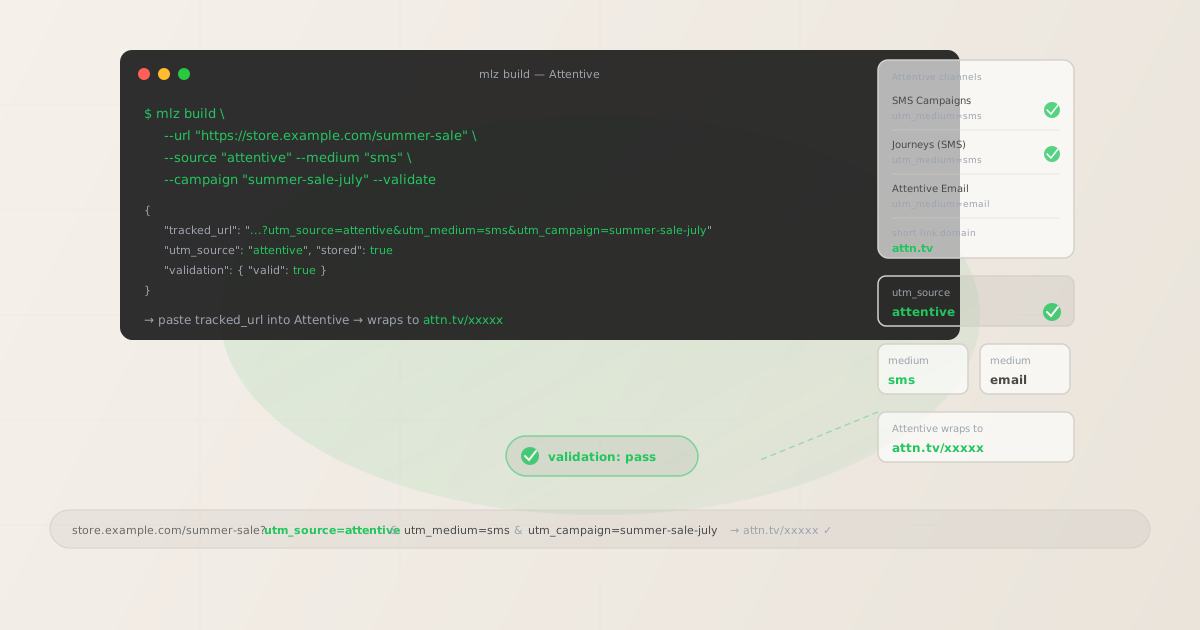
The correct utm_source and utm_medium for Attentive
Use utm_source=attentive — lowercase, no suffix — for all sends from the Attentive platform, across both SMS and email channels. The source value identifies the sending platform. Channel routing in GA4 is handled separately by utm_medium: use utm_medium=sms for all Attentive SMS Campaigns and Journey steps, and utm_medium=email for all Attentive Email sends.
Some teams use attentive-mobile as the source value, reasoning that Attentive is a mobile channel. Others inadvertently use the brand name of their store instead of the sending platform, or use attentive-sms to include the channel in the source value. All of these create separate, fragmented GA4 source rows that make it impossible to aggregate all Attentive-driven sessions in a single segment. Standardise on utm_source=attentive across your entire team and document it before any send goes out.
| Send type | utm_source | utm_medium | Correct? |
|---|---|---|---|
| SMS Campaign | attentive |
sms |
✓ Yes |
| Journey step (SMS) | attentive |
sms |
✓ Yes |
| Attentive Email send | attentive |
email |
✓ Yes |
| SMS Campaign | attentive-mobile |
sms |
✗ No — splits source in GA4 |
| SMS Campaign | attentive-sms |
sms |
✗ No — channel encoded in wrong field |
| Any send | attentive |
attentive |
✗ No — routes to Unassigned in GA4 |
GA4's default channel grouping places sessions with utm_medium=sms into the SMS channel and sessions with utm_medium=email into the Email channel, regardless of the source. All Attentive SMS sessions appear under the SMS channel in GA4's channel reports, with attentive as the source dimension for isolating Attentive-driven traffic from other SMS platforms you may also use.
How Attentive's link shortener works — and why UTM parameters must be set first
Every link in an Attentive SMS message is wrapped by Attentive's short link infrastructure at the time the message template is saved or the send is scheduled. Attentive generates an attn.tv short link that redirects to the destination URL you provided when building the message. The destination URL — including all query parameters — is captured at link creation time and cannot be edited after the short link is generated.
This architecture has a direct consequence for UTM tracking: if you enter a bare destination URL (e.g. https://store.example.com/summer-sale) into Attentive's link field, Attentive generates an attn.tv short link that redirects to that bare URL. GA4 receives sessions from that short link with no utm_source, utm_medium, or utm_campaign — the sessions appear as direct traffic. There is no mechanism to add UTM parameters to the short link after it exists. The window to add UTM parameters is before Attentive wraps the URL.
The correct workflow: build the fully tracked URL with mlz build, validate it with mlz check, then paste the tracked URL into Attentive's link field. Attentive wraps the tracked URL — UTM parameters and all — into the attn.tv short link. When a subscriber clicks the short link, Attentive's redirect infrastructure forwards them to the tracked URL, GA4 receives the UTM parameters, and the session is attributed correctly.
# Step 1: build the tracked URL before entering it into Attentive
$ mlz build \
  --url "https://store.example.com/summer-sale" \
  --source "attentive" \
  --medium "sms" \
  --campaign "summer-sale-july" \
  --validate

{
  "tracked_url": "https://store.example.com/summer-sale?utm_source=attentive&utm_medium=sms&utm_campaign=summer-sale-july",
  "params": {
    "utm_source": "attentive",
    "utm_medium": "sms",
    "utm_campaign": "summer-sale-july"
  },
  "destination_url": "https://store.example.com/summer-sale",
  "created_at": "2026-06-04T10:00:00.000Z",
  "link_id": "lnk_abc12345",
  "stored": true
}

# Step 2: validate the destination URL resolves correctly
$ mlz check "https://store.example.com/summer-sale?utm_source=attentive&utm_medium=sms&utm_campaign=summer-sale-july"

# Step 3: paste the tracked_url value into Attentive's link field
# Attentive wraps it → attn.tv/xxxxx → redirects to the tracked URL
Run mlz check against the full tracked URL before handing it to Attentive. This confirms the destination page resolves correctly, responds within an acceptable time, and does not have a redirect chain that strips query parameters before reaching the final destination. A UTM-tracked URL that forwards through an intermediate redirect that drops the query string will still generate an attn.tv short link — but the subscriber's session will arrive at the final destination without UTM parameters and appear as direct traffic in GA4. Validate before Attentive wraps the link.
Attentive Journeys — UTM tracking for automated SMS sequences
Attentive Journeys are automated message sequences triggered by subscriber actions or events: a subscriber opting in (Welcome Journey), a shopper abandoning a cart (Abandoned Cart Journey), a shopper viewing a product without purchasing (Browse Abandonment Journey), or a customer completing a purchase (Post-Purchase Journey). Each Journey is multi-step: a Welcome Journey might send an initial opt-in confirmation immediately, a second message with a first-purchase incentive 24 hours later, and a third engagement message 72 hours after that. Abandoned Cart Journeys typically send an initial recovery message one hour after abandonment, a second with a discount 24 hours later, and a final reminder at 48 hours.
Each Journey step that includes a link to an external destination requires a tracked URL with a unique utm_content value identifying the specific step. Without per-step utm_content identifiers, GA4 aggregates all sessions from an entire Journey into a single campaign dimension row — it is impossible to determine which step in a Welcome Journey drove the first purchase, or which Abandoned Cart message step produced the recovery conversion. Use --content in mlz build to assign a step identifier to each Journey message.
# Welcome Journey — step 1: opt-in confirmation with first-purchase link
$ mlz build \
  --url "https://store.example.com/collections/new" \
  --source "attentive" \
  --medium "sms" \
  --campaign "welcome-journey" \
  --content "step-1-optin-confirmation" \
  --validate

{
  "tracked_url": "https://store.example.com/collections/new?utm_source=attentive&utm_medium=sms&utm_campaign=welcome-journey&utm_content=step-1-optin-confirmation",
  "stored": true
}

# Welcome Journey — step 2: first-purchase incentive (24h delay)
$ mlz build \
  --url "https://store.example.com/collections/new" \
  --source "attentive" \
  --medium "sms" \
  --campaign "welcome-journey" \
  --content "step-2-first-purchase-offer" \
  --validate

{
  "tracked_url": "https://store.example.com/collections/new?utm_source=attentive&utm_medium=sms&utm_campaign=welcome-journey&utm_content=step-2-first-purchase-offer",
  "stored": true
}

# Abandoned Cart Journey — step 1: initial recovery (1h after abandonment)
$ mlz build \
  --url "https://store.example.com/cart" \
  --source "attentive" \
  --medium "sms" \
  --campaign "abandoned-cart-journey" \
  --content "step-1-initial-recovery" \
  --validate

{
  "tracked_url": "https://store.example.com/cart?utm_source=attentive&utm_medium=sms&utm_campaign=abandoned-cart-journey&utm_content=step-1-initial-recovery",
  "stored": true
}
Build all tracked URLs for every step of a Journey before opening Attentive's Journey editor. Define the full set of step identifiers for the Journey first — step-1-optin-confirmation, step-2-first-purchase-offer, step-3-engagement-reminder — then run mlz build for each step. Paste each returned tracked_url into the corresponding Journey message step in Attentive's editor. Because each step's attn.tv short link is generated from the destination URL entered at configuration time, there is no opportunity to update UTM parameters after the Journey is activated without pausing and reconfiguring each affected step.
For Attentive's Browse Abandonment Journey — triggered when a subscriber views a specific product page without purchasing — use utm_campaign=browse-abandonment-journey with utm_content for per-step tracking. The destination URL for each Browse Abandonment step is typically the product page the subscriber viewed, but since browse abandonment Journeys use dynamic product data injected by Attentive, only the primary CTA can be given a manually built tracked URL. Use a category or collection URL as the static CTA destination for browse abandonment steps rather than a dynamic product URL, and apply UTM tracking to that static destination.
Attentive's native UTM settings vs. custom campaign slugs
Attentive includes a native UTM parameter setting in Campaign Settings under "UTM Parameters." When enabled, Attentive auto-appends utm_source, utm_medium, and utm_campaign to all links in a Campaign or Journey message automatically — you do not need to build tracked URLs manually for the native parameters. This feature is useful for ensuring no link goes out without at least a source and medium, even when tracked URLs are not built in advance.
However, Attentive's auto-generated utm_campaign value uses Attentive's internal Campaign or Journey ID — a numeric or alphanumeric identifier like 12345678 or cmp_xyz67890. This internal ID appears in GA4 as the campaign dimension value. It is unique and unambiguous, but it is not human-readable: a GA4 campaign report showing 12345678 does not tell a marketing analyst which initiative that represents without cross-referencing back to Attentive's campaign list.
For human-readable campaign slugs like summer-sale-july, abandoned-cart-journey, or welcome-journey, you must build tracked URLs manually using mlz build with a --campaign value you define, and enter those tracked URLs into Attentive's link fields. The native UTM settings and manually built tracked URLs can coexist if Attentive's auto-UTM is enabled only as a fallback: Attentive's auto-appended parameters are overridden by the parameters already present in any manually built tracked URL. Prefer manually built tracked URLs with human-readable campaign slugs for any Campaign or Journey you intend to analyse in GA4.
If you rely on Attentive's native UTM settings and a Campaign or Journey link also carries a manually built tracked URL, Attentive does not double-append: the existing parameters in the tracked URL take precedence. The key rule is that Attentive applies its auto-UTM only to links that do not already carry UTM parameters. This makes it safe to mix: manually build tracked URLs for Campaign and Journey CTAs where you want human-readable slugs, and let Attentive's auto-UTM serve as a safety net for any links you may have missed.
Attentive UTM tracking gotchas
- UTM parameters must be on the destination URL before Attentive creates the attn.tv short link
- Attentive generates its
attn.tvshort links at the time a Campaign or Journey step is saved. The destination URL is fixed at that point — there is no way to add, change, or remove UTM parameters from an existingattn.tvshort link. If you enter a bare destination URL and then try to update the UTM parameters after the short link is generated, you must delete the link, re-enter the correctly tracked URL, and allow Attentive to generate a new short link. The only window to get UTM parameters onto the destination URL is before handing it to Attentive. Always build tracked URLs withmlz build --validatefirst, then paste thetracked_urloutput into Attentive. - Attentive's auto-UTM generates a numeric campaign ID, not a human-readable slug
- Attentive's native "UTM Parameters" setting in Campaign Settings auto-appends UTM parameters to all links — including
utm_campaign— but the campaign value is Attentive's internal Campaign or Journey ID, not a descriptive slug you define. This works for attribution but produces unreadable campaign dimension values in GA4. If your team needs to identify campaigns by name in GA4 reports without cross-referencing Attentive's campaign list, always build tracked URLs manually withmlz build --campaign "your-human-readable-slug"and enter them into Attentive's link fields directly. - Do not conflate subscriber acquisition UTMs with send attribution UTMs
- Attentive uses a two-tap mobile opt-in and website popup to capture subscribers. The UTM parameters on the page where a subscriber opted in describe how that visitor arrived at your site originally — organic search, paid ad, email, social — not the Attentive SMS that will follow. After the subscriber opts in and Attentive begins sending them Journey messages, the UTM parameters on those Journey message links describe the Attentive sends. These are separate attribution events. Do not use the subscriber's original acquisition UTMs as the UTM parameters for Attentive SMS messages — they are unrelated. Apply
utm_source=attentiveconsistently to all outbound Attentive SMS and email links, regardless of how the subscriber was originally acquired. - Validate tracked URLs for redirect chain UTM preservation before pasting into Attentive
- Some ecommerce stores use redirect layers — Shopify redirects, CDN redirects, URL shorteners applied to the destination before UTM parameters — that strip query strings mid-chain. A tracked URL that resolves correctly in a browser may silently drop UTM parameters if an intermediate redirect does not forward query strings. Run
mlz checkagainst every tracked URL before pasting it into Attentive. If the redirect chain strips query strings, fix the redirect configuration at the destination before generating theattn.tvshort link — there is no recovery path after the short link is created with the untracked destination URL baked in. - Standardise on utm_source=attentive — not attentive-mobile, not your brand name
- Teams working with Attentive for the first time sometimes use
utm_source=attentive-mobile(reasoning that Attentive is a mobile SMS platform), or use the brand name of their own store, or useattentive-smsto encode the channel. Each variant creates a separate source row in GA4 that splits Attentive-driven sessions across multiple rows in source reports. Standardise onutm_source=attentive. Runmlz build --source attentiveto enforce the normalised value across every tracked URL your team generates, and document this convention in your team's UTM naming guide.
Attentive UTM naming conventions
Recommended UTM parameter values for Attentive, aligned with GA4 default channel groupings and a lowercase-hyphenated taxonomy:
- utm_source:
attentive— always, for all SMS Campaigns, SMS Journeys, and Attentive Email sends. Never useattentive-mobile,attentive-sms, or any brand name or domain-based variant. - utm_medium:
smsfor all Attentive SMS Campaigns and Journey steps.emailfor all Attentive Email sends. Never useutm_medium=attentive— it routes sessions to Unassigned in GA4's default channel grouping. - utm_campaign: Lowercase, hyphenated, initiative-level slug. For Journeys: the sequence type —
welcome-journey,abandoned-cart-journey,browse-abandonment-journey,post-purchase-journey. For SMS Campaigns: the specific send initiative —summer-sale-july,flash-sale-weekend,new-arrivals-june. Do not use Attentive's internal numeric Campaign ID as yourutm_campaignvalue unless you are fully relying on Attentive's native auto-UTM setting. - utm_content: Per-step identifier for Journey messages:
step-1-optin-confirmation,step-2-first-purchase-offer,step-1-initial-recovery,step-2-discount-followup,step-3-final-reminder. For multi-CTA SMS Campaigns where a single message links to multiple destinations, use per-CTA identifiers:hero-cta,secondary-product-link. For single-link SMS Campaigns,utm_contentmay be omitted. - utm_term: Optional for Attentive. Consider using
utm_termto distinguish subscriber segments when the same Journey applies to multiple acquisition-source segments and you want to track the segment dimension in GA4 independently from the campaign. Example:utm_term=vip-segmentvs.utm_term=standard-segmentwithin the same Welcome Journey.
See the UTM naming conventions guide for the full cross-platform reference and the UTM tracking for developers guide for programmatic generation and validation at scale.
FAQ
- Can I add UTM parameters to an attn.tv short link after Attentive has created it?
- No. Attentive generates
attn.tvshort links from the destination URL you provide at link creation time. The destination URL — including all query parameters — is fixed when the short link is created. There is no mechanism to append or edit UTM parameters on an existingattn.tvshort link. If you need to change the UTM parameters on a link already used in an Attentive Campaign or Journey, you must delete the existing link, enter a corrected tracked URL, and allow Attentive to create a new short link. This is why building and validating the tracked URL withmlz build --validatebefore entering it into Attentive is essential — there is no recovery path after the fact. - Should I use Attentive's native UTM parameter settings or build URLs manually?
- Both approaches are valid and can coexist. Attentive's native UTM settings auto-append
utm_source,utm_medium, andutm_campaignto all links in a Campaign or Journey — useful as a safety net to ensure no link goes out untracked. However, Attentive's auto-generatedutm_campaignvalue is the internal Campaign or Journey ID, not a human-readable slug. For GA4 reports where you want to identify campaigns by name, build tracked URLs manually withmlz build --campaign "summer-sale-july"and enter them into Attentive's link fields. Attentive does not double-append UTM parameters if the URL already carries them — so manually built tracked URLs take precedence over Attentive's auto-UTM when both are active. - How do I track individual Attentive Journey steps in GA4?
- Use a unique
utm_contentvalue for each Journey step that links to an external page. Define step identifiers for all Journey steps before configuring the Journey in Attentive:step-1-initial-recovery,step-2-discount-followup,step-3-final-reminder. Build each tracked URL withmlz build --medium sms --campaign "abandoned-cart-journey" --content "step-X-identifier" --validate, then paste the returnedtracked_urlinto the corresponding Journey step link field in Attentive. GA4 attributes sessions and conversions to individual Journey steps through theutm_contentdimension in custom reports. - What utm_source should I use for Attentive Email (the email channel within Attentive)?
- Use
utm_source=attentivefor Attentive Email sends, the same as for SMS. The source value identifies the sending platform — Attentive — not the channel. Channel distinction is made byutm_medium: useutm_medium=emailfor Attentive Email sends andutm_medium=smsfor SMS sends. This convention allows you to compare SMS and email performance within the same sending platform in GA4 by filtering onutm_source=attentiveand segmenting byutm_medium. - How do I validate an Attentive tracked URL's redirect chain preserves UTM parameters?
- Run
mlz check "https://store.example.com/summer-sale?utm_source=attentive&utm_medium=sms&utm_campaign=summer-sale-july"to verify the destination URL resolves correctly, responds within an acceptable time, and does not return an error status. For ecommerce stores using Shopify redirects or CDN-level rewrites, also manually test the full URL in a browser and confirm the UTM parameters appear in the final URL after any redirects complete. If any redirect in the chain drops the query string, theattn.tvshort link will silently forward subscribers to the destination without UTM parameters — appearing as direct traffic in GA4. Fix redirect chain issues at the destination before generating the Attentive short link.
Recommended posts
Build Attentive campaign links from the terminal
Pass --source "attentive" and --medium "sms" (or --medium "email") to mlz build to get a normalised, validated tracked URL ready to paste into Attentive's link field before it generates the attn.tv short link. For Attentive Journeys, build per-step tracked URLs with --content "step-X-identifier" for each Journey message that links to an external destination. Run mlz check to verify that your destination URL resolves correctly and that no redirect in the chain strips the UTM query string before committing the URL to Attentive. Once Attentive wraps a URL into an attn.tv short link, the destination is fixed — validate first.
1,000 links/month free. No credit card.
Your API key
Save this now — it won't be shown again.
npm install -g missinglinkz
Free plan: 1,000 links/month. No credit card. See the UTM tracking for developers guide for the full programmatic workflow including API and MCP integration.