UTM Tracking for Omnisend: How to Build and Validate Email, SMS, and Push Campaign Links
UTM tracking for Omnisend is more complex than single-channel ESPs because Omnisend sends across three channels — email, SMS, and web push notifications — each requiring a different utm_medium value. Omnisend also includes a built-in UTM tracking feature that auto-appends parameters derived from your campaign name. When your campaign is named "Spring Sale 2026," Omnisend generates utm_campaign=Spring%20Sale%202026 — URL-encoded spaces and mixed case that fragments GA4 attribution from manually built, lowercase slugs. For e-commerce merchants using Omnisend's Automations (welcome series, cart abandonment, post-purchase sequences), the problem extends to all automation-triggered messages: each automated send inherits a utm_campaign value based on the automation or campaign name in Omnisend, not a controlled slug you defined. This guide covers the correct UTM values for every Omnisend channel, how to build consistent tracked links with mlz build, how to disable Omnisend's auto-UTM, and how to validate e-commerce destination URLs before every send.
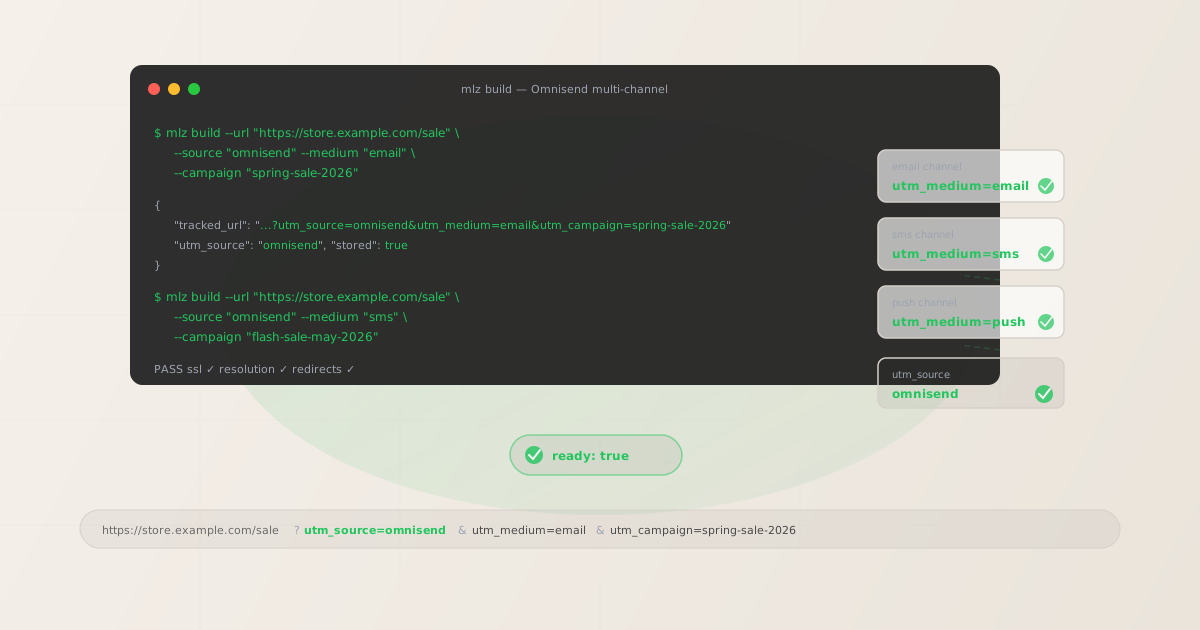
The correct utm_source and utm_medium for Omnisend
Use utm_source=omnisend — all lowercase — for all sends from Omnisend regardless of channel. The utm_medium value changes based on the send channel. Omnisend is a multi-channel platform, and using a distinct utm_medium per channel is the only way to differentiate email, SMS, and push traffic in GA4 reports without splitting your attribution across multiple source values.
| Omnisend channel | utm_source | utm_medium | GA4 default channel |
|---|---|---|---|
| Email campaign (one-time broadcast) | omnisend |
email |
|
| Email automation (welcome, cart, post-purchase) | omnisend |
email |
|
| SMS campaign (one-time broadcast) | omnisend |
sms |
SMS (or Other) |
| SMS automation (cart recovery, order update) | omnisend |
sms |
SMS (or Other) |
| Web push notification (campaign or automation) | omnisend |
push |
Other |
GA4 maps utm_medium=email to the Email default channel group automatically. utm_medium=sms maps to SMS if your GA4 channel groupings include an SMS rule, otherwise it falls into the Other bucket — you can create a custom channel group rule in GA4 to reclassify it. utm_medium=push is not a GA4 default channel and will appear under Other unless you define a custom channel rule. Using these three distinct medium values lets you compare Omnisend email, SMS, and push traffic side-by-side in GA4 without blending them into a single undifferentiated "omnisend" row.
utm_campaign naming for Omnisend campaigns and automations
Omnisend distinguishes between one-time Campaigns (manual sends to a segment or full list) and Automations (event-triggered sequences like welcome series, cart abandonment, and post-purchase flows). These two send types need different utm_campaign naming strategies.
# Email Campaign (one-time send) — date-stamped slug
$ mlz build --url "https://store.example.com/sale" \
  --source "omnisend" --medium "email" \
  --campaign "spring-sale-may-2026" --content "main-cta"

# Cart abandonment Automation — stable evergreen slug
$ mlz build --url "https://store.example.com/cart" \
  --source "omnisend" --medium "email" \
  --campaign "cart-abandonment" --content "hour-1-cta"

# Welcome series Automation — stable evergreen slug
$ mlz build --url "https://store.example.com/new-arrivals" \
  --source "omnisend" --medium "email" \
  --campaign "welcome-series" --content "day-1-cta"

# SMS Campaign — separate utm_medium, date-stamped slug
$ mlz build --url "https://store.example.com/flash" \
  --source "omnisend" --medium "sms" \
  --campaign "flash-sale-may-2026"
One-time Campaign slugs should encode when the send happened: spring-sale-may-2026, mothers-day-promo-2026. Automation slugs should describe the automation's purpose without encoding a date: cart-abandonment, welcome-series, post-purchase-followup. Automation slugs are evergreen — the same automation runs for months or years, accumulating attribution data under a single stable slug in GA4. Date-stamping an automation slug would fragment that attribution over time.
Use utm_content to distinguish individual messages within a multi-step Automation. For a 3-email cart abandonment sequence: use utm_campaign=cart-abandonment for all three emails, with utm_content=hour-1-cta, utm_content=hour-24-cta, and utm_content=day-3-final-cta per message. In GA4's Explore report, utm_content as a secondary dimension on the cart abandonment campaign row shows which message in the sequence drove the most conversions.
Building Omnisend links with mlz build
mlz build generates a normalised tracked URL with lowercase hyphen-separated values. For an Omnisend email Campaign:
$ mlz build \
  --url "https://store.example.com/sale" \
  --source "omnisend" \
  --medium "email" \
  --campaign "spring-sale-may-2026" \
  --content "main-cta"

{
  "tracked_url": "https://store.example.com/sale?utm_source=omnisend&utm_medium=email&utm_campaign=spring-sale-may-2026&utm_content=main-cta",
  "params": {
    "utm_source": "omnisend",
    "utm_medium": "email",
    "utm_campaign": "spring-sale-may-2026",
    "utm_content": "main-cta"
  },
  "link_id": "lnk_om4e7v2p",
  "stored": true
}
Copy the tracked_url and paste it into Omnisend's email editor as your button or link destination. Omnisend's click-tracking wraps all links in a redirect to record click counts — this redirect preserves your full destination URL including the UTM query string when forwarding subscribers to the destination.
For SMS messages, build links with --medium "sms". SMS messages are character-constrained, so shorten the tracked URL with a link shortener after building if character count is a concern — but validate the shortened URL resolves to your destination with UTM parameters intact before sending. For web push notifications, use --medium "push":
# SMS Campaign link
$ mlz build \
  --url "https://store.example.com/flash" \
  --source "omnisend" \
  --medium "sms" \
  --campaign "flash-sale-may-2026"

{
  "tracked_url": "https://store.example.com/flash?utm_source=omnisend&utm_medium=sms&utm_campaign=flash-sale-may-2026",
  "params": {
    "utm_source": "omnisend",
    "utm_medium": "sms",
    "utm_campaign": "flash-sale-may-2026"
  },
  "link_id": "lnk_om9k3c1r",
  "stored": true
}

# Web push notification link
$ mlz build \
  --url "https://store.example.com/new-arrivals" \
  --source "omnisend" \
  --medium "push" \
  --campaign "new-arrivals-may-2026"

{
  "tracked_url": "https://store.example.com/new-arrivals?utm_source=omnisend&utm_medium=push&utm_campaign=new-arrivals-may-2026",
  "params": {
    "utm_source": "omnisend",
    "utm_medium": "push",
    "utm_campaign": "new-arrivals-may-2026"
  },
  "link_id": "lnk_om2n5d8q",
  "stored": true
}
How to disable Omnisend's built-in UTM tracking
Omnisend includes a UTM tracking setting that, when enabled, automatically appends UTM parameters to all links in your campaigns and automations. Omnisend derives utm_campaign from your campaign name — whatever text you entered in Omnisend's campaign name field. If the campaign is named "Spring Sale 2026," Omnisend generates utm_campaign=Spring%20Sale%202026 (URL-encoded spaces, mixed case). In GA4, this creates a separate row from a manually built utm_campaign=spring-sale-2026, splitting data that belongs together.
When Omnisend's auto-UTM is active and you've also embedded manually built parameters in your links, Omnisend may append its own parameters during the send. If the same UTM key appears twice in a URL, GA4 processes only one value. The safest approach is to disable Omnisend's auto-UTM entirely and manage all UTM parameters manually using mlz build.
To disable Omnisend's UTM tracking:
- Campaign-level: When creating or editing a campaign in Omnisend, look for a "Tracking" or "UTM parameters" section in the campaign setup flow. Omnisend typically presents this as a step before scheduling the send. Disable automatic UTM tracking for the campaign where you are applying custom parameters. This setting applies only to the current campaign.
- Account-level: In your Omnisend account settings, navigate to the Tracking or Integrations section. If Omnisend provides a global toggle for automatic UTM appending, disabling it prevents auto-UTM from being applied to all future campaigns and automations by default. This is the preferred approach for teams that manage all tracked links through
mlz build. - Automations: For Omnisend Automations (welcome series, cart abandonment, post-purchase), review the UTM tracking setting when building or editing the automation workflow. Disable auto-UTM for each automation where you are applying custom parameters to individual message links.
Once Omnisend's auto-UTM is disabled, all links send with your manually built UTM parameters intact — exactly as generated by mlz build.
Validating Omnisend destination URLs for e-commerce
Omnisend is primarily used by Shopify and WooCommerce merchants whose destination URLs are often product pages, collection pages, or checkout flows. E-commerce URLs are more likely to change than static landing pages — products go out of stock and URLs redirect to new SKUs, seasonal landing pages get archived after a campaign ends, and checkout flows sometimes break after platform updates. Use mlz build --validate to confirm every destination resolves cleanly before sending a Campaign or activating an Automation:
$ mlz build \
  --url "https://store.example.com/sale" \
  --source "omnisend" \
  --medium "email" \
  --campaign "spring-sale-may-2026" \
  --content "main-cta" \
  --validate

{
  "tracked_url": "https://store.example.com/sale?utm_source=omnisend&utm_medium=email&utm_campaign=spring-sale-may-2026&utm_content=main-cta",
  "validation": {
    "valid": true,
    "checks": [
      { "check": "url_format", "status": "pass", "message": "URL format is valid." },
      { "check": "ssl", "status": "pass", "message": "URL uses HTTPS." },
      { "check": "resolution", "status": "pass", "message": "Destination responded with 200.", "details": { "response_time_ms": 198 } },
      { "check": "redirects", "status": "pass", "message": "No redirects detected." }
    ]
  },
  "link_id": "lnk_om4e7v2p",
  "stored": true
}
For Omnisend Automations, validate all destination URLs when building the automation, and periodically re-validate while the automation is active. Automations run continuously — a product page that goes out of stock or a checkout URL that changes after a Shopify theme update will silently break every future conversion in that automation. Use mlz links list to retrieve all stored tracked URLs for your account and run spot-checks on automation destinations after major platform updates.
Omnisend UTM tracking gotchas
- Omnisend's auto-UTM uses your campaign name — not a slug you control
- When Omnisend's built-in UTM tracking is enabled, it derives
utm_campaignfrom your Omnisend campaign name. If that name contains spaces or mixed case (e.g., "Spring Sale 2026"), Omnisend URL-encodes it asutm_campaign=Spring%20Sale%202026. GA4 treatsSpring%20Sale%202026andspring-sale-2026as separate values — creating two rows for what should be a single campaign. Disable Omnisend's auto-UTM and usemlz buildto controlutm_campaignformatting exactly. - Multi-channel sends need different utm_medium per channel
- Omnisend lets you create a Campaign that sends across email, SMS, and push in a coordinated sequence. Each channel must use a distinct
utm_medium— email sends getutm_medium=email, SMS getsutm_medium=sms, push getsutm_medium=push. Using the sameutm_mediumacross all channels (e.g.,utm_medium=omnisend) makes it impossible to compare channel performance in GA4 because all three channels appear as a single source/medium combination. Build separate tracked URLs per channel withmlz build, one for each channel in the multi-channel send. - Cart abandonment automation links point to dynamic cart URLs
- Omnisend's cart abandonment automation typically links to a customer-specific cart recovery URL rather than a static product or collection page. These cart recovery URLs are usually short-lived and dynamically generated — they are not static destinations you validate once and reuse. For the UTM portion of cart abandonment automation emails, focus on building consistent tracked URLs for the secondary CTAs in the email (e.g., "Browse our store" links, featured product links) rather than the primary cart recovery link. Apply
utm_campaign=cart-abandonmentandutm_content=browse-ctato those static secondary links and validate them withmlz build --validate. - Omnisend shortens URLs in SMS — validate after shortening
- SMS messages are character-constrained. If your
mlz build-generated tracked URL is too long for your SMS message, you may need to shorten it before inserting it into Omnisend's SMS editor. Always validate the shortened URL resolves to your destination with UTM parameters intact before sending. Usemlz check <shortened-url>to confirm the redirect chain preserves your UTM query string. A link shortener that strips query parameters will silently drop all your UTM attribution data without a validation step. - Omnisend Automation names become auto-UTM utm_campaign values
- When Omnisend's auto-UTM is active for Automations, it uses the Automation name as the source of the auto-generated
utm_campaignvalue. All emails in a multi-step Automation receive the same auto-generatedutm_campaign, making it impossible to distinguish which step drove a conversion. Disable auto-UTM for Automations and apply a stable evergreenutm_campaignslug plus a step-specificutm_contentvalue per message:utm_campaign=welcome-serieswithutm_content=day-1-cta,utm_content=day-3-discount, etc.
Omnisend UTM naming conventions
Recommended UTM parameter values for Omnisend across all channels and send types, aligned with GA4 channel groupings:
- utm_source:
omnisend— all lowercase, no hyphens or underscores, for all sends from Omnisend (email, SMS, push). - utm_medium:
emailfor email campaigns and automations;smsfor SMS campaigns and automations;pushfor web push notification campaigns and automations. - utm_campaign: lowercase hyphen-separated slug — for Campaigns (one-time sends):
spring-sale-may-2026,mothers-day-promo-2026,flash-sale-june-2026; for Automations:welcome-series,cart-abandonment,post-purchase-followup,browse-abandonment,win-back. - utm_content: CTA or step identifier — for email Campaigns:
main-cta,secondary-cta,hero-image-link; for Automation steps:day-1-cta,hour-1-cta,day-3-discount,final-offer-cta. For SMS where character count permits, use brief identifiers:main,final. - utm_term: Use sparingly for segment-targeted sends where audience segment is meaningful for attribution:
vip-customers,first-time-buyers,30d-inactive.
For multi-channel Omnisend Campaigns that send across email, SMS, and push simultaneously, build three separate tracked URLs — one per channel — with the same utm_campaign slug but different utm_medium values. In GA4, filter by utm_source=omnisend and use utm_medium as a secondary dimension to compare channel performance within a single campaign.
See the UTM naming conventions guide for the full cross-channel reference and the UTM tracking for developers guide for programmatic generation at scale.
FAQ
- Should I use omnisend or omni-send as utm_source?
- Use
utm_source=omnisend— all lowercase, no hyphen, no underscore. "Omnisend" is written as a single word (it's the brand name), so the UTM source value matches: one word, all lowercase. Avoidomni-send,omni_send, orOmnisend(capitalised) — each of these creates a separate attribution row in GA4 from correctly-cased values, fragmenting your email attribution data over time. - How do I track email, SMS, and push separately in GA4?
- Use a distinct
utm_mediumper channel:utm_medium=emailfor email sends,utm_medium=smsfor SMS sends, andutm_medium=pushfor web push sends. Keeputm_source=omnisendthe same across all three. In GA4's Traffic Acquisition or Explore reports, filter byutm_source=omnisendand break down byutm_mediumto compare email vs. SMS vs. push performance for the same campaign. If you useutm_medium=omnisendfor all channels, you lose the ability to differentiate channel performance in GA4 without cross-referencing Omnisend's own analytics. - How do I name utm_campaign for Omnisend cart abandonment automations?
- Use a stable evergreen slug:
utm_campaign=cart-abandonment. Do not date-stamp automation slugs — automations run continuously and accumulate attribution data under a single slug over months or years. Useutm_contentto distinguish individual emails within the cart abandonment sequence:utm_content=hour-1-cta,utm_content=hour-24-cta,utm_content=day-3-final-cta. This lets GA4 show cart abandonment attribution as a unified campaign row while still allowing per-step performance analysis via theutm_contentdimension. - Does Omnisend's click tracking strip UTM parameters?
- Omnisend wraps all email links with a click-tracking redirect to record click events. This redirect preserves your full destination URL, including the UTM query string built with
mlz build, when forwarding subscribers to your site. The click-tracking redirect and Omnisend's built-in UTM tracking are independent features — disabling auto-UTM does not disable click tracking. Once auto-UTM is disabled, your manually built UTM parameters are forwarded intact through the click-tracking redirect. - How do I validate Omnisend destination URLs for Shopify stores?
- Use
mlz build --validatewhen building any link destined for an Omnisend send. For Shopify stores, pay particular attention to product page URLs (they change when products are archived or reorganised) and collection page URLs (they redirect when collection handles change). If a product goes out of stock after an Automation is activated, the destination URL may redirect to a sold-out page or a 404 — breaking every future send in that automation. Usemlz check <url>to periodically spot-check automation destination URLs after Shopify theme updates or inventory changes.
Recommended posts
Build Omnisend links from the terminal
Pass --source "omnisend" with the appropriate --medium (email, sms, or push) to mlz build and get a normalised, validated URL ready to paste into Omnisend's campaign or automation editor. Lowercase, no mixed-case from Omnisend's auto-UTM, stable slugs for Automations and date-stamped slugs for one-time Campaigns. Add --validate to confirm every e-commerce destination URL resolves before send.
1,000 links/month free. No credit card.
Your API key
Save this now — it won't be shown again.
npm install -g missinglinkz
Free plan: 1,000 links/month. No credit card. See the UTM tracking for developers guide for the full programmatic workflow.