UTM Tracking for Vero: How to Build and Validate Campaign Links
UTM tracking for Vero starts with utm_source=vero — lowercase, the platform name — for all email sends originating from the Vero platform, whether sent through Vero Cloud (the hosted product) or via Vero's API. Vero is a developer-oriented behavioral email platform that triggers messages based on events tracked in your application: a user reaches day seven of a trial, completes onboarding, or performs a high-intent action that triggers a conversion-focused email. Vero's two primary send types are Workflows — automated sequences of messages triggered by events, with conditions, delays, and branching — and Newsletters, one-off broadcast sends dispatched to a segment. The UTM challenge unique to Vero is that the platform's developer focus makes it easy to embed Liquid template variables inside email link URLs, including UTM parameter values — a tempting pattern that produces per-recipient UTM values that fragment GA4 attribution data into high-cardinality noise. Building static tracked URLs with mlz build before configuring any Workflow message or Newsletter keeps UTM values as fixed identifiers that aggregate attribution data cleanly in GA4, rather than per-user dynamic values that create a separate dimension row for each unique combination of user attribute values.
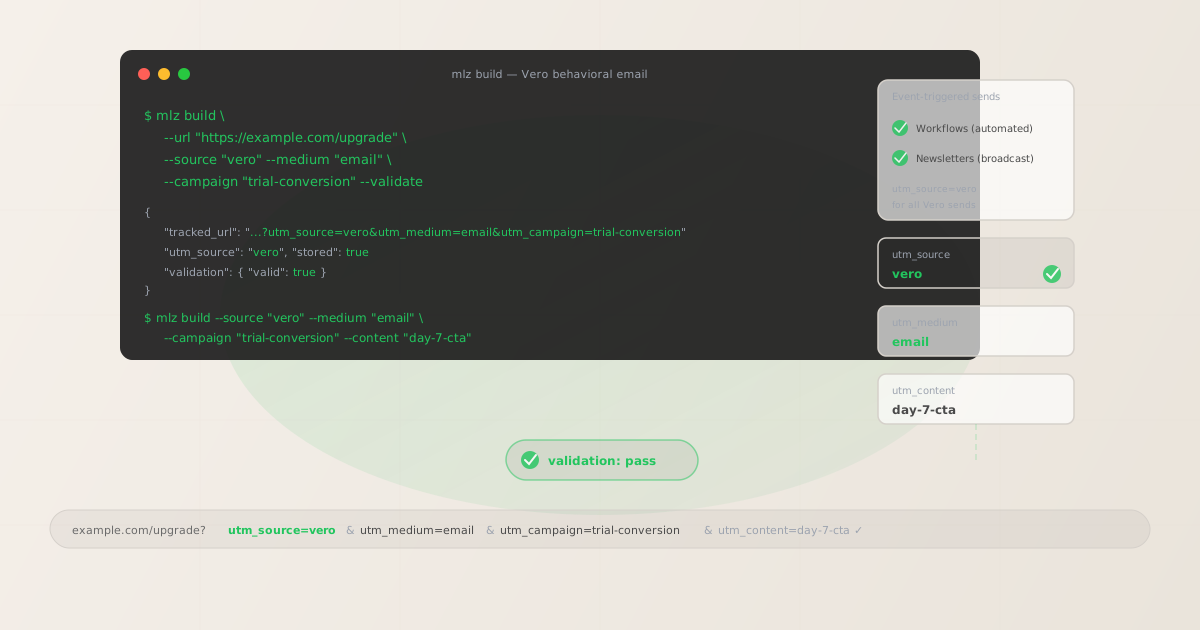
The correct utm_source and utm_medium for Vero
Use utm_source=vero — lowercase, single word — for all email sends from Vero, both Workflow-triggered messages and Newsletter broadcasts. There is no distinction between Vero Cloud and Vero API sends in the source value: the source identifies the platform that sent the email, not the method by which the send was triggered. GA4 attribution data for all Vero email activity should aggregate under a single source value — vero — regardless of whether the send was triggered automatically by a Workflow event or dispatched manually as a Newsletter.
The medium for Vero email sends is utm_medium=email. Vero is an email-focused platform and does not natively support SMS or push as separate channels in the same way that multi-channel platforms do, so email is the correct medium for all Vero sends.
| Source value | Origin | Use this? |
|---|---|---|
Vero |
Mixed case — common manual entry | ✗ No — separate GA4 row from vero |
vero-cloud |
Deployment-specific label | ✗ No — splits data by deployment type |
{{ user.email_client }} |
Liquid template variable | ✗ No — dynamic values fragment GA4 data |
vero |
mlz build output | ✓ Yes — lowercase, static, aggregates cleanly |
If your organisation uses Vero alongside another email platform — Mailchimp for newsletter sends, Vero for behavioral email — use a distinct utm_source for each platform: mailchimp and vero respectively. Never use utm_source=email for either, which would collapse all email platform sends into a single undifferentiated source dimension in GA4 with no way to distinguish which platform drove which sessions.
Vero Workflows — UTM tracking for event-triggered behavioral email
Vero Workflows are automated sequences of messages triggered by events tracked in your application. A trial conversion Workflow might trigger when a user event fires (such as trial_day_7_reached), send a conversion-focused email after a one-day delay, evaluate a condition (has the user activated a key feature?), and branch into a "high-intent" follow-up or a "low-intent" nurture sequence. Each message step in a Workflow that includes a CTA linking to a destination URL needs a tracked URL with a unique utm_content value to make step-level attribution visible in GA4.
The critical rule for Vero Workflow UTM tracking is to use static, pre-built tracked URLs — not Liquid template variables inside UTM parameter values. Vero supports Liquid templates for personalising email content, and it is technically possible to embed event properties or user attributes inside link URLs: https://example.com/{{ event.properties.destination }}?utm_campaign={{ user.plan_tier }}-conversion. This produces a different UTM value for every unique plan tier value in your user database, fragmenting GA4's utm_campaign dimension into dozens or hundreds of rows — one per unique plan tier value — rather than the single campaign row you need for clean attribution reporting.
# Workflow message 1 — triggered at trial day 7
$ mlz build \
  --url "https://example.com/upgrade" \
  --source "vero" \
  --medium "email" \
  --campaign "trial-conversion" \
  --content "day-7-upgrade-cta" \
  --validate

{
  "tracked_url": "https://example.com/upgrade?utm_source=vero&utm_medium=email&utm_campaign=trial-conversion&utm_content=day-7-upgrade-cta",
  "validation": { "valid": true }
}

# Workflow message 2 — high-intent branch, day 10 follow-up
$ mlz build \
  --url "https://example.com/pricing" \
  --source "vero" \
  --medium "email" \
  --campaign "trial-conversion" \
  --content "day-10-high-intent-pricing" \
  --validate

{
  "tracked_url": "https://example.com/pricing?utm_source=vero&utm_medium=email&utm_campaign=trial-conversion&utm_content=day-10-high-intent-pricing",
  "validation": { "valid": true }
}
Build all tracked URLs for a Workflow before configuring any message template in Vero. Use mlz links list --campaign "trial-conversion" to retrieve a JSON list of all stored links for this campaign and confirm every Workflow message step has a validated tracked URL before activating the Workflow. The tracked URL is then pasted into the email template's link destination as a static value — the Liquid personalisation in the email body (first name, product name, feature names) is entirely separate from the UTM values in the link URL, which should remain static for all recipients of the same message step.
Vero Newsletters — UTM tracking for broadcast sends
Vero Newsletters are one-off email sends dispatched to a defined segment of users — not triggered by an event, but sent at a scheduled time or dispatched manually. Newsletters in Vero correspond to product announcements, feature highlights, promotional emails, and content newsletters sent to your entire user base or a filtered subset.
For Newsletter UTM tracking, the campaign slug identifies the initiative and the content identifier distinguishes individual sends within a recurring series. For recurring Newsletters — a monthly product digest, a weekly update email — include the series identifier and year in the campaign slug: newsletter-monthly-2026. Use utm_content to distinguish individual issues when granular per-send attribution matters: issue-2026-06, issue-2026-07. This aggregates all newsletter sessions under a single campaign dimension in GA4, enabling month-over-month comparison, while still allowing per-issue drill-down through the content dimension.
For one-off product announcement Newsletters, use the initiative slug as the campaign: feature-launch-june-2026. If the Newsletter contains multiple CTAs linking to different destinations — a hero CTA to the new feature, a secondary CTA to the changelog, a footer CTA to the pricing page — give each CTA a distinct utm_content value and build a separate tracked URL for each destination.
Vero UTM tracking gotchas
- Liquid templates inside UTM parameter values fragment GA4 attribution
- Vero's Liquid template engine is powerful — it lets you personalise email copy with user attributes, event properties, and computed values. But when Liquid variables appear inside UTM parameter values in link URLs, they resolve to per-recipient values at send time, creating a unique UTM value for each distinct attribute value across your entire user base. A
utm_campaign={{ user.plan_tier }}-conversionvalue produces separate GA4 dimension rows for every plan tier:starter-conversion,growth-conversion,enterprise-conversion,free-trial-conversion, and so on. You lose the ability to compare campaign performance in aggregate — each row shows only the conversions from that specific plan tier. Use staticutm_campaignandutm_contentvalues built withmlz build; use Liquid templates for email body personalisation, not for UTM parameter values. - Vero's event property pass-through can create UTM conflicts
- Vero Workflows are triggered by events, and those events carry properties:
{ "event": "trial_day_7_reached", "properties": { "destination_url": "https://example.com/upgrade?promo=TRIAL10" } }. If the event property includes a destination URL with existing query parameters — promotional codes, referral identifiers, A/B test variant flags — and your Vero template uses the event property as the link URL directly ({{ event.properties.destination_url }}), those existing parameters may conflict with or appear alongside the UTM parameters you intend to attach. Build tracked URLs withmlz buildusing the clean destination URL without existing parameters, and configure the Vero email template to use the tracked URL as a static string rather than deriving the destination from an event property. - Vero's open tracking pixel can affect page load attribution in GA4
- Vero tracks email opens by embedding a tracking pixel in each email. The tracking pixel is a 1x1 image that fires a request to Vero's servers when the email is rendered. This is independent of UTM tracking, but it is worth noting that pre-fetch or pre-rendering by email clients (Gmail's image proxy, Apple Mail's Mail Privacy Protection) can cause Vero to report false open events. These pre-fetches do not click links and do not generate GA4 sessions — they affect Vero's open rate metrics but not your UTM attribution data in GA4. UTM tracking in GA4 is triggered by link clicks and subsequent page loads, not by email opens.
- Vero Workflow branching requires distinct tracked URLs per branch
- Vero Workflows support conditional branching: "if the user has completed onboarding action X, go to branch A; otherwise go to branch B." Each branch can lead to different message steps with different CTAs and destinations. Build a separate tracked URL for each message in each branch, using a
utm_contentvalue that identifies both the step position and the branch:day-10-high-intent-pricing,day-10-low-intent-feature. This lets GA4 show whether the conversion-focused pricing page email or the feature education email drives more downstream upgrades from the Workflow — which is the central question the branching condition was designed to answer. - Vero Newsletter segment definitions affect attribution scope
- Vero's segment filtering lets you send Newsletters to specific subsets of your user base based on user attributes, event history, or custom properties. If you send the same Newsletter to two different segments as separate sends — one to free-tier users, one to paid-tier users — and both sends use the same tracked URL, GA4 will aggregate all sessions under the same campaign and content row with no way to distinguish which segment drove which sessions. For segment-differentiated sends of the same Newsletter content, use a distinct
utm_termvalue per send:--term "segment-free",--term "segment-paid". This preserves the aggregate campaign view while enabling segment-level drill-down through GA4's term dimension.
Vero UTM naming conventions
Recommended UTM parameter values for Vero, aligned with GA4 default channel groupings and a lowercase-hyphenated taxonomy:
- utm_source:
vero— always, for all email sends from the Vero platform, whether triggered by a Workflow event or dispatched as a Newsletter. Never useVero(mixed case),vero-cloud(deployment-qualified), or dynamic Liquid values like{{ user.email_platform }}. - utm_medium:
emailfor all Vero sends — Workflow-triggered messages and Newsletter broadcasts. - utm_campaign: Lowercase, hyphenated, initiative-level slug — set before building any tracked links and stable across Workflow versions and Newsletter iterations. Workflow programmes:
trial-conversion,onboarding-activation,churn-prevention-30d. Newsletter initiatives:feature-launch-june-2026,newsletter-monthly-2026,product-update-q3-2026. Never use dynamic Liquid values as the campaign slug. - utm_content: Per Workflow message step:
day-7-upgrade-cta,day-10-high-intent-pricing,day-14-final-push. Per Workflow branch:day-10-high-intent-pricing,day-10-low-intent-feature. Per Newsletter issue:issue-2026-06. Per CTA within a single email:hero-cta,secondary-cta. Never use dynamic Liquid values as the content identifier. - utm_term: Optional. Use to pass audience segment membership into GA4 for segment-level attribution when the same Workflow or Newsletter is sent to different segment definitions as separate sends:
segment-free,segment-paid,segment-enterprise. Also useful for passing event-triggered context into GA4 when the event name is a meaningful attribution signal:trigger-day-7,trigger-feature-activated.
See the UTM naming conventions guide for the full cross-platform reference and the UTM tracking for developers guide for programmatic generation and validation at scale.
FAQ
- Can I use Vero's Liquid templates for UTM parameter values?
- You should not use Liquid template variables as UTM parameter values. Vero's Liquid engine resolves variables to per-recipient values at send time —
{{ user.plan_tier }}becomesstarterfor one recipient andenterprisefor another. When a Liquid variable appears inside a UTM parameter value, each unique resolved value creates a separate dimension row in GA4:utm_campaign=starter-conversionandutm_campaign=enterprise-conversionappear as completely separate campaigns in GA4 with no way to compare or aggregate them. Use Liquid templates for personalising email body text, subject lines, and non-UTM link destinations. Use static, pre-built UTM values frommlz buildfor all tracked link parameters — the static values aggregate cleanly in GA4 regardless of what user attributes Vero resolves at send time. - How do I track individual Workflow message steps separately in GA4?
- Use a unique
utm_contentvalue for each message step in the Workflow. Before building any email template in Vero, define the step-content identifier for each message step:day-7-upgrade-cta,day-10-high-intent-pricing,day-14-final-push. Build the tracked URL withmlz build --campaign "trial-conversion" --content "day-7-upgrade-cta" --validateand paste the returnedtracked_urlas a static string into the email template's link destination. Repeat for each message step in the Workflow. GA4 attributes sessions and conversions to individual Workflow steps through the content dimension — each step is independently measurable without creating separate Workflows or campaign dimensions in Vero. - Does Vero's click-tracking preserve UTM parameters through its redirect?
- Vero wraps email links in a click-tracking redirect that routes through Vero's tracking servers before forwarding to the destination URL. This redirect records Vero's click events and is separate from GA4 UTM tracking. Vero's click-tracking redirect should preserve UTM query parameters through to the final destination. Verify this by running
mlz checkagainst a real Vero click-tracking URL from a test send — the command follows the full redirect chain and confirms whether UTM parameters arrive intact at the final destination URL. If UTM parameters are stripped during the Vero redirect, GA4 attributes the resulting session as direct traffic rather than to the Vero email send, silently eliminating email attribution across every send that uses the same configuration. - How do I handle UTM tracking for Vero Newsletters sent to multiple segments?
- If you send the same Newsletter content to two separate Vero segments as distinct sends — free-tier users and paid-tier users — and you want to measure performance by segment in GA4, use a distinct
utm_termvalue per send. Build two tracked URLs for each destination: one with--term "segment-free"and one with--term "segment-paid". Use the free-tier tracked URL for the free-tier segment send and the paid-tier tracked URL for the paid-tier segment send. GA4's term dimension then shows conversion rates per segment for the same Newsletter campaign — a meaningful signal for deciding whether the Newsletter is driving different outcomes across your user tiers without requiring you to set up separate Vero segments, separate campaign slugs, or separate GA4 reports for each segment. - What is the difference between Vero Cloud and the Vero API for UTM tracking purposes?
- Vero Cloud is the hosted web UI product where you configure Workflows, build email templates, and manage Newsletter sends. The Vero API allows you to send transactional and triggered emails programmatically from your application code, bypassing the Vero UI entirely. For UTM tracking, there is no difference: use
utm_source=verofor all sends regardless of whether the send was initiated from the Vero Cloud UI or via the Vero API. The source value identifies the platform that delivered the email — Vero — not the mechanism by which the send was triggered. If you are building tracked URLs programmatically for Vero API sends, usemlz buildfrom your deployment scripts or CI pipeline before configuring the email template or API call that will use the tracked URL.
Recommended posts
Build Vero campaign links from the terminal
Pass --source "vero" and --medium "email" to mlz build to get a normalised, validated tracked URL ready to paste into any Vero email template as a static link destination. Build all tracked URLs before opening Vero's template editor — one per Workflow message step with a distinct --content value, and one per CTA for Newsletters. Run --validate to confirm that destination URLs resolve correctly before activating any Workflow or dispatching any Newsletter. The key rule for Vero specifically: always use the tracked_url returned by mlz build as a static string in your Vero template — never build UTM values from Liquid template variables, which will fragment your GA4 attribution data across every unique user attribute value in your database.
1,000 links/month free. No credit card.
Your API key
Save this now — it won't be shown again.
npm install -g missinglinkz
Free plan: 1,000 links/month. No credit card. See the UTM tracking for developers guide for the full programmatic workflow including API and MCP integration.