UTM Tracking for Sovrn //Commerce: How to Build and Validate Affiliate Campaign Links
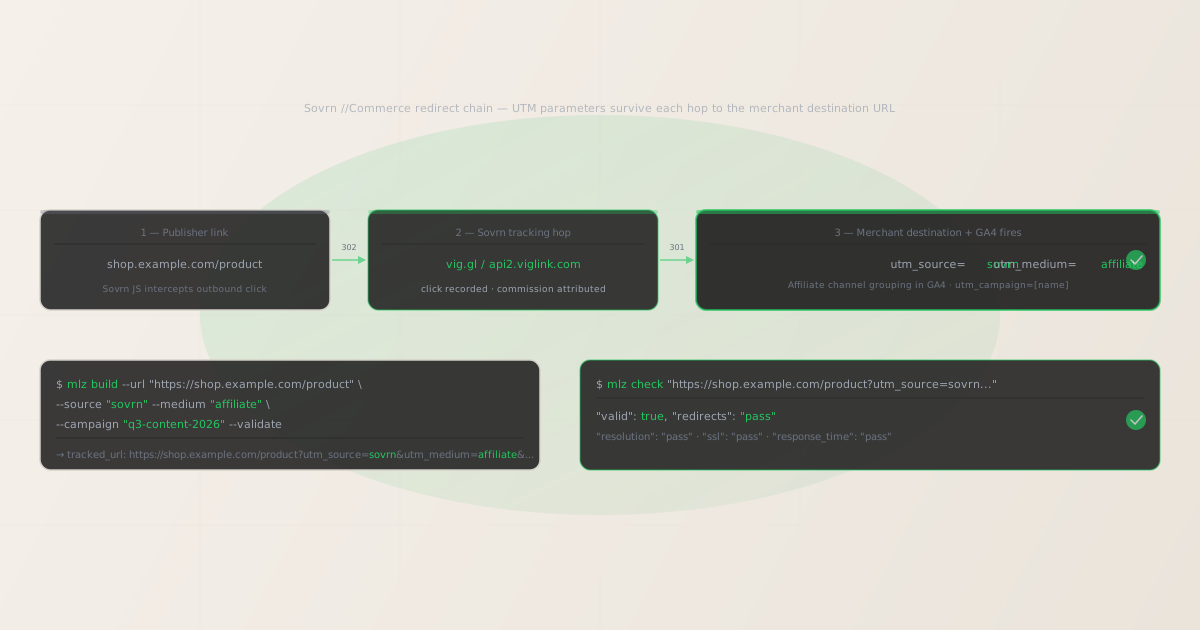
To add UTM tracking for Sovrn //Commerce (formerly VigLink), configure UTM parameters on the destination URL you register as a merchant in the Sovrn Commerce platform — not on the publisher-facing affiliate links that Sovrn’s JavaScript generates automatically. GA4 reads UTM parameters from the landing page URL after Sovrn’s tracking redirect (through vig.gl or api2.viglink.com) delivers the visitor to your destination. Use MissingLinkz mlz build to generate a normalized destination URL with consistent lowercase-hyphenated UTM values and mlz check to confirm Sovrn’s redirect chain delivers those parameters intact to your landing page. The attribution gap specific to Sovrn Commerce: merchants who migrated from VigLink to Sovrn often have a mix of destination URLs using utm_source=viglink and utm_source=sovrn — GA4 records these as two entirely separate sources, splitting historical Affiliate channel data and making it impossible to compare performance before and after the platform rebrand. mlz build enforces a consistent source value at generation time, ensuring all new Sovrn destination URLs use the same convention regardless of which team member generates them.
How Sovrn //Commerce routes traffic and where UTM parameters belong
Sovrn //Commerce, originally launched as VigLink, is a content monetization platform that helps publishers earn revenue from editorial content without manually building affiliate links. Publishers install a JavaScript snippet on their site that automatically detects outbound links to merchant sites and converts them into affiliate links routed through Sovrn’s tracking infrastructure (vig.gl or api2.viglink.com). This conversion happens transparently, without requiring publishers to maintain affiliate link catalogues or join individual merchant programmes.
When a reader clicks a Sovrn-monetized link on a publisher site, the click routes through Sovrn’s tracking domain, which records the click event for commission attribution and publisher revenue reporting, then redirects to the merchant’s destination URL. Sovrn’s click attribution system operates independently from GA4 UTM tracking and does not depend on or interfere with UTM parameters on the destination URL.
The consequence for UTM tracking: UTM parameters belong on the destination URL registered in the Sovrn Commerce merchant portal, not on the publisher-facing affiliate links that Sovrn’s JavaScript generates automatically. Paste the UTM-tagged destination URL generated by mlz build into the destination URL field when configuring your merchant account. For a broader explanation of how content-monetization affiliate platforms interact with UTM parameters, see the UTM tracking for developers guide.
Building Sovrn //Commerce destination URLs with mlz build
Merchants managing Sovrn Commerce programmes often face a version-history problem: the platform was previously known as VigLink, and many existing destination URLs still carry utm_source=viglink from before the rebrand. New team members generating destination URLs for Sovrn programmes default to utm_source=sovrn, creating a fragmented GA4 Affiliate channel where Sovrn-driven traffic appears as two separate sources across the reporting history. mlz build enforces a consistent source value from structured input, so the entire team generates URLs with the same convention regardless of their familiarity with the platform’s naming history.
The recommended naming convention for Sovrn Commerce traffic is utm_source=sovrn, utm_medium=affiliate, and utm_campaign=[campaign-name]. If you are migrating from a VigLink-era URL setup and want to maintain backward compatibility in GA4 reporting, consult your attribution data before switching — updating all existing destination URLs to utm_source=sovrn at once creates a clean break in historical data. Use utm_content to differentiate between product categories, publisher verticals, or seasonal campaigns within the same Sovrn programme.
$ mlz build \
  --url "https://shop.example.com/product" \
  --source "sovrn" \
  --medium "affiliate" \
  --campaign "q3-content-2026" \
  --content "editorial-publishers" \
  --validate

{
  "tracked_url": "https://shop.example.com/product?utm_source=sovrn&utm_medium=affiliate&utm_campaign=q3-content-2026&utm_content=editorial-publishers",
  "params": {
    "utm_source": "sovrn",
    "utm_medium": "affiliate",
    "utm_campaign": "q3-content-2026",
    "utm_content": "editorial-publishers"
  },
  "destination_url": "https://shop.example.com/product",
  "link_id": "lnk_sv_q3_ep",
  "campaign_id": "cmp_q3-content-2026",
  "stored": true,
  "created_at": "2026-07-05T11:00:00.000Z"
}
The tracked_url value is what you register as the destination URL in the Sovrn Commerce merchant portal for the relevant product or landing page. For programmes with multiple product verticals or content publisher types, generate a distinct destination URL per segment using the --content flag:
mlz build --url "https://shop.example.com/product" --source "sovrn" --medium "affiliate" --campaign "q3-content-2026" --content "deal-sites"
For naming conventions and how consistent casing prevents GA4 data fragmentation across affiliate sources, see the UTM naming conventions guide. To generate destination URLs programmatically for large product catalogues via the REST API, see how to build UTM links programmatically.
Validating the Sovrn //Commerce redirect chain with mlz check
Once you have a UTM-tagged destination URL, validate it end-to-end with mlz check before registering it in the Sovrn Commerce merchant portal. mlz check follows the complete redirect chain from your destination URL, confirms the server responds with a 200 status code, and verifies that query parameters are not stripped at any hop. Run this before any Sovrn programme activates, and re-run it after any infrastructure changes that touch URL handling on your site — particularly CDN updates, e-commerce platform upgrades, or changes to server-side redirect rules.
$ mlz check "https://shop.example.com/product?utm_source=sovrn&utm_medium=affiliate&utm_campaign=q3-content-2026"

{
  "url": "https://shop.example.com/product?utm_source=sovrn&utm_medium=affiliate&utm_campaign=q3-content-2026",
  "valid": true,
  "checks": [
    { "check": "url_format", "status": "pass", "message": "URL format is valid." },
    { "check": "ssl", "status": "pass", "message": "URL uses HTTPS." },
    { "check": "resolution", "status": "pass", "message": "Destination responded with 200.", "details": { "status_code": 200, "response_time_ms": 203 } },
    { "check": "redirects", "status": "pass", "message": "No redirects detected." },
    { "check": "response_time", "status": "pass", "message": "Response time: 203ms.", "details": { "response_time_ms": 203 } }
  ],
  "status_code": 200,
  "response_time_ms": 203,
  "validated_at": "2026-07-05T11:01:00.000Z"
}
A valid: true result means the destination URL resolves correctly and query parameters survive the complete redirect chain to the final page load. If valid is false, the checks array identifies the specific failing hop. Common failure modes for Sovrn Commerce merchant URLs include server-side redirect rules that normalize or strip query strings, HTTP-to-HTTPS upgrade redirects on product pages that do not preserve the query string, and e-commerce platform canonical URL enforcement that redirects deep-linked product pages to a clean URL. For a detailed walkthrough of diagnosing redirect chain failures, see how to check if a redirect strips UTM parameters.
Sovrn //Commerce UTM tracking gotchas for merchants
- Configure UTM parameters on the destination URL, not on Sovrn-generated affiliate links
- Sovrn //Commerce works by having publishers install a JavaScript snippet that automatically monetizes outbound links to your site. As a merchant, you do not manually distribute affiliate links to publishers — Sovrn’s JS handles link conversion automatically. The configuration point you own is the destination URL registered in the Sovrn Commerce merchant portal for each product or landing page. Paste the UTM-tagged URL generated by
mlz buildinto that destination URL field. When Sovrn’s JavaScript detects a publisher link to your site, it routes the click through vig.gl and forwards to your registered destination URL, delivering the UTM parameters to your landing page where GA4 fires. - The VigLink-to-Sovrn rebrand creates a source-naming discontinuity in GA4 attribution data
- Sovrn acquired VigLink and rebranded the product as Sovrn //Commerce. Merchants who ran programmes under VigLink often have historical destination URLs using
utm_source=viglink, while new programmes useutm_source=sovrn. GA4 records these as two separate sources in the Affiliate channel, splitting revenue attribution data and making it impossible to view total Sovrn-driven performance across the historical dataset. Before migrating destination URLs en masse, audit your GA4 data to understand how much historical VigLink traffic you want to preserve as a separate source. Usemlz buildto generate all new destination URLs consistently withutm_source=sovrngoing forward. - Casing inconsistency in utm_medium fragments the Affiliate channel grouping in GA4
- GA4’s default channel grouping identifies the Affiliate channel by matching
utm_mediumagainst the valueaffiliate(lowercase). If any Sovrn destination URL uses a non-standard medium value —Affiliate,content-affiliate,viglink-affiliate— that session does not group into the Affiliate channel and falls into Unassigned or a custom channel where it becomes invisible in standard channel performance reports.mlz buildnormalizes all medium values to lowercase, preventing this channel grouping failure. For the full explanation of GA4 case sensitivity, see are UTM parameters case sensitive in GA4? - Sovrn monetizes editorial content links, so traffic arrives at deep product URLs
- Sovrn’s JavaScript converts any editorial mention of a product into a monetized affiliate link, whether that mention is in a review, a gift guide, a how-to article, or a news piece. Unlike coupon or deal sites that link to dedicated landing pages, editorial Sovrn traffic can arrive at any deep product URL on your site. This means product detail pages, category pages, and blog posts may all receive Sovrn-monetized traffic with different redirect behaviours. Validate each product page URL registered in Sovrn with
mlz checkseparately, because different pages on the same domain can have different redirect configurations — particularly on e-commerce platforms with complex canonical URL rules for product variants or filtered category pages. - E-commerce platforms commonly redirect product page URLs in ways that strip query parameters
- Shopify, Magento, WooCommerce, and other e-commerce platforms implement URL normalization rules on product pages — redirecting pluralized slugs to singular, enforcing trailing slash conventions, or replacing product-variant URLs with canonical product URLs. These server-side redirects do not always preserve query string parameters. A product page destination URL that appears to work correctly in a browser can silently strip all UTM parameters before GA4 fires, making Sovrn sessions appear as direct traffic. Run
mlz checkagainst every product URL registered in Sovrn to confirm parameters survive the complete redirect chain before your programme is active.
Frequently asked questions
- Where do I add UTM parameters in Sovrn //Commerce?
- In the Sovrn Commerce merchant portal, register the UTM-tagged destination URL for each product or landing page you want to track. This is the URL that Sovrn’s vig.gl redirect delivers visitors to after recording the click for commission attribution. The format is:
https://shop.example.com/product?utm_source=sovrn&utm_medium=affiliate&utm_campaign=q3-content-2026. Generate this URL usingmlz buildto ensure consistent lowercase-hyphenated formatting across all team members, then paste it into the relevant destination URL field in the merchant portal. Sovrn’s JavaScript handles link conversion on publisher sites automatically. - Should I use utm_source=sovrn or utm_source=viglink for Sovrn //Commerce traffic?
- Use
utm_source=sovrnfor all new Sovrn Commerce programmes. If you have existing VigLink-era destination URLs that useutm_source=viglinkand want to maintain continuity in historical GA4 data, you can continue usingutm_source=viglinkor add a GA4 custom channel grouping rule that combines both sources into a single Sovrn channel. For new programmes, standardize onutm_source=sovrnand usemlz buildto enforce consistent formatting. Setutm_medium=affiliateconsistently across all affiliate network traffic so GA4’s default channel grouping correctly identifies the Affiliate channel. - Does Sovrn’s vig.gl redirect strip UTM parameters from the destination URL?
- Sovrn’s vig.gl redirect is designed to forward the registered destination URL intact, including all query parameters. Parameter stripping typically occurs on the merchant’s server side after Sovrn delivers the visitor: e-commerce platform canonical URL enforcement, server-side redirect rules that normalize query strings, or HTTP-to-HTTPS upgrade redirects on product pages that do not preserve the query string. Run
mlz checkagainst your destination URL to confirm parameters survive the full redirect chain to the final page load before registering it in the Sovrn Commerce merchant portal. - Can I validate Sovrn //Commerce destination URLs programmatically across a large product catalogue?
- For merchants with large product catalogues registered in Sovrn, automated destination URL validation prevents individual product page redirect failures from silently breaking affiliate attribution. Use
mlz checkin a CI/CD pipeline or scripted validation workflow that tests each destination URL on a scheduled basis, alerting on any URL that returnsvalid: false. This catches infrastructure changes — e-commerce platform upgrades, product page slug changes, CDN configuration updates — that break specific product URLs without affecting the rest of the site. For a complete implementation guide, see automating campaign link validation in CI/CD. - What is the difference between Sovrn //Commerce and Skimlinks for UTM tracking purposes?
- Both Sovrn //Commerce and Skimlinks are content-to-commerce platforms that monetize editorial links via publisher JavaScript snippets, and the UTM tracking setup is identical for both: UTM parameters belong on the merchant’s destination URL, not on the publisher-facing affiliate links the platforms generate. The practical difference is platform origin: Sovrn //Commerce grew from VigLink (acquired 2014), while Skimlinks has operated independently from the UK publisher market since 2008. Both have large publisher networks, but their publisher bases, commission structures, and merchant portal interfaces differ. For attribution purposes, use
utm_source=sovrnfor Sovrn Commerce andutm_source=skimlinksfor Skimlinks, keeping them as distinct sources in GA4 so you can compare content-monetization performance between the two networks.
Build Sovrn //Commerce-ready UTM destination URLs and validate every redirect before your programme activates
mlz build generates normalized, consistently cased UTM destination URLs for Sovrn Commerce programmes — eliminating the VigLink-to-Sovrn naming inconsistency across teams. mlz check validates the full redirect chain, catching e-commerce platform canonical URL enforcement, server-side query string normalization, and HTTP-to-HTTPS upgrade redirects that silently strip UTM parameters before GA4 fires.
1,000 links/month free. No credit card.
Your API key
Save this now — it won't be shown again.
npm install -g missinglinkz
Free plan: 1,000 links/month. No credit card. See the UTM tracking for developers guide for the full programmatic workflow.