UTM Tracking for Skimlinks: How to Build and Validate Affiliate Campaign Links
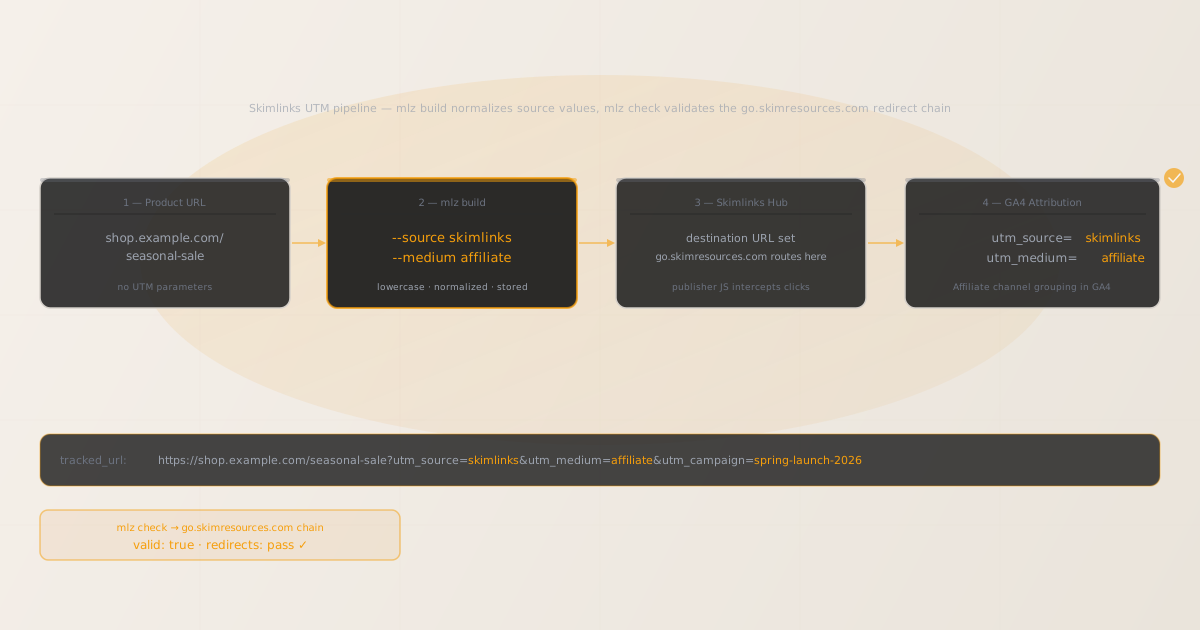
To add UTM tracking for Skimlinks, configure UTM parameters directly on the destination URL you register in the Skimlinks Merchant Hub — not on the publisher-facing affiliate links that Skimlinks generates automatically. GA4 reads UTM parameters from the landing page URL after Skimlinks’ go.skimresources.com tracking redirect delivers the visitor to your destination. Use MissingLinkz mlz build to generate a normalized destination URL with consistent lowercase-hyphenated UTM values and mlz check to confirm the go.skimresources.com redirect chain delivers those parameters intact to your landing page. The silent failure mode common to Skimlinks merchant setups: teams managing multiple product categories or regional landing pages manually append UTM parameters with inconsistent casing — utm_source=Skimlinks, utm_source=skimlinks, utm_source=SkimLinks — creating separate source entries in GA4 that fragment Affiliate channel reporting and make it impossible to aggregate Skimlinks performance data. mlz build enforces lowercase-hyphenated output at generation time, eliminating this class of attribution error before it reaches the Skimlinks Merchant Hub configuration.
How Skimlinks routes traffic and where UTM parameters belong
Skimlinks is a content-to-commerce platform used by major publishers including Condé Nast, Hearst, BuzzFeed, and thousands of independent content sites. Publishers install a lightweight JavaScript snippet that automatically detects outbound links to merchant sites and converts them into affiliate links routed through Skimlinks’ go.skimresources.com tracking infrastructure. The conversion happens client-side, without requiring publishers to manually construct affiliate links for each product or merchant they mention.
When a reader clicks a monetized link on a publisher site, the click routes through go.skimresources.com, which records the click event for commission attribution and publisher performance reporting, then redirects to the merchant’s destination URL. Skimlinks’ click attribution system operates independently from GA4 UTM tracking and does not depend on or interfere with UTM parameters on the destination URL.
The consequence for UTM tracking: UTM parameters belong on the destination URL you register for your products in the Skimlinks Merchant Hub, not on the publisher-facing affiliate links that Skimlinks generates automatically. Paste the UTM-tagged destination URL generated by mlz build into the destination URL field when configuring your merchant account. For a broader explanation of how content-monetization affiliate networks interact with UTM parameters, see the UTM tracking for developers guide.
Building Skimlinks destination URLs with mlz build
Merchant teams managing Skimlinks programmes across multiple product categories, seasonal campaigns, or regional markets frequently encounter the casing inconsistency problem. One team member enters utm_source=Skimlinks (capitalized), another enters utm_source=skimlinks (correct), and a third enters utm_source=skimlinks-content (modified). GA4 is case-sensitive and records these as distinct sources, fragmenting Affiliate channel reporting and making it impossible to view total Skimlinks traffic in a single row. mlz build accepts structured input and always outputs lowercase-hyphenated values regardless of what the operator types, eliminating this class of attribution error at the point of URL generation.
The standard naming convention for Skimlinks traffic is utm_source=skimlinks, utm_medium=affiliate, and utm_campaign=[campaign-name]. Use utm_content to differentiate between product categories, publisher tiers, or seasonal programmes within the same campaign. For merchants running Skimlinks across multiple regional markets with market-specific landing pages, use a region-qualified source value such as utm_source=skimlinks-uk or utm_source=skimlinks-us to enable geographic attribution breakdowns in GA4.
$ mlz build \
  --url "https://shop.example.com/seasonal-sale" \
  --source "skimlinks" \
  --medium "affiliate" \
  --campaign "spring-launch-2026" \
  --content "lifestyle-publishers" \
  --validate

{
  "tracked_url": "https://shop.example.com/seasonal-sale?utm_source=skimlinks&utm_medium=affiliate&utm_campaign=spring-launch-2026&utm_content=lifestyle-publishers",
  "params": {
    "utm_source": "skimlinks",
    "utm_medium": "affiliate",
    "utm_campaign": "spring-launch-2026",
    "utm_content": "lifestyle-publishers"
  },
  "destination_url": "https://shop.example.com/seasonal-sale",
  "link_id": "lnk_sk_s26_lp",
  "campaign_id": "cmp_spring-launch-2026",
  "stored": true,
  "created_at": "2026-07-05T10:00:00.000Z"
}
The tracked_url value is what you enter as the destination URL in the Skimlinks Merchant Hub for the relevant product or landing page. For programmes with multiple publisher categories or content verticals, generate a distinct destination URL per segment using utm_content:
mlz build --url "https://shop.example.com/seasonal-sale" --source "skimlinks" --medium "affiliate" --campaign "spring-launch-2026" --content "tech-publishers"
For naming conventions and how consistent casing prevents GA4 data fragmentation across affiliate sources, see the UTM naming conventions guide. To generate destination URLs programmatically for large product catalogues or automated campaign management workflows via the REST API, see how to build UTM links programmatically.
Validating the go.skimresources.com redirect chain with mlz check
Once you have a UTM-tagged destination URL, validate it end-to-end with mlz check before entering it into the Skimlinks Merchant Hub. mlz check follows the complete redirect chain from your destination URL, confirms the server responds with a 200 status code, and verifies that query parameters are not stripped at any hop. Run this before any Skimlinks programme activates, and re-run after infrastructure changes that touch URL handling on your site — particularly CDN configuration deployments, e-commerce platform upgrades, or changes to server-side redirect rules.
$ mlz check "https://shop.example.com/seasonal-sale?utm_source=skimlinks&utm_medium=affiliate&utm_campaign=spring-launch-2026"

{
  "url": "https://shop.example.com/seasonal-sale?utm_source=skimlinks&utm_medium=affiliate&utm_campaign=spring-launch-2026",
  "valid": true,
  "checks": [
    { "check": "url_format", "status": "pass", "message": "URL format is valid." },
    { "check": "ssl", "status": "pass", "message": "URL uses HTTPS." },
    { "check": "resolution", "status": "pass", "message": "Destination responded with 200.", "details": { "status_code": 200, "response_time_ms": 182 } },
    { "check": "redirects", "status": "pass", "message": "No redirects detected." },
    { "check": "response_time", "status": "pass", "message": "Response time: 182ms.", "details": { "response_time_ms": 182 } }
  ],
  "status_code": 200,
  "response_time_ms": 182,
  "validated_at": "2026-07-05T10:01:00.000Z"
}
A valid: true result means the destination URL resolves correctly and query parameters survive the complete redirect chain to the final page load. If valid is false, the checks array identifies the specific failing hop. Common failure modes for Skimlinks merchant URLs include server-side redirect rules that normalize or strip query strings, HTTP-to-HTTPS upgrade redirects on regional or product-category subdomains that do not preserve the query string, and e-commerce platform canonical URL enforcement that redirects deep-linked product pages to a clean URL and strips attached parameters. For a detailed walkthrough of diagnosing redirect chain failures, see how to check if a redirect strips UTM parameters.
Skimlinks UTM tracking gotchas for merchants
- Configure UTM parameters on the destination URL, not on publisher-facing affiliate links
- Skimlinks works by having publishers install a JavaScript snippet that automatically monetizes outbound links to your site — you do not manually provide publishers with affiliate links in most cases. The configuration point you own as a merchant is the destination URL registered in the Skimlinks Merchant Hub for each product or landing page. Paste the UTM-tagged URL generated by
mlz buildinto that destination URL field. When Skimlinks’ JavaScript detects a publisher link to your site, it routes the click through go.skimresources.com and forwards to your registered destination URL, delivering the UTM parameters to your landing page where GA4 fires. - Skimlinks serves major editorial publishers who link to your products contextually
- Unlike traditional affiliate networks where publishers actively promote specific deals or products, Skimlinks monetizes editorial content: a travel article linking to a hotel, a fashion review linking to a product page, a tech guide linking to a tool. This means publisher traffic can arrive at deep product URLs rather than your homepage or a dedicated campaign landing page. Ensure that UTM-tagged destination URLs registered in Skimlinks point to the specific pages publishers are likely to link to, not a generic homepage. Validate each registered destination URL separately with
mlz check, since deep product pages may have different redirect behaviour than top-level campaign landing pages. - Casing inconsistency in utm_medium fragments the Affiliate channel grouping in GA4
- GA4’s default channel grouping identifies the Affiliate channel by matching
utm_mediumagainst the valueaffiliate(lowercase). If any Skimlinks destination URL uses a non-standard medium value —Affiliate,content-affiliate,skimlinks-affiliate— that session does not group into the Affiliate channel and instead falls into Unassigned, making Skimlinks traffic invisible in standard channel performance reports.mlz buildnormalizes all medium values to lowercase and flags non-standard values, preventing this channel grouping failure. For the full explanation of GA4 case sensitivity, see are UTM parameters case sensitive in GA4? - Multiple product categories may need distinct destination URLs with different UTM content values
- Merchants selling across multiple product categories on Skimlinks — apparel, accessories, home goods, seasonal collections — benefit from using
utm_contentto differentiate category performance in GA4. Rather than a single destination URL with no content segmentation, generate a distinct destination URL per category usingmlz build --content "apparel",--content "accessories", and so on. This lets you see which product categories drive the most revenue from Skimlinks editorial traffic and allocate content marketing investment accordingly. - E-commerce platform redirects on product pages commonly strip query string parameters
- Many e-commerce platforms (Shopify, Magento, WooCommerce) implement server-side redirect rules that normalize product page URLs — removing trailing slashes, enforcing canonical URL patterns, or redirecting HTTP to HTTPS. These redirects do not always preserve attached query string parameters, meaning a destination URL that looks correct can silently lose all UTM parameters before GA4 fires. This failure is not visible without testing: the page loads, but GA4 records the session as direct or organic. Run
mlz checkagainst every destination URL you configure in Skimlinks to confirm parameters survive the complete redirect chain before your programme activates.
Frequently asked questions
- Where do I add UTM parameters in Skimlinks?
- In the Skimlinks Merchant Hub, register the UTM-tagged destination URL for your products or landing pages. This is the URL that Skimlinks’ go.skimresources.com redirect delivers visitors to after recording the click for commission attribution. The format is:
https://shop.example.com/seasonal-sale?utm_source=skimlinks&utm_medium=affiliate&utm_campaign=spring-launch-2026. Generate this URL usingmlz buildto ensure consistent lowercase-hyphenated formatting, then paste it into the relevant destination URL field in the Merchant Hub. Publisher links to your site will automatically be monetized and route through go.skimresources.com to deliver to this UTM-tagged destination. - What utm_source value should I use for Skimlinks traffic?
- Use
utm_source=skimlinksas the standard source value for all Skimlinks network traffic. For merchants running regional programmes with market-specific landing pages and a need for geographic attribution in GA4, useutm_source=skimlinks-uk,utm_source=skimlinks-us, and so on. Keep all values lowercase and hyphenated —mlz buildenforces this automatically. Setutm_medium=affiliateconsistently across all affiliate network traffic so GA4’s default channel grouping correctly identifies the Affiliate channel. - Does go.skimresources.com strip UTM parameters from the destination URL?
- Skimlinks’ go.skimresources.com redirect is designed to forward the registered destination URL intact, including all query parameters. Parameter stripping typically occurs on the merchant’s server side after Skimlinks delivers the visitor: e-commerce platform canonical URL enforcement, server-side redirect rules that normalize query strings, or HTTP-to-HTTPS upgrade redirects that do not preserve the query string. Run
mlz checkagainst your destination URL to confirm parameters survive the full redirect chain to the final page load before registering it in the Skimlinks Merchant Hub. - Can I validate Skimlinks destination URLs programmatically across a large product catalogue?
- For merchants with hundreds of product pages registered in Skimlinks, automated destination URL validation is a practical governance requirement. Use
mlz checkin a CI/CD pipeline or scripted validation workflow that tests each destination URL before it is submitted to the Skimlinks Merchant Hub, failing the submission if any URL returnsvalid: false. This prevents infrastructure changes — CDN deployments, e-commerce platform upgrades, server-side redirect rule changes — from silently breaking affiliate attribution across active Skimlinks placements. For a complete implementation guide, see automating campaign link validation in CI/CD. - How is Skimlinks different from traditional affiliate networks for UTM tracking purposes?
- In traditional affiliate networks (Impact, Awin, CJ Affiliate), publishers manually select products, generate affiliate links from the network’s dashboard, and include them in their content. The merchant controls which products are promoted and can configure UTM parameters in the programme settings. With Skimlinks, publishers install JavaScript that automatically converts all outbound links to your site into monetized affiliate links — no manual link creation required. As a merchant, you configure your destination URLs in the Merchant Hub, and Skimlinks’ JavaScript handles everything else. The UTM tracking setup is the same: UTM parameters belong on the destination URL you register. The practical difference is scale — Skimlinks can drive traffic from thousands of editorial publishers who mention your products contextually without you needing to establish individual publisher relationships.
Build Skimlinks-ready UTM destination URLs and validate every redirect before your programme activates
mlz build generates normalized, consistently cased UTM destination URLs for your Skimlinks product registrations across all categories and markets. mlz check validates the full redirect chain — catching e-commerce platform canonical URL enforcement, server-side query string normalization, and HTTP-to-HTTPS upgrade redirects that silently strip UTM parameters before GA4 fires.
1,000 links/month free. No credit card.
Your API key
Save this now — it won't be shown again.
npm install -g missinglinkz
Free plan: 1,000 links/month. No credit card. See the UTM tracking for developers guide for the full programmatic workflow.