UTM Tracking for Singular: How to Build and Validate Campaign Links
Singular is a marketing analytics and attribution platform that combines mobile MMP functionality with marketing data aggregation — tracking installs, events, and ROI across paid channels while also centralizing spend and performance data from ad networks. Singular tracking links route ad clicks through Singular's click-recording infrastructure to capture attribution data before redirecting users to the app store or a web destination. Singular uses its own tracking link format with parameters such as _p (publisher), _di (device ID), and creative identifiers embedded in the link URL. These are Singular's internal attribution parameters — GA4 does not read them for web session attribution. When a Singular tracking link routes a user to a web destination, the resulting GA4 web session shows as Direct unless you append UTM parameters to that destination URL. Build your tracked destination URL with mlz build --source "singular" --medium "[channel]" --campaign "your-slug" --validate and set the resulting tracked_url as the destination in your Singular tracking link configuration. Then run mlz check on the full Singular tracking link URL to confirm UTM parameters survive Singular's redirect chain to the final destination.
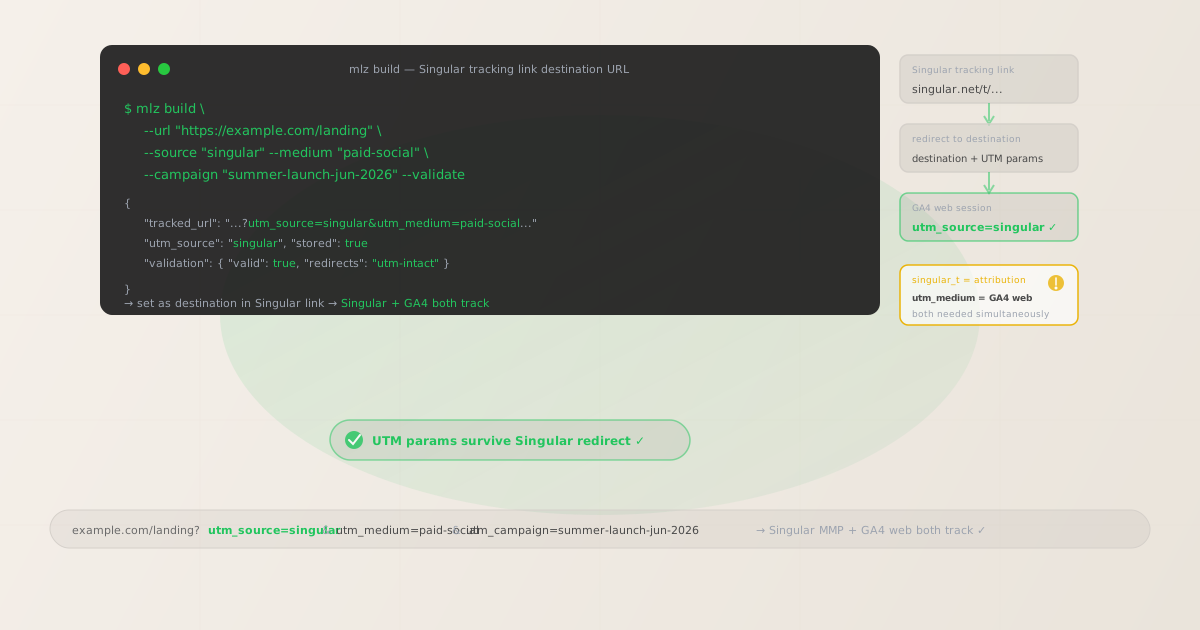
Why Singular tracking links need separate UTM parameters for GA4
Singular and GA4 measure attribution at different layers using incompatible parameter formats. Singular measures mobile attribution: which ad networks, campaigns, creatives, and publishers drove link clicks that led to app installs and downstream in-app events. This measurement is powered by Singular's SDK in the mobile app and Singular's probabilistic attribution — after a user installs and opens the app, the Singular SDK matches the open event to the last recorded click. GA4 measures web session behavior: what users do on web pages and landing pages when they arrive via a web URL. The intersection of these two systems occurs when a Singular tracking link routes a user to a web destination rather than directly to the app store.
Singular tracking links embed attribution data using Singular's own parameter format. Parameters like _p (publisher identifier), _di (device ID type), and creative identifiers are read by Singular's click-recording infrastructure. Singular also supports passing through custom postback parameters, but these are used for server-to-server attribution notifications — not for injecting UTM parameters into the web destination. GA4 only reads standard UTM parameters (utm_source, utm_medium, utm_campaign) from the query string of the page URL that opens in the browser.
The result: campaigns tracked through Singular where users land on web pages show persistent Direct traffic in GA4. Paid social, paid search, and display campaigns routed through Singular trackers — whether to a web landing page directly or as a web fallback for users without the app — all appear unattributed in GA4 without explicit UTM parameters on the destination URL.
| Parameter type | Where it appears | What it tracks | Used by |
|---|---|---|---|
_p (publisher) |
Singular tracking link | Publisher/network in Singular dashboard | ✓ Singular SDK (app) |
| Creative identifiers | Singular tracking link | Creative performance in Singular analytics | ✓ Singular SDK (app) |
utm_source=singular |
Destination URL | Web session source in GA4 | ✓ GA4 (web) |
utm_medium |
Destination URL | Channel classification in GA4 | ✓ GA4 (web) |
utm_campaign |
Destination URL | Campaign grouping in GA4 reports | ✓ GA4 (web) |
Singular's platform also aggregates spend data from ad networks and combines it with attribution data for ROI reporting — a capability that operates entirely at the Singular platform level and has no bearing on GA4 web session attribution. The GA4 web attribution gap exists regardless of how much spend and conversion data Singular aggregates internally. Building UTM-tagged destination URLs for every Singular tracking link is the only way to get accurate web session attribution in GA4.
Building tracked Singular destination URLs with mlz build
In a Singular tracking link, the destination URL is the web page where users land after being routed through Singular's click-recording infrastructure. For web-targeted campaigns or web fallback scenarios, this destination URL is what GA4 sees in the browser — it needs UTM parameters. Build your tracked destination URL with mlz build before creating or updating the Singular tracking link, then set the resulting tracked_url as the redirect destination in the link configuration. Add --validate to confirm the destination resolves correctly before the campaign launches.
# Paid social campaign (Meta ad → Singular tracker → web destination)
$ mlz build \
  --url "https://example.com/landing" \
  --source "singular" \
  --medium "paid-social" \
  --campaign "summer-launch-jun-2026" \
  --validate

{
  "tracked_url": "https://example.com/landing?utm_source=singular&utm_medium=paid-social&utm_campaign=summer-launch-jun-2026",
  "params": {
    "utm_source": "singular",
    "utm_medium": "paid-social",
    "utm_campaign": "summer-launch-jun-2026"
  },
  "stored": true
}

# Paid search campaign (Google Ads → Singular tracker → web destination)
$ mlz build \
  --url "https://example.com/promo" \
  --source "singular" \
  --medium "cpc" \
  --campaign "brand-search-jun-2026" \
  --term "product-name" \
  --validate

{
  "tracked_url": "https://example.com/promo?utm_source=singular&utm_medium=cpc&utm_campaign=brand-search-jun-2026&utm_term=product-name"
}

# App retargeting with web fallback (Singular tracker for re-engagement)
$ mlz build \
  --url "https://example.com/offer" \
  --source "singular" \
  --medium "paid-social" \
  --campaign "retargeting-lapsed-jun-2026" \
  --content "carousel-ad" \
  --validate

{
  "tracked_url": "https://example.com/offer?utm_source=singular&utm_medium=paid-social&utm_campaign=retargeting-lapsed-jun-2026&utm_content=carousel-ad"
}
Set the tracked_url as the destination in the Singular tracking link configuration. When a user clicks the Singular link, Singular records the click attribution (publisher, creative, campaign) via its click-recording server and then redirects the user to the destination URL. If the destination carries UTM parameters, GA4 reads them from the page URL when it opens in the browser — attributing the web session to the correct campaign source and medium.
Validating UTM parameters survive the Singular redirect chain
Singular tracking links route clicks through Singular's click-recording infrastructure before redirecting to the destination. The click-recording step records attribution data embedded in the tracking link URL, then issues a redirect to the configured destination. If the destination URL contains UTM parameters with ampersands, those characters must be properly URL-encoded in the tracking link query string — otherwise Singular's server may truncate the destination URL at the first unencoded ampersand, dropping the remaining UTM parameters.
After setting your tracked destination URL in the Singular tracking link, validate the complete Singular tracking link URL with mlz check to confirm UTM parameters reach the final destination.
# Check the full Singular tracking link URL
# Confirms UTM parameters survive Singular's click-recording redirect
$ mlz check "https://singular.net/t/example?_p=publisher_name&_di=idfa&_dn=Meta&redirect=https%3A%2F%2Fexample.com%2Flanding%3Futm_source%3Dsingular%26utm_medium%3Dpaid-social%26utm_campaign%3Dsummer-launch-jun-2026"

{
  "url": "https://singular.net/t/example?_p=publisher_name...",
  "valid": true,
  "checks": [
    { "check": "ssl", "status": "pass", "message": "URL uses HTTPS." },
    { "check": "resolution", "status": "pass", "message": "Destination responded with 200." },
    { "check": "redirects", "status": "pass", "message": "2 redirects detected. UTM parameters present at final destination." }
  ],
  "status_code": 200
}
If mlz check shows UTM parameters are missing at the final destination, verify that the destination URL is correctly URL-encoded in the Singular tracking link. When the destination URL contains UTM parameters (for example ?utm_source=singular&utm_medium=paid-social&utm_campaign=summer-launch), the entire destination URL — including the ampersands between UTM parameters — must be URL-encoded when embedded as a query parameter in the Singular link: %3F for ? and %26 for &. See the redirect UTM stripping guide for step-by-step diagnosis if parameters are dropped at any hop.
Singular UTM tracking gotchas
- Singular's platform-level attribution data does not flow into GA4 web session reports
- Singular aggregates data from ad networks, combines it with mobile attribution, and provides unified ROI reporting across channels. This aggregation happens at the Singular platform level — it combines spend data from ad network APIs with conversion data from Singular's mobile attribution SDK. None of this data is accessible to GA4 for web session reporting. GA4 measures web sessions independently using the URL parameters in the browser. To bridge the two measurement systems, UTM parameters on the destination URL are the only mechanism for web-session-level attribution in GA4 from Singular-tracked campaigns.
- Singular's custom dimension and macro system does not automatically produce UTM-compliant values
- Singular supports custom macros and passback parameters in tracking link configurations. These macros can inject publisher names, campaign identifiers, or creative names into the destination URL — but the values injected are drawn from how Singular identifies these entities internally. Singular campaign names may include spaces, mixed case, or special characters that fragment GA4 reports (a campaign named "Summer App Install US iOS" becomes a separate GA4 dimension value from "summer-app-install-us-ios"). Use
mlz buildto generate clean, lowercase-hyphenated tracked URLs as static destination values rather than relying on dynamic macro injection for UTM parameter values. - Singular web-to-app tracking (SKAdNetwork and ATT-compliant) requires UTM parameters on web measurement events separately
- With iOS privacy restrictions (ATT and SKAdNetwork), Singular handles mobile attribution in a privacy-preserving way that aggregates conversion values without individual-level device data. For campaigns targeting iOS users where app attribution is privacy-constrained, web-based measurement events on the landing page (GA4 events, web conversion pixels) become more important as a complementary signal. UTM parameters on the destination URL ensure GA4 captures web session attribution for these campaigns even when app-level attribution is privacy-constrained or unavailable. Build tracked destination URLs with
mlz buildand validate them withmlz checkto ensure the web measurement layer is working correctly alongside Singular's privacy-compliant mobile attribution. - Cross-channel campaign links (same campaign running across multiple networks in Singular) each need separate tracked URLs
- Singular's cross-channel campaign management lets you run a single campaign across multiple ad networks from one place. Each network placement will have its own Singular tracking link with different
_p(publisher) and_dn(display network) values for attribution. The destination URL in each network's tracking link should carry UTM parameters that reflect the specific channel — so GA4 can distinguish web sessions from Meta vs. Google vs. TikTok within the same Singular campaign. Generate separate tracked URLs for each channel withmlz buildusing the appropriate--sourceand--mediumvalues, and configure each Singular tracking link with its corresponding tracked destination URL. - Singular's deep link support (deferred deep links via Singular Links) needs UTM parameters on web fallback destinations
- Singular supports deferred deep links — tracking links that open the correct in-app screen if the app is installed, route to the app store if not, or fall back to a web destination on desktop. The web fallback destination in a Singular deep link configuration needs UTM parameters for GA4 web session attribution — the same pattern as other MMP deep link implementations. Build the web fallback destination URL with
mlz buildand configure it as the web fallback in the Singular Link settings. After configuration, validate the complete Singular Link URL withmlz checkto confirm UTM parameters survive the deep link routing redirect chain to the web fallback destination.
Singular UTM naming conventions
Recommended UTM parameter values for Singular campaigns, aligned with GA4 channel reporting and a lowercase-hyphenated taxonomy:
- utm_source:
singularfor all campaigns where Singular is the tracking and attribution platform. Usingsingularas the source groups all Singular-tracked web sessions in GA4, making it straightforward to analyze the web traffic footprint of Singular-measured campaigns before breaking down by medium and campaign. Alternatively, use the underlying ad network name (meta,google,tiktok) to take advantage of GA4's automatic channel grouping based on source/medium combinations. The key constraint is consistency: choose one approach and apply it uniformly across all Singular trackers to avoid fragmented GA4 reports. - utm_medium: Match the traffic channel type to GA4's default channel grouping definitions. For paid social campaigns (Meta, TikTok, Snapchat, Pinterest):
paid-social. For paid search (Google Ads, Microsoft Ads):cpc. For programmatic display and retargeting:display. For app retargeting campaigns:paid-socialordisplaydepending on the ad format. For affiliate or publisher network traffic:affiliate. Useutm_mediumto describe the nature of the traffic channel consistently across all campaigns regardless of which ad network delivered it. - utm_campaign: A lowercase-hyphenated identifier that maps to the Singular campaign for cross-referencing. For acquisition campaigns:
app-install-ios-us-jun-2026,app-install-android-us-jun-2026. For retargeting campaigns:retargeting-lapsed-30d-jun-2026,cart-abandon-retargeting. For brand awareness campaigns:brand-awareness-summer-2026. Using a slug that mirrors the Singular campaign identifier makes it easier to join GA4 web session data with Singular attribution and ROI data in analytics reporting tools. - utm_content: Creative or variant identifier for A/B testing and creative performance. For social campaigns with multiple creative variants:
utm_content=video-15s-lifestyle,utm_content=static-product. For display campaigns with multiple sizes:utm_content=banner-300x250,utm_content=interstitial-320x480. Singular tracks creative performance at the impression and click level via its ad network data aggregation;utm_contentextends that creative-level insight to web session behavior in GA4. - utm_term: Keyword or audience segment for paid search campaigns and segmented retargeting. For paid search tracked through Singular: the keyword or match type. For retargeting audience segments:
utm_term=lapsed-60d,utm_term=high-intent-visitors. Omit for brand and social campaigns where keyword-level web session tracking is not relevant.
See the UTM naming conventions guide for the full cross-platform taxonomy reference, and the UTM tracking for developers guide for programmatic generation and validation at scale.
FAQ
- Why do my Singular campaign clicks show as Direct in GA4?
- If Singular is attributing installs and ad clicks correctly but GA4 shows the resulting web sessions as Direct, UTM parameters are missing from the destination URL in the Singular tracking link. Build a tracked destination URL with
mlz build --source "singular" --medium "[channel]" --campaign "your-campaign" --validateand update the destination in your Singular tracking link to that tracked URL. Then runmlz checkon the full Singular tracking link URL to confirm UTM parameters survive the redirect chain to the final destination. - Does Singular pass through UTM parameters from the ad network to the destination URL?
- Singular does not automatically extract and forward UTM parameters from ad network click data to the web destination URL. Singular records attribution data using its own tracking parameters. To get UTM parameters into the web session URL that GA4 reads, those parameters must be explicitly configured in the destination URL of the Singular tracking link. Build a UTM-tagged destination URL with
mlz buildand set it as the destination in the Singular link — this is the only reliable way to ensure UTM parameters appear in the GA4 web session for Singular-tracked traffic. - Can I use Singular for both mobile attribution and web conversion tracking?
- Yes. Singular's platform covers both mobile attribution (via the Singular SDK) and web conversion tracking (via a JavaScript web SDK or server-side API). These are separate measurement layers operating independently. Mobile attribution measures app installs and in-app events via the SDK. Web conversion tracking measures web page interactions via the JavaScript web SDK. GA4 is a separate web analytics platform that measures web sessions via URL parameters in the browser. All three can operate on the same campaign simultaneously: Singular tracks the mobile attribution, Singular's web SDK tracks web conversions for Singular reporting, and UTM parameters on the destination URL feed GA4 session attribution.
- How do I handle Singular tracking links in email or SMS campaigns?
- For email campaigns that include Singular tracking links as click-through destinations, the UTM parameters need to be on the web destination URL in the Singular link — not on the email's click link itself. The email link may already have ESP click-tracking wrapping, creating a redirect chain: email click → ESP redirect → Singular tracking link → Singular redirect → final destination. Test the complete chain with
mlz checkon the ESP-wrapped Singular link to verify UTM parameters survive all redirect hops to the final destination. If UTM parameters are dropped at any hop, identify which redirect is stripping them using the guidance in the redirect UTM stripping guide. - Should I use utm_source=singular or the actual ad network name?
- Use
utm_source=singularwhen you want to group all Singular-tracked web sessions together in GA4 for a unified view of Singular's web traffic contribution — useful when you run many campaigns across many networks in Singular and want to see the total picture first. Use the specific ad network name (utm_source=meta,utm_source=google) when you want GA4's automatic channel grouping to classify traffic correctly into "Paid Social" or "Paid Search" buckets — which is more useful for channel-level performance analysis in GA4 without needing custom reports. Generate tracked URLs for each approach withmlz buildand validate withmlz checkbefore the campaign launches.
Recommended posts
Build Singular campaign destination URLs from the terminal
Use mlz build --source "singular" --medium "[channel]" --campaign "your-slug" --validate to generate validated tracked URLs for each Singular tracking link's destination. Set the resulting tracked_url as the destination in your Singular link configuration. After setup, run mlz check on the complete Singular tracking link URL to confirm UTM parameters survive the redirect chain to the final web destination.
1,000 links/month free. No credit card.
Your API key
Save this now — it won't be shown again.
npm install -g missinglinkz
Free plan: 1,000 links/month. No credit card. See the UTM tracking for developers guide for the full programmatic workflow including API and MCP integration.