UTM Tracking for AppsFlyer: How to Build and Validate Campaign Links
AppsFlyer is the world's largest mobile attribution platform, used by app marketers to measure installs, re-engagements, and in-app events across every major ad network. AppsFlyer's OneLink technology — hosted at app.appsflyer.com or a custom domain — is the click-tracking backbone for every campaign using AppsFlyer as the mobile measurement partner. The core attribution gap: AppsFlyer uses its own parameter format (af_channel, af_ad, af_adset, af_campaign) to record attribution in the AppsFlyer dashboard. These are AppsFlyer's internal parameters and do not populate GA4 web session attribution. When an AppsFlyer OneLink redirects to a web destination — which happens for web-to-app campaigns, desktop fallbacks, and retargeting campaigns with both mobile and web traffic — GA4 records the session as Direct unless standard UTM parameters are present in the destination URL. Build your tracked destination URL with mlz build --source "appsflyer" --medium "[channel]" --campaign "your-slug" --validate, set the resulting tracked_url as the af_web_dp parameter in your OneLink, and run mlz check on the full OneLink URL to confirm UTM parameters survive the AppsFlyer redirect chain before launch.
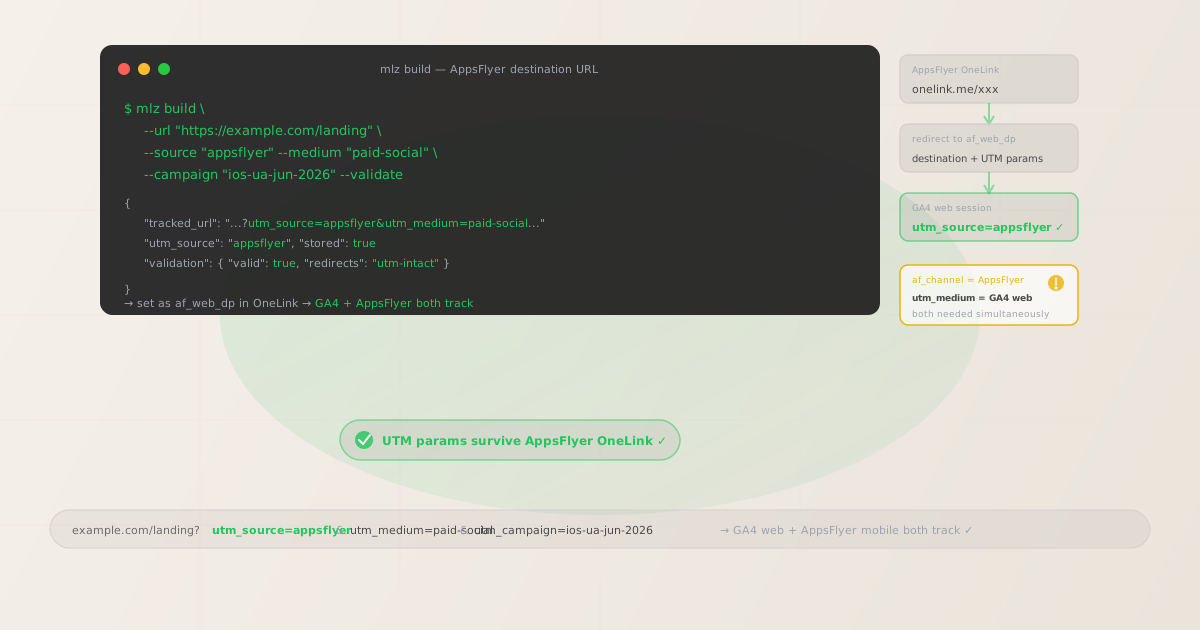
Why AppsFlyer campaigns need separate UTM parameters for GA4
AppsFlyer and GA4 are parallel measurement systems that operate at different levels of the attribution stack. AppsFlyer measures mobile attribution: which ad networks, campaigns, and creatives drove app installs and re-engagements, attributed using device fingerprinting, SKAN 4.0 (for iOS), and probabilistic matching. GA4 measures web session behavior: how users interact with web pages and complete web-based conversions. The two systems intersect whenever an AppsFlyer OneLink redirects traffic to a web destination rather than directly to the app store.
When a user on desktop clicks an ad that uses AppsFlyer OneLink tracking, AppsFlyer cannot redirect to the App Store — there is no App Store on desktop. Instead, OneLink redirects to the af_web_dp (web destination parameter) URL you configured. If that URL does not contain UTM parameters, GA4 sees a web session with no referrer information and attributes it as Direct. The AppsFlyer parameters that record the click (af_channel, af_ad) are in the OneLink URL itself — they are not forwarded to the destination URL by AppsFlyer and are not readable by GA4. The same problem occurs on mobile for users who don't have the app installed: OneLink serves the web fallback URL, and without UTM parameters on that fallback URL, the GA4 session is unattributed.
The solution is to build UTM-tagged destination URLs and use them as the af_web_dp value in OneLink. This way, GA4 reads the UTM parameters from the destination URL query string and attributes the web session correctly, while AppsFlyer reads its own parameters from the OneLink URL and records mobile attribution independently. Both measurement systems work simultaneously without any conflict.
| Parameter type | Where it appears | What it tracks | Used by |
|---|---|---|---|
af_channel |
AppsFlyer OneLink URL | Channel in AppsFlyer dashboard | ✓ AppsFlyer SDK (mobile) |
af_campaign |
AppsFlyer OneLink URL | Campaign name in AppsFlyer | ✓ AppsFlyer SDK (mobile) |
utm_source=appsflyer |
af_web_dp destination URL | Web session source in GA4 | ✓ GA4 (web) |
utm_medium |
af_web_dp destination URL | Channel classification in GA4 | ✓ GA4 (web) |
utm_campaign |
af_web_dp destination URL | Campaign grouping in GA4 reports | ✓ GA4 (web) |
AppsFlyer's documentation recommends adding UTM parameters to the af_web_dp destination URL for exactly this reason. The two parameter sets coexist on the same session without conflict: AppsFlyer reads its own parameters from the OneLink URL and assigns mobile attribution; GA4 reads UTM parameters from the destination URL and assigns web session attribution.
Building tracked AppsFlyer destination URLs with mlz build
In AppsFlyer OneLink, the af_web_dp parameter specifies the web destination URL for desktop users and mobile users who don't have the app installed. This is where UTM parameters belong. Build your tracked destination URL with mlz build, then set the resulting tracked_url as the af_web_dp value in your OneLink configuration. Use --validate to confirm the destination resolves correctly and the redirect chain preserves UTM parameters. After configuring the OneLink, run mlz check on the full OneLink URL to verify end-to-end UTM preservation across the complete redirect chain.
# Paid social campaign (desktop fallback web destination)
$ mlz build \
  --url "https://example.com/install" \
  --source "appsflyer" \
  --medium "paid-social" \
  --campaign "ios-ua-jun-2026" \
  --validate

{
  "tracked_url": "https://example.com/install?utm_source=appsflyer&utm_medium=paid-social&utm_campaign=ios-ua-jun-2026",
  "params": {
    "utm_source": "appsflyer",
    "utm_medium": "paid-social",
    "utm_campaign": "ios-ua-jun-2026"
  },
  "stored": true
}

# Paid search campaign (CPC, desktop users redirect to web)
$ mlz build \
  --url "https://example.com/offer" \
  --source "appsflyer" \
  --medium "cpc" \
  --campaign "search-brand-jun-2026" \
  --content "headline-a" \
  --validate

{
  "tracked_url": "https://example.com/offer?utm_source=appsflyer&utm_medium=cpc&utm_campaign=search-brand-jun-2026&utm_content=headline-a"
}

# Retargeting campaign (email re-engagement via AppsFlyer email partner)
$ mlz build \
  --url "https://example.com/come-back" \
  --source "appsflyer" \
  --medium "email" \
  --campaign "retargeting-lapsed-jun-2026" \
  --validate

{
  "tracked_url": "https://example.com/come-back?utm_source=appsflyer&utm_medium=email&utm_campaign=retargeting-lapsed-jun-2026"
}
Set the tracked_url as the af_web_dp parameter in your AppsFlyer OneLink template. In the AppsFlyer dashboard, navigate to your OneLink template, find the "Web fallback" or "af_web_dp" field, and paste the tracked URL as the value. When a desktop user or a mobile user without the app clicks the OneLink, AppsFlyer records the attribution event and redirects to this tracked URL. GA4 reads the UTM parameters and correctly attributes the web session.
Validating UTM parameters survive the AppsFlyer OneLink redirect
AppsFlyer OneLink redirects route clicks through AppsFlyer's click-recording servers before sending the user to the final destination. On mobile, OneLink evaluates whether to redirect to the app store (for new users), launch the app directly (for existing users), or fall back to the web destination. On desktop, OneLink redirects directly to the af_web_dp URL. Each redirect hop is an opportunity for UTM parameters to be stripped — particularly if the af_web_dp value is not correctly URL-encoded in the OneLink URL, or if an intermediate server in your destination stack rewrites URLs.
After configuring the OneLink with your tracked destination URL, validate the full OneLink URL to confirm UTM parameters arrive intact at the final destination.
# Check the complete OneLink URL (not just the destination)
# Confirms UTM parameters survive the OneLink redirect chain
$ mlz check "https://yourapp.onelink.me/aBcD?pid=paid_social&af_channel=facebook&af_web_dp=https%3A%2F%2Fexample.com%2Finstall%3Futm_source%3Dappsflyer%26utm_medium%3Dpaid-social%26utm_campaign%3Dios-ua-jun-2026"

{
  "url": "https://yourapp.onelink.me/aBcD?pid=paid_social&af_channel=facebook&af_web_dp=...",
  "valid": true,
  "checks": [
    { "check": "ssl", "status": "pass", "message": "URL uses HTTPS." },
    { "check": "resolution", "status": "pass", "message": "Destination responded with 200." },
    { "check": "redirects", "status": "pass", "message": "2 redirects detected. UTM parameters present at final destination." }
  ],
  "status_code": 200
}
If the redirect check reports missing UTM parameters at the final destination, verify that the af_web_dp value in the OneLink URL is correctly URL-encoded (the & between UTM parameters must be encoded as %26 within the af_web_dp query parameter value). Also check whether any CDN, load balancer, or server-side URL rewriting in your destination stack strips query parameters on redirect. See the guide to detecting redirect-based UTM stripping for step-by-step diagnosis.
AppsFlyer UTM tracking gotchas
- AppsFlyer's
af_channelandaf_campaignparameters are not UTM parameters and are not read by GA4 - AppsFlyer uses its own parameter naming convention for attribution:
pid(media source),af_channel,af_campaign,af_ad,af_adset,af_sub1throughaf_sub5. These parameters are in the OneLink URL itself and are read by the AppsFlyer SDK after app install via the install referrer or SKAN attribution. GA4 does not understand AppsFlyer's parameter format. Only standardutm_source,utm_medium, andutm_campaignparameters in the destination URL's query string affect GA4 channel grouping and campaign attribution. This is why you need UTM parameters on theaf_web_dpdestination URL even though you already haveaf_channelandaf_campaignin the OneLink URL. - AppsFlyer's Smart Script can auto-inject UTM parameters from the referrer — but it's not reliable for all traffic types
- AppsFlyer offers a "Smart Script" that can automatically pass UTM parameters from the referring page's URL into the OneLink. If a user lands on your website from a Google Ads click with
utm_source=googleand then clicks a OneLink, Smart Script can forward those UTM parameters to theaf_web_dpdestination. However, Smart Script only works for web-to-app flows where the referring page has UTM parameters — it does not work for direct app store links, it does not generate UTM parameters for direct clicks without a UTM-tagged referrer, and it requires JavaScript on the referring page. For programmatic, multi-channel campaigns where you control the OneLink parameters directly, building explicit UTM-tagged destination URLs withmlz buildis more reliable and auditable than relying on Smart Script auto-injection. - OneLink templates serve multiple ad networks — you need separate UTM medium values per network
- A single AppsFlyer OneLink template is typically used across multiple ad networks — Facebook, Google Ads, TikTok, and other partners all use the same OneLink domain but with different
pidandaf_channelvalues. If you set a singleaf_web_dpURL with a fixedutm_medium=paid-socialacross all networks, GA4 will attribute Google Ads clicks as "paid-social" when they redirect to the web destination. Build separate tracked destination URLs per medium withmlz buildand configure them as separateaf_web_dpvalues per network in your OneLink template, or use AppsFlyer's dynamic parameters to inject the correct medium into the destination URL at click time. - AppsFlyer's SKAN 4.0 (iOS privacy framework) changes click routing — UTM parameters on the web destination still work
- iOS 14.5 and later require app marketers to use Apple's SKAN (StoreKit Ad Network) framework for iOS attribution. Under SKAN 4.0, AppsFlyer cannot use device-level identifiers for attribution and instead relies on SKAN's probabilistic attribution model. SKAN attribution affects how AppsFlyer attributes iOS app installs in its dashboard — it does not affect the web redirect behavior of OneLink. When an iOS user without the app clicks a OneLink, the OneLink still redirects to the App Store or to the
af_web_dpURL depending on device state. UTM parameters on theaf_web_dpURL continue to work normally for GA4 web session attribution regardless of iOS privacy restrictions, since UTM parameters are in the URL and do not rely on device identifiers. - URL-encoding the
af_web_dpvalue is critical when building OneLink URLs programmatically - The
af_web_dpparameter in the OneLink URL must contain a URL-encoded version of the destination URL. The&character separating UTM parameters in the destination URL must be encoded as%26within theaf_web_dpvalue. If it is not encoded, AppsFlyer's URL parser may interpret the&as a separator between OneLink parameters, breaking both the destination URL and the OneLink parameter parsing. After constructing the complete OneLink URL with theaf_web_dpvalue, always runmlz checkon the complete OneLink URL to verify that the redirect chain resolves to the correct destination with UTM parameters intact.
AppsFlyer UTM naming conventions
Recommended UTM parameter values for AppsFlyer campaigns, aligned with GA4 channel reporting and a lowercase-hyphenated taxonomy:
- utm_source:
appsflyerfor all campaigns where AppsFlyer is the measurement platform. Some teams prefer to use the underlying ad network name (facebook,google,tiktok) as the UTM source, matching thepidparameter in the OneLink. Usingappsflyeras the source makes it immediately clear in GA4 that these web sessions originated from AppsFlyer-tracked campaigns — useful when you have both AppsFlyer-tracked campaigns and campaigns tracked without an MMP running simultaneously. Choose one convention and apply it consistently. If you use network names, maintain a clear mapping between AppsFlyerpidvalues and yourutm_sourcevalues in your campaign taxonomy documentation. - utm_medium: Use the channel type of the campaign, not "appsflyer" — AppsFlyer is the measurement platform, not the channel. For Meta/Facebook campaigns:
paid-social. For Google UAC and App campaigns:cpcorpaid-search. For TikTok campaigns:paid-social. For programmatic/display:display. For email re-engagement campaigns via AppsFlyer email partner integrations:email. For push notification retargeting campaigns:push. Alignutm_mediumwith GA4's default channel groupings to ensure web sessions from AppsFlyer campaigns are grouped into the correct channel buckets in GA4 reports. - utm_campaign: A consistent lowercase-hyphenated campaign name that mirrors your AppsFlyer campaign name where possible. For user acquisition:
ios-ua-jun-2026,android-acquisition-jun-2026. For retargeting:retargeting-cart-abandon-jun-2026,retargeting-lapsed-30d. For loyalty/retention:retention-power-users-jun-2026. Aligningutm_campaignvalues with AppsFlyeraf_campaignvalues makes cross-referencing GA4 web data with AppsFlyer install data much easier. - utm_content: Creative or ad variant identifier. For A/B tested creative variants:
utm_content=creative-a,utm_content=creative-b. For campaigns with multiple ad sizes or formats:utm_content=video-15s,utm_content=static-square. Mirrors theaf_adoraf_ad_idparameter in the OneLink for cross-system creative performance analysis. - utm_term: Keyword or audience segment identifier. For Apple Search Ads campaigns tracked via AppsFlyer (where keyword-level data is available): the search keyword. For audience-targeted retargeting campaigns: the audience segment identifier. Omit for campaigns where keyword-level attribution is not relevant (most mobile UA campaigns).
See the UTM naming conventions guide for the full cross-platform taxonomy reference, and the UTM tracking for developers guide for programmatic generation workflows at scale.
FAQ
- Does AppsFlyer automatically add UTM parameters to the web destination URL?
- No, not by default. AppsFlyer's Smart Script feature can auto-inject UTM parameters from the referring page's URL into the
af_web_dpdestination for web-to-app flows, but Smart Script only works when the referring page already has UTM parameters and requires JavaScript on the referring page. For programmatic campaigns where you control the OneLink parameters directly, build explicit UTM-tagged destination URLs withmlz build --source "appsflyer" --medium "[channel]" --campaign "your-slug" --validateand set those tracked URLs as theaf_web_dpvalue in your OneLink configuration. Explicit UTM construction is more reliable and auditable than Smart Script auto-injection. - Why do my AppsFlyer campaign clicks show as Direct in GA4?
- If AppsFlyer is recording clicks and attributing installs correctly but GA4 shows the resulting web sessions as Direct, UTM parameters are missing from the
af_web_dpdestination URL. This is the most common scenario for teams new to running AppsFlyer alongside GA4. The fix: generate a UTM-tagged destination URL withmlz build --source "appsflyer" --medium "[channel]" --campaign "your-campaign" --validate, then update your OneLink'saf_web_dpvalue to that tracked URL. Runmlz checkon the full OneLink URL afterward to confirm UTM parameters survive the redirect chain. - Can I use AppsFlyer attribution and UTM parameters on the same campaign?
- Yes, and this is the recommended approach. AppsFlyer attribution parameters (
pid,af_channel,af_campaign) are in the OneLink URL and are read by the AppsFlyer SDK after app install. UTM parameters (utm_source,utm_medium,utm_campaign) are in theaf_web_dpdestination URL and are read by GA4 when the user lands on the web page. The two systems are completely independent. Use both simultaneously: AppsFlyer measures mobile attribution, GA4 measures web session behavior. Cross-reference in AppsFlyer's Cohort Analysis or via BigQuery for full-funnel performance. - What is the difference between using utm_source=appsflyer vs. the network name (e.g., utm_source=facebook)?
- Both are valid and functional in GA4. Using
utm_source=appsflyergroups all AppsFlyer-tracked web sessions together in GA4, regardless of the underlying ad network — useful for understanding the overall volume of web traffic from AppsFlyer campaigns. Using the network name (utm_source=facebook,utm_source=google) makes GA4 channel groupings match the actual ad network, which is helpful if you compare campaigns across networks in GA4 directly. The tradeoff: if you use network names, you need differentaf_web_dpURLs per network in your OneLink template, or AppsFlyer dynamic parameters to inject the correct source. Usingutm_source=appsflyerallows a singleaf_web_dpURL with network differentiation viautm_mediumandutm_campaign. Pick the approach that matches your GA4 reporting requirements and apply it consistently. - How do I validate UTM parameters survive the full OneLink redirect chain?
- Run
mlz check "https://yourapp.onelink.me/aBcD?pid=...&af_web_dp=your-encoded-tracked-url"on the full OneLink URL. The redirect chain check confirms that UTM parameters present in theaf_web_dpvalue arrive intact at the final destination after all OneLink redirect hops. If UTM parameters are being stripped, verify that theaf_web_dpvalue is properly URL-encoded (especially that&is encoded as%26) and check whether any server-side URL rewriting at your destination strips query strings. See the redirect UTM stripping guide for diagnosis steps.
Recommended posts
Build AppsFlyer campaign destination URLs from the terminal
Use mlz build --source "appsflyer" --medium "[channel]" --campaign "your-slug" --validate to generate validated tracked URLs for each AppsFlyer campaign. Set the resulting tracked_url as the af_web_dp parameter in your OneLink configuration. After setup, run mlz check on the complete OneLink URL to confirm UTM parameters survive the redirect chain to the final destination before the campaign goes live.
1,000 links/month free. No credit card.
Your API key
Save this now — it won't be shown again.
npm install -g missinglinkz
Free plan: 1,000 links/month. No credit card. See the UTM tracking for developers guide for the full programmatic workflow including API and MCP integration.