UTM Tracking for Sendlane: How to Build and Validate Campaign Links
UTM tracking for Sendlane uses utm_source=sendlane for email sends and utm_source=sendlane paired with utm_medium=sms for SMS sends from the Sendlane platform. Sendlane is an e-commerce email and SMS marketing platform with deep integrations for Shopify, BigCommerce, and WooCommerce merchants, positioned as an alternative to Klaviyo for stores that want email and SMS in a single platform. A critical distinction for Sendlane teams: Sendlane includes its own revenue attribution layer — a proprietary tracking pixel and revenue reporting dashboard that attributes orders back to specific email and SMS sends within Sendlane's own analytics. This internal revenue attribution is a separate system from GA4 UTM tracking, and they do not automatically synchronise. Teams that see revenue data in Sendlane's analytics sometimes assume that GA4 is receiving attribution data from those sends — it is not, unless UTM parameters are explicitly applied to every link in every email and SMS. Sendlane's revenue tracking tells you which Sendlane sends drove Shopify orders; GA4 UTM tracking tells you which sessions from Sendlane contributed to goals and conversions across your full funnel. Both require independent configuration, and both matter for a complete attribution picture.
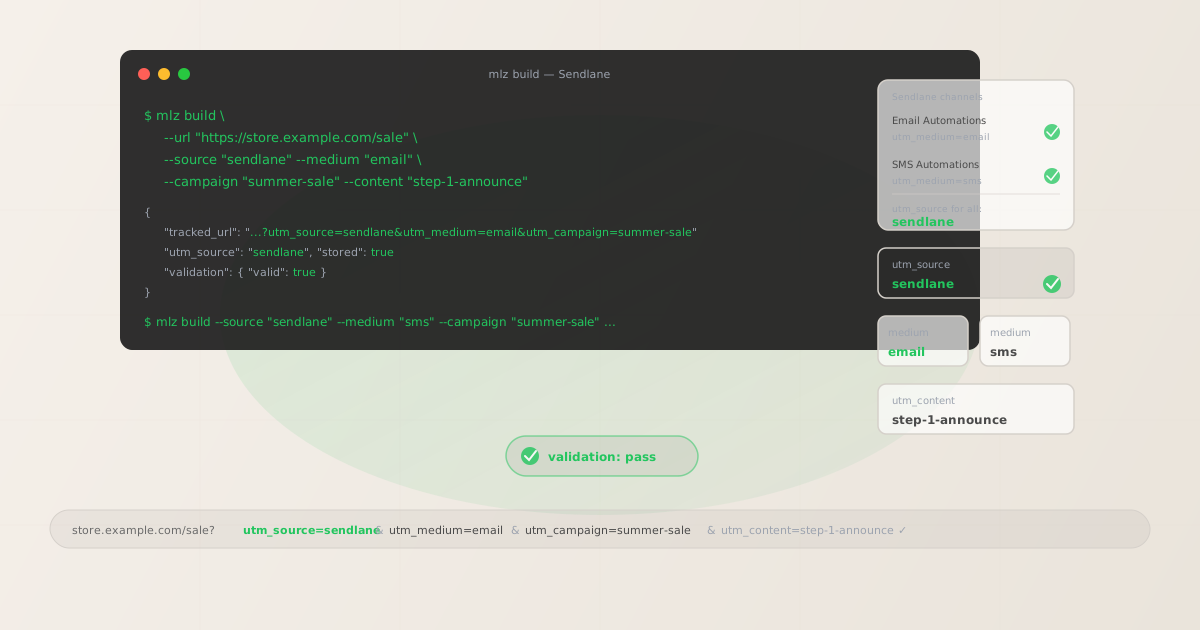
The correct utm_source and utm_medium for Sendlane
Use utm_source=sendlane — lowercase, the platform name — for all sends from the Sendlane platform, whether email or SMS. The source value identifies the platform, not the channel type. Channel assignment in GA4 is handled by utm_medium: use utm_medium=email for all email sends from Sendlane Automations and Campaigns, and utm_medium=sms for all SMS sends from Sendlane SMS Automations and SMS Campaigns.
Never use utm_medium=sendlane: that medium value does not match GA4's default channel grouping definitions and routes the traffic to Unassigned rather than Email or SMS. The distinction between email and SMS in GA4 is made by the medium value, not by different source values — both email and SMS sends from Sendlane should use utm_source=sendlane, with the channel type encoded in the medium.
| Channel | utm_source | utm_medium | Correct? |
|---|---|---|---|
| Email Automation | sendlane |
email |
✓ Yes |
| Email Campaign | sendlane |
email |
✓ Yes |
| SMS Automation | sendlane |
sms |
✓ Yes |
| SMS Campaign | sendlane |
sms |
✓ Yes |
| Any send | sendlane |
sendlane |
✗ No — routes to Unassigned in GA4 |
For e-commerce stores sending both email and SMS from Sendlane, GA4 will aggregate all email sessions under the Email channel and all SMS sessions under the SMS channel — both attributed to the sendlane source. This enables cross-channel comparison within Sendlane's traffic (email vs. SMS) through GA4's medium dimension, while maintaining a single platform-level source value for overall Sendlane attribution roll-up.
Sendlane Automations — UTM tracking for triggered email and SMS sequences
Sendlane Automations are triggered sequences that activate when a contact meets a defined condition: subscribing to a list, placing an order, abandoning a cart, browsing a product page, or reaching a specific LTV threshold. An Automation is a multi-step sequence of emails, SMS messages, time delays, conditional splits, and actions. Sendlane Automations cover standard e-commerce sequences including welcome series, abandoned cart recovery, post-purchase sequences, win-back campaigns, and VIP loyalty flows.
Each Automation step that contains a link — email or SMS — needs a tracked URL with a unique utm_content value identifying the specific step. Without per-step content values, GA4 attributes all sessions from an Automation's messages to the same campaign dimension row, making it impossible to determine which step drove a conversion or generated the most visits. For Automations with conditional splits — different messages for customers who purchased vs. customers who did not — add the branch identifier to the content slug: step-3-purchased-upsell, step-3-nopurchase-reminder.
# Abandoned cart Automation — step 1 email
$ mlz build \
  --url "https://store.example.com/cart" \
  --source "sendlane" \
  --medium "email" \
  --campaign "abandoned-cart" \
  --content "step-1-reminder" \
  --validate

{
  "tracked_url": "https://store.example.com/cart?utm_source=sendlane&utm_medium=email&utm_campaign=abandoned-cart&utm_content=step-1-reminder",
  "validation": { "valid": true }
}

# Abandoned cart Automation — step 2 SMS with discount
$ mlz build \
  --url "https://store.example.com/cart" \
  --source "sendlane" \
  --medium "sms" \
  --campaign "abandoned-cart" \
  --content "step-2-sms-discount" \
  --validate

{
  "tracked_url": "https://store.example.com/cart?utm_source=sendlane&utm_medium=sms&utm_campaign=abandoned-cart&utm_content=step-2-sms-discount",
  "validation": { "valid": true }
}
Paste each tracked URL as the link destination in the corresponding Automation step in Sendlane's workflow editor. For SMS steps, the tracked URL is the link included in the SMS message body — SMS tracked URLs should be verified with mlz check before activation to confirm they resolve correctly, since SMS recipients are especially likely to abandon a link that is slow or returns an error.
For Automations that serve as the primary abandoned cart or post-purchase recovery mechanism — where Sendlane's own revenue attribution is tracking order completions — the UTM tracked links ensure that GA4 also captures the session that led to the order. Sendlane's internal revenue attribution and GA4 UTM attribution can both be correct simultaneously: Sendlane attributes the order to the Automation, and GA4 attributes the session that completed the order to the sendlane / email source/medium.
Sendlane Campaigns — UTM tracking for one-off sends
Sendlane Campaigns are one-off email or SMS sends dispatched to a list or segment at a scheduled time or sent immediately. Email Campaigns are used for promotional blasts, product launch announcements, sale events, newsletters, and any send that does not require the triggered multi-step structure of an Automation. SMS Campaigns cover flash sale alerts, event reminders, and time-sensitive promotional messages sent in bulk.
For email Campaigns with multiple CTAs pointing to different destination pages — a hero product CTA, a secondary category CTA, a footer sale CTA — build a separate tracked URL for each destination with a distinct utm_content value identifying the CTA position: hero-product-cta, category-cta, sale-footer-cta. For SMS Campaigns, the message body typically contains one link — build a single tracked URL with utm_medium=sms and a content value identifying the campaign send: flash-sale-sms, event-reminder-sms.
E-commerce Campaigns timed to seasonal events — Black Friday, Cyber Monday, end-of-season sales — should use a campaign slug that includes the event and year: black-friday-2026, cyber-monday-2026, summer-sale-2026. If the same sale event includes both email and SMS sends, use the same campaign slug for both channels with the channel differentiation handled by utm_medium: campaign="black-friday-2026" with medium="email" for email sends and medium="sms" for SMS sends. This enables cross-channel comparison within the same campaign in GA4 through the medium dimension.
Sendlane revenue attribution vs GA4 UTM tracking
Sendlane includes a revenue attribution system that tracks orders back to specific email and SMS sends using a combination of click-tracking redirects and Sendlane's conversion tracking pixel (installed on the Shopify, BigCommerce, or WooCommerce store's order confirmation page). When a contact clicks a link in a Sendlane email, completes a purchase, and the Sendlane pixel fires on the order confirmation page, Sendlane attributes the revenue to the email send that drove the click — regardless of whether that link carried UTM parameters.
This means Sendlane's own analytics can show revenue attributed to an email Campaign or Automation even when those links had no UTM parameters. Teams sometimes interpret the presence of revenue data in Sendlane's analytics as confirmation that attribution tracking is working — but GA4 sees none of this data. Without UTM parameters, GA4 attributes the session that completed the purchase as direct or organic, with no connection to the Sendlane send. The Sendlane pixel fires only when the Sendlane click-tracking redirect is the most recent referring source before the purchase — a last-click attribution model within Sendlane's own system. GA4's attribution, by contrast, follows the user's full session path and uses the UTM parameters on the entry URL that began the session.
Both attribution systems can coexist and provide complementary data: Sendlane's internal attribution for understanding which sends drive immediate order completions within Sendlane's click window, and GA4 UTM attribution for understanding how Sendlane email and SMS traffic fits into the full cross-channel acquisition path. Both require their own configuration — Sendlane's pixel must be installed on the order confirmation page, and UTM parameters must be applied to every email and SMS link before the send.
Sendlane UTM tracking gotchas
- Sendlane's internal revenue tracking is not a substitute for GA4 UTM tracking
- Sendlane's revenue attribution pixel tracks orders within Sendlane's own analytics platform. This data does not flow into GA4 automatically and is not visible in GA4 traffic reports. If a customer clicks a Sendlane email link (even without UTM parameters), Sendlane may attribute the order to the email send in its own dashboard — but GA4 will show that session as direct or organic with no email attribution at all. Configure UTM parameters on all Sendlane links to ensure GA4 receives attribution data independently. Run
mlz build --source sendlane --medium emailfor email links andmlz build --source sendlane --medium smsfor SMS links before building any Sendlane template. - Sendlane's click-tracking redirect wraps all email links — verify UTM preservation
- Sendlane wraps all links in email messages with a click-tracking redirect for internal analytics. In standard configurations, this redirect preserves UTM query parameters through to the final destination URL. Verify this by obtaining a Sendlane click-tracking wrapped URL from a test send and running
mlz check "https://track.sendlane.com/..."against it — the command follows the full redirect chain and reports whether UTM parameters arrive at the destination. If the Sendlane redirect strips parameters, GA4 attributes the resulting sessions as direct traffic. This verification is particularly important for Shopify stores using Sendlane, where the destination URLs may include Shopify's own redirect layer before reaching the final product or collection page. - SMS links should be verified for length and UTM parameter preservation
- SMS messages have strict character limits and SMS recipients are more likely than email recipients to abandon a long or broken link. UTM-tracked links for SMS sends will be longer than the original destination URL — validate them with
mlz checkbefore including them in any SMS Campaign or Automation step. If the tracked URL is too long for the SMS character budget, use a link shortener on the tracked URL (not on the original URL) so the short link resolves to the full tracked URL with UTM parameters intact. After shortening, runmlz checkagainst the shortened URL to confirm the redirect chain correctly forwards UTM parameters to the final destination. - Sendlane Automation triggers should not be confused with UTM sources
- Sendlane Automations can be triggered by a wide range of events: cart abandonment, post-purchase, browse abandonment, list subscription, custom events via API. Some teams create separate source values to distinguish Automation trigger types:
utm_source=sendlane-cart,utm_source=sendlane-postpurchase. This fragments platform-level attribution in GA4: all sends from the Sendlane platform should aggregate underutm_source=sendlanefor platform-level roll-up analysis. Distinguish Automation type and trigger through the campaign slug —utm_campaign=abandoned-cart,utm_campaign=post-purchase-followup,utm_campaign=browse-abandonment— and keeputm_source=sendlaneas the consistent platform identifier across all Automations and Campaigns. - Shopify integration does not auto-apply UTM parameters to Sendlane emails
- Sendlane's native Shopify integration synchronises contact data, order history, and product catalogue between Sendlane and Shopify — it does not automatically add UTM parameters to email links. The integration enables Sendlane to send triggered Automations based on Shopify purchase events and pull product images and prices into email templates dynamically, but the link URLs themselves must still be explicitly built with UTM parameters before being configured in the email template. Do not assume that the Shopify integration handles UTM tracking — it does not. Build all tracked links with
mlz buildbefore configuring any Sendlane email or SMS template that will be sent to Shopify customers.
Sendlane UTM naming conventions
Recommended UTM parameter values for Sendlane, aligned with GA4 default channel groupings and a lowercase-hyphenated taxonomy:
- utm_source:
sendlane— always, for all email and SMS sends from the Sendlane platform. Never use source-level qualifiers to distinguish Automation type or trigger — encode those distinctions in the campaign slug. - utm_medium:
emailfor all Sendlane email Automations and email Campaigns.smsfor all Sendlane SMS Automations and SMS Campaigns. Never useutm_medium=sendlane. - utm_campaign: Lowercase, hyphenated, initiative-level slug. For Automations: the sequence type and purpose —
abandoned-cart,post-purchase-followup,welcome-series,win-back-90day. For Campaigns: the specific send initiative —black-friday-2026,summer-sale-2026,product-launch-june. When the same campaign sends both email and SMS, use the same campaign slug for both — the medium distinguishes the channel. - utm_content: Per Automation step with CTA:
step-1-reminder,step-2-sms-discount,step-3-purchased-upsell,step-3-nopurchase-final. Per Campaign CTA if multiple destinations in one email:hero-product-cta,category-cta,sale-footer-cta. For SMS Campaigns:flash-sale-smsto identify the specific SMS send within the campaign. - utm_term: Optional. For Sendlane, consider using utm_term to distinguish sends to different purchase-behaviour-based segments when the campaign initiative is the same but the audience differs significantly:
segment-vip,segment-lapsed-90d,segment-new-subscribers. Preferable to encoding the segment in utm_source or utm_campaign when the initiative is shared across segments.
See the UTM naming conventions guide for the full cross-platform reference and the UTM tracking for developers guide for programmatic generation and validation at scale.
FAQ
- If Sendlane shows revenue attributed to my emails, do I still need UTM parameters?
- Yes. Sendlane's internal revenue attribution and GA4 UTM attribution are separate systems that do not share data. Sendlane attributes revenue within its own platform using its tracking pixel and click-tracking redirects — this data appears in Sendlane's analytics dashboard but not in GA4. Without UTM parameters on your Sendlane email and SMS links, GA4 receives no attribution data from those sends at all: sessions that originated from Sendlane emails appear as direct or organic traffic in GA4. Both attribution systems provide complementary data — Sendlane for immediate order attribution within Sendlane's click window, GA4 for cross-channel session and conversion attribution across your full funnel.
- Should I use different utm_source values for email and SMS in Sendlane?
- No. Use
utm_source=sendlanefor both email and SMS sends. The channel type — email vs. SMS — is encoded inutm_medium:utm_medium=emailfor email sends andutm_medium=smsfor SMS sends. Using separate source values per channel (utm_source=sendlane-email,utm_source=sendlane-sms) fragments GA4 attribution across two platform-specific source rows that cannot be aggregated into a single Sendlane platform row without custom channel groupings. Keeputm_source=sendlaneconsistent across all channel types so that platform-level roll-up is available by default in GA4's source reports. - How do I track individual Automation steps in GA4?
- Use a unique
utm_contentvalue for each Automation step that contains a link. Define the content identifiers for all steps before building any tracked URLs:step-1-reminder,step-2-sms-discount,step-3-last-chance. For email steps, build the tracked URL withmlz build --medium email --content "step-1-reminder" --validate; for SMS steps, use--medium sms. Paste the returnedtracked_urlas the link destination in the corresponding Automation step in Sendlane's workflow editor. GA4 attributes sessions and conversions to individual Automation steps through the utm_content dimension — each step is independently measurable without requiring separate Automations or separate campaign slugs per step. - Does Sendlane's Shopify integration handle UTM tracking automatically?
- No. Sendlane's Shopify integration synchronises contacts, orders, and product data between platforms to enable triggered Automations and dynamic email templates — it does not automatically apply UTM parameters to email or SMS links. The links in Sendlane email templates must be explicitly built with UTM parameters before being configured in the template. Run
mlz build --source sendlane --medium emailfor all destination URLs before opening Sendlane's template editor, and paste the returned tracked URLs into the link settings for each CTA. - Do UTM parameters survive Sendlane's SMS link shortening?
- Sendlane may shorten links in SMS messages for character count management. If Sendlane's SMS delivery shortens your tracked URL, verify that the shortened URL correctly redirects to the full tracked destination with UTM parameters intact. Run
mlz check "https://sendlane-shortened-url"against the SMS link to follow the complete redirect chain and confirm UTM parameters arrive at the final destination. If the shortening process strips parameters, the sessions from SMS clicks will appear as direct traffic in GA4. Contact Sendlane's support to understand how their SMS link shortening handles query string parameters, and if needed, use an external short link service that explicitly preserves query parameters before including the tracked URL in the SMS message body.
Recommended posts
Build Sendlane campaign links from the terminal
Pass --source "sendlane" and --medium "email" (or --medium "sms") to mlz build to get a normalised, validated tracked URL ready to paste into any Sendlane template as a static link destination. Build all tracked URLs before opening Sendlane's template editor — one per Automation step with a distinct --content value, one per Campaign or per CTA within a Campaign. Run --validate to confirm that destination URLs resolve correctly before activating any Automation or dispatching any Campaign. The key rule for Sendlane specifically: do not rely on Sendlane's internal revenue attribution to substitute for GA4 UTM tracking. Both systems serve different purposes and both require independent configuration — Sendlane's pixel tracks orders within Sendlane's click window, UTM parameters send attribution data to GA4 for full-funnel analysis.
1,000 links/month free. No credit card.
Your API key
Save this now — it won't be shown again.
npm install -g missinglinkz
Free plan: 1,000 links/month. No credit card. See the UTM tracking for developers guide for the full programmatic workflow including API and MCP integration.