UTM Tracking for Twilio SendGrid: How to Build and Validate Campaign Links
UTM tracking for SendGrid starts with a naming decision: should teams tag links with utm_source=sendgrid or utm_source=twilio-sendgrid? Use sendgrid — it's shorter, more scannable in GA4 filter dropdowns, and consistent with how the platform is referred to internally and in analytics dashboards. The full "Twilio SendGrid" name is a legal/brand designation; in practice teams and documentation refer to the product as SendGrid, and your source values should match that convention. The scalability problem surfaces as soon as more than one person is building SendGrid emails: SendGrid's Marketing Campaigns feature auto-generates UTM parameters, but the values it produces are not engineering-grade. It uses the campaign name as-is for utm_campaign, which means spaces encoded as %20 or +, mixed casing, and values that drift based on whoever named the campaign in the UI. For Email API and SMTP sends — the transactional path used by developers — there is no auto-UTM at all: every UTM parameter must be embedded in the HTML template. Any team with more than one person building SendGrid emails will eventually produce utm_source=sendgrid, utm_source=SendGrid, and utm_source=sendgrid-newsletter in the same week — three separate rows in GA4 for one sending platform. Use mlz build to generate normalised tracked URLs before editing any SendGrid template, and embed the complete tracked URL as the link destination.
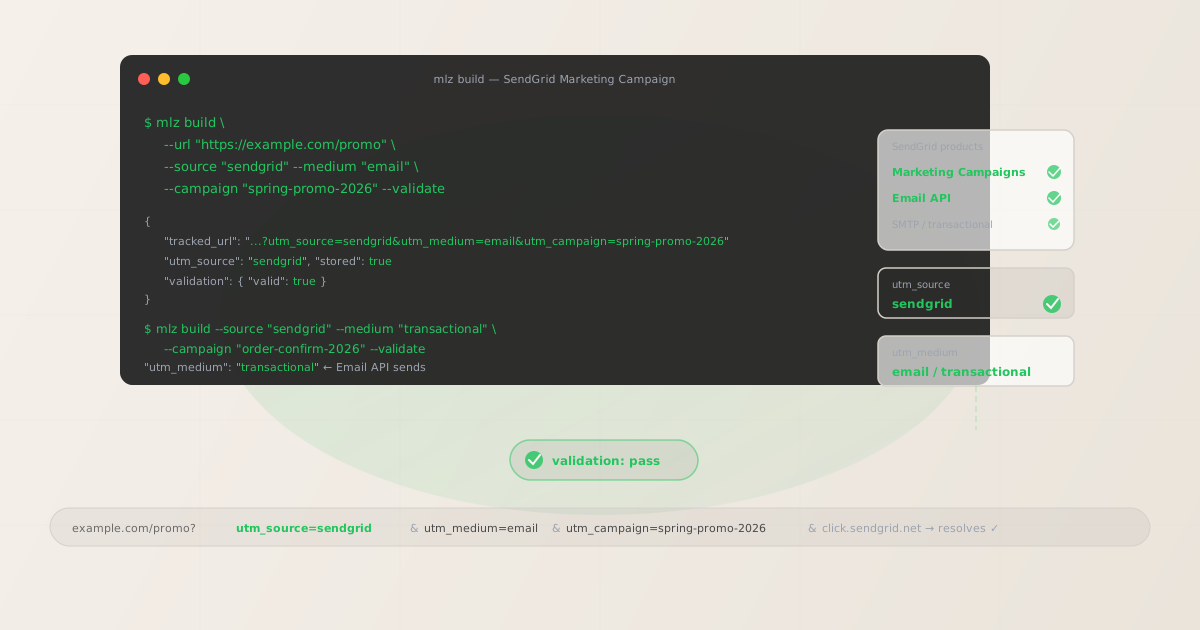
The correct utm_source and utm_medium for SendGrid
Use utm_source=sendgrid — lowercase, no prefix — for all sends from Twilio SendGrid, whether they originate from Marketing Campaigns or the Email API. The value should be stable and consistent across your entire SendGrid sending history. Avoid twilio-sendgrid (verbose, and the platform is universally called SendGrid in analytics contexts), sg as an abbreviation (ambiguous), and never let SendGrid's auto-UTM generate the value for you without reviewing what it actually produces.
The utm_medium for SendGrid depends on the send type. Marketing Campaigns sends are promotional emails: use email. Email API sends to existing users — transactional receipts, notifications, lifecycle triggers — can also use email, but some teams distinguish them with transactional to separate promotional and transactional attribution in GA4:
| SendGrid send type | utm_source | utm_medium | GA4 default channel |
|---|---|---|---|
| Marketing Campaigns (newsletter, promo) | sendgrid |
email |
|
| Email API — marketing send | sendgrid |
email |
|
| Email API — transactional / system | sendgrid |
transactional |
Other |
GA4 maps utm_medium=email to the Email default channel group automatically. utm_medium=transactional lands in Other unless you configure a custom channel group in GA4's Admin settings. If your team sends a meaningful volume of transactional emails with tracked links — onboarding steps, feature announcements, upgrade prompts embedded in receipts — a custom channel group for transactional is worth creating so those sessions appear as a distinct attribution row rather than disappearing into Other.
SendGrid's click tracking and UTM parameters
SendGrid's click tracking feature — enabled by default in Marketing Campaigns and available for Email API sends — wraps every link in a click.sendgrid.net redirect before forwarding the recipient to the destination URL. The full destination URL, including all UTM query parameters, is encoded in the redirect link. When a recipient clicks the link, SendGrid records the click in its analytics, then redirects the browser to the destination URL with the UTM parameters intact.
This means UTM parameters are technically preserved through SendGrid's click tracking redirect. However, "technically preserved" is not the same as "validated and confirmed." The redirect chain adds a step between the email click and your destination, and that step can obscure problems: a destination URL that returns a 404, a redirect chain that strips query parameters, or an HTTPS misconfiguration that breaks the final hop. SendGrid's click tracking UI tells you the click happened — it does not tell you whether the final destination resolved correctly with the UTM parameters intact.
Use mlz build --validate to check that the destination URL resolves before embedding it in any SendGrid template. The validation runs against the actual destination URL — SSL, resolution, redirect chain — so you catch broken destinations before they are baked into an email that sends to your entire list:
$ mlz build \
  --url "https://example.com/spring-sale" \
  --source "sendgrid" \
  --medium "email" \
  --campaign "spring-promo-2026" \
  --validate

{
  "tracked_url": "https://example.com/spring-sale?utm_source=sendgrid&utm_medium=email&utm_campaign=spring-promo-2026",
  "params": {
    "utm_source": "sendgrid",
    "utm_medium": "email",
    "utm_campaign": "spring-promo-2026"
  },
  "validation": {
    "valid": true,
    "checks": [
      { "check": "ssl", "status": "pass" },
      { "check": "resolution", "status": "pass", "details": { "response_time_ms": 145 } },
      { "check": "redirects", "status": "pass" }
    ]
  },
  "link_id": "lnk_sg7p4x3k",
  "stored": true
}
Copy the tracked_url from the JSON output and paste it as the link destination in the SendGrid editor. SendGrid's click tracking will wrap this URL in its click.sendgrid.net redirect — your UTM parameters are embedded in the destination portion of the redirect and will be present when the browser reaches your landing page.
Building Marketing Campaign links with mlz build
SendGrid Marketing Campaigns has a built-in UTM tracking option under Settings → Tracking → Google Analytics. When enabled, SendGrid automatically appends utm_source=sendgrid, utm_medium=email, and utm_campaign set to the campaign name as typed in the UI. The problem is that campaign names entered in a drag-and-drop editor are not a UTM taxonomy: "Spring Sale 2026" becomes utm_campaign=Spring+Sale+2026 in the query string — spaces encoded as +, mixed case, no hyphenation. GA4 treats this as a different campaign from spring-sale-2026 or spring_sale_2026.
The recommended approach is to disable SendGrid's auto-UTM setting and build tracked URLs manually with mlz build before editing any campaign template. This gives you full control over all five UTM parameter values and produces normalised, consistent slugs that match the rest of your UTM taxonomy:
# Primary CTA button — links to the sale landing page
$ mlz build \
  --url "https://example.com/spring-sale" \
  --source "sendgrid" \
  --medium "email" \
  --campaign "spring-promo-2026" \
  --content "cta-hero-button" \
  --validate

{
  "tracked_url": "https://example.com/spring-sale?utm_source=sendgrid&utm_medium=email&utm_campaign=spring-promo-2026&utm_content=cta-hero-button",
  "params": {
    "utm_source": "sendgrid",
    "utm_medium": "email",
    "utm_campaign": "spring-promo-2026",
    "utm_content": "cta-hero-button"
  },
  "validation": { "valid": true },
  "link_id": "lnk_sg2m9v1r",
  "stored": true
}

# Text link in the email body — same campaign, different content
$ mlz build \
  --url "https://example.com/spring-sale" \
  --source "sendgrid" \
  --medium "email" \
  --campaign "spring-promo-2026" \
  --content "body-text-link"

# Footer link — tracks engagement from the low-attention zone
$ mlz build \
  --url "https://example.com/spring-sale" \
  --source "sendgrid" \
  --medium "email" \
  --campaign "spring-promo-2026" \
  --content "footer-link"
Each tracked URL generated by mlz build is stored and linked to the campaign slug. Use mlz links list --campaign "spring-promo-2026" to retrieve all tracked URLs for this campaign before assembling the template — you can confirm every CTA in the email has its own correctly formed tracked URL before the campaign goes live.
Building Email API and transactional links
SendGrid's Email API — used for developer-driven transactional sends via the REST API or SMTP — has no auto-UTM feature at all. Every UTM parameter must be embedded directly in the HTML template. For static templates this means hardcoding the full tracked URL. For dynamic templates using Handlebars (SendGrid's templating language) or Jinja2 (for Python-based senders), UTM parameters can be passed as template variables — but this creates a risk: if utm_campaign is a template variable populated per-send, different sends in the same campaign type can produce different (and inconsistent) values depending on what was passed at send time.
The better pattern for Email API sends: build the complete tracked URL with mlz build before populating the template, then pass the full tracked URL as a single Handlebars variable. This keeps UTM parameter construction outside the template — where it's ungoverned — and inside mlz build, where it's normalised and stored:
# Transactional: order confirmation CTA — utm_medium=transactional
$ mlz build \
  --url "https://example.com/order/track" \
  --source "sendgrid" \
  --medium "transactional" \
  --campaign "order-confirm-2026" \
  --content "track-order-cta" \
  --validate

{
  "tracked_url": "https://example.com/order/track?utm_source=sendgrid&utm_medium=transactional&utm_campaign=order-confirm-2026&utm_content=track-order-cta",
  "params": {
    "utm_source": "sendgrid",
    "utm_medium": "transactional",
    "utm_campaign": "order-confirm-2026",
    "utm_content": "track-order-cta"
  },
  "validation": {
    "valid": true,
    "checks": [
      { "check": "ssl", "status": "pass" },
      { "check": "resolution", "status": "pass", "details": { "response_time_ms": 112 } },
      { "check": "redirects", "status": "pass" }
    ]
  },
  "link_id": "lnk_sg8n2c5w",
  "stored": true
}
In the SendGrid dynamic template, reference the tracked URL as a single Handlebars variable: {{tracked_order_url}}. Populate this variable with the complete tracked_url string from the mlz build output when constructing the API request. This pattern means every order confirmation email fired by the API uses a pre-validated, pre-normalised tracked URL — utm_source, utm_medium, and utm_campaign are fixed at template build time, not at send time.
For Email API sends where the destination URL is truly dynamic per-send (for example, a personalised product page URL based on the recipient's order), use mlz build to generate the tracked URL server-side as part of the send pipeline, before the API call. This keeps UTM construction in your application code rather than in the template engine.
SendGrid UTM tracking gotchas
- sendgrid vs twilio-sendgrid — lock in the shorter version from the start
- Both
sendgridandtwilio-sendgridappear in the wild. GA4 treats them as different sources — once you have historical data under one, switching splits your SendGrid attribution across two source rows. Decide onsendgrid(shorter, standard) before your first campaign goes live and enforce it withmlz build. If you have existing data undertwilio-sendgrid, create a custom channel group in GA4 to consolidate the old value while transitioning all new sends tosendgrid. - SendGrid's auto-UTM produces non-normalised campaign names
- SendGrid Marketing Campaigns' built-in Google Analytics tracking sets
utm_campaignto the campaign display name as-is. A campaign named "Spring Sale 2026" producesutm_campaign=Spring+Sale+2026orutm_campaign=Spring%20Sale%202026depending on how SendGrid encodes it — mixed case, URL-encoded spaces. This is a different value fromspring-sale-2026in GA4 filtering. Disable SendGrid's auto-UTM in Settings → Tracking and usemlz buildto produce clean, lowercase, hyphenated campaign slugs that match your taxonomy. The extra minute at campaign build time prevents months of fragmented attribution data. - SendGrid's click tracking adds a redirect — validate the final destination
- SendGrid wraps every tracked link in a
click.sendgrid.netredirect. UTM parameters are preserved through this redirect as part of the encoded destination URL. However, a broken destination URL — a 404, a certificate error, a redirect that strips the query string — is invisible in SendGrid's click analytics. SendGrid records the click at the redirect step; it does not report whether the final destination resolved. Usemlz build --validateto confirm the destination resolves correctly before embedding the URL in any template. For active campaigns, usemlz check <url>to spot-check destinations after web infrastructure changes. - Handlebars template variables for UTM parameters create per-send inconsistency
- Dynamic templates using Handlebars make it tempting to pass
utm_campaignas a template variable —{{utm_campaign}}— populated per API call. This means whoever constructs the API request controls the campaign name, and different engineers (or automated processes) will pass different values:OrderConfirmation,order_confirmation,order-confirmation-2026. Each produces a separate row in GA4. Instead, build the complete tracked URL withmlz buildand pass the entire URL as a single variable:{{tracked_cta_url}}. UTM parameters are frozen at build time, not at send time. - Transactional emails need per-template tracked URLs, not one generic URL
- A common shortcut on transactional sends is to use a single tracked URL for all emails of a given type — one
utm_campaign=transactionalURL for every order confirmation, regardless of the CTA destination. This makes it impossible to distinguish which transactional message type drove a conversion in GA4 — all transactional email sessions appear under the same row. Build a tracked URL per distinct template-and-CTA combination:order-confirm-track-order-cta,shipping-notify-view-order-cta,account-welcome-get-started-cta. The granularity is worth it when you want to know which transactional touchpoint actually drives activation or repeat purchase.
SendGrid UTM naming conventions
Recommended UTM parameter values for Twilio SendGrid, aligned with GA4 default channel groupings and consistent with a lowercase-hyphenated UTM taxonomy:
- utm_source:
sendgrid— lowercase, no prefix, for all sends from SendGrid regardless of whether they originate from Marketing Campaigns or the Email API. Never useSendGridwith mixed case,twilio-sendgrid, orsg. - utm_medium:
emailfor Marketing Campaigns and Email API sends that are promotional or lifecycle-triggered. Usetransactionalfor Email API sends that are transactional / system-generated (order confirmations, shipping notifications, account alerts) if you want to separate promotional and transactional attribution in GA4. - utm_campaign: Lowercase, hyphenated, descriptive of the send type and time period. Marketing Campaigns:
spring-promo-2026,welcome-series-q2,product-launch-may-2026. Never use SendGrid's auto-generated campaign name as-is. For transactional templates: descriptive of the trigger event —order-confirm-2026,shipping-notify-2026,account-welcome-2026. - utm_content: Use to distinguish individual CTAs within the same send:
cta-hero-button,body-text-link,footer-link,track-order-cta. Each distinct link destination in a single email should have its own tracked URL with a uniqueutm_contentvalue. - utm_term: Optional for segmented sends. Use to carry audience segment or lifecycle stage into GA4 when the same campaign template sends to multiple segments:
new-subscriber,engaged-user,win-back,vip. Particularly useful for Marketing Campaigns sends to custom contact lists where segment-level performance comparison matters.
See the UTM naming conventions guide for the full cross-platform reference and the UTM tracking for developers guide for programmatic generation and validation at scale.
FAQ
- Should I use utm_source=sendgrid or utm_source=twilio-sendgrid?
- Use
sendgrid. It's shorter, more scannable in GA4 filter dropdowns, and consistent with how the platform is referred to in analytics contexts. The full "Twilio SendGrid" name is a brand/legal designation; the sending platform is universally called SendGrid in practice. Either value works technically, but pick one before your first campaign goes live and enforce it. GA4 treatssendgridandtwilio-sendgridas different sources — historical data split between both values requires a custom channel group to consolidate. If you already have data undertwilio-sendgrid, configure a GA4 custom channel group to combine the old value while transitioning new sends tosendgrid. - Does SendGrid's click tracking preserve UTM parameters?
- Yes — SendGrid's click tracking wraps links in a
click.sendgrid.netredirect that encodes the full destination URL, including any UTM query parameters. When a recipient clicks the link, SendGrid records the click and then forwards the browser to the destination URL with the UTM parameters intact. The important caveat: SendGrid records the click at the redirect step, not at the destination. If your destination URL returns a 404 or a certificate error, SendGrid's analytics will show the click, but GA4 will not receive the session. Usemlz build --validateto confirm destination URLs resolve correctly before embedding them in SendGrid templates. - When should I use utm_medium=transactional instead of utm_medium=email for SendGrid API sends?
- Use
transactionalwhen you want to cleanly separate system-triggered sends (order confirmations, shipping notifications, account alerts, password resets) from promotional or lifecycle sends (newsletters, product announcements, onboarding sequences) in GA4. Both values route to the Email channel group if you useemail, which makes them indistinguishable at the medium level. If you usetransactionalfor system sends, those sessions appear in GA4's Other default channel group — you can then create a custom channel group called "Transactional Email" to make them visible as a distinct attribution row. If your team does not need to separate promotional and transactional sends in GA4 attribution, usingemailfor all SendGrid sends is simpler. - How do I validate a URL that will be wrapped in SendGrid's click tracking redirect?
- Validate the destination URL — not the
click.sendgrid.netredirect URL — before adding it to the SendGrid template. Runmlz build --validate --url "https://example.com/destination" --source "sendgrid" --medium "email" --campaign "your-campaign". The--validateflag checks the destination URL directly: SSL configuration, HTTP resolution, and redirect chain. This confirms the final destination is reachable. SendGrid's click tracking adds its own redirect layer on top, but if the destination resolves correctly in validation, it will resolve correctly after theclick.sendgrid.nethop. For spot-checking live campaign destinations after web infrastructure changes, usemlz check <destination-url>. - How do I generate tracked URLs for a large SendGrid campaign with many links?
- Use
mlz buildin a shell script or short automation to batch-generate tracked URLs for all CTAs in the campaign before editing the template. For a campaign with five distinct links, run fivemlz buildcommands with matching--campaignslug and unique--contentvalues per CTA. After building, runmlz links list --campaign "your-campaign-slug"to retrieve all stored tracked URLs for that campaign in a single JSON output — useful for copy-pasting into a template build checklist or passing programmatically into a CMS or email builder via the MissingLinkz API. See the campaign link infrastructure overview for API and MCP integration options for teams that build large numbers of tracked links per campaign.
Recommended posts
Build SendGrid links from the terminal
Pass --source "sendgrid" --medium "email" (or transactional) to mlz build and get a normalised, validated tracked URL ready to paste into any SendGrid template — sendgrid lowercase consistently, the right medium for Marketing Campaigns vs. Email API, and clean hyphenated campaign slugs that replace whatever SendGrid's auto-UTM would have generated. Add --validate to confirm destination URLs resolve correctly through SendGrid's click tracking redirect before the campaign goes live, and run mlz check on active campaign destinations after any web infrastructure change to catch broken links before they affect your attribution data.
1,000 links/month free. No credit card.
Your API key
Save this now — it won't be shown again.
npm install -g missinglinkz
Free plan: 1,000 links/month. No credit card. See the UTM tracking for developers guide for the full programmatic workflow.