UTM Tracking for Mailjet: How to Build and Validate Campaign Links
UTM tracking for Mailjet has a platform-specific trap that most teams don't notice until they see their GA4 source/medium report: Mailjet's built-in UTM tracking is enabled by default and uses your Mailjet campaign name verbatim as utm_campaign. If your campaign is named "Spring Launch 2026", Mailjet generates utm_campaign=Spring+Launch+2026 — mixed case, URL-encoded spaces, a naming convention that creates a separate row in GA4 for every campaign unless you happen to name all Mailjet campaigns in perfect lowercase-hyphenated form. Mailjet is now owned by Sinch (acquired 2021) but continues to operate under the Mailjet brand. The platform covers two distinct send types — Campaigns (the marketing email UI builder) and Transactional (API and SMTP sends) — each requiring a different utm_medium. The source itself is utm_source=mailjet: lowercase, no hyphen, no space — Mailjet is one word. The right workflow is to disable Mailjet's built-in UTM tracking, build tracked links externally with mlz build, and paste the complete URL into your Mailjet template or API call. This gives you normalised, validated parameters that match your taxonomy rather than Mailjet's campaign name field.
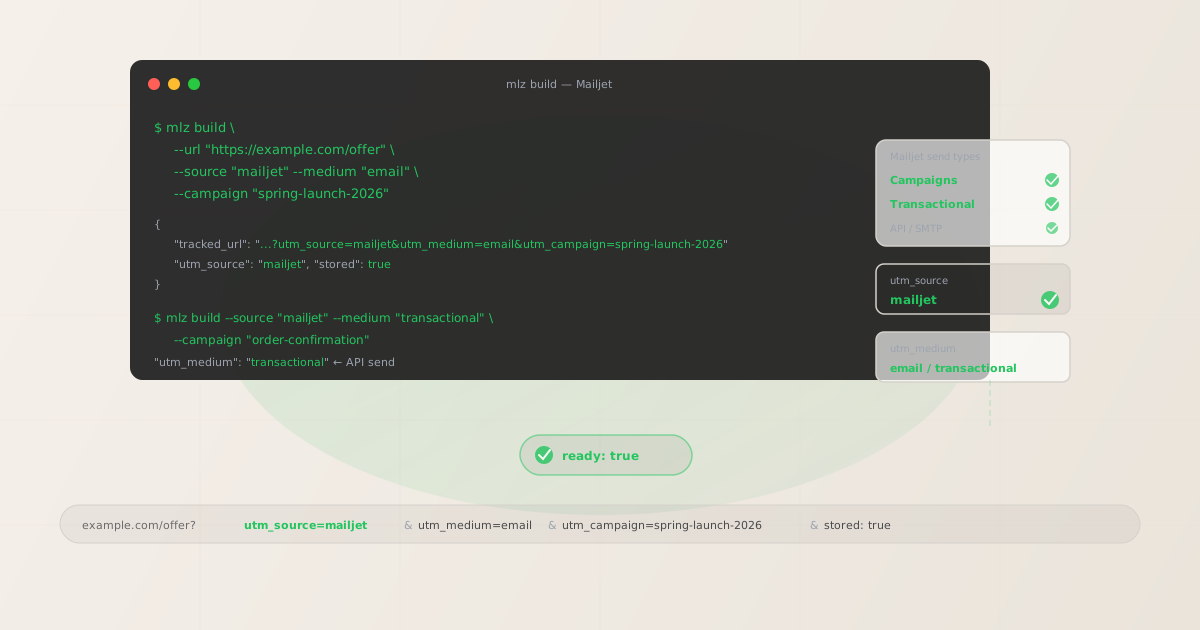
The correct utm_source and utm_medium for Mailjet
Use utm_source=mailjet — lowercase, one word, no hyphen — for all sends from Mailjet, whether marketing campaigns or transactional API sends. Mailjet is a single compound word in the platform's own branding ("Mailjet" not "Mail Jet" or "mail-jet"), and the lowercase-no-separator form is unambiguous in GA4 filter dropdowns. Avoid mail-jet with a hyphen (no precedent in the platform's own naming), mailjet.com as a URL form (creates a different dimension value than mailjet), and sinch-mailjet or sinch (Sinch is the parent company, not the product — using it as utm_source makes your GA4 attribution unreadable to anyone unfamiliar with the acquisition).
The utm_medium for Mailjet depends on whether the email is a marketing campaign send or a transactional API/SMTP send:
| Mailjet send type | utm_source | utm_medium | GA4 default channel |
|---|---|---|---|
| Campaign (marketing UI builder) | mailjet |
email |
|
| Transactional (API send) | mailjet |
transactional |
Other |
| Transactional (SMTP relay) | mailjet |
transactional |
Other |
GA4 maps utm_medium=email to the Email default channel group automatically. utm_medium=transactional lands in Other unless you configure a custom channel group in GA4's Admin settings. For most e-commerce and SaaS products that use Mailjet transactional sends at volume — order confirmations, password resets, shipping notifications — creating a custom channel group for transactional medium is worth the setup time, because transactional email conversions are high-intent and you want them as a distinct acquisition channel rather than aggregated into Other.
Mailjet's built-in UTM tracking: why to disable it and use mlz build instead
Mailjet has a built-in UTM tracking toggle in Campaign Settings that, when enabled, automatically appends UTM parameters to all links in an email. It sounds convenient but creates a specific data quality problem: Mailjet uses your Mailjet campaign name as the utm_campaign value, verbatim, with no normalisation. A campaign named "May Newsletter" becomes utm_campaign=May+Newsletter. A campaign named "New Feature - June" becomes utm_campaign=New+Feature+-+June. Mixed case, URL-encoded spaces and special characters, and values that bear no relationship to your UTM taxonomy — every campaign produces a unique, non-conforming utm_campaign row in GA4.
There is a second problem: when Mailjet's auto-UTM feature is enabled, it can override manually added UTM parameters on some link clicks, particularly when the redirect through Mailjet's click-tracking domain (links.mailjet.com) processes the URL. This means links you carefully built with utm_campaign=spring-launch-2026 may arrive at GA4 as utm_campaign=Spring+Launch+2026 if Mailjet's auto-UTM fires after your manually set parameters.
The correct approach: disable Mailjet's built-in UTM tracking in Campaign Settings, build all tracked links externally with mlz build, and paste the complete tracked URL — with all five UTM parameters already appended — as the href destination in your Mailjet template. Mailjet's click-tracking wrapper (links.mailjet.com) preserves query string parameters through the redirect, so your UTM string arrives at the destination intact, as long as the parameters are URL-encoded correctly. mlz build handles encoding automatically.
Building Mailjet Campaign links with mlz build
For marketing campaign emails built in Mailjet's Campaign editor, use utm_medium=email and a date-stamped or descriptive campaign slug that reflects your send — not the Mailjet campaign name field value. Mailjet Campaigns are point-in-time sends to a contact list or segment, so campaign slugs should be dated: spring-launch-2026, may-newsletter-2026, product-update-june-2026. Use utm_content to distinguish individual links within the same email when multiple CTA buttons point to different destinations.
# Marketing Campaign — dated slug, utm_content for CTA variant
$ mlz build \
  --url "https://example.com/spring-offer" \
  --source "mailjet" \
  --medium "email" \
  --campaign "spring-launch-2026" \
  --content "primary-cta" \
  --validate

{
  "tracked_url": "https://example.com/spring-offer?utm_source=mailjet&utm_medium=email&utm_campaign=spring-launch-2026&utm_content=primary-cta",
  "params": {
    "utm_source": "mailjet",
    "utm_medium": "email",
    "utm_campaign": "spring-launch-2026",
    "utm_content": "primary-cta"
  },
  "validation": {
    "valid": true,
    "checks": [
      { "check": "ssl", "status": "pass" },
      { "check": "resolution", "status": "pass", "details": { "response_time_ms": 143 } },
      { "check": "redirects", "status": "pass" }
    ]
  },
  "link_id": "lnk_mj7k3p2q",
  "stored": true
}

# Secondary link in the same email — different utm_content
$ mlz build \
  --url "https://example.com/pricing" \
  --source "mailjet" \
  --medium "email" \
  --campaign "spring-launch-2026" \
  --content "pricing-link"
Copy each tracked_url from the JSON output and paste it as the link destination in Mailjet's Campaign drag-and-drop editor or HTML editor. With Mailjet's built-in UTM tracking disabled, these URLs will pass through the links.mailjet.com click-tracking redirect unchanged — your UTM parameters arrive at the destination page exactly as built.
Building Mailjet Transactional email links
Mailjet's Transactional send type covers emails sent via the Mailjet Send API or SMTP relay — order confirmations, account activation emails, password resets, shipping notifications, invoice emails. These are triggered programmatically per user event, not sent as batch campaigns to a list. For transactional sends, use utm_medium=transactional to distinguish this traffic from marketing campaign sends in GA4. Use a stable, evergreen utm_campaign slug that describes the email type — these slugs do not need date stamps because you want attribution to accumulate under a single slug for the full operational lifetime of the email.
For emails sent via the Mailjet Send API, UTM parameters must be embedded directly in the template HTML or injected per-send via template variables in the API payload. There is no API-level UTM injection parameter — you control UTM values through the link href in your template.
# Order confirmation — stable evergreen slug, utm_content for CTA
$ mlz build \
  --url "https://example.com/orders/confirm" \
  --source "mailjet" \
  --medium "transactional" \
  --campaign "order-confirmation" \
  --content "view-order-cta"

{
  "tracked_url": "https://example.com/orders/confirm?utm_source=mailjet&utm_medium=transactional&utm_campaign=order-confirmation&utm_content=view-order-cta",
  "params": {
    "utm_source": "mailjet",
    "utm_medium": "transactional",
    "utm_campaign": "order-confirmation",
    "utm_content": "view-order-cta"
  },
  "link_id": "lnk_mj2t9r5n",
  "stored": true
}

# Password reset email
$ mlz build \
  --url "https://example.com/reset-password" \
  --source "mailjet" \
  --medium "transactional" \
  --campaign "password-reset" \
  --content "reset-link"

# Account activation email
$ mlz build \
  --url "https://example.com/activate" \
  --source "mailjet" \
  --medium "transactional" \
  --campaign "account-activation" \
  --content "activate-cta"
Embed the tracked_url output directly in your Mailjet template HTML as the href value. If you use Mailjet's template language (MJML or its proprietary template syntax) with dynamic variables, build the base tracked URL first, then use a template variable only for the dynamic portion of the destination path — never interpolate UTM parameters via template variables, as this bypasses normalisation and re-introduces the naming drift you're trying to prevent.
Mailjet UTM tracking gotchas
- Mailjet's auto-UTM feature overwrites your manually set parameters — disable it first
- Mailjet's built-in UTM tracking toggle is enabled at the account or campaign level in Settings. When active, it appends its own UTM parameters to all links, using the Mailjet campaign name as
utm_campaign. If you've also manually added UTM parameters to your links, the result depends on which set of parameters wins the Mailjet click-tracking redirect. The safe resolution: disable Mailjet's built-in UTM tracking entirely and build all tracked links withmlz build. Go to Settings → Tracking in your Mailjet account to confirm the toggle is off before activating any campaign. - utm_source is mailjet — one word, no hyphen, no space
- The most common variation that creates GA4 attribution fragmentation is
mail-jet(hyphenated) ormail jet(with a space, URL-encoded asmail+jet). GA4 treats each spelling as a different source — data undermailjet,mail-jet, andmail+jetnever aggregates unless you build custom channel groups manually. Usemlz build --source "mailjet"consistently to prevent the variation from appearing in the first place. If you have historical data under a different spelling, add a GA4 custom channel group to consolidate it while transitioning new sends tomailjet. - Mailjet click-tracking wraps links in links.mailjet.com — parameters must be URL-encoded
- Mailjet's click-tracking system wraps destination URLs in a redirect through
links.mailjet.combefore forwarding users to your destination. UTM parameters are preserved through this redirect, but only if they are correctly URL-encoded. Spaces in parameter values (utm_campaign=Spring Launch) may be double-encoded or stripped depending on the client.mlz buildproduces properly encoded query strings — all parameter values are validated and encoded at build time — so the tracked URL passes cleanly through the Mailjet redirect wrapper. - Transactional templates embed static URLs — validate before deploying
- Transactional email templates in Mailjet are deployed once and then fire continuously for every triggered send. A destination URL embedded in a transactional template may be live for months or years without review. Use
mlz build --validatewhen building tracked URLs for transactional templates to confirm the destination resolves before embedding it. Runmlz check <url>spot-checks on transactional template destinations after any infrastructure change, product page restructure, or domain migration. Usemlz links list --campaign "order-confirmation"to retrieve all stored tracked URLs for a given transactional campaign slug and systematically verify them.
Mailjet UTM naming conventions
Recommended UTM parameter values for Mailjet, aligned with GA4 default channel groupings and applicable to both marketing Campaign sends and Transactional API/SMTP sends:
- utm_source:
mailjet— lowercase, one word, no hyphen, no space. Use for all Mailjet sends regardless of send type. Do not usesinch-mailjet,mailjet.com, or abbreviations. Consistent across Campaigns and Transactional sends. - utm_medium:
emailfor marketing Campaign sends built in the Mailjet Campaign editor;transactionalfor API and SMTP sends — order confirmations, account activations, password resets, shipping notifications. These must be different so GA4 can separate promotional email performance from transactional email performance. - utm_campaign: For marketing Campaigns (batch sends to a list): use dated, descriptive slugs —
spring-launch-2026,may-newsletter-2026,black-friday-2026. For Transactional sends: use stable evergreen slugs that describe the email type —order-confirmation,password-reset,account-activation,shipping-notification. Never date-stamp transactional slugs. - utm_content: Use to distinguish individual links within the same email when multiple links or CTA buttons are present in a single send —
primary-cta,pricing-link,view-order-cta,activate-cta. Build a separate tracked URL per distinct link destination per email. - utm_term: Optional. Use for audience segment or cohort labeling if the same Campaign template sends to multiple segments with different targeting —
vip-customers,trial-users,inactive-30d. This gives you segment-level conversion data in GA4 without needing separate campaign slugs per segment.
See the UTM naming conventions guide for the full cross-platform reference and the UTM tracking for developers guide for programmatic generation and validation at scale.
FAQ
- What is the correct utm_source for Mailjet?
- Use
mailjet— lowercase, one word, no hyphen. Mailjet is a single compound word in the platform's own branding, and the lowercase form is unambiguous in GA4. Do not usemail-jet,sinch-mailjet,mailjet.com, orsinch. GA4 treats each variation as a separate source, and data split across multiple source values for the same platform cannot be consolidated without custom channel groups. Enforce the correct spelling withmlz build --source "mailjet"and the value is normalised at the point of link generation, not at the point of human typing. - Should I use utm_medium=email or utm_medium=transactional for Mailjet sends?
- Use
emailfor marketing Campaign sends (batch sends built in the Mailjet Campaign editor and sent to a contact list or segment). Usetransactionalfor emails sent via the Mailjet Send API or SMTP relay — order confirmations, password resets, account activations, shipping notifications. The distinction matters in GA4:utm_medium=emailmaps to the Email default channel group;utm_medium=transactionallands in Other unless you create a custom channel group. If you send both campaign and transactional emails via Mailjet and use the same medium for both, you cannot separate their conversion data in GA4's acquisition reports without custom explorations. - How do I stop Mailjet from overriding my UTM parameters?
- Disable Mailjet's built-in UTM tracking in your account settings before sending. In the Mailjet dashboard, navigate to Settings → Tracking and turn off the UTM tracking toggle. Then build all tracked links externally with
mlz buildand paste the complete tracked URL — with all five UTM parameters already appended — as the href destination in your Mailjet template. With auto-UTM disabled, Mailjet's click-tracking redirect (links.mailjet.com) passes the full query string through unchanged. Your manually built UTM parameters arrive at the destination exactly as constructed. - How should I track UTM parameters in Mailjet Transactional email templates?
- Embed the tracked URL directly in the template HTML as a static href value. Build the tracked URL first with
mlz build --source "mailjet" --medium "transactional" --campaign "order-confirmation" --content "view-order-cta" --validate, copy thetracked_urlfrom the JSON output, and paste it as the link destination in your Mailjet template. If your template uses dynamic variables for personalisation (e.g., order ID in the URL path), use variables only for the dynamic path segment and keep UTM parameters as static query string components. Never inject UTM parameter values via template variables — this bypasses naming normalisation and re-introduces the inconsistencymlz buildprevents. - How do I validate all my Mailjet Campaign destination URLs before sending?
- Build all Campaign links with
mlz build --validateto run SSL, resolution, and redirect checks at link build time. Usemlz links list --campaign "<campaign-slug>"to retrieve all stored tracked URLs for a specific campaign. For transactional email templates that have been live for some time, runmlz check <url>spot-checks on destination URLs after any website infrastructure change, domain migration, or product page restructure. Transactional email templates are set-and-forget by design, which makes them vulnerable to silent destination failures when the rest of the website changes around them. Periodic programmatic validation is the only scalable way to catch these before they affect user experience and attribution data simultaneously.
Recommended posts
Build Mailjet links from the terminal
Pass --source "mailjet" --medium "email" (or transactional for API and SMTP sends) to mlz build and get a normalised, validated tracked URL ready to paste into any Mailjet template — mailjet spelled consistently in lowercase, the right medium per send type, dated slugs for Campaign sends and stable evergreen slugs for Transactional templates. Add --validate to confirm destination URLs resolve before your campaign goes out, and run mlz check periodically on Transactional template destinations to catch broken links before they affect months of attribution data and user experience simultaneously.
1,000 links/month free. No credit card.
Your API key
Save this now — it won't be shown again.
npm install -g missinglinkz
Free plan: 1,000 links/month. No credit card. See the UTM tracking for developers guide for the full programmatic workflow.