UTM Tracking for Sender: How to Build and Validate Campaign Links
UTM tracking for Sender uses utm_source=sender for all email sends from the Sender platform and utm_medium=sms for SMS sends, with utm_medium=email for email Automations and Campaigns. Sender (Sender.net) is an affordable email and SMS marketing platform with a generous free tier — up to 2,500 subscribers and 15,000 emails per month at no cost — positioning itself as a cost-effective alternative to Mailchimp, Brevo, and MailerLite for small businesses, e-commerce stores, and individual creators. Sender provides email campaigns, automated drip sequences, SMS campaigns, and a popup builder for on-site lead capture. Sender does not include a built-in UTM parameter builder: all tracked URLs must be constructed externally and pasted into email and SMS templates before sending. A naming consideration specific to Sender: the platform name is a common English word. Establish utm_source=sender as a documented convention across your marketing team to prevent ad hoc variations — utm_source=sender.net, utm_source=sender-app, or utm_source=sendernet — that would fragment attribution in GA4 across multiple source dimension rows that cannot be merged without custom channel groupings.
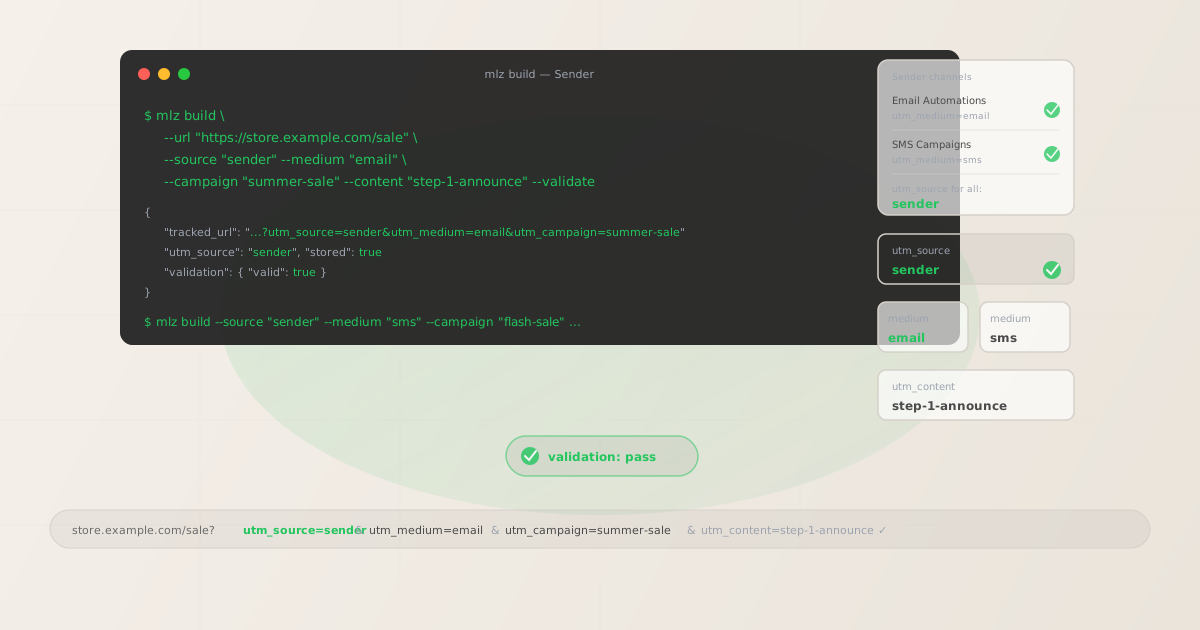
The correct utm_source and utm_medium for Sender
Use utm_source=sender — lowercase, the platform name without the domain suffix — for all sends from the Sender platform, whether email Automations, email Campaigns, or SMS Campaigns. The source value identifies the platform, not the channel type. Channel assignment in GA4 is handled by utm_medium: use utm_medium=email for all Sender email Automations and email Campaigns, and utm_medium=sms for all Sender SMS Campaigns.
Never use utm_source=sender.net (the domain name rather than the platform name) or utm_medium=sender (the platform name as the medium). The domain-name variation creates a separate GA4 source row from the platform-name variation — teams that mix the two across different campaigns end up with fragmented attribution that requires manual cleanup. Standardise on utm_source=sender across your entire team and document this convention explicitly, because the word "sender" is ambiguous enough that different team members will independently derive different conventions without a documented standard.
| Channel | utm_source | utm_medium | Correct? |
|---|---|---|---|
| Email Automation | sender |
email |
✓ Yes |
| Email Campaign | sender |
email |
✓ Yes |
| SMS Campaign | sender |
sms |
✓ Yes |
| Any send | sender.net |
email |
✗ No — creates a different source row in GA4 |
| Any send | sender |
sender |
✗ No — routes to Unassigned in GA4 |
GA4's default channel grouping assigns sessions to the Email channel when utm_medium=email is present, and to an SMS or Other channel when utm_medium=sms is present, regardless of the source value. All Sender email sends appear under the Email channel in GA4's channel reports, with sender as the source dimension for filtering Sender-specific traffic. SMS sends from Sender appear under the SMS or Other channel depending on your GA4 channel grouping configuration.
Sender Automations — UTM tracking for automated email sequences
Sender Automations are multi-step email sequences triggered by subscriber actions or schedule-based conditions: joining a list, visiting a specific page (via Sender's website tracking), purchasing from a connected e-commerce store, clicking a link in a previous email, or a time-based trigger such as a subscriber's birthday or a fixed delay after sign-up. Automations are used for welcome sequences, abandoned cart recovery, post-purchase follow-ups, lead nurture drips, re-engagement sequences, and onboarding flows. Each Automation is a visual workflow of email steps, time delays, and conditional branches.
Each Automation step that contains a destination link needs a tracked URL with a unique utm_content value identifying the specific step. Without per-step content identifiers, GA4 aggregates all sessions from an entire Automation sequence into a single campaign dimension row — it is impossible to determine which step in the sequence drove a conversion, which re-engagement email brought a subscriber back, or which abandoned cart recovery step was most effective. For Automations with conditional branches — different email paths for subscribers who clicked vs. subscribers who did not — append the branch identifier to the content slug: step-2-clicked, step-2-notclicked-followup.
# Welcome Automation — step 1: welcome email with primary CTA
$ mlz build \
  --url "https://store.example.com/new-arrivals" \
  --source "sender" \
  --medium "email" \
  --campaign "welcome-series" \
  --content "step-1-welcome" \
  --validate

{
  "tracked_url": "https://store.example.com/new-arrivals?utm_source=sender&utm_medium=email&utm_campaign=welcome-series&utm_content=step-1-welcome",
  "validation": { "valid": true }
}

# Abandoned cart Automation — step 2: follow-up with discount
$ mlz build \
  --url "https://store.example.com/cart" \
  --source "sender" \
  --medium "email" \
  --campaign "abandoned-cart" \
  --content "step-2-discount-followup" \
  --validate

{
  "tracked_url": "https://store.example.com/cart?utm_source=sender&utm_medium=email&utm_campaign=abandoned-cart&utm_content=step-2-discount-followup",
  "validation": { "valid": true }
}
Paste each tracked URL into the link destination field in the corresponding Automation step email in Sender's visual workflow editor. Build all tracked URLs before configuring the Automation — define the campaign slug and the full set of content identifiers for all steps first, then run mlz build for each step to maintain naming consistency across the entire sequence. If Sender's e-commerce integration (Shopify or WooCommerce) automatically populates product URLs in Automation templates, replace those auto-populated URLs with manually built tracked URLs that include UTM parameters before activating the Automation.
Sender Campaigns — UTM tracking for one-off email and SMS sends
Sender Campaigns are one-off email or SMS sends dispatched to a list or segment at a scheduled time or immediately. Email Campaigns are used for promotional blasts, newsletters, product announcements, sale events, and any send that does not require a triggered multi-step Automation structure. SMS Campaigns cover flash sale alerts, time-sensitive promotional messages, event reminders, and short promotional texts sent in bulk to opted-in subscribers.
For email Campaigns with a single primary CTA, build one tracked URL with a campaign slug that identifies the specific send initiative: utm_campaign=summer-sale-june, utm_campaign=q2-newsletter, utm_campaign=new-collection-launch. For email Campaigns with multiple CTAs pointing to different destination pages, build a separate tracked URL for each CTA with a distinct utm_content value: hero-product-cta, category-cta, sale-banner-cta. For SMS Campaigns, the message body typically contains one link — build a single tracked URL with utm_medium=sms and a campaign slug identifying the SMS send: utm_campaign=flash-sale-june, utm_campaign=event-reminder-summer.
# Summer sale email Campaign — hero CTA
$ mlz build \
  --url "https://store.example.com/summer-sale" \
  --source "sender" \
  --medium "email" \
  --campaign "summer-sale-june" \
  --content "hero-cta" \
  --validate

{
  "tracked_url": "https://store.example.com/summer-sale?utm_source=sender&utm_medium=email&utm_campaign=summer-sale-june&utm_content=hero-cta",
  "validation": { "valid": true }
}

# Summer sale SMS Campaign
$ mlz build \
  --url "https://store.example.com/summer-sale" \
  --source "sender" \
  --medium "sms" \
  --campaign "summer-sale-june" \
  --validate

{
  "tracked_url": "https://store.example.com/summer-sale?utm_source=sender&utm_medium=sms&utm_campaign=summer-sale-june",
  "validation": { "valid": true }
}
For the same promotional initiative sending both email and SMS Campaigns — a summer sale announcement delivered via both channels — use the same campaign slug for both sends with the channel distinction handled by utm_medium: utm_campaign=summer-sale-june with utm_medium=email for the email Campaign and utm_medium=sms for the SMS Campaign. This allows cross-channel comparison within the same campaign initiative in GA4 through the medium dimension without requiring separate campaign slugs per channel.
SMS tracked URLs for Sender Campaigns should be verified with mlz check before inclusion in any SMS message body. Run mlz check "https://store.example.com/summer-sale?utm_source=sender&utm_medium=sms&utm_campaign=summer-sale-june" to confirm the URL resolves correctly, responds within an acceptable time, and does not return an error. SMS recipients are more likely than email recipients to abandon a link that is slow or returns an error — validate all SMS destination URLs before sending.
Sender popup forms and UTM tracking
Sender includes a popup and embedded form builder for on-site lead capture — visitors submit their email address through a Sender popup, and the contact is added to a Sender subscriber list for future email and SMS sends. Sender's popup forms are a contact acquisition mechanism, not a link tracking mechanism: they do not apply UTM parameters to subsequent emails sent to contacts who sign up through a popup.
The source of the lead capture — which popup, which page, which campaign drove the sign-up — is a separate tracking problem from UTM tracking on outbound email links. Use GA4's form submission tracking or Sender's webhook integration to capture the acquisition source at sign-up time if you need to understand how contacts entered your Sender list. Once contacts are in Sender and receiving emails and SMS, UTM tracking on those outbound links is the mechanism for attributing their return visits to GA4. The two systems address different questions: the popup tracks the acquisition event, the UTM parameter tracks the re-engagement event.
Sender UTM tracking gotchas
- Sender has no built-in UTM parameter builder — all tracked links must be built externally
- Sender does not include a UTM settings panel, a link-level parameter interface, or any automatic UTM application feature. Every tracked URL must be built outside Sender using
mlz build, a spreadsheet builder, or Google's Campaign URL Builder, and pasted into the link destination fields in each Automation step and Campaign template. There is no retroactive option to apply UTM parameters to links in already-sent emails. Build all tracked URLs before opening Sender's email or SMS template editor and paste them in during template configuration — not as an afterthought before scheduling the send. - Standardise on utm_source=sender across your whole team
- "Sender" is a common English word. Without a documented convention, different team members will independently produce different source values:
utm_source=sender,utm_source=sender.net,utm_source=senderapp,utm_source=sendernet. Each variation creates a separate source row in GA4 that cannot be merged without custom channel groupings. Standardise onutm_source=sender(lowercase, no domain suffix), document this explicitly in your team's UTM naming convention guide, and runmlz build --source senderas the enforced build command so the source value is always normalised. See the UTM naming conventions guide for a full template to share with your team. - Sender's click tracking may wrap email links — verify UTM parameter preservation
- Sender wraps email links with its own click-tracking redirect for internal open and click analytics. In standard Sender configurations, this redirect preserves UTM query parameters through to the final destination. Verify this by obtaining a click-tracking-wrapped URL from a Sender test email send and running
mlz check "https://track.sender.net/..."against it — the command follows the complete redirect chain and reports whether UTM parameters survive each hop. If the redirect strips parameters, sessions from Sender email clicks will appear in GA4 as direct or organic traffic regardless of the UTM parameters applied to the original destination URL. - SMS links should be validated for length and UTM preservation
- UTM-tracked links for Sender SMS Campaigns are longer than the original destination URL — adding four UTM parameters adds 50–100 characters to the URL depending on parameter values. Verify the tracked SMS URL with
mlz checkbefore including it in any SMS Campaign. If the tracked URL is too long for the SMS character budget, shorten it using a URL shortener applied to the fully tracked URL — not to the original URL before UTM parameters are added. After shortening, runmlz checkagainst the short URL to confirm the redirect chain correctly forwards UTM parameters to the final destination without stripping query strings. - Sender e-commerce integrations do not auto-apply UTM parameters to dynamic product links
- Sender integrates with Shopify and WooCommerce to enable triggered Automations based on purchase events and to pull product images and prices into email templates dynamically. This integration synchronises product data and purchase events — it does not automatically apply UTM parameters to the product URLs in email templates. If a Sender Automation template includes a dynamically populated product URL from the Shopify or WooCommerce integration, that product URL must be replaced with a manually tracked URL containing UTM parameters before the Automation is activated. Do not assume that the e-commerce integration handles UTM tracking on dynamically generated product links.
Sender UTM naming conventions
Recommended UTM parameter values for Sender, aligned with GA4 default channel groupings and a lowercase-hyphenated taxonomy:
- utm_source:
sender— always, for all email and SMS sends from the Sender platform. Document and enforce this value across your team; do not allowsender.net,senderapp, or any variant. - utm_medium:
emailfor all Sender email Automations and email Campaigns.smsfor all Sender SMS Campaigns. Never useutm_medium=sender. - utm_campaign: Lowercase, hyphenated, initiative-level slug. For Automations: the sequence name and purpose —
welcome-series,abandoned-cart,post-purchase-followup,win-back-60d. For Campaigns: the specific send initiative —summer-sale-june,q2-newsletter,flash-sale-friday. When the same initiative sends both email and SMS, use the same campaign slug for both — the medium distinguishes the channel. - utm_content: Per Automation step with a CTA link:
step-1-welcome,step-2-reminder,step-2-discount-followup. Per Campaign CTA if multiple destination links in one email:hero-cta,category-cta,sale-banner-cta. For SMS Campaigns with a single link, utm_content may be omitted or set to a descriptive identifier:flash-sale-sms. - utm_term: Optional. For Sender, consider using utm_term to distinguish sends to different subscriber segments when the campaign initiative is shared but the audience differs significantly:
segment-new-subscribers,segment-loyal-customers. Preferable to encoding the segment in utm_source or utm_campaign when the initiative is the same across segments.
See the UTM naming conventions guide for the full cross-platform reference and the UTM tracking for developers guide for programmatic generation and validation at scale.
FAQ
- Should I use utm_source=sender or utm_source=sender.net?
- Use
utm_source=sender. The platform name is Sender, not Sender.net — the domain is sender.net, but the UTM source value should reflect the platform name, not the domain. Using the domain name as the source creates a separate GA4 source row from the platform-name convention, and if any team member uses the platform name instead of the domain, attribution is split between two source rows. Standardise onutm_source=senderand document this explicitly in your UTM naming convention guide. Runmlz build --source senderto enforce the normalised value. - How do I track individual Automation steps in GA4?
- Use a unique
utm_contentvalue for each Automation step email that contains a destination link. Before configuring any Automation in Sender, define the content identifiers for all steps:step-1-welcome,step-2-reminder,step-3-final-cta. Build each tracked URL withmlz build --medium email --content "step-X-identifier" --validate, then paste the returnedtracked_urlinto the link destination for the corresponding Automation step. GA4 attributes sessions and conversions to individual Automation steps through the utm_content dimension — each step is measurable without requiring separate Automations or campaign slugs per step. - Does Sender have a built-in UTM builder?
- No. Sender does not include a built-in UTM parameter builder, UTM settings panel, or automatic UTM application feature. Every tracked URL must be built externally and pasted into email and SMS templates manually. Use
mlz build --source sender --medium email --campaign "your-campaign"to build a tracked URL from the terminal, with optional--contentand--validateflags for per-step tracking and destination validation. - Can I use the same campaign slug for both email and SMS sends in Sender?
- Yes, and this is the recommended approach when email and SMS sends are part of the same promotional initiative. Use
utm_campaign=summer-sale-junefor both the email Campaign and the SMS Campaign, withutm_medium=emailfor the email send andutm_medium=smsfor the SMS send. This allows cross-channel comparison within the same campaign in GA4 through the medium dimension — you can filter by campaign and then break down by medium to compare email vs. SMS sessions, conversions, and revenue from the same promotional initiative. - How do I validate that Sender's click tracking preserves UTM parameters?
- Send a test email through Sender's test send feature, click the link in the test email to obtain the Sender click-tracking-wrapped URL, then run
mlz check "https://track.sender.net/..."against the wrapped URL. The command follows the complete redirect chain from Sender's click-tracking URL through to the final destination and reports each redirect hop. If UTM parameters survive each hop and arrive at the final destination, the tracked URL is working correctly. Perform this validation once when first configuring UTM tracking for Sender emails — if Sender's click-tracking redirect strips parameters, GA4 will show all email sessions as direct or organic regardless of the UTM parameters applied to the original destination URL.
Recommended posts
Build Sender campaign links from the terminal
Pass --source "sender" and --medium "email" (or --medium "sms") to mlz build to get a normalised, validated tracked URL ready to paste into any Sender Automation step or Campaign template. Build all tracked URLs before opening Sender's template editor — one per Automation step with a distinct --content value, one per Campaign CTA. Run --validate to confirm destination URLs resolve correctly before activating any Automation or scheduling any Campaign. The key rule for Sender specifically: document and enforce utm_source=sender as the single canonical source value across your team — the platform name is generic enough that undocumented conventions produce inconsistent values that fragment attribution silently over time.
1,000 links/month free. No credit card.
Your API key
Save this now — it won't be shown again.
npm install -g missinglinkz
Free plan: 1,000 links/month. No credit card. See the UTM tracking for developers guide for the full programmatic workflow including API and MCP integration.