UTM Tracking for Privy: How to Build and Validate Campaign Links
UTM tracking for Privy uses utm_source=privy for all email and SMS sends from the platform, with utm_medium=email for email Automations and Newsletter Campaigns and utm_medium=sms for SMS Campaigns. Privy is an ecommerce marketing platform used primarily by Shopify and WooCommerce stores — it is best known for its popup and flyout form builder for lead capture, but it also provides email Automations (abandoned cart sequences, welcome series, post-purchase follow-ups), one-off Newsletter Campaigns, and SMS text marketing. Privy does not include a built-in UTM parameter builder: all tracked URLs must be constructed externally and pasted into email and SMS templates. The critical pitfall unique to Privy: its Shopify integration dynamically populates product URLs in email Automation templates — including abandoned cart recovery emails — from Shopify's product catalog. These auto-populated product links do not carry UTM parameters and must be replaced with manually tracked URLs before any Automation is activated.
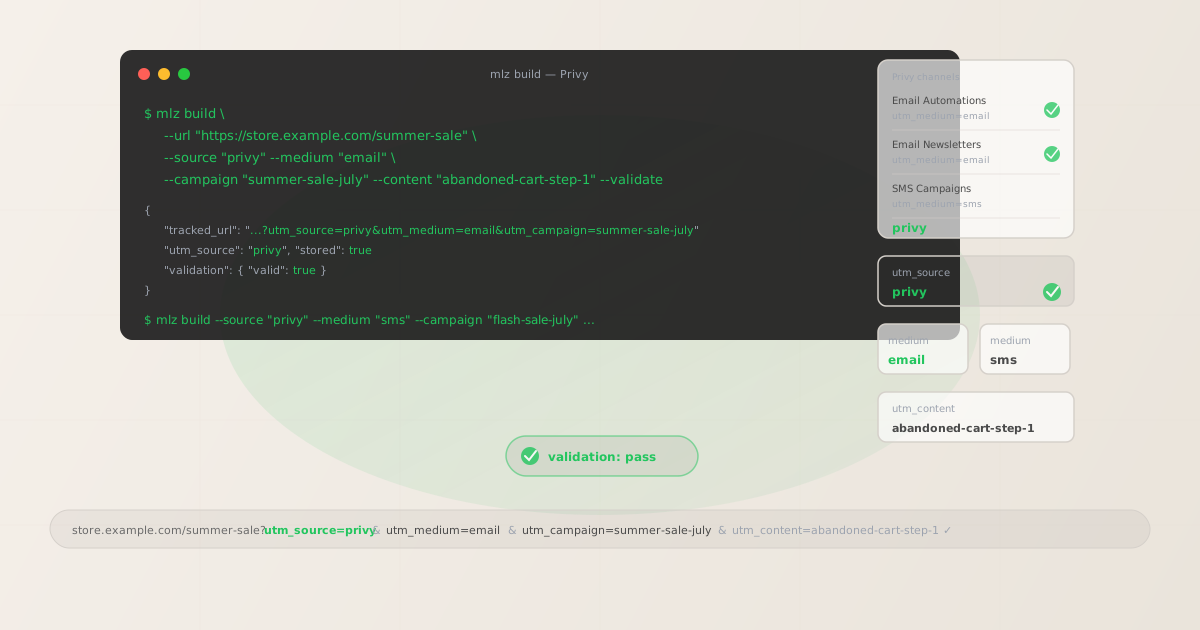
The correct utm_source and utm_medium for Privy
Use utm_source=privy — lowercase, the platform name — for all email and SMS sends from the Privy platform. The source value identifies the sending platform, not the message type. Channel assignment in GA4 is handled by utm_medium: use utm_medium=email for all Privy email Automations and Newsletter Campaigns, and utm_medium=sms for Privy SMS Campaigns.
Many Privy users configure the platform only for its popup and flyout forms — they use Privy to capture emails but may never actively configure UTM tracking for the email sends that follow. This creates a gap: contacts captured by Privy popups receive Privy emails, those emails link to the store, and the resulting sessions appear in GA4 as direct or organic traffic because no UTM parameters were added to the email links. Establish utm_source=privy as an explicit convention across your team before activating any Privy Automation or sending any Privy Newsletter Campaign.
| Send type | utm_source | utm_medium | Correct? |
|---|---|---|---|
| Email Automation step | privy |
email |
✓ Yes |
| Newsletter Campaign | privy |
email |
✓ Yes |
| SMS Campaign | privy |
sms |
✓ Yes |
| Any send | privy.com |
email |
✗ No — creates a different source row in GA4 |
| Any send | privy |
privy |
✗ No — routes to Unassigned in GA4 |
GA4's default channel grouping assigns sessions to the Email channel when utm_medium=email is present and to the SMS or Other channel when utm_medium=sms is present, regardless of the source value. All Privy email sends appear under the Email channel in GA4's channel reports, with privy as the source dimension for filtering Privy-specific traffic from other email platforms you use.
Privy Email Automations — UTM tracking for triggered email sequences
Privy Automations are triggered email sequences that fire based on subscriber or customer actions: a contact joining a Privy display (popup or flyout), a shopper abandoning their cart on a connected Shopify or WooCommerce store, a customer completing a purchase (post-purchase follow-up), a first-time buyer (welcome series), a customer reaching a win-back threshold (re-engagement sequence), or a subscriber's birthday. Automations are multi-step: an abandoned cart Automation might send an initial recovery email one hour after abandonment, a follow-up with a discount code 24 hours later, and a final reminder at 48 hours.
Each Automation email step that links to an external destination requires a tracked URL with a utm_content value identifying the specific step. Without per-step identifiers, GA4 aggregates all sessions from an entire Automation sequence into a single campaign dimension row — it is impossible to determine which step in an abandoned cart sequence drove the recovery, or which welcome email step produced the first purchase conversion.
# Abandoned cart Automation — step 1: initial recovery email
$ mlz build \
  --url "https://store.example.com/cart" \
  --source "privy" \
  --medium "email" \
  --campaign "abandoned-cart" \
  --content "step-1-initial-recovery" \
  --validate

{
  "tracked_url": "https://store.example.com/cart?utm_source=privy&utm_medium=email&utm_campaign=abandoned-cart&utm_content=step-1-initial-recovery",
  "validation": { "valid": true }
}

# Abandoned cart Automation — step 2: discount code follow-up
$ mlz build \
  --url "https://store.example.com/cart" \
  --source "privy" \
  --medium "email" \
  --campaign "abandoned-cart" \
  --content "step-2-discount-followup" \
  --validate

{
  "tracked_url": "https://store.example.com/cart?utm_source=privy&utm_medium=email&utm_campaign=abandoned-cart&utm_content=step-2-discount-followup",
  "validation": { "valid": true }
}
Paste each tracked URL into the link destination field in the corresponding Privy Automation email step. Build all tracked URLs before opening Privy's email template editor — define the campaign slug and the full set of content identifiers for all steps in the Automation first, then run mlz build for each step. For abandoned cart Automations, the primary CTA is typically a "Return to Cart" or "Complete Your Purchase" button linking to the shopper's cart URL — build a tracked version of the cart URL with utm_campaign=abandoned-cart and utm_content=step-X-identifier for each step.
For welcome series Automations triggered by a contact joining a Privy popup display, use a campaign slug that reflects the acquisition source and lifecycle stage: utm_campaign=welcome-popup-signup for contacts from your popup form, utm_campaign=welcome-flyout-signup for contacts from your flyout form if you run both and want to distinguish the acquisition pathway at the campaign level. If you run a single welcome series regardless of which Privy display captured the contact, a unified utm_campaign=welcome-series is sufficient — use utm_content for per-step tracking.
Privy Newsletter Campaigns — UTM tracking for one-off email sends
Privy Newsletter Campaigns are one-off email sends dispatched to a subscriber list or segment at a scheduled time or immediately. Newsletter Campaigns are used for promotional blasts, sale announcements, new product launches, seasonal promotions, and any email send that is not part of a recurring triggered Automation sequence. A Newsletter Campaign typically has one or more CTAs: a primary button linking to the sale landing page or product collection, and optionally secondary links to individual featured products.
For Newsletter Campaigns with a single primary CTA, build one tracked URL with a campaign slug identifying the specific send initiative: utm_campaign=summer-sale-july, utm_campaign=new-arrivals-june, utm_campaign=holiday-preview-2026. For Newsletter Campaigns with multiple CTAs pointing to different destination pages, build a separate tracked URL for each CTA with a distinct utm_content value: hero-product-cta, category-women-cta, category-men-cta, sale-banner-link.
# Summer sale Newsletter Campaign — hero CTA
$ mlz build \
  --url "https://store.example.com/summer-sale" \
  --source "privy" \
  --medium "email" \
  --campaign "summer-sale-july" \
  --content "hero-cta" \
  --validate

{
  "tracked_url": "https://store.example.com/summer-sale?utm_source=privy&utm_medium=email&utm_campaign=summer-sale-july&utm_content=hero-cta",
  "validation": { "valid": true }
}

# Same sale — SMS Campaign
$ mlz build \
  --url "https://store.example.com/summer-sale" \
  --source "privy" \
  --medium "sms" \
  --campaign "summer-sale-july" \
  --validate

{
  "tracked_url": "https://store.example.com/summer-sale?utm_source=privy&utm_medium=sms&utm_campaign=summer-sale-july",
  "validation": { "valid": true }
}
When the same promotional initiative sends both an email Newsletter Campaign and an SMS Campaign — a summer sale announcement via both channels — use the same campaign slug for both sends with the channel distinction handled by utm_medium: utm_campaign=summer-sale-july with utm_medium=email for the Newsletter Campaign and utm_medium=sms for the SMS Campaign. This allows cross-channel comparison within the same campaign initiative in GA4 through the medium dimension without requiring separate campaign slugs per channel.
Privy's Shopify integration and auto-populated product URLs
Privy integrates directly with Shopify to enable abandoned cart Automations, post-purchase sequences, and product-featuring email templates. This integration allows Privy to pull real-time cart contents, product images, product names, and prices into email templates automatically — creating a personalised abandoned cart email that shows each shopper the specific products they left behind.
The critical UTM risk from this integration: Privy's Shopify-pulled product URLs in email templates are the raw Shopify product URLs without UTM parameters. The abandoned cart recovery email shows the right products from the shopper's cart, but the "Return to Cart" or product links link to the Shopify cart or product pages without any utm_source, utm_medium, or utm_campaign parameters. Sessions from shoppers who click these untracked links appear in GA4 as direct or organic traffic — the Privy abandoned cart recovery email gets no attribution in GA4 despite driving the return visit that completed the purchase.
The solution is to use a static tracked URL for the primary cart recovery CTA — the "Return to Your Cart" or "Complete Your Purchase" button — rather than relying on Privy's dynamic cart URL. Most abandoned cart recovery emails have one primary CTA linking to the cart page: build that tracked URL with mlz build --source privy --medium email --campaign abandoned-cart --content step-1-recovery and manually set it as the link destination for the primary CTA button in the Privy email template, overriding any auto-populated cart URL. For individual product links in the abandoned cart email body, the auto-populated product URLs from Shopify still provide a useful fallback — but the primary CTA that drives recovery should always be a manually tracked URL.
Privy UTM tracking gotchas
- Privy has no built-in UTM parameter builder — all tracked links must be built externally
- Privy does not include a UTM settings panel, link-level parameter interface, or automatic UTM application feature. Every tracked URL must be built outside Privy using
mlz buildand pasted into the link destination fields in Automation step templates and Newsletter Campaign editors. There is no retroactive option to add UTM parameters to links in already-sent emails or already-active Automations. Build all tracked URLs before opening Privy's email template editor — activating an Automation without tracked URLs means every session it drives will appear as direct traffic in GA4 until you pause, re-configure, and re-activate the Automation. - Shopify-integrated abandoned cart emails auto-populate product URLs without UTM parameters
- Privy's Shopify integration pulls cart contents and product data into abandoned cart email templates automatically. The resulting product links in the email body are raw Shopify product or cart URLs without UTM parameters — they do not carry
utm_source=privyor any campaign attribution. Always manually set the primary recovery CTA link to a tracked URL built withmlz build --source privy --medium email --campaign abandoned-cart, overriding Privy's auto-populated cart URL for the main CTA button. Sessions from shoppers who click the auto-populated product links in the email body will appear as direct traffic in GA4 — accept this for secondary product links but never for the primary recovery button. - Privy is known as a popup tool but sends significant email volume — ensure UTM tracking covers all sends
- Many marketing teams set up Privy specifically for its popup and flyout form builder and treat the email functionality as secondary. As a result, Privy email Automations and Newsletter Campaigns may be active and sending for months without any UTM tracking configured — producing sessions that appear as direct or organic in GA4 with no attribution to Privy email. Audit your active Privy Automations to identify which have been sending without tracked URLs, and prioritise adding UTM tracking to high-volume Automations like abandoned cart recovery and welcome series.
- Privy popup form submissions drive contact acquisition — not email sessions — track them separately
- When a visitor submits a Privy popup or flyout form on your store, they are captured as a contact in Privy's list. This form submission event is a contact acquisition event, not a returning session attributable to an email send. The UTM parameters on the page where the visitor submitted the form describe how that visitor arrived at your site originally (organic search, paid ad, social media) — not the Privy email that may follow weeks later. Privy email UTM tracking applies to the outbound email links that bring the contact back to your site after they have already subscribed. Do not conflate the two: the popup captures the contact, the UTM-tracked email link attributes the return visit.
- SMS tracked URLs should be validated for redirect chain and UTM preservation before sending
- UTM-tracked links for Privy SMS Campaigns are longer than the original destination URL. If the tracked URL is long, use a URL shortener applied to the fully tracked URL (not to the original URL before UTM parameters are added), then run
mlz checkagainst the shortened URL to confirm the redirect chain forwards UTM parameters to the final destination without stripping query strings. SMS recipients are more likely to abandon slow or broken links — validate all SMS destination URLs withmlz checkbefore sending any Privy SMS Campaign.
Privy UTM naming conventions
Recommended UTM parameter values for Privy, aligned with GA4 default channel groupings and a lowercase-hyphenated taxonomy:
- utm_source:
privy— always, for all email Automations, Newsletter Campaigns, and SMS Campaigns from the Privy platform. Never useprivy.com,privy-email, or any domain-based or channel-suffixed variant. Document and enforce this value across your team. - utm_medium:
emailfor all Privy email Automations and Newsletter Campaigns.smsfor all Privy SMS Campaigns. Never useutm_medium=privy— it routes sessions to Unassigned in GA4's default channel grouping. - utm_campaign: Lowercase, hyphenated, initiative-level slug. For Automations: the sequence type and purpose —
abandoned-cart,welcome-series,post-purchase-followup,win-back-90d. For Newsletter Campaigns: the specific send initiative —summer-sale-july,new-arrivals-june,holiday-preview-2026. For Privy displays that capture contacts and trigger automated emails, the Automation campaign slug identifies the email sequence, not the display that captured the contact. - utm_content: Per Automation step with a primary CTA:
step-1-initial-recovery,step-2-discount-followup,step-3-final-reminder. Per Newsletter Campaign CTA when multiple destination links exist:hero-cta,category-women-cta,sale-banner-link. For SMS Campaigns with a single link, utm_content may be omitted or set to a descriptive identifier:sms-flash-sale. - utm_term: Optional for Privy. Consider using utm_term to distinguish Automations triggered by contacts from different Privy displays when the same sequence type applies to multiple acquisition sources:
display-homepage-popup,display-exit-intent-flyout. Preferable to encoding the display source in utm_source or utm_campaign when the Automation sequence itself is identical across displays.
See the UTM naming conventions guide for the full cross-platform reference and the UTM tracking for developers guide for programmatic generation and validation at scale.
FAQ
- Should I use utm_source=privy or utm_source=privy.com?
- Use
utm_source=privy. The platform name is Privy, not Privy.com — the UTM source value should reflect the platform name, not the domain. Using the domain creates a separate GA4 source row from the platform-name convention. Standardise onutm_source=privyacross your entire team and document it explicitly in your UTM naming convention guide. Runmlz build --source privyto enforce the normalised value. - How do I track which Privy Automation step drove a purchase in GA4?
- Use a unique
utm_contentvalue for each Automation step that links to an external page. Before configuring any Automation in Privy, define content identifiers for all steps:step-1-initial-recovery,step-2-discount-followup,step-3-final-reminder. Build each tracked URL withmlz build --medium email --content "step-X-identifier" --validate, then paste the returnedtracked_urlinto the link destination for the corresponding Automation step. GA4 attributes sessions and conversions to individual Automation steps through the utm_content dimension. - Does Privy automatically add UTM parameters to email links?
- No. Privy does not include a UTM parameter builder or automatic UTM application feature. All tracked URLs must be built externally using
mlz build --source privy --medium email --campaign "your-campaign"and pasted into email templates manually. For abandoned cart Automations in particular, the Shopify integration populates product and cart URLs in email templates without UTM parameters — always replace the primary CTA link with a manually tracked URL before activating any Automation. - What do I do about Privy's abandoned cart email showing Shopify product URLs?
- For the primary recovery CTA button — the main "Return to Cart" or "Complete Your Purchase" call-to-action — replace the auto-populated Shopify cart URL with a tracked URL built with
mlz build --source privy --medium email --campaign abandoned-cart --content step-1-recovery. Set this tracked URL as the button's link destination in Privy's email editor. For the individual product thumbnail links in the email body (which show the specific abandoned products from the shopper's cart), accept that these auto-populated Shopify product URLs will not carry UTM parameters — they are contextual product references, not the primary recovery CTA. Focus your UTM tracking efforts on the primary CTA button that drives the recovery conversion. - How do I validate a Privy tracked URL before activating an Automation?
- Run
mlz check "https://store.example.com/cart?utm_source=privy&utm_medium=email&utm_campaign=abandoned-cart"to confirm the destination URL resolves correctly, responds within an acceptable time, does not return an error status, and does not have a redirect chain that strips the UTM query string. For Privy SMS Campaign URLs, also verify the total URL length before including the tracked URL in any SMS message body — a long tracked URL may exceed the character budget and require shortening before use.
Recommended posts
Build Privy campaign links from the terminal
Pass --source "privy" and --medium "email" (or --medium "sms") to mlz build to get a normalised, validated tracked URL ready to paste into any Privy Automation step or Newsletter Campaign template. For abandoned cart Automations using Privy's Shopify integration, build tracked URLs for each step's primary CTA before opening the Privy email editor — the Shopify-pulled product URLs in the template body will not carry UTM parameters and must be replaced at the CTA button level. Run mlz check to verify destination URLs resolve correctly before activating any Automation or sending any Campaign.
1,000 links/month free. No credit card.
Your API key
Save this now — it won't be shown again.
npm install -g missinglinkz
Free plan: 1,000 links/month. No credit card. See the UTM tracking for developers guide for the full programmatic workflow including API and MCP integration.