UTM Tracking for Postscript: How to Build and Validate Campaign Links
UTM tracking for Postscript uses utm_source=postscript for all SMS sends from the platform, with utm_medium=sms for both Campaigns and Flow messages. Postscript is a Shopify-native SMS marketing platform built specifically for ecommerce brands — it shortens every outbound link through its pscrpt.app URL shortener before the message reaches the subscriber. This link shortening creates the same non-obvious UTM constraint that applies to Attentive's attn.tv: the pscrpt.app short link is generated from the destination URL you enter in Postscript's message editor at the time the Campaign or Flow step is configured. Once a short link exists, its destination URL — including all query parameters — is fixed. You cannot append UTM parameters to a pscrpt.app short URL after it has been created. Every tracked URL, with UTM parameters already attached, must be built and validated before it is pasted into Postscript. Use mlz build to generate the tracked URL, mlz check to validate the destination resolves correctly, then paste the tracked URL into Postscript's link field — not the bare destination URL.
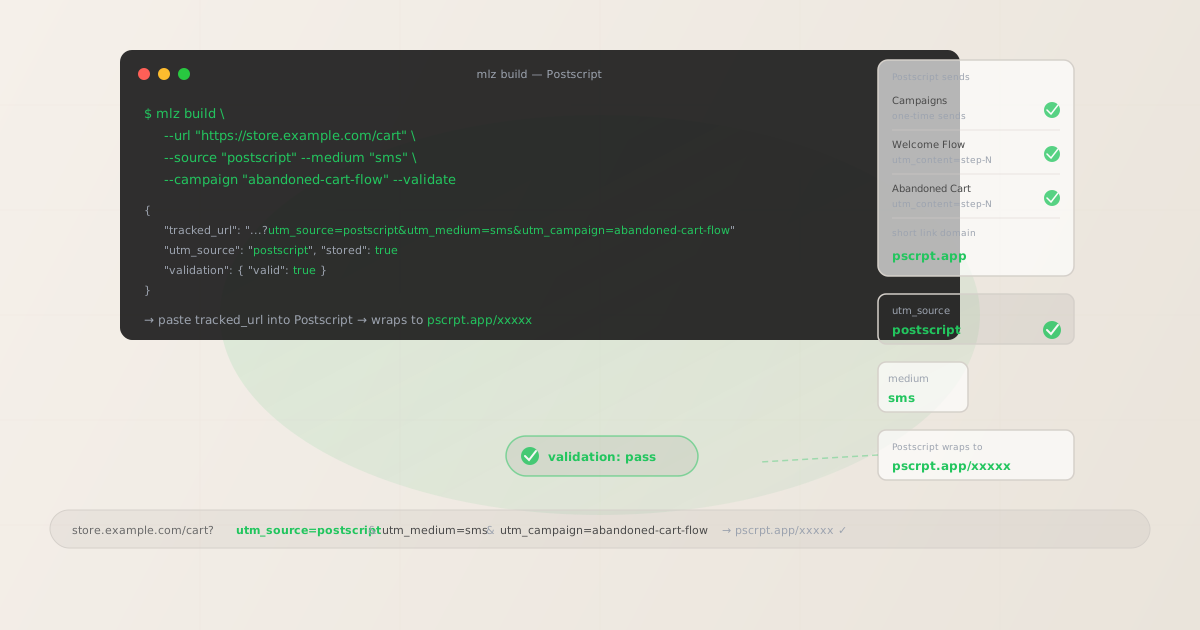
The correct utm_source and utm_medium for Postscript
Use utm_source=postscript — lowercase, no suffix — for all sends from the Postscript platform, across all send types: one-time Campaigns and all automated Flow messages (Welcome Flow, Abandoned Cart Flow, Browse Abandonment Flow, Customer Winback Flow). The source value identifies the sending platform, not the send type or individual message. Channel routing in GA4 is handled by utm_medium: use utm_medium=sms for all Postscript sends, since Postscript is an SMS-only platform.
Some teams use utm_source=postscript-sms to encode the channel in the source value, or use a generic value like sms for all SMS platforms combined. Both create attribution problems: postscript-sms creates a separate source row in GA4 from postscript, making it impossible to segment all Postscript-driven sessions without a custom filter. Using utm_source=sms for all SMS platforms strips the platform dimension entirely — you cannot distinguish Postscript traffic from Attentive traffic or Klaviyo SMS traffic in the same GA4 source report. Standardise on utm_source=postscript and put the channel dimension in utm_medium=sms where it belongs.
| Send type | utm_source | utm_medium | Correct? |
|---|---|---|---|
| Campaign (one-time send) | postscript |
sms |
✓ Yes |
| Welcome Flow | postscript |
sms |
✓ Yes |
| Abandoned Cart Flow | postscript |
sms |
✓ Yes |
| Any send | postscript-sms |
sms |
✗ No — splits source in GA4 |
| Any send | sms |
sms |
✗ No — cannot identify platform |
| Any send | postscript |
postscript |
✗ No — routes to Unassigned in GA4 |
GA4's default channel grouping places sessions with utm_medium=sms into the SMS channel, regardless of the source. All Postscript SMS sessions appear under the SMS channel in GA4's channel reports, with postscript as the source dimension for isolating Postscript-driven traffic from other SMS platforms your store may also use — such as Klaviyo SMS, Attentive, or Omnisend SMS.
How Postscript's link shortening works — and why UTM parameters must be set first
Every link in a Postscript Campaign or Flow message is wrapped by Postscript's short link infrastructure at the time the message template is saved or the Flow step is configured. Postscript generates a pscrpt.app short link from the destination URL you provided when building the message. If you have configured a custom short domain for your store, Postscript uses that instead of pscrpt.app — but the same constraint applies regardless of which short domain is used.
The destination URL — including all query parameters — is captured at short link creation time and cannot be changed after the short link is generated. If you enter a bare destination URL (for example, https://store.example.com/summer-sale) into Postscript's link field, Postscript generates a pscrpt.app short link that redirects to the bare URL. Subscribers who click that short link will arrive at your store without UTM parameters — their sessions appear as direct traffic in GA4. There is no mechanism to add UTM parameters to the short link after it has been created without deleting the short link and reconfiguring the Campaign or Flow step with the correct tracked URL.
The correct workflow: build the fully tracked URL with mlz build, validate the destination resolves correctly with mlz check, then paste the tracked URL into Postscript's link field. Postscript wraps the tracked URL — UTM parameters and all — into the pscrpt.app short link. When a subscriber clicks the short link, Postscript's redirect forwards them to the tracked URL, GA4 records the UTM parameters, and the session is attributed to Postscript correctly.
# Step 1: build the tracked URL before entering it into Postscript
$ mlz build \
  --url "https://store.example.com/summer-sale" \
  --source "postscript" \
  --medium "sms" \
  --campaign "summer-sale-july" \
  --validate

{
  "tracked_url": "https://store.example.com/summer-sale?utm_source=postscript&utm_medium=sms&utm_campaign=summer-sale-july",
  "params": {
    "utm_source": "postscript",
    "utm_medium": "sms",
    "utm_campaign": "summer-sale-july"
  },
  "destination_url": "https://store.example.com/summer-sale",
  "created_at": "2026-06-05T10:00:00.000Z",
  "link_id": "lnk_ps12345a",
  "stored": true
}

# Step 2: validate the destination URL resolves correctly
$ mlz check "https://store.example.com/summer-sale?utm_source=postscript&utm_medium=sms&utm_campaign=summer-sale-july"

# Step 3: paste the tracked_url into Postscript's message editor
# Postscript wraps it → pscrpt.app/xxxxx → redirects to tracked URL
Run mlz check against the full tracked URL before pasting it into Postscript. Shopify stores sometimes use redirect layers — Shopify page redirects, CDN rewrites, or third-party apps — between the destination URL and the final page. A tracked URL that resolves correctly in a browser may drop UTM parameters if an intermediate redirect does not forward the query string. Validating before Postscript generates the pscrpt.app short link is the only reliable window to catch this.
Postscript Campaigns vs Flows — different UTM tracking needs
Postscript organises sends into two categories with distinct UTM tracking considerations:
Campaigns are one-time SMS sends to a subscriber list or segment — flash sales, new product launches, back-in-stock alerts, seasonal promotions. Each Campaign contains a single message with one or more links. Use a utm_campaign value that identifies the specific send initiative: summer-sale-july, new-arrivals-june, flash-sale-weekend. If the Campaign message contains multiple links to different destinations, add a utm_content value to each to distinguish them in GA4 attribution.
Flows are automated SMS sequences triggered by subscriber actions or Shopify events. Postscript's built-in Flow types include the Welcome Flow (triggered when a subscriber opts in), the Abandoned Cart Flow (triggered when a Shopify customer abandons their cart), the Browse Abandonment Flow (triggered by product page views without adding to cart), the Customer Winback Flow (triggered by inactivity), and custom event-triggered Flows. Each Flow is multi-step: an Abandoned Cart Flow might send an initial recovery message one hour after abandonment, a second with a discount 24 hours later, and a final reminder at 48 hours.
Each Flow step that links to an external destination needs a unique utm_content value identifying the specific step. Without per-step utm_content identifiers, GA4 aggregates all sessions from every step of a Flow into a single campaign dimension row — it is impossible to determine which step produced the recovery conversion.
# Abandoned Cart Flow — step 1: initial recovery (1h after abandonment)
$ mlz build \
  --url "https://store.example.com/cart" \
  --source "postscript" \
  --medium "sms" \
  --campaign "abandoned-cart-flow" \
  --content "step-1-initial-recovery" \
  --validate

{
  "tracked_url": "https://store.example.com/cart?utm_source=postscript&utm_medium=sms&utm_campaign=abandoned-cart-flow&utm_content=step-1-initial-recovery",
  "stored": true
}

# Abandoned Cart Flow — step 2: discount offer (24h after abandonment)
$ mlz build \
  --url "https://store.example.com/cart" \
  --source "postscript" \
  --medium "sms" \
  --campaign "abandoned-cart-flow" \
  --content "step-2-discount-offer" \
  --validate

{
  "tracked_url": "https://store.example.com/cart?utm_source=postscript&utm_medium=sms&utm_campaign=abandoned-cart-flow&utm_content=step-2-discount-offer",
  "stored": true
}

# Welcome Flow — step 1: opt-in confirmation with first-purchase offer
$ mlz build \
  --url "https://store.example.com/collections/all" \
  --source "postscript" \
  --medium "sms" \
  --campaign "welcome-flow" \
  --content "step-1-first-purchase" \
  --validate

{
  "tracked_url": "https://store.example.com/collections/all?utm_source=postscript&utm_medium=sms&utm_campaign=welcome-flow&utm_content=step-1-first-purchase",
  "stored": true
}
Build all tracked URLs for every step of a Flow before opening Postscript's Flow editor. Define the full set of step identifiers first — step-1-initial-recovery, step-2-discount-offer, step-3-final-reminder — then run mlz build for each. Paste each returned tracked_url into the corresponding Flow step in Postscript's editor. Because the pscrpt.app short link is generated from the destination URL at configuration time, there is no opportunity to update UTM parameters after the Flow is activated without pausing the Flow and reconfiguring each affected step.
Shopify dynamic URLs and Postscript
Postscript's tight Shopify integration means some Flow messages use dynamically generated URLs — URLs that Postscript constructs at send time using Shopify data specific to the individual subscriber and their session. The Abandoned Cart Flow is the primary example: Postscript can include a dynamic cart recovery link in the message body that takes the subscriber directly to their specific abandoned cart, with their items pre-loaded. This dynamic cart URL is generated by Postscript at message send time using Shopify's cart token or checkout URL — it cannot be manually pre-built with mlz build because the URL is unique per subscriber per abandonment event.
For dynamic cart recovery links, Postscript handles UTM tagging through its own link management settings — you configure the utm_source, utm_medium, and utm_campaign values for dynamic links in Postscript's UTM settings, and Postscript appends them to the dynamically generated cart URLs at send time. Set these values to postscript, sms, and your chosen campaign slug respectively in Postscript's UTM configuration. You do not need to build these tracked URLs with mlz build — Postscript's dynamic link system handles the parameter appending.
Static CTAs — links to a landing page, collection, or product that do not need to be personalised per subscriber — must still be built with mlz build before being pasted into Postscript. The distinction is: if the URL is the same for every subscriber who receives the message, build it with mlz build --validate and paste the tracked URL. If the URL is subscriber-specific and generated dynamically by Postscript, configure UTM parameters in Postscript's UTM settings and let Postscript handle appending them.
Postscript UTM tracking gotchas
- UTM parameters must be on the destination URL before Postscript creates the pscrpt.app short link
- Postscript generates its
pscrpt.appshort links at the time a Campaign message is saved or a Flow step is configured. The destination URL — including all query parameters — is fixed at that point. If you enter a bare destination URL and later realise UTM parameters are missing, you must delete the link and re-enter the correctly tracked URL to generate a new short link. There is no way to edit the destination of an existingpscrpt.appshort link. The only window to get UTM parameters onto the destination is before handing it to Postscript. Always build tracked URLs withmlz build --validatefirst, confirm the outputtracked_urlcarries the correct parameters, then paste it into Postscript. - Dynamic cart recovery URLs are different from static CTAs — handle them separately
- Postscript's Abandoned Cart Flow can include a dynamic cart recovery link that reconstructs the subscriber's abandoned cart on click. This link is generated by Postscript at message send time using Shopify's cart token — it cannot be pre-built. Configure Postscript's UTM settings to append
utm_source=postscript,utm_medium=sms, and your campaign slug to dynamic cart links automatically. For static CTAs in the same Flow step (a discount page, a collection page, a brand landing page), build tracked URLs manually withmlz buildand paste them into the message. Never apply static tracking to a dynamic cart URL or vice versa. - Shopify redirects and product page URL structures can strip UTM parameters
- Shopify stores frequently use redirects: /products/old-name redirecting to /products/new-name, collections pages redirecting through canonical URLs, CDN edge rewrites, and third-party app redirects that process URLs before the page loads. Any of these redirects that does not preserve the query string will drop UTM parameters before GA4 records the session. Run
mlz checkagainst every static tracked URL you build for Postscript to confirm the full parameter string survives to the final response. A redirect that strips parameters will cause the subscriber's session to appear as direct traffic in GA4 even though thepscrpt.appshort link correctly carries the tracked URL as its destination. - Do not use the same utm_campaign value for Campaigns and Flows
- It is tempting to reuse a campaign slug — for example,
summer-sale— across both a one-time Campaign send and an Abandoned Cart Flow running during the same period. If you do, GA4 will aggregate sessions from both the one-time send and the automated Flow under the same campaign dimension value, making it impossible to compare their individual performance. Use distinct campaign slugs:summer-sale-campaignfor the one-time send andabandoned-cart-flow(orsummer-sale-abandoned-cartif you want to tie it thematically) for the Flow. Maintain a consistent naming convention so all Flows are identifiable as flows in GA4 filtering. - Standardise on utm_source=postscript — not postscript-sms, not sms
- Teams new to Postscript sometimes use
utm_source=postscript-smsto make the channel explicit in the source value, or useutm_source=smsas a platform-agnostic SMS source. Both approaches cause problems:postscript-smscreates a separate GA4 source row frompostscriptif any links slip through without the suffix, splitting attribution;smsas a source value makes Postscript sessions indistinguishable from Klaviyo SMS, Attentive, or any other SMS platform you run. Standardise onutm_source=postscriptand enforce it by running all static tracked URLs throughmlz build --source postscript.
Postscript UTM naming conventions
Recommended UTM parameter values for Postscript, aligned with GA4 default channel groupings and a lowercase-hyphenated taxonomy:
- utm_source:
postscript— always, for all Campaigns and Flow messages sent from Postscript. Never usepostscript-sms,sms, or your store name as the source value. - utm_medium:
smsfor all Postscript sends. Postscript is an SMS-only platform. Usingutm_medium=smsroutes sessions to GA4's SMS channel and keeps the medium consistent across all SMS platforms your store uses. - utm_campaign: Lowercase, hyphenated, initiative-level slug. For one-time Campaigns:
summer-sale-july,flash-sale-weekend,new-arrivals-june. For automated Flows: the sequence name —welcome-flow,abandoned-cart-flow,browse-abandonment-flow,customer-winback-flow. Never reuse the sameutm_campaignvalue across one-time sends and automated Flows. - utm_content: Per-step identifier for multi-step Flow messages:
step-1-initial-recovery,step-2-discount-offer,step-3-final-reminder. For one-time Campaigns with multiple CTAs, use per-CTA identifiers:hero-cta,secondary-product-link. Omitutm_contentfor single-link Campaigns without step differentiation needs. - utm_term: Rarely needed for Postscript. Consider using
utm_termto distinguish subscriber segments when the same Campaign is sent to multiple lists with different offers and you need per-segment performance data in GA4.
See the UTM naming conventions guide for the full cross-platform reference and the UTM tracking for developers guide for programmatic generation and validation at scale.
FAQ
- Can I add UTM parameters to a pscrpt.app short link after Postscript has created it?
- No. Postscript generates
pscrpt.appshort links from the destination URL you provide at the time you save a Campaign message or configure a Flow step. The destination URL, including all query parameters, is fixed when the short link is created. There is no mechanism to append or edit UTM parameters on an existingpscrpt.appshort link. If you discover that a link was entered without UTM parameters after the short link has been generated, you must delete the link, enter a corrected tracked URL built withmlz build --validate, and allow Postscript to create a new short link. For active Flows, this requires pausing the Flow before making the change. - Does Postscript have a built-in UTM builder?
- Postscript includes a UTM parameter configuration section in Campaign settings where you can set default
utm_source,utm_medium, andutm_campaignvalues. When configured, Postscript appends these values to links that do not already carry UTM parameters. For dynamic cart recovery links, this is the intended method — you configure the values once and Postscript appends them to dynamically generated cart URLs at send time. For static CTAs, pre-building tracked URLs withmlz buildand pasting the full tracked URL into the message gives you more control: you can use human-readable campaign slugs, includeutm_contentfor per-CTA tracking, and validate the destination before the short link is created. - How do I track individual Postscript Flow steps in GA4?
- Use a unique
utm_contentvalue for each Flow step that links to an external URL. Define step identifiers for all steps before opening Postscript's Flow editor:step-1-initial-recovery,step-2-discount-offer,step-3-final-reminder. Build each tracked URL withmlz build --campaign "abandoned-cart-flow" --content "step-X-identifier" --validate, then paste the returnedtracked_urlinto the corresponding Flow step in Postscript. GA4 attributes sessions and conversions to individual Flow steps through theutm_contentdimension in custom exploration reports. - What should I do about Postscript's dynamic abandoned cart links?
- Postscript's Abandoned Cart Flow includes the ability to use a dynamically generated cart recovery link that reconstructs the subscriber's specific abandoned cart. This link is created by Postscript at message send time using the subscriber's Shopify cart token — you cannot pre-build it. Configure UTM parameters for dynamic links in Postscript's settings: set
utm_source=postscript,utm_medium=sms, and your abandoned cart campaign slug. Postscript appends these parameters to the dynamically generated cart URL when the message sends. For any other links in the same Abandoned Cart Flow message that are static (a discount landing page, a collections page), build those tracked URLs manually withmlz buildand paste them into the message alongside the dynamic cart recovery link. - How do I validate that Shopify redirects are not stripping my UTM parameters?
- Run
mlz check "https://store.example.com/page?utm_source=postscript&utm_medium=sms&utm_campaign=your-slug"to validate that the full tracked URL resolves correctly and does not encounter an error or unexpected redirect response.mlz checkfollows the redirect chain and reports each hop — if a redirect in the chain returns a response that drops the query string, the final tracked URL loses its UTM parameters before the page loads. Fix redirect chain issues at the Shopify store level (ensuring all page redirects preserve query strings) before pasting the tracked URL into Postscript. Once thepscrpt.appshort link is created from the destination URL, you cannot change where it points without reconfiguring the Campaign or Flow step.
Recommended posts
Build Postscript campaign links from the terminal
Pass --source "postscript" and --medium "sms" to mlz build to get a normalised, validated tracked URL ready to paste into Postscript's message editor before it generates the pscrpt.app short link. For Postscript Flows, build per-step tracked URLs with --content "step-X-identifier" for each step that links to an external destination. Run mlz check to verify that your destination URL resolves correctly and that no Shopify redirect in the chain strips the UTM query string before committing the URL to Postscript. Once Postscript wraps a URL into a pscrpt.app short link, the destination is fixed — validate first.
1,000 links/month free. No credit card.
Your API key
Save this now — it won't be shown again.
npm install -g missinglinkz
Free plan: 1,000 links/month. No credit card. See the UTM tracking for developers guide for the full programmatic workflow including API and MCP integration.