UTM Tracking for Microsoft/Bing Ads: How to Build and Validate Campaign Links
For Microsoft Ads (formerly Bing Ads), use utm_source=bing with utm_medium=cpc. Microsoft Ads has its own auto-tagging system — the msclkid parameter — that appends a click ID to destination URLs automatically. Unlike Google's gclid, however, msclkid does not automatically populate GA4's Traffic Acquisition reports with source and medium data. Without explicit UTM parameters, Microsoft Ads clicks often appear in GA4 as (not set) or are attributed to organic search rather than the Paid Search channel group. UTM parameters and msclkid serve different purposes and should be used together.
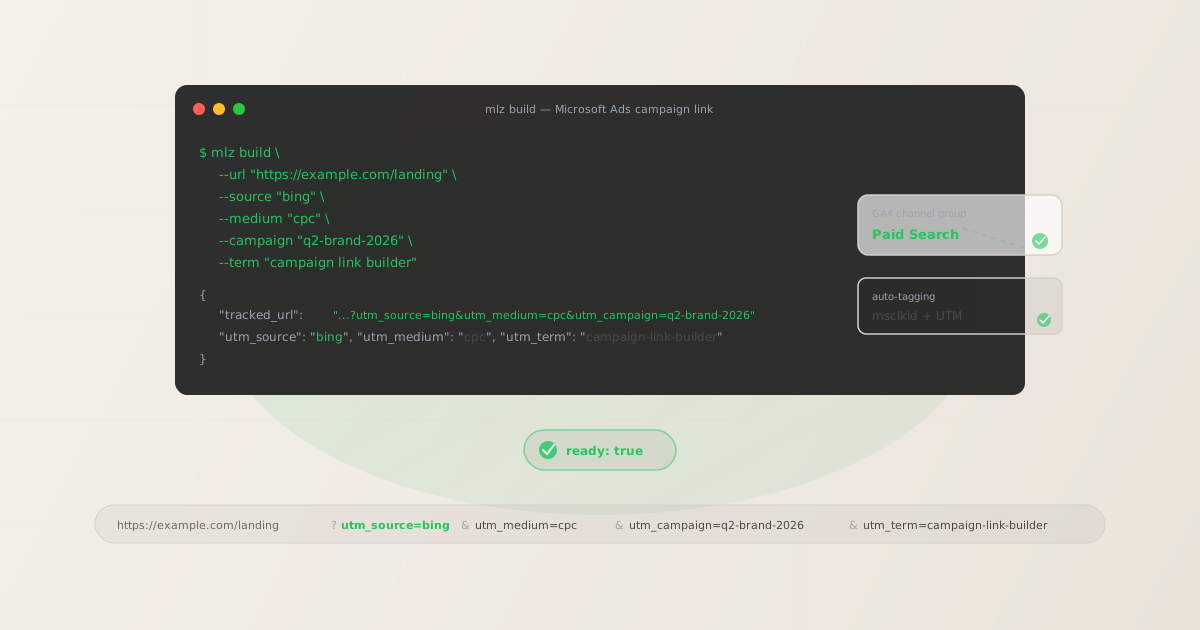
msclkid auto-tagging vs. UTM parameters: what each does
Microsoft Ads' auto-tagging system appends an msclkid parameter to destination URLs when a user clicks an ad. This is Microsoft's equivalent of Google's gclid — a click identifier used for Microsoft's own attribution and reporting inside Ads Manager. Understanding what each system does prevents the common mistake of relying on msclkid alone:
| What it does | msclkid (auto-tagging) | UTM parameters |
|---|---|---|
| Populates Microsoft Ads Manager reports | ✓ Yes | ✗ No |
| Populates GA4 Traffic Acquisition reports | ✗ No | ✓ Yes |
| Routes sessions to GA4 Paid Search channel | ✗ No | ✓ Yes |
| Survives redirect chains reliably | ✗ Varies | ✓ Yes (query string) |
| Works with third-party analytics (Mixpanel, Amplitude) | ✗ No | ✓ Yes |
The practical conclusion: keep Microsoft Ads auto-tagging enabled (it feeds Ads Manager's conversion and audience data), and add UTM parameters to destination URLs so GA4 can attribute sessions correctly. Both systems work on the same URL simultaneously — msclkid is appended automatically by Microsoft, while UTM parameters are part of the destination URL you set in Ads Manager.
Note that GA4 has a Microsoft Ads integration in the Google Ads Linked Accounts section — but this integration provides cost data import, not automatic UTM attribution. UTM parameters remain necessary for session-level source and medium attribution in GA4.
The correct utm_source and utm_medium for Microsoft Ads
Microsoft Ads covers search, audience (display), and shopping campaigns. The source and medium vary by campaign type:
| Microsoft Ads campaign type | utm_source | utm_medium |
|---|---|---|
| Search campaign (text ads) | bing |
cpc |
| Shopping campaign (Product Ads) | bing |
cpc |
| Audience campaign (display / native) | bing |
display |
| Responsive Search Ads (RSA) | bing |
cpc |
| Dynamic Search Ads (DSA) | bing |
cpc |
Use utm_source=bing (not microsoft or bingads). GA4's default Paid Search channel group condition recognises bing as a search platform source combined with a paid medium indicator like cpc. Using utm_source=microsoft or non-standard variants requires custom channel group configuration in GA4.
For Audience campaigns (Microsoft's display and native ad network), use utm_medium=display rather than cpc. GA4 routes utm_source=bing&utm_medium=display to the Display channel group, keeping brand awareness spend separate from search intent spend in your acquisition reports.
Using ValueTrack dynamic parameters with UTM
Microsoft Ads supports ValueTrack parameters — dynamic placeholders that Microsoft fills at click time with real campaign and keyword data. These are equivalent to Google's ValueTrack parameters and let you use dynamic values in your UTM tags without building a separate URL for every keyword or ad group. The most commonly used ValueTrack parameters for UTM:
# Destination URL template with ValueTrack dynamic parameters
https://example.com/landing
  ?utm_source=bing
  &utm_medium=cpc
  &utm_campaign={CampaignName}
  &utm_term={keyword}
  &utm_content={AdId}

# Microsoft fills in at click time:
#   {CampaignName} → your campaign name (e.g. "spring-launch-2026")
#   {keyword}      → the matched keyword (e.g. "campaign-link-builder")
#   {AdId}         → the ad ID that served (numeric, for ad-level reporting)

# Example rendered URL after click:
https://example.com/landing
  ?utm_source=bing
  &utm_medium=cpc
  &utm_campaign=spring-launch-2026
  &utm_term=campaign-link-builder
  &utm_content=12345678
Set this URL template in Microsoft Ads Manager under the campaign's "Ad URL options" or at the account level as a tracking template. ValueTrack parameters are filled server-side by Microsoft before the user lands on your page — so GA4 sees the resolved values, not the placeholder text.
If you use ValueTrack parameters for utm_campaign and utm_term, you don't need to set separate UTM values for each campaign manually. Only utm_source=bing and utm_medium=cpc need to be hardcoded — the rest can use Microsoft's ValueTrack system.
Building Microsoft Ads UTM links with mlz build
For campaigns where you set static UTM values (rather than ValueTrack), mlz build generates the tracked URL and normalises all parameter values to lowercase. This is particularly useful when building landing page-specific links for brand campaigns, seasonal promotions, or A/B test variants:
# Search campaign link with keyword
$ mlz build \
  --url "https://example.com/landing" \
  --source "bing" \
  --medium "cpc" \
  --campaign "q2-brand-2026" \
  --term "campaign link builder"

{
  "tracked_url": "https://example.com/landing?utm_source=bing&utm_medium=cpc&utm_campaign=q2-brand-2026&utm_term=campaign-link-builder",
  "params": {
    "utm_source": "bing",
    "utm_medium": "cpc",
    "utm_campaign": "q2-brand-2026",
    "utm_term": "campaign-link-builder"
  },
  "link_id": "lnk_r8mx7t4w",
  "stored": true
}

# Audience (display) campaign
$ mlz build \
  --url "https://example.com/landing" \
  --source "bing" \
  --medium "display" \
  --campaign "q2-awareness-2026" \
  --content "banner-300x250"
"tracked_url": "...?utm_source=bing&utm_medium=display&utm_campaign=q2-awareness-2026&utm_content=banner-300x250"
The mlz build CLI normalises --term "campaign link builder" to utm_term=campaign-link-builder (lowercase, spaces converted to hyphens) automatically. This prevents the GA4 keyword fragmentation that occurs when the same keyword appears with different capitalisation or spacing across ads.
Add --validate to confirm the destination URL resolves with HTTPS and returns a 200 status at build time. Microsoft Ads reviews destination URLs before ads go live — catching a broken destination before submission saves the review turnaround time.
Validating Microsoft Ads campaign links before launch
Microsoft Ads reviews destination URLs as part of the ad approval process. A URL that returns a non-200 status or redirects unexpectedly will cause the ad to be rejected or paused. Use mlz build --validate --inspect to run the full destination check before submitting campaigns for review:
$ mlz build \
  --url "https://example.com/landing" \
  --source "bing" \
  --medium "cpc" \
  --campaign "q2-brand-2026" \
  --term "campaign-link-builder" \
  --validate

{
  "tracked_url": "https://example.com/landing?utm_source=bing&utm_medium=cpc&utm_campaign=q2-brand-2026&utm_term=campaign-link-builder",
  "validation": {
    "valid": true,
    "checks": [
      { "check": "url_format", "status": "pass", "message": "URL format is valid." },
      { "check": "ssl", "status": "pass", "message": "URL uses HTTPS." },
      { "check": "resolution", "status": "pass", "message": "Destination responded with 200.", "details": { "response_time_ms": 218 } },
      { "check": "redirects", "status": "pass", "message": "No redirects detected." }
    ]
  }
}
The redirect check is especially important for Microsoft Ads. If your destination URL redirects to a different domain, Microsoft may flag the ad for using a destination URL that doesn't match the display URL domain — a policy violation that causes ad rejection. A clean redirect check means no unexpected domain hops. For a complete pre-publish workflow, see mlz publish-check.
Microsoft Ads tracking gotchas
- msclkid appended by Microsoft may conflict with UTM redirect chains
- When Microsoft Ads auto-tagging appends
msclkidto your destination URL, the resulting URL includes both your UTM parameters and the click ID:?utm_source=bing&utm_medium=cpc&utm_campaign=q2&msclkid=abc123. Most redirect chains pass all query parameters through unchanged. However, some landing page builders, CDN configurations, or link shorteners may strip unknown parameters or only pass specific query strings. Ifmsclkidis stripped (but UTMs survive), you lose Microsoft Ads' internal attribution. If UTMs are stripped (butmsclkidsurvives), you lose GA4 attribution. Validate your full destination URL chain withmlz checkto confirm all parameters pass through. - Bing vs. microsoft vs. bingads — choose one and stick to it
- GA4's default Paid Search channel group recognises
bingas a source paired withcpcas a medium. Usingutm_source=microsoftorutm_source=bingadsroutes sessions to an unmatched source row in GA4 and may not be attributed to the Paid Search channel group without custom rules. Useutm_source=bingconsistently across all Microsoft Ads campaigns. Themlz buildCLI stores and suggests consistent naming withmlz campaigns suggest --source bingonce you've used it at least once. - Parallel tracking changes where the destination URL is called
- Microsoft Ads supports parallel tracking — a performance feature where the user's browser goes directly to the destination URL while Microsoft's click measurement happens in the background, rather than routing the user through Microsoft's servers first. With parallel tracking enabled, the URL the user sees in their browser is the final destination URL including your UTM parameters — which is exactly the URL GA4 reads for session attribution. Parallel tracking does not affect UTM parameter survival; it is a performance optimisation, not an attribution change.
- Shopping campaigns need per-product UTM tags in the feed
- Microsoft Shopping campaigns pull destination URLs from your product catalog feed. To add UTM parameters to Shopping campaign links, either add a
custom_labelfield with the UTM-tagged URL in your feed, or use Microsoft's tracking templates with ValueTrack parameters to append?utm_source=bing&utm_medium=cpc&utm_campaign={CampaignName}to every product URL automatically. The tracking template approach is more maintainable for large catalogs — one template rule applies to all products. - Audience campaigns require utm_medium=display, not cpc
- Microsoft Audience Ads appear on the Microsoft Audience Network (MSN, Outlook, LinkedIn in some placements) — these are display and native ads, not paid search ads. Using
utm_medium=cpcon Audience campaigns mixes display traffic into your Paid Search channel group in GA4, which inflates search conversion rates and understates display performance. Useutm_medium=displayfor all Audience campaign links to keep the channel split clean.
Microsoft Ads UTM naming conventions
Consistent naming across Microsoft Ads and Google Ads campaigns is critical for cross-channel reporting in GA4. The recommended conventions for Microsoft Ads:
- utm_source:
bing(always lowercase — never "Bing", "Microsoft", or "BingAds") - utm_medium:
cpcfor search and shopping,displayfor Audience campaigns - utm_campaign: lowercase hyphen-separated matching the campaign name, e.g.
q2-brand-2026 - utm_term: the matched keyword, lowercase hyphen-separated, e.g.
campaign-link-builder; use ValueTrack{keyword}for dynamic population - utm_content: ad group name or ad creative identifier for A/B testing, e.g.
headline-variant-a
If you run both Google Ads and Microsoft Ads, consider using the same campaign slug in utm_campaign across both platforms — this lets you compare cross-platform performance for the same campaign in GA4 by filtering by campaign name and comparing by source.
For the full cross-channel naming reference, see the UTM naming conventions guide. For the GA4 case sensitivity mechanics that explain why lowercase enforcement matters, see Are UTM parameters case sensitive in GA4?
FAQ
- Do I need UTM parameters if I have msclkid auto-tagging enabled?
- Yes.
msclkidis a click identifier used by Microsoft Ads for internal attribution, bidding optimisation, and reporting inside Ads Manager. It does not automatically populate GA4's Traffic Acquisition reports with source, medium, or campaign data. Without UTM parameters, Microsoft Ads clicks in GA4 may appear as organic search (if GA4 detects the Bing referrer), direct, or(not set)— but they will not route to the Paid Search channel group without explicitutm_medium=cpc. Keep auto-tagging enabled and add UTM parameters to destination URLs; both systems work in parallel. - Should I use utm_source=bing or utm_source=microsoft?
- Use
utm_source=bing. GA4's default Paid Search channel group condition recognisesbingas a search platform source when paired withutm_medium=cpc. Usingutm_source=microsoftwill not match GA4's default Paid Search channel group definitions without a custom channel group rule. Changing this convention after campaigns are live creates a historical attribution split in GA4 — traffic before the change shows under one source, traffic after shows under another. - How do ValueTrack parameters interact with UTM parameters?
- ValueTrack parameters are Microsoft Ads' dynamic placeholders (like
{CampaignName}or{keyword}) that Microsoft fills at click time. They can be used directly as the values of UTM parameters in your destination URL template. For example, setting the destination URL tohttps://example.com/?utm_source=bing&utm_medium=cpc&utm_campaign={CampaignName}&utm_term={keyword}means Microsoft fills in the actual campaign name and keyword before the user lands on your page — and GA4 records those resolved values. This is the recommended approach for search campaigns with many keywords, as it avoids building separate URL for each keyword. - Why are my Microsoft Ads sessions showing as organic search in GA4?
- This happens when UTM parameters are missing and GA4 detects the
bing.comreferrer — GA4 may attribute the session to organic search because it recognises Bing as a search engine. The fix is to add explicitutm_source=bing&utm_medium=cpcto your destination URLs (or tracking template). Once UTM parameters are present, GA4 uses them for attribution instead of the referrer header, and sessions route to the Paid Search channel group correctly. - How do I track Microsoft Shopping campaigns in GA4?
- For Shopping campaigns, add UTM parameters to the destination URLs in your product catalog feed, or use a Microsoft tracking template that appends
?utm_source=bing&utm_medium=cpc&utm_campaign={CampaignName}to all product URLs automatically. The tracking template approach is more maintainable for large catalogs. To validate that Shopping Ad destination URLs resolve correctly and return 200, usemlz checkagainst a sample of your product URLs — particularly after catalog updates, when product page URLs commonly change.
Recommended posts
Build Microsoft Ads UTM links from the terminal
Pass --source "bing" --medium "cpc" to mlz build and get a normalised, validated URL ready for your Microsoft Ads destination field. Lowercase normalisation means GA4 routes every session to the Paid Search channel group correctly — alongside whatever msclkid Microsoft appends automatically. Add --validate to confirm the destination resolves cleanly before the ad enters Microsoft's review queue.
1,000 links/month free. No credit card.
Your API key
Save this now — it won't be shown again.
npm install -g missinglinkz
Free plan: 1,000 links/month. No credit card. See the UTM tracking for developers guide for the full programmatic workflow.