UTM Tracking for MaxBounty: How to Build and Validate Affiliate Campaign Links
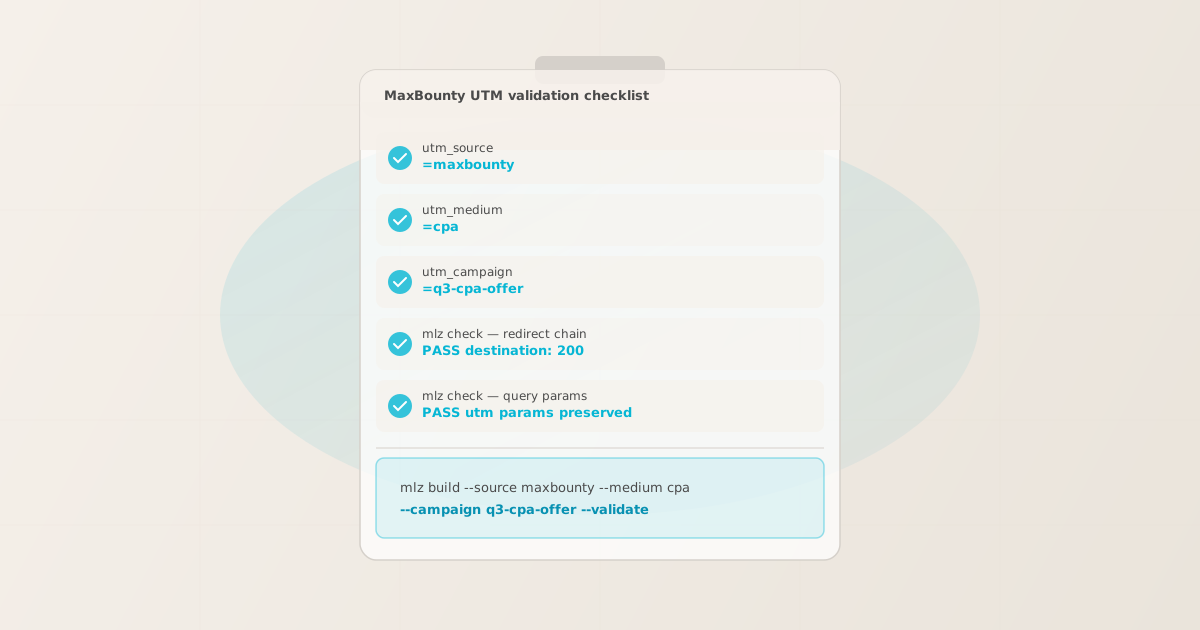
To add UTM tracking for MaxBounty, configure UTM parameters on the destination URL you submit with your CPA offer — not on the affiliate tracking links that MaxBounty generates for publishers. When an affiliate clicks the MaxBounty tracking link, MaxBounty’s system records the conversion event and forwards the visitor to your registered destination URL, carrying any query parameters you placed on it. GA4 reads UTM parameters from that landing page URL after the MaxBounty redirect completes. Use MissingLinkz mlz build to generate a normalized destination URL with consistent lowercase UTM values and mlz check to confirm that MaxBounty’s tracking redirect delivers those parameters intact before your offer goes live. The most common MaxBounty UTM attribution error: advertisers add UTM parameters directly to the affiliate tracking link URL that MaxBounty provides, rather than to the destination URL registered in the offer configuration — those parameters appear in the affiliate link but are not forwarded to the landing page, causing GA4 to record the session as direct traffic with no campaign attribution.
How MaxBounty routes traffic and where UTM parameters belong
MaxBounty is a performance-based CPA (cost-per-action) affiliate network where advertisers submit offers and affiliates promote them in exchange for a commission per completed action — a lead form submission, a sale, a free trial sign-up, or an app install. Advertisers configure their offer in MaxBounty’s platform with a destination URL that receives traffic after a conversion event. MaxBounty’s tracking system generates unique affiliate tracking links for each approved publisher, routes clicks through MaxBounty’s tracking infrastructure (typically tracking.maxbounty.com), records the conversion event for commission attribution, and then redirects the visitor to the advertiser’s registered destination URL.
This architecture creates a two-layer tracking system: MaxBounty’s own click-and-conversion tracking, which operates independently of GA4, and the advertiser’s UTM-based attribution in GA4, which depends on the destination URL receiving query parameters intact after the MaxBounty redirect. These two systems serve different purposes and do not interfere with each other when configured correctly.
The consequence for UTM tracking: UTM parameters belong on the destination URL registered in the MaxBounty offer configuration, not on the affiliate tracking links that MaxBounty generates for publishers. Advertisers do not control or modify those affiliate tracking links — MaxBounty generates them automatically for each publisher. The configuration point you own as an advertiser is the destination URL field in your offer settings. Paste the UTM-tagged URL generated by mlz build into that field. For a broader explanation of UTM parameter placement in affiliate redirect chains, see the UTM tracking for developers guide.
Building MaxBounty destination URLs with mlz build
MaxBounty advertisers managing multiple offers across different verticals often encounter a GA4 attribution fragmentation problem: different team members generating destination URLs independently use inconsistent source values (maxbounty, max-bounty, MaxBounty, mb-affiliate) and inconsistent medium values (cpa, affiliate, CPA, cpa-network). GA4 records each unique combination as a separate source — the MaxBounty Affiliate channel appears as four or five disconnected rows in the Acquisition report, making it impossible to assess total MaxBounty-driven performance without manual data cleaning.
The recommended naming convention for MaxBounty traffic is utm_source=maxbounty, utm_medium=cpa, and utm_campaign=[offer-name-slug]. Use utm_content to differentiate between offer variants or landing page tests within the same campaign. mlz build enforces these values through structured input rather than free-text entry, so every destination URL generated by any team member follows the same format.
$ mlz build \
  --url "https://offers.example.com/lead-form" \
  --source "maxbounty" \
  --medium "cpa" \
  --campaign "q3-insurance-leads-2026" \
  --content "landing-v1" \
  --validate

{
  "tracked_url": "https://offers.example.com/lead-form?utm_source=maxbounty&utm_medium=cpa&utm_campaign=q3-insurance-leads-2026&utm_content=landing-v1",
  "params": {
    "utm_source": "maxbounty",
    "utm_medium": "cpa",
    "utm_campaign": "q3-insurance-leads-2026",
    "utm_content": "landing-v1"
  },
  "destination_url": "https://offers.example.com/lead-form",
  "link_id": "lnk_mb_q3_il",
  "campaign_id": "cmp_q3-insurance-leads-2026",
  "stored": true,
  "created_at": "2026-07-06T10:00:00.000Z"
}
The tracked_url value is what you register as the destination URL in the MaxBounty offer configuration. For offers running across multiple landing page variants or different creative tests, generate a distinct destination URL per variant using the --content flag to distinguish performance in GA4 without creating separate MaxBounty offers:
mlz build --url "https://offers.example.com/lead-form" --source "maxbounty" --medium "cpa" --campaign "q3-insurance-leads-2026" --content "landing-v2"
For naming conventions and how consistent casing prevents GA4 data fragmentation across CPA network sources, see the UTM naming conventions guide. To generate destination URLs programmatically for MaxBounty offer batches via the REST API, see how to build UTM links programmatically.
Validating the MaxBounty redirect chain with mlz check
Once you have a UTM-tagged destination URL, validate it end-to-end with mlz check before registering it in the MaxBounty offer configuration and before the offer becomes active on the network. mlz check follows the complete redirect chain from your destination URL, confirms the server responds with a 200 status code, and verifies that query parameters are not stripped at any hop. Run this validation before submitting the offer for approval, and re-run it after any infrastructure changes that affect URL handling on your landing page server — particularly after landing page builder updates, CDN configuration changes, or A/B testing framework deployments that may introduce redirect rules.
$ mlz check "https://offers.example.com/lead-form?utm_source=maxbounty&utm_medium=cpa&utm_campaign=q3-insurance-leads-2026"

{
  "url": "https://offers.example.com/lead-form?utm_source=maxbounty&utm_medium=cpa&utm_campaign=q3-insurance-leads-2026",
  "valid": true,
  "checks": [
    { "check": "url_format", "status": "pass", "message": "URL format is valid." },
    { "check": "ssl", "status": "pass", "message": "URL uses HTTPS." },
    { "check": "resolution", "status": "pass", "message": "Destination responded with 200.", "details": { "status_code": 200, "response_time_ms": 187 } },
    { "check": "redirects", "status": "pass", "message": "No redirects detected." },
    { "check": "response_time", "status": "pass", "message": "Response time: 187ms.", "details": { "response_time_ms": 187 } }
  ],
  "status_code": 200,
  "response_time_ms": 187,
  "validated_at": "2026-07-06T10:01:00.000Z"
}
A valid: true result confirms the destination URL resolves correctly and query parameters survive the complete redirect chain. If valid is false, the checks array pinpoints the failing hop. Common failure modes for MaxBounty offer destination URLs include landing page builder redirect rules that strip query strings (Unbounce, Instapage, and Leadpages all have configurable query string passthrough settings that can be accidentally disabled), HTTPS enforcement redirects that drop query parameters, and A/B testing frameworks that redirect traffic to variant URLs without preserving the original query string. For a walkthrough of diagnosing redirect chain failures, see how to check if a redirect strips UTM parameters.
MaxBounty UTM tracking gotchas for advertisers
- UTM parameters go on the destination URL, not on MaxBounty affiliate tracking links
- MaxBounty generates unique tracking links for each approved affiliate (publisher) on your offer. These links are owned and distributed by MaxBounty — you as an advertiser do not modify them. Adding UTM parameters to the MaxBounty tracking link URL itself does not work: those parameters are not part of the redirect forwarding chain and do not reach the landing page. The correct configuration point is the destination URL field in your MaxBounty offer settings. Paste the UTM-tagged URL from
mlz buildthere. MaxBounty’s tracking redirect forwards visitors to that destination URL with all query parameters intact, where GA4 fires and records the UTM attribution. - MaxBounty sub-ID parameters are for affiliate-side tracking, not advertiser UTM tracking
- MaxBounty provides affiliates with sub-ID parameters (typically named
s1throughs5orsub1throughsub5depending on the offer configuration) that affiliates append to their tracking links to tag their own traffic sources — for example, distinguishing which of their owned websites or ad placements drove a conversion. These sub-ID parameters are part of MaxBounty’s internal affiliate tracking system and appear in MaxBounty’s reporting dashboard, not in GA4. As an advertiser, you do not configure sub-IDs — that is the affiliate’s responsibility. Your UTM parameters on the destination URL operate in parallel, writing attribution data into GA4 regardless of what sub-IDs affiliates attach to their tracking links. - Inconsistent utm_medium values break GA4 Affiliate channel grouping
- GA4’s default channel grouping rule for the Affiliate channel matches
utm_mediumcontaining the valueaffiliate(lowercase). If MaxBounty destination URLs usecpaas the medium instead ofaffiliate, those sessions do not automatically group into the Affiliate channel — they fall into Unassigned or a custom channel that may not exist in your GA4 property. The industry convention for MaxBounty specifically has shifted towardutm_medium=cpato distinguish network-based CPA traffic from direct affiliate partnerships, but either value is valid as long as it is consistent across all offers and matches your GA4 channel definitions. Usemlz buildto enforce whichever convention you adopt so no individual offer is configured with a different medium value. For the full explanation of GA4 case sensitivity, see are UTM parameters case sensitive in GA4? - Landing page builders commonly have query string passthrough settings that are off by default
- Unbounce, Instapage, Leadpages, and similar landing page platforms build UTM parameter passthrough as a configurable option, often disabled by default. When this setting is off, the platform strips all query parameters from the destination URL before the page loads, causing GA4 to record every MaxBounty-driven session as direct with no campaign attribution. This is one of the most common causes of complete MaxBounty UTM attribution loss — everything looks correct in the MaxBounty dashboard (clicks recorded, conversions tracked) but GA4 shows zero organic Affiliate channel traffic. Run
mlz checkagainst the destination URL to surface this failure before your offer activates, not after spending the month’s CPA budget on unattributed traffic. - Multiple destination URL variants require separate validation before offer submission
- Advertisers running A/B tests on MaxBounty often register multiple destination URLs for different landing page variants within a single offer. Each variant URL has its own redirect behaviour, its own landing page builder configuration, and potentially its own query string handling rules. A destination URL that validates correctly for variant A does not guarantee variant B will behave the same way. Run
mlz checkagainst each destination URL registered in MaxBounty separately, and repeat validation whenever a landing page variant is updated or moved to a new URL path. For automating this validation across multiple URLs on a schedule, see automating campaign link validation in CI/CD.
Frequently asked questions
- Where do I add UTM parameters for MaxBounty tracking?
- In the MaxBounty advertiser portal, configure the destination URL for your offer with UTM parameters already appended. Generate the UTM-tagged URL using MissingLinkz
mlz buildto ensure consistent lowercase-hyphenated formatting across all team members, then paste it into the destination URL field in your MaxBounty offer settings. The format is:https://offers.example.com/lead-form?utm_source=maxbounty&utm_medium=cpa&utm_campaign=q3-offer-name. MaxBounty’s tracking redirect forwards the visitor to this URL after recording the click event, and GA4 reads the UTM parameters from the landing page URL to attribute the session to your MaxBounty campaign. - What UTM values should I use for MaxBounty?
- Use
utm_source=maxbounty,utm_medium=cpa(oraffiliateif you want MaxBounty traffic to group into GA4’s default Affiliate channel automatically), andutm_campaign=[your-offer-slug]. Keep all values lowercase-hyphenated:q3-insurance-leadsrather thanQ3 Insurance Leads. GA4 treatsmaxbountyandMaxBountyas two different sources, so inconsistent casing across your team fragments the MaxBounty row in GA4’s Acquisition report. Usemlz buildto generate all MaxBounty destination URLs from structured input to enforce this convention automatically. - Can I add UTM parameters to the MaxBounty affiliate tracking link?
- No. The affiliate tracking links that MaxBounty generates for publishers (the
tracking.maxbounty.com/...URLs) are controlled by MaxBounty and are not configurable by advertisers. Any UTM parameters added to those affiliate links are not forwarded to the landing page through MaxBounty’s redirect system — they are specific to the affiliate’s click-tracking configuration, not the advertiser’s GA4 attribution. UTM parameters for GA4 attribution belong exclusively on the destination URL registered in your MaxBounty offer settings. - How do I tell if MaxBounty’s redirect is stripping my UTM parameters?
- Run
mlz checkagainst your destination URL with UTM parameters appended. If the result showsvalid: falsewith a failingredirectsorresolutioncheck, the redirect chain is not preserving query parameters. The most common cause is a landing page builder (Unbounce, Instapage, Leadpages) with query string passthrough disabled, or a server-side redirect rule that normalizes the URL before the page loads. Check the query string passthrough settings in your landing page builder first, then re-runmlz checkto confirm the fix. MaxBounty’s own redirect system does not strip query parameters from the destination URL — the stripping almost always happens on the advertiser’s server side after MaxBounty forwards the visitor. - Do MaxBounty sub-IDs interfere with UTM tracking in GA4?
- No. MaxBounty’s affiliate sub-IDs (
s1–s5) are appended to the affiliate tracking link by the publisher to track their own traffic sources within MaxBounty’s reporting system. These sub-ID parameters are processed by MaxBounty’s tracking infrastructure and do not appear in the destination URL forwarded to your landing page. They operate in a completely separate layer from your UTM parameters. GA4 only receives the UTM parameters you configured on the destination URL, not the affiliate’s sub-ID values.
Recommended posts
Build MaxBounty-ready UTM destination URLs and validate every redirect before your offer activates
mlz build generates normalized, consistently cased UTM destination URLs for MaxBounty offers — eliminating source and medium fragmentation across your team. mlz check validates the full redirect chain, catching landing page builder query string passthrough failures, HTTPS enforcement redirects, and A/B testing framework rewrites that silently strip UTM parameters before GA4 fires.
1,000 links/month free. No credit card.
Your API key
Save this now — it won't be shown again.
npm install -g missinglinkz
Free plan: 1,000 links/month. No credit card. See the UTM tracking for developers guide for the full programmatic workflow.