UTM Tracking for Impact: How to Build and Validate Campaign Links
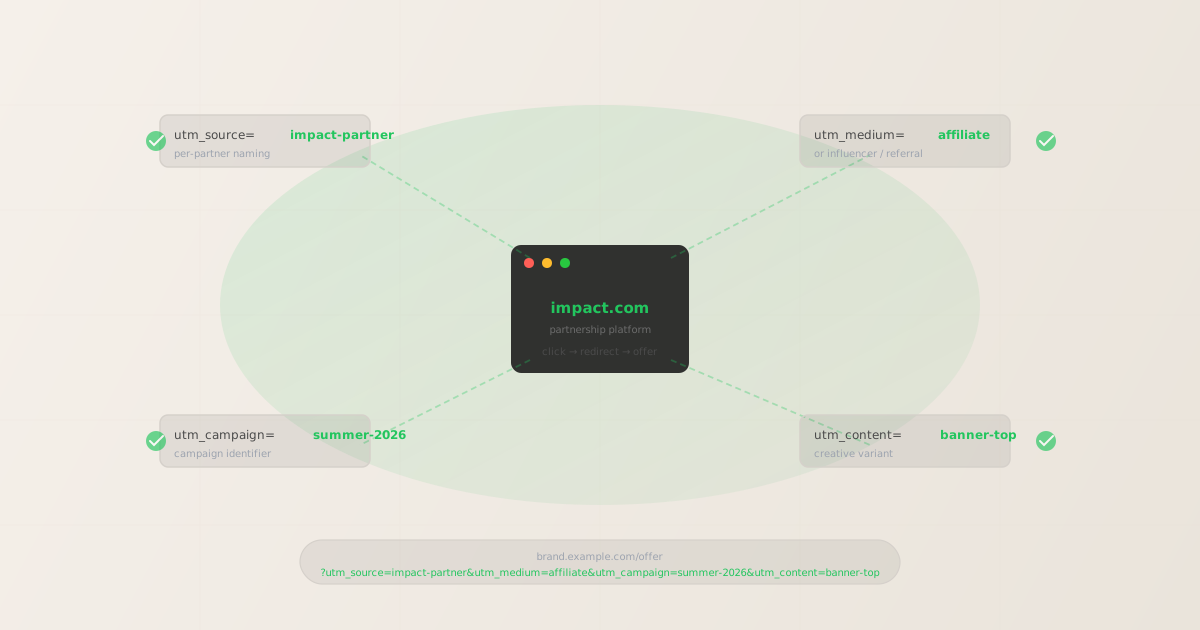
To add UTM tracking for Impact, add UTM parameters to the destination URL — the offer URL you configure inside Impact's dashboard — not to the Impact tracking link itself. GA4 reads UTM parameters from the page the browser lands on after the redirect chain completes. Use mlz build to generate correctly normalized, per-partner UTM destination URLs, and mlz check to validate the full redirect chain before the link goes live in Impact. That is the correct setup. But here is where teams lose attribution data: UTM parameters can be present on the destination URL and still fail to reach GA4. Impact's redirect architecture passes clicks through its own tracking server before forwarding to your offer URL. If the redirect is misconfigured — or if a CDN, A/B testing tool, or secondary redirect on your brand's side strips query parameters — GA4 fires on a URL with no UTM data. A parameter syntax checker would return valid. mlz check follows the entire redirect chain and confirms that UTM parameters survive to the final destination. That is the check that prevents silent attribution loss in partnership programs.
How Impact's partner tracking interacts with UTM parameters
Impact (formerly Impact Radius) is a partnership management platform that manages affiliate, influencer, B2B, and media partnerships. When a partner shares a tracking link, the click goes to Impact's tracking server first. Impact records the click, then redirects the browser to the brand's offer URL — the destination you configure in the Impact dashboard.
This redirect architecture has one important implication for UTM tracking: UTM parameters belong on the offer URL, not on the Impact tracking link. Impact's tracking link carries its own identifiers (including ImpactClickId, Impact's proprietary click ID). UTM parameters added directly to the tracking link may or may not survive the redirect to your offer URL, depending on how Impact is configured. The only reliable approach is to put UTM parameters directly on the offer URL that you configure in Impact's campaign settings.
GA4 attribution works by reading utm_source, utm_medium, and utm_campaign from the URL at page load time — the URL the browser is on when the GA4 tag fires. For GA4 to correctly attribute partnership traffic, those parameters must be present on the final destination URL after the Impact redirect resolves. If the redirect strips them at any hop, the session lands in GA4 as Direct or Referral, and the partnership manager has no conversion data to report to partners.
Note that Impact's own dashboard reports click and conversion data independently of GA4, using its own tracking IDs. But if your analytics, marketing mix modeling, or ROI reporting runs through GA4, you need UTM parameters to survive the redirect chain. Both systems can coexist: Impact tracks via ImpactClickId, GA4 tracks via UTM parameters on the destination URL. They are not in conflict.
For the broader context on how UTM parameters work and why redirect survival matters, see the UTM tracking for developers guide.
Building per-partner UTM destination URLs for Impact with mlz build
Impact programs typically have many partners — affiliates, influencers, referral partners, media partners — each needing a distinct utm_source so GA4 can attribute conversions to the right partner. Generating these manually introduces inconsistencies: mixed casing, misspelled source names, missing parameters. mlz build generates normalized, validated destination URLs from structured input and stores each link so you have an auditable record of what was configured in Impact.
The standard convention for Impact is utm_source=[partner-name], utm_medium=affiliate (or influencer for influencer partnerships, or referral for B2B referrals), and utm_campaign=[campaign-name]. Use utm_content to differentiate creative variants or placement positions within the same partner.
$ mlz build \
  --url "https://brand.example.com/offer" \
  --source "impact-partner" \
  --medium "affiliate" \
  --campaign "summer-2026" \
  --content "banner-top" \
  --validate

{
  "tracked_url": "https://brand.example.com/offer?utm_source=impact-partner&utm_medium=affiliate&utm_campaign=summer-2026&utm_content=banner-top",
  "params": {
    "utm_source": "impact-partner",
    "utm_medium": "affiliate",
    "utm_campaign": "summer-2026",
    "utm_content": "banner-top"
  },
  "destination_url": "https://brand.example.com/offer",
  "link_id": "lnk_impact_summer26_bn",
  "campaign_id": "cmp_summer-2026",
  "stored": true,
  "created_at": "2026-06-27T10:15:22.000Z"
}
For an influencer partnership on the same campaign, change --source and --medium:
mlz build --url "https://brand.example.com/offer" --source "creator-jane" --medium "influencer" --campaign "summer-2026" --content "ig-story"
For a B2B referral partner:
mlz build --url "https://brand.example.com/offer" --source "partner-acme" --medium "referral" --campaign "summer-2026"
The tracked_url value from each mlz build call is what you paste into the offer URL field in Impact's campaign settings. Each partner gets their own URL with a distinct utm_source. For naming conventions across affiliate, influencer, and referral partnership types, see the UTM naming conventions guide. To generate these at scale via the API or npm, see how to build UTM links programmatically.
Validating the Impact redirect chain with mlz check
Once you have the UTM destination URL, the next step is to validate that it works end-to-end before setting it as the offer URL in Impact. mlz check follows the complete redirect chain from your destination URL, confirms the server responds with a 200, and verifies UTM parameters are present at the final destination. Run it before the Impact campaign goes live — not after you notice a drop in attributed conversions.
$ mlz check "https://brand.example.com/offer?utm_source=impact-partner&utm_medium=affiliate&utm_campaign=summer-2026"

{
  "url": "https://brand.example.com/offer?utm_source=impact-partner&utm_medium=affiliate&utm_campaign=summer-2026",
  "valid": true,
  "checks": [
    { "check": "url_format", "status": "pass", "message": "URL format is valid." },
    { "check": "ssl", "status": "pass", "message": "URL uses HTTPS." },
    { "check": "resolution", "status": "pass", "message": "Destination responded with 200.", "details": { "status_code": 200, "response_time_ms": 218 } },
    { "check": "redirects", "status": "pass", "message": "No redirects detected." },
    { "check": "response_time", "status": "pass", "message": "Response time: 218ms.", "details": { "response_time_ms": 218 } }
  ],
  "status_code": 200,
  "response_time_ms": 218,
  "validated_at": "2026-06-27T10:15:46.000Z"
}
A clean result means the destination URL resolves correctly with UTM parameters intact. If valid is false, the checks array tells you exactly which hop in the chain failed. The most common failure mode for Impact configurations is a redirect somewhere in the chain stripping query parameters — the exact scenario a parameter-only validator would miss but mlz check catches. For a detailed walkthrough of diagnosing redirect chain failures, see how to check if a redirect strips UTM parameters.
Impact UTM tracking gotchas for partnership managers
- ImpactClickId is not a UTM parameter
- Impact appends its own click ID (
ImpactClickIdorirclickid) to track conversions within Impact's own attribution model. This is separate from UTM parameters. Do not confuse them: UTM parameters are for GA4 attribution, ImpactClickId is for Impact's internal reports. Both can coexist on the same URL. You do not need to remove ImpactClickId to make UTM tracking work. - UTM parameters go on the offer URL, not on the tracking link
- Impact's tracking link (the URL partners actually share) routes clicks through Impact's redirect server. If you add UTM parameters to the tracking link rather than the offer URL, those parameters may be stripped during the redirect to your destination. Always configure UTM parameters on the offer URL field inside Impact's campaign settings — the URL your browser ends up on after Impact's redirect.
- Secondary redirects on the brand side can strip UTM parameters
- Brands often have their own redirect infrastructure: vanity URL shorteners, Cloudflare redirect rules, A/B testing tools, or regional routing layers. Any of these can strip query parameters if they are not explicitly configured to preserve them.
mlz checkfollows the full chain and surfaces this before the campaign launches. A parameter-only validator would show the parameters as present on the starting URL while GA4 receives nothing. - Influencer and affiliate programs need distinct utm_source per partner
- If all affiliates share
utm_source=impact, GA4 cannot distinguish which partner drove a conversion. Use the partner's name or ID as the source value (impact-partner-name), and useutm_medium=affiliate,utm_medium=influencer, orutm_medium=referralto separate program types. The naming convention should be decided once and enforced consistently — per-partnermlz buildcalls make this repeatable without manual copy-paste errors. - GA4 attribution requires UTMs at the page load, not the click
- GA4 reads UTM parameters from
document.locationat the moment the GA4 tag fires. If Impact's redirect takes longer than the page load (rare but possible with misconfigured redirect chains), or if client-side JavaScript rewrites the URL before GA4 fires, the parameters may not be captured. Validate the destination URL directly, not just the Impact tracking link, to confirm the redirect chain resolves to the correct final URL before the GA4 tag fires.
Frequently asked questions
- Where exactly do I put UTM parameters in Impact's dashboard?
- In Impact's campaign settings, there is an offer URL field (sometimes called "destination URL" in older Interface versions). That is where you put the UTM-tagged URL you generate with
mlz build. Impact appends its own tracking parameters when generating partner links, but the offer URL you configure becomes the final destination after the redirect. Example:https://brand.example.com/offer?utm_source=partner-name&utm_medium=affiliate&utm_campaign=your-campaign. - Does Impact strip UTM parameters from the offer URL during the redirect?
- Impact's redirect is generally designed to pass the offer URL through to the browser intact, but the behavior depends on how the campaign is configured and whether there are secondary redirects on the brand side. The safest approach is to validate the complete redirect chain with
mlz checkbefore the campaign goes live. Do not assume the parameters survive without testing. - Can I use one offer URL for all partners, or does each partner need a different URL?
- You need a different offer URL per partner if you want per-partner GA4 attribution. Each partner's URL should have a distinct
utm_sourcevalue (the partner's name or ID). Theutm_medium,utm_campaign, andutm_contentcan be shared across partners within the same campaign.mlz buildhandles per-partner URL generation in a single command per partner. - How is Impact's ImpactClickId different from UTM parameters?
- ImpactClickId (also seen as
irclickid) is Impact's proprietary click identifier. It is used by Impact to attribute conversions within its own platform — independent of GA4. UTM parameters are read by GA4 (and other analytics tools) to attribute sessions to campaigns. Both work in parallel: Impact uses its click ID for its reports, GA4 uses UTM parameters for its reports. Configure both correctly and you get attribution data in both systems without either interfering with the other. - What if I'm running an influencer campaign through Impact rather than a traditional affiliate program?
- The setup is the same: add UTM parameters to the offer URL in Impact's campaign settings. The main difference is the
utm_mediumvalue — useinfluencerinstead ofaffiliateto separate these programs in GA4 reports. Use the creator's handle or name asutm_sourcefor per-creator attribution. If a creator appears on multiple platforms, useutm_contentto differentiate (e.g.,utm_content=ig-storyvsutm_content=youtube-endcard).
Build Impact-compatible UTM destination URLs and validate every redirect chain
mlz build generates correctly normalized, per-partner UTM destination URLs to configure in Impact's offer settings. mlz check validates the full redirect chain — confirming UTM parameters survive from the destination URL to the offer page where GA4 fires.
1,000 links/month free. No credit card.
Your API key
Save this now — it won't be shown again.
npm install -g missinglinkz
Free plan: 1,000 links/month. No credit card. See the UTM tracking for developers guide for the full programmatic workflow.