UTM Tracking for Mautic: How to Build and Validate Campaign Links
UTM tracking for Mautic starts with utm_source=mautic — lowercase, no version suffix, consistent across both self-hosted Mautic open source and Mautic.com cloud deployments. Mautic is an open source marketing automation platform that sends email via two mechanisms: broadcast emails sent directly to Segments, and Send Email actions embedded in Campaign workflows (automated sequences of actions, decisions, and conditions triggered by contact behaviour). The UTM challenge in Mautic is that the platform includes a built-in UTM append feature that auto-generates utm_campaign and utm_content values from the Campaign name and Email name as set in Mautic's admin interface. These internal names are workspace labels — they contain spaces, slashes, date stamps, and mixed case that become garbled or inconsistent when used as GA4 dimension values. Building tracked links externally with mlz build before configuring any Campaign action or broadcast email is the only way to guarantee that every send uses a normalised, GA4-readable UTM value set — regardless of what Mautic's internal object names look like.
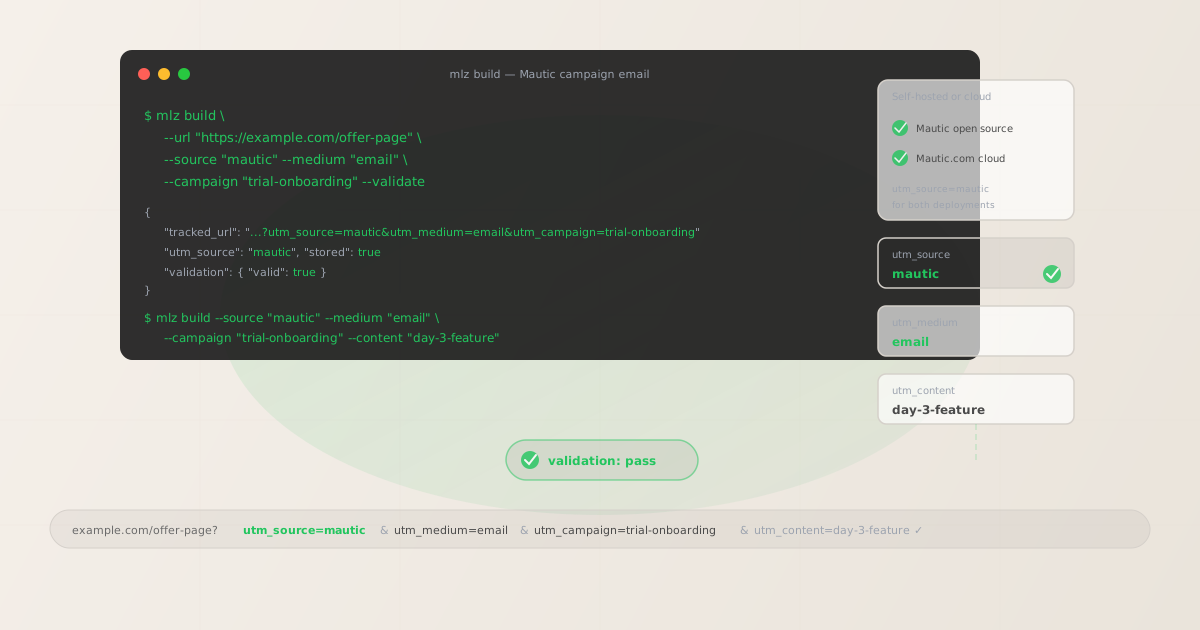
The correct utm_source and utm_medium for Mautic
Use utm_source=mautic — lowercase, single word — for all email and SMS sends that originate from Mautic, whether you are running self-hosted Mautic (open source v4 or v5) or the Mautic.com managed cloud. There is no need to differentiate between deployment types in the UTM source value; the source identifies the platform, not the hosting model. GA4 attribution data for Mautic email sends should aggregate under a single source value regardless of whether your Mautic instance is hosted on your own infrastructure or on Mautic.com.
The medium for Mautic email sends is utm_medium=email. For Mautic's SMS channel (via supported SMS gateway integrations), use utm_medium=sms. For Mautic push notifications (via push notification channel plugins), use utm_medium=push.
| Source value | Origin | Use this? |
|---|---|---|
Mautic |
Mixed case — common manual entry | ✗ No — separate GA4 row from mautic |
mautic-v5 |
Version-specific label | ✗ No — fragments data across upgrades |
mautic-cloud |
Deployment-specific label | ✗ No — splits hosted vs self-hosted data |
mautic |
mlz build output | ✓ Yes — lowercase, consistent, aggregates cleanly |
If your organisation runs both a self-hosted Mautic instance for one product and Mautic.com cloud for another, still use utm_source=mautic for both — differentiate by utm_campaign using a brand or product prefix in the campaign slug, not by varying the source value.
Mautic's built-in UTM append feature and why to override it
Mautic includes a tracking configuration option that can automatically append UTM parameters to email links at send time. When this feature is enabled, Mautic uses the Campaign name as utm_campaign and the Email name as utm_content. It sets utm_source to a value derived from the Mautic channel (typically email — which is incorrect: email is the medium, not the source) and utm_medium to the channel type.
The problems with Mautic's auto-UTM generation are structural:
- Campaign names produce unreadable utm_campaign values. Mautic Campaign names are workspace labels for team navigation: "2026 Trial Onboarding — Product A" becomes
utm_campaign=2026+Trial+Onboarding+%E2%80%94+Product+Ain GA4 — URL-encoded, mixed case, impossible to filter or trend. Every variation in how a Campaign is named creates a separate GA4 row. - utm_source is set to "email" instead of "mautic". GA4's default channel grouping maps
utm_source=emailto the Email channel — not to the platform that sent it. This means Mautic sessions and Mailchimp sessions and SendGrid sessions all appear underutm_source=emailwith no way to distinguish the sending platform in GA4's source dimension. - Email template names as utm_content are inconsistent. Email template names in Mautic are reused across Campaigns and often edited over time. Using the template name as
utm_contentmeans the same template sent in two different Campaigns receives the sameutm_contentvalue — making it impossible to attribute a session to a specific Campaign action that used that template.
Disable Mautic's auto-UTM feature in the Mautic admin panel and build all tracked URLs externally with mlz build before creating Campaign actions or configuring broadcast email sends.
Mautic Campaigns — per-action UTM tracking for automated workflows
Mautic Campaigns are automated workflows built in the Campaign canvas: a sequence of Send Email actions, decisions (Did the contact open the email? Did they click a link?), and conditions (Is the contact in segment X? Does their lead score exceed Y?). A Campaign for a trial onboarding flow might have five Send Email actions spread over fourteen days, each linking to a different landing page or resource.
Each Send Email action in a Campaign that links to a destination URL needs a tracked URL with a unique utm_content value to make action-level attribution visible in GA4. Without differentiation, GA4 shows sessions from all five emails under a single campaign row — you know the Campaign is working, but not which action step is driving conversions.
# Campaign action day 1 — welcome email with product overview CTA
$ mlz build \
  --url "https://example.com/getting-started" \
  --source "mautic" \
  --medium "email" \
  --campaign "trial-onboarding" \
  --content "day-1-welcome" \
  --validate

{
  "tracked_url": "https://example.com/getting-started?utm_source=mautic&utm_medium=email&utm_campaign=trial-onboarding&utm_content=day-1-welcome",
  "validation": { "valid": true }
}

# Campaign action day 3 — feature highlight email
$ mlz build \
  --url "https://example.com/feature-overview" \
  --source "mautic" \
  --medium "email" \
  --campaign "trial-onboarding" \
  --content "day-3-feature" \
  --validate

{
  "tracked_url": "https://example.com/feature-overview?utm_source=mautic&utm_medium=email&utm_campaign=trial-onboarding&utm_content=day-3-feature",
  "validation": { "valid": true }
}
Build all tracked URLs for a Campaign before configuring any Send Email action in Mautic's Campaign canvas. After building, use mlz links list --campaign "trial-onboarding" to retrieve a JSON list of all stored links for this campaign — confirm every action has a validated tracked URL before activating the Campaign. Paste each tracked_url directly into the email template's CTA link destination, not into Mautic's link tracking field.
Mautic broadcast emails sent to Segments
Mautic broadcast emails are one-off or scheduled sends dispatched directly to one or more Segments — not part of a Campaign workflow. These correspond to newsletters, product announcements, promotional emails, and event invitations. For broadcast emails, the Campaign structure does not apply: use the initiative name as utm_campaign and a send-identifier as utm_content to distinguish multiple sends within the same initiative.
For recurring broadcast series — weekly newsletters, monthly product digests — include the frequency and year in the campaign slug: newsletter-weekly-2026. This lets GA4 compare year-over-year newsletter performance without creating an unmanageable number of separate campaign dimensions (one per individual send), and without collapsing all newsletter sessions into a single undifferentiated row. Use utm_content to distinguish individual sends within the series if granular attribution is needed: issue-2026-06-02, issue-2026-06-09.
Mautic also supports A/B testing of broadcast emails via its built-in A/B test feature. For emails under test, pass a variant identifier as utm_content: subject-a, subject-b. This lets GA4 show conversion rates for each variant independently — the same data Mautic's own A/B test report shows for open and click rates, but extended to downstream conversion events on the landing page.
Mautic UTM tracking gotchas
- Mautic's auto-UTM sets utm_source=email, not utm_source=mautic
- Mautic's built-in UTM generation, when enabled, typically sets
utm_sourceto the channel type — oftenemail— rather than to the platform name. A source value ofemailis not useful for platform attribution: GA4 would show all email platform sends (Mautic, Mailchimp, Klaviyo, HubSpot) under the same source row with no way to distinguish which platform sent which sessions. Disable Mautic's auto-UTM in the admin panel, then build all tracked links withmlz build --source "mautic"to produce a source value that correctly attributes sessions to the Mautic platform in GA4. - Mautic's click-tracking redirect can strip UTM parameters on certain server configurations
- Mautic wraps email links in its own click-tracking redirect — a URL that routes through your Mautic instance (or Mautic.com) before forwarding to the destination. On some self-hosted Mautic configurations, particularly those using custom nginx rewrite rules or CDN proxy setups, the redirect chain can strip query parameters including UTM values before they reach the destination. Run
mlz checkagainst a test-send tracked URL after it passes through Mautic's redirect to verify UTM parameters survive the full redirect chain. A stripped UTM parameter results in direct traffic attribution in GA4 rather than email attribution — an invisible failure that compounds across every campaign send until the server configuration is fixed. - Campaign canvas action names don't map cleanly to utm_content without a convention
- Mautic's Campaign canvas lets you name each action node: "Day 1 Welcome Email", "Day 3 Feature Highlight", "Day 7 Conversion Push". These internal labels are useful for navigating the canvas but produce inconsistent
utm_contentvalues if used directly — spaces become URL-encoded, mixed case creates separate GA4 rows. Adopt a convention of lowercase-hyphenated day-and-intent identifiers:day-1-welcome,day-3-feature,day-7-conversion. Build these withmlz build --content "day-1-welcome"and document the mapping between canvas action names and their correspondingutm_contentslugs in your team's campaign setup checklist. - Mautic Segment filters can change mid-campaign, affecting attribution scope
- Mautic Segments are dynamic: contacts enter and leave them as their field values and behaviour change. If a Segment used by a Campaign action or broadcast email is updated between send iterations — adding new contacts, changing filter criteria — the next send goes to a different audience than the first. This does not affect UTM parameters directly, but it does affect the attribution interpretation in GA4: what looks like a consistent utm_source=mautic, utm_campaign=trial-onboarding series in GA4 may actually represent sends to materially different audience compositions. Document Segment definitions alongside UTM parameters in your campaign setup records to preserve attribution context for future analysis.
- Mautic landing pages need tracked URLs on their CTAs
- Mautic includes a landing page builder for creating campaign landing pages hosted within the Mautic instance. If a Mautic-hosted landing page links through to a final conversion destination — a pricing page, a sign-up form, a product page on an external domain — the links on that landing page also need tracked URLs. An untracked link from a Mautic landing page to an external destination creates a session attributed to "direct" in GA4 rather than to the Mautic email campaign that originally drove traffic to the landing page. Build tracked URLs for every CTA on Mautic landing pages that link to external destinations.
Mautic UTM naming conventions
Recommended UTM parameter values for Mautic, aligned with GA4 default channel groupings and a lowercase-hyphenated taxonomy:
- utm_source:
mautic— always, for all email, SMS, and push sends from Mautic open source or Mautic.com cloud. Never useMautic(mixed case),mautic-v5(version-specific), oremail(Mautic's auto-generated incorrect value). - utm_medium:
emailfor all Mautic email sends — Campaign Send Email actions and broadcast Segment emails. Usesmsfor Mautic SMS channel sends. Usepushfor Mautic push notification channel sends. - utm_campaign: Lowercase, hyphenated, initiative-level slug set by the campaign manager before building any tracked links. Automated Campaign workflows:
trial-onboarding,lead-nurture-mid-funnel,win-back-lapsed-90d. Broadcast sends:product-launch-june-2026,newsletter-weekly-2026,event-webinar-q3-2026. Never use Mautic's Campaign display name as the campaign slug. - utm_content: Per Campaign action:
day-1-welcome,day-3-feature,day-7-conversion. Per broadcast send within a series:issue-2026-06-02. Per CTA within a single email:hero-cta,secondary-cta. Per A/B test variant:subject-a,subject-b. Use distinct content values any time two separate Mautic sends should be independently measurable in GA4. - utm_term: Optional. Use to pass contact segment membership or lead score tier into GA4 for segment-level attribution:
high-score,segment-trial-users,segment-enterprise. Useful when the same Campaign runs against multiple Segments and you need segment-level performance visibility without creating separate Campaign objects in Mautic.
See the UTM naming conventions guide for the full cross-platform reference and the UTM tracking for developers guide for programmatic generation and validation at scale.
FAQ
- Should I disable Mautic's built-in UTM tracking feature?
- Yes — if you want accurate, GA4-readable UTM attribution. Mautic's auto-UTM typically sets
utm_source=email(which conflates all email platforms in GA4) and derivesutm_campaignandutm_contentfrom internal Campaign and Email names that contain spaces and mixed case. These produce URL-encoded, unreadable dimension values in GA4 and fragment attribution across minor variations in naming. Disable it in Mautic's admin panel under Channels > Email > UTM Tags settings (or the equivalent in your Mautic version), then build all tracked URLs externally withmlz build --source "mautic"before configuring any email template's CTA link. - Does Mautic's click-tracking redirect preserve UTM parameters?
- It should — Mautic's click-tracking redirect encodes the destination URL, including UTM parameters, within the redirect URL. However, on self-hosted Mautic instances with custom server configurations, the redirect can drop query parameters if the rewrite rules are not configured to pass query strings through. Verify by running
mlz checkagainst a test-send click-tracking URL to confirm UTM parameters reach the destination with their values intact. Mautic.com cloud instances generally preserve UTM parameters through the redirect without configuration changes. - How do I track individual Campaign actions separately in GA4?
- Use a unique
utm_contentvalue for each Campaign Send Email action. Before building any email template, decide on the content identifier for each action:day-1-welcome,day-3-feature,day-7-conversion. Build the tracked URL withmlz build --campaign "trial-onboarding" --content "day-1-welcome"and paste it into the CTA link in the email template for that action. Repeat for each action in the Campaign. GA4 then reports sessions and conversions at the content level — each action is independently attributable without creating separate Campaign objects in Mautic or separate campaign dimensions in GA4. - Can I use Mautic's contact tokens inside tracked URLs?
- Mautic supports contact field tokens in email body content —
{contactfield=firstname},{contactfield=company}. These tokens are resolved at send time when Mautic personalises the email. If you embed a Mautic token inside a UTM parameter value — for example,utm_content=segment-{contactfield=lead_score}— the token resolves to the contact's field value at send time, creating a uniqueutm_contentvalue per recipient. This produces a large number of distinct content dimension values in GA4 (one per unique field value across all contacts), which can fragment attribution data and exceed GA4's cardinality limits for dimensions with many unique values. For UTM parameter values, use fixed identifiers that aggregate data rather than per-contact tokens that fragment it. - How should I handle Mautic's SMS channel UTM tracking?
- Mautic's SMS channel (via supported SMS gateway integrations like Twilio) can include shortened URLs in SMS messages. For SMS sends, use
utm_medium=smsto distinguish from email attribution. The source remainsutm_source=mautic. Since SMS character limits restrict URL length, use a link shortener or a short tracked URL — build the full tracked URL withmlz build, which gives you thetracked_urlwith complete UTM parameters. Then shorten that tracked URL with a link shortener that preserves query parameters through its redirect (verify withmlz check) before embedding the shortened URL in the SMS message body.
Recommended posts
Build Mautic campaign links from the terminal
Disable Mautic's auto-UTM feature in your admin panel, then pass --source "mautic" and --medium "email" to mlz build to get a normalised, validated tracked URL ready to paste into any Mautic email template. Build all tracked URLs before opening Mautic's template editor — one per Campaign action with a distinct --content value, and one per CTA for broadcast emails. Run --validate to confirm that destination URLs resolve correctly before activating any Campaign or dispatching any broadcast send. For self-hosted Mautic instances, also run mlz check against a test-send click-tracking URL to verify Mautic's redirect preserves UTM parameters through your server configuration.
1,000 links/month free. No credit card.
Your API key
Save this now — it won't be shown again.
npm install -g missinglinkz
Free plan: 1,000 links/month. No credit card. See the UTM tracking for developers guide for the full programmatic workflow including API and MCP integration.