UTM Tracking for Adobe Campaign: How to Build and Validate Campaign Links
UTM tracking for Adobe Campaign starts with one decision: use utm_source=adobe-campaign — lowercase, hyphenated — for all email sends from the platform, and build your tracked links externally with mlz build before entering them into Adobe Campaign's delivery editor. Adobe Campaign delivers email via Campaign objects that contain one or more Delivery objects. Each Delivery corresponds to a single send — a batch email to a segment, a transactional message, or a step in an automated journey. The UTM challenge in Adobe Campaign is structural: Campaign and Delivery display names are internal labels used by production teams for organisation, not for reporting. When these labels flow into utm_campaign values — via Adobe's native Google Analytics integration or manual copy-paste — they produce URL-encoded, mixed-case, pipe-delimited strings that become unreadable in GA4 filter dropdowns and impossible to trend across reporting periods. Use mlz build to generate normalised tracked URLs outside Adobe Campaign's editors, then paste the tracked_url output into each Delivery's URL destination field.
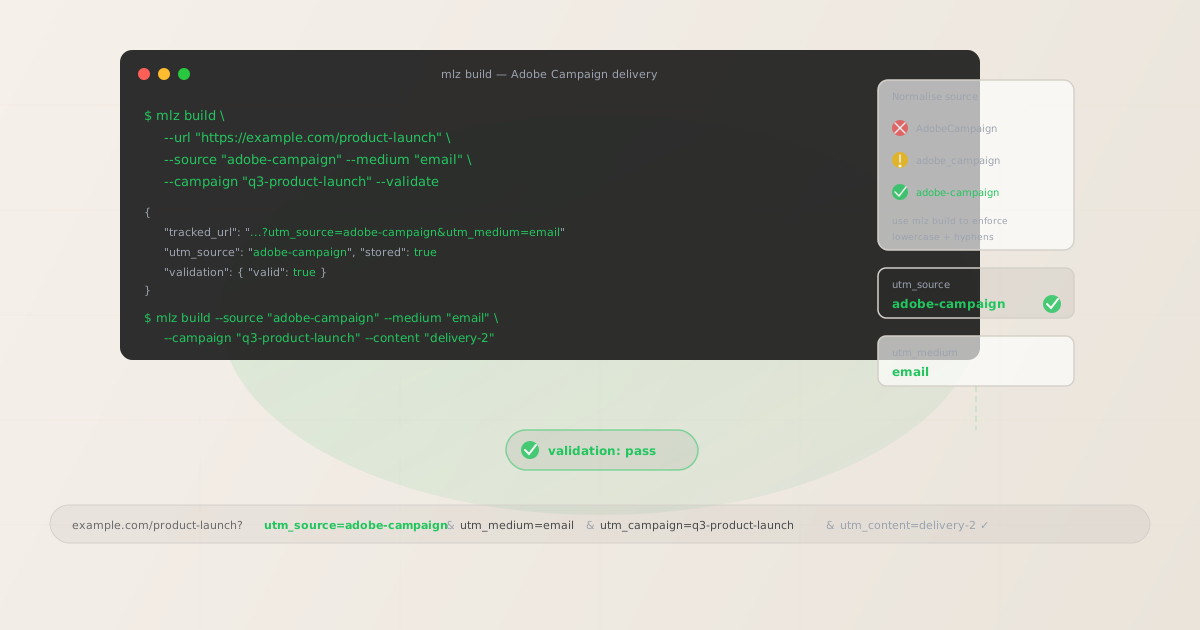
The correct utm_source and utm_medium for Adobe Campaign
Use utm_source=adobe-campaign — lowercase, hyphen-separated — for all email and SMS sends that originate from Adobe Campaign Classic (v7) or Adobe Campaign Web (formerly Adobe Campaign Standard). The hyphen convention matches the brand's own styling ("Adobe Campaign", two words, no camelCase or underscore) and produces a readable GA4 dimension value that trends cleanly over time.
Avoid utm_source=AdobeCampaign (concatenated CamelCase — GA4 treats it as a separate source row from adobe-campaign), utm_source=adobe_campaign (underscore — inconsistent with the hyphen convention used across other platform sources like act-on, campaign-monitor), and utm_source=adobe-campaign-classic or utm_source=adobe-campaign-standard (unnecessarily version-specific — GA4 attribution data should aggregate across platform versions, not fragment by deployment type).
| Source value | Origin | Use this? |
|---|---|---|
AdobeCampaign |
CamelCase — common manual entry | ✗ No — separate GA4 row |
adobe_campaign |
Underscore — inconsistent convention | ✗ No — breaks channel groupings |
adobe-campaign-classic |
Version-specific label | ✗ No — fragments by platform version |
adobe-campaign |
mlz build output | ✓ Yes — lowercase, hyphenated, consistent |
The medium for all Adobe Campaign email sends is utm_medium=email. For direct mail or SMS sends managed through Adobe Campaign, use utm_medium=direct-mail and utm_medium=sms respectively — so GA4 distinguishes channel attribution without mixing email session data with other channel types.
Adobe Campaign's Campaign and Delivery hierarchy — what goes in utm_campaign
Adobe Campaign Classic and Campaign Web both use a two-level hierarchy: a Campaign object (the strategic initiative) contains one or more Delivery objects (individual sends to specific audiences). The Campaign label in Adobe is an internal reference — production teams use names like "Q3 2026 | Retail — Summer Collection | Tier 1" for searchability in the Campaign console. These internal names are not suitable as utm_campaign values.
The utm_campaign value should be a lowercase-hyphenated slug that identifies the initiative in GA4 reports — set by whoever builds the tracked URL, not derived from Adobe's Campaign label. Set it once before building any Deliveries under that Campaign and use the same value across all Deliveries in the Campaign so that GA4 aggregates all sessions from a single initiative under one campaign row. Where Deliveries represent distinct send phases or sub-initiatives, append a suffix: summer-collection for the main campaign, and summer-collection-reengagement for the re-engagement send targeting non-openers.
For per-Delivery differentiation within a Campaign — for example, two different versions of the same email sent to different audience segments — use utm_content:
# Main launch Delivery — all subscribers
$ mlz build \
  --url "https://example.com/summer-collection" \
  --source "adobe-campaign" \
  --medium "email" \
  --campaign "summer-collection" \
  --content "delivery-main" \
  --validate

{
  "tracked_url": "https://example.com/summer-collection?utm_source=adobe-campaign&utm_medium=email&utm_campaign=summer-collection&utm_content=delivery-main",
  "validation": { "valid": true }
}

# Re-engagement Delivery — non-openers 7 days later
$ mlz build \
  --url "https://example.com/summer-collection" \
  --source "adobe-campaign" \
  --medium "email" \
  --campaign "summer-collection" \
  --content "delivery-reengagement" \
  --validate

{
  "tracked_url": "https://example.com/summer-collection?utm_source=adobe-campaign&utm_medium=email&utm_campaign=summer-collection&utm_content=delivery-reengagement",
  "validation": { "valid": true }
}
Build all tracked URLs before opening Adobe Campaign's delivery template editor. After building, use mlz links list --campaign "summer-collection" to retrieve a JSON list of all stored links for this campaign — useful for confirming complete coverage before any Delivery is activated. Paste each tracked_url into the corresponding CTA link destination in Adobe Campaign's email template.
Adobe Campaign's link tracking wrapper and how it interacts with UTM parameters
Adobe Campaign Classic and Campaign Web both include a link click-tracking feature that wraps destination URLs in an Adobe redirect before delivery. When a recipient clicks a link, Adobe's tracking server records the click event and redirects the browser to the destination URL — including any UTM query parameters encoded in the destination.
This tracking wrapper is separate from UTM parameter management. Adobe's redirect preserves UTM parameters correctly — a destination URL with ?utm_source=adobe-campaign&utm_medium=email&utm_campaign=summer-collection embedded in Adobe's tracking redirect will deliver those parameters to the browser when the click resolves. The important exception: if Adobe Campaign's own Google Analytics integration (available in Campaign Classic) is enabled and configured to auto-append UTM parameters, it may override or duplicate any UTM parameters already present in the destination URL. Disable Adobe's GA integration and build all tracked links externally to avoid parameter conflicts.
Adobe Campaign Classic also has a "tracking URL" feature in the Delivery Wizard that can modify link destinations at the point of delivery preparation. If you use this feature, verify that the tracked URL you build with mlz build survives the delivery preparation process intact by running mlz check against a test send URL — specifically checking that the UTM parameters are not stripped, encoded differently, or duplicated by Adobe's tracking wrapper.
Adobe Campaign transactional messages and triggered campaigns
Adobe Campaign supports two types of sends beyond standard batch email: Transactional Messages (real-time triggered sends in response to specific events — password reset, order confirmation, cart abandonment) and recurring Deliveries (scheduled sends using a dynamic audience query that updates at send time, such as a weekly newsletter).
Transactional messages present a specific UTM challenge: the destination URL is typically the same page across every send (the order confirmation page, the account settings page, the cart), but each send is triggered by a unique user event. The UTM parameters in a transactional message tracked URL should identify the message type and channel, not the individual send event — GA4 measures aggregate conversions from transactional messages as a category, not per-user triggers.
- Order confirmation email:
utm_source=adobe-campaign,utm_medium=email,utm_campaign=transactional,utm_content=order-confirmation - Cart abandonment email:
utm_source=adobe-campaign,utm_medium=email,utm_campaign=transactional,utm_content=cart-abandonment - Password reset email:
utm_source=adobe-campaign,utm_medium=email,utm_campaign=transactional,utm_content=password-reset
For recurring Deliveries — weekly newsletters, monthly digests — include the year and frequency in the campaign slug to distinguish separate series in GA4 over time: utm_campaign=newsletter-weekly-2026. This lets you compare year-over-year newsletter performance without creating a separate campaign dimension for every individual send.
Adobe Campaign UTM tracking gotchas
- Delivery names as utm_campaign produce URL-encoded noise in GA4
- Adobe Campaign's GA integration, when enabled, derives
utm_campaignfrom the Campaign or Delivery display name set in the Adobe console. Internal naming conventions in production environments typically include pipes, colons, and mixed case for searchability: "Q3 | Retail — Summer Collection | Tier 1 | 2026-06-01" becomesutm_campaign=Q3+%7C+Retail+%E2%80%94+Summer+Collection+%7C+Tier+1+%7C+2026-06-01in GA4. This is URL-encoded and unreadable in filter dropdowns. Even if you manage to grep for it, each minor variation in the Delivery name creates a separate GA4 campaign row. Disable Adobe's GA integration and build all tracked links with normalised slugs usingmlz build --campaign "summer-collection". - Adobe's tracking redirect can double-encode special characters
- Adobe Campaign Classic wraps destination URLs in a redirect URL that itself URL-encodes the destination. If the destination URL contains special characters in UTM parameters — spaces (should not occur if you use
mlz build), ampersands, or percent-encoded characters — the double encoding can produce garbled UTM values in GA4. Building tracked URLs withmlz buildensures all UTM parameters use only lowercase ASCII characters and hyphens, which survive Adobe's redirect encoding without alteration. Verify by checking a test-send tracked URL withmlz checkafter it passes through Adobe's tracking wrapper. - Multi-brand deployments create cross-brand source fragmentation
- Large enterprises use Adobe Campaign to manage email for multiple brands from a single instance or multiple connected instances. If different brand teams each apply their own UTM source conventions —
utm_source=brand-a-campaign,utm_source=adobe-brandB,utm_source=adobe-campaign— GA4 cannot aggregate cross-brand Adobe Campaign sends under a single source for platform-level reporting. Standardise onutm_source=adobe-campaignacross all brands and useutm_campaignto distinguish brand and initiative:brand-a-summer-collection,brand-b-product-launch. - Adobe Campaign Web's journey-based sends need per-step utm_content
- Adobe Campaign Web includes a Journey Optimiser-style workflow builder where email sends are nodes in an automated journey. Each journey node that sends an email to a landing page needs a distinct
utm_contentvalue to make step-level attribution visible in GA4. Without per-step differentiation, all sessions from a multi-step onboarding journey aggregate to a single campaign row in GA4 — you can see the campaign is working, but not which step converts best. Build one tracked URL per journey node with a unique--contentvalue before configuring any node's email template. - Seed address sends contaminate UTM attribution if not excluded from GA4
- Adobe Campaign Classic supports seed address lists — test recipients who receive a copy of every Delivery for QA and compliance review. Seed address sends follow the same tracked URLs as live sends. If seed addresses belong to your own domain or company, their GA4 sessions will appear under the same UTM parameters as real recipients. Exclude internal IP ranges and seed address email domains from GA4 using IP-based filters or the Measurement Protocol exclusion list to prevent internal test traffic from inflating campaign attribution numbers.
Adobe Campaign UTM naming conventions
Recommended UTM parameter values for Adobe Campaign, aligned with GA4 default channel groupings and a lowercase-hyphenated taxonomy:
- utm_source:
adobe-campaign— always, for all email, SMS, and direct mail sends from Adobe Campaign Classic or Campaign Web. Never useAdobeCampaign,adobe_campaign, or version-specific variants likeadobe-campaign-classic. - utm_medium:
emailfor all email Deliveries. Usesmsfor SMS sends via Adobe Campaign's SMS channel connector. Usedirect-mailfor Adobe Campaign's direct mail Delivery type (where landing page URLs are included in the physical mail piece with a QR code or shortened URL). - utm_campaign: Lowercase, hyphenated, initiative-level slug — set by the campaign manager, not derived from Adobe's Campaign or Delivery display name. Seasonal campaigns:
summer-collection-2026,black-friday-2026. Recurring sends:newsletter-weekly-2026,monthly-digest-2026. Transactional:transactional(useutm_contentto distinguish message types). - utm_content: Per Delivery within a Campaign:
delivery-main,delivery-reengagement. Per journey node:step-1-welcome,step-3-product-highlight. Per CTA variant:hero-cta,secondary-cta. Per A/B test variant:subject-a,subject-b. Use distinct content values any time two separate Adobe Campaign sends should be independently measurable in GA4. - utm_term: Optional. Use to pass audience segment or customer tier into GA4 for segment-level attribution:
high-value,lapsed-30d,loyalty-tier-gold. Useful when the same Delivery runs against different audience segments and you need segment-level performance visibility in GA4 without creating separate Campaign objects.
See the UTM naming conventions guide for the full cross-platform reference and the UTM tracking for developers guide for programmatic generation and validation at scale.
FAQ
- Should I use utm_source=adobe-campaign or utm_source=AdobeCampaign?
- Use
adobe-campaign— all lowercase, hyphenated. GA4 treats dimension values as case-sensitive strings:AdobeCampaign,adobe-campaign, andadobe_campaignare three separate source rows in every Source/Medium report. If your organisation has historical Adobe Campaign sends under mixed-case values, create a GA4 custom channel group that matches all known Adobe Campaign source variants under a single "Email — Adobe Campaign" channel for historical reporting, then enforceadobe-campaignviamlz buildgoing forward. - How do I disable Adobe Campaign's native Google Analytics integration?
- In Adobe Campaign Classic, the Google Analytics integration is configured in the Adobe Campaign console under Platform > External Accounts. Locate the GA4 or Universal Analytics external account and set its status to disabled. In Adobe Campaign Web, the integration is configured in the Administration panel under Channels > Email settings > Web Analytics. Disabling the integration stops Adobe from auto-appending UTM parameters to Delivery links. Adobe's own link click-tracking redirect (which wraps all email links to record click events) continues to function — only the automatic UTM parameter appending is disabled.
- Does Adobe Campaign's tracking redirect preserve UTM parameters?
- Yes — Adobe's click-tracking redirect encodes the full destination URL, including UTM query parameters, within the redirect URL. When a recipient clicks, Adobe records the click and forwards the browser to the destination with UTM parameters intact. The exception is double-encoding: if UTM parameter values contain special characters, Adobe's URL encoding layer may re-encode them. Using
mlz buildensures all UTM values are lowercase ASCII with hyphens — characters that survive Adobe's redirect without alteration. Runmlz checkagainst a test-send URL after it passes through Adobe's tracking redirect to verify the parameters arrive at the destination unchanged. - How should I handle UTM tracking for multi-brand Adobe Campaign deployments?
- Standardise on
utm_source=adobe-campaignacross all brands and useutm_campaignto identify brand and initiative. Avoid brand-specific source values likeutm_source=brand-a-adobe— these fragment cross-brand Adobe Campaign reporting in GA4 and make it impossible to aggregate platform-level email attribution. Use a campaign naming convention like{brand}-{initiative}-{year}:brand-a-summer-sale-2026,brand-b-loyalty-launch-2026. This lets GA4 channel grouping aggregate all Adobe Campaign sends under a single "Email" channel whileutm_campaignpreserves brand and initiative distinctions. - What utm_content value should I use for transactional messages?
- Use a descriptive lowercase-hyphenated identifier for the message type:
order-confirmation,cart-abandonment,password-reset,shipping-notification,account-verification. This lets GA4 show the volume of sessions attributable to each transactional message type — which matters for measuring the downstream impact of transactional emails on user re-engagement (a user clicking through from an order confirmation and browsing additional products, for example). Use the sameutm_contentvalue consistently across every send of a given transactional message type — it should identify the message template, not the individual send event.
Recommended posts
Build Adobe Campaign links from the terminal
Pass --source "adobe-campaign" and --medium "email" to mlz build to get a normalised, validated tracked URL ready to paste into any Adobe Campaign Delivery template. Disable Adobe's native GA integration in your account settings before building tracked links to prevent parameter conflicts. Build tracked URLs for every CTA across all Deliveries in a Campaign before opening Adobe's template editor, using the same --campaign slug for the initiative and distinct --content values for each Delivery. Run --validate to confirm destination URLs resolve correctly before activating any Delivery — particularly for landing pages with redirect rules or CDN caching behaviour that may differ between test and production environments.
1,000 links/month free. No credit card.
Your API key
Save this now — it won't be shown again.
npm install -g missinglinkz
Free plan: 1,000 links/month. No credit card. See the UTM tracking for developers guide for the full programmatic workflow including API and MCP integration.