UTM Tracking for Hyros: How to Build and Validate Campaign Links
Hyros is an ad attribution platform built for online advertisers running high-ticket offers, coaching programs, and info products. It installs a first-party JavaScript tracking pixel on your landing pages and thank-you pages that reads utm_source, utm_medium, utm_campaign, utm_content, and utm_term from the URL the moment the page loads, then ties those UTM values to the lead's email address or phone number when they submit a form. Every subsequent conversion event — webinar attendance, sales call booking, payment — is attributed back to the original ad click using those UTM values Hyros captured at the first landing page visit. This attribution model depends entirely on UTM parameters being present and correctly formatted when the Hyros pixel fires. If a landing page redirect strips UTM parameters before the page loads, Hyros captures an empty URL and the lead is recorded as Unattributed — meaning Hyros cannot report which ad, channel, or campaign drove that conversion. Use mlz build to generate correctly formatted, lowercase-hyphenated UTM links for every Hyros campaign, and run mlz check on every destination URL before ads activate to verify no redirect in the chain drops the query string that Hyros depends on for attribution.
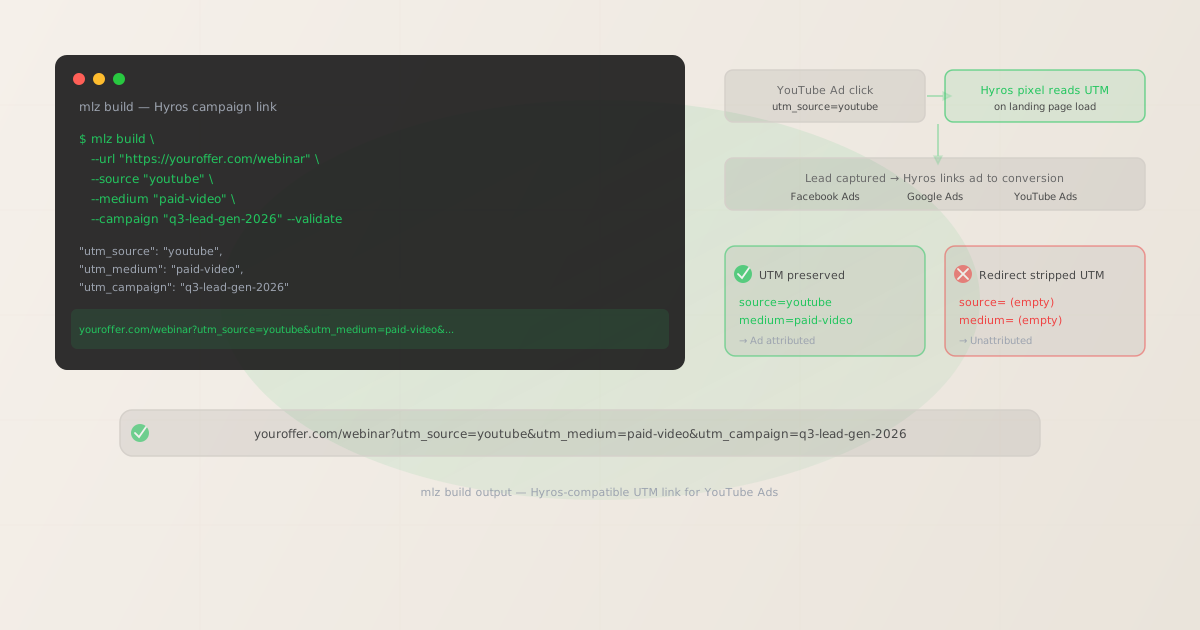
How Hyros reads UTM parameters for ad-to-conversion attribution
Hyros installs a lightweight JavaScript tracking pixel — typically added via Google Tag Manager or directly in the page <head> — that fires on every page load across your funnel. On the first landing page visit, the Hyros pixel reads all five standard UTM parameters from the URL query string and stores them against the visitor's browser fingerprint in a first-party cookie. When the visitor submits a lead form, the Hyros pixel captures their email address or phone number and creates a contact record in Hyros with those stored UTM values attached as the lead source.
Hyros then tracks that contact through every downstream conversion event: webinar attendance, application submission, sales call booking, and payment. Each conversion is attributed to the original UTM-tagged ad click using the values Hyros captured on the first landing page visit. This full-funnel attribution chain — from the first ad click through to closed revenue — is the core value proposition Hyros delivers to agencies and advertisers running multi-step sales funnels with long conversion windows.
The attribution chain breaks if the Hyros pixel reads an empty URL on the first visit. Any redirect between the ad click and the final landing page that strips query parameters before the Hyros pixel fires will cause the pixel to store empty UTM values. The contact is created with no source attribution, and every downstream conversion event in the funnel is recorded as Unattributed revenue in Hyros reports — invisible to your ROAS calculations and ROI analysis by channel.
| Scenario | What Hyros reads | Attribution result |
|---|---|---|
| Clean UTM link, direct landing | utm_source=youtube, utm_medium=paid-video |
✓ Attributed to YouTube Paid Video |
| Redirect preserves query strings | utm_source=youtube, utm_medium=paid-video |
✓ Attributed correctly |
| Redirect strips query strings | (empty — UTM not in URL) | ✗ Unattributed contact |
| Capitalized source (YouTube) | utm_source=YouTube |
✗ Creates separate source bucket |
| Non-standard medium (paidsocial) | utm_medium=paidsocial |
✗ Channel grouping breaks |
Building UTM-tagged links for Hyros campaigns with mlz build
mlz build generates UTM-tagged URLs with normalized, lowercase-hyphenated parameter values — the exact format Hyros reads consistently and that Hyros's own documentation recommends for channel grouping. Add --validate to confirm the destination resolves and no redirect in the chain will strip the UTM parameters before Hyros fires.
# YouTube Ads — video sales letter
$ mlz build \
  --url "https://youroffer.com/webinar-registration" \
  --source "youtube" \
  --medium "paid-video" \
  --campaign "q3-lead-gen-2026" \
  --content "vsl-30s-creator" \
  --validate

{
  "tracked_url": "https://youroffer.com/webinar-registration?utm_source=youtube&utm_medium=paid-video&utm_campaign=q3-lead-gen-2026&utm_content=vsl-30s-creator",
  "params": {
    "utm_source": "youtube",
    "utm_medium": "paid-video",
    "utm_campaign": "q3-lead-gen-2026",
    "utm_content": "vsl-30s-creator"
  },
  "stored": true
}

# Facebook Ads — interest-based traffic to webinar
$ mlz build \
  --url "https://youroffer.com/webinar-registration" \
  --source "facebook" \
  --medium "paid-social" \
  --campaign "q3-lead-gen-2026" \
  --content "carousel-testimonials" \
  --validate

{
  "tracked_url": "https://youroffer.com/webinar-registration?utm_source=facebook&utm_medium=paid-social&utm_campaign=q3-lead-gen-2026&utm_content=carousel-testimonials",
  "stored": true
}

# Google Ads — branded keyword search
$ mlz build \
  --url "https://youroffer.com/book-a-call" \
  --source "google" \
  --medium "cpc" \
  --campaign "branded-search-2026" \
  --term "your-brand-name" \
  --validate

{
  "tracked_url": "https://youroffer.com/book-a-call?utm_source=google&utm_medium=cpc&utm_campaign=branded-search-2026&utm_term=your-brand-name",
  "stored": true
}
mlz build enforces lowercase-hyphenated normalization on all parameter values. It is not possible to generate utm_source=YouTube, utm_medium=Paid Video, or utm_campaign=Q3 Lead Gen 2026 through the CLI — the output is always lowercased and hyphenated. This is the format Hyros reads cleanly and that produces consistent channel grouping across Facebook Ads, Google Ads, and YouTube Ads in Hyros reports. The tracked_url from the JSON output is ready to paste into the destination URL field in any ad platform's campaign builder. The stored field confirms the link was saved to the MissingLinkz campaign library for audit and reference.
Validating landing page destinations with mlz check before Hyros fires
Hyros reads UTM parameters from the URL the moment the landing page JavaScript executes in the browser. Any redirect that fires server-side before the page renders — a funnel platform redirect, a custom domain redirect, or a URL shortener redirect — fires before the Hyros pixel can run. If that redirect doesn't preserve query strings in its Location response header, the browser follows the redirect to a clean URL with no UTM parameters. The Hyros pixel then fires on the clean URL and records an Unattributed contact. mlz check validates the full redirect chain before the campaign launches, confirming query strings survive from the ad click URL to the final landing page URL the Hyros pixel sees.
$ mlz check "https://youroffer.com/webinar-registration?utm_source=youtube&utm_medium=paid-video&utm_campaign=q3-lead-gen-2026"

{
  "url": "https://youroffer.com/webinar-registration?utm_source=youtube&utm_medium=paid-video&utm_campaign=q3-lead-gen-2026",
  "valid": true,
  "checks": [
    { "check": "url_format", "status": "pass", "message": "URL format is valid." },
    { "check": "ssl", "status": "pass", "message": "URL uses HTTPS." },
    { "check": "resolution", "status": "pass", "message": "Destination responded with 200.", "details": { "status_code": 200, "response_time_ms": 218 } },
    { "check": "redirects", "status": "pass", "message": "No redirects detected." },
    { "check": "response_time", "status": "pass", "message": "Response time: 218ms.", "details": { "response_time_ms": 218 } }
  ],
  "status_code": 200,
  "response_time_ms": 218,
  "validated_at": "2026-06-19T08:14:22.000Z"
}
Run mlz check on every campaign destination URL before the ad activates. Funnel platforms (ClickFunnels, GoHighLevel, Kartra, Kajabi) accumulate redirect rules as funnels are built, cloned, and restructured. URL changes when updating funnel steps, split testing between versions, or migrating to a custom domain all introduce new redirects. Any redirect that doesn't include the original query string in the forwarded Location URL will strip UTM parameters before the Hyros pixel fires. The redirects check in mlz check output confirms whether the complete hop sequence from ad click URL to final rendered page preserves query strings — or flags the problem before any ad spend is wasted on Unattributed conversions.
Hyros UTM tracking gotchas for online advertisers
- Funnel platform redirects fire before Hyros pixel JavaScript executes
- Hyros's tracking pixel is client-side JavaScript. It runs in the browser only after the page HTML and scripts have loaded. Funnel platform redirects — ClickFunnels custom domain redirects, GoHighLevel URL rewrites, Kajabi landing page routing — are server-side HTTP responses. When a visitor clicks your ad, the funnel platform's server responds with a
301or302redirect before any JavaScript runs in the browser. If the redirect response drops query parameters from theLocationheader, the browser follows the redirect to a clean URL. The Hyros pixel fires on the clean page URL and reads no UTM parameters. The contact is created with no ad source. Runmlz checkon every funnel URL before campaigns activate to verify the full redirect chain preserves query strings. - Hyros's own auto-tag does not replace UTM parameters
- Hyros can automatically append a
hyros_idparameter to outbound links from some integrations, but this is a Hyros-specific tracking parameter for its own session stitching — it does not replace the standard UTM parameters that Hyros also reads for channel and campaign attribution. You need both: the Hyros pixel in your page, and correctly formatted UTM parameters in the inbound URL from the ad. Thehyros_idparameter helps Hyros stitch sessions across pages; the UTM parameters tell Hyros which ad, source, and campaign drove the original click. Omitting UTM parameters because Hyros has its own ID parameter will break channel-level attribution in Hyros reports. - YouTube requires utm_source=youtube, not google
- When running YouTube Ads through Google Ads, the default auto-tag behavior populates Google Ads click IDs (
gclid) but does not add UTM parameters automatically. When you add UTM parameters manually, useutm_source=youtuberather thanutm_source=googleif you want Hyros to distinguish YouTube traffic from Google Search traffic in channel reports. Usingutm_source=googlefor YouTube campaigns merges YouTube and Google Search into a single source bucket in Hyros, making it impossible to separate YouTube video spend from search spend in ROAS reporting. Useutm_medium=paid-videofor YouTube Ads andutm_medium=cpcfor Google Search to maintain channel separation in Hyros.mlz buildenforces these values as lowercase with no variation. - URL shorteners used in bio links and email campaigns strip UTMs unless configured
- Agencies and creators frequently use URL shorteners (Bitly, TinyURL, custom short domains) for bio links, SMS campaigns, and email copy. Many shortener configurations do not forward query strings by default — a Bitly link to your landing page will redirect to the clean URL without UTM parameters unless the shortener is explicitly set to pass through query strings. The Hyros pixel fires on the final destination page and reads an empty URL. Run
mlz checkon the shortened URL itself to verify the full redirect chain preserves UTM parameters through to the final Hyros-tracked landing page. Theredirectscheck will show each hop in the chain and confirm whether query strings survive the complete sequence. - Capitalized or inconsistently formatted source values create separate attribution buckets
- Hyros stores UTM values as strings and uses them directly in channel and source grouping in reports.
utm_source=Facebookandutm_source=facebookare treated as two separate sources — they appear as separate rows in Hyros source breakdowns and cannot be merged retroactively without manual cleanup. Agencies managing multiple account managers building links manually across multiple ad platforms accumulate source variant strings that fragment ROAS reporting.mlz buildnormalizes all source and medium values to lowercase on output — it is not possible to store a capitalized or spaced variant through the CLI.
Hyros UTM naming conventions for online advertisers and agencies
Recommended UTM parameter values for campaigns tracked through Hyros, aligned with Hyros's channel grouping and compatible with GA4's default channel definitions. All values enforced by mlz build:
- utm_source: lowercase ad platform name.
youtubefor YouTube Ads (distinct from Google Search).facebookfor all Meta-owned placements including Instagram and Messenger.googlefor Google Search and Google Shopping.instagramif you want Instagram reported separately from Facebook in Hyros.tiktokfor TikTok Ads.emailfor email campaign links.podcastfor podcast ad traffic. Do not use abbreviations (fb,yt,gads) or branded variants (YouTube Ads,Meta) — Hyros and GA4 treat these as distinct sources from the standard lowercase names. - utm_medium:
paid-videofor YouTube TrueView, Reels video ads, and TikTok video.paid-socialfor Facebook, Instagram, and TikTok non-video placements.cpcfor Google Search clicks.displayfor Google Display Network.emailfor email marketing sends.smsfor SMS campaigns.organicfor organic social and content. Hyros groups channels by medium value — non-standard variants likepaid_social,paidsocial, orsocial-paidappear as separate ungrouped channels in Hyros reports. - utm_campaign: lowercase-hyphenated campaign slug with a flight identifier.
q3-lead-gen-2026,webinar-june-2026,branded-search-2026,book-a-call-q4. Consistent campaign naming across channels lets Hyros correctly attribute multi-channel conversion paths to the right campaign flight in funnel reporting. - utm_content: ad creative or placement identifier.
vsl-30s-creator,carousel-testimonials,image-case-study,email-sequence-day3. Use utm_content to distinguish between ad creatives within the same campaign so Hyros can show which creative drove the most conversions at the lowest cost per lead. - utm_term: paid search keyword for Google Ads Search campaigns.
branded-keywords,competitor-brand,problem-aware-terms. Omit for paid social, video, and email campaigns where keyword matching does not apply.
For the full cross-platform naming reference, see the UTM naming conventions guide and UTM tracking for developers.
FAQ
- Why does Hyros show conversions as Unattributed even though I'm running ads?
- The most common cause is that UTM parameters are not reaching the Hyros pixel at landing page load. This happens when a redirect between the ad click and the final landing page strips UTM query strings before the page renders. Run
mlz checkon the exact destination URL you're using in your ads — pass the full URL including UTM parameters — and check theredirectsresult. If the redirect chain shows a hop that changes the URL and drops the query string, that's the point where Hyros stops reading UTM values. Fix the redirect to pass query strings through, then re-verify withmlz checkbefore reactivating the campaign. Also check for URL shorteners in the ad destination, bio links, or email copy pointing to your funnel. - Should I use Hyros's auto-tagging instead of UTM parameters?
- Hyros uses its own tracking parameters (
hyros_id) for session stitching across funnel steps, but these supplement rather than replace standard UTM parameters for ad attribution. Hyros reads UTM parameters to populate channel, source, campaign, and content dimensions in its attribution reports. Without UTM parameters, Hyros can track that a conversion happened and tie it to a contact, but it cannot attribute that conversion to a specific ad platform, campaign, or creative. Use both: UTM parameters in every inbound ad URL for campaign attribution, and Hyros's own pixel for full-funnel session tracking and conversion linking. - Does Hyros work with ClickFunnels, GoHighLevel, and other funnel platforms?
- Yes — Hyros integrates with ClickFunnels, GoHighLevel, Kajabi, Kartra, and most major funnel platforms via a JavaScript pixel added to the page head or via a native integration. The UTM parameter challenge is at the redirect layer, not the platform integration layer. When you set up a custom domain on ClickFunnels or use GoHighLevel's funnel routing, the platform adds server-side redirects that may or may not preserve query strings depending on configuration. Run
mlz checkon the final destination URL for each funnel step where you install the Hyros pixel to confirm UTM parameters survive every redirect in the chain from ad click to Hyros pixel fire. - How do I track affiliate traffic in Hyros with UTM parameters?
- Affiliate traffic is tracked in Hyros using standard UTM parameters in the affiliate's tracking link. Use
utm_source=affiliateandutm_medium=referralas the base values, then useutm_campaignorutm_contentto identify the specific affiliate:utm_campaign=affiliate&utm_content=affiliate-name-here. Build each affiliate link withmlz build --source "affiliate" --medium "referral" --campaign "affiliate" --content "affiliate-name"so the naming is normalized and consistent in Hyros attribution reports. This approach avoids the fragmentation that occurs when affiliates build their own UTM links using different capitalization or naming conventions. - Can I use the same UTM links for Hyros and GA4 simultaneously?
- Yes. Hyros and GA4 both read standard UTM parameters from the same URL query string independently. Hyros's pixel reads them for ad-to-conversion attribution in Hyros reports. GA4's client-side tracking reads the same parameters for session attribution and channel grouping in GA4 reports. Using
mlz buildto generate normalized, lowercase-hyphenated UTM values ensures both tools read consistent parameter values — preventing the fragmented source rows in GA4 (from capitalization variants) and the separate source buckets in Hyros that result from inconsistent formatting across team members or ad platforms.
Recommended posts
Build Hyros-compatible tracked links and validate landing page redirects
mlz build generates correctly formatted UTM links that Hyros reads cleanly for ad-to-conversion attribution. mlz check validates the full redirect chain before campaigns launch — confirming UTM parameters survive from ad click URL to Hyros pixel read on the final landing page. Generate and validate in the terminal before every campaign activation.
1,000 links/month free. No credit card.
Your API key
Save this now — it won't be shown again.
npm install -g missinglinkz
Free plan: 1,000 links/month. No credit card. See the UTM tracking for developers guide for the full programmatic workflow including API and MCP integration.