UTM Tracking for Elevar: How to Build and Validate Campaign Links
Elevar is a Shopify-focused server-side tracking platform that installs a data layer on your store and fires events server-side to Meta Conversions API (CAPI), GA4 Measurement Protocol, TikTok Events API, Pinterest Conversions API, and other advertising destinations. The Elevar data layer reads utm_source, utm_medium, utm_campaign, utm_content, and utm_term from the URL at session start and attaches these values to every server-side event it fires — view_item, add_to_cart, begin_checkout, and purchase. This server-side approach bypasses iOS 14+ and ad blocker restrictions that degrade client-side pixel tracking, but it creates a new failure mode: if a Shopify redirect strips UTM parameters before the page loads, the Elevar data layer reads an empty URL and every server-side event for that session is sent to Meta CAPI and GA4 with no UTM attribution. The result is a purchase event that Meta and GA4 receive but cannot attribute to the paid campaign that drove the click. Use mlz build to generate correctly formatted UTM links, and run mlz check on every destination URL before campaigns launch to verify the redirect chain preserves UTM parameters from click to Elevar data layer read.
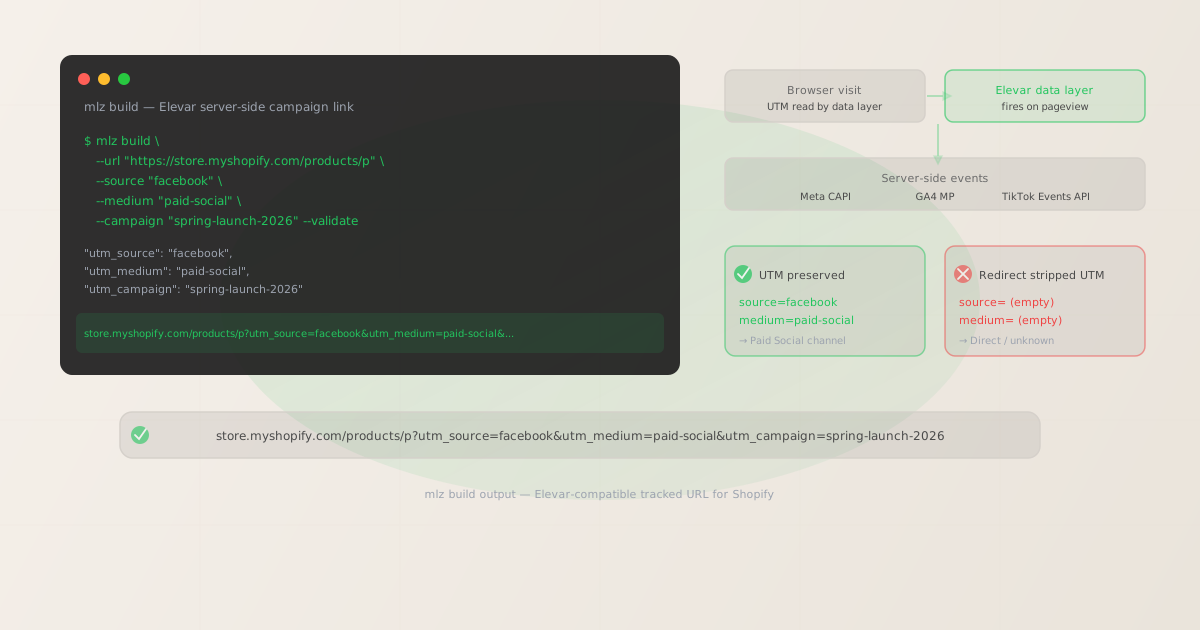
How Elevar's data layer reads UTM parameters for server-side attribution
Elevar installs a JavaScript data layer on your Shopify store — typically via the Elevar Shopify app — that runs on every page load. The data layer fires on the DOMContentLoaded event, reads any UTM parameters present in the current URL, and stores them in a first-party session cookie scoped to your store domain. These stored UTM values are then attached as attribution data to every server-side event Elevar sends to your configured destinations for the duration of the session.
The key advantage of Elevar's server-side approach is event delivery reliability: a purchase event sent server-side via Meta CAPI arrives at Meta regardless of whether the buyer used Safari with ITP, an ad blocker, or a browser that rejected the client-side Meta pixel. But the UTM values attached to that server-side event come from what the data layer read from the URL at session start. If the UTM parameters were already gone from the URL by the time the Elevar data layer ran — because a Shopify redirect stripped them before the page finished loading — the server-side purchase event arrives at Meta CAPI with no campaign attribution. Meta receives a deduplication-matched purchase but with no UTM source to attribute it to. GA4 Measurement Protocol receives the same event with empty campaign data.
Elevar also handles attribution across multiple sessions using a configurable attribution window. The UTM values captured at the first UTM-tagged session start are stored and used to attribute conversions that happen in later sessions within the window. This means one malformed UTM link that a customer clicks in session one contaminates the attribution for every conversion event in their attribution window — a problem that compounds over multi-touch journeys.
| Scenario | What Elevar reads | Meta CAPI / GA4 result |
|---|---|---|
| Clean UTM link, no redirect | utm_source=facebook, utm_medium=paid-social |
✓ Attributed to Paid Social |
| Shopify redirect preserves query strings | utm_source=facebook, utm_medium=paid-social |
✓ Attributed correctly |
| Shopify redirect strips query strings | (empty — UTM not in URL) | ✗ Direct / unattributed |
| Capitalized utm_source (Facebook) | utm_source=Facebook |
✗ GA4 creates separate source row |
| Non-standard medium (paidsocial) | utm_medium=paidsocial |
✗ GA4 Paid Social channel broken |
Building UTM-tagged links for Elevar and Shopify campaigns with mlz build
mlz build generates UTM-tagged URLs with normalized, lowercase-hyphenated parameter values. Add --validate to confirm the Shopify destination resolves before Elevar's data layer fires on the first paid session. The output tracked_url is ready to paste into Meta Ads Manager, TikTok Ads, Google Ads, or any other ad platform.
# Meta Ads — dynamic product ad
$ mlz build \
  --url "https://store.myshopify.com/products/best-seller" \
  --source "facebook" \
  --medium "paid-social" \
  --campaign "spring-launch-2026" \
  --content "dpa-catalog-retarget" \
  --validate

{
  "tracked_url": "https://store.myshopify.com/products/best-seller?utm_source=facebook&utm_medium=paid-social&utm_campaign=spring-launch-2026&utm_content=dpa-catalog-retarget",
  "params": {
    "utm_source": "facebook",
    "utm_medium": "paid-social",
    "utm_campaign": "spring-launch-2026",
    "utm_content": "dpa-catalog-retarget"
  },
  "stored": true
}

# TikTok Ads — video creative
$ mlz build \
  --url "https://store.myshopify.com/collections/new-arrivals" \
  --source "tiktok" \
  --medium "paid-social" \
  --campaign "spring-launch-2026" \
  --content "video-creator-30s" \
  --validate

{
  "tracked_url": "https://store.myshopify.com/collections/new-arrivals?utm_source=tiktok&utm_medium=paid-social&utm_campaign=spring-launch-2026&utm_content=video-creator-30s",
  "stored": true
}

# Klaviyo email — post-purchase flow
$ mlz build \
  --url "https://store.myshopify.com/collections/recommended" \
  --source "klaviyo" \
  --medium "email" \
  --campaign "post-purchase-upsell" \
  --content "day-3-email" \
  --validate

{
  "tracked_url": "https://store.myshopify.com/collections/recommended?utm_source=klaviyo&utm_medium=email&utm_campaign=post-purchase-upsell&utm_content=day-3-email",
  "stored": true
}
mlz build enforces lowercase-hyphenated normalization on every parameter value. It is not possible to generate utm_source=Facebook, utm_medium=Paid Social, or utm_campaign=Spring Launch 2026 through the CLI — the output is always lowercase and hyphenated. This is the format Elevar's data layer reads consistently, GA4's channel grouping expects for the default channel definitions, and Meta CAPI's attribution model uses for campaign-level reporting in Ads Manager.
The tracked_url from the JSON output is ready to paste into the destination URL field in Meta Ads Manager, TikTok Ads, Google Ads, or any email marketing platform. The stored field confirms the link was saved to the MissingLinkz campaign library for campaign audit and reference.
Validating Shopify destination URLs with mlz check before Elevar fires
Elevar's data layer reads UTM parameters from the URL at the moment the page loads. If a Shopify redirect fires between the click and the page load, and that redirect does not preserve query strings, Elevar reads an empty URL and sends server-side events to Meta CAPI and GA4 with no UTM values. mlz check validates the full redirect chain before the campaign launches — confirming the destination resolves with a 200 status, HTTPS is configured, and no redirect in the chain strips query strings.
$ mlz check "https://store.myshopify.com/products/best-seller?utm_source=facebook&utm_medium=paid-social&utm_campaign=spring-launch-2026"

{
  "url": "https://store.myshopify.com/products/best-seller?utm_source=facebook&utm_medium=paid-social&utm_campaign=spring-launch-2026",
  "valid": true,
  "checks": [
    { "check": "url_format", "status": "pass", "message": "URL format is valid." },
    { "check": "ssl", "status": "pass", "message": "URL uses HTTPS." },
    { "check": "resolution", "status": "pass", "message": "Destination responded with 200.", "details": { "status_code": 200, "response_time_ms": 231 } },
    { "check": "redirects", "status": "pass", "message": "No redirects detected." },
    { "check": "response_time", "status": "pass", "message": "Response time: 231ms.", "details": { "response_time_ms": 231 } }
  ],
  "status_code": 200,
  "response_time_ms": 231,
  "validated_at": "2026-06-18T09:02:45.000Z"
}
Run mlz check on every campaign destination URL before the ad activates. Shopify stores accumulate redirect rules over time — URL restructuring from platform migrations, product URL changes when variants are added or removed, collection path changes when categories are reorganized. Any 301 or 302 redirect that doesn't pass query strings drops all UTM parameters before Elevar's data layer reads the URL. The redirect fires server-side before the JavaScript data layer runs client-side, so the data layer never sees the original UTM parameters from the ad click. The redirects check in mlz check output confirms whether the full hop sequence from click URL to final landing page preserves query strings.
Elevar UTM tracking gotchas for Shopify stores
- Elevar reads UTM parameters client-side — Shopify redirects fire before the data layer
- Elevar's data layer is JavaScript that runs in the browser after the page DOM is available. Shopify's redirect system operates server-side: when a visitor lands on a redirected URL, Shopify returns an HTTP
301or302response before the browser has rendered any JavaScript. If the redirect response does not include the original query string in theLocationheader, the browser follows the redirect to a clean URL with no UTM parameters. By the time the Elevar data layer fires on the final page, the UTM parameters are gone from the URL. This is not a bug in Elevar — it is a Shopify redirect configuration issue. The fix is to verify every campaign destination URL withmlz checkbefore the campaign launches, confirming no redirect in the chain drops query parameters. - Server-side events sent with no UTM are not retroactively fixable
- When Elevar sends a Meta CAPI event with no
utm_sourceorutm_campaign, Meta records the event as a purchase from an unknown source. The event still counts toward Meta's conversion reporting through Event Match Quality — it deduplicates with the client-side pixel event if both fired — but in Meta's attribution models it contributes to "View Through" or "Click" conversions without campaign-level breakdown. These events cannot be retroactively updated with UTM data after the fact. GA4 Measurement Protocol events with missing UTM data appear as Direct traffic in channel reports. Fix the Shopify redirect before campaigns launch; do not rely on retroactive data correction after sessions are already recorded. - GA4 channel grouping breaks with non-standard medium values
- Elevar passes UTM values directly to GA4 via the Measurement Protocol. GA4's default channel grouping uses exact string matching on
utm_mediumto assign sessions to channels:paid-socialmaps to Paid Social,cpcmaps to Paid Search,emailmaps to Email. Non-standard variants likepaidsocial,social,Paid-Social, orpaid_socialfall through to Unassigned channel in GA4 — even when Elevar has correctly sent the server-side event. The channel grouping problem happens at the GA4 dimension level, not the Elevar event level. Enforcing lowercase-hyphenated medium values withmlz buildprevents this fragmentation. - Elevar's attribution window multiplies the cost of UTM formatting errors
- Elevar stores the UTM values from the first UTM-tagged session and uses them to attribute conversions throughout a configurable window (typically 30 days, sometimes longer). A customer who clicks a malformed UTM link in session one will have that malformed attribution data used for every conversion event in the following 30 days. A single incorrectly formatted link can generate months of misattributed server-side events across Meta CAPI, GA4, TikTok Events API, and every other destination configured in Elevar. The lifetime impact of a UTM formatting error is proportional to the length of the attribution window.
- Shopify variant URL redirects are a common UTM-stripping vector
- Shopify generates product variant URLs as query-string-based URLs like
/products/item?variant=12345. When an ad campaign links to a specific variant URL and Shopify's URL rewrites or redirect rules rewrite it to a canonical product URL without preserving the original query string, the UTM parameters are stripped along with the variant query. This is especially common when Shopify apps generate their own URL redirects for routing, A/B testing, or landing page purposes. Runmlz checkspecifically on variant URLs if your campaigns target specific product variants — theredirectscheck will surface whether the variant URL chain preserves query strings to the final rendered page.
Elevar UTM naming conventions for Shopify stores
Recommended UTM parameter values for campaigns tracked through Elevar, aligned with GA4's default channel grouping and Meta CAPI's campaign attribution requirements. All values enforced by mlz build:
- utm_source: lowercase platform name.
facebookfor all Meta-owned placements (Facebook, Instagram, Messenger, Audience Network).tiktokfor TikTok Ads.googlefor Google Ads (Search, Shopping, Display, YouTube).pinterestfor Pinterest Ads.snapchatfor Snapchat Ads.klaviyofor Klaviyo email and SMS campaigns.attentivefor Attentive SMS.postscriptfor Postscript SMS.youtubefor YouTube Ads (use instead ofgoogleif you want GA4 to differentiate YouTube from search). Do not abbreviate (fb,ig) or use branded variants (Meta,Google Ads) — GA4's channel grouping won't match. - utm_medium:
paid-socialfor Meta, TikTok, Pinterest, and Snapchat paid placements.cpcfor Google Search and Microsoft Search paid clicks.shoppingfor Google Shopping ads.displayfor Google Display Network and programmatic display.emailfor all email marketing sends.smsfor all SMS sends.videofor YouTube TrueView and paid video.organicfor organic social posts. The medium value directly determines which GA4 default channel receives the session — any value not recognized by GA4's channel grouping rules creates an Unassigned channel entry. - utm_campaign: lowercase-hyphenated campaign slug. Include a date or flight identifier for campaign-level reporting:
spring-launch-2026,bfcm-2026,post-purchase-upsell,abandoned-cart-flow. Consistent campaign naming across channels lets Elevar's multi-session attribution correctly attribute conversions to the right campaign flight across both paid and email touchpoints. - utm_content: ad creative or email content variant.
dpa-catalog-retarget,video-creator-30s,carousel-lifestyle,day-3-email. Essential for A/B creative testing and for distinguishing between multiple ad sets or email variants within the same campaign. Always lowercase-hyphenated. - utm_term: keyword for paid search campaigns only.
branded-keywords,competitor-brand,category-terms. Omit for paid social and email campaigns.
For the full cross-platform UTM naming reference, see the UTM naming conventions guide and UTM tracking for developers.
FAQ
- Why is Elevar sending purchase events to Meta CAPI with no UTM attribution?
- The most common cause is a Shopify redirect that strips UTM parameters before the Elevar data layer runs. When a visitor clicks a paid ad and lands on a redirected Shopify URL that doesn't preserve query strings, the data layer fires on the final page with no UTM values in the URL. The server-side purchase event is sent to Meta CAPI with no
utm_sourceorutm_campaign, making it appear as a Direct conversion. Runmlz checkon the exact campaign destination URL before the ad launches — theredirectscheck will show whether the redirect chain preserves query strings. Also check for Shopify apps that add URL rewrites (landing page builders, A/B testing tools, redirect managers) that may strip query parameters. - Does Elevar's server-side tracking require correctly formatted UTM parameters?
- Elevar sends whatever UTM values it reads from the URL — it doesn't validate or normalize them. If the URL has
utm_source=Facebook(capitalized), Elevar sendsutm_source=Facebookto GA4 and Meta CAPI. GA4 creates a separate source row forFacebookdistinct fromfacebook— the capitalized variant doesn't match GA4's default channel grouping rule for Paid Social. Meta CAPI accepts any value but campaign-level reporting in Ads Manager groups by the UTM values as received. Usemlz buildto generate consistently normalized UTM values that work correctly with both Elevar's pass-through and each destination platform's attribution model. - Can I use the same UTM links for Elevar and Northbeam or Triple Whale simultaneously?
- Yes. Elevar, Northbeam, Triple Whale, and Rockerbox all read standard UTM parameters from the same URL query string independently. Elevar reads them for server-side event attribution. Northbeam's pixel reads them for first-party multi-touch attribution. Triple Whale's pixel reads them for its own attribution model. All three tools receive the same lowercase-hyphenated parameter values from the same tracked URL — a single
mlz buildoutput satisfies all attribution platforms simultaneously. See UTM tracking for Northbeam for Northbeam-specific naming conventions that overlap with Elevar's GA4 channel grouping requirements. - How do I find which Shopify redirects are stripping UTM parameters?
- The most efficient approach is to run
mlz checkon each campaign destination URL before launch. Theredirectscheck confirms whether query strings survive the full hop sequence. For auditing existing campaigns, export the destination URLs from each ad platform and run them throughmlz checkin a shell loop or via thePOST /v1/preflightREST API endpoint. In Shopify Admin, navigate to Online Store → Navigation → URL Redirects to see the redirect table — look for any redirect that maps a URL matching your campaign destination to a target URL without the query string placeholder. Also check any installed Shopify apps that manage redirects, landing pages, or URL routing. - Does Elevar track organic and email traffic as well as paid?
- Yes. Elevar's data layer fires on every pageview and reads whatever UTM parameters are present in the URL — paid, email, organic, or affiliate. For email flows in Klaviyo, Attentive, or other platforms, include UTM parameters in every email link using
mlz build --source "klaviyo" --medium "email" --campaign "your-flow". Email-triggered server-side events sent to GA4 with proper UTM values appear in GA4's Email channel and can be attributed in Elevar's multi-session attribution alongside paid touch points. Organic social posts without UTM parameters are recorded as Direct or Organic Social depending on the referrer — adding UTM parameters to organic posts improves attribution completeness across all channels.
Recommended posts
Build Elevar-compatible tracked links and validate Shopify redirects
mlz build generates correctly formatted UTM links that Elevar passes without modification to Meta CAPI, GA4, and TikTok Events API. mlz check validates the full Shopify redirect chain before campaigns launch — confirming UTM parameters survive from ad click to Elevar data layer read. Generate and validate in the terminal or CI pipeline before every campaign activation.
1,000 links/month free. No credit card.
Your API key
Save this now — it won't be shown again.
npm install -g missinglinkz
Free plan: 1,000 links/month. No credit card. See the UTM tracking for developers guide for the full programmatic workflow including API and MCP integration.