UTM Tracking for Northbeam: How to Build and Validate Campaign Links
Northbeam uses UTM parameters as its primary attribution mechanism for DTC and ecommerce brands. The Northbeam pixel fires on pageview, reads utm_source, utm_medium, utm_campaign, utm_content, and utm_term from the URL, and stores them in a first-party cookie — bypassing the third-party cookie restrictions that degrade cross-session attribution on other platforms. Northbeam's channel grouping uses exact string matching against these parameter values. A utm_source of Facebook (capitalized) does not match the rule for facebook — it creates a separate Unknown entry in channel reporting instead of consolidating with your other Paid Social traffic. A utm_medium of Paid Social (with space and capital) breaks the same match. Missing utm_campaign makes campaign-level ROAS reporting impossible. Build tracked URLs with mlz build --source "facebook" --medium "paid-social" --campaign "your-slug" to enforce the lowercase-hyphenated formatting Northbeam requires, and validate with mlz check before campaigns launch.
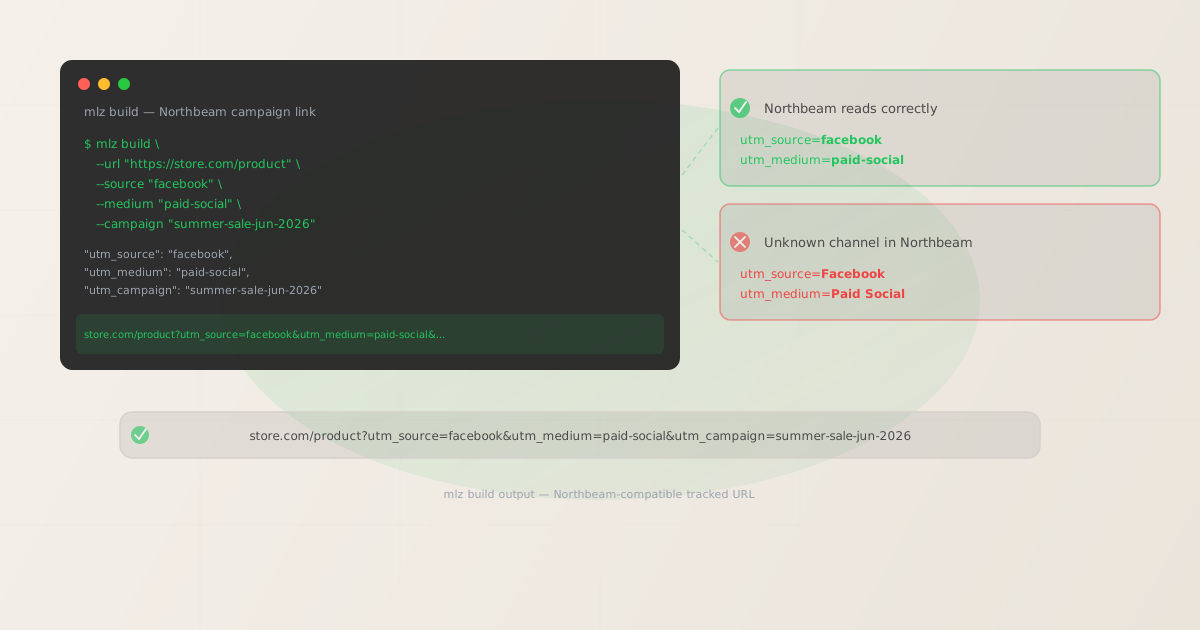
How Northbeam reads UTM parameters for multi-touch attribution
Northbeam's attribution model is built on top of UTM parameters read by the Northbeam pixel — a first-party JavaScript pixel typically installed via Shopify or a tag manager. When a visitor lands on the site, the pixel fires on pageview, reads any UTM parameters present in the URL, and stores them in a first-party cookie. Because this is first-party data scoped to the store domain, the UTM values persist across Northbeam's attribution window even in browser environments that restrict third-party cookies.
Northbeam supports multiple attribution models simultaneously — Last Click, First Click, Linear, Position-Based, and its data-driven model — and all of them read from the UTM values captured by the pixel at session time. For multi-touch journeys (a customer clicks a Meta ad, then sees a TikTok ad, then converts via email), each touchpoint's UTM parameters are captured separately. This means every paid channel link driving traffic to the store must have correctly formatted UTM parameters, or that touchpoint becomes invisible to Northbeam's models.
Northbeam's channel grouping maps specific utm_source and utm_medium combinations to channels using exact string matching. The channel table drives the "Channel ROAS" and "Channel LTV" views that most DTC brands rely on for spend decisions:
| utm_source | utm_medium | Northbeam channel |
|---|---|---|
facebook |
paid-social |
✓ Paid Social |
google |
cpc |
✓ Paid Search |
tiktok |
paid-social |
✓ Paid Social |
klaviyo |
email |
|
Facebook (capitalized) |
paid-social |
✗ Unknown |
facebook |
Paid Social (space + capital) |
✗ Misclassified |
fb (abbreviation) |
paid-social |
✗ Unknown |
Because Northbeam operates on exact string matching, a single capitalization variant from one team member is enough to fragment your channel ROAS table. DTC brands typically run campaigns across multiple ad platforms, from multiple team members generating links in separate tools — each with their own manual conventions. Attribution fragmentation accumulates quietly: Unknown channel entries, split ROAS across variants of the same source, campaign-level reporting that can't consolidate because campaign slugs don't match.
Building UTM-tagged links for Northbeam campaigns with mlz build
mlz build generates UTM-tagged URLs with normalized, lowercase-hyphenated parameter values — the format Northbeam's channel grouping expects. Pass the destination URL, source, medium, campaign, and optional content or term values. The output tracked_url is ready to paste into the ad platform's destination URL field. Add --validate to confirm the destination resolves before Northbeam's pixel fires on the first session.
# Meta / Facebook Ads campaign
$ mlz build \
  --url "https://store.com/product" \
  --source "facebook" \
  --medium "paid-social" \
  --campaign "summer-sale-jun-2026" \
  --content "carousel-product" \
  --validate

{
  "tracked_url": "https://store.com/product?utm_source=facebook&utm_medium=paid-social&utm_campaign=summer-sale-jun-2026&utm_content=carousel-product",
  "params": {
    "utm_source": "facebook",
    "utm_medium": "paid-social",
    "utm_campaign": "summer-sale-jun-2026",
    "utm_content": "carousel-product"
  },
  "stored": true
}

# TikTok Ads campaign
$ mlz build \
  --url "https://store.com/landing" \
  --source "tiktok" \
  --medium "paid-social" \
  --campaign "ugc-launch-jun-2026" \
  --content "video-15s-ugc" \
  --validate

{
  "tracked_url": "https://store.com/landing?utm_source=tiktok&utm_medium=paid-social&utm_campaign=ugc-launch-jun-2026&utm_content=video-15s-ugc",
  "stored": true
}

# Google Shopping campaign
$ mlz build \
  --url "https://store.com/category" \
  --source "google" \
  --medium "cpc" \
  --campaign "brand-shopping-jun-2026" \
  --term "product-name" \
  --validate

{
  "tracked_url": "https://store.com/category?utm_source=google&utm_medium=cpc&utm_campaign=brand-shopping-jun-2026&utm_term=product-name",
  "stored": true
}
mlz build always produces lowercase parameter values. There is no way to accidentally generate utm_source=Facebook or utm_medium=Paid Social through the CLI — normalization is enforced at generation time, before the link is distributed. This prevents the case fragmentation that splits Northbeam's channel ROAS table across capitalization variants produced by different team members using different tools.
The tracked_url from the JSON output is ready to paste into Meta Ads Manager's destination URL field, TikTok Ads' landing page URL field, Google Ads' final URL field, or any other platform. The stored field confirms the link was saved to your MissingLinkz campaign library for auditing and reference.
Validating campaign links with mlz check before Northbeam pixel fires
Northbeam's pixel fires on pageview. If the destination URL is unreachable when a paid visitor lands, or if a redirect in the chain strips UTM parameters before the page loads, Northbeam records no attribution for that session — the ad spend is invisible to the attribution model. mlz check validates the destination before the campaign launches: it confirms the URL resolves with a 200, HTTPS is configured, no redirect strips UTM parameters, and response time is acceptable.
$ mlz check "https://store.com/product?utm_source=facebook&utm_medium=paid-social&utm_campaign=summer-sale-jun-2026"

{
  "url": "https://store.com/product?utm_source=facebook&utm_medium=paid-social&utm_campaign=summer-sale-jun-2026",
  "valid": true,
  "checks": [
    { "check": "url_format", "status": "pass", "message": "URL format is valid." },
    { "check": "ssl", "status": "pass", "message": "URL uses HTTPS." },
    { "check": "resolution", "status": "pass", "message": "Destination responded with 200.", "details": { "status_code": 200, "response_time_ms": 224 } },
    { "check": "redirects", "status": "pass", "message": "No redirects detected." },
    { "check": "response_time", "status": "pass", "message": "Response time: 224ms.", "details": { "response_time_ms": 224 } }
  ],
  "status_code": 200,
  "response_time_ms": 224,
  "validated_at": "2026-06-17T09:20:14.000Z"
}
Run mlz check on every campaign link before the ad activates. This is especially important for Shopify stores where product pages can redirect based on URL structure changes, variant availability, or collections rerouting — a Shopify redirect that strips query strings will drop all UTM values and break Northbeam attribution for every session that lands on it. The redirects check confirms whether any redirect in the chain has dropped query parameters before the page loads and Northbeam's pixel fires.
Northbeam UTM tracking gotchas
- Northbeam is case-sensitive — exactly like GA4 and Triple Whale
- Northbeam's channel grouping uses exact string matching against UTM parameter values.
Facebookandfacebookare treated as different sources — they produce separate channel entries rather than consolidating into Paid Social.Paid Socialandpaid-socialcreate different groupings; only the lowercase-hyphenated form maps to the correct Northbeam channel. This case fragmentation is invisible in the ad platforms (Meta Ads Manager accepts any capitalization) but immediately visible in Northbeam's channel attribution table as unexplained Unknown entries and split ROAS figures. Usemlz buildto enforce lowercase-hyphenated values at generation time — the output always normalizes to lowercase, preventing the fragmentation before it can accumulate. - Missing utm_campaign breaks Northbeam's campaign-level ROAS
- Northbeam calculates ROAS at the campaign level by joining ad spend data (pulled from Meta, Google, TikTok, and other ad platform integrations) with attributed revenue (from pixel sessions tagged with UTM parameters). If
utm_campaignis missing from a link, Northbeam can't assign attributed revenue to a specific campaign for the spend-to-revenue ROAS calculation. If theutm_campaignslug doesn't match how the campaign is named in the ad platform, the join fails silently and ROAS reporting shows incomplete data. Always include--campaigninmlz buildfor any paid campaign link, and use a slug that corresponds to the campaign name in the ad platform. - Northbeam's MTA models all depend on consistent UTM structure
- Northbeam's multi-touch attribution models (Last Click, First Click, Linear, Position-Based, Northbeam's proprietary model) operate on the UTM values stored in the first-party cookie across the customer journey. A touchpoint where
utm_mediumwaspaid_socialinstead ofpaid-socialcreates a touchpoint that Northbeam can't assign to a channel — it appears in the journey but can't contribute to channel-level ROAS or cohort attribution. Inconsistent naming across team members generates attribution noise that compounds over every campaign flight. Standardizing onmlz buildfor all link generation enforces a consistent naming taxonomy across channels and team members. - Shopify redirect rules can silently strip Northbeam's UTM parameters
- Shopify stores frequently accumulate redirect rules: URL structure changes after a platform migration, product variant URL rewrites, deprecated collection paths redirected to new ones. Any Shopify redirect that doesn't preserve query strings drops all UTM parameters before Northbeam's pixel fires — attributing the session to Direct instead of the paid channel that drove the click. This is especially common with
301redirects created during store migrations or theme changes. Runmlz checkon every campaign destination URL before launch to verify no redirect in the chain is stripping query strings. Theredirectscheck in the output confirms whether UTM parameters survive the full hop sequence. - Northbeam's paid social channel combines Meta, TikTok, Pinterest, and Snapchat
- Northbeam's default channel grouping combines multiple paid social platforms under a single "Paid Social" channel using
utm_medium=paid-social. To see channel-level spend breakdown for individual platforms, useutm_sourceto distinguish them (facebook,tiktok,pinterest,snapchat) while usingutm_medium=paid-socialconsistently across all of them. Northbeam's platform-level view then separates them by source. Never use the platform name as the medium —utm_medium=tiktokdoesn't map to Northbeam's Paid Social channel and will fall through to Unknown.
Northbeam UTM naming conventions
Recommended UTM parameter values for Northbeam campaigns, aligned with Northbeam's channel grouping and a lowercase-hyphenated taxonomy enforced by mlz build:
- utm_source: lowercase platform name.
facebookfor Meta and Instagram (both platforms share the same Northbeam source — useutm_contentorutm_mediumplacement modifiers to distinguish them).tiktokfor TikTok Ads.googlefor all Google Ads formats.klaviyofor Klaviyo email and SMS.attentivefor Attentive SMS.postscriptfor Postscript SMS.pinterestfor Pinterest Ads.snapchatfor Snapchat Ads. Avoid abbreviations and brand variants: noFB,Meta,IG,Google Ads. Northbeam's channel rules map specific source strings — deviation creates Unknown attribution. - utm_medium: must match Northbeam's channel grouping expectations.
paid-socialfor Meta, TikTok, Pinterest, and Snapchat paid placements.cpcfor Google Search, Microsoft Search, and paid search placements.displayfor Google Display Network and programmatic display.emailfor email campaigns across all platforms.smsfor SMS platforms.organicfor organic social content. Do not usesocial,paid_social,paidsocial, orPaid Social— these do not match Northbeam's Paid Social channel grouping rule. - utm_campaign: lowercase-hyphenated campaign identifier. Include the time period so Northbeam's campaign-level ROAS joins correctly across campaign flights:
summer-sale-jun-2026,brand-search-always-on,abandon-cart-jun-2026. Theutm_campaignvalue is how Northbeam maps attributed revenue to ad spend from the platform integrations — match the slug as closely as possible to how the campaign is named in the ad platform. - utm_content: creative or ad variant identifier.
carousel-lifestyle,static-product,video-15s-ugc,story-reels. Northbeam usesutm_contentfor creative-level attribution, making it the right place to distinguish ad variants running within the same campaign. Keep values lowercase-hyphenated. - utm_term: keyword identifier for search campaigns.
competitor-brand,product-category-keywords. Omit for paid social campaigns where keyword-level attribution doesn't apply.
For the full cross-platform UTM naming reference, see the UTM naming conventions guide and the UTM tracking for developers guide.
FAQ
- Why does Northbeam show Unknown channels for some of my traffic?
- Unknown channel attribution in Northbeam almost always means
utm_sourceorutm_mediumdoesn't match Northbeam's channel grouping rules. The most common causes: capitalization variants (Facebookinstead offacebook), non-standard medium values (Paid Socialinstead ofpaid-social), abbreviations (fbinstead offacebook), or missing UTM parameters entirely. Regenerate affected campaign links withmlz buildusing normalized values, update the URLs in the ad platforms, and monitor Northbeam's channel attribution over the next campaign flight. Historical sessions with malformed UTMs remain attributed to Unknown — the fix only applies prospectively to newly generated links. - Can I use Northbeam and GA4 with the same UTM parameters?
- Yes. Northbeam and GA4 both read standard UTM parameters from the URL. Northbeam's pixel reads them when it fires on pageview and stores them in a first-party cookie. GA4's measurement tag reads the same UTM parameters from the same URL query string and records them as session attribution. Both tools receive identical parameter values from the same URL. A correctly formatted UTM link — lowercase source, hyphenated medium, campaign slug — works simultaneously for Northbeam multi-touch attribution and GA4 session attribution without modification.
mlz buildgenerates links that satisfy both platforms' format requirements in a single command. For detail on GA4's own case sensitivity rules, see are UTM parameters case sensitive in GA4? - Does Northbeam work without UTM parameters?
- Northbeam can record sessions without UTM parameters but cannot attribute them to a channel, campaign, or creative. Sessions without UTM data appear as Direct in Northbeam's attribution reports. Northbeam's ad platform integrations still pull spend data, but without corresponding UTM-tagged sessions to match against, ROAS calculations and multi-touch attribution models have no data to work with. Every paid channel link driving traffic to the store needs UTM parameters present and correctly formatted.
- What's the difference between Northbeam and GA4 attribution for DTC brands?
- GA4 uses session-scoped attribution — it assigns the conversion to the last-click session by default (other models available). Northbeam uses multi-touch attribution that tracks the full customer journey across all UTM-tagged touchpoints, applies multiple attribution models simultaneously, and integrates ad spend from platform APIs to calculate channel and campaign ROAS. Both tools read from the same UTM parameters. Northbeam gives DTC brands the cross-channel ROAS view that GA4's session-based model can't produce. For this reason, accurate UTM parameter formatting matters even more for Northbeam than for GA4 — a malformed UTM creates an attribution gap in a multi-touch model that may span 7 to 30 days of customer journey data.
- How do I validate Northbeam campaign links in bulk before a campaign launch?
- Run
mlz checkin a shell loop over your campaign URL list, or call thePOST /v1/preflightREST API endpoint from a script to validate in parallel. For CI/CD integration, see the GitHub Actions campaign link validation guide — the same workflow works for Northbeam campaign links. Theredirectscheck in each result confirms whether UTM parameters survive the redirect chain to the final destination, which is the critical check for Shopify stores with redirect rules.
Recommended posts
Build Northbeam-compatible tracked links from the terminal
mlz build enforces the lowercase-hyphenated formatting Northbeam requires for accurate channel grouping and campaign-level ROAS reporting. Generate validated tracked URLs from the terminal or CI pipeline — no manual UTM entry, no capitalization variants, no Unknown channels. Run mlz check on every link before the campaign launches to confirm destinations resolve and no Shopify redirect strips UTM parameters before the Northbeam pixel fires.
1,000 links/month free. No credit card.
Your API key
Save this now — it won't be shown again.
npm install -g missinglinkz
Free plan: 1,000 links/month. No credit card. See the UTM tracking for developers guide for the full programmatic workflow including API and MCP integration.