UTM Tracking for Emarsys (SAP): How to Build and Validate Campaign Links
UTM tracking for Emarsys starts with a single naming decision: use utm_source=emarsys — lowercase, no SAP prefix. Emarsys is an enterprise multi-channel marketing platform acquired by SAP in 2020; teams universally call it "Emarsys" regardless of the SAP parentage, and your analytics source values should match that convention. The scalability problem surfaces immediately in any team larger than one: Emarsys has no forced UTM normalisation. Each marketer who builds a campaign manually sets UTM values in their own way, producing utm_source=Emarsys, utm_source=emarsys, and utm_source=SAP-Emarsys in the same week — three separate source rows in GA4 for a single sending platform. Cross-channel campaigns compound this further. Emarsys supports email, SMS, mobile push, and web push from one platform, but each channel needs a different utm_medium value. Teams that copy-paste a single tracked email URL into an SMS template produce sessions attributed to utm_medium=email even though they originated from an SMS click. Use mlz build to generate per-channel tracked URLs with normalised parameter values, and run --validate before embedding any URL in an Emarsys template.
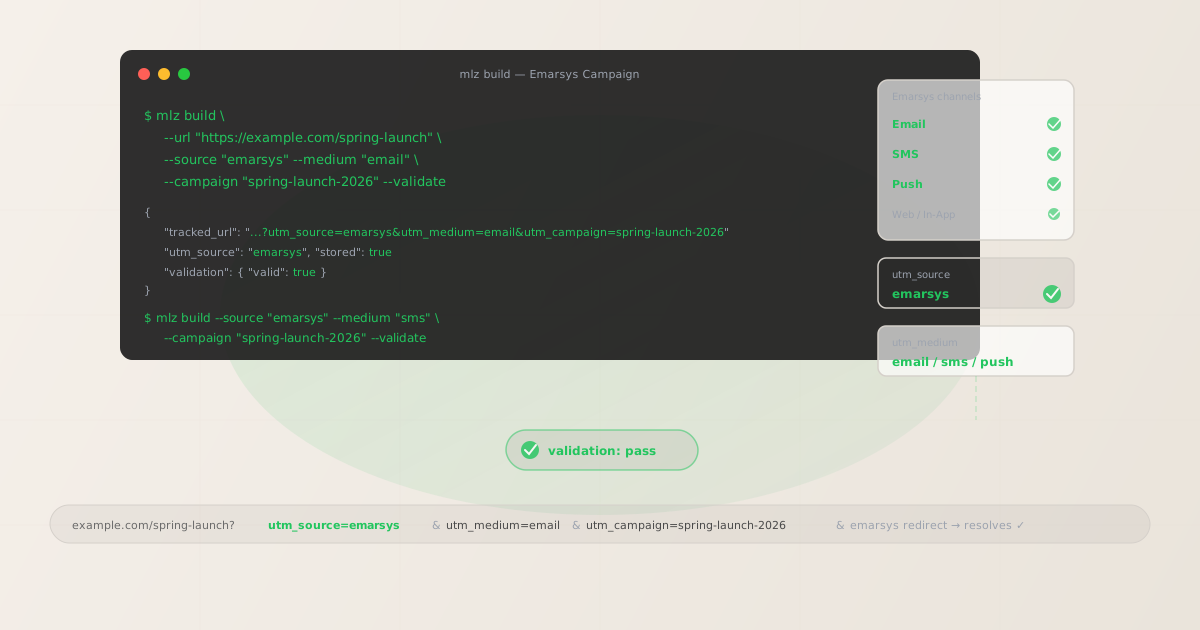
The correct utm_source and utm_medium for Emarsys
Use utm_source=emarsys — lowercase, no SAP prefix — for all sends that originate from the Emarsys platform, regardless of channel. The value must be consistent across your entire Emarsys sending history. Avoid SAP-Emarsys (verbose, brand-legal designation that does not appear in day-to-day analytics contexts), sap_emarsys, and never allow individual team members to set their own UTM source value without a governance step.
The utm_medium for Emarsys depends on the sending channel. Emarsys is a multi-channel platform, and each channel maps to a distinct medium value that determines how GA4 classifies the traffic:
| Channel | utm_source | utm_medium | GA4 default channel |
|---|---|---|---|
| Email campaigns | emarsys |
email |
|
| SMS campaigns | emarsys |
sms |
Other (custom channel group "SMS") |
| Mobile push | emarsys |
push |
Other (custom channel group "Push") |
| Automation (email) | emarsys |
email |
GA4 maps utm_medium=email to the Email default channel group automatically. utm_medium=sms and utm_medium=push land in GA4's Other channel group by default. If your team drives a meaningful volume of sessions through SMS or push, configure custom channel groups in GA4's Admin settings — for example, a "SMS Marketing" group matching utm_medium=sms — so those sessions appear as distinct attribution rows rather than disappearing into Other.
For web push via Emarsys, choose either push or web-push and document your choice. Use the same value consistently across every web push send — switching between the two splits your web push attribution across two medium rows in GA4.
Emarsys Tactics, Campaigns, and Programs — which UTM slug for each?
Emarsys organises sending work into three main workflow types, and each needs a distinct UTM naming convention to keep attribution clean in GA4.
Tactics are pre-built best-practice campaign templates — abandoned cart, birthday offer, win-back — that deploy quickly from a catalogue. The risk is precisely what makes them fast: Tactics are pre-configured and teams often activate them without reviewing the UTM values in the CTA links. Templates with default or auto-generated UTM values produce ungoverned source and campaign data from the moment they go live. Build tracked URLs for every CTA in a Tactic template with mlz build before activating the Tactic, not after.
Campaigns are bespoke single sends or recurring broadcast emails. Use a descriptive lowercase-hyphenated campaign slug: summer-launch-2026, product-update-may-2026.
Programs are multi-step automation journeys — the Emarsys term for what other platforms call workflows or sequences. Use a program-[name] convention: program-welcome-series, program-post-purchase. Each step in a Program that links out to a landing page should have its own tracked URL with a unique utm_content value to distinguish Program steps in GA4.
# Abandoned cart Tactic — CTA linking to the cart recovery page
$ mlz build \
  --url "https://example.com/cart/recover" \
  --source "emarsys" \
  --medium "email" \
  --campaign "tactic-abandoned-cart-2026" \
  --content "cta-complete-purchase" \
  --validate

{
  "tracked_url": "https://example.com/cart/recover?utm_source=emarsys&utm_medium=email&utm_campaign=tactic-abandoned-cart-2026&utm_content=cta-complete-purchase",
  "params": {
    "utm_source": "emarsys",
    "utm_medium": "email",
    "utm_campaign": "tactic-abandoned-cart-2026",
    "utm_content": "cta-complete-purchase"
  },
  "validation": { "valid": true },
  "link_id": "lnk_em4r9x2k",
  "stored": true
}
Copy the tracked_url from the output and replace the default link destination in the Tactic or Campaign template. Running mlz links list --campaign "tactic-abandoned-cart-2026" after building all CTAs confirms every link in the template has a validated, stored tracked URL before you activate the Tactic.
Emarsys click tracking and UTM preservation
Emarsys wraps email links in its own click tracking redirect. UTM parameters are preserved through this redirect as part of the encoded destination URL — when a recipient clicks, Emarsys records the click at the redirect level, then forwards the browser to the destination URL with all UTM parameters intact.
The important caveat: Emarsys records clicks at the redirect, not at the destination. A broken destination URL — a 404, a certificate error, a redirect that strips the query string — shows as a click in Emarsys analytics but delivers a failed page load to the recipient. GA4 receives no session from that click. The Emarsys click count and the GA4 session count diverge, and the difference is invisible in Emarsys's own reporting.
For SMS and push links: Emarsys may or may not wrap these in click tracking depending on your platform configuration and channel setup. Whether or not click tracking is active, validate destination URLs with mlz build --validate before embedding any link in a template, Tactic, or Program step.
$ mlz build \
  --url "https://example.com/spring-launch" \
  --source "emarsys" \
  --medium "email" \
  --campaign "spring-launch-2026" \
  --validate

{
  "tracked_url": "https://example.com/spring-launch?utm_source=emarsys&utm_medium=email&utm_campaign=spring-launch-2026",
  "params": {
    "utm_source": "emarsys",
    "utm_medium": "email",
    "utm_campaign": "spring-launch-2026"
  },
  "validation": {
    "valid": true,
    "checks": [
      { "check": "ssl", "status": "pass" },
      { "check": "resolution", "status": "pass", "details": { "response_time_ms": 138 } },
      { "check": "redirects", "status": "pass" }
    ]
  },
  "link_id": "lnk_em7p2v9n",
  "stored": true
}
Paste the tracked_url value as the link destination in the Emarsys Campaign or Tactic template. Emarsys's click tracking redirect will wrap this URL — your UTM parameters are encoded in the destination portion and survive the redirect hop to reach GA4 intact.
Multi-channel UTM management in Emarsys
Enterprise teams using Emarsys for email, SMS, and push face a UTM management challenge that does not exist in single-channel platforms: the same campaign message sends through multiple channels simultaneously, and each channel needs a different utm_medium value. If the same tracked URL is used for both the email and SMS versions of a campaign, GA4 attributes all resulting sessions to one medium — whichever was set in the URL — even though some of those sessions arrived via SMS click.
The correct approach is to run mlz build three times for any cross-channel campaign — once for each sending channel — with the same --campaign slug but a different --medium value per channel. Each tracked URL then goes into the respective Emarsys channel template.
# Email version — goes into the Emarsys email template
$ mlz build \
  --url "https://example.com/summer-sale" \
  --source "emarsys" \
  --medium "email" \
  --campaign "summer-sale-2026" \
  --validate

{ "tracked_url": "https://example.com/summer-sale?utm_source=emarsys&utm_medium=email&utm_campaign=summer-sale-2026", "validation": { "valid": true } }

# SMS version — goes into the Emarsys SMS template
$ mlz build \
  --url "https://example.com/summer-sale" \
  --source "emarsys" \
  --medium "sms" \
  --campaign "summer-sale-2026" \
  --validate

{ "tracked_url": "https://example.com/summer-sale?utm_source=emarsys&utm_medium=sms&utm_campaign=summer-sale-2026", "validation": { "valid": true } }

# Push version — goes into the Emarsys push template
$ mlz build \
  --url "https://example.com/summer-sale" \
  --source "emarsys" \
  --medium "push" \
  --campaign "summer-sale-2026" \
  --validate

{ "tracked_url": "https://example.com/summer-sale?utm_source=emarsys&utm_medium=push&utm_campaign=summer-sale-2026", "validation": { "valid": true } }
After building all three, run mlz links list --campaign "summer-sale-2026" to retrieve every stored tracked URL for this campaign. You get one JSON output listing all three channel variants — useful for pasting into a pre-send checklist or confirming that no channel template is using a URL intended for a different channel.
Emarsys UTM tracking gotchas
- emarsys vs sap-emarsys — decide before your first campaign
- GA4 treats
emarsysandsap-emarsysas separate traffic sources. Once a campaign has run under one value, switching splits your Emarsys attribution across two source rows in GA4 — the old row remains in historical data. Useemarsys: it is shorter, the standard in analytics contexts, and matches how the platform is universally referred to in operations and reporting. Enforce it withmlz build --source "emarsys"so the value is never set manually by individual team members. - Tactics bypass governance steps — build tracked URLs before activating
- Emarsys Tactics deploy quickly because they are pre-configured templates. That speed comes at a cost: the CTA links in a Tactic may carry default UTM values, auto-generated values, or no UTM parameters at all, depending on how the Tactic was configured. Build tracked URLs for every CTA in the Tactic template with
mlz buildbefore activating. Replacing the Tactic's default link destination with a validated, normalised tracked URL frommlz buildtakes less than a minute and prevents months of ungoverned source and campaign data accumulating in GA4. - Multi-channel campaigns need per-channel tracked URLs
- Copying an email tracked URL — with
utm_medium=email— into an SMS template means every session that arrives via SMS click is attributed to email medium in GA4. The Emarsys SMS analytics will show clicks; GA4 will misattribute the resulting sessions. Build a separate tracked URL per channel with matching--campaignand channel-appropriate--medium:email,sms, orpush. One URL per channel per CTA, built withmlz buildbefore the campaign activates. - Programs and automation flows need per-step utm_content
- Emarsys Programs are multi-step journeys. If every email in a welcome Program uses the same tracked URL, GA4 shows all Program-attributed sessions under one row — you cannot distinguish which step in the journey drove the conversion. Use a unique
utm_contentvalue per Program step:welcome-step-1,welcome-step-2,welcome-step-3. Build each step's tracked URL withmlz build --content "welcome-step-N"before the Program goes live. - Emarsys personalisation and dynamic content need per-recipient URL generation
- Emarsys's dynamic content and personalisation features — including personalised product recommendations or per-recipient offer pages — may produce different destination URLs for each recipient. A single
mlz buildcall at template-build time cannot cover recipient-level URL variation. For these use cases, call the MissingLinkz API programmatically as part of your send pipeline to generate a validated tracked URL per recipient, before the Emarsys API request fires. This keeps UTM construction outside the Emarsys template engine — where it is ungoverned — and inside a controlled build step.
Emarsys UTM naming conventions
Recommended UTM parameter values for SAP Emarsys, aligned with GA4 default channel groupings and a lowercase-hyphenated taxonomy:
- utm_source:
emarsys— lowercase, no SAP prefix, across all channels (email, SMS, push, web push). Never useSAP-Emarsys,sap_emarsys,Emarsyswith a capital E, or any abbreviated form. - utm_medium:
emailfor email channel sends (Campaigns and Automation Programs),smsfor SMS sends,pushfor mobile push,web-pushfor web push (pick one for web push and enforce it consistently). Never reuse an email tracked URL for SMS or push. - utm_campaign: Lowercase, hyphenated, specific to the send type and time period. Tactics:
tactic-abandoned-cart-2026,tactic-birthday-offer-2026. Campaigns:summer-launch-2026,product-update-may-2026. Programs:program-welcome-series,program-post-purchase. Never use display names or UI-entered strings as-is. - utm_content: Per CTA within an email:
cta-hero-button,body-text-link. Per Program step:welcome-step-1,welcome-step-2. Each distinct CTA or Program step that links to a landing page should have its own tracked URL with a uniqueutm_contentvalue. - utm_term: Optional. Use to carry audience segment or lifecycle stage into GA4 when the same Campaign or Tactic sends to multiple Emarsys contact segments:
high-value,lapsed-90d,new-subscriber. Useful for comparing segment-level performance within a single campaign in GA4.
See the UTM naming conventions guide for the full cross-platform reference and the UTM tracking for developers guide for programmatic generation and validation at scale.
FAQ
- Should I use utm_source=emarsys or utm_source=sap-emarsys?
- Use
emarsys. It is shorter, more scannable in GA4 filter dropdowns, and consistent with how the platform is referred to in analytics and marketing operations contexts. The full "SAP Emarsys" name is a brand and legal designation; in practice teams refer to the platform as Emarsys and your source values should match. Pickemarsysbefore your first campaign and enforce it withmlz build --source "emarsys". GA4 treatsemarsysandsap-emarsysas different sources — historical data split between both values requires a custom channel group to consolidate. - Does Emarsys click tracking preserve UTM parameters?
- Yes — Emarsys wraps email links in a click tracking redirect that encodes the full destination URL, including UTM query parameters. When a recipient clicks, Emarsys records the click and forwards the browser to the destination with UTM parameters intact. The important caveat: Emarsys records the click at the redirect level, not at the destination. A broken destination URL (a 404, certificate error, or redirect that strips the query string) shows as a click in Emarsys analytics but generates no session in GA4. Use
mlz build --validateto confirm destination URLs resolve correctly before embedding them in any Emarsys template. - What utm_medium should I use for Emarsys SMS sends?
- Use
sms. GA4 placesutm_medium=smsin the Other default channel group by default — create a custom channel group in GA4 Admin called "SMS Marketing" (matchingutm_medium exactly contains sms) to make SMS-attributed sessions visible as a distinct attribution row. Never reuse an email tracked URL (withutm_medium=email) for SMS sends — all SMS-originated sessions would appear in GA4 as email medium, making channel-level attribution impossible. - How do I track multi-channel campaigns accurately across Emarsys email, SMS, and push?
- Build a separate tracked URL per channel with the same
--campaignslug but a different--mediumvalue: runmlz build --source "emarsys" --medium "email" --campaign "summer-sale-2026"for the email template,--medium "sms"for the SMS template, and--medium "push"for the push template. Each tracked URL goes into the respective Emarsys channel template. One URL per channel per CTA — the same destination, three different tracked URLs. After building, runmlz links list --campaign "summer-sale-2026"to confirm all three channel variants are stored and ready. - How do I handle UTM tracking for Emarsys Tactics?
- Build tracked URLs for each CTA in the Tactic template with
mlz buildbefore activating the Tactic. Do not rely on Emarsys auto-UTM settings or manually entered values inside the Tactic configuration — these produce inconsistent and often non-normalised source and campaign values. Open the Tactic template, identify every CTA link, build a tracked URL for each with a unique--contentvalue per CTA, then replace the Tactic's default link destinations with the validated tracked URLs frommlz buildoutput before going live.
Recommended posts
Build Emarsys links from the terminal
Pass --source "emarsys" with the correct --medium for each Emarsys channel to mlz build and get a normalised, validated tracked URL ready to paste into any Emarsys template, Tactic, or Program step. Run the command once per channel per CTA — email, sms, push — with the same --campaign slug across all three, and use --validate to confirm destination URLs resolve correctly before the Emarsys campaign activates. UTM source, medium, and campaign values are fixed at build time, never set manually inside the Emarsys editor where they can drift with each team member who touches the template.
1,000 links/month free. No credit card.
Your API key
Save this now — it won't be shown again.
npm install -g missinglinkz
Free plan: 1,000 links/month. No credit card. See the UTM tracking for developers guide for the full programmatic workflow including API and MCP integration.