UTM Tracking for Dotdigital: How to Build and Validate Campaign Links
UTM tracking for Dotdigital starts with one naming decision that every team gets wrong at least once: the source value should be utm_source=dotdigital — not dotmailer, which was the platform's name before a 2019 rebrand. GA4 treats dotmailer and dotdigital as completely separate traffic sources. Teams that were using Dotdigital before the rebrand often have a split in their historical attribution data — two rows in GA4 for what is actually one sending platform. The fix going forward is straightforward: always use dotdigital for all new sends. The scalability problem surfaces as soon as more than one person is scheduling Dotdigital campaigns. Dotdigital's built-in Google Analytics tracking uses the campaign display name for utm_campaign — producing mixed-case, space-encoded values like utm_campaign=Spring+Newsletter that GA4 treats as a different campaign from spring-newsletter-2026 or spring_newsletter. Teams with more than one person sending Dotdigital campaigns will produce fragmented GA4 data within weeks. The infrastructure-grade approach: disable Dotdigital's auto-UTM and use mlz build to generate normalised tracked URLs before editing any campaign template.
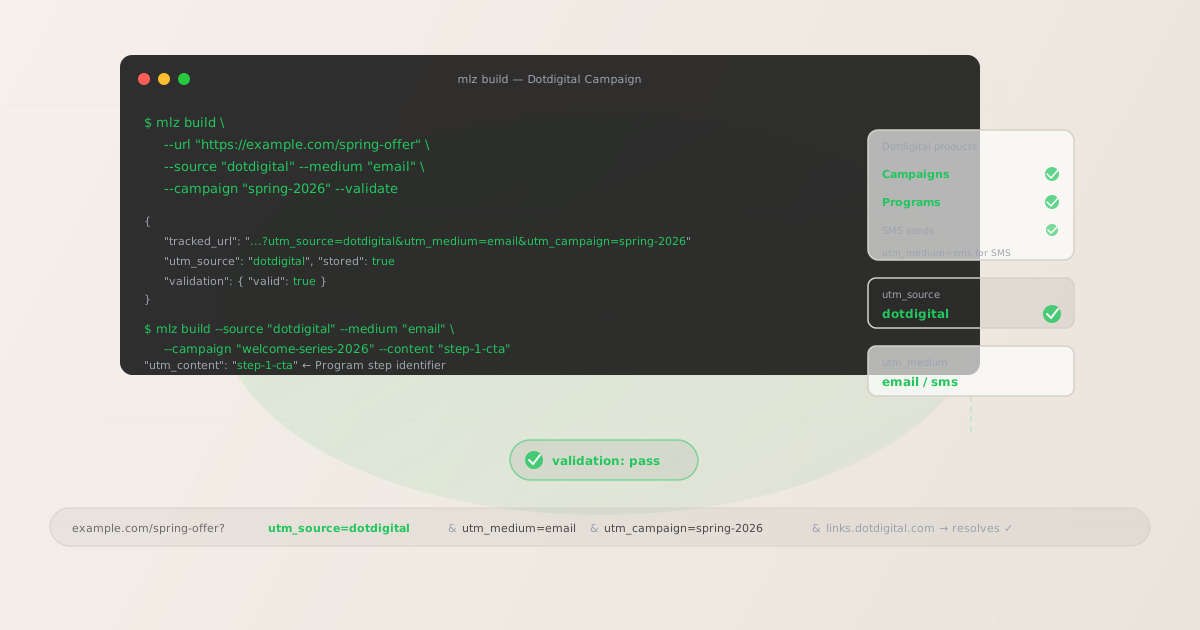
The correct utm_source and utm_medium for Dotdigital
Use utm_source=dotdigital — lowercase, current brand name — for all sends from the Dotdigital platform, whether from Campaigns, Programs automation, or transactional sends. Avoid dotmailer (legacy, pre-2019 brand name), engagement-cloud (a product tier name, not the platform), and dde (an acronym used internally but not recognisable as an analytics source label). The platform is Dotdigital; your source values should match that exactly.
Dotdigital rebranded from dotmailer in 2019, so teams that have been on the platform since before the rebrand may have historical GA4 data under utm_source=dotmailer. These two values appear as separate rows in GA4's Source / Medium report — there is no automatic consolidation. To combine old dotmailer data with current dotdigital data in a single view, create a GA4 custom channel group that maps both dotmailer and dotdigital to a single "Dotdigital Email" channel definition. For all new sends, lock in dotdigital and enforce it with mlz build.
The utm_medium choice depends on what Dotdigital feature is sending:
| Campaign type | utm_source | utm_medium | GA4 default channel |
|---|---|---|---|
| Campaigns (promotional / newsletter) | dotdigital |
email |
|
| Programs / automation (welcome, post-purchase) | dotdigital |
email |
|
| SMS sends | dotdigital |
sms |
Other |
GA4 maps utm_medium=email to the Email default channel group automatically. utm_medium=sms lands in Other unless you configure a custom channel group in GA4's Admin settings. If your team sends Dotdigital SMS campaigns with tracked links — and you want those sessions visible as a distinct attribution row rather than mixed into Other — a custom channel group for sms is worth creating. Programs automation uses email as the medium regardless of how complex the program is: Programs send emails, so the medium reflects the channel.
Dotdigital click tracking and UTM preservation
Dotdigital wraps links in its own click tracking redirect via links.dotdigital.com. UTM parameters are encoded in the destination URL within that redirect and are preserved when the browser reaches the final destination — the same mechanism used by all major ESP click tracking systems. When a recipient clicks a tracked link, Dotdigital records the click at the redirect level, then forwards the browser to the destination URL with your UTM parameters intact.
However, as with all click-tracking redirects, the Dotdigital system records the click at the redirect step — not at the destination. A broken destination URL is invisible to Dotdigital analytics. If your landing page returns a 404, has a certificate error, or lives behind a redirect chain that strips query parameters, Dotdigital will record the click while GA4 receives no session. The gap between "Dotdigital shows 500 clicks" and "GA4 shows 300 sessions" is often a broken destination, not a tracking problem.
Use mlz build --validate to confirm destination URLs resolve before embedding them in any Dotdigital template. The validation runs against the actual destination URL — SSL, resolution, redirect chain — so you catch broken destinations before the campaign sends:
$ mlz build \
  --url "https://example.com/spring-offer" \
  --source "dotdigital" \
  --medium "email" \
  --campaign "spring-2026" \
  --validate

{
  "tracked_url": "https://example.com/spring-offer?utm_source=dotdigital&utm_medium=email&utm_campaign=spring-2026",
  "params": {
    "utm_source": "dotdigital",
    "utm_medium": "email",
    "utm_campaign": "spring-2026"
  },
  "validation": {
    "valid": true,
    "checks": [
      { "check": "ssl", "status": "pass" },
      { "check": "resolution", "status": "pass", "details": { "response_time_ms": 138 } },
      { "check": "redirects", "status": "pass" }
    ]
  },
  "link_id": "lnk_dd4p2x7n",
  "stored": true
}
Copy the tracked_url from the JSON output and paste it as the link destination in the Dotdigital campaign editor. Dotdigital's click tracking will wrap this URL in its links.dotdigital.com redirect — your UTM parameters are encoded in the destination portion of the redirect and will be intact when the browser reaches your landing page.
Building Campaign links with mlz build
Dotdigital Campaigns include a Google Analytics integration toggle in campaign settings. When enabled, it appends UTM parameters using the campaign display name field as-is for utm_campaign. A campaign called "Spring Newsletter 2026" produces utm_campaign=Spring+Newsletter+2026 — spaces encoded as +, mixed case, no hyphenation. GA4 treats this as a completely different campaign from spring-newsletter-2026. Every person who names a Dotdigital campaign slightly differently introduces a new row in GA4's campaign report.
The recommended approach: disable Dotdigital's built-in Google Analytics integration and use mlz build before editing any campaign template. Build one tracked URL per CTA in the email, using --content to distinguish them:
# Primary CTA button — hero section of the email
$ mlz build \
  --url "https://example.com/spring-offer" \
  --source "dotdigital" \
  --medium "email" \
  --campaign "spring-newsletter-2026" \
  --content "cta-hero-button" \
  --validate

{
  "tracked_url": "https://example.com/spring-offer?utm_source=dotdigital&utm_medium=email&utm_campaign=spring-newsletter-2026&utm_content=cta-hero-button",
  "params": {
    "utm_source": "dotdigital",
    "utm_medium": "email",
    "utm_campaign": "spring-newsletter-2026",
    "utm_content": "cta-hero-button"
  },
  "validation": { "valid": true },
  "link_id": "lnk_dd7m3r9k",
  "stored": true
}

# Body text link — same campaign, different content identifier
$ mlz build \
  --url "https://example.com/spring-offer" \
  --source "dotdigital" \
  --medium "email" \
  --campaign "spring-newsletter-2026" \
  --content "body-text-link"
Each tracked URL generated by mlz build is stored and linked to the campaign slug. Use mlz links list --campaign "spring-newsletter-2026" to retrieve all tracked URLs for this campaign before assembling the template — confirming every CTA in the email has its own correctly formed tracked URL before the campaign is scheduled.
Programs (automation) UTM tracking
Dotdigital Programs are multi-step automated journeys — welcome series, post-purchase flows, re-engagement sequences, birthday triggers. Each program step typically sends a different email, often linking to different destinations. The UTM risk with Programs is subtle: automation templates shared across programs often get a single tracked URL embedded, even when the campaign slug should differ per program. A welcome series and a re-engagement sequence can share the same template layout but should never share the same utm_campaign value — combining them in GA4 makes it impossible to measure which automation program is actually driving conversions.
The correct approach: build tracked URLs per Program-and-step combination with mlz build, using utm_campaign to identify the program type and utm_content for the specific step:
# Welcome series — step 1 (day 0 email)
$ mlz build \
  --url "https://example.com/getting-started" \
  --source "dotdigital" \
  --medium "email" \
  --campaign "welcome-series-2026" \
  --content "step-1-cta" \
  --validate

{
  "tracked_url": "https://example.com/getting-started?utm_source=dotdigital&utm_medium=email&utm_campaign=welcome-series-2026&utm_content=step-1-cta",
  "params": {
    "utm_source": "dotdigital",
    "utm_medium": "email",
    "utm_campaign": "welcome-series-2026",
    "utm_content": "step-1-cta"
  },
  "validation": { "valid": true },
  "link_id": "lnk_dd1w5s8m",
  "stored": true
}

# Welcome series — step 2 (day 3 follow-up)
$ mlz build \
  --url "https://example.com/features" \
  --source "dotdigital" \
  --medium "email" \
  --campaign "welcome-series-2026" \
  --content "step-2-cta" \
  --validate

{
  "tracked_url": "https://example.com/features?utm_source=dotdigital&utm_medium=email&utm_campaign=welcome-series-2026&utm_content=step-2-cta",
  "params": {
    "utm_source": "dotdigital",
    "utm_medium": "email",
    "utm_campaign": "welcome-series-2026",
    "utm_content": "step-2-cta"
  },
  "validation": { "valid": true },
  "link_id": "lnk_dd2e6t4p",
  "stored": true
}
With this pattern, each step in the welcome series has its own tracked URL stored under the same utm_campaign slug. In GA4, you can filter by utm_campaign=welcome-series-2026 to see the total program attribution, then break down by utm_content to see which step drove the conversion. If a later step in the program links to the same destination as an earlier step, build a new tracked URL for the later step — never reuse a tracked URL from a different program step.
Dotdigital UTM tracking gotchas
- dotmailer vs dotdigital — lock in the current brand name from the start
- The platform rebranded to Dotdigital in 2019. If your GA4 data has rows under both
dotmaileranddotdigital, those are two separate source rows — GA4 has no automatic way to merge them. Going forward, enforcedotdigitalfor all new sends. For historical data, create a GA4 custom channel group that maps bothdotmailer / emailanddotdigital / emailto a single "Dotdigital Email" channel definition so your cross-date comparisons are not broken by the naming transition. - Dotdigital's auto-UTM uses campaign display names as-is
- Dotdigital's built-in Google Analytics tracking sets
utm_campaignto whatever the campaign is named in the UI — mixed case, URL-encoded spaces, no normalisation. A campaign named "May Re-engagement" producesutm_campaign=May+Re-engagementorMay%20Re-engagement— a different value frommay-re-engagement-2026in GA4 filtering. Disable Dotdigital's auto-UTM in campaign settings and usemlz buildto produce clean, lowercase-hyphenated campaign slugs. The extra step before campaign build prevents months of fragmented attribution data. - Programs need per-step utm_content values — not one URL shared across all steps
- The most common Programs UTM error: building a single tracked URL for a program and embedding it in all program steps. This makes it impossible to determine which program step drove conversions in GA4 — all sessions from the entire welcome series look identical. Build a tracked URL per program-step combination with a unique
--contentvalue:welcome-step-1,welcome-step-2,welcome-step-3. Keep theutm_campaignslug consistent across all steps so you can still roll up program-level attribution. - Click tracking redirect adds a layer — validate destination URLs before embedding
- Dotdigital's click tracking wraps links in a
links.dotdigital.comredirect. UTM parameters are preserved through this redirect, but a broken destination URL is invisible to Dotdigital analytics — the platform records the click at the redirect step, not at the landing page. Usemlz build --validateto confirm destination URLs resolve correctly before embedding them in any campaign or program template. For spot-checking live campaign destinations after web infrastructure changes, usemlz check <destination-url>. - SMS sends need utm_medium=sms — not email
- Dotdigital supports SMS sends alongside email. If you add tracked links to Dotdigital SMS messages, use
utm_medium=sms— notemail. Mixing SMS and email sends underutm_medium=emailmakes it impossible to separate SMS attribution from email attribution in GA4.smslands in GA4's Other default channel group; create a custom channel group if you want SMS sessions visible as a distinct row.
Dotdigital UTM naming conventions
Recommended UTM parameter values for Dotdigital, aligned with GA4 default channel groupings and a consistent lowercase-hyphenated taxonomy:
- utm_source:
dotdigital— lowercase, current platform name. Never usedotmailerfor new sends,engagement-cloud, ordde. Enforce withmlz buildto eliminate case variation. - utm_medium:
emailfor all email sends — Campaigns and Programs alike. Usesmsfor Dotdigital SMS sends where you are adding tracked links. The medium reflects the channel, not the Dotdigital product name. - utm_campaign: Lowercase, hyphenated, descriptive of the send type and time period:
spring-newsletter-2026,welcome-series-q2,re-engagement-may-2026,post-purchase-flow-2026. Never use Dotdigital's auto-generated campaign name as-is. - utm_content: Use to distinguish individual CTAs within a campaign:
cta-hero-button,body-text-link,footer-link. For Programs, use to distinguish program steps:welcome-step-1,welcome-step-2. Each distinct link in an email should have a uniqueutm_contentvalue. - utm_term: Optional. Use to carry audience segment information into GA4 when the same campaign sends to multiple Dotdigital contact lists or segments:
new-subscriber,engaged-user,lapsed-purchaser.
See the UTM naming conventions guide for the full cross-platform reference and the UTM tracking for developers guide for programmatic generation and validation at scale.
FAQ
- Should I use utm_source=dotmailer or utm_source=dotdigital?
- Use
dotdigital— it's the current platform name since the 2019 rebrand.dotmaileris the legacy value; GA4 treats it as a completely separate traffic source fromdotdigital. If your account has historical data underdotmailer, create a GA4 custom channel group to consolidate the old value into the same channel definition asdotdigitalfor cross-date comparisons. For all new sends, enforcedotdigitalconsistently viamlz build. - Does Dotdigital's click tracking preserve UTM parameters?
- Yes — Dotdigital's click tracking wraps links in a
links.dotdigital.comredirect that encodes the full destination URL, including UTM query parameters. When a recipient clicks the link, Dotdigital records the click and forwards the browser to the destination with UTM parameters intact. The important caveat: Dotdigital records the click at the redirect step, not at the destination. A broken destination URL will show in Dotdigital's click analytics but not in GA4 sessions. Usemlz build --validateto confirm destination URLs resolve correctly before embedding them in templates. - What utm_medium should I use for Dotdigital Programs (automation)?
- Use
email— Programs send emails, so the medium reflects the channel, not the sending mechanism. The same logic applies to all Dotdigital automation: welcome series, post-purchase flows, re-engagement sequences, birthday triggers. All useutm_medium=email. Theutm_campaignslug andutm_contentvalues carry the program-specific and step-specific attribution detail. - How do I track individual steps in a Dotdigital Program?
- Use
utm_contentto distinguish each step. Keep the sameutm_campaignslug across all steps in the same program so you can roll up program-level attribution in GA4, but varyutm_contentper step:welcome-step-1,welcome-step-2,welcome-step-3. Build a separate tracked URL for each step withmlz build --campaign "welcome-series-2026" --content "step-N-cta". Never embed the same tracked URL in multiple program steps — that collapses all step-level data into a single indistinguishable row in GA4. - How do I batch-generate tracked URLs for a Dotdigital campaign with multiple links?
- Run
mlz buildfor each CTA with a matching--campaignslug and a unique--contentvalue per CTA. After building, runmlz links list --campaign "your-campaign-slug"to retrieve all stored tracked URLs for that campaign in a single JSON output — useful for assembling a template build checklist or passing programmatically into a CMS or email builder via the MissingLinkz API. See the campaign link infrastructure overview for API and MCP integration options for teams building large numbers of tracked links per campaign.
Recommended posts
Build Dotdigital links from the terminal
Pass --source "dotdigital" --medium "email" to mlz build and get a normalised, validated tracked URL ready to paste into any Dotdigital template — dotdigital lowercase consistently (not dotmailer), clean hyphenated campaign slugs that replace whatever Dotdigital's auto-UTM would have generated, and per-step utm_content values that give Programs the attribution granularity they need. Add --validate to confirm destination URLs resolve correctly through Dotdigital's click tracking redirect before the campaign goes live, and run mlz check on active campaign destinations after any web infrastructure change.
1,000 links/month free. No credit card.
Your API key
Save this now — it won't be shown again.
npm install -g missinglinkz
Free plan: 1,000 links/month. No credit card. See the UTM tracking for developers guide for the full programmatic workflow.