UTM Tracking for ClickMagick: How to Build and Validate Campaign Links
ClickMagick is a click tracking, attribution, and link management platform used primarily by direct response marketers, info-product sellers, affiliates, and performance marketers. It works by creating tracking links — typically at track.clickmagick.com/yourlink or a custom tracking domain — that route clicks through ClickMagick's servers before redirecting to a destination URL you define inside ClickMagick's dashboard. This is where UTM parameters come in: the destination URL embedded inside ClickMagick's tracking link is what GA4, Wicked Reports, and other analytics tools read when their pixels fire on the final landing page. If the destination URL is missing UTM parameters, or if ClickMagick's redirect chain — or a subsequent funnel platform redirect — strips the query string before the analytics pixel fires, your paid traffic is misattributed as Direct. The fix isn't a manual workaround. Use mlz build to generate correctly normalized UTM links to embed as the destination URL inside ClickMagick, and run mlz check on the full ClickMagick tracking link to verify the entire redirect chain from ClickMagick's servers to the final landing page preserves UTM parameters at every hop.
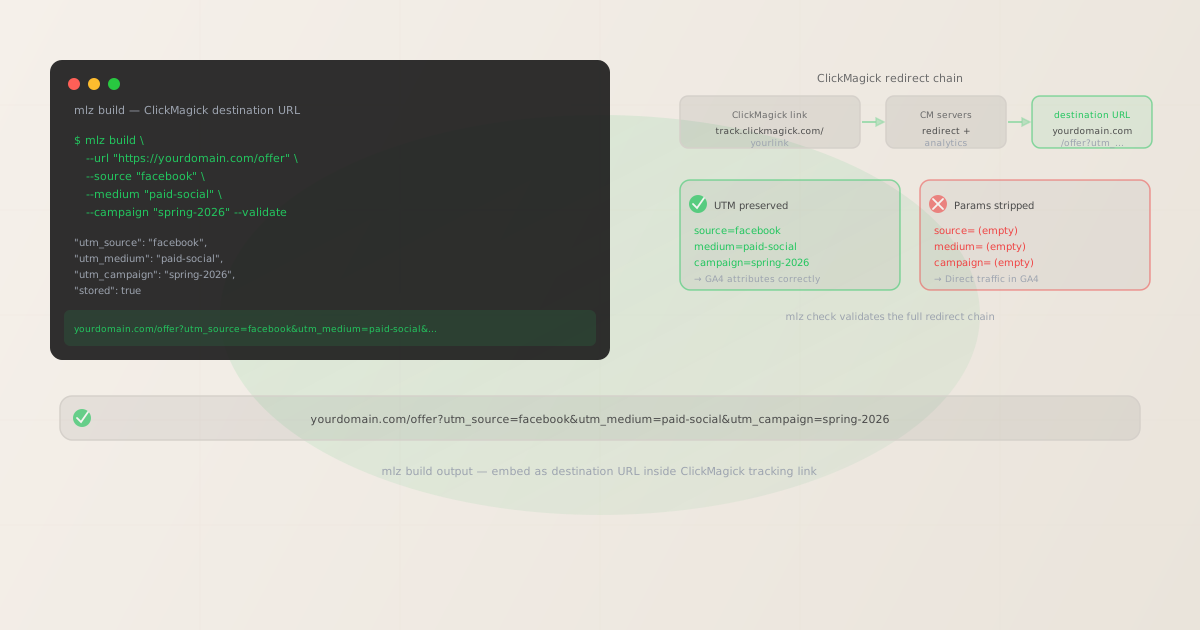
How ClickMagick tracking links interact with UTM parameters
ClickMagick operates as a redirect intermediary. When a visitor clicks a ClickMagick tracking link, their browser is sent to ClickMagick's servers first — where ClickMagick records the click event and applies its own tracking logic — then redirected to the destination URL you configured inside ClickMagick's dashboard. That destination URL is the page where your analytics pixel lives and where UTM parameters need to be present.
This means UTM parameters must be embedded in the destination URL you set inside ClickMagick, not in the ClickMagick tracking link itself. ClickMagick has its own internal tracking fields — sub-IDs (s1 through s5) — that attach directly to the ClickMagick tracking link URL for ClickMagick's internal reporting. These are completely separate from UTM parameters, which belong on your destination URL for GA4 and other analytics tools to read.
The most dangerous failure mode: a ClickMagick tracking link where the destination URL includes UTM parameters, but the redirect chain from ClickMagick's servers to the destination — or a subsequent funnel platform redirect on the destination side — strips the query string before GA4's pixel fires. The click is recorded in ClickMagick. Your funnel platform shows a visitor. But GA4 sees a Direct session because no UTM parameters survived to the page where GA4's gtag.js executed.
| Scenario | What GA4 sees | Attribution result |
|---|---|---|
| Destination URL has correct UTM params, redirect passes query strings | utm_source=facebook, utm_medium=paid-social |
✓ Paid Social attributed correctly |
| Destination URL has UTM params but ClickMagick redirect strips them | (empty — pixel reads clean URL) | ✗ Direct traffic in GA4 |
Capitalized source (Facebook instead of facebook) |
utm_source=Facebook |
✗ Separate source bucket — not merged with facebook |
| ClickFunnels, Kajabi, or GoHighLevel strips params before landing page | (empty — funnel platform dropped query string) | ✗ Unknown Source in Wicked Reports, Direct in GA4 |
The redirect type ClickMagick uses — 301 permanent or 302 temporary — does not determine whether UTM parameters survive. What matters is whether ClickMagick's redirect server forwards the query string from your embedded destination URL to the final page, and whether any intermediate redirects after ClickMagick's hop also forward query strings. Run mlz check against the full ClickMagick tracking link URL to verify the actual redirect behavior, not the configured redirect type.
Building UTM destination URLs for ClickMagick with mlz build
mlz build generates UTM-tagged destination URLs with normalized, lowercase-hyphenated parameter values. The output of mlz build is what you paste into the destination URL field inside ClickMagick's tracking link dashboard — not the ClickMagick tracking link URL itself. Add --validate to confirm the destination resolves before embedding it in ClickMagick.
# Facebook Ads — generate destination URL to embed in ClickMagick
$ mlz build \
  --url "https://yourdomain.com/landing" \
  --source "facebook" \
  --medium "paid-social" \
  --campaign "spring-launch-2026" \
  --content "video-30s" \
  --validate

{
  "tracked_url": "https://yourdomain.com/landing?utm_source=facebook&utm_medium=paid-social&utm_campaign=spring-launch-2026&utm_content=video-30s",
  "params": {
    "utm_source": "facebook",
    "utm_medium": "paid-social",
    "utm_campaign": "spring-launch-2026",
    "utm_content": "video-30s"
  },
  "destination_url": "https://yourdomain.com/landing",
  "link_id": "lnk_cm4x9jra",
  "campaign_id": "cmp_fx8zt2vq",
  "stored": true,
  "created_at": "2026-06-20T09:11:04.000Z"
}

# Google Ads — CPC campaign destination URL
$ mlz build \
  --url "https://yourdomain.com/landing" \
  --source "google" \
  --medium "cpc" \
  --campaign "brand-search-2026" \
  --term "your-brand-name" \
  --validate

{
  "tracked_url": "https://yourdomain.com/landing?utm_source=google&utm_medium=cpc&utm_campaign=brand-search-2026&utm_term=your-brand-name",
  "stored": true
}

# Email — broadcast link destination URL for ClickMagick tracking
$ mlz build \
  --url "https://yourdomain.com/offer" \
  --source "email" \
  --medium "email" \
  --campaign "june-promo-2026" \
  --content "broadcast-day-1" \
  --validate

{
  "tracked_url": "https://yourdomain.com/offer?utm_source=email&utm_medium=email&utm_campaign=june-promo-2026&utm_content=broadcast-day-1",
  "stored": true
}
The tracked_url value from the JSON output is the URL you paste into ClickMagick's destination URL field when creating or editing a tracking link. mlz build normalizes all parameter values to lowercase-hyphenated format on output — GA4 will never see utm_source=Facebook, utm_medium=Paid Social, or utm_campaign=Spring Launch 2026 from a link generated through the CLI. The stored: true field confirms the link was saved to the MissingLinkz campaign library, so the full team has a shared record of every tracking link built for each campaign regardless of which ClickMagick tracking link wraps it.
Validating the ClickMagick redirect chain with mlz check
Building a correctly formatted destination URL and embedding it in ClickMagick is step one. Step two is verifying that the full ClickMagick tracking link — the URL your audience actually clicks — preserves UTM parameters through every hop in the redirect chain to the final landing page. You need to run mlz check against the ClickMagick tracking link URL itself, not just the destination URL, because the redirect behavior is determined by ClickMagick's server configuration and any intermediate redirects on your destination domain.
A ClickMagick tracking link that appears to work correctly at click time can silently strip query strings at the redirect layer — for example, if your ClickMagick tracking link points to a ClickFunnels page that has its own canonical redirect, or if a GoHighLevel funnel step performs a server-side redirect before the page loads. The redirects check in mlz check output shows whether query strings survive the full hop sequence from the ClickMagick tracking link to the final URL where GA4's gtag.js executes.
$ mlz check "https://track.clickmagick.com/yourlink?utm_source=facebook&utm_medium=paid-social&utm_campaign=spring-launch-2026"

{
  "url": "https://track.clickmagick.com/yourlink?utm_source=facebook&utm_medium=paid-social&utm_campaign=spring-launch-2026",
  "valid": true,
  "checks": [
    { "check": "url_format", "status": "pass", "message": "URL format is valid." },
    { "check": "ssl", "status": "pass", "message": "URL uses HTTPS." },
    { "check": "resolution", "status": "pass", "message": "Destination responded with 200.", "details": { "status_code": 200, "response_time_ms": 318 } },
    { "check": "redirects", "status": "pass", "message": "No redirects detected." },
    { "check": "response_time", "status": "pass", "message": "Response time: 318ms.", "details": { "response_time_ms": 318 } }
  ],
  "status_code": 200,
  "response_time_ms": 318,
  "validated_at": "2026-06-20T09:14:22.000Z"
}
Run mlz check against the full ClickMagick tracking link — including the UTM parameters appended to the destination URL — before every campaign goes live. Validate after any change to the ClickMagick tracking link configuration, after updating the destination URL inside ClickMagick, and after any structural change to your funnel platform pages (new funnels, domain changes, platform migrations). The redirects check confirms whether query strings survive the complete hop sequence. If that check returns a warning or failure, the UTM parameters you carefully built with mlz build are being lost in transit before GA4 or Wicked Reports can read them.
ClickMagick UTM tracking gotchas for direct response marketers
- ClickMagick sub-IDs (s1–s5) are internal tracking fields, not UTM parameters
- ClickMagick's sub-ID fields —
s1,s2,s3,s4,s5— are ClickMagick's own internal tracking mechanism. They attach to the ClickMagick tracking link URL and are used within ClickMagick's reports, postback URLs, and affiliate commission tracking. They are not UTM parameters and are not read by GA4, Wicked Reports, or any external analytics tool. If your analytics data shows campaigns without proper source/medium attribution, adding sub-IDs to the ClickMagick link will not fix it — you need UTM parameters on the destination URL. Usemlz buildto generate the correctly formatted destination URL with UTM parameters; use ClickMagick's sub-ID fields alongside that, not instead of it. - Funnel platforms (ClickFunnels, Kajabi, GoHighLevel) often introduce a second redirect that strips UTM params
- A common ClickMagick setup sends traffic to a ClickFunnels, Kajabi, or GoHighLevel landing page as the destination URL. These platforms often perform their own server-side redirects — for canonical URL normalization, A/B test routing, or page version management — that execute before the page's analytics pixel fires. If your ClickMagick destination URL is
https://yourfunnel.clickfunnels.com/offer?utm_source=facebook&utm_medium=paid-social&utm_campaign=spring-launchbut ClickFunnels canonically redirects tohttps://yourfunnel.clickfunnels.com/offer(dropping the query string), GA4 fires on the clean URL and records Direct. Runmlz checkagainst the full ClickMagick tracking link to surface this second-hop stripping behavior before the campaign goes live. If ClickFunnels or another platform is stripping params, investigate whether the platform has a query string forwarding setting or whether the destination URL structure needs to be adjusted. - ClickMagick's redirect type (301 vs 302) does not determine whether UTM params survive
- A common misconception: changing the ClickMagick redirect from 301 (permanent) to 302 (temporary) or vice versa will fix UTM parameter loss. The redirect type is a browser and search engine caching instruction — it does not control whether query strings from your embedded destination URL are forwarded through ClickMagick's redirect server to the final page. UTM parameter preservation depends on how ClickMagick's redirect infrastructure handles the query string from the destination URL you configured, and on any intermediate redirects after ClickMagick's hop. Use
mlz checkon the actual ClickMagick tracking link to verify query string behavior rather than relying on redirect type assumptions. - Manual UTM building in ClickMagick's dashboard creates case and format inconsistencies across tracking links
- When multiple people build ClickMagick tracking links manually — typing destination URLs directly into ClickMagick's dashboard for different campaigns and ad sets — they inevitably produce inconsistent UTM values across the campaign library.
utm_source=Facebookin one link,utm_source=facebookin another.utm_medium=Paid Socialin one,utm_medium=paid-socialin another. Each variant creates a separate source or medium bucket in GA4 that doesn't merge with the canonical value, fragmenting channel reporting. Usemlz buildfor all UTM generation — it normalizes all values to lowercase-hyphenated format on output, so every destination URL in every ClickMagick tracking link uses the same consistent format regardless of who on the team built it. - ClickMagick's conversion tracking (postback URLs) and UTM-based attribution in GA4 are two separate systems that both need to work
- ClickMagick tracks conversions via server-side postback URLs that fire independently of the browser — a conversion pixel or postback fires when a purchase is completed, sending click data from ClickMagick's sub-IDs back to ClickMagick's servers. This is entirely separate from UTM-based attribution, which relies on GA4's client-side JavaScript pixel reading UTM parameters from the URL when the page loads. Both systems need to work correctly simultaneously: postback URLs for ClickMagick's internal attribution reporting, UTM parameters for GA4 and any other analytics platform you're running alongside ClickMagick. A ClickMagick postback firing correctly does not mean UTM parameters are surviving to GA4. Validate the UTM chain independently with
mlz check.
FAQ
- Can I use ClickMagick tracking links AND UTM parameters at the same time?
- Yes — and this is the correct setup. ClickMagick tracking links and UTM parameters are complementary, not mutually exclusive. ClickMagick's tracking link records the click event on ClickMagick's servers using its own sub-ID system. Your UTM parameters ride on the destination URL inside ClickMagick and are read by GA4, Wicked Reports, or any other analytics platform that has a pixel on the final landing page. You get ClickMagick's click-level tracking (with bot filtering, geolocation, and postback attribution) alongside GA4's session-level UTM attribution — but only if the UTM parameters in the destination URL survive the ClickMagick redirect chain to the final page. Use
mlz buildto generate the destination URL andmlz checkto verify it survives the redirect. - How do I know if my ClickMagick redirect is stripping UTM parameters?
- Run
mlz checkagainst the full ClickMagick tracking link URL, including the UTM parameters embedded in your destination URL. Theredirectscheck in the output tells you whether query strings survive the hop sequence from the ClickMagick tracking link through to the final page. Alternatively, open the ClickMagick tracking link in a browser with the Network tab open in DevTools, follow each redirect hop manually, and check whether the final URL in the address bar still contains your UTM parameters. If the final URL is clean, a redirect somewhere in the chain stripped the query string. Themlz checkapproach is more reliable because it tests the server-side redirect behavior, not just browser-side caching. - Do ClickMagick's sub-ID fields replace UTM parameters?
- No. ClickMagick's sub-ID fields (s1–s5) are completely separate from UTM parameters and serve a different purpose. Sub-IDs are ClickMagick's internal tracking mechanism — they allow you to pass data through the click that ClickMagick records for its own reporting and can pass back to affiliate networks via postback URLs. GA4, Wicked Reports, Triple Whale, and other analytics platforms cannot read ClickMagick's sub-IDs — they only read standard UTM parameters (
utm_source,utm_medium,utm_campaign,utm_content,utm_term) from the URL query string at page load. You can and should use both: sub-IDs on the ClickMagick tracking link for ClickMagick's reporting, UTM parameters on the destination URL for external analytics attribution. - What happens when ClickFunnels strips UTM params after the ClickMagick redirect?
- When ClickFunnels (or Kajabi, GoHighLevel, or another funnel platform) performs a server-side redirect after the ClickMagick hop and drops the query string, GA4 fires on the final clean URL and records the session as Direct traffic — no source, no medium, no campaign. ClickMagick's click tracking still works because it fires before the funnel platform redirect. But your GA4 attribution for that click is lost. To diagnose: run
mlz checkagainst the full ClickMagick tracking link and inspect theredirectscheck for evidence of query string loss. To fix: check whether your funnel platform has a URL parameter forwarding or pass-through setting, restructure the funnel URL to avoid the canonical redirect, or use a custom domain for the funnel page that avoids the platform's redirect behavior. The core problem is a server-side redirect stripping the query string —mlz checksurfaces it; fixing it requires changing the redirect behavior at the platform level. - How do I validate UTM parameters through a ClickMagick tracking link in bulk?
- For bulk validation across multiple ClickMagick tracking links, use the MissingLinkz REST API's
POST /v1/preflightendpoint in a shell loop or CI/CD pipeline step. Pass each ClickMagick tracking link URL with its UTM parameters in the request body and check thevalidfield and theredirectscheck result in the response for each link. This approach lets you validate an entire campaign's worth of ClickMagick tracking links — across Facebook, Google, YouTube, and email — before launching, without opening each link manually. See the UTM tracking for developers guide for the full API integration pattern including batch validation, authentication, and CI/CD pipeline integration with the MissingLinkz MCP server.
Recommended posts
Build ClickMagick-compatible destination URLs and validate every redirect chain
mlz build generates correctly normalized UTM links to embed as destination URLs inside ClickMagick tracking links. mlz check validates the full ClickMagick tracking link redirect chain — confirming UTM parameters survive from ClickMagick's servers to the final page where GA4 and other analytics fire.
1,000 links/month free. No credit card.
Your API key
Save this now — it won't be shown again.
npm install -g missinglinkz
Free plan: 1,000 links/month. No credit card. See the UTM tracking for developers guide for the full programmatic workflow including API and MCP integration.