UTM Tracking for Wicked Reports: How to Build and Validate Campaign Links
Wicked Reports is a multi-touch attribution platform built for direct-to-consumer ecommerce and digital marketing businesses. It installs a first-party JavaScript pixel across your entire site — landing pages, product pages, checkout, and thank-you pages — that reads utm_source, utm_medium, utm_campaign, utm_content, and utm_term from the URL at every session start and uses those values to build a chronological record of every paid and organic touchpoint in a customer's journey from first click to purchase. Wicked Reports connects that touchpoint data to actual revenue through direct integrations with Shopify, WooCommerce, and payment platforms, then applies multiple attribution models — first touch, last touch, and linear — so you can see which channels and campaigns drive new customer acquisition versus repeat purchases. This multi-session, multi-touch model is what makes Wicked Reports useful for businesses with long purchase consideration windows. It's also what makes UTM formatting consistency so critical: a single session where a redirect strips UTM parameters before the Wicked Reports pixel fires creates an Unknown Source touchpoint in the customer's journey, corrupting the multi-touch model for that contact. Use mlz build to generate correctly normalized UTM links for every channel, and run mlz check on every destination URL before campaigns activate to verify the redirect chain preserves UTM parameters through to the Wicked Reports pixel.
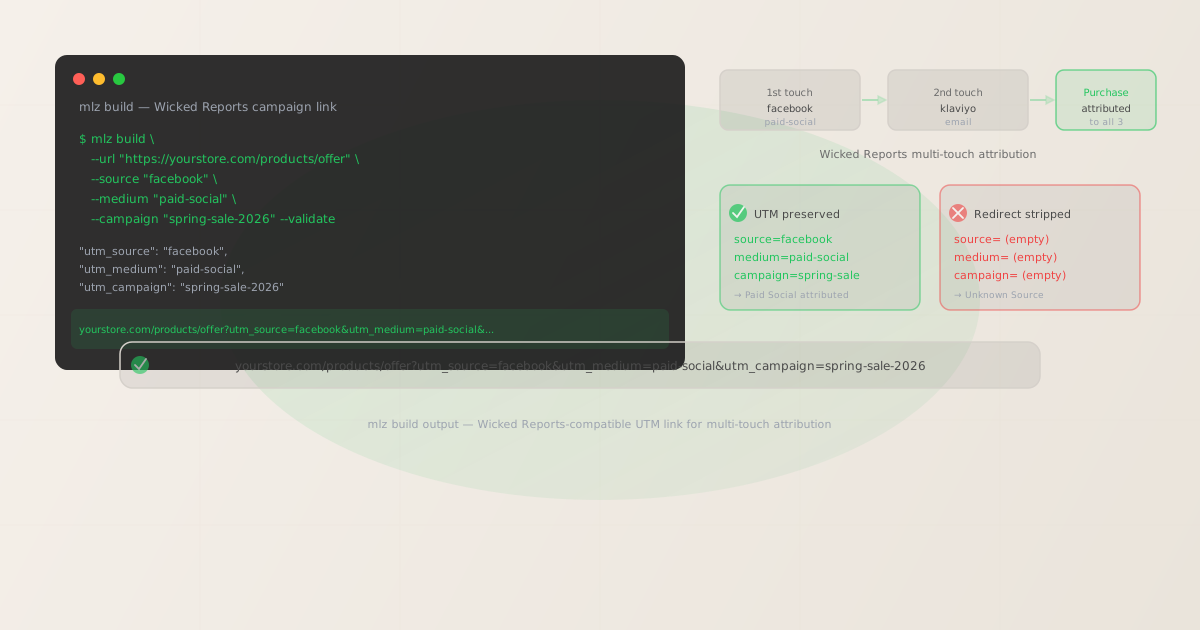
How Wicked Reports reads UTM parameters for multi-touch attribution
Wicked Reports tracks the complete customer journey across multiple sessions over time. The Wicked Reports pixel fires on every page load across your site and reads any UTM parameters present in the URL at that moment. It stores each UTM-tagged session as a distinct touchpoint in the visitor's journey record, identified by a first-party cookie. When a purchase is recorded — through Shopify webhook, WooCommerce order, or Stripe payment — Wicked Reports matches the purchaser's cookie to their touchpoint history and constructs the complete multi-touch journey from first paid click to conversion.
This session-by-session tracking approach means Wicked Reports can attribute a purchase to a Facebook ad that drove the first click three weeks earlier, an email that drove a return visit two weeks later, and a Google search that drove the final session. Each touchpoint in that journey depends on the Wicked Reports pixel successfully reading UTM parameters from the URL at session start. A session where UTM parameters were stripped by a redirect before the pixel fired appears as an Unknown Source touchpoint — it breaks the attribution chain and causes Wicked Reports to either drop that touchpoint from the model or attribute it incorrectly to Direct traffic.
Because Wicked Reports tracks every session across the customer lifetime, UTM formatting errors compound more severely than in single-session attribution tools. A naming inconsistency that creates a variant source (Facebook vs facebook) doesn't just affect one session's attribution — it affects every session with that variant for every customer in the database. Wicked Reports cannot merge or retroactively normalize source variants after they're recorded, so the data fragmentation persists in historical reports.
| Scenario | What Wicked Reports reads | Attribution result |
|---|---|---|
| Clean UTM link, no redirect | utm_source=facebook, utm_medium=paid-social |
✓ Touchpoint attributed to Paid Social |
| Redirect preserves query strings | utm_source=facebook, utm_medium=paid-social |
✓ Multi-touch model intact |
| Redirect strips query strings | (empty — pixel reads clean URL) | ✗ Unknown Source touchpoint |
| Capitalized source (Facebook) | utm_source=Facebook |
✗ Separate source bucket created |
| Inconsistent email source (Email, email, klaviyo) | Three variant strings for the same channel | ✗ Email ROAS fragmented across three rows |
Building UTM-tagged links for Wicked Reports with mlz build
mlz build generates UTM-tagged URLs with normalized, lowercase-hyphenated parameter values — the format Wicked Reports reads consistently for accurate channel grouping and multi-touch attribution. Add --validate to confirm the destination resolves with 200 and no redirect in the chain strips query strings before the Wicked Reports pixel fires.
# Facebook Ads — prospecting campaign
$ mlz build \
  --url "https://yourstore.com/collections/best-sellers" \
  --source "facebook" \
  --medium "paid-social" \
  --campaign "spring-sale-2026" \
  --content "carousel-lifestyle" \
  --validate

{
  "tracked_url": "https://yourstore.com/collections/best-sellers?utm_source=facebook&utm_medium=paid-social&utm_campaign=spring-sale-2026&utm_content=carousel-lifestyle",
  "params": {
    "utm_source": "facebook",
    "utm_medium": "paid-social",
    "utm_campaign": "spring-sale-2026",
    "utm_content": "carousel-lifestyle"
  },
  "stored": true
}

# Klaviyo email — abandoned cart sequence
$ mlz build \
  --url "https://yourstore.com/cart" \
  --source "klaviyo" \
  --medium "email" \
  --campaign "abandoned-cart-flow" \
  --content "day-2-email" \
  --validate

{
  "tracked_url": "https://yourstore.com/cart?utm_source=klaviyo&utm_medium=email&utm_campaign=abandoned-cart-flow&utm_content=day-2-email",
  "stored": true
}

# Google Ads — branded search
$ mlz build \
  --url "https://yourstore.com" \
  --source "google" \
  --medium "cpc" \
  --campaign "branded-search-2026" \
  --term "your-brand" \
  --validate

{
  "tracked_url": "https://yourstore.com?utm_source=google&utm_medium=cpc&utm_campaign=branded-search-2026&utm_term=your-brand",
  "stored": true
}
mlz build normalizes all parameter values to lowercase-hyphenated format on output. Wicked Reports will never see utm_source=Facebook, utm_medium=Paid Social, or utm_campaign=Spring Sale 2026 from a link generated through the CLI — the output is always lowercase and hyphenated. This prevents the source variant fragmentation that creates multiple separate rows for the same channel in Wicked Reports' attribution reports. The tracked_url from the JSON output is ready to paste directly into the destination URL field in Meta Ads Manager, Google Ads, Klaviyo, or any other platform. The stored field confirms the link was saved to the MissingLinkz campaign library for campaign audit and reference across the team.
Validating campaign destinations with mlz check before Wicked Reports fires
Wicked Reports' pixel reads UTM parameters from the URL at session start — the moment the page JavaScript executes in the browser. Shopify redirects (from URL changes, handle updates, or app-generated routing), URL shorteners used in social bio links and email copy, and custom domain redirect configurations all fire server-side before the Wicked Reports pixel can run. If any redirect in the chain fails to preserve the original query string, the pixel fires on a URL with no UTM parameters. mlz check validates the full redirect sequence from click URL to final page URL before the campaign launches.
$ mlz check "https://yourstore.com/collections/best-sellers?utm_source=facebook&utm_medium=paid-social&utm_campaign=spring-sale-2026"

{
  "url": "https://yourstore.com/collections/best-sellers?utm_source=facebook&utm_medium=paid-social&utm_campaign=spring-sale-2026",
  "valid": true,
  "checks": [
    { "check": "url_format", "status": "pass", "message": "URL format is valid." },
    { "check": "ssl", "status": "pass", "message": "URL uses HTTPS." },
    { "check": "resolution", "status": "pass", "message": "Destination responded with 200.", "details": { "status_code": 200, "response_time_ms": 244 } },
    { "check": "redirects", "status": "pass", "message": "No redirects detected." },
    { "check": "response_time", "status": "pass", "message": "Response time: 244ms.", "details": { "response_time_ms": 244 } }
  ],
  "status_code": 200,
  "response_time_ms": 244,
  "validated_at": "2026-06-19T08:42:11.000Z"
}
Run mlz check on every campaign destination URL before the ad set or email campaign activates. Shopify stores with Wicked Reports installed accumulate URL changes over time — product URL handle changes when product names are updated, collection path changes when store navigation is restructured, custom domain redirects from prior platform migrations. Each URL change can introduce a redirect that may not pass query strings, breaking UTM parameter delivery to the Wicked Reports pixel. The redirects check in mlz check output confirms whether query strings survive the complete hop sequence from the URL you use in the ad to the final URL the Wicked Reports pixel reads at page load.
Wicked Reports UTM tracking gotchas for ecommerce and direct-to-consumer brands
- Wicked Reports tracks every session, so UTM errors compound across the customer lifetime
- Unlike single-session attribution tools that only track the first or last click, Wicked Reports builds a complete touchpoint history for each customer across their entire lifetime with your store. Every session where a redirect strips UTM parameters adds an Unknown Source touchpoint to that customer's journey record. If a customer makes ten visits across six weeks before purchasing — four of which were UTM-tagged paid sessions whose parameters were stripped by a Shopify redirect — Wicked Reports has incomplete data for four touchpoints in that customer's model. The multi-touch attribution score calculated from that incomplete model misrepresents the contribution of each paid channel. Validate every campaign destination URL before launch so all paid touchpoints in Wicked Reports contain complete, consistent UTM data.
- Email attribution requires UTM parameters in every link, every send
- Wicked Reports' email attribution works by matching a pixel-tracked session from an email click (UTM-tagged) to a customer contact in Klaviyo, ActiveCampaign, or another integrated email platform. When an email subscriber clicks a link, Wicked Reports reads the UTM parameters from that click session and attributes it as an email touchpoint in the customer's journey. If the email link does not have UTM parameters — or if a redirect between the email link and the landing page strips them — Wicked Reports either misses the email touchpoint entirely or records it as a Direct session. All email campaign links should include
utm_source(the ESP name:klaviyo,activecampaign,mailchimp),utm_medium=email,utm_campaign, andutm_content(email variant). Build each email link withmlz build --source "klaviyo" --medium "email"to enforce consistent formatting across your entire email program. - Unknown Source entries in Wicked Reports indicate missing or stripped UTM parameters
- When Wicked Reports records a session with no UTM parameters, it appears as Unknown Source in attribution reports. Unknown Source entries are a signal — not a normal channel. A high percentage of Unknown Source touchpoints in a customer segment means paid traffic is arriving without UTM parameters, often because redirects are stripping query strings before the Wicked Reports pixel fires. To investigate: export the touchpoints for Unknown Source contacts and cross-reference the session timing against your active ad campaigns. If the Unknown Source sessions correlate with campaign flight periods, run
mlz checkagainst the campaign destination URLs to identify which redirects are dropping UTM parameters. Also check for URL shorteners in social bio links, SMS campaigns, and email copy pointing to your store. - Shopify URL handle changes after campaign launch create redirect-and-strip failures
- Shopify automatically creates a
301redirect from the old URL to the new URL when you change a product's URL handle or update a collection path. If an ad campaign is using the old URL and the new Shopify redirect doesn't preserve query strings, every click from that campaign after the URL change arrives at the new page without UTM parameters. The Wicked Reports pixel fires on the clean redirected URL and records Unknown Source. Runmlz checkon active campaign URLs whenever product or collection URL handles are updated in Shopify — Shopify's redirect behavior for query strings can vary depending on the redirect type (automatic handle redirect vs. manual URL redirect configured in Shopify Admin). Verify theredirectscheck result confirms query strings survive the new redirect before leaving the existing campaign live. - Wicked Reports' ROI calculation requires complete UTM coverage across all channels
- Wicked Reports calculates ROAS and ROI by connecting ad spend data (imported from Facebook Ads, Google Ads, and other platforms) to revenue data (from Shopify or payment integrations) via the UTM touchpoints it records. If a channel's UTM data is incomplete — due to redirect-stripped sessions, inconsistent source naming, or missing UTM parameters in some campaign links — Wicked Reports calculates a skewed ROAS for that channel. It attributes some revenue to the channel (from sessions where UTM parameters did arrive) but misses the sessions where they didn't, producing a ROAS figure that's higher than the true number because the denominator (sessions driving revenue) is inflated relative to the spend numerator. Complete, consistent UTM coverage across every campaign link is required for Wicked Reports' ROAS figures to be reliable.
Wicked Reports UTM naming conventions for ecommerce brands
Recommended UTM parameter values for campaigns tracked through Wicked Reports, aligned with Wicked Reports' channel grouping and compatible with GA4's default channel definitions. All values enforced by mlz build:
- utm_source: lowercase platform name.
facebookfor all Meta-owned placements (Facebook News Feed, Instagram, Messenger, Reels).googlefor Google Search, Google Shopping, and Google Display Network.tiktokfor TikTok Ads.pinterestfor Pinterest Ads.snapchatfor Snapchat Ads.klaviyofor Klaviyo email flows and campaigns.attentivefor Attentive SMS.postscriptfor Postscript SMS.youtubefor YouTube TrueView and paid video if you want YouTube attributed separately from Google Search in Wicked Reports. Do not use abbreviations (fb,gads) or product names with spaces (Google Ads,Facebook Ads). - utm_medium:
paid-socialfor Meta, TikTok, Pinterest, and Snapchat paid placements.cpcfor Google Search clicks.shoppingfor Google Shopping ads if you want Shopping attributed separately from Search in Wicked Reports.displayfor Google Display and programmatic display.emailfor all email marketing — regardless of whether it's an automated flow, broadcast, or transactional sequence.smsfor all SMS campaigns.paid-videofor YouTube TrueView and TikTok TopView.affiliatefor affiliate traffic. Wicked Reports groups attribution by medium — non-standard variants likepaidsocial,social-ads, orsocpaidcreate ungrouped rows that don't align with Wicked Reports' channel revenue breakdown. - utm_campaign: lowercase-hyphenated slug with a date or flight identifier.
spring-sale-2026,bfcm-2026-prospecting,abandoned-cart-flow,post-purchase-upsell. Consistent campaign naming lets Wicked Reports correctly match ad spend imports (from Facebook Ads API) to revenue sessions — Wicked Reports' cost-per-acquisition calculations require campaign name consistency between the UTM parameter and the ad platform campaign name. - utm_content: ad creative or email variant identifier.
carousel-lifestyle,image-product-shot,video-ugc-30s,day-2-email. Use utm_content to distinguish between multiple creatives or email variants within the same campaign so Wicked Reports can show which creative or email drives the highest new-customer acquisition rate. - utm_term: paid search keyword for Google Ads Search campaigns only.
branded-keywords,competitor-brand,category-keywords. Omit for paid social, display, shopping, and email campaigns.
For the full cross-platform naming reference, see the UTM naming conventions guide and UTM tracking for developers.
FAQ
- Why does Wicked Reports show high Unknown Source percentages in my attribution reports?
- Unknown Source in Wicked Reports means the pixel recorded sessions where no UTM parameters were present in the URL. The most common causes are: (1) campaign destination URLs where a server-side redirect strips query strings before the Wicked Reports pixel fires — run
mlz checkagainst every active campaign URL to identify which redirects drop UTM parameters; (2) email links without UTM parameters — every link in every email should include utm_source, utm_medium, and utm_campaign; (3) social bio links and URL shorteners that don't forward query strings. Start by checking your highest-spend campaigns first — runmlz checkon the destination URL including the UTM parameters you're using and look at theredirectscheck result to see whether query strings survive the full redirect chain to the final Wicked Reports-tracked page. - Does Wicked Reports work with Shopify's native checkout?
- Yes. Wicked Reports integrates directly with Shopify via a native app and webhook connection. The Wicked Reports pixel is installed across the full Shopify storefront — including product pages, collection pages, cart, and checkout — and the Shopify order webhook sends purchase data to Wicked Reports for revenue attribution. The UTM parameter challenge is at the landing page redirect layer before the Wicked Reports pixel has a chance to fire, not at the checkout integration layer. The most common Shopify-specific issue is product URL handle changes that create
301redirects dropping query strings — runmlz checkagainst the specific product and collection URLs used in active campaigns whenever store structure changes. - How does Wicked Reports handle email attribution differently from GA4?
- Wicked Reports ties email clicks to specific customer contacts via its ESP integration (Klaviyo, ActiveCampaign, etc.), while GA4 attributes sessions to channels based purely on UTM parameters. Wicked Reports can attribute a purchase to an email touchpoint even if the customer cleared their cookies between the email click and the purchase — because Wicked Reports can match the customer's email address from the ESP contact list to their Shopify customer record. But it still requires UTM parameters in the email link to correctly label that touchpoint as Email in attribution reports. Without UTM parameters, Wicked Reports records the email click session but labels it as Unknown Source — it may still connect it to the customer's journey via contact matching, but the channel attribution is lost. Use
mlz build --source "klaviyo" --medium "email"for every link in your email program. - Can I use Wicked Reports and Triple Whale simultaneously with the same UTM links?
- Yes. Wicked Reports and Triple Whale both read standard UTM parameters from the same URL query string, independently. Wicked Reports reads them for its multi-touch attribution model; Triple Whale reads them for its first and last touch attribution. A single correctly formatted
mlz buildoutput satisfies both tools simultaneously. The same applies to GA4 — all three tools read UTM parameters from the same URL. The critical requirement is that all three tools see the parameters at page load, so the redirect chain must preserve query strings through to the final page. See UTM tracking for Triple Whale for Triple Whale-specific naming conventions that overlap with Wicked Reports' requirements. - How do I audit existing campaigns for UTM formatting issues in Wicked Reports?
- Export the destination URLs from each active ad platform (Meta Ads Manager, Google Ads, etc.) and run them through
mlz checkin a shell loop to validate the redirect chain for each URL. For batch validation, use thePOST /v1/preflightREST API endpoint — pass each destination URL along with its UTM parameters and check thevalidfield in the response. Theredirectscheck in each response shows whether the specific URL preserves query strings through the full redirect chain. This audit approach surfaces both redirect problems (query strings stripped) and formatting issues (capitalized values, spaces in parameters) that are creating Unknown Source entries or source variant fragmentation in Wicked Reports. Fix each issue in the ad platform before the next campaign flight to prevent the problem from recurring.
Recommended posts
Build Wicked Reports-compatible tracked links and validate every redirect chain
mlz build generates correctly formatted UTM links that Wicked Reports reads consistently for multi-touch attribution. mlz check validates the full redirect chain before campaigns launch — confirming UTM parameters survive from ad click URL to Wicked Reports pixel read on the final page. Generate and validate in the terminal before every campaign activation.
1,000 links/month free. No credit card.
Your API key
Save this now — it won't be shown again.
npm install -g missinglinkz
Free plan: 1,000 links/month. No credit card. See the UTM tracking for developers guide for the full programmatic workflow including API and MCP integration.