UTM Tracking for Branch: How to Build and Validate Campaign Links
Branch is a deep linking and mobile attribution platform used by app teams to create links that route users to the correct in-app destination — whether they have the app installed or not. Branch links (app.link/xxx or custom domain links) handle the entire routing decision: open the app to the right screen if installed, redirect to the app store if not, or fall back to a web URL on desktop and unsupported devices. The attribution gap with GA4: Branch uses its own parameter format for attribution (~channel, ~campaign, ~feature, ~ad_name) which are read by the Branch SDK after app open. These are Branch's internal analytics parameters and are not standard UTM parameters — GA4 does not read Branch's tilde-prefixed parameters for web session attribution. When a Branch link redirects to a web destination via the $fallback_url (for desktop users or users without the app), the resulting GA4 web session shows as Direct unless you append UTM parameters to that fallback URL. Build your tracked fallback URL with mlz build --source "branch" --medium "[channel]" --campaign "your-slug" --validate and set the resulting tracked_url as the $fallback_url value in your Branch link. Then run mlz check on the full Branch link URL to confirm UTM parameters survive Branch's redirect chain to the final destination.
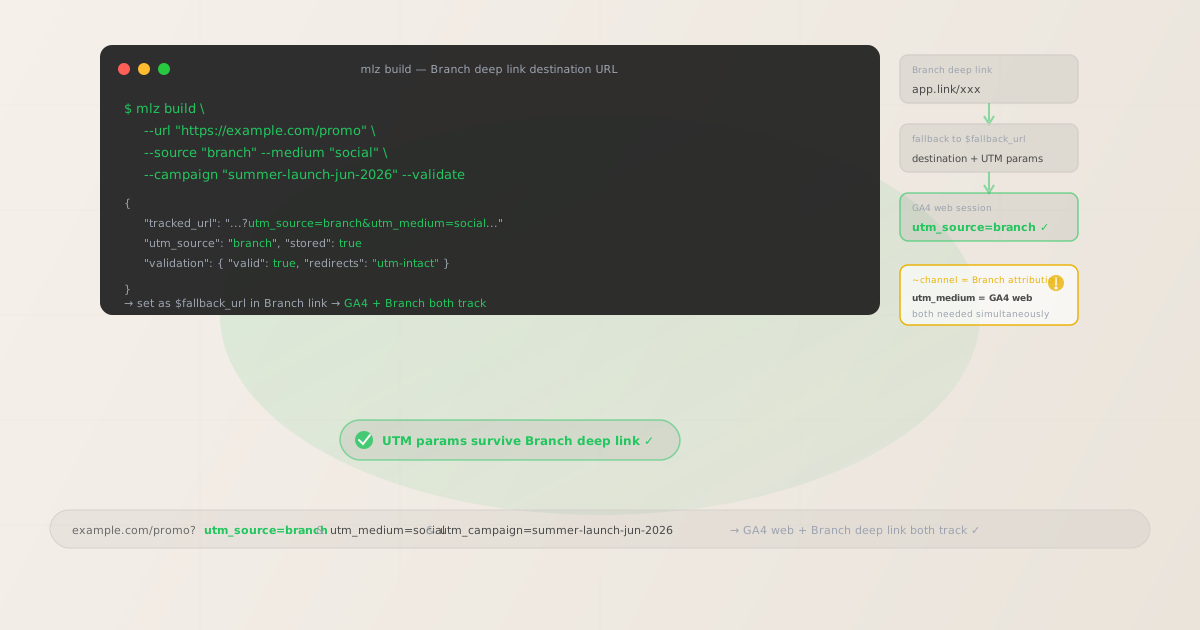
Why Branch deep links need separate UTM parameters for GA4
Branch and GA4 measure different things at different levels of the user journey. Branch measures deep link attribution: which campaigns, channels, and creatives drove link clicks that led to app opens, installs, and in-app conversion events — tracked using the Branch SDK installed in the app. GA4 measures web session behavior: what users do on web pages and landing pages that serve as destinations when the app path is unavailable. The two systems intersect whenever a Branch link routes traffic to a web URL — the $fallback_url — rather than directly into the app.
Branch's attribution parameters use a tilde prefix convention: ~channel, ~campaign, ~feature, ~ad_name, ~ad_set_name. These parameters are embedded in the Branch link URL and are parsed by the Branch SDK in the app after link open. They do not get forwarded to the $fallback_url web destination — and even if they were forwarded, GA4 does not understand Branch's tilde-parameter format for channel grouping or campaign attribution. GA4 only reads standard utm_source, utm_medium, and utm_campaign parameters from the query string of the URL that opens in the browser.
The result: teams using Branch for deep linking see a persistent Direct traffic problem in GA4. Paid social campaigns that successfully drive clicks on Branch links show zero attribution in GA4 for the web sessions that result from users landing on the $fallback_url. Email campaigns with Branch links for web-to-app routing show email traffic as Direct. The fix is to build UTM-tagged destination URLs for the $fallback_url in every Branch link.
| Parameter type | Where it appears | What it tracks | Used by |
|---|---|---|---|
~channel |
Branch link URL | Channel in Branch dashboard | ✓ Branch SDK (app) |
~campaign |
Branch link URL | Campaign in Branch analytics | ✓ Branch SDK (app) |
utm_source=branch |
$fallback_url destination | Web session source in GA4 | ✓ GA4 (web) |
utm_medium |
$fallback_url destination | Channel classification in GA4 | ✓ GA4 (web) |
utm_campaign |
$fallback_url destination | Campaign grouping in GA4 reports | ✓ GA4 (web) |
Branch also offers native UTM parameter support: you can add utm_source, utm_medium, and utm_campaign directly to Branch links, and Branch will forward these to the $fallback_url destination. However, managing this via the Branch dashboard for every link at scale is manual and error-prone. Building programmatically with mlz build and validating with mlz check ensures consistent, validated UTM parameters on every fallback URL before the campaign launches.
Building tracked Branch destination URLs with mlz build
In a Branch link, the $fallback_url parameter specifies the web destination for users on desktop or devices where the app redirect is not possible. This is where UTM parameters belong. Build your tracked destination URL with mlz build before creating or updating the Branch link, then set the resulting tracked_url as the $fallback_url value. Add --validate to confirm the destination resolves correctly and the redirect chain preserves UTM parameters. After configuring the Branch link, run mlz check on the full Branch link URL to verify end-to-end UTM preservation.
# Social campaign (Facebook ad → Branch link → web fallback)
$ mlz build \
  --url "https://example.com/promo" \
  --source "branch" \
  --medium "paid-social" \
  --campaign "summer-launch-jun-2026" \
  --validate

{
  "tracked_url": "https://example.com/promo?utm_source=branch&utm_medium=paid-social&utm_campaign=summer-launch-jun-2026",
  "params": {
    "utm_source": "branch",
    "utm_medium": "paid-social",
    "utm_campaign": "summer-launch-jun-2026"
  },
  "stored": true
}

# Email campaign (Branch link for app re-engagement, web fallback for non-app users)
$ mlz build \
  --url "https://example.com/offer" \
  --source "branch" \
  --medium "email" \
  --campaign "reengagement-email-jun-2026" \
  --content "hero-cta" \
  --validate

{
  "tracked_url": "https://example.com/offer?utm_source=branch&utm_medium=email&utm_campaign=reengagement-email-jun-2026&utm_content=hero-cta"
}

# Organic referral / share (Branch Journeys web banner)
$ mlz build \
  --url "https://example.com/download" \
  --source "branch" \
  --medium "referral" \
  --campaign "journeys-banner-jun-2026" \
  --validate

{
  "tracked_url": "https://example.com/download?utm_source=branch&utm_medium=referral&utm_campaign=journeys-banner-jun-2026"
}
Set the tracked_url as the $fallback_url parameter when creating the Branch link — either in the Branch dashboard, via the Branch API, or in the Branch SDK link creation call. When Branch routes a user to the web fallback (desktop, or mobile without the app installed), the browser opens the tracked URL with UTM parameters intact. GA4 reads those parameters and attributes the web session correctly.
Validating UTM parameters survive the Branch redirect chain
Branch links route clicks through Branch's click-recording infrastructure before deciding where to redirect the user. The routing logic evaluates device type, whether the app is installed, and the Branch link configuration to choose between in-app routing, App Store redirect, or web fallback. Each hop in this chain is an opportunity for query parameters to be dropped — particularly if the $fallback_url value is not correctly encoded within the Branch link URL, or if an intermediate server in your destination stack strips query strings during the redirect.
After setting your tracked fallback URL in the Branch link, validate the complete Branch link URL to confirm UTM parameters survive the redirect chain to the final destination.
# Check the full Branch link URL (not just the fallback destination)
# Confirms UTM parameters survive Branch routing to the final web URL
$ mlz check "https://yourapp.app.link/aBcD1234?%24fallback_url=https%3A%2F%2Fexample.com%2Fpromo%3Futm_source%3Dbranch%26utm_medium%3Dpaid-social%26utm_campaign%3Dsummer-launch-jun-2026"

{
  "url": "https://yourapp.app.link/aBcD1234?%24fallback_url=...",
  "valid": true,
  "checks": [
    { "check": "ssl", "status": "pass", "message": "URL uses HTTPS." },
    { "check": "resolution", "status": "pass", "message": "Destination responded with 200." },
    { "check": "redirects", "status": "pass", "message": "3 redirects detected. UTM parameters present at final destination." }
  ],
  "status_code": 200
}
Note that Branch link redirects often involve more hops than MMP redirects from other platforms — Branch routing may go through Branch's click-recording server, then Branch's routing decision server, then the final fallback URL. This makes the mlz check redirect chain validation especially important for Branch links. If UTM parameters are stripped, check the URL encoding of the $fallback_url parameter (note: Branch uses the dollar-sign prefix $fallback_url which also needs encoding as %24fallback_url in URL query strings). See the redirect UTM stripping guide for diagnosis steps.
Branch UTM tracking gotchas
- Branch's tilde-prefixed parameters (
~channel,~campaign) are not UTM parameters and are not read by GA4 - Branch uses a tilde prefix to distinguish its own analytics parameters from other query parameters. The
~channel,~campaign,~feature,~ad_name,~ad_set_name, and~tagsparameters are read by the Branch SDK after the app is opened via the deep link — they power Branch's attribution dashboard and analytics. GA4 ignores Branch's tilde-parameter format. Only standardutm_source,utm_medium, andutm_campaignquery string parameters in the URL that opens in the web browser affect GA4 channel grouping and campaign attribution. You need both: Branch parameters for deep link attribution, UTM parameters on the$fallback_urlfor web session attribution in GA4. - Branch's
$desktop_urland$fallback_urlserve different routing scenarios — both need UTM parameters - Branch supports multiple web destination parameters for different routing scenarios:
$fallback_url(catch-all for unsupported devices and desktop),$desktop_url(specific destination for desktop users),$ios_urland$android_url(App Store and Play Store for users without the app). If you configure both$desktop_urland$fallback_url, you need UTM parameters on both destination URLs — desktop users are routed to$desktop_url, and other unsupported devices use$fallback_url. Generate separate tracked URLs for each destination withmlz buildand validate each one withmlz checkindependently. - Branch Journeys (web-to-app banners) create Branch links from your existing web pages — the page URL needs UTM parameters
- Branch Journeys shows a smart banner or interstitial on your mobile website, prompting users to open the app or download it. When a user clicks the Journey CTA, Branch creates a deep link using the current page's URL as the web context. The UTM parameters that matter here are those on the original page URL that showed the Journey banner — not just on the Journey link itself. If a user arrives at
https://example.com/promofrom a paid social campaign (with UTM parameters) and then clicks the Journey banner, Branch captures that page's UTM parameters as part of the deep link context. Ensure your web pages have UTM parameters from upstream traffic sources — the same pages you serve Branch Journeys on should have UTM-tagged inbound links. Usemlz buildto generate tracked URLs for those upstream links. - The
$fallback_urlparameter name uses a dollar sign prefix that requires URL encoding - When constructing Branch link URLs programmatically or in query strings, the
$fallback_urlparameter name must be URL-encoded as%24fallback_urlbecause the dollar sign ($) is a reserved character in URL syntax. Additionally, the destination URL value (your tracked URL with UTM parameters) must itself be URL-encoded within the Branch link query string, with&encoded as%26. After constructing the Branch link URL, runmlz checkon the complete URL to verify that both the parameter name encoding and the destination URL encoding are correct and that UTM parameters arrive at the final destination. - Branch Universal Ads (Branch-managed ad campaigns) generate Branch links automatically — verify UTM parameters are in the web fallback
- If you use Branch Universal Ads to run paid campaigns directly through Branch's ad network integrations (Facebook, Google, TikTok), Branch generates the OneLink or Branch link for you. In this case, check the Branch Universal Ads configuration for each campaign to confirm the web fallback URL (
$fallback_urlor$desktop_url) includes your UTM parameters. If Branch is auto-generating fallback URLs from your campaign configuration, you may need to add UTM parameters as a custom$fallback_urloverride in the Branch Universal Ads settings. Usemlz buildto generate the correct tracked URL and add it as the custom web fallback in the Branch Universal Ads campaign settings.
Branch UTM naming conventions
Recommended UTM parameter values for Branch campaigns, aligned with GA4 channel reporting and a lowercase-hyphenated taxonomy:
- utm_source:
branchfor all campaigns where Branch is the deep linking platform. Some teams prefer to use the underlying ad network or channel name (facebook,email,sms) as the UTM source to match GA4 channel groupings more directly. Usingbranchas the source groups all Branch-linked web sessions together in GA4, making it easy to see the total web traffic footprint of Branch campaigns before drilling into medium and campaign. Using the channel name aligns GA4's automatic channel grouping more precisely (e.g., GA4 recognizesutm_source=facebookandutm_medium=paid-socialas "Paid Social" in channel grouping). Choose one convention and apply it consistently across all Branch links. - utm_medium: Use the channel type of the campaign, aligned with GA4 default channel groupings. For paid social (Meta, TikTok):
paid-social. For email re-engagement campaigns:email. For SMS campaigns:sms. For push notification campaigns using Branch for deep linking:push. For referral links (user-generated shares, referral programs):referral. For Branch Journeys (web-to-app banners):referralorweb-to-app. For organic app store optimization or QR codes:organic. Useutm_mediumto capture the nature of the traffic, not the deep linking platform. - utm_campaign: A lowercase-hyphenated campaign name that mirrors your Branch
~campaignparameter value where possible. For seasonal campaigns:summer-launch-jun-2026,black-friday-2026. For re-engagement campaigns:reengagement-lapsed-30d,cart-abandon-email. For referral programs:referral-program-2026. For Branch Journeys campaigns:journeys-install-banner,journeys-reopen-prompt. Aligningutm_campaignwith your Branch campaign name makes it easier to cross-reference GA4 web session data with Branch attribution data in reporting. - utm_content: Creative or variant identifier for A/B testing and creative performance analysis. For email campaigns with multiple CTA variants:
utm_content=cta-hero,utm_content=cta-footer. For social campaigns with multiple ad formats:utm_content=video-15s,utm_content=carousel. Useutm_contentto identify which version of a link drove the most web sessions — especially useful for Journeys A/B tests where different banner designs route to the same destination. - utm_term: Keyword or audience segment. For paid search campaigns with Branch links: the search keyword. For audience-segmented retargeting campaigns: the audience segment identifier. Omit for brand and social campaigns where keyword-level tracking is not relevant.
See the UTM naming conventions guide for the full cross-platform taxonomy reference, and the UTM tracking for developers guide for programmatic generation and validation at scale.
FAQ
- Does Branch automatically forward UTM parameters to the web fallback URL?
- Branch can forward UTM parameters if you add them directly to the Branch link as query parameters (e.g., adding
utm_source=branch&utm_medium=paid-socialto the Branch link URL itself). Branch will then include those parameters in the$fallback_urlredirect. However, this requires careful URL construction to avoid conflicts between Branch's own parameters and the UTM parameters in the link. The more reliable pattern is to build a fully tracked destination URL withmlz buildand set it explicitly as the$fallback_urlvalue in the Branch link configuration — this keeps UTM parameter management explicit, auditable, and consistent across all campaigns. - Why do my Branch campaign clicks show as Direct in GA4?
- If Branch is attributing installs and deep link opens correctly but GA4 shows the resulting web sessions (from users who land on the
$fallback_url) as Direct, UTM parameters are missing from the fallback destination URL. Build a tracked destination URL withmlz build --source "branch" --medium "[channel]" --campaign "your-campaign" --validateand update the$fallback_urlin your Branch link to that tracked URL. Then runmlz checkon the full Branch link URL to confirm UTM parameters survive the Branch redirect chain to the final destination. - Can I use Branch deep links and UTM parameters on the same campaign?
- Yes. Branch deep link attribution (tracked via Branch's SDK using
~channel,~campaign,~feature) and GA4 web session attribution (tracked via UTM parameters on the$fallback_url) are completely independent measurement systems. Branch measures app opens and conversions via the SDK; GA4 measures web page sessions via URL query strings. Both can be active simultaneously with no conflict. Use both: Branch for app attribution, UTM parameters for web session attribution in GA4. - What is the difference between $fallback_url and $desktop_url in Branch?
$fallback_urlis the catch-all web destination for any device or scenario where Branch cannot route to the app store or open the app.$desktop_urlis a more specific override for desktop users only. If you set both, desktop users get$desktop_urland other web-fallback scenarios (tablet, unsupported browsers) get$fallback_url. If you only set$fallback_url, it covers all fallback scenarios including desktop. For most campaigns, setting a UTM-tagged URL as$fallback_urlcovers the majority of web attribution scenarios. If you use$desktop_url, generate separate tracked URLs for each withmlz buildand validate each independently.- How do I handle Branch links in email campaigns where the email client strips query parameters?
- Email clients that display HTML emails generally do not strip URL query parameters — query parameters are preserved when the user clicks a link in the email. The issue in email is more commonly that the ESP's own link tracking (click wrapping) adds a redirect that may or may not preserve UTM parameters. For Branch links used in email campaigns, test the complete email link (including ESP click tracking wrapping) with
mlz checkto verify UTM parameters survive the full redirect chain from email click → ESP redirect → Branch link → web fallback. See the redirect UTM stripping guide for diagnosis steps if parameters are dropped at any hop.
Recommended posts
Build Branch campaign destination URLs from the terminal
Use mlz build --source "branch" --medium "[channel]" --campaign "your-slug" --validate to generate validated tracked URLs for each Branch campaign's web fallback destination. Set the resulting tracked_url as the $fallback_url in your Branch link configuration. After setup, run mlz check on the complete Branch link URL to confirm UTM parameters survive the redirect chain to the final web destination.
1,000 links/month free. No credit card.
Your API key
Save this now — it won't be shown again.
npm install -g missinglinkz
Free plan: 1,000 links/month. No credit card. See the UTM tracking for developers guide for the full programmatic workflow including API and MCP integration.