UTM Tracking for Benchmark Email: How to Build and Validate Campaign Links
UTM tracking for Benchmark Email requires a decision before your first campaign: choose utm_source=benchmark-email (hyphenated) and use it consistently — or risk the split that happens when some campaigns use Benchmark's auto-generated utm_source=benchmarkemail (no hyphen) and others use a manually entered value. Benchmark Email is a full-featured email marketing platform popular with small and medium businesses; it supports regular campaigns, Automation Pro (their behaviour-triggered workflow builder), and A/B split tests. The tracking problem is the same one every email platform creates: Benchmark's built-in UTM feature sets utm_campaign from your campaign display name, producing mixed-case, space-encoded values that clutter GA4 instead of clean filterable slugs. A campaign named "Summer Sale — June 2026" becomes utm_campaign=Summer+Sale+%E2%80%94+June+2026 in GA4 — an en-dash percent-encoded and spaces plus-encoded, creating an ugly row that's difficult to filter or compare over time. Use mlz build to generate normalised tracked URLs outside Benchmark's editor — lowercase, hyphenated, consistent — then paste the tracked_url as the link destination in the Benchmark Email template.
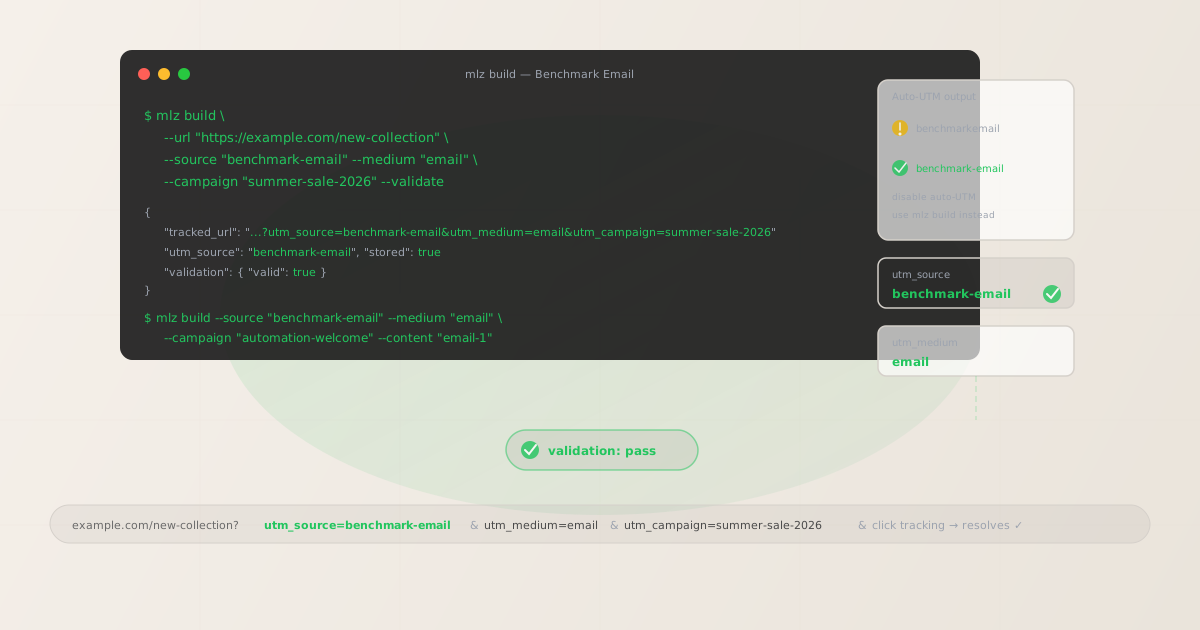
The correct utm_source and utm_medium for Benchmark Email
Use utm_source=benchmark-email — hyphenated, all lowercase — for all sends that originate from Benchmark Email. The hyphen distinguishes the value from Benchmark's own auto-generated benchmarkemail (no hyphen), and the lowercase convention keeps GA4 filter dropdowns clean and scannable. The medium for Benchmark Email sends is straightforward: utm_medium=email for all campaign types — regular campaigns, Automation Pro workflows, A/B tests, and autoresponder sequences.
Never use utm_source=benchmarkemail (Benchmark's default auto-generated value — one word, no hyphen), utm_source=Benchmark (mixed case creates a separate GA4 source row from benchmark-email), or whatever campaign display name gets picked up by Benchmark's auto-UTM. If Benchmark's built-in Google Analytics integration is enabled — found under Settings > Integrations — disable it per campaign or globally, then set your own UTM values by replacing CTA link destinations with tracked URLs built by mlz build.
| Source value | Origin | Use this? |
|---|---|---|
benchmarkemail |
Benchmark's auto-UTM default | ✗ No — one word, non-standard |
Benchmark |
Manually entered (mixed case) | ✗ No — mixed case, ambiguous |
benchmark |
Manually entered (lowercase) | ✗ No — ambiguous, missing product name |
benchmark-email |
mlz build output | ✓ Yes — normalised, unambiguous |
GA4 treats each of these as a separate traffic source. If your team has sent campaigns under benchmarkemail and now switches to benchmark-email, GA4 will show two separate Email source rows. To consolidate historical data, use a custom channel group in GA4 Admin that matches both values under a single "Benchmark Email" grouping — but prevent the split going forward by enforcing benchmark-email via mlz build from this point on.
Disabling Benchmark Email's auto-UTM and taking control of your parameter values
Benchmark Email provides a Google Analytics integration under Settings > Integrations that can automatically append UTM parameters to links in your campaigns. When enabled, it uses your campaign name as utm_campaign — exactly the source of the encoding problem described above. Disable it at the account level, or at minimum review and override the auto-generated values for each campaign before sending.
The alternative — and the more durable approach — is to build your tracked URLs with mlz build before opening Benchmark's template editor, then paste the tracked_url output directly as the link destination in the template. Your UTM parameters are embedded in the destination URL. Benchmark's click tracking wraps the whole URL, preserving the query string intact through the redirect to your landing page.
$ mlz build \
  --url "https://example.com/summer-sale" \
  --source "benchmark-email" \
  --medium "email" \
  --campaign "summer-sale-2026" \
  --validate

{
  "tracked_url": "https://example.com/summer-sale?utm_source=benchmark-email&utm_medium=email&utm_campaign=summer-sale-2026",
  "params": {
    "utm_source": "benchmark-email",
    "utm_medium": "email",
    "utm_campaign": "summer-sale-2026"
  },
  "validation": {
    "valid": true,
    "checks": [
      { "check": "ssl", "status": "pass" },
      { "check": "resolution", "status": "pass", "details": { "response_time_ms": 156 } },
      { "check": "redirects", "status": "pass" }
    ]
  },
  "link_id": "lnk_bm6q4r8w",
  "stored": true
}
Paste the tracked_url into the link editor in Benchmark's drag-and-drop or HTML template builder. With Benchmark's auto-UTM disabled, your normalised tracked URL flows through Benchmark's click tracking redirect to your landing page — GA4 receives a clean, lowercase-hyphenated session with the correct source, medium, and campaign values.
Automation Pro workflows — UTM tracking per step
Benchmark Email's Automation Pro feature lets you build behaviour-triggered email sequences: welcome series, post-purchase follow-ups, re-engagement campaigns, abandoned cart sequences. Each email in an Automation Pro workflow that links to a landing page needs a tracked URL with a unique utm_content value to make workflow step-level attribution visible in GA4.
Without per-step utm_content differentiation, GA4 shows all Automation Pro-attributed sessions under a single campaign row. You can see that the automation drove sessions — but not which step in the sequence drove them. If the welcome series has five emails and the third email drives most of the conversions, that information is invisible in GA4 unless each step uses a distinct tracked URL.
Use a utm_campaign slug that identifies the workflow, and a utm_content value that identifies the step: mlz build --campaign "automation-welcome" --content "email-1". Build one tracked URL per CTA per step before configuring the Automation Pro sequence — then paste each tracked URL into the corresponding step's template.
# Welcome series — email 1 (sent immediately on signup)
$ mlz build \
  --url "https://example.com/getting-started" \
  --source "benchmark-email" \
  --medium "email" \
  --campaign "automation-welcome" \
  --content "email-1" \
  --validate

{ "tracked_url": "https://example.com/getting-started?utm_source=benchmark-email&utm_medium=email&utm_campaign=automation-welcome&utm_content=email-1", "validation": { "valid": true } }

# Welcome series — email 2 (sent 3 days later)
$ mlz build \
  --url "https://example.com/features" \
  --source "benchmark-email" \
  --medium "email" \
  --campaign "automation-welcome" \
  --content "email-2" \
  --validate

{ "tracked_url": "https://example.com/features?utm_source=benchmark-email&utm_medium=email&utm_campaign=automation-welcome&utm_content=email-2", "validation": { "valid": true } }
After building all step tracked URLs, run mlz links list --campaign "automation-welcome" to retrieve every stored tracked URL for this workflow. The JSON output lists all step variants — useful for confirming every Automation Pro step has a validated tracked URL before the sequence activates.
Benchmark Email click tracking and UTM preservation
Benchmark Email wraps all email links in a click tracking redirect. UTM parameters embedded in the destination URL are preserved through this redirect — when a recipient clicks, Benchmark records the click and forwards the browser to the destination with all UTM query parameters intact.
Benchmark records the click at the redirect level, not at the destination. This creates a familiar gap: a broken destination page (404, certificate error, redirect that strips the query string) shows as a click in Benchmark's campaign analytics but generates no session in GA4. The Benchmark click count and the GA4 session count diverge, and the discrepancy is not visible from inside Benchmark's reporting. Run mlz build --validate to confirm destination URLs resolve correctly before embedding them in any Benchmark Email template.
One additional Benchmark-specific consideration: Benchmark's click tracking redirect URL format includes the campaign ID and list ID in the redirect path. If your destination URL has a redirect of its own — for example, a link shortener or a CDN rewrite that also processes the URL — the combined redirect chain may handle the query string differently than expected. Use mlz build --validate to test the full chain and confirm UTM parameters arrive at the final destination intact.
Benchmark Email UTM tracking gotchas
- benchmarkemail vs benchmark-email — the hyphen matters
- Benchmark Email's auto-UTM generates
utm_source=benchmarkemail— one word, no hyphen. GA4 treatsbenchmarkemailandbenchmark-emailas separate traffic sources. If some campaigns use the auto-generated value and others use your manually set hyphenated value, GA4 splits your Benchmark Email attribution across two source rows. Consolidate by disabling Benchmark's auto-UTM and enforcingutm_source=benchmark-emailviamlz build --source "benchmark-email"from this point forward. Use a GA4 custom channel group to unify any historical split if you have significant data underbenchmarkemail. - Auto-UTM sets utm_campaign from display names
- Benchmark's built-in tracking uses the campaign display name as-is for
utm_campaign. Display names entered in Benchmark's campaign wizard are UI-facing labels — they contain spaces, mixed case, and sometimes special characters. A campaign named "June Newsletter — Subscribers" becomesutm_campaign=June+Newsletter+%E2%80%94+Subscribersin GA4, which is hard to filter, impossible to trend over time, and produces separate rows for every minor variation in how team members name campaigns. Disable auto-UTM and usemlz build --campaign "june-newsletter-2026"to set a normalised slug at build time. - Automation Pro steps without utm_content are invisible in GA4
- Automation Pro workflows trigger emails based on subscriber behaviour — opens, clicks, time delays, list joins. Each step in a workflow that links to a landing page should have its own tracked URL with a unique
--contentvalue. Without per-step differentiation, GA4 shows all Automation Pro-attributed sessions under one campaign row. You know the automation is driving conversions; you don't know which step. Build one tracked URL per step per CTA withmlz build --campaign "automation-[name]" --content "email-N"before configuring any workflow step's email template. - A/B split tests need per-variant tracked URLs for GA4 parity
- Benchmark Email's A/B split test feature tests subject lines, sender names, or send times across segments of your list. Benchmark's own reporting shows opens and clicks per variant. GA4 cannot report at the variant level unless each variant uses a different tracked URL — specifically a different
utm_contentvalue. Build variant-specific tracked URLs:mlz build --content "variant-a"andmlz build --content "variant-b". Insert the appropriate tracked URL into each variant's template. Without this, GA4 aggregates all variant sessions into one row — Benchmark's A/B data and GA4's conversion data cannot be joined at the variant level. - Benchmark Lite has limited template editing — validate destination URLs before saving
- Benchmark Email's lower-tier plans (Benchmark Lite) restrict access to some template editor features. Regardless of template access, the destination URL in every CTA link is editable and is the field where you paste the
tracked_urlfrommlz build --validate. Run--validatewhen building to confirm the destination resolves correctly — particularly important for campaign links that point to landing pages built on external tools (Unbounce, Instapage, Webflow) that may have their own redirect rules or CDN caching behaviour that could affect query string preservation.
Benchmark Email UTM naming conventions
Recommended UTM parameter values for Benchmark Email, aligned with GA4 default channel groupings and a lowercase-hyphenated taxonomy:
- utm_source:
benchmark-email— always, for all sends from the Benchmark Email platform. Never usebenchmarkemail(Benchmark's auto-generated value, one word),Benchmark(mixed case), orbenchmark(ambiguous, could refer to anything named Benchmark). - utm_medium:
emailfor all Benchmark Email sends — regular campaigns, Automation Pro workflows, A/B tests, and one-time sends. Benchmark Email is an email-only platform, so the medium is alwaysemail. - utm_campaign: Lowercase, hyphenated, specific to the campaign or automation. Regular campaigns:
summer-sale-2026,june-newsletter-2026. Automation Pro:automation-welcome,automation-cart-recovery,automation-re-engagement. Never use Benchmark's display name as the campaign value. - utm_content: Per CTA in a campaign:
hero-cta,body-link-1. Per Automation Pro step:email-1,email-2,email-3. Per A/B variant:variant-a,variant-b. Use distinctutm_contentvalues any time the same campaign sends to different landing page CTAs or sends the same message as part of a multi-step sequence. - utm_term: Optional. Use to carry list segment or audience cohort into GA4 when the same campaign sends to multiple Benchmark Email lists:
subscribers-active,leads-new,customers-90d. Useful for comparing list performance within a single send.
See the UTM naming conventions guide for the full cross-platform reference and the UTM tracking for developers guide for programmatic generation and validation at scale.
FAQ
- Should I use utm_source=benchmarkemail or utm_source=benchmark-email?
- Use
benchmark-email(hyphenated). Benchmark's own auto-UTM generatesbenchmarkemail(one word, no hyphen), which is non-standard and hard to read in GA4 filter dropdowns. GA4 treats the two values as separate traffic sources — if you mix them, your Benchmark Email attribution is split across two rows. Pickbenchmark-emailbefore your first campaign and enforce it withmlz build --source "benchmark-email". If you have historical data underbenchmarkemail, create a GA4 custom channel group that matches both values under a single grouping to consolidate reporting. - Does Benchmark Email's click tracking preserve UTM parameters?
- Yes — Benchmark Email wraps email links in a click tracking redirect that encodes the full destination URL, including UTM query parameters. When a recipient clicks, Benchmark records the click and forwards the browser to the destination with UTM parameters intact. The caveat: Benchmark records clicks at the redirect, not at the destination. A broken destination URL shows as a click in Benchmark analytics but generates no session in GA4. Use
mlz build --validateto confirm destination URLs resolve before embedding them in any Benchmark Email template. - Does disabling Benchmark's auto-UTM integration affect other tracking?
- No — Benchmark's Google Analytics integration controls whether UTM parameters are appended automatically by Benchmark's system. Disabling it does not affect your GA4 tag or any other tracking you have set up on your landing pages. It only stops Benchmark from auto-appending UTM parameters. Your manually built tracked URLs (from
mlz build) provide the UTM parameters — Benchmark's click tracking wraps the whole URL, preserving the parameters through to your landing page and GA4 as normal. - How do I track Automation Pro workflows per step in GA4?
- Build a separate tracked URL for each workflow step with a unique
utm_contentvalue:mlz build --campaign "automation-welcome" --content "email-1"for step one,--content "email-2"for step two, and so on. Paste each tracked URL into the corresponding step's email template in Automation Pro. GA4 can then report on which step in the sequence drives sessions and conversions. Without per-step differentiation, GA4 attributes all sessions from the entire workflow to one campaign row — step-level attribution is invisible. - What's the right utm_campaign format for Benchmark Email campaigns?
- Use a lowercase, hyphenated slug that identifies the campaign specifically and includes the time period when relevant:
summer-sale-2026,june-newsletter-2026,product-launch-july-2026. Avoid Benchmark's display name as the campaign value — display names produce percent-encoded, mixed-case GA4 rows. For Automation Pro workflows, prefix the campaign slug withautomation-:automation-welcome,automation-cart-recovery,automation-re-engagement. This convention makes automation-attributed sessions immediately identifiable in GA4 campaign reports.
Recommended posts
Build Benchmark Email links from the terminal
Pass --source "benchmark-email" and --medium "email" to mlz build to get a normalised, validated tracked URL ready to paste into any Benchmark Email campaign template, Automation Pro step, or A/B test variant. Disable Benchmark's auto-UTM in your account Settings, build all tracked URLs with a consistent lowercase-hyphenated --campaign slug before opening Benchmark's template editor, and run --validate to confirm destination URLs resolve correctly before the send goes live. UTM parameter values are fixed at build time — never derived from campaign display names that vary with every team member who creates a campaign.
1,000 links/month free. No credit card.
Your API key
Save this now — it won't be shown again.
npm install -g missinglinkz
Free plan: 1,000 links/month. No credit card. See the UTM tracking for developers guide for the full programmatic workflow including API and MCP integration.