UTM Tracking for Act-On: How to Build and Validate Campaign Links
UTM tracking for Act-On starts with one decision: use utm_source=act-on (hyphenated, lowercase) for all email sends from the platform, and disable Act-On's native link tracking if it auto-appends utm_source=acton without the hyphen — a value that creates a separate GA4 source row from the correctly normalised act-on value. Act-On is a B2B marketing automation platform built for demand generation, lead nurturing, and account-based marketing. It sends email via Programs (multi-step automated sequences) and one-off email campaigns, and integrates with Salesforce and Microsoft Dynamics for CRM attribution. The UTM challenge in Act-On is twofold: first, ensuring the source value is act-on (not acton or ActOn); and second, building per-step tracked URLs for Program sequences so that each email in a nurture track has a distinct utm_content value that makes step-level attribution visible in GA4. Manual UTM entry in Act-On's link editor is the primary source of inconsistency — teams hand-type source values, campaign slugs, and content identifiers without a shared reference. Use mlz build to generate normalised tracked URLs outside Act-On's editor, then paste the tracked_url into the link destination field in each Program email step or campaign message.
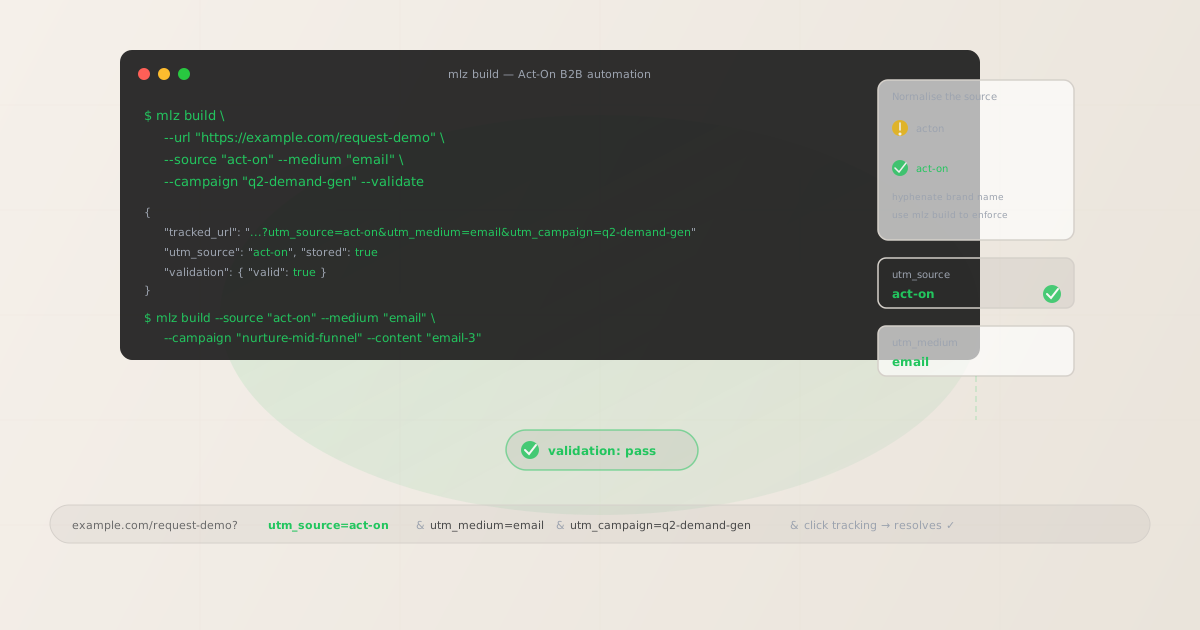
The correct utm_source and utm_medium for Act-On
Use utm_source=act-on — hyphenated, all lowercase — for all email sends that originate from the Act-On platform. The hyphen reflects Act-On's brand styling (the company name is hyphenated) and distinguishes the value from any legacy acton (no hyphen) values that Act-On's own tracking features may have auto-generated in earlier versions or configurations. The medium for all Act-On email sends is utm_medium=email.
Avoid utm_source=acton (no hyphen), utm_source=ActOn (mixed case), utm_source=act_on (underscore — GA4 parses underscores differently in some filter contexts), and utm_source=act-on-marketing-automation (unnecessarily verbose).
| Source value | Origin | Use this? |
|---|---|---|
acton |
Act-On auto-tracking (legacy) | ✗ No — no hyphen, non-standard |
ActOn |
Manually entered (mixed case) | ✗ No — mixed case, separate GA4 row |
act_on |
Manually entered (underscore) | ✗ No — inconsistent with hyphen convention |
act-on |
mlz build output | ✓ Yes — hyphenated, normalised |
GA4 treats each source value as a separate dimension. If your Act-On account has historical data under acton or ActOn from campaigns where team members set source values manually, those sessions appear in separate GA4 rows that do not aggregate with act-on. Create a GA4 custom channel group that matches all known Act-On source variants under a single "Email — Act-On" channel grouping, then prevent new splits going forward by enforcing act-on via mlz build.
Act-On's native link tracking and when to override it
Act-On has a built-in link tracking feature that wraps email links in a click-tracking redirect to record click events. This is separate from UTM parameter management. Act-On's tracking may also provide a Google Analytics integration option that can auto-append UTM parameters to email links — in this configuration, Act-On derives utm_campaign from the program or campaign name set in Act-On's interface.
Campaign names in Act-On are UI labels — they often contain spaces, mixed case, and internal categorisation prefixes ("Q2 | Demand Gen | Mid-Funnel" becomes utm_campaign=Q2+%7C+Demand+Gen+%7C+Mid-Funnel in GA4 — URL-encoded, unreadable in filter dropdowns, impossible to trend over time). If Act-On's auto-UTM is enabled, disable it at the account or program level, then build all tracked URLs externally with mlz build before creating Act-On email templates.
The two scenarios where you should always override Act-On's auto-UTM:
- Multi-program accounts: When multiple teams or business units run separate Act-On programs, auto-UTM produces inconsistent source and campaign values across programs. External UTM generation with
mlz buildenforces a consistent taxonomy regardless of who created the program or what they named it in Act-On. - CRM-integrated accounts: Act-On integrates with Salesforce and Microsoft Dynamics to pass lead attribution data into CRM records. If UTM parameters are inconsistent (mixed case, different source spellings), CRM reports that aggregate by campaign source will fragment. Building tracked URLs with
mlz buildbefore entering them in Act-On ensures the source value that flows into the CRM matches the convention used across all marketing channels.
Act-On Programs — per-step UTM tracking for nurture sequences
Act-On Programs are multi-step automated sequences: lead nurture tracks, onboarding sequences, re-engagement campaigns, trial-to-paid conversion flows. Each email step in a Program that links to a landing page needs a tracked URL with a unique utm_content value to make step-level attribution visible in GA4.
Without per-step differentiation, GA4 attributes all sessions from every email in the entire Program to a single campaign row. You can see that the Program is driving sessions — but not which step. For a five-email mid-funnel nurture track, GA4 shows total attributed sessions but cannot identify whether most conversions come from the first email (high-intent, fast movers) or the fifth email (low-intent leads that needed more touchpoints). This matters for Program optimisation: knowing which step converts is the basis for A/B testing subject lines, CTAs, and timing in that step.
# Nurture Program — step 1 (sent on lead score threshold)
$ mlz build \
  --url "https://example.com/ebook-download" \
  --source "act-on" \
  --medium "email" \
  --campaign "nurture-mid-funnel" \
  --content "email-1" \
  --validate

{ "tracked_url": "https://example.com/ebook-download?utm_source=act-on&utm_medium=email&utm_campaign=nurture-mid-funnel&utm_content=email-1", "validation": { "valid": true } }

# Nurture Program — step 3 (sent 7 days later)
$ mlz build \
  --url "https://example.com/request-demo" \
  --source "act-on" \
  --medium "email" \
  --campaign "nurture-mid-funnel" \
  --content "email-3" \
  --validate

{ "tracked_url": "https://example.com/request-demo?utm_source=act-on&utm_medium=email&utm_campaign=nurture-mid-funnel&utm_content=email-3", "validation": { "valid": true } }
Build all tracked URLs for a Program before configuring any of the Program's email step templates. After building, run mlz links list --campaign "nurture-mid-funnel" to retrieve every stored tracked URL for this Program. The JSON output lists all step variants — useful for confirming every email step has a validated tracked URL before the Program is activated. Paste each tracked_url into the link destination field in the corresponding Act-On Program email step editor.
Act-On CRM integration and UTM attribution
Act-On integrates with Salesforce (via Act-On's native connector) and Microsoft Dynamics (via the Act-On sync). When a lead fills in a form on a landing page they reached from an Act-On email, the UTM parameters from that session can be passed into the lead's CRM record — either via the form handler, a hidden field setup, or the CRM connector's field mapping configuration.
Consistent UTM values matter for CRM attribution because Salesforce campaigns, opportunities, and lead source fields are often populated based on UTM parameter values. If some Act-On sends use utm_source=acton and others use utm_source=act-on, CRM reports that group leads by source will fragment — two rows for what should be a single Act-On Email channel. This compounds across quarterly reports: marketing-sourced pipeline attribution that should show "Act-On email drove X pipeline this quarter" instead splits across multiple source values with no clear aggregate.
Building all tracked links with mlz build --source "act-on" ensures the same source value flows through from the email click to the GA4 session to the CRM lead record. The tracked URL is the same regardless of which team member built the Act-On Program or what they called it in Act-On's interface.
Act-On UTM tracking gotchas
- acton vs act-on — the hyphen creates a split
- Act-On's native Google Analytics integration (if enabled) may append
utm_source=actonwithout the hyphen. GA4 treatsactonandact-onas separate traffic sources — different dimension values, separate rows in every Source/Medium report. If you have sent campaigns under both values, your Act-On email attribution is fragmented. Disable Act-On's auto-UTM integration, build tracked links withmlz build --source "act-on"from this point forward, and create a GA4 custom channel group to consolidate any historicalactonsessions under a unified "Email — Act-On" label if the historical volume is significant. - Program display names produce unreadable utm_campaign values
- If Act-On's GA Analytics integration is enabled and derives
utm_campaignfrom the Program name, the output is the display name as entered in Act-On's interface. Program names often use pipes, colons, and mixed case for internal categorisation: "Q2 | Demand Gen | Mid-Funnel Nurture" becomesutm_campaign=Q2+%7C+Demand+Gen+%7C+Mid-Funnel+Nurturein GA4 — URL-encoded, unreadable in filter dropdowns, and producing a separate row for every minor variation in how the Program was named. Disable auto-UTM and usemlz build --campaign "q2-demand-gen-mid-funnel"to set a normalised slug at build time. - Program steps without utm_content collapse nurture attribution
- Act-On Programs can contain many email steps — a mid-funnel nurture track might include six or seven emails over three weeks. Without per-step
utm_contentvalues, GA4 attributes sessions from all steps to a single campaign row. You know the Program is driving sessions; you cannot identify which step is responsible. Build one tracked URL per step with a distinct--contentvalue before configuring any step's email template. This makes each Program step independently measurable in GA4's Content report. - Act-On Landing Pages need tracked URLs on their CTAs too
- Act-On includes a landing page builder that lets you host landing pages directly in Act-On. If a landing page hosted in Act-On links through to a final conversion destination (a pricing page, a demo request form, a product page), the links on that landing page also need tracked URLs — particularly if the landing page is accessed from sources other than email (paid ads, organic search, social). An untracked link from the Act-On landing page to the final destination creates a session in GA4 attributed to "direct" rather than to the original source. Build tracked URLs for every CTA on Act-On landing pages using the appropriate source, medium, and campaign values for the channel that drove traffic to the landing page.
- Lead scoring doesn't replace UTM tracking for GA4 attribution
- Act-On's lead scoring system tracks contact engagement within Act-On — email opens, clicks, website visits tracked by Act-On's beacon, form submissions. Lead score data lives in Act-On and syncs to the CRM. GA4 attribution, by contrast, is session-based — it records which UTM parameters were present when a session began. The two systems are complementary, not interchangeable: Act-On lead scoring tells you which contacts are engaged; UTM parameters in GA4 tell you which campaigns are driving conversions from new sessions. Both are needed. Don't assume Act-On's activity tracking replaces the need for explicit UTM parameters on every campaign link.
Act-On UTM naming conventions
Recommended UTM parameter values for Act-On, aligned with GA4 default channel groupings and a lowercase-hyphenated taxonomy:
- utm_source:
act-on— always, for all email sends from the Act-On platform. Never useacton(no hyphen, Act-On's auto-generated value in some configurations),ActOn(mixed case), oract_on(underscore). - utm_medium:
emailfor all Act-On email sends — Programs, one-off campaigns, automated sends, and triggered messages. If Act-On is used to send SMS (via integration), useutm_medium=smsto distinguish from email attribution. - utm_campaign: Lowercase, hyphenated, specific to the Program or campaign and its intent. Nurture Programs:
nurture-mid-funnel,nurture-top-of-funnel. Demand generation:q2-demand-gen,webinar-june-2026. One-off campaigns:product-launch-q3,customer-newsletter-may-2026. Never use Act-On's Program display name as the campaign value. - utm_content: Per Program step:
email-1,email-2,email-3. Per CTA within a single email:hero-cta,secondary-cta. Per content variant in A/B tests:variant-a,variant-b. Use distinctutm_contentvalues any time the same campaign delivers multiple messages or multiple CTAs that should be independently measurable in GA4. - utm_term: Optional. Use to pass lead segment or account segment into GA4 when the same Program sends to different audience tiers:
enterprise,smb,trial-users,leads-ql. Useful for comparing segment performance within a single Program run.
See the UTM naming conventions guide for the full cross-platform reference and the UTM tracking for developers guide for programmatic generation and validation at scale.
FAQ
- Should I use utm_source=acton or utm_source=act-on?
- Use
act-on(hyphenated). Act-On's own Google Analytics integration may auto-generateutm_source=acton(no hyphen) — a non-standard value that creates a separate GA4 source row from the hyphenated convention. GA4 treatsactonandact-onas different traffic sources. If you have historical data underacton, create a GA4 custom channel group that matches both values under a unified "Email — Act-On" channel. From this point forward, build all tracked URLs withmlz build --source "act-on"and disable Act-On's native UTM auto-generation. - How do I disable Act-On's auto-UTM feature?
- In Act-On, the Google Analytics integration is configured at the account level under Settings > Integrations > Google Analytics. Disabling this integration stops Act-On from auto-appending UTM parameters to links. You can also override it at the individual email or Program step level by replacing link destinations with tracked URLs built outside Act-On. Disabling auto-UTM does not affect Act-On's own link click-tracking redirect — Act-On still wraps links in its redirect to record click events. Only the automatic UTM parameter appending is disabled.
- Does Act-On's click tracking preserve UTM parameters?
- Yes — Act-On's link tracking uses a redirect wrapper that encodes the full destination URL, including any UTM query parameters embedded in the destination. When a recipient clicks, Act-On records the click event and forwards the browser to the destination with UTM parameters intact. As with all email platform click-tracking redirects, Act-On records the click at the redirect level — not at the destination. A broken destination URL shows as a click in Act-On's reporting but produces no session in GA4. Use
mlz build --validateto confirm destination URLs resolve correctly before embedding them in any Act-On email template. - How do I track Act-On Program steps in GA4?
- Build a separate tracked URL for each Program step with a unique
utm_contentvalue:mlz build --campaign "nurture-mid-funnel" --content "email-1"for step one,--content "email-2"for step two, and so on. Paste each tracked URL into the link destination in the corresponding Program step's email template. GA4 then reports sessions and conversions at the content level — each step is independently attributable. Without per-step differentiation, all Program-attributed sessions appear under a single campaign row with no step-level breakdown. - How do UTM parameters flow into Salesforce when using Act-On?
- UTM parameters flow into Salesforce CRM via the form submission on the landing page. When a lead submits a form on a landing page they reached from an Act-On email, the UTM parameters from their session can be captured by hidden form fields and passed to Salesforce as part of the lead record — via Act-On's Salesforce connector or directly via the form handler. This requires form fields mapped to UTM parameters (utm_source, utm_medium, utm_campaign) and Salesforce fields configured to receive them. Consistent UTM values — enforced by building tracked links with
mlz build --source "act-on"— ensure CRM attribution reports aggregate correctly without fragmentation from source value variants.
Recommended posts
Build Act-On campaign links from the terminal
Pass --source "act-on" and --medium "email" to mlz build to get a normalised, validated tracked URL ready to paste into any Act-On Program email step or campaign message. Disable Act-On's auto-UTM integration in your account settings, build all tracked URLs with a consistent lowercase-hyphenated --campaign slug before opening Act-On's template editor, and use --content to give each Program step a unique GA4-distinguishable tracked URL. Run --validate to confirm destination URLs resolve correctly before activating any Program — particularly for landing pages hosted outside Act-On that may have their own redirect rules or CDN caching behaviour.
1,000 links/month free. No credit card.
Your API key
Save this now — it won't be shown again.
npm install -g missinglinkz
Free plan: 1,000 links/month. No credit card. See the UTM tracking for developers guide for the full programmatic workflow including API and MCP integration.