UTM Tracking for Acoustic (IBM Marketing Cloud): How to Build and Validate Campaign Links
UTM tracking for Acoustic starts with utm_source=acoustic — lowercase, the current platform name — for all email and SMS sends from the Acoustic platform in 2026. Acoustic is an enterprise marketing automation and customer engagement platform that has operated under four different names since it was founded as Silverpop in 2000: Silverpop (2000–2014), IBM Marketing Cloud (2014–2019) — which also carried the sub-brand Watson Campaign Automation from 2017–2019 — and finally Acoustic after IBM divested the marketing technology business in 2019. The naming history creates a distinctive and common UTM tracking problem at enterprise organisations: teams that have sent email campaigns since before the 2019 rebrand may have historical GA4 data under utm_source=silverpop, utm_source=ibm-marketing, or utm_source=watson — meaning years of Acoustic platform sends are attributed to four separate source dimensions in GA4, making platform-level performance comparison impossible across the full programme history. Standardising new sends on utm_source=acoustic using mlz build stops the fragmentation from growing while preserving a clear audit trail of the migration point in GA4 data.
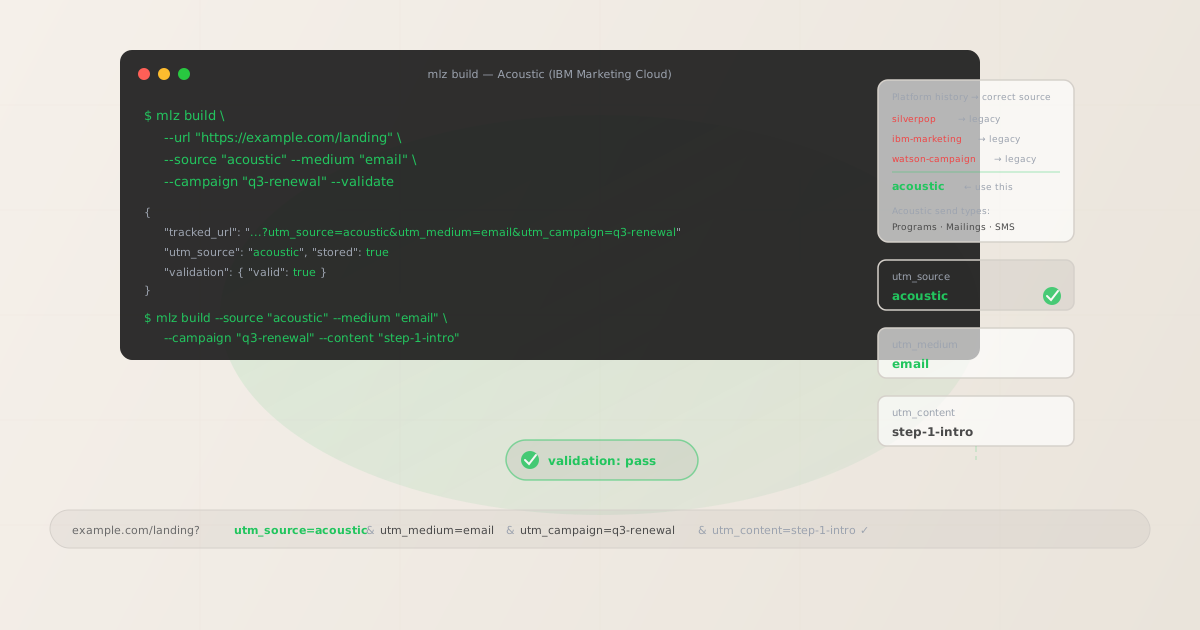
The correct utm_source and utm_medium for Acoustic
Use utm_source=acoustic — lowercase, the current platform name — for all new email and SMS sends from the Acoustic platform from 2026 onward. The source value should reflect the current platform identity, not historical platform names, to ensure that new sends aggregate under a single, consistent source dimension in GA4 regardless of when team members joined the organisation or which platform name they learned when they were onboarded.
The medium for Acoustic email sends is utm_medium=email. For SMS sends via Acoustic's mobile messaging capabilities, use utm_medium=sms. For mobile push notifications sent via Acoustic Campaign, use utm_medium=push. Never use utm_medium=acoustic — the medium describes the channel type, not the platform name, and GA4's default channel grouping definitions match on medium values like email, sms, and push, not on platform names.
| Source value | Origin | Use this? |
|---|---|---|
silverpop |
Pre-2014 platform name | ✗ No — legacy, creates separate GA4 row |
ibm-marketing |
2014–2019 platform name | ✗ No — legacy, creates separate GA4 row |
watson |
Watson Campaign Automation sub-brand | ✗ No — legacy, creates separate GA4 row |
Acoustic |
Mixed case — common manual entry | ✗ No — separate GA4 row from acoustic |
acoustic |
mlz build output | ✓ Yes — lowercase, current, aggregates cleanly |
For enterprise teams with significant historical attribution data under silverpop or ibm-marketing, the migration to acoustic creates a clean break point in GA4 data — sends before the migration point appear under the legacy source, sends after appear under acoustic. This is preferable to attempting to backfill historical data, which is not supported in GA4. Document the migration date in your campaign taxonomy documentation so that analysts comparing year-over-year performance across the migration boundary understand the source dimension change.
Acoustic Programs — UTM tracking for automated multi-step sequences
Acoustic Programs (called Campaign Automation or Automated Programs in some Acoustic product documentation) are the platform's multi-step automated messaging sequences. A Program is a workflow of messages, waits, conditions, splits, and actions that processes contacts as they enter and progress through the sequence. Programs in Acoustic are the equivalent of Journeys in Braze, Workflows in Klaviyo, or Campaigns in Ontraport — automated sequences where contacts receive a series of messages over time based on their behaviour and attributes.
Each email message within a Program that contains a CTA linking to a destination URL needs a tracked URL with a unique utm_content value to make step-level attribution visible in GA4. Without per-step utm_content values, GA4 attributes all sessions from a Program's emails to the same campaign dimension row — making it impossible to determine which Program message step generated a conversion or drove a session.
Build all tracked URLs for a Program before configuring any message template in Acoustic's Program editor. Define a programmatic content identifier for each step — not the display name from the Program workflow diagram — using a position and purpose slug: step-1-intro, step-3-offer, step-7-expiry-reminder. For Programs with conditional splits or branching paths, add the branch identifier to the content slug: step-3-high-intent-pricing, step-3-low-intent-feature.
# Program step 1 — intro email with product CTA
$ mlz build \
  --url "https://example.com/renew" \
  --source "acoustic" \
  --medium "email" \
  --campaign "q3-renewal" \
  --content "step-1-intro" \
  --validate

{
  "tracked_url": "https://example.com/renew?utm_source=acoustic&utm_medium=email&utm_campaign=q3-renewal&utm_content=step-1-intro",
  "validation": { "valid": true }
}

# Program step 3 — high-intent branch with pricing CTA
$ mlz build \
  --url "https://example.com/pricing" \
  --source "acoustic" \
  --medium "email" \
  --campaign "q3-renewal" \
  --content "step-3-high-intent-pricing" \
  --validate

{
  "tracked_url": "https://example.com/pricing?utm_source=acoustic&utm_medium=email&utm_campaign=q3-renewal&utm_content=step-3-high-intent-pricing",
  "validation": { "valid": true }
}
Paste each tracked URL as a static string into the corresponding Program message template in Acoustic. Do not use Acoustic's personalisation fields or dynamic content blocks to derive the tracked URL from a contact attribute — contact-level dynamic values inside UTM parameters fragment GA4 attribution data in the same way as merge fields in any other platform. After configuring all Program message templates, run mlz links list --campaign "q3-renewal" to confirm every Program step has a validated tracked URL before activating the Program.
Acoustic Mailings — UTM tracking for one-off sends
Acoustic Mailings are one-off email sends dispatched to a contact list or database query — not part of an automated Program sequence, but sent at a scheduled time or dispatched manually. Mailings in Acoustic are used for product announcements, promotional campaigns, newsletters, event invitations, and any send that does not require the multi-step automation logic of a Program.
For Mailing UTM tracking, the campaign slug identifies the marketing initiative and should match the naming convention used for related Program sequences where applicable — so that a campaign that includes both an initial Mailing blast and a follow-up Program sequence appears under the same campaign dimension in GA4. For example, a product launch initiative that starts with a Mailing announcement and follows up with an automated Program sequence should use utm_campaign=product-launch-q3-2026 for both the Mailing and the Program, with the utm_content value distinguishing the Mailing from the Program steps: mailing-announcement, step-1-followup, step-3-offer.
For Mailings that contain multiple CTAs linking to different destination pages — a hero CTA to the product announcement page, a secondary CTA to the changelog, a footer CTA to the pricing page — build a separate tracked URL for each destination with a distinct utm_content value: hero-cta, changelog-cta, pricing-cta. This allows GA4 to show which CTA position within the Mailing drove which downstream conversions — a meaningful signal for optimising future Mailing layouts and copy hierarchy.
Multi-account and multi-region Acoustic deployments
Large enterprise organisations using Acoustic may have multiple Acoustic accounts or organisational units — one per business unit, one per geographic region, or one per brand within a portfolio. A global enterprise might have an Acoustic account for North American operations, a separate account for European operations, and additional accounts for specific business divisions.
The utm_source=acoustic value does not distinguish between Acoustic accounts. If your organisation needs to attribute sends to specific business units or regions in GA4, encode the differentiator in the utm_campaign slug — not by creating separate source values. Use a campaign slug that includes a business unit or region prefix where cross-unit comparison requires attribution isolation: emea-renewal-q3-2026, apac-product-launch-2026, us-enterprise-onboarding-2026. This preserves utm_source=acoustic as the consistent platform-level identifier while enabling business unit or regional drill-down through the campaign dimension. Never use utm_source=acoustic-emea or utm_source=acoustic-us — source-level qualifiers fragment what should be a platform-level attribution roll-up into unit-specific silos that cannot be compared or aggregated in GA4.
Acoustic UTM tracking gotchas
- Historical platform name fragmentation in GA4
- If your organisation has been using the Acoustic platform since before the 2019 rebrand from IBM Watson Campaign Automation, historical GA4 data may contain sessions attributed to
silverpop,ibm-marketing, orwatsonas the utm_source value. These legacy source dimensions accumulate years of send data that cannot be merged with newacoustic-sourced sessions in GA4 — they appear as separate rows in dimension reports with no native way to aggregate them. For organisations that need to compare email programme performance across the full platform history, create a custom channel grouping in GA4 that maps all legacy Acoustic source values (silverpop,ibm-marketing,watson,acoustic) to a single reporting dimension. Document the migration date so analysts understand why the source dimension changes at a specific point in the historical data. - Acoustic's Universal Behaviors link tracking wraps all email links
- Acoustic's Universal Behaviors feature wraps all links in email messages with a click-tracking redirect that routes through Acoustic's tracking infrastructure before forwarding to the destination URL. This tracking redirect records click events for Acoustic's own analytics and is separate from GA4 UTM tracking. In standard configurations, the Universal Behaviors redirect preserves UTM query parameters through to the final destination. Verify this by obtaining a click-tracking wrapped URL from a test Mailing send in Acoustic and running
mlz checkagainst it — the command follows the full redirect chain and reports whether UTM parameters arrive intact at the destination. If the Acoustic redirect strips UTM parameters, GA4 attributes the resulting sessions as direct traffic rather than email traffic from Acoustic, eliminating email attribution for every send that uses that link configuration. - Personalisation fields inside UTM values fragment enterprise attribution
- Acoustic's personalisation engine supports contact-level dynamic content through database field references — equivalent to merge fields in other platforms. These field references can technically be inserted into link URL query parameters, including UTM parameter values:
utm_campaign=renewal-%%ACCOUNT_TIER%%. At send time, Acoustic resolves the field reference to the contact's actual account tier value —renewal-enterprise,renewal-midmarket,renewal-smb. Each unique resolved value creates a separate GA4 dimension row, fragmenting renewal campaign performance across tier-specific rows that cannot be aggregated to the programme level. At enterprise scale with dozens of account tiers, this fragmentation renders GA4 campaign reports unusable. Use staticutm_campaignslugs built withmlz buildfor all tracked URLs — the account tier is meaningful as a contact-level segmentation variable in Acoustic's own reporting, not as a UTM parameter value that flows into GA4. - Acoustic transactional messages should use utm_medium=email regardless of trigger type
- Acoustic supports triggered transactional messages sent via Acoustic Transact — order confirmations, password resets, purchase receipts, account notifications. These messages are sent programmatically via API or triggered by specific contact events, but they are still delivered over the email channel. Use
utm_medium=emailfor all Acoustic Transact email messages, notutm_medium=transactionalorutm_medium=triggered. The channel type is email regardless of the trigger mechanism, and GA4's default channel groupings classify sessions by medium value —emailroutes to the Email channel grouping, while a custom medium liketransactionalwould route to the Unassigned grouping. Distinguish transactional sends from marketing sends through theutm_campaignslug:transact-order-confirm,transact-password-reset. - Multi-account deployments should not use source-level qualifiers
- Enterprise organisations with multiple Acoustic accounts — one per region, business unit, or brand — sometimes create source-level qualifiers to distinguish sends across accounts:
utm_source=acoustic-emea,utm_source=acoustic-us. This creates permanent fragmentation in the source dimension: platform-level roll-up data that should aggregate underacousticis instead distributed across account-qualified source rows that cannot be combined in GA4 without custom groupings. Encode the business unit or regional differentiator in the campaign slug instead —utm_campaign=emea-renewal-q3-2026— and keeputm_source=acousticas the consistent platform identifier across all accounts.
Acoustic UTM naming conventions
Recommended UTM parameter values for Acoustic, aligned with GA4 default channel groupings and a lowercase-hyphenated taxonomy:
- utm_source:
acoustic— always, for all email, SMS, and push sends from the Acoustic platform, regardless of which Acoustic account or organisational unit sends the message. Legacy valuessilverpop,ibm-marketing, andwatsonremain accurate for historical data but should not be used for new sends. - utm_medium:
emailfor all Acoustic email Mailings, Program messages, and Transact messages.smsfor Acoustic SMS sends.pushfor Acoustic mobile push notifications. - utm_campaign: Lowercase, hyphenated, initiative-level slug — defined before building any tracked links and consistent across all message types within the same initiative. Programs and Mailings that are part of the same marketing initiative should use the same campaign slug. Multi-account deployments: encode the business unit or region in the campaign slug, not in the source value. Examples:
q3-renewal,product-launch-q3-2026,emea-enterprise-onboarding-2026,newsletter-monthly-2026. - utm_content: Per Program step:
step-1-intro,step-3-high-intent-pricing,step-7-expiry-reminder. Per branch within a step:step-3-high-intent-pricing,step-3-low-intent-feature. Per Mailing:mailing-announcement, or per CTA within a Mailing:hero-cta,pricing-cta. For Transact messages:transact-order-confirm,transact-password-reset. - utm_term: Optional. Use for audience segment or account tier differentiation when the same Program or Mailing is sent to different contact segments as separate sends and per-segment attribution is needed in GA4:
segment-enterprise,segment-midmarket,segment-smb. Preferable to encoding the segment inutm_campaignwhen the campaign initiative is the same for all segments and only the audience differs.
See the UTM naming conventions guide for the full cross-platform reference and the UTM tracking for developers guide for programmatic generation and validation at scale.
FAQ
- Should I use utm_source=silverpop or utm_source=acoustic for current sends?
- Use
utm_source=acousticfor all new sends from 2026 onward, regardless of which platform name the sending team learned when they were onboarded to the system. The source value should reflect the current platform identity so that new sends aggregate under a consistent source dimension in GA4. Historical data undersilverpop,ibm-marketing, orwatsonfrom sends before the migration date remains accurate for that period — do not attempt to retroactively change it. For organisations that need to compare performance across the full platform history, create a custom GA4 channel grouping that maps all four Acoustic source values to a single reporting dimension, and document the migration date so analysts understand the attribution boundary. - How do I track individual Program steps separately in GA4?
- Use a unique
utm_contentvalue for each Program message step that contains a CTA. Before configuring any message template in Acoustic's Program editor, define the content identifier for each step:step-1-intro,step-3-offer,step-7-expiry-reminder. Build the tracked URL withmlz build --campaign "q3-renewal" --content "step-1-intro" --validateand paste the returnedtracked_urlas a static string into the Program message template. GA4 attributes sessions and conversions to individual Program steps through the content dimension — each step is independently measurable without requiring separate Programs, separate campaign slugs, or separate GA4 segments per step. - Does Acoustic's Universal Behaviors link tracking preserve UTM parameters?
- Acoustic's Universal Behaviors wraps all email links in a click-tracking redirect that routes through Acoustic's infrastructure before forwarding to the destination URL. In standard configurations, this redirect preserves UTM query parameters intact. Verify by obtaining a click-tracking wrapped URL from a test Mailing send and running
mlz checkagainst it — the command follows the full redirect chain and reports whether UTM parameters arrive at the final destination. If parameters are stripped during the Acoustic redirect, GA4 attributes the resulting sessions as direct traffic rather than to the Acoustic email send, silently eliminating email attribution for every send that uses the same link configuration. This verification step is especially important after Acoustic platform updates or configuration changes that may affect redirect behaviour. - How should I handle UTM tracking for Acoustic Transact messages?
- Acoustic Transact messages — order confirmations, password resets, purchase receipts — should use
utm_source=acousticandutm_medium=email, the same source and medium as marketing email Mailings and Program messages. The channel type is email regardless of whether the message is triggered by a contact action, an API call, or a marketing automation rule. Distinguish transactional sends from marketing sends through the campaign slug:transact-order-confirm,transact-password-reset,transact-account-notification. This ensures transactional email traffic aggregates under the Email channel in GA4 alongside marketing email traffic, while remaining distinguishable by campaign dimension for performance analysis. - How do I distinguish sends from multiple Acoustic accounts in GA4?
- Encode the distinguishing identifier in the
utm_campaignslug rather than creating separateutm_sourcevalues. If your North American and European Acoustic accounts both send a Q3 renewal campaign, useutm_campaign=nam-renewal-q3-2026for North American sends andutm_campaign=emea-renewal-q3-2026for European sends — with both usingutm_source=acoustic. This preserves platform-level roll-up under the singleacousticsource dimension while enabling regional comparison through the campaign dimension. Creating separate source values per account (acoustic-nam,acoustic-emea) fragments the platform-level attribution and requires custom channel groupings to restore any cross-account aggregate view.
Recommended posts
Build Acoustic campaign links from the terminal
Pass --source "acoustic" and --medium "email" to mlz build to get a normalised, validated tracked URL ready to paste into any Acoustic message template as a static link destination. Build all tracked URLs before opening Acoustic's Program editor or Mailing template editor — one per Program message step with a distinct --content value, one per Mailing or per CTA within a Mailing. Run --validate to confirm that destination URLs resolve correctly before activating any Program or dispatching any Mailing. The key rule for Acoustic specifically: standardise on utm_source=acoustic for all new sends regardless of which legacy platform name your team learned during onboarding — consistent source values are the prerequisite for any meaningful platform-level attribution analysis in GA4.
1,000 links/month free. No credit card.
Your API key
Save this now — it won't be shown again.
npm install -g missinglinkz
Free plan: 1,000 links/month. No credit card. See the UTM tracking for developers guide for the full programmatic workflow including API and MCP integration.