Marketing DevOps: Automate Campaign Link Validation in Your Deploy Pipeline
Marketing DevOps applies CI/CD principles to campaign operations: treat campaign links like code, gate on validation before publish, and fail the build when a destination URL is broken. If you're currently using Selenium, Playwright, or manual browser checks for campaign link QA, you're using the wrong tool — those are end-to-end browser testing frameworks designed for UI interactions, not pre-publish URL validation. mlz preflight was built for this exact problem: check SSL, Open Graph tags, UTM parameter integrity, redirect chain preservation, and HTTP resolution in a single command with a JSON response and non-zero exit code on failure. Wire it into any CI system in under five minutes.
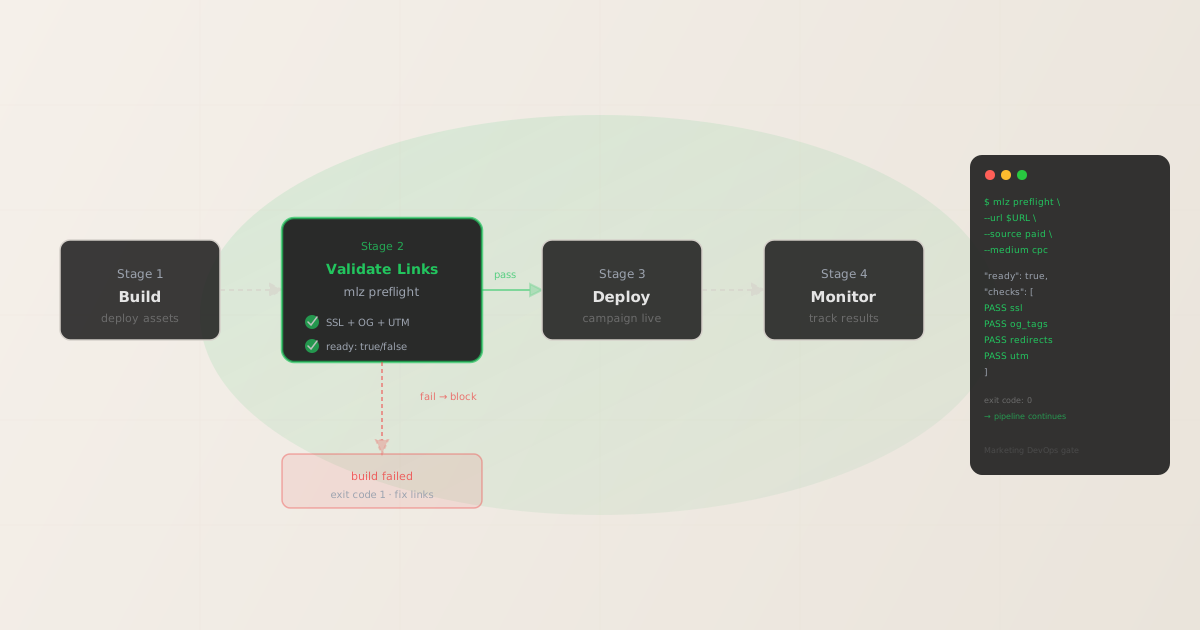
What marketing DevOps link QA actually means
Traditional software DevOps gates on test coverage, linting, and integration tests before code ships. Marketing DevOps applies the same principle to campaign assets: before any campaign link is published, it must pass a structured validation check. If it fails, the publish is blocked — the same way a failing unit test blocks a merge.
Marketing link QA breaks down into four distinct checks that need to happen before every campaign URL goes live:
- Destination health
- Does the URL resolve? Does it respond with HTTP 200? Is the domain serving HTTPS? A 404 or HTTP-only destination is a hard failure that should block any campaign launch immediately.
- UTM parameter integrity
- Are the UTM parameters correctly formed, lowercase-normalized, and consistent with the campaign taxonomy? Case fragmentation —
utm_source=LinkedInvsutm_source=linkedin— creates separate rows in GA4 that make attribution reporting unreliable. - Redirect chain preservation
- If the destination URL goes through a redirect — a vanity domain, a CDN rewrite, or a link shortener — do the UTM parameters survive each hop? Any redirect that strips query strings silently drops all tracking before GA4 records the session.
- Social sharing metadata
- Are Open Graph tags and Twitter Card tags present and complete? A missing
og:imagecauses broken previews when the link is shared on LinkedIn, Facebook, or Slack. These failures are invisible until the link goes live and someone actually shares it.
Tools like CampaignTrackly publish "UTM QA checklists" — spreadsheet-based reviews that require a human to manually check each item. That's manual DevOps, not automated DevOps. The marketing DevOps standard is: if a check can be automated, it must be automated, and the pipeline must fail when it fails.
Why Playwright and Selenium are the wrong tools for campaign link QA
When engineering teams look for "campaign link testing," they often reach for the browser testing frameworks they already know. Playwright and Selenium are the wrong choice for three reasons:
- They test UI interactions, not link health
- Playwright and Selenium are designed to simulate user interactions — click a button, fill a form, assert that a modal appears. Checking whether
og:imageis present in a page's<head>, or whether UTM parameters survive a redirect chain, doesn't require a browser. It requires an HTTP client that can parse response headers and HTML metadata. Running a headless Chrome instance to check an OG tag is like using a forklift to move a coffee mug. - They're slow and expensive in CI
- A Playwright test requires downloading a browser binary (Chromium, Firefox, or WebKit), spinning up a headless instance, and loading the full page — JavaScript, CSS, images, fonts. For a campaign with 50 landing page URLs, that's 50 full page loads in CI.
mlz preflightmakes a targeted HTTP request, parses the response, and returns in under 500ms per URL with no browser dependency. - They add maintenance burden for no gain
- Browser test suites require maintenance: selectors break, timeouts need tuning, CI runners need browser versions pinned. A campaign link validation check needs no selectors and no user interaction simulation. The maintenance burden of a Playwright suite for link QA is entirely unnecessary overhead.
The right tool for marketing DevOps link QA is a purpose-built CLI that does exactly what the checks require: HTTP requests, HTML parsing, and structured JSON output. That's what mlz preflight provides.
The campaign link validation stack: three commands
For most marketing DevOps pipelines, three mlz commands cover the full validation requirement:
1. Validate the destination URL (SSL, resolution, redirect chain)
mlz check "https://yoursite.com/landing"
2. Inspect metadata (OG tags, Twitter Card, viewport, favicon)
mlz inspect "https://yoursite.com/landing" --format json
3. All-in-one preflight (builds UTM link + validates + inspects)
mlz preflight --url "https://yoursite.com/landing" --source "paid" --medium "cpc" --campaign "devops-launch" --format json
In a marketing DevOps pipeline, mlz preflight is the standard choice — it runs all checks in one call and returns a single "ready": true/false flag that a pipeline can gate on. The JSON response structure:
{
  "ready": true,
  "tracked_url": "https://yoursite.com/landing?utm_source=paid&utm_medium=cpc&utm_campaign=devops-launch",
  "checks": [
    { "check": "ssl", "status": "pass", "message": "URL uses HTTPS." },
    { "check": "resolution", "status": "pass", "message": "Destination responded with 200." },
    { "check": "redirects", "status": "pass", "message": "No redirects detected. UTM parameters preserved." },
    { "check": "og_tags", "status": "pass", "message": "Open Graph tags present: title, description, and image." },
    { "check": "twitter_card", "status": "pass", "message": "Twitter Card present (type: summary_large_image)." }
  ],
  "summary": { "total": 12, "passed": 12, "warnings": 0, "failed": 0 },
  "recommendation": "All checks passed. Campaign link is ready to publish."
}
The "ready" boolean is the pipeline gate. The checks[] array gives the specific failure detail for any failing checks. mlz preflight exits with code 0 on success and code 1 on any hard failure — the standard CI contract. Warnings exit with code 0 by default (warnings don't block the build).
GitHub Actions: campaign link validation workflow
Add this workflow file to gate on campaign link validation before any campaign deployment step. The workflow reads campaign URLs from a config file and fails the build if any link doesn't pass:
name: Campaign Link Validation

on:
  pull_request:
    paths:
      - 'campaigns/**'
  workflow_dispatch:

jobs:
  validate-links:
    runs-on: ubuntu-latest
    steps:
      - uses: actions/checkout@v4

      - name: Set up Node.js
        uses: actions/setup-node@v4
        with:
          node-version: '20'
          cache: 'npm'

      - name: Install MissingLinkz
        run: npm install -g missinglinkz

      - name: Validate campaign links
        env:
          MLZ_API_KEY: ${{ secrets.MLZ_API_KEY }}
        run: |
          FAILED=0
          while IFS=',' read -r url source medium campaign; do
            echo "Checking: $url"
            mlz preflight \
              --url "$url" \
              --source "$source" \
              --medium "$medium" \
              --campaign "$campaign" \
              --format json || FAILED=1
          done < campaigns/links.csv
          exit $FAILED
The campaigns/links.csv file lists each campaign URL with its UTM parameters — one row per link. The loop runs mlz preflight on each and accumulates failures. Any failing check sets FAILED=1 and exits with code 1 at the end, blocking the PR merge or downstream deploy step.
For a more complete template including Slack notifications and artifact uploads, see the GitHub Actions campaign link validation guide.
GitLab CI: campaign link validation stage
Add a dedicated stage to your .gitlab-ci.yml that runs before any deploy stage:
stages:
  - build
  - validate-links
  - deploy

validate_campaign_links:
  stage: validate-links
  image: node:20
  before_script:
    - npm install -g missinglinkz
  script:
    - |
      FAILED=0
      while IFS=',' read -r url source medium campaign; do
        echo "Validating: $url"
        mlz preflight \
          --url "$url" \
          --source "$source" \
          --medium "$medium" \
          --campaign "$campaign" \
          --format json || FAILED=1
      done < campaigns/links.csv
      exit $FAILED
  variables:
    MLZ_API_KEY: "$MLZ_API_KEY"
  rules:
    - if: '$CI_PIPELINE_SOURCE == "merge_request_event"'
    - if: '$CI_COMMIT_BRANCH == $CI_DEFAULT_BRANCH'
The stage runs on every merge request and on every push to the default branch. The deploy stage is blocked until validate-links passes — the standard GitLab CI stage dependency model.
Azure DevOps: campaign link validation pipeline step
trigger:
  branches:
    include:
      - main

pool:
  vmImage: ubuntu-latest

steps:
  - task: NodeTool@0
    inputs:
      versionSpec: '20.x'

  - script: npm install -g missinglinkz
    displayName: Install MissingLinkz

  - script: |
      FAILED=0
      while IFS=',' read -r url source medium campaign; do
        mlz preflight \
          --url "$url" \
          --source "$source" \
          --medium "$medium" \
          --campaign "$campaign" \
          --format json || FAILED=1
      done < campaigns/links.csv
      exit $FAILED
    displayName: Validate campaign links
    env:
      MLZ_API_KEY: $(MLZ_API_KEY)
Store MLZ_API_KEY as a pipeline secret variable in Azure DevOps. The script step exits with code 1 if any link fails validation, which marks the pipeline task as failed and blocks downstream deploy tasks.
Hard failures vs. warnings: what blocks the build
mlz preflight distinguishes between two severity levels in the checks[] response:
- Hard failures (status: "fail") — exit code 1
- Checks that, if ignored, guarantee the campaign will not work correctly: SSL missing, destination returning non-200, UTM parameters stripped in a redirect, or no OG image found. These fail the pipeline. A campaign should never launch with a hard failure.
- Warnings (status: "warn") — exit code 0
- Checks that indicate a potential issue but not a blocking one: a favicon missing, a slow load time, a Twitter Card configured but without an image. These surface in the JSON output and logs but do not block the build by default. Teams can review warnings asynchronously without blocking campaign launches.
This two-tier model matches standard DevOps linting practice: errors block the build, warnings generate noise that informs the team without stopping work. For campaigns where warnings should also block (high-stakes product launches, paid social where preview quality matters), use jq to inspect the JSON and set an explicit failure condition:
mlz preflight --url "$URL" --source "$SRC" --medium "$MED" --campaign "$CAMP" --format json | jq -e '.summary.warnings == 0 and .ready == true'
The jq -e flag causes jq to exit with code 1 if the expression evaluates to false. This makes warnings a blocking condition when that threshold is set explicitly — without changing the default behavior for other pipelines. For more on validation thresholds, see the CI/CD campaign link validation overview.
Why purpose-built beats generic for marketing DevOps
Generic CI testing frameworks (Selenium, Playwright, curl scripts) can technically perform some of these checks. Teams that have tried them for marketing DevOps hit the same problems:
- curl + grep — fragile string parsing, no structured output, no exit code semantics for warnings vs. failures, no UTM-specific logic
- Playwright — headless browser overhead per URL, requires page execution (scripts, lazy-loaded images), not designed for metadata inspection or UTM validation
- Custom scripts — built once, break when OG tag formats change, require maintenance when new check categories emerge, not transferable across teams
mlz preflight is the purpose-built option: structured JSON output by design, standard exit code semantics, maintained check definitions, and no browser dependency. A marketing DevOps team can add it to a pipeline in one npm install and one script step without writing custom validation logic.
For teams building this validation layer from scratch, the campaign link validation guide covers the full check taxonomy. For the REST API equivalent (useful when the pipeline is calling from a server-side script rather than a CLI step), see the MissingLinkz REST API guide. For teams using the developer UTM tracking stack, campaign link validation fits naturally as the final step before any tracked URL is committed to a campaign config file.
FAQ
- Do I need an API key to run
mlz preflightin CI? - For basic URL validation (SSL, resolution, redirects, OG tags, Twitter Cards), an API key is optional —
mlz preflightcan run without one. Store your API key as a CI secret (MLZ_API_KEY) to enable link storage, campaign tracking, and quota-based usage across the team. The free plan includes 1,000 validations per month. - How do I validate a list of 50 campaign URLs without rate limiting?
- Run validations sequentially in the shell loop shown above, or use the REST API (
POST /v1/preflight) from a script that controls concurrency. Sequential runs from the CLI are typically fast enough for pre-deploy gate use cases — 50 URLs validate in under 30 seconds. For larger batches, see the REST API guide for parallel patterns. - What file format should the campaign links CSV be in?
- The examples above use a simple four-column CSV:
url,source,medium,campaign. You can extend it to includetermandcontentcolumns and read them in the shell loop. Any structured format that your existing campaign management tooling exports works — the shell loop just needs to map columns tomlz preflightflags. - Can I run this as a pre-commit hook instead of a CI step?
- Yes. Use pre-commit or a simple
package.jsonlint script to callmlz preflightbefore each commit. This catches broken links before they enter the repository, in addition to (not instead of) the CI gate. For a walkthrough, see the CLI OG tag checker guide which shows the pre-commit hook pattern. - Is this the same as the GitHub Actions template in the other article?
- The GitHub Actions campaign link validation guide is the focused, copy-paste complete template for GitHub specifically. This article covers the marketing DevOps concept across all three major CI systems (GitHub Actions, GitLab CI, Azure DevOps) and explains the philosophy behind the validation gate. Use both together.
Recommended posts
Add campaign link validation to your marketing DevOps pipeline
Install MissingLinkz and add mlz preflight as a validation gate in your CI pipeline. Block campaign launches on broken destinations, missing OG tags, and UTM parameter failures — before any ad spend is committed.
1,000 links/month free. No credit card.
Your API key
Save this now — it won't be shown again.
npm install -g missinglinkz
Runs in any CI system that supports Node.js. Store MLZ_API_KEY as a pipeline secret and call mlz preflight on every campaign URL before deploy.