Landing Page Readiness Checklist: 15 Points Before Every Launch
A landing page readiness checklist covers the full range of things that can quietly break before launch: hero images that fail to load, missing Open Graph tags that produce blank social previews, redirect chains that strip UTM parameters, slow page loads that drain conversions, and canonical URLs that split analytics. This 15-point checklist is organized by check type — visual, technical, performance, and tracking — and shows which half you can run automatically with a single command and which half still requires a human eye.
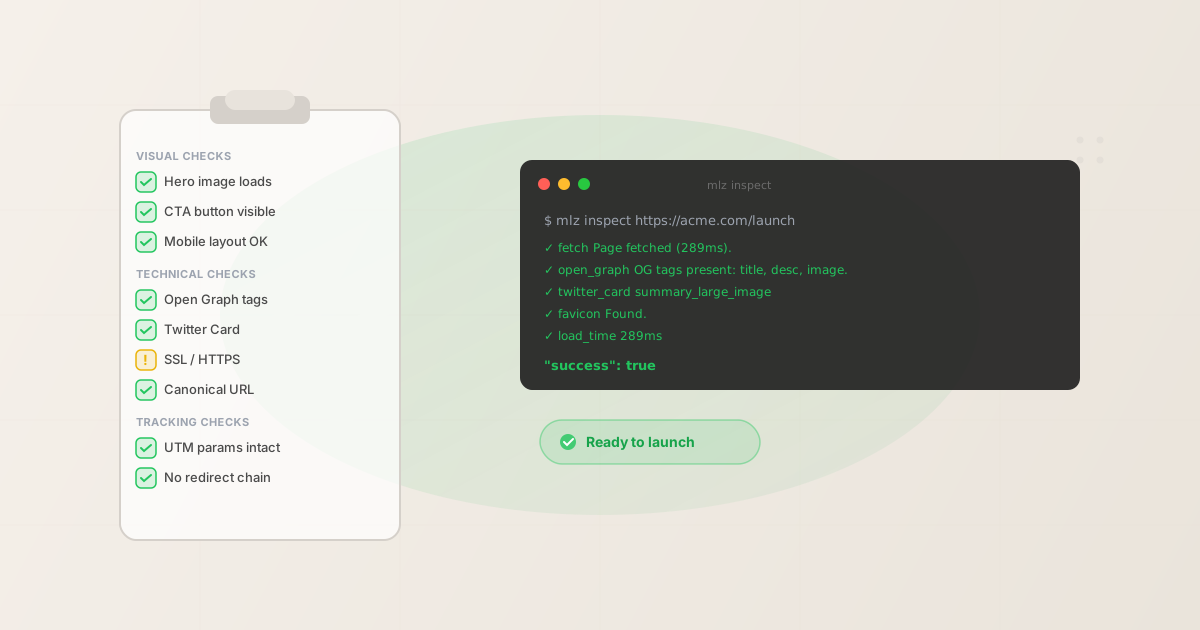
The 15-point landing page readiness checklist
These 15 checks are organized by the four categories that matter for a campaign landing page. The first three categories (visual, technical, performance) are the most common sources of silent failure. The tracking category is the most expensive to miss — broken attribution means you spend budget without knowing whether it worked.
Visual checks (manual)
Visual checks require a human eye. No automated tool reliably answers "does this look right?" — that judgment belongs to the person who designed the page. These four checks should take about five minutes in a browser.
- 1. Hero image loads correctly
- Open the page in a browser and confirm the hero image renders at the correct size with no broken image icon. Also confirm it loads at a reasonable speed — a hero image that delays the page by two seconds kills conversions before the visitor reads the headline. Resize the browser to mobile width (375px) and confirm the image crops gracefully or is replaced by a mobile-optimized version.
- 2. CTA button is visible above the fold
- The primary call-to-action must be visible without scrolling on a standard laptop screen (1280×800 viewport). If it is below the fold, conversions from social traffic — which arrives with minimal context — will drop significantly. A visitor who arrives from a LinkedIn ad has already decided to click once; do not make them scroll to convert.
- 3. Copy reads correctly for the source platform
- If this landing page is the destination for a LinkedIn campaign, the headline should be written with that context in mind. Read the headline and the first paragraph. They should answer the question the ad just raised — not restart the conversation from scratch. Check for any placeholder text, formatting artifacts, or CMS export residue.
- 4. Mobile layout is intact
- Use your browser's mobile emulation mode or a real device. The most common mobile failures are: columns stacking out of order, CTA buttons too small to tap (minimum 44×44px target), text that overflows its container, and form fields that are too small to use. Check on at least one Android-sized viewport (360px wide) and one iPhone-sized viewport (390px wide).
Technical checks (mlz inspect)
Technical checks are fully automatable. The mlz inspect command checks all five of these in a single HTTP fetch and returns structured JSON. Run it from the terminal or add it to your CI pipeline — see automating social preview checks for the GitHub Actions workflow.
mlz inspect https://your-landing-page.com --format json
- 5. Open Graph tags present and complete
og:title,og:description, andog:imagemust all be present. These three tags control the preview card on LinkedIn, Facebook, Slack, Discord, and most other platforms that render link previews. A missingog:imageproduces a text-only preview. A missingog:descriptionshows blank space or a random excerpt from the page body.mlz inspectreports pass, warn, or fail for each tag individually. See landing page validation for social sharing for the full OG tag spec.- 6. Twitter Card tags present
twitter:cardmust be set to a valid type —summary_large_imageis the right choice for campaign landing pages. X (Twitter) uses its own card system independent of Open Graph. A page with all OG tags configured can still render as a plain text link on X without thetwitter:cardmeta tag. The most common value to use issummary_large_image;twitter:imageshould matchog:image.- 7. SSL / HTTPS configured
- The page must be served over HTTPS. An HTTP landing page displays "Not Secure" in the browser address bar — visible to every visitor before they read a word of copy. Campaign platforms (LinkedIn, Facebook, Google Ads) may also flag or reject destination URLs that do not use HTTPS. Mixed-content errors (HTTPS page loading HTTP resources) can also trigger browser warnings even when the base URL uses HTTPS.
- 8. Canonical URL matches destination
- The
<link rel="canonical">tag must point to the correct URL — ideally the clean destination URL without UTM parameters. A canonical tag that points to a different page tells search engines to attribute traffic and authority to that other page instead. It also means analytics data may be split between the UTM-decorated URL and the canonical URL in some reporting tools. - 9. Favicon present
- A favicon is a small signal, but it matters for credibility. A browser tab without a favicon marks the page as low-quality or unfinished to visitors who have multiple tabs open. Some platforms also use the favicon as part of the link preview chrome.
mlz inspectchecks for the favicon file and reports its URL if found.
Here is what a clean mlz inspect result looks like:
{
  "url": "https://acme.com/q2-launch",
  "success": true,
  "checks": [
    { "check": "fetch",        "status": "pass", "message": "Page fetched successfully (289ms)." },
    { "check": "open_graph",   "status": "pass", "message": "Open Graph tags present: title, description, and image." },
    { "check": "twitter_card", "status": "pass", "message": "Twitter Card present (type: summary_large_image)." },
    { "check": "favicon",      "status": "pass", "message": "Favicon found." },
    { "check": "load_time",    "status": "pass", "message": "Page load time: 289ms." }
  ],
  "open_graph": {
    "title":       "Acme — Q2 Product Launch",
    "description": "See what we shipped this quarter.",
    "image":       "https://acme.com/og/q2-launch.png"
  },
  "load_time_ms": 289
}
Performance checks
Performance checks overlap with the technical checks — mlz inspect reports page load time — but some performance signals require additional tooling or human judgment.
- 10. Page loads in under 2 seconds on a 4G connection
- The
mlz inspectload time measurement reflects server response time from a data center on a fast connection. Mobile visitors on 4G experience 200–400ms of additional latency. Ifmlz inspectreports a load time over 1,500ms, assume real-world mobile performance is over 2 seconds. Test the page in Chrome DevTools with "Fast 4G" throttling enabled to see what your paid traffic actually experiences. A page load over 3 seconds on mobile loses approximately 50% of visitors before they read anything. - 11. No console errors or failed resource loads
- Open the browser console (F12) with the network tab visible. Reload the page. Look for red 4xx or 5xx errors in the network tab — these indicate assets (images, scripts, stylesheets) that failed to load. A JavaScript error that prevents analytics from firing is one of the hardest bugs to detect post-launch. A CSS load failure can make the page visually broken on some browsers or caching configurations.
- 12. Form submissions work
- If the landing page contains a lead capture form, test the submission end-to-end before launch. Submit with valid data, confirm the success state shows correctly, and check that the submission appears in your CRM or email tool. This is easy to skip when launching under deadline pressure and reliably broken when it matters most.
Tracking checks
Tracking checks are partly automatable (UTM parameter validation) and partly manual (analytics tag verification). A campaign with broken tracking is money spent without measurement.
- 13. UTM parameters survive the redirect chain
- If the destination URL redirects — HTTP to HTTPS, www to non-www, or through a vanity URL shortener — test that the UTM parameters you appended to the campaign link still appear on the final page after all redirects. Redirect implementations that drop query strings are common in WordPress redirect plugins, CDN configuration, and link shorteners. The
mlz checkcommand validates the full redirect chain. See the campaign link QA checklist for the full attribution check set. - 14. Analytics tag is firing on the destination page
- Open the landing page in an incognito browser window with the GA4 DebugView or the Google Tag Assistant active. Confirm the page view event fires and that the
utm_source,utm_medium, andutm_campaignparameters are captured correctly. A GA4 tag that fires on the homepage but not on the landing page (because the tag was added manually rather than via a CMS field) is a silent failure that voids the campaign's ROI measurement. - 15. UTM parameter naming is consistent with taxonomy
- Confirm that the UTM values on the campaign link match the documented taxonomy for the account.
utm_source=LinkedInandutm_source=linkedinare two separate sources in GA4 — both will appear in reports, creating two rows where you expect one. The value must be lowercase, hyphen-delimited, and match the value that was used in all previous campaigns for the same source. See UTM governance at scale for how to enforce this systematically.
FAQ
- How long should this checklist take to complete?
- The visual checks (items 1–4) take about 5–10 minutes if the page is working correctly. The technical checks (items 5–9) take under 30 seconds if you use
mlz inspect. The performance checks (items 10–12) take 5–10 minutes including manual form testing. The tracking checks (items 13–15) take 5–15 minutes depending on how accessible your analytics debug tooling is. Total: 20–40 minutes. If you skip it and a problem surfaces post-launch, the cost is a multiple of that in wasted ad spend and emergency remediation time. - Which items on this list can an AI agent run automatically?
- Items 5–9 (the technical checks) and item 13 (UTM redirect validation) are fully automatable via
mlz inspectandmlz check. Item 15 (UTM naming consistency) is automatable if you have a documented taxonomy file —mlz buildenforces naming at build time. Items 1–4 (visual checks), 10–12 (performance + form testing), and 14 (analytics tag verification) currently require manual verification. An AI agent using the MissingLinkz MCP server can handle the automatable half in a single tool call. - Do I need to run this checklist for every landing page variation in a multi-variant campaign?
- Yes, for every URL that receives paid traffic. The technical and tracking checks are URL-specific — a variant that changes the headline or image can also accidentally strip the OG tags if the CMS export does not copy them correctly. The visual checks need to be run once per variant. The performance and tracking checks are most critical on the primary variant; secondary variants should at minimum pass the technical checks before receiving traffic.
- What is the difference between this checklist and the campaign link QA checklist?
- The campaign link QA checklist focuses on the tracked URL — the link you are about to publish in a social post, email, or ad — and validates that the UTM parameters are present, the destination resolves, and the preview metadata is in place. This landing page readiness checklist is broader: it covers the page itself, including visual state, form functionality, performance, and tracking tags. Run both before a campaign launch: the campaign link QA checklist confirms the link is correct; this checklist confirms the destination page is ready to receive the traffic.
Recommended posts
Run the technical half automatically
Install MissingLinkz and run mlz inspect to check OG tags, Twitter Cards, SSL, favicon, and load time in a single command. Items 5–9 on this checklist are done in under a minute.
1,000 links/month free. No credit card.
Your API key
Save this now — it won't be shown again.
npm install -g missinglinkz
mlz inspect https://your-landing-page.com --format json
See the SKILL.md reference for all inspect flags and JSON response fields.