Automating Social Preview Checks: GitHub Actions, Pre-Deploy Hooks, and CLI
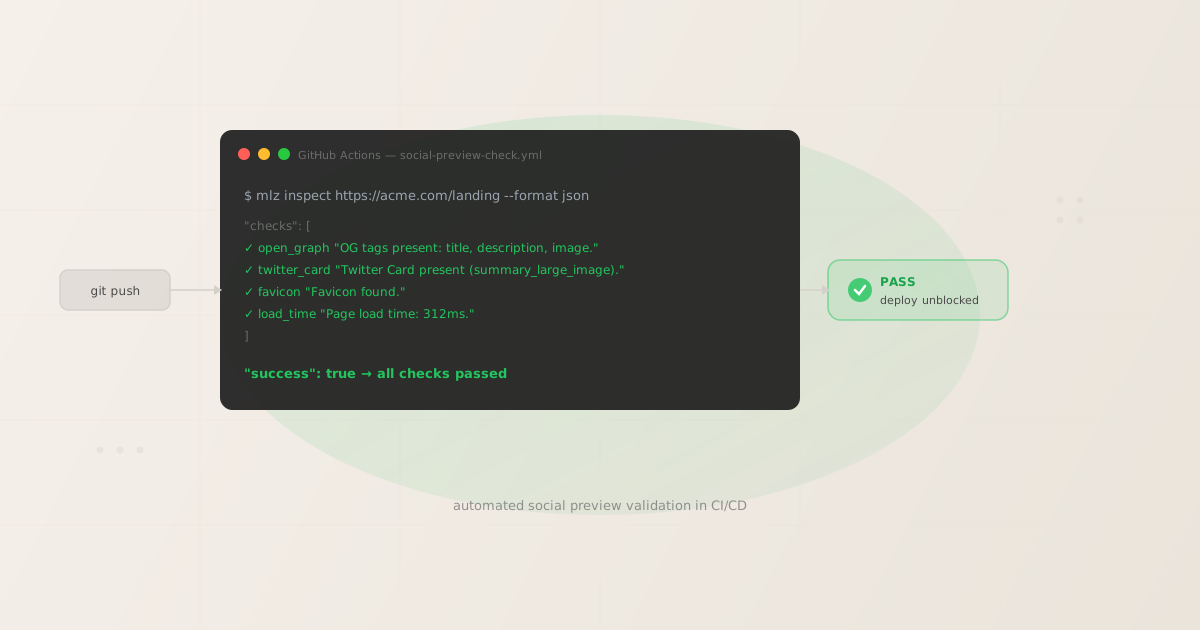
Automating social preview checks means catching missing OG tags, broken Twitter Cards, and slow page loads in your CI pipeline — before a campaign link goes live and drives real traffic to a broken preview. Manual checks done in a browser catch the obvious failures. Automated checks catch the quiet ones: a staging deploy that stripped the og:image meta tag, a CDN rewrite that removed the twitter:card declaration, a redirect that doubled the page load time. This guide shows exactly how to wire up mlz inspect in GitHub Actions, a pre-deploy hook, and a shell loop.
Why social preview checks belong in automation
Every time a page is deployed, the HTML that social platforms scrape can change. A template update, a CMS export, or a caching layer swap can silently remove the meta tags that control how links look on LinkedIn, Facebook, X, and Slack. By the time a campaign link goes out with a broken preview, the damage is already done: click-through rates drop, the paid campaign budget is spent, and the root cause is a missing <meta> tag that would have taken 30 seconds to fix.
Manual social preview checks — opening the Facebook Sharing Debugger, the LinkedIn Post Inspector, the Twitter Card Validator — require a browser session per platform per URL. They do not compose into CI pipelines. They do not run before every deploy. They do not produce structured output you can parse.
mlz inspect runs the same checks — OG tags, Twitter Card tags, viewport meta, favicon, page load time — as a single terminal command that returns JSON and exits non-zero on failure. That exit code is what makes it automatable. A CI step fails; a pre-deploy hook blocks; an agent workflow stops and reports. See landing page validation for social sharing for the full taxonomy of what these checks cover.
GitHub Actions: validate social previews before merge
The most reliable place to run social preview checks is as a required CI step that must pass before a pull request can merge. Here is a complete GitHub Actions workflow that runs mlz inspect against a staging URL whenever a pull request targets the main branch:
name: Social Preview Check

on:
  pull_request:
    branches: [main]

jobs:
  inspect:
    runs-on: ubuntu-latest
    steps:
      - name: Checkout
        uses: actions/checkout@v4

      - name: Set up Node.js
        uses: actions/setup-node@v4
        with:
          node-version: '20'

      - name: Install MissingLinkz
        run: npm install -g missinglinkz

      - name: Inspect staging landing page
        env:
          MLZ_API_KEY: ${{ secrets.MLZ_API_KEY }}
        run: |
          mlz inspect https://staging.acme.com/landing --format json
          exit $?
The workflow installs missinglinkz globally, then runs mlz inspect against the staging URL. If any check fails (missing OG tags, Twitter Card absent, page not reachable), the command exits with a non-zero code and the CI step fails. The pull request cannot merge until the checks pass.
MLZ_API_KEY is optional for the inspect command — OG tag checks work without authentication. Set it in your repository secrets if you want results stored in your MissingLinkz account for later review.
Checking multiple URLs
If a campaign launches multiple landing pages, check them all in the same CI job:
run: |
  URLS=(
    "https://staging.acme.com/landing-a"
    "https://staging.acme.com/landing-b"
    "https://staging.acme.com/landing-c"
  )
  FAILED=0
  for URL in "${URLS[@]}"; do
    echo "Inspecting $URL"
    mlz inspect "$URL" --format json || FAILED=1
  done
  exit $FAILED
This pattern runs all inspections and collects failures rather than stopping at the first one, so you get a complete picture of what needs fixing.
Pre-deploy hook: block deploys on social preview failures
For teams using deployment scripts directly — without a full CI pipeline — a pre-deploy hook blocks the deploy if any social preview check fails. Add this to your deployment script before the deploy command runs:
#!/bin/bash
set -e

STAGING_URL="https://staging.acme.com/landing"

echo "Running social preview check before deploy..."

RESULT=$(mlz inspect "$STAGING_URL" --format json)
SUCCESS=$(echo "$RESULT" | python3 -c "import sys,json; d=json.load(sys.stdin); print(d['success'])" 2>/dev/null)

if [ "$SUCCESS" != "True" ]; then
  echo "Social preview check failed. Blocking deploy."
  echo "$RESULT" | python3 -m json.tool
  exit 1
fi

echo "Social preview check passed. Deploying..."
# your deploy command here
The script runs mlz inspect, parses the success field from the JSON output, and exits with code 1 if the check failed. Because it uses set -e, any subsequent deploy command will not execute if this step fails.
What the inspect output looks like
Here is a real mlz inspect response showing what the script is parsing:
{
  "url": "https://acme.com/landing",
  "success": true,
  "checks": [
    { "check": "fetch", "status": "pass", "message": "Page fetched successfully (312ms)." },
    { "check": "open_graph", "status": "pass", "message": "Open Graph tags present: title, description, and image." },
    { "check": "twitter_card", "status": "pass", "message": "Twitter Card present (type: summary_large_image)." },
    { "check": "favicon", "status": "pass", "message": "Favicon found." },
    { "check": "load_time", "status": "pass", "message": "Page load time: 312ms." }
  ],
  "open_graph": {
    "title": "Acme — Q2 Product Launch",
    "description": "See what we shipped this quarter.",
    "image": "https://acme.com/og/q2-launch.png",
    "type": "website",
    "url": "https://acme.com/landing"
  },
  "twitter_card": {
    "card": "summary_large_image",
    "title": "Acme — Q2 Product Launch",
    "image": "https://acme.com/og/q2-launch.png"
  },
  "load_time_ms": 312
}
Every field is machine-readable. success: true is the top-level gate. The checks array gives per-check detail. The open_graph and twitter_card objects let you extract and log the actual tag values that were found.
Slack notification on failure
CI failures are easy to miss if the team is not actively watching the pipeline. Adding a Slack notification means the right people hear about a broken social preview immediately rather than discovering it when the campaign is already live. Here is how to extend the GitHub Actions workflow to send a notification when mlz inspect fails:
      - name: Inspect staging landing page
        id: inspect
        continue-on-error: true
        run: mlz inspect https://staging.acme.com/landing --format json

      - name: Notify Slack on failure
        if: steps.inspect.outcome == 'failure'
        uses: slackapi/[email protected]
        with:
          payload: |
            {
              "text": "Social preview check failed on PR #${{ github.event.number }}. OG tags or Twitter Card may be broken. Review before merging."
            }
        env:
          SLACK_WEBHOOK_URL: ${{ secrets.SLACK_WEBHOOK_URL }}
          SLACK_WEBHOOK_TYPE: INCOMING_WEBHOOK

      - name: Fail job if inspect failed
        if: steps.inspect.outcome == 'failure'
        run: exit 1
The key pattern here is continue-on-error: true on the inspect step combined with a follow-up step that checks the outcome. This lets the Slack notification fire before the job fails, instead of the job aborting before it reaches the notification step.
Caching tips for fast runs
The main latency in a mlz inspect CI step is the npm install -g missinglinkz command. On a cold runner this takes 10–20 seconds. You can reduce this to under a second by caching the npm global install between runs:
      - name: Cache npm global
        uses: actions/cache@v4
        with:
          path: ~/.npm
          key: npm-global-missinglinkz-${{ hashFiles('**/package-lock.json') }}
          restore-keys: |
            npm-global-missinglinkz-

      - name: Install MissingLinkz
        run: npm install -g missinglinkz
With caching, the install step typically resolves in 1–2 seconds on cache hit. The inspect command itself takes as long as the page takes to respond — usually under 500ms for a production URL, and up to 2 seconds if the staging environment is slow to start.
For teams running inspect on many URLs, consider running the checks in parallel using a matrix strategy rather than a shell loop. Matrix jobs run concurrently and the total CI time is bounded by the slowest URL, not by the total count.
FAQ
- Does mlz inspect work on staging URLs that require authentication?
mlz inspectmakes a standard HTTP GET request. If your staging environment is behind HTTP basic auth or requires a session cookie, the inspector will not be able to fetch the page metadata. The most common workaround is to create a dedicated preview URL that bypasses auth — a common pattern with tools like Vercel Preview Deployments or a staging environment with an allow-listed IP range for CI runners.- Can I run social preview checks without an API key?
- Yes.
mlz inspectruns without anMLZ_API_KEY. The command fetches the page directly and parses the meta tags. An API key is only needed if you want to store inspection results in your MissingLinkz account or access them later via the API. For CI-only use, no key is required. - What does mlz inspect check beyond OG tags?
- The inspect command checks Open Graph tags (
og:title,og:description,og:image), Twitter Card tags (twitter:card,twitter:title,twitter:image), the favicon, and page load time. For a complete picture of OG tag validation specific to campaign links, see OG tag validation for campaign links. For checking OG tags directly from the command line, see how to check OG tags from the command line. - Should I run social preview checks on every commit or just before merging?
- Running on every pull request (as shown in the workflow above) is the right default. Running on every commit to a feature branch is usually too frequent — most commits touch code, not HTML meta tags. Running only on merge to main risks catching failures too late if your deploy pipeline is fast. The pull request gate is the right balance: it checks once per change, before the change lands in production.
- How do I inspect a URL that is not yet live (e.g., a local dev server)?
- If the URL is accessible from the CI runner,
mlz inspectwill check it. For local dev servers, this means the URL must be publicly accessible — which it is not by default. Use a tunneling tool like ngrok or set up an ephemeral staging environment as part of your CI pipeline. Both approaches are common in teams that want end-to-end preview validation before code merges.
Recommended posts
Automate your next deploy
Add mlz inspect to your GitHub Actions workflow and catch broken social previews before they reach production. Install takes under a minute.
1,000 links/month free. No credit card.
Your API key
Save this now — it won't be shown again.
npm install -g missinglinkz
mlz inspect https://your-landing-page.com --format json
See the SKILL.md reference for all mlz inspect flags and JSON response fields.