Campaign Link QA Checklist: 12 Checks Before Every Launch
A campaign link QA checklist is the last line of defense before paid traffic hits your landing page. It catches the failures that are invisible in a browser: stripped UTM parameters, missing Open Graph tags, SSL misconfigurations, slow page loads, and redirect chains that break attribution. This checklist covers all 12 checks — and shows how to run the entire thing with one terminal command instead of twelve separate tools.
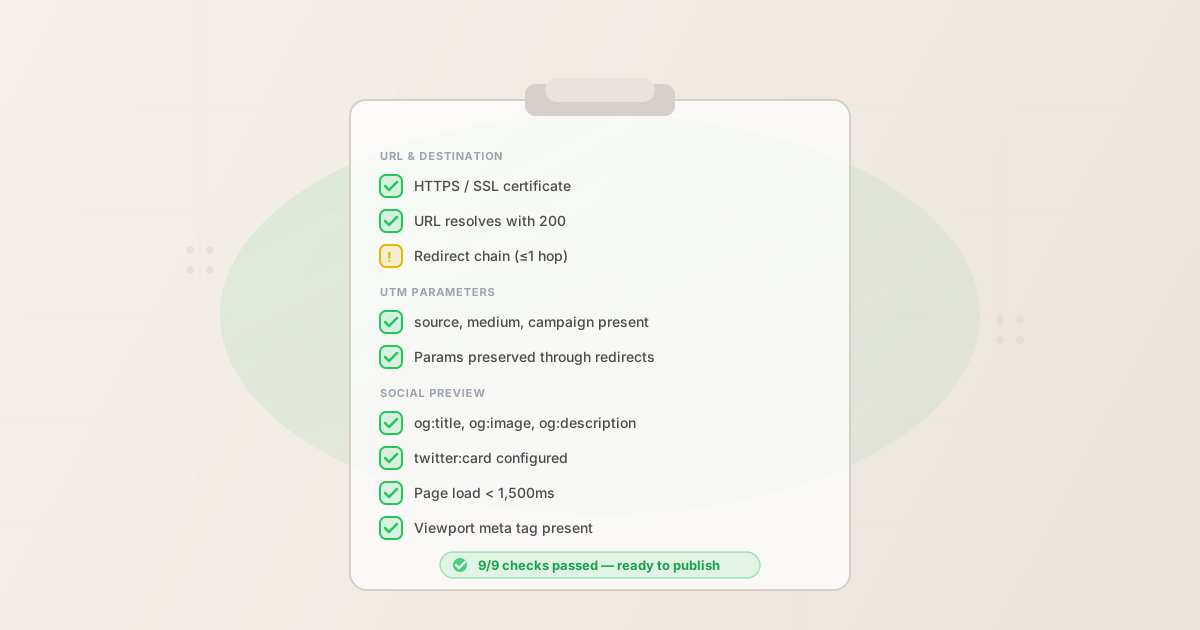
The 12-point campaign link QA checklist
Every campaign link you publish should pass these 12 checks. They are organized by category: destination checks first (is the URL reachable?), then attribution checks (will tracking work?), then social sharing checks (will the preview look right?), then content checks (is the post copy ready?).
Destination checks
- 1. HTTPS / SSL certificate
- The destination URL must use HTTPS. HTTP pages display a "Not Secure" warning in every major browser — visitors see it and leave before reading the page. The SSL certificate must also be valid and not expired. Fail condition: URL uses HTTP, or HTTPS returns a certificate error.
- 2. URL resolves with HTTP 200
- The destination must return an HTTP 200 status code. A 404 means the page was deleted or moved. A 500 means the server has an error. A 301 to an unexpected URL means the destination changed. Fail condition: any non-200 response, or no response at all.
- 3. Redirect chain is short
- Every redirect adds latency and creates an opportunity for UTM parameters to be stripped. One redirect (e.g., HTTP to HTTPS) is acceptable. Two or more is a warning. Three or more should block launch. Warn condition: 1 redirect. Fail condition: 2+ redirects.
- 4. Page loads in under 1,500ms
- Slow pages lose visitors before a word is read, and return 200 while doing it — there is no error anywhere to notice. The thresholds below are the ones the check enforces, so you can act on the measurement rather than an industry average. Warn condition: 1,500–3,000ms. Fail condition: over 3,000ms.
Attribution checks
- 5. All required UTM parameters present
utm_source,utm_medium, andutm_campaignmust all be present. Missing any of them means you cannot attribute the traffic to the right channel in analytics. Fail condition: any of the three required parameters is absent from the tracked URL.- 6. UTM parameters use consistent naming
- Values must be lowercase and hyphen-delimited.
utm_source=LinkedInandutm_source=linkedinare two different sources in GA4. A single capital letter fragments your reporting into separate rows. Warn condition: uppercase letters, underscores where hyphens are expected, or spaces in values. - 7. UTM parameters survive the redirect chain
- Append the UTM parameters to the destination URL and follow the full redirect chain. Confirm the parameters arrive intact on the final page. Some reverse proxies, CDNs, and WordPress redirect plugins strip query strings. Fail condition: UTM parameters absent from the final URL after following all redirects.
Social sharing checks
- 8. Open Graph tags present
og:title,og:description, andog:imagemust all be present. These tags control how the link renders when shared on LinkedIn, Facebook, Slack, and most social platforms. Missing tags mean a blank, unclickable preview. Fail condition: any of the three core OG tags is absent. See the Open Graph tags guide for the full spec.- 9. Twitter Card tags present
twitter:cardmust be present and set to a valid type. X uses its own card system independent of Open Graph. A page with all OG tags can still render as a plain text link on X without Twitter Card meta. Fail condition:twitter:cardabsent or set to an invalid value.- 10. Viewport meta tag present
- The destination must include
<meta name="viewport" content="width=device-width, initial-scale=1">or equivalent. Pages without it render at desktop width on mobile — approximately 60% of social media traffic arrives on mobile devices. Fail condition: viewport meta tag absent. - 11. Canonical URL matches destination
- The
<link rel="canonical">value must match the destination URL (minus UTM parameters). A mismatch splits analytics data across two URLs and confuses search engine indexing. Warn condition: canonical URL does not match destination.
Content checks (when applicable)
- 12. Post copy within platform character limit
- When the campaign link is going into a social post, validate the post copy against the target platform's character limit before publishing. X allows 280 characters. LinkedIn allows 3,000. Instagram allows 2,200. Truncation or rejection after publishing is preventable. Fail condition: character count exceeds platform limit.
Manual checks vs. automated
You can run every check above manually. Here is what that looks like:
- Check 1 (SSL): Open the URL in a browser, look for the padlock
- Check 2 (resolution): Try to load the page
- Check 3 (redirects): Use
curl -I -Land count the 301/302 responses - Check 4 (page speed): Open Chrome DevTools, reload, check Network timing
- Checks 5–7 (UTM): Manually inspect the URL string and follow each redirect
- Check 8 (OG tags): Right-click → View Source, search for
og: - Check 9 (Twitter Card): Same as above, search for
twitter: - Check 10 (Viewport): Same as above, search for
viewport - Check 11 (Canonical): Same as above, search for
canonical - Check 12 (copy): Manually count characters
That is approximately 10–15 minutes per link, using five different tools, with no machine-readable output. For a campaign with three landing pages and four social platforms, that is 90 minutes of manual QA before every launch. And that is assuming you remember to check all twelve items.
Automated checks run all twelve in under 10 seconds. The output is structured JSON with a clear pass/fail verdict. You can run it from the terminal, from a CI pipeline, or through an AI agent via MCP.
Run the whole checklist with one command
The MissingLinkz mlz publish-check command runs a full pre-publish checklist: it builds the UTM-tagged link, validates the destination URL, inspects the landing page for OG tags and social metadata, and validates post copy against platform limits. One command, all twelve checks:
mlz publish-check --url "https://acme.com/launch" --campaign "q2-launch" --source "linkedin" --medium "social" --copy "Our Q2 product launch is live. See what's new." --platform linkedin
The output gives you a top-level ready: true/false verdict, then breaks down every individual check result:
{
  "ready": true,
  "link": {
    "tracked_url": "https://acme.com/launch?utm_source=linkedin&utm_medium=social&utm_campaign=q2-launch"
  },
  "validation": {
    "valid": true,
    "checks": [
      { "check": "ssl", "status": "pass" },
      { "check": "resolution", "status": "pass" },
      { "check": "redirects", "status": "pass" },
      { "check": "response_time", "status": "pass" }
    ]
  },
  "inspection": {
    "checks": [
      { "check": "open_graph", "status": "pass" },
      { "check": "twitter_card", "status": "pass" },
      { "check": "favicon", "status": "pass" },
      { "check": "load_time", "status": "pass" }
    ]
  },
  "content_validation": {
    "valid": true,
    "character_count": 46,
    "character_limit": 3000
  },
  "summary": {
    "total_checks": 13,
    "passed": 12,
    "warnings": 1,
    "failures": 0
  }
}
The ready: true at the top means no checks failed. The one warning (CTA not detected in copy) is advisory — you decide whether to act on it. The tracked_url is your final, validated, publish-ready link.
For a deeper walkthrough of the pre-publish flow, see how to validate UTM links before publishing. For background on what each of these checks catches, see how mlz preflight catches what other tools miss.
When warnings are OK vs. when they should block launch
Not every warning means "do not launch." The distinction matters: a warning is a signal worth evaluating, not necessarily a hard stop. Here is how to treat each warning type:
- Redirect chain: 1 hop — usually OK
- A single redirect from HTTP to HTTPS, or from a non-www to a www domain, is standard and acceptable. The UTM parameters should still be preserved. Run check 7 explicitly: confirm the parameters survive the hop before launching a paid campaign where every click costs money.
- Page load: 1,500–3,000ms — investigate before launch
- This range is a yellow zone. It is not definitively slow, but it is worth investigating. Check whether the slow response is consistent or intermittent. If the page reliably loads in under 2 seconds in your region, launching with a warning is reasonable. If it is consistently over 2 seconds on mobile connections, fix it before a paid campaign.
- Missing og:description — fix before social campaigns
- A missing
og:descriptioncauses LinkedIn and Facebook to either show blank description text or pull an arbitrary string from the page body. For organic sharing this is low stakes. For a paid LinkedIn campaign where your copy is tuned for conversion, fix it before launch. - CTA not detected — contextual decision
- The CTA check scans for phrases like "Learn more," "Sign up," and "Get started." If your campaign copy leads with a statistic or a question rather than a direct CTA, the check may flag a warning that is actually fine. Read the actual copy — if there is a clear action for the reader to take, the warning is a false positive.
- Any failure — block launch
- If
ready: false, do not launch. A failed check means a fundamental problem: the page is unreachable, the UTM parameters are missing, OG tags are absent, or the destination is returning an error. Launching with a failure wastes budget and breaks attribution. Fix the issue and re-run the checklist.
FAQ
- Do I need to run this checklist for every single link?
- Yes — every link that will receive paid traffic. For organic social sharing with small audiences, you can be more selective. For any campaign where clicks cost money, the checklist is non-negotiable. The tool runs in under 10 seconds. The cost of skipping it is the cost of discovering a problem after you have spent the budget.
- Can I run this in a CI/CD pipeline?
- Yes.
mlz publish-checkreturns structured JSON and exits with a non-zero status code if any checks fail. This makes it a natural CI step — add it to your GitHub Actions workflow alongside your other pre-deploy checks. See automating campaign link validation in CI/CD for the full workflow example. - What if a check fails but I need to launch on a deadline?
- That is a business decision, not a tool limitation. The checklist tells you what is broken and how severe it is. If you choose to launch with a known failure, document the risk and have a mitigation plan (e.g., swapping the destination URL mid-campaign). The tool gives you full visibility — what you do with it is up to you.
- Does the checklist cover all platforms (Facebook, X, Instagram)?
- The destination and attribution checks apply equally to all platforms. The social sharing checks (OG tags, Twitter Card) cover the formats used by Facebook, LinkedIn, X, and most other platforms. Platform-specific checks like Instagram link-in-bio workflows are not covered because Instagram does not render link previews in the feed. Run the checklist once per destination URL, then validate platform-specific post copy separately with
mlz validate --platform instagram.
Recommended posts
Run the checklist in one command
Install MissingLinkz and run mlz publish-check to validate every campaign link before launch. The full 12-point checklist runs in under 10 seconds.
1,000 links/month free. No credit card.
Your API key
Save this now — it won't be shown again.
npm install -g missinglinkz
mlz publish-check --url "https://yoursite.com/landing" --campaign "q2-launch" --source "linkedin" --medium "social"
Save the checklist above, or let mlz publish-check run it automatically. See the SKILL.md reference for all flags.