GA4 UTM Attribution Lost in Cross-Domain Checkout: How Developers Fix It
GA4 UTM attribution is lost in cross-domain checkout when a user clicks a campaign link on example.com and the purchase completes on shop.example.com — a different domain or subdomain that GA4 treats as a separate origin. Without cross-domain tracking configured, GA4 starts a new session the moment the user crosses from one domain to the other, and that new session has no UTM context: it registers as (direct) / (none). Your campaign drove the click and the conversion, but GA4 credits (direct). This is one of the most common causes of revenue attribution gaps in GA4 for e-commerce and SaaS companies with separated marketing and checkout domains. MissingLinkz's mlz check traces the redirect chain from a campaign link to the final destination, reporting exactly which hop changes the domain and drops the query string — catching the cross-domain gap before the campaign launches rather than discovering it weeks later in your attribution reports. This article explains why GA4 resets sessions at domain boundaries, how to detect the specific redirect that causes it, and what to configure to fix it.
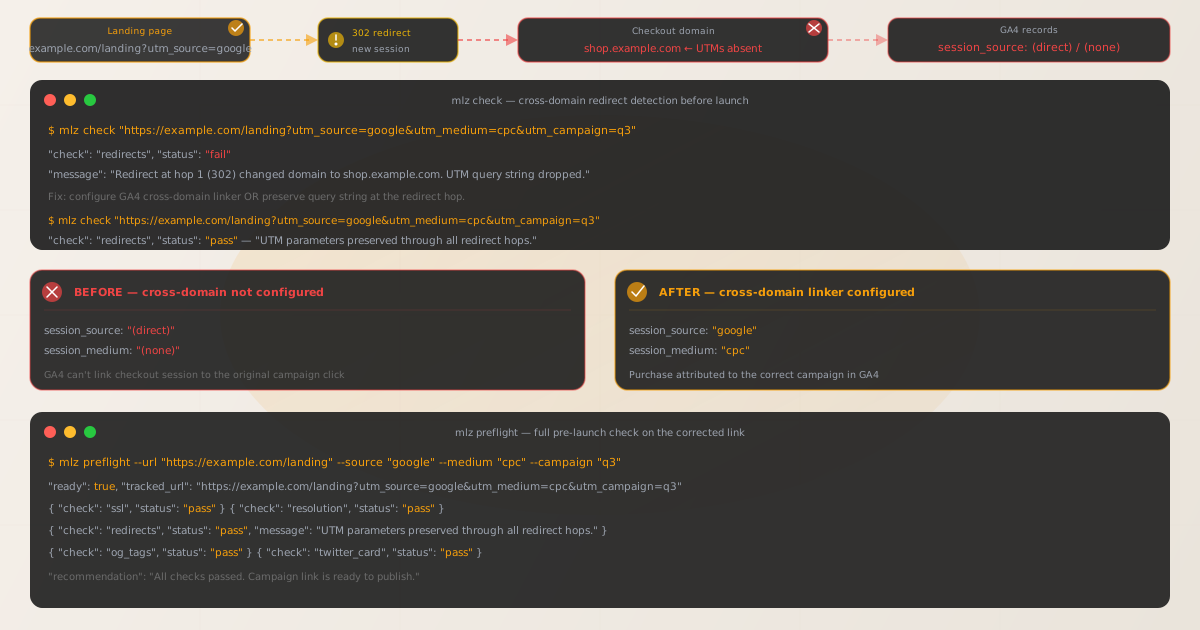
Why GA4 resets sessions when users cross domains
GA4 uses browser cookies scoped to a specific domain to identify a user session. When a user is on example.com, GA4's measurement tag sets a cookie on .example.com — and when the user navigates to shop.example.com, that subdomain is a different cookie scope unless you have explicitly configured GA4's cross-domain tracking to recognize it as part of the same measurement.
What matters for UTM attribution is not just the cookie continuity, but the session source. GA4 assigns a session source at session start from the URL that initiated the session. If the user's session on example.com starts from a UTM-tagged link and they then navigate to shop.example.com, GA4 can start a new session on shop.example.com. That new session has no UTM parameters in its initiating URL — the user arrived directly from an internal navigation, not from an external source — so GA4 records it as (direct) / (none).
This is the core mechanism: the session on the checkout domain does not see the UTM parameters that initiated the session on the landing domain, so it cannot attribute the conversion correctly. The campaign link worked — the user arrived. The tracking did not — the conversion is orphaned from the acquisition source.
| Scenario | GA4 session source |
|---|---|
User clicks UTM link → lands on example.com → purchases on example.com |
✓ Correct — campaign source attributed |
User clicks UTM link → lands on example.com → navigates to shop.example.com — cross-domain NOT configured |
✗ (direct) / (none) — attribution lost |
User clicks UTM link → 302 redirect to shop.example.com — UTMs NOT forwarded |
✗ (direct) / (none) — attribution lost |
User clicks UTM link → lands on example.com → navigates to shop.example.com — cross-domain configured |
✓ Correct — session continues with original UTM source |
User clicks UTM link → 302 redirect to shop.example.com — UTMs forwarded in query string |
✓ Correct — GA4 reads UTMs on landing page |
How mlz check detects the cross-domain redirect before launch
The most common version of this failure mode involves a 301 or 302 redirect: the campaign link points to example.com/landing, which redirects to shop.example.com/product. If that redirect does not forward the UTM query string, the tracking data never reaches the checkout page.
Run mlz check against the full campaign URL — including the UTM parameters — to trace the redirect chain and identify whether the cross-domain hop preserves the query string:
$ mlz check "https://example.com/landing?utm_source=google&utm_medium=cpc&utm_campaign=q3-launch"

{
  "url": "https://example.com/landing?utm_source=google&utm_medium=cpc&utm_campaign=q3-launch",
  "valid": false,
  "checks": [
    { "check": "url_format",   "status": "pass", "message": "URL format is valid." },
    { "check": "ssl",          "status": "pass", "message": "URL uses HTTPS." },
    { "check": "resolution",   "status": "pass", "message": "Destination responded with 200.",
      "details": { "status_code": 200, "response_time_ms": 188 } },
    { "check": "redirects",    "status": "fail",
      "message": "Redirect at hop 1 (302) changed domain to shop.example.com. UTM query string not present in final URL." },
    { "check": "response_time", "status": "pass", "message": "Response time: 188ms.",
      "details": { "response_time_ms": 188 } }
  ],
  "status_code": 200,
  "response_time_ms": 188,
  "validated_at": "2026-07-13T09:14:22.334Z"
}
The page returns HTTP 200 and the destination is reachable, so this failure mode is completely invisible to a browser load or a simple HTTP status check. mlz check follows the redirect chain and compares the query string at each hop — when the query string disappears after the domain change, the redirect check fails and the URL is flagged as invalid for campaign use.
Note that mlz check follows HTTP-level redirects. If the domain transition happens via JavaScript client-side navigation rather than an HTTP redirect, the mechanism is different — see UTM parameters lost after JavaScript redirect for that specific failure pattern.
Three ways to fix cross-domain UTM attribution
There are three complementary approaches, and which one applies depends on how your domains are structured and how the user transitions between them.
- Fix 1: Configure GA4 cross-domain tracking
-
If users navigate from the landing domain to the checkout domain via regular hyperlinks (not server-side redirects), GA4's cross-domain linker is the correct fix. The linker appends a temporary session identifier to outbound links so GA4 can stitch the two sessions together and preserve the original UTM source.
In the GA4 admin panel, go to Admin → Data Streams → [your stream] → Configure tag settings → Configure your domains and add both domains as matched domains. GA4 will automatically append the
_gllinker parameter to all outbound links pointing to the listed domains. The gtag.js snippet on the checkout domain reads this parameter and continues the session.After configuring, test by clicking a UTM-tagged link from the landing page to the checkout domain and verifying in GA4 DebugView that the checkout session shows the original
utm_sourceandutm_mediumvalues — not(direct). - Fix 2: Forward UTM parameters through the redirect
-
If the domain transition is handled by a server-side redirect (301 or 302), the fix is simpler: update the redirect rule to forward the query string. The redirect destination must include the full query string from the incoming URL.
In Apache
.htaccess:# BROKEN — drops query string (UTM parameters lost) Redirect 302 /landing https://shop.example.com/product # FIXED — forwards query string (UTM parameters preserved) RewriteEngine On RewriteCond %{QUERY_STRING} .+ RewriteRule ^landing$ https://shop.example.com/product?%{QUERY_STRING} [R=302,L]In Nginx:
# BROKEN — Nginx omits query string when using return directive
location /landing {
  return 302 https://shop.example.com/product;
}

# FIXED — $is_args$args appends the query string if present
location /landing {
  return 302 https://shop.example.com/product$is_args$args;
}
After updating the redirect, run
mlz checkagain against the full UTM-tagged URL to confirm the query string survives the hop before you launch the campaign. - Fix 3: Land the user directly on the checkout domain
-
If the redirect is purely for routing — the landing page exists only to redirect to the checkout — consider updating the campaign link to point directly to the checkout domain URL with the UTM parameters appended. This eliminates the cross-domain redirect entirely and is the simplest solution when the intermediate landing page adds no value. Use
mlz buildormlz preflightto generate and validate the direct checkout URL:mlz preflight --url "https://shop.example.com/product" --source "google" --medium "cpc" --campaign "q3-launch"
Verifying the fix in GA4 DebugView
After applying the fix, use GA4 DebugView to confirm attribution is flowing correctly before the campaign goes live. DebugView shows session events in real time and is the fastest way to verify that the checkout domain session inherits the original UTM source.
- Step 1: Enable debug mode in your browser
- Install the Google Analytics Debugger Chrome extension, or add
?gtm_debug=xto your URL for GTM-managed tags. Both put GA4 into debug mode for your device. - Step 2: Click a UTM-tagged test link
- Use
mlz buildto generate a properly formatted UTM link pointing to the landing page. Click the link in your browser with debug mode active. Navigate through to the checkout domain as a real user would. - Step 3: Check DebugView on both domains
- In the GA4 admin panel, open DebugView. You should see events firing for both
example.comandshop.example.com. For the checkout domain events, the session parameterssession_sourceandsession_mediumshould show your UTM values —"google"and"cpc"— not"(direct)"and"(none)". - Step 4: Re-run mlz check to confirm the redirect fix
-
Run
mlz checkone more time against the full UTM-tagged URL. A passing result confirms the redirect preserves the query string at every hop and the campaign link is ready for production:$ mlz check "https://example.com/landing?utm_source=google&utm_medium=cpc&utm_campaign=q3-launch" { "valid": true, "checks": [ { "check": "redirects", "status": "pass", "message": "No query string dropped. UTM parameters preserved through all redirect hops." } ] }
Subdomain vs cross-domain: the GA4 distinction matters
GA4 treats first-party subdomains differently depending on your measurement configuration. By default, shop.example.com is a subdomain of example.com — but whether GA4 considers it the same session context depends on how the cookie domain is configured in your gtag.js snippet and whether you have explicitly listed both in GA4's cross-domain settings.
If your gtag configuration uses cookie_domain: 'auto' (the default), GA4 sets cookies on the top-level registered domain (example.com), and cookies are readable by all subdomains. This means example.com and shop.example.com share the same GA4 client ID — so the session continues. However, session source attribution still depends on whether the checkout page fires a new session start event. If the user navigates to the checkout subdomain in the same tab, GA4 may or may not start a new session based on session timeout (30 minutes by default) and whether the checkout page is served with a referrer that matches the exclusion list.
The safest test is always DebugView plus mlz check: DebugView tells you what GA4 is recording, and mlz check tells you whether the UTM parameters survive the redirect chain to reach the checkout page's URL.
For fully separate domains — mainsite.com and checkout-provider.com — cross-domain tracking configuration is mandatory. The cookie domains do not overlap, so GA4 cannot share the client ID without the cross-domain linker parameter. Without it, every purchase on checkout-provider.com will appear as direct traffic regardless of the acquisition source.
Pre-launch checklist for campaigns with cross-domain checkout
- Run mlz check on every campaign link that redirects
- Before any campaign goes live, run
mlz checkagainst the full UTM-tagged URL to confirm the redirect chain does not drop the query string. A"valid": trueresult means the UTM parameters reach the final destination. A"redirects": "fail"result means attribution will be lost in production. - Verify GA4 cross-domain tracking is configured
- Log in to GA4 admin → Data Streams → your stream → Configure tag settings → Configure your domains. Both the landing domain and the checkout domain should appear in the list. If they do not, add them before the campaign launches.
- Test a complete purchase flow in DebugView
- With GA4 debug mode active, click a test campaign link, navigate through to a completed test purchase on the checkout domain, and confirm in DebugView that the conversion event on the checkout domain carries the correct session source — not (direct).
- Run mlz preflight for the full destination check
- Once the redirect chain passes, run
mlz preflightto validate the complete destination: SSL, OG tags, Twitter Card, viewport, canonical URL, and UTM parameter survival in a single command. - Monitor the first 48 hours after launch
- In GA4, create a custom report that shows conversions broken out by
session_sourceandsession_medium. If cross-domain attribution is working, you will see the campaign source as the conversion source. If (direct)/(none) accounts for more than a few percent of campaign-attributed conversions, investigate the checkout domain session start events in DebugView.
Recommended posts
Frequently asked questions
- Why does GA4 show campaign traffic as direct after a cross-domain checkout?
- GA4 starts a new session when a user crosses to a domain that is not in the configured cross-domain list and the cookie does not carry across. That new session has no UTM parameters in its URL — the user navigated from an internal page, not from an external campaign link — so GA4 attributes it as (direct)/(none). The original click on the campaign link was correctly attributed; the conversion event on the checkout domain is not.
- How do I check if a redirect is dropping my UTM parameters?
- Run
mlz check "https://your-landing-page.com/path?utm_source=google&utm_medium=cpc&utm_campaign=q3". The command follows every HTTP redirect hop and checks whether the UTM query string is present in the final destination URL. If the redirect check returns"status": "fail", the redirect is dropping the query string before GA4 fires. - Does configuring GA4 cross-domain tracking fix UTM attribution automatically?
- The GA4 cross-domain linker fixes session continuity for user navigation — when a user clicks a hyperlink from the landing domain to the checkout domain. It does not fix UTM attribution loss caused by a server-side redirect that drops the query string. If the cross-domain transition is a redirect (not a link click), you must also fix the redirect to forward the query string. Use
mlz checkto determine which case applies. - What is the difference between mlz check and mlz preflight for this use case?
mlz checkvalidates the destination URL: SSL, resolution, redirect chain, query string survival, and response time.mlz preflightdoes all of that plus builds the UTM-tagged URL, inspects the landing page for OG tags, Twitter Card, viewport, and canonical URL, and returns a singleready: true/falseverdict. For cross-domain redirect debugging, start withmlz checkto isolate the redirect issue. Once the redirect chain passes, runmlz preflightto confirm the complete destination is campaign-ready.- Does this issue affect subdomain checkouts the same way as fully separate domains?
- It depends on your GA4 cookie configuration and whether the subdomain is in GA4's cross-domain list. If your gtag uses
cookie_domain: 'auto'and bothexample.comandshop.example.comshare the same registered domain, GA4 may maintain session continuity automatically. However, if the checkout subdomain is a separate GA4 data stream, session source attribution will still reset at the domain boundary regardless of cookie sharing. Always verify with DebugView andmlz checkrather than assuming subdomain sharing works.
Validate cross-domain campaign links before launch
Use mlz check to trace the redirect chain from your campaign URL to the final checkout destination and confirm UTM parameters survive every hop. Catch attribution failures in pre-launch testing, not post-campaign reporting.
1,000 links/month free. No credit card.
Your API key
Save this now — it won't be shown again.
npm install -g missinglinkz
Then run mlz check "https://your-landing-page.com/path?utm_source=google&utm_medium=cpc&utm_campaign=q3" to verify your redirect chain before launch.