utm_source Fragmentation in GA4: How Developers Fix It Programmatically
utm_source fragmentation in GA4 happens when the same traffic source is recorded under multiple names because different team members use different capitalisations or spellings. linkedin, LinkedIn, LinkedIn Ads, and LI all become separate rows in your GA4 source/medium report, splitting your actual LinkedIn sessions across four rows and making the channel look dramatically underperforming. GA4 is case-sensitive and string-exact — it has no way to know those four values mean the same thing. MissingLinkz fixes this at the point of link generation: mlz build normalises every utm_source and utm_medium value to lowercase-hyphenated format before the URL is ever created, so fragmentation cannot happen regardless of what the team types in.
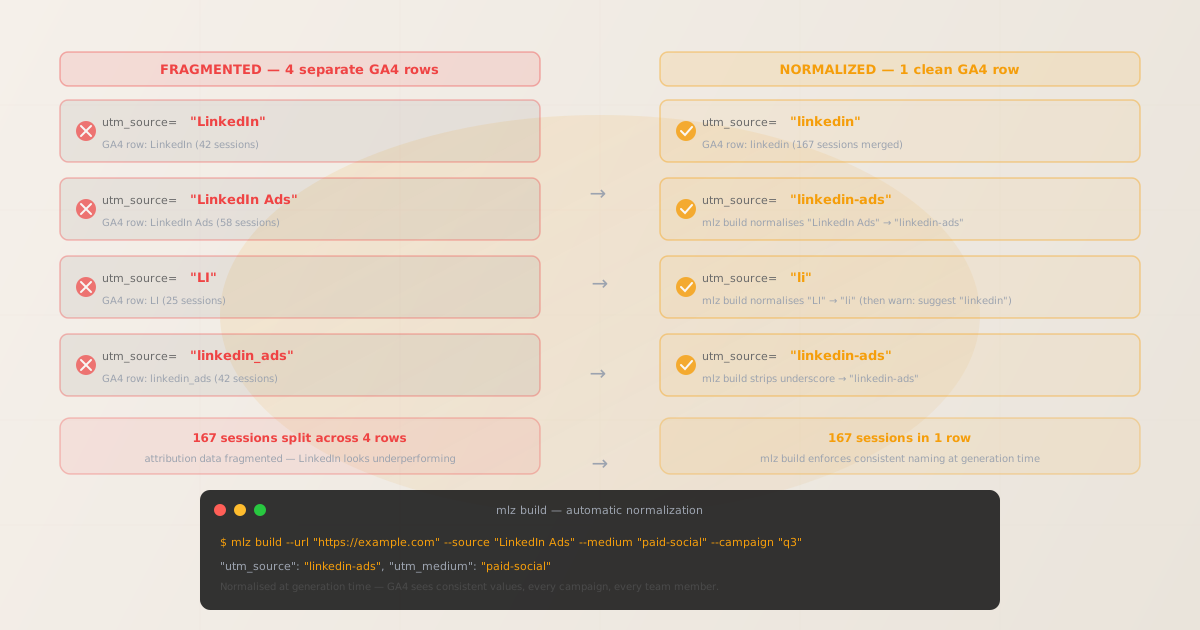
What utm_source fragmentation is
GA4's source/medium report groups sessions by the exact string values of utm_source and utm_medium. It applies no fuzzy matching, no case folding, and no synonym resolution. When your team generates UTM links manually — through Google's Campaign URL Builder, spreadsheets, or just typing URLs by hand — different people naturally write the same source differently:
| What someone typed | GA4 row it creates | Sessions attributed there |
|---|---|---|
linkedin |
linkedin / social | 42 |
LinkedIn |
LinkedIn / social | 58 |
LinkedIn Ads |
LinkedIn Ads / social | 41 |
LI |
LI / social | 26 |
All 167 sessions came from LinkedIn. In GA4, they look like four separate, low-volume sources. Your LinkedIn channel looks weak not because it is weak, but because its data is scattered. Reports built on this data lead to decisions like cutting LinkedIn spend — when the reality is that LinkedIn was your third-best channel all along.
Why utm_source fragmentation happens
Fragmentation is a coordination failure, not a technical one. There are three root causes:
- No shared taxonomy + no enforcement
- If your team doesn't have a documented, enforced list of canonical source names, every person and every tool makes its own choice. A paid search manager types
Google. A social manager typeslinkedin-ads. An email person typesMailChimp. Without a single source of truth, each link is a data quality gamble. - Manual link builders have no validation layer
- Google's Campaign URL Builder accepts whatever you type and makes a URL. It has no opinion on case or naming consistency. Web-based UTM builders face the same constraint: they build, they don't govern. Every manual entry is a chance for a casing variation to slip through.
- Historical links compound over time
- Once a fragmented value exists in GA4, it stays in your historical data indefinitely. You can create a
utm_sourcechannel grouping rule to re-map values going forward, but older data is already split. The only durable fix is to prevent fragmentation at the point of generation, not after it reaches the analytics platform.
How to detect utm_source fragmentation in your GA4 data
The quickest detection method: open GA4 → Reports → Acquisition → Traffic Acquisition, group by Session source, and search for your main channels. If you see LinkedIn appearing as both linkedin and LinkedIn — or Google appearing as google, Google, and Google Ads — you have fragmentation.
For a programmatic audit, use mlz campaigns suggest to see what your existing campaign data looks like and get consistent naming recommendations:
# Check what consistent naming looks like for a given source
$ mlz campaigns suggest --source linkedin
"recommended_source": "linkedin"
"existing_variants": ["LinkedIn", "linkedin-ads", "LI", "linkedin"]
"note": "4 variants detected. Canonical: linkedin. Use mlz build to enforce."

$ mlz campaigns suggest --medium social
"recommended_medium": "social"
"existing_variants": ["Social", "social", "Organic Social"]
The programmatic fix: mlz build automatic normalization
MissingLinkz's normalization rule is applied on every mlz build call, regardless of what the caller types. The rule: all utm_source, utm_medium, and utm_campaign values are lowercased, spaces are converted to hyphens, and special characters are stripped. This matches GA4's own channel grouping expectations for lowercase-hyphenated values.
# Input: mixed-case, spaced values (what someone might type manually)
$ mlz build \
  --url "https://example.com/landing" \
  --source "LinkedIn Ads" \
  --medium "Paid Social" \
  --campaign "Q3 Product Launch 2026"

{
  "tracked_url": "https://example.com/landing?utm_source=linkedin-ads&utm_medium=paid-social&utm_campaign=q3-product-launch-2026",
  "params": {
    "utm_source": "linkedin-ads",
    "utm_medium": "paid-social",
    "utm_campaign": "q3-product-launch-2026"
  },
  "stored": true
}
The normalisation happens in the API layer, not just the CLI display — so it applies equally whether you call mlz build from the terminal, call POST /v1/links from a script, or invoke mlz_build_link via the MCP server from an AI agent. Every surface produces the same canonical output.
Building and validating the destination in one step
Normalisation prevents fragmentation, but it doesn't tell you whether the destination URL actually works. Add --validate to your mlz build call to check SSL, resolution, and redirect chain before the link is saved:
$ mlz build \
  --url "https://example.com/landing" \
  --source "google" \
  --medium "cpc" \
  --campaign "q3-search" \
  --validate

# Normalises values AND checks that the destination resolves correctly
{
  "tracked_url": "https://example.com/landing?utm_source=google&utm_medium=cpc&utm_campaign=q3-search",
  "params": {
    "utm_source": "google",
    "utm_medium": "cpc",
    "utm_campaign": "q3-search"
  },
  "stored": true
}
For the fullest pre-launch check — UTM normalization + destination validation + OG tag and Twitter Card inspection in one command — use mlz preflight. See how to validate UTM links before publishing for the complete walkthrough.
Going further: team-wide taxonomy enforcement
Automatic normalization prevents the case and spacing variations that cause most fragmentation. But it can't prevent two developers from independently choosing linkedin vs li as the source name for the same channel — normalization just ensures each name is consistently lowercase, it doesn't enforce a single canonical name. For that, you need taxonomy enforcement.
MissingLinkz supports two enforcement tiers:
- Free tier: local .mlzconfig.json (client-side allowlist)
- Run
mlz taxonomy initto scaffold a.mlzconfig.jsonin your project root. Define your allowed source and medium values. Pass--stricttomlz buildto reject any value not in your local list. This is bypassable by editing the file — it's a developer convention tool, not an org-wide gate. Suitable for a single developer or small team working in the same repo. - Team plan: server-enforced dictionary (org-wide gate)
- With the Team plan, use
mlz taxonomy allow --source linkedin google facebookto set an org-wide allowlist. Turn on strict mode withmlz taxonomy strict --on. After that, anymlz buildor API call with an off-dictionary source returns aTAXONOMY_VIOLATIONerror and exits non-zero — the build fails, the link is not saved, and the CI pipeline stops. Every seat key in the workspace enforces the same dictionary, so a contractor working in a different repo can't accidentally introduce a new source variant.
# Set the allowed source dictionary
$ mlz taxonomy allow --source linkedin google facebook twitter instagram
$ mlz taxonomy allow --medium social cpc email display referral affiliate

# Enable strict enforcement for the workspace
$ mlz taxonomy strict --on

# Now any off-dictionary value is rejected
$ mlz build --url "https://example.com" --source "LI" --medium "social" --campaign "q3"
Error: TAXONOMY_VIOLATION — source "LI" is not in the allowed dictionary.
Allowed: linkedin, google, facebook, twitter, instagram
Suggestion: did you mean "linkedin"?
Manual link builders vs. mlz build: fragmentation prevention comparison
| Capability | Google URL Builder | Spreadsheet / manual | mlz build |
|---|---|---|---|
| Lowercase normalisation | ✗ No | ✗ No | ✓ Automatic |
| Space-to-hyphen conversion | ✗ No | ✗ No | ✓ Automatic |
| Taxonomy allowlist (local) | ✗ No | ✗ No | ✓ .mlzconfig.json (free) |
| Org-wide strict enforcement | ✗ No | ✗ No | ✓ Team plan |
| CI/CD integration | ✗ No (web only) | ✗ No | ✓ CLI + API + MCP |
| Destination validation at build time | ✗ No | ✗ No | ✓ --validate flag |
Recommended posts
FAQ
- How do I fix utm_source fragmentation in existing GA4 data?
- Existing fragmented data in GA4 cannot be edited retroactively. You can create custom channel grouping rules in GA4 (Admin → Data Display → Channel Groups) to consolidate fragmented sources into a single channel going forward, but historical sessions stay split. The permanent fix is to prevent future fragmentation by generating all new links through a normalising tool like
mlz build. - Does mlz build fix utm_source fragmentation for developer-generated links?
- Yes. Because normalization happens server-side in the MissingLinkz API, it applies consistently whether you call
mlz buildfrom the terminal, use the npm package in a script, or callPOST /v1/linksdirectly from your application code. Any surface that generates links through MissingLinkz produces normalized output — you can't accidentally ship a mixed-case source value. - What is utm_source fragmentation in GA4?
- utm_source fragmentation in GA4 is when the same traffic source (like LinkedIn) appears as multiple rows in your source/medium report because different team members used different capitalisations or spellings when building UTM links. GA4 is case-sensitive, so
linkedin,LinkedIn, andLinkedIn Adseach become a separate row. The result is that your real channel performance data is scattered across several low-impression rows instead of appearing as a single, accurate aggregate. - Will GA4 ever merge utm_source variants automatically?
- No. GA4 does not apply any normalization or fuzzy matching to UTM parameter values. If you want to consolidate fragmented sources in GA4, you need to either (1) use a channel grouping rule to map multiple source values to a single channel name in reporting, or (2) prevent the fragmentation from occurring in the first place by generating all links through a tool that normalizes at write time.
- Does strict taxonomy enforcement break existing campaigns?
- Enabling strict enforcement (
mlz taxonomy strict --on) only affects new link-building requests made after enforcement is activated. Existing stored links are not retroactively rejected or modified. However, any automated process or script that was previously generating off-dictionary source values will start receivingTAXONOMY_VIOLATIONerrors — which is the point. Audit your automation before enabling strict mode to ensure it uses only dictionary-approved values.
Stop utm_source fragmentation before it reaches GA4
MissingLinkz normalises every UTM value at generation time. Whether you build links from the CLI, an API call, or an AI agent, the output is always lowercase and hyphenated — consistent GA4 data, every campaign.
1,000 links/month free. No credit card.
Your API key
Save this now — it won't be shown again.
npm install -g missinglinkz
Then run mlz build for every campaign link — fragmentation-proof GA4 data from day one.