UTM Tracking for WooCommerce: How to Build and Validate Campaign Links
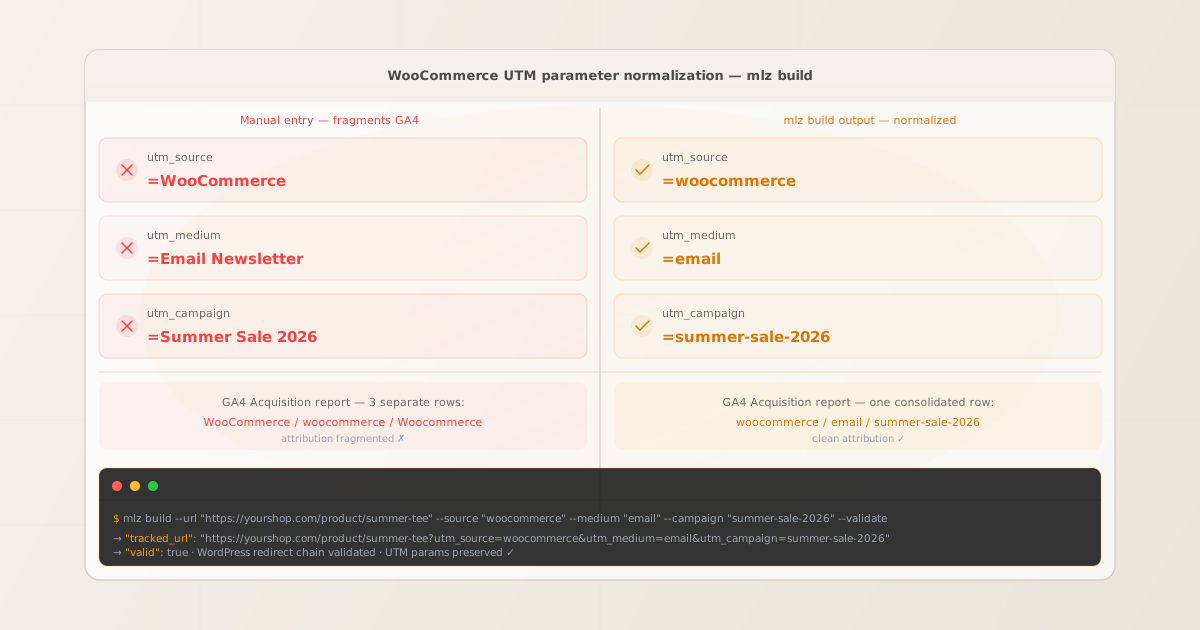
To add UTM tracking to WooCommerce campaign links, append UTM parameters to the WooCommerce product, category, or shop page URLs your ads, emails, and social posts link to. MissingLinkz mlz build enforces lowercase-hyphenated formatting across all UTM values, preventing the GA4 source fragmentation that manual entry causes when team members write WooCommerce, woocommerce, and Woocommerce as separate source values. mlz check validates that WordPress’s permalink structure, .htaccess rewrite rules, and caching plugin configurations don’t strip query strings before GA4 records the session. The most common WooCommerce UTM tracking failure: WordPress’s trailing slash normalization redirect fires before the page loads and discards the query string — your campaign drives traffic but GA4 shows it as Direct because the UTM parameters never arrive at the final URL.
How WooCommerce handles UTM parameters
WooCommerce is a WordPress plugin. It extends WordPress’s URL routing system, adding product pages (e.g., /product/summer-tee/), category pages (/product-category/clothing/), shop pages (/shop/), cart, and checkout. Campaign links point directly to these WordPress URLs with UTM parameters in the query string. GA4 reads UTM parameters from the browser URL after the page finishes loading.
Between the campaign link URL and the final rendered page, WordPress routes the request through several layers that can drop query strings: the web server’s .htaccess rewrite rules, WordPress’s own permalink normalization (enforcing or removing trailing slashes), WooCommerce product redirect rules for out-of-stock or archived products, and caching plugin integrations that handle URL normalization. Each layer is a potential point where UTM parameters can be silently stripped before GA4 fires.
The attribution chain for WooCommerce campaigns is direct — unlike affiliate platforms where UTMs live on a merchant destination URL behind a third-party tracker, here the campaign link points straight to the WooCommerce product URL with UTM parameters appended. This simplicity means the validation concern is entirely on the WordPress side: does the URL resolve correctly and do query strings survive the WordPress redirect layer? Use mlz build to generate normalized UTM-tagged URLs and mlz check to validate the complete redirect chain before any campaign launches. For the full UTM parameter specification and how GA4 attribution works, see the UTM tracking for developers guide.
Building WooCommerce campaign URLs with mlz build
WooCommerce stores often have multiple team members generating campaign links — a marketing manager for email campaigns, a paid search specialist for Google Ads, a social media coordinator for Meta campaigns. Without a consistent tool, each person independently types UTM values and introduces the casing inconsistencies that fragment GA4’s Acquisition report. GA4 treats woocommerce, WooCommerce, and Woo Commerce as three separate sources. The same fragmentation happens with medium values: email, Email, email-newsletter, and Email Newsletter are four separate channels in GA4.
The recommended UTM naming convention for WooCommerce campaigns: utm_source identifies the traffic origin (e.g., klaviyo, google, facebook, instagram); utm_medium identifies the channel type (email, cpc, social); utm_campaign identifies the specific promotion (summer-sale-2026, black-friday-2026). Use utm_content to differentiate between product variants or creative versions within the same campaign. mlz build enforces these values through structured flags, normalizing values to lowercase-hyphenated format and preventing the casing inconsistencies that fragment GA4 data.
$ mlz build \
  --url "https://yourshop.com/product/summer-tee/" \
  --source "klaviyo" \
  --medium "email" \
  --campaign "summer-sale-2026" \
  --content "product-feature-block" \
  --validate

{
  "tracked_url": "https://yourshop.com/product/summer-tee/?utm_source=klaviyo&utm_medium=email&utm_campaign=summer-sale-2026&utm_content=product-feature-block",
  "params": {
    "utm_source": "klaviyo",
    "utm_medium": "email",
    "utm_campaign": "summer-sale-2026",
    "utm_content": "product-feature-block"
  },
  "destination_url": "https://yourshop.com/product/summer-tee/",
  "link_id": "lnk_woo_sum26",
  "campaign_id": "cmp_summer-sale-2026",
  "stored": true,
  "created_at": "2026-07-08T09:30:00.000Z"
}
The tracked_url value is what goes into your Klaviyo template, Google Ads Final URL, or social post link. For category page campaigns linking to a product category landing page rather than a specific product:
mlz build --url "https://yourshop.com/product-category/summer/" --source "google" --medium "cpc" --campaign "summer-sale-2026" --content "category-shopping"
For naming conventions and how consistent casing prevents GA4 data fragmentation across WooCommerce campaign sources, see the UTM naming conventions guide. To generate WooCommerce campaign URLs programmatically via the REST API for bulk campaign setups, see how to build UTM links programmatically.
Validating WooCommerce URLs with mlz check
Once you have the UTM-tagged WooCommerce URL from mlz build, validate it end-to-end with mlz check before placing it in any ad, email, or social post. mlz check follows the complete redirect chain from the URL you provide, confirms the server responds with a 200 status code, and verifies that query parameters survive every hop through the WordPress and WooCommerce URL routing layers. Run this validation before any campaign launch, and re-run it after WordPress plugin updates, permalink structure changes, .htaccess modifications, WooCommerce product status changes, or server configuration updates.
$ mlz check "https://yourshop.com/product/summer-tee/?utm_source=klaviyo&utm_medium=email&utm_campaign=summer-sale-2026"

{
  "url": "https://yourshop.com/product/summer-tee/?utm_source=klaviyo&utm_medium=email&utm_campaign=summer-sale-2026",
  "valid": true,
  "checks": [
    { "check": "url_format", "status": "pass", "message": "URL format is valid." },
    { "check": "ssl", "status": "pass", "message": "URL uses HTTPS." },
    { "check": "resolution", "status": "pass", "message": "Destination responded with 200.", "details": { "status_code": 200, "response_time_ms": 268 } },
    { "check": "redirects", "status": "pass", "message": "No redirects detected." },
    { "check": "response_time", "status": "pass", "message": "Response time: 268ms.", "details": { "response_time_ms": 268 } }
  ],
  "status_code": 200,
  "response_time_ms": 268,
  "validated_at": "2026-07-08T09:31:00.000Z"
}
A valid: true result confirms the WooCommerce product URL resolves with a 200 status code and all query parameters survive the complete WordPress redirect chain. If valid is false, the checks array identifies the failing step. The most common WooCommerce failure: a redirects check showing parameter stripping during WordPress’s trailing slash normalization, or a resolution failure where WooCommerce has automatically redirected an out-of-stock product URL to the shop page. For a walkthrough of diagnosing redirect chain failures, see how to check if a redirect strips UTM parameters.
WooCommerce UTM tracking gotchas
- WordPress trailing slash normalization drops query parameters during redirect
- WordPress enforces a consistent trailing slash policy defined by the permalink structure setting in Settings › Permalinks. If your permalink structure ends with a slash (e.g.,
/product/%postname%/) and a campaign link omits the trailing slash (e.g.,https://yourshop.com/product/summer-tee), WordPress issues a 301 redirect to add the slash. Depending on the server configuration and which component handles the redirect — Apache’s.htaccess, Nginx, or WordPress itself — query parameters may or may not survive this normalization. The fix is simple: always include the trailing slash in campaign links if your WordPress permalink structure requires one.mlz checkcatches this: aredirectscheck failure identifies the trailing slash redirect as the cause. Update the URL inmlz buildto match the canonical permalink format WordPress enforces. - WooCommerce automatically redirects out-of-stock and archived product URLs
- WooCommerce has built-in redirect behaviour for products that become unavailable. When a product is set to “Out of stock” with the redirect option enabled, or when a product is deleted, WooCommerce redirects incoming requests to the parent product category page or to the shop page — without preserving the original query string. A campaign running against a product URL that becomes out-of-stock mid-campaign will silently fail: visitors click the UTM-tagged link, WooCommerce redirects them to the shop page, and GA4 records a Direct session with no product context. Set a recurring validation step using
mlz checkagainst all active campaign URLs to detect unexpected redirects from stock status changes. For automating this validation on a schedule, see automating campaign link validation in CI/CD. - Caching plugins can interfere with query string handling at the URL normalization layer
- WordPress caching plugins — W3 Total Cache, WP Rocket, LiteSpeed Cache, WP Super Cache — interact with URL handling at the server level. Some caching plugin configurations normalize incoming URLs before serving a cached response, and this normalization can drop query strings for requests that the plugin considers cacheable. WP Rocket’s “Never Cache URLs with the Following Parameters” feature and W3 Total Cache’s query string exclusion list address this by explicitly exempting UTM parameters from caching normalization. Verify your caching plugin is configured to preserve
utm_source,utm_medium,utm_campaign,utm_content, andutm_termin incoming URLs. Runmlz checkfrom an IP that is not whitelisted in your caching layer to test the real visitor experience. - WPML language redirects route visitors to language-specific URLs and drop query strings
- WooCommerce stores running WPML (WordPress Multilingual Plugin) or Polylang for internationalization may redirect incoming requests to a language-specific URL based on browser language or the visitor’s country. A campaign link pointing to
https://yourshop.com/product/summer-tee/may be redirected tohttps://yourshop.com/de/product/sommer-t-shirt/orhttps://de.yourshop.com/product/sommer-t-shirt/depending on the WPML language redirect configuration. These language redirects do not always preserve query parameters. If your WooCommerce store uses language-based URL routing, validate UTM-tagged campaign links from the geographic regions your campaigns target — specifically check whether the WPML redirect for each language preserves the full query string. - WooCommerce checkout page URLs do not preserve UTM parameters from product pages
- WooCommerce’s checkout page (
/checkout/) is a separate URL from the product page a campaign links to. GA4 attributes the session to the campaign on the product page visit, not the checkout page. The UTM parameters in your campaign link do not need to appear on the checkout URL — GA4 carries the session-level attribution through the checkout funnel automatically, provided the session is not interrupted. The campaign link URL is the attribution entry point; the checkout URL is downstream. Do not attempt to add UTM parameters to the checkout URL directly. Validate the product page URL — which is the campaign destination — withmlz check, not the checkout page.
Frequently asked questions
- How do I add UTM parameters to a WooCommerce product link?
- Append UTM parameters directly to the WooCommerce product or category page URL used as the destination in your ads, emails, or social posts. The format is:
https://yourshop.com/product/product-name/?utm_source=klaviyo&utm_medium=email&utm_campaign=summer-sale-2026. Use MissingLinkzmlz buildto generate these URLs with consistent lowercase-hyphenated formatting. Note the trailing slash — if your WordPress permalink structure requires one (check Settings › Permalinks), include it in the base URL before appending UTM parameters, or WordPress will redirect and may drop the query string. - Why are my WooCommerce UTM parameters disappearing in GA4?
- The most common causes are: (1) WordPress’s trailing slash normalization redirect strips the query string — check your permalink structure and ensure campaign links match the canonical URL format; (2) a WooCommerce product redirect fires for an out-of-stock product and routes visitors to the shop page without the query string; (3) a caching plugin normalizes the URL and drops query parameters before serving the cached page; (4) a WPML language redirect routes visitors to a language-specific URL without preserving query strings. Run
mlz checkagainst the full UTM-tagged product URL to identify exactly which redirect in the chain is stripping parameters. - Do WordPress caching plugins strip UTM parameters?
- Caching plugins do not deliberately strip UTM parameters, but some configurations do so incidentally. WP Rocket and W3 Total Cache both have settings for excluding URLs with specific query parameters from cache normalization. Check your plugin’s configuration and add
utm_source,utm_medium,utm_campaign,utm_content, andutm_termto the exclusion list if query string handling is causing issues. Runmlz checkfrom a fresh browser session (without admin cookies) to test the caching layer behaviour a real visitor experiences. - What UTM values should I use for WooCommerce campaigns?
- Use lowercase-hyphenated values consistently across your team. For email campaigns:
utm_source=klaviyo(or your ESP name),utm_medium=email. For paid search:utm_source=google,utm_medium=cpc. For social:utm_source=instagram,utm_medium=social. Campaign slug:utm_campaign=summer-sale-2026. Useutm_contentto differentiate product variants or creative versions:utm_content=hero-banner-v1. Run all URLs throughmlz buildto enforce this convention and prevent GA4 attribution fragmentation from inconsistent casing across your WooCommerce marketing team. - How do I validate UTM parameters on WooCommerce URLs before a campaign launches?
- Run
mlz checkagainst the full UTM-tagged WooCommerce URL:mlz check "https://yourshop.com/product/summer-tee/?utm_source=google&utm_medium=cpc&utm_campaign=summer-2026". The output confirms whether the URL resolves with a 200 status, whether any WordPress redirect drops the query string, and whether the response time is acceptable. Run this validation for every new campaign URL before launch, and again after any WordPress or WooCommerce update that might affect URL handling, permalink structure, caching configuration, or product stock status.
Recommended posts
Build and validate WooCommerce UTM campaign links before every launch
mlz build generates normalized, consistently cased UTM destination URLs for WooCommerce campaigns — eliminating source and medium fragmentation in your GA4 Acquisition report. mlz check validates the full redirect chain, catching WordPress trailing slash normalization issues, WooCommerce product redirect rules, caching plugin interference, and WPML language redirects that silently strip UTM parameters before GA4 fires.
1,000 links/month free. No credit card.
Your API key
Save this now — it won't be shown again.
npm install -g missinglinkz
Free plan: 1,000 links/month. No credit card. See the UTM tracking for developers guide for the full programmatic workflow.