UTM Tracking for Shopify: How to Build and Validate Campaign Links
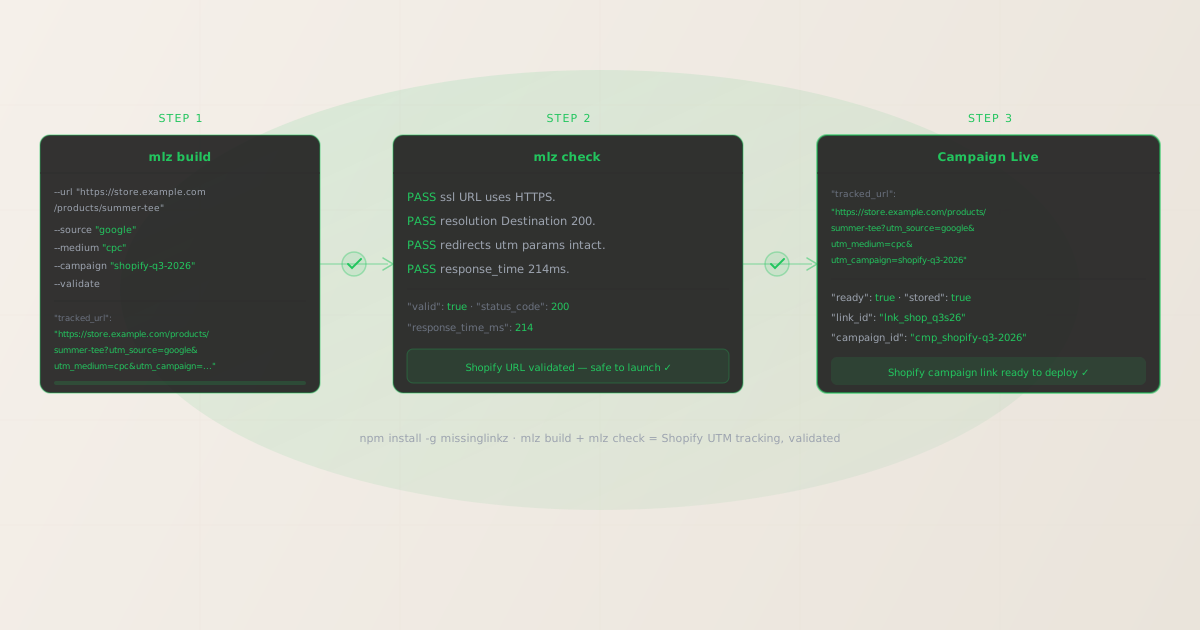
To add UTM tracking to Shopify campaign links, append UTM parameters directly to the Shopify product, collection, or landing page URLs your ads, emails, and social posts link to. MissingLinkz mlz build generates normalized, consistently lowercase UTM values; mlz check validates that Shopify’s redirect layer delivers those parameters intact before GA4 fires. The most common Shopify UTM attribution failure: Shopify’s URL canonicalization redirects a product URL from one path to another and drops query parameters — your campaign drives traffic but GA4 reports it as Direct. Running mlz check against the UTM-tagged product URL before launching catches this class of error automatically.
How Shopify handles UTM parameters
Shopify is a hosted e-commerce platform where every store gets a Shopify-managed subdomain (e.g., yourstore.myshopify.com) and typically a custom domain (e.g., yourstore.com). Shopify serves product pages, collection pages, blog posts, and custom landing pages. When a visitor arrives via a campaign link, Shopify’s CDN (powered by Fastly) and the storefront application handle the request before the page loads.
GA4 reads UTM parameters from the URL in the visitor’s browser after the page finishes loading. If any redirect between the campaign link URL and the final page drops the query string, GA4 never sees the UTM values and attributes the session to Direct. Shopify introduces several redirect layers that can silently strip UTM parameters: theme-level canonical URL redirects, Shopify Markets geo-routing, custom URL redirect rules configured in the Shopify admin, and HTTPS enforcement redirects on the myshopify.com domain.
Unlike affiliate redirect architectures where UTM parameters live on a merchant destination URL behind a third-party tracker, Shopify campaign links are direct: the ad, email, or social post links straight to your Shopify product or collection page with UTM parameters in the URL. The entire attribution chain is simpler — but each Shopify redirect rule is still a potential point of failure. Use mlz build to generate normalized UTM-tagged Shopify URLs and mlz check to confirm the redirect chain passes query strings intact. For a broader explanation of how UTM parameters work across the full funnel, see the UTM tracking for developers guide.
Building Shopify campaign URLs with mlz build
Shopify stores running paid, email, and social campaigns across multiple channels encounter the same GA4 fragmentation problem as any other platform: team members manually typing UTM values use inconsistent casing and spelling (Google vs google vs Google Ads, CPC vs cpc vs paid-search). GA4 treats each unique combination as a separate source row, fragmenting what should be a single Google Ads channel across multiple unrecognizable entries in the Acquisition report.
The recommended UTM naming convention for Shopify paid search campaigns is utm_source=google, utm_medium=cpc, and utm_campaign=[campaign-slug]. For social media campaigns: utm_source=instagram (or facebook, tiktok, pinterest), utm_medium=social, utm_campaign=[slug]. For email: utm_source=klaviyo (or the ESP name), utm_medium=email. Use utm_content to differentiate product variants or landing page versions within the same campaign. mlz build enforces these values through structured flags, preventing the casing and spacing inconsistencies that fragment GA4 data across your Shopify marketing team.
$ mlz build \
  --url "https://yourstore.com/products/summer-tee" \
  --source "google" \
  --medium "cpc" \
  --campaign "shopify-summer-2026" \
  --content "product-hero-v2" \
  --validate

{
  "tracked_url": "https://yourstore.com/products/summer-tee?utm_source=google&utm_medium=cpc&utm_campaign=shopify-summer-2026&utm_content=product-hero-v2",
  "params": {
    "utm_source": "google",
    "utm_medium": "cpc",
    "utm_campaign": "shopify-summer-2026",
    "utm_content": "product-hero-v2"
  },
  "destination_url": "https://yourstore.com/products/summer-tee",
  "link_id": "lnk_shop_sum26",
  "campaign_id": "cmp_shopify-summer-2026",
  "stored": true,
  "created_at": "2026-07-08T09:00:00.000Z"
}
The tracked_url is what goes into your Google Ads Final URL, email template link, or social post. For collection page campaigns targeting browsing rather than a specific product:
mlz build --url "https://yourstore.com/collections/summer" --source "instagram" --medium "social" --campaign "shopify-summer-2026" --content "collection-reel"
For naming conventions and how consistent lowercase-hyphenated values prevent GA4 data fragmentation across Shopify campaign sources, see the UTM naming conventions guide. To generate Shopify campaign URLs programmatically via the REST API for bulk campaign setups, see how to build UTM links programmatically.
Validating Shopify URLs with mlz check
Once you have the UTM-tagged Shopify URL from mlz build, validate it end-to-end with mlz check before placing it in any ad, email, or social post. mlz check follows the complete redirect chain from the URL you provide, confirms the server responds with a 200 status code, and verifies that query parameters survive every hop. Run this validation before any campaign launch, and re-run it after Shopify theme updates, custom redirect rule changes in the Shopify admin, Shopify Markets configuration changes, or domain migration.
$ mlz check "https://yourstore.com/products/summer-tee?utm_source=google&utm_medium=cpc&utm_campaign=shopify-summer-2026"

{
  "url": "https://yourstore.com/products/summer-tee?utm_source=google&utm_medium=cpc&utm_campaign=shopify-summer-2026",
  "valid": true,
  "checks": [
    { "check": "url_format", "status": "pass", "message": "URL format is valid." },
    { "check": "ssl", "status": "pass", "message": "URL uses HTTPS." },
    { "check": "resolution", "status": "pass", "message": "Destination responded with 200.", "details": { "status_code": 200, "response_time_ms": 214 } },
    { "check": "redirects", "status": "pass", "message": "No redirects detected." },
    { "check": "response_time", "status": "pass", "message": "Response time: 214ms.", "details": { "response_time_ms": 214 } }
  ],
  "status_code": 200,
  "response_time_ms": 214,
  "validated_at": "2026-07-08T09:01:00.000Z"
}
A valid: true result confirms the Shopify product URL resolves correctly and all query parameters survive the complete redirect chain. If valid is false, the checks array identifies the failing step. The most common Shopify failure modes: a redirects check showing parameter stripping (usually a canonical URL redirect in the theme or a custom admin redirect rule), or a resolution failure on a product URL where the product has been archived or deleted and Shopify returns a 404. For a walkthrough of diagnosing redirect chain failures, see how to check if a redirect strips UTM parameters.
Shopify UTM tracking gotchas
- Shopify canonical URL redirects strip UTM parameters at the theme level
- Many Shopify themes configure canonical URL handling that redirects product page requests to a normalized form. A common pattern: a product accessible at
/products/summer-teeis also accessible at/collections/summer/products/summer-tee. Shopify’s canonical redirect normalizes one of these to the other, and some theme implementations perform this redirect server-side without preserving the original query string. The result: your campaign link points to/products/summer-tee?utm_source=google&utm_medium=cpc, Shopify redirects to/collections/summer/products/summer-teewithout the query string, and GA4 records a Direct session. Runmlz checkagainst the exact URL you intend to use as your ad destination — if the redirect check fails, link directly to the canonical URL that Shopify resolves to without a redirect. - Shopify Markets geo-redirects route visitors to regional storefronts and may drop query strings
- Shopify Markets allows merchants to create localized experiences for different countries, routing visitors from Germany to a German-language subfolder (
/de) or subdomain (de.yourstore.com). When geo-routing is configured aggressively, a visitor clicking a UTM-tagged campaign link may be silently redirected to the regional storefront without the original query parameters. If your Shopify store uses Shopify Markets with geo-routing, validate the UTM-tagged URL from the regions your campaigns target — specifically runmlz checkagainst URLs pointing to each regional variant. Some merchants configure an explicit?country=parameter or use the Geolocation app to show a selector rather than auto-routing, which avoids this issue entirely. - Custom redirect rules in the Shopify admin silently overwrite campaign destination URLs
- Shopify’s URL redirect management (in Online Store › Navigation › URL Redirects) lets merchants configure 301 redirects from old product URLs to new ones. When a campaign link points to an old product URL with UTM parameters, Shopify’s 301 redirect fires first and delivers the visitor to the new URL without the original query string attached. GA4 records a Direct session instead of attributing to the campaign. Before launching any campaign, verify that the destination URL is not the source in an active Shopify redirect rule.
mlz checkcatches this: aredirectscheck that shows parameters being dropped identifies the redirect rule as the cause. Update the campaign link to point directly to the destination URL rather than the old redirected path. - Archived or out-of-stock products redirect to collection pages and strip query parameters
- Shopify automatically handles archived products by returning a 404 or redirecting to a collection page depending on the theme configuration. If a campaign is running against a product that gets archived mid-campaign, visitors clicking the campaign link land on the collection page with no UTM parameters and no product context — both the conversion and the attribution are lost. Set a recurring validation step using
mlz checkagainst all active campaign URLs to detect 404s and unexpected redirects. For campaigns running over multiple weeks, automate this validation in a CI/CD pipeline. See automating campaign link validation in CI/CD for the setup. - Password-protected Shopify stores redirect all traffic to the password page during pre-launch
- Shopify stores in password protection mode (used during store setup and pre-launch testing) redirect every incoming request to the password page, stripping all query parameters in the process. If you share campaign links for review or testing while the store is still password-protected, any UTM-tagged URL you test will show a
resolutionfailure inmlz check— the destination returns the password page rather than the product. This is expected during development. Disable the password before launching paid campaigns, and re-runmlz checkagainst all campaign URLs after disabling it to confirm product pages resolve correctly with UTM parameters intact.
Frequently asked questions
- How do I add UTM parameters to a Shopify product link?
- Add UTM parameters directly to the Shopify product or collection page URL you use as the destination in your ads, emails, or social posts. The format is:
https://yourstore.com/products/product-name?utm_source=google&utm_medium=cpc&utm_campaign=campaign-name. Use MissingLinkzmlz buildto generate these URLs with consistent lowercase-hyphenated formatting, which prevents GA4 attribution fragmentation from casing inconsistencies across your team. Paste thetracked_urlfrom the output into your ad platform’s Final URL field, email template, or social post. - Why are my Shopify UTM parameters not showing in GA4?
- The most common cause is a Shopify redirect stripping the query string before GA4 fires. Check these in order: (1) run
mlz checkagainst the campaign URL to detect any redirect that drops parameters; (2) look for custom redirect rules in Shopify admin under Online Store › Navigation › URL Redirects; (3) check if Shopify Markets geo-routing is active and routing visitors to a regional URL without the query string; (4) confirm the product is not archived or returning a 404. Ifmlz checkshows aredirectscheck failure, the check output identifies exactly where in the chain the parameters are dropped. - Does Shopify strip UTM parameters?
- Shopify’s storefront itself does not deliberately strip UTM parameters. However, Shopify’s redirect infrastructure — theme canonical redirects, custom admin redirect rules, Shopify Markets geo-routing, and HTTPS enforcement redirects — can drop query strings depending on how each is configured. The Shopify CDN (Fastly) caches pages by URL, and UTM-tagged URLs are treated as distinct cache keys, so caching is not a source of parameter loss. Run
mlz checkagainst any UTM-tagged Shopify URL before launching a campaign to confirm parameters survive the complete redirect chain specific to your store’s configuration. - What UTM naming convention should I use for Shopify campaigns?
- Use lowercase-hyphenated values consistently across your team:
utm_source=google,utm_medium=cpcfor paid search;utm_source=instagram,utm_medium=socialfor social;utm_source=klaviyo,utm_medium=emailfor email campaigns. The campaign slug should identify the promotion:utm_campaign=summer-sale-2026. Useutm_contentto differentiate between product variants or ad creatives:utm_content=product-hero-v1vsutm_content=lifestyle-banner. Run all URLs throughmlz buildto enforce this convention — it normalizes values automatically, preventing casing inconsistencies that create duplicate GA4 source rows. - Can I validate UTM parameters on a Shopify URL before the campaign launches?
- Yes. Run
mlz checkagainst the full UTM-tagged Shopify URL before placing it in any ad or email:mlz check "https://yourstore.com/products/summer-tee?utm_source=google&utm_medium=cpc&utm_campaign=summer-2026". The output confirms whether the URL resolves with a 200 status code, whether any redirects drop the query string, and whether the response time is acceptable. Run this validation for every new campaign URL and after any Shopify store change that might affect URL handling (theme updates, new redirect rules, Shopify Markets changes, domain migrations).
Recommended posts
Build and validate Shopify UTM campaign links before every launch
mlz build generates normalized, consistently cased UTM destination URLs for Shopify campaigns — eliminating source and medium fragmentation in your GA4 Acquisition report. mlz check validates the full redirect chain, catching Shopify canonical redirects, custom admin redirect rules, and Shopify Markets geo-routing issues that silently strip UTM parameters before GA4 fires.
1,000 links/month free. No credit card.
Your API key
Save this now — it won't be shown again.
npm install -g missinglinkz
Free plan: 1,000 links/month. No credit card. See the UTM tracking for developers guide for the full programmatic workflow.