UTM Tracking for Tenjin: How to Build and Validate Campaign Links
Tenjin is a mobile measurement platform built for gaming apps. Its SDK tracks installs, in-app events, and advertising revenue across gaming-focused ad networks — ironSource, Unity Ads, AdColony, and Meta — and provides ROAS reporting that game studios use to manage user acquisition spend. Tenjin tracking links embed mobile attribution parameters such as campaign_id, bundle_id, and ad_network in the tracking URL. These are Tenjin's internal attribution identifiers — GA4 does not read them for web session attribution. When a Tenjin tracking link routes a user to a web destination (a download page, web-to-app landing page, or sign-up flow), the GA4 web session shows as Direct unless you append UTM parameters to that destination URL. Build your tracked destination URL with mlz build --source "tenjin" --medium "[channel]" --campaign "your-slug" --validate and set the resulting tracked_url as the destination in the Tenjin tracking link. Then run mlz check on the full Tenjin tracking link URL to confirm UTM parameters survive the redirect chain.
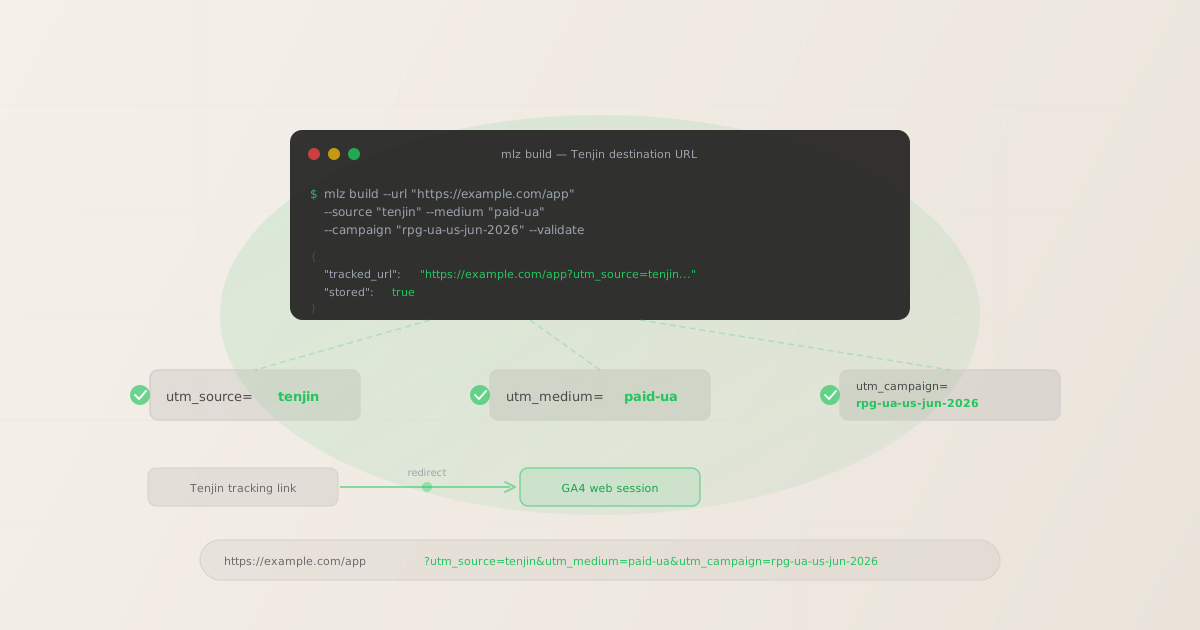
Why Tenjin tracking links need separate UTM parameters for GA4
Tenjin measures mobile attribution at the SDK layer: when a user installs a game and opens it for the first time, the Tenjin SDK sends an attribution event that Tenjin matches to the last recorded ad click using device identifiers and probabilistic matching. Tenjin records which campaign_id, ad_network, and bundle_id drove that install, enabling per-network ROAS reporting in the Tenjin dashboard. This attribution mechanism runs entirely within Tenjin's platform and the mobile app — it does not produce or forward UTM parameters.
GA4 measures web session attribution independently using URL parameters read from the page that opens in the browser. When a Tenjin tracking link redirects a user to a web destination — a download landing page, a web-to-app flow, or a cross-platform campaign landing page — GA4 reads the query string of that web URL. If it finds utm_source, utm_medium, and utm_campaign, it attributes the session to the correct campaign. If those parameters are absent, GA4 falls back to Direct attribution.
The gap is structural: Tenjin's tracking link parameters (campaign_id, bundle_id, ad_network) exist in the Tenjin tracking link URL for Tenjin's click-recording infrastructure to read. They do not appear in the final destination URL that opens in the browser. GA4 never sees them. Building a UTM-tagged destination URL and setting it in the Tenjin tracking link configuration is the only way to close this gap.
| Parameter | Where it appears | What it tracks | Used by |
|---|---|---|---|
campaign_id |
Tenjin tracking link | Campaign in Tenjin dashboard | ✓ Tenjin SDK |
ad_network |
Tenjin tracking link | Network performance in Tenjin | ✓ Tenjin SDK |
bundle_id |
Tenjin tracking link | App identity for attribution | ✓ Tenjin SDK |
utm_source=tenjin |
Destination URL | Web session source in GA4 | ✓ GA4 (web) |
utm_medium |
Destination URL | Channel classification in GA4 | ✓ GA4 (web) |
Gaming UA campaigns frequently route users to web destinations in several common scenarios: web-to-app flows where users are directed to a mobile landing page with a download CTA, cross-platform campaigns where PC and console gamers land on a web sign-up page, and SKAdNetwork-constrained iOS campaigns where a web landing page serves as a measurement fallback. In all cases, the Tenjin tracking link handles mobile attribution and the UTM-tagged destination URL handles GA4 web session attribution — both systems running in parallel on the same campaign.
Building tracked Tenjin destination URLs with mlz build
In a Tenjin tracking link configuration, the redirect destination is the web page where users land after Tenjin records the click. This destination URL is what the browser receives — and what GA4 reads for web session attribution. Build your tracked destination URL with mlz build before creating or updating the Tenjin tracking link, then set the resulting tracked_url as the redirect destination. Add --validate to confirm the destination resolves before the campaign goes live.
# UA campaign (ironSource/Unity Ads → Tenjin → web destination)
$ mlz build \
  --url "https://example.com/download" \
  --source "tenjin" \
  --medium "paid-ua" \
  --campaign "rpg-ua-us-jun-2026" \
  --validate

{
  "tracked_url": "https://example.com/download?utm_source=tenjin&utm_medium=paid-ua&utm_campaign=rpg-ua-us-jun-2026",
  "params": {
    "utm_source": "tenjin",
    "utm_medium": "paid-ua",
    "utm_campaign": "rpg-ua-us-jun-2026"
  },
  "stored": true
}

# Retargeting / re-engagement campaign
$ mlz build \
  --url "https://example.com/offer" \
  --source "tenjin" \
  --medium "paid-retargeting" \
  --campaign "lapsed-30d-jun-2026" \
  --content "banner-300x250" \
  --validate

{
  "tracked_url": "https://example.com/offer?utm_source=tenjin&utm_medium=paid-retargeting&utm_campaign=lapsed-30d-jun-2026&utm_content=banner-300x250",
  "stored": true
}

# Web-to-app fallback (Meta install campaign via Tenjin)
$ mlz build \
  --url "https://example.com/app" \
  --source "tenjin" \
  --medium "paid-social" \
  --campaign "meta-install-jun-2026" \
  --validate

{
  "tracked_url": "https://example.com/app?utm_source=tenjin&utm_medium=paid-social&utm_campaign=meta-install-jun-2026",
  "stored": true
}
Set the tracked_url value as the redirect destination in the Tenjin tracking link configuration. When a user clicks the Tenjin link, Tenjin records the click attribution data (campaign, network, bundle) via its click-recording server, then issues a redirect to the configured destination URL. Because the destination URL carries UTM parameters, GA4 reads them from the page URL when it loads in the browser — attributing the web session to the correct campaign source and medium, independent of and simultaneous with Tenjin's mobile SDK attribution.
Validating UTM parameters survive the Tenjin redirect chain
Tenjin tracking links route clicks through Tenjin's click-recording server before redirecting to the destination. The click-recording step reads attribution parameters from the Tenjin link URL, records the click event, then issues an HTTP redirect to the configured destination. If that destination URL contains UTM parameters with ampersands, those characters must be properly URL-encoded within the Tenjin tracking link — otherwise Tenjin's server may interpret an unencoded ampersand as a delimiter between Tenjin's own query parameters, truncating the destination URL and dropping UTM parameters silently.
After configuring your tracked destination URL in the Tenjin tracking link, validate the complete Tenjin tracking link URL with mlz check to confirm UTM parameters are present at the final destination.
# Check the full Tenjin tracking link URL
# Confirms UTM parameters survive Tenjin's click-recording redirect
$ mlz check "https://tenjin.com/track?campaign_id=rpg-ua-us-jun-2026&ad_network=ironsource&bundle_id=com.example.rpg&redirect=https%3A%2F%2Fexample.com%2Fdownload%3Futm_source%3Dtenjin%26utm_medium%3Dpaid-ua%26utm_campaign%3Drpg-ua-us-jun-2026"

{
  "url": "https://tenjin.com/track?campaign_id=rpg-ua-us-jun-2026...",
  "valid": true,
  "checks": [
    { "check": "ssl", "status": "pass", "message": "URL uses HTTPS." },
    { "check": "resolution", "status": "pass", "message": "Destination responded with 200." },
    { "check": "redirects", "status": "pass", "message": "2 redirects detected. UTM parameters present at final destination." }
  ],
  "status_code": 200
}
If mlz check shows UTM parameters are missing at the final destination, check that the destination URL is correctly URL-encoded inside the Tenjin tracking link. Ampersands between UTM parameters (&) must become %26, and the question mark before the first UTM parameter must become %3F, when embedded as a value in the Tenjin tracking link's query string. See the redirect UTM stripping guide for step-by-step diagnosis if parameters drop at any hop in the chain.
Tenjin UTM tracking gotchas
- Tenjin's SKAdNetwork (SKAN) campaign data doesn't flow into GA4
- Tenjin supports privacy-preserving iOS attribution via Apple's SKAdNetwork framework. SKAN provides aggregated conversion values at the campaign level — fingerprinting and device-level matching are not available for ATT opt-out users on iOS 14.5+. This aggregated SKAN data lives entirely within Tenjin's attribution system. GA4 web session attribution is separate and still depends on UTM parameters in the destination URL. For iOS campaigns where Tenjin uses SKAN for app-level attribution, UTM parameters on the web destination remain fully operational and are especially valuable as a complementary signal for measuring web conversion events alongside privacy-constrained mobile attribution.
- Tenjin's game analytics data (LTV, ROAS per network) is separate from GA4 web data
- Tenjin aggregates spend data from gaming ad networks — ironSource, Unity Ads, AdColony, Moloco, Meta — and combines it with install and LTV data from its SDK to produce per-network ROAS reports. This aggregation is Tenjin-internal and not accessible to GA4 for web session reporting. To cross-reference Tenjin campaign performance with web conversion data (landing page sign-ups, app downloads initiated from a web page, web-to-app flow completions), UTM parameters are the bridge: build tracked destination URLs with
mlz build, and join GA4 web session data with Tenjin attribution data using theutm_campaignslug as the shared key. - Tenjin tracking link URL encoding for destination URLs with UTM parameters
- When you configure a UTM-tagged destination URL in a Tenjin tracking link, the entire destination URL — including the
?separator and all&characters between UTM parameters — must be URL-encoded within the Tenjin link. Without encoding, Tenjin's server reads each unencoded&as a separator between its own query parameters and truncates the destination URL at the first one, dropping all UTM parameters after it. Always validate withmlz checkon the full Tenjin tracking link URL after encoding to confirm the parameters arrive at the final destination intact. - Gaming UA networks each need separate tracked destination URLs per network
- Gaming UA campaigns typically run simultaneously across multiple ad networks — ironSource, Unity Ads, Meta, AdColony — each with its own Tenjin tracking link. The destination URL in each network's Tenjin link should carry UTM parameters that reflect the specific network, so GA4 can distinguish web traffic from each source within the same campaign. Use separate
mlz buildcalls per network with the appropriate--sourceor--contentvalues (for example,--source "ironsource"or--source "tenjin" --content "ironsource") and configure each Tenjin tracking link with its corresponding tracked destination URL. This enables GA4 to report network-level web session performance alongside Tenjin's network-level install and ROAS data.
Tenjin UTM naming conventions
Recommended UTM parameter values for Tenjin campaigns, aligned with GA4 channel reporting and a lowercase-hyphenated taxonomy:
- utm_source:
tenjinto group all Tenjin-tracked web sessions in GA4 for a unified view of Tenjin's web traffic contribution. Alternatively, use the underlying ad network name —ironsource,unity-ads,meta,adcolony— to take advantage of GA4's automatic channel grouping based on source/medium combinations. The key is consistency: choose one approach and apply it uniformly across all Tenjin tracking links for a campaign so GA4 reports are not fragmented across both source conventions. - utm_medium:
paid-uafor user acquisition campaigns (new installs),paid-retargetingfor re-engagement campaigns targeting lapsed players,paid-socialfor social network placements (Meta, TikTok) measured through Tenjin,cpcfor paid search placements. Match the medium to the nature of the traffic channel, not the ad network name, so GA4's default channel groupings work correctly. - utm_campaign: A lowercase-hyphenated identifier that mirrors the Tenjin campaign name for cross-referencing. For user acquisition campaigns:
rpg-ua-ios-us-jun-2026,idle-game-ua-android-global-jun-2026. For retargeting:lapsed-30d-jun-2026,churned-high-ltv-jun-2026. Using a slug that maps to the Tenjincampaign_idmakes it straightforward to join GA4 web session data with Tenjin ROAS and install data in BI tools. - utm_content: Creative or ad unit identifier for A/B testing creative performance on web destinations:
banner-300x250,video-15s-gameplay,playable-30s. Tenjin tracks creative performance at the network level via its ad data aggregation;utm_contentextends that creative-level insight to web session behavior in GA4 for landing page optimization. - utm_term: Audience segment or keyword identifier for segmented campaigns:
mobile-rpg-download,free-game-ios,high-intent-gamers. Use for paid search campaigns tracked through Tenjin or for audience-segmented retargeting campaigns where web session segmentation by audience is useful alongside Tenjin's install-level attribution.
See the UTM naming conventions guide for the full cross-platform taxonomy reference, and the UTM tracking for developers guide for programmatic generation and validation at scale using the mlz CLI, API, and MCP server.
FAQ
- Why do Tenjin campaign clicks show as Direct in GA4?
- If Tenjin is attributing installs and click events correctly but GA4 shows the resulting web sessions as Direct, UTM parameters are missing from the destination URL in the Tenjin tracking link configuration. Tenjin records its own attribution parameters (
campaign_id,ad_network,bundle_id) in the tracking link URL — these do not appear in the destination URL that opens in the browser. GA4 only reads UTM parameters from the page URL. Build a tracked destination URL withmlz build --source "tenjin" --medium "[channel]" --campaign "your-campaign" --validate, update the redirect destination in the Tenjin tracking link, and then runmlz checkon the full Tenjin link URL to confirm UTM parameters survive the redirect chain. - Does Tenjin pass through UTM parameters automatically to destination URLs?
- Tenjin does not automatically extract and forward UTM parameters to web destination URLs. Tenjin records mobile attribution data using its own parameter format and SDK event tracking. For UTM parameters to appear in the GA4 web session for Tenjin-tracked traffic, they must be explicitly configured in the destination URL of the Tenjin tracking link. Use
mlz buildto generate a clean, validated UTM-tagged destination URL and set it as the redirect destination in the Tenjin link — this is the only reliable mechanism for GA4 web attribution from Tenjin-tracked campaigns. - Can I use Tenjin for both mobile attribution and web analytics simultaneously?
- Yes. Tenjin handles mobile attribution — install events, in-app events, revenue, and network ROAS — via its SDK integrated into the mobile app. GA4 handles web session analytics independently via URL parameters in the browser. Both systems can operate simultaneously on the same campaign: Tenjin records mobile attribution when the app is installed and opened, and GA4 records web session data when the user lands on the web destination via the Tenjin tracking link. UTM parameters on the destination URL are the bridge that enables GA4 to attribute web sessions to the correct Tenjin campaign without requiring any direct integration between the two platforms.
- How do I set UTM parameters in Tenjin tracking links?
- Tenjin tracking links have a configurable redirect destination URL. To add UTM parameters, build a UTM-tagged destination URL using
mlz build --source "tenjin" --medium "[channel]" --campaign "your-slug" --validateand use the resultingtracked_urlas the redirect destination in the Tenjin tracking link configuration. When embedding a URL with UTM parameters as a query parameter value inside the Tenjin tracking link URL, URL-encode the destination URL: replace?with%3Fand&with%26. Validate the complete Tenjin link withmlz checkto confirm UTM parameters arrive at the final destination. - Should I use utm_source=tenjin or the underlying ad network name?
- Use
utm_source=tenjinwhen you want to group all Tenjin-tracked web sessions together in GA4 to measure the total web traffic contribution of campaigns managed through Tenjin — useful for studios running many networks and wanting a consolidated view first. Use the underlying ad network name (utm_source=ironsource,utm_source=unity-ads) when you want GA4's automatic channel grouping to classify traffic correctly by network, enabling channel-level performance comparisons in GA4 standard reports without custom segments. Generate separate tracked URLs for each approach withmlz buildand validate withmlz checkbefore any campaign launches.
Recommended posts
Build Tenjin campaign destination URLs from the terminal
Use mlz build --source "tenjin" --medium "[channel]" --campaign "your-slug" --validate to generate a validated tracked URL for each Tenjin tracking link's redirect destination. Set the resulting tracked_url as the redirect destination in the Tenjin link configuration. After setup, run mlz check on the complete Tenjin tracking link URL to confirm UTM parameters survive the redirect chain — and that both Tenjin mobile attribution and GA4 web session attribution are running in parallel on every campaign.
1,000 links/month free. No credit card.
Your API key
Save this now — it won't be shown again.
npm install -g missinglinkz
Free plan: 1,000 links/month. No credit card. See the UTM tracking for developers guide for the full programmatic workflow including API and MCP integration.