UTM Tracking for Tapfiliate: How to Build and Validate Affiliate Campaign Links
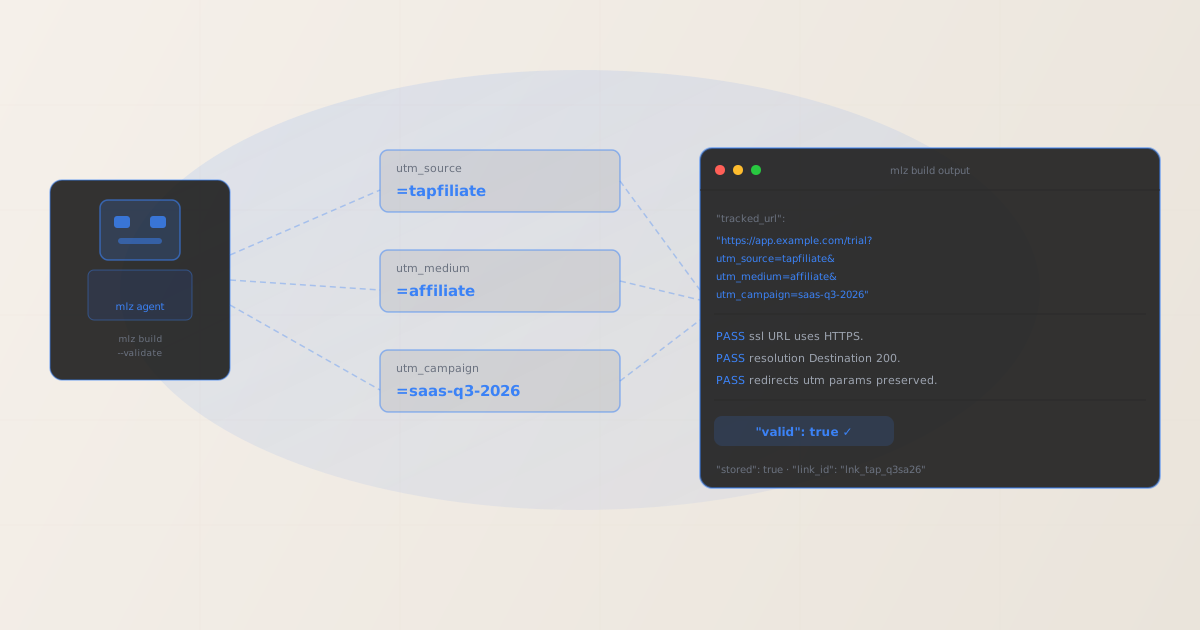
To add UTM tracking for Tapfiliate, configure UTM parameters on the destination URL you register for each affiliate program — not on the Tapfiliate tracking links that your affiliates share. When a prospect clicks an affiliate’s Tapfiliate tracking link, Tapfiliate records the referral event for commission attribution and redirects the visitor to your registered destination URL, preserving any query parameters you placed on it. GA4 reads UTM parameters from that landing page URL after the Tapfiliate redirect completes. Use MissingLinkz mlz build to generate a normalized destination URL with consistent lowercase UTM values and mlz check to confirm that Tapfiliate’s redirect delivers those parameters intact before your affiliate program launches. The most common Tapfiliate UTM attribution error in SaaS environments: engineering teams configure the SaaS app’s signup or trial URL to enforce a canonical redirect that strips query parameters before the page loads — Tapfiliate’s redirect delivers the UTM-tagged URL correctly, but the app rewrite discards it before GA4 fires, causing every Tapfiliate-driven signup to appear as direct traffic.
How Tapfiliate routes traffic and where UTM parameters belong
Tapfiliate is a cloud-based affiliate tracking platform used primarily by SaaS companies, subscription businesses, and online courses to run in-house affiliate programs. Businesses configure their affiliate program in Tapfiliate’s dashboard, set a destination URL (typically the SaaS signup page, free trial URL, or pricing page), define commission rules, and invite affiliates who then receive unique tracking links. When a prospect clicks an affiliate’s link, Tapfiliate’s tracking infrastructure records the referral event — attributing any resulting conversion to the affiliate for commission purposes — and redirects the prospect to the merchant’s registered destination URL.
Tapfiliate’s click tracking, conversion recording, and commission attribution operate using Tapfiliate’s own first-party cookie and JavaScript library. These systems are separate from GA4. Tapfiliate records a referral attribution regardless of whether the destination URL carries UTM parameters; GA4 attribution depends entirely on UTM parameters being present in the URL that loads in the browser after the Tapfiliate redirect completes. Both systems run in parallel: Tapfiliate handles affiliate commission payouts; GA4 handles internal performance attribution for the marketing and growth team.
The consequence for UTM tracking: UTM parameters belong on the destination URL registered in the Tapfiliate program settings, not on the tracking links that Tapfiliate generates for affiliates. Tapfiliate generates affiliate tracking links automatically — merchants do not control their format. The configuration point you own as a merchant is the destination URL in your Tapfiliate program configuration. Paste the UTM-tagged URL generated by mlz build into that field. For a broader explanation of UTM parameter placement in affiliate redirect architectures, see the UTM tracking for developers guide.
Building Tapfiliate destination URLs with mlz build
SaaS companies running Tapfiliate programs across multiple products, pricing tiers, or affiliate cohorts often encounter GA4 attribution fragmentation: marketing team members generating destination URLs independently use inconsistent UTM values (tapfiliate, tap, Tapfiliate, tap-affiliate) and inconsistent medium values (affiliate, partner, referral, Affiliate). GA4 records each unique combination as a separate source row in the Acquisition report, fragmenting what should appear as a single “Tapfiliate Affiliate” channel across several disconnected entries that are impossible to aggregate without manual data cleaning.
The recommended naming convention for Tapfiliate traffic is utm_source=tapfiliate, utm_medium=affiliate, and utm_campaign=[program-or-cohort-slug]. Use utm_content to differentiate between landing page variants (trial-page-v1, trial-page-v2) or affiliate tier cohorts (top-tier-partners, content-creators) within the same program. mlz build enforces these values through structured flags rather than free-text entry, preventing the casing and spacing inconsistencies that fragment GA4 data.
$ mlz build \
  --url "https://app.example.com/trial" \
  --source "tapfiliate" \
  --medium "affiliate" \
  --campaign "saas-q3-2026" \
  --content "trial-page-v2" \
  --validate

{
  "tracked_url": "https://app.example.com/trial?utm_source=tapfiliate&utm_medium=affiliate&utm_campaign=saas-q3-2026&utm_content=trial-page-v2",
  "params": {
    "utm_source": "tapfiliate",
    "utm_medium": "affiliate",
    "utm_campaign": "saas-q3-2026",
    "utm_content": "trial-page-v2"
  },
  "destination_url": "https://app.example.com/trial",
  "link_id": "lnk_tap_q3sa26",
  "campaign_id": "cmp_saas-q3-2026",
  "stored": true,
  "created_at": "2026-07-07T10:00:00.000Z"
}
The tracked_url value is what you configure as the destination URL in the Tapfiliate program settings. Affiliates receive their unique Tapfiliate tracking links; Tapfiliate uses those links to record the referral before forwarding the prospect to your UTM-tagged destination. For programs running multiple landing page variants or targeting different customer segments, generate a distinct destination URL per variant using the --content flag:
mlz build --url "https://app.example.com/trial" --source "tapfiliate" --medium "affiliate" --campaign "saas-q3-2026" --content "pricing-page-v1"
For naming conventions and how consistent casing prevents GA4 data fragmentation across affiliate source values, see the UTM naming conventions guide. To generate destination URLs programmatically for Tapfiliate program configurations via the REST API, see how to build UTM links programmatically.
Validating the Tapfiliate redirect chain with mlz check
Once you have a UTM-tagged destination URL, validate it end-to-end with mlz check before registering it in the Tapfiliate program configuration and before activating the affiliate program. mlz check follows the complete redirect chain from your destination URL, confirms the server responds with a 200 status code, and verifies that query parameters are not stripped at any hop. Run this validation before launching the program, and re-run it after any infrastructure changes affecting URL handling on your SaaS application or marketing site — particularly after authentication layer updates, signup flow refactors, Next.js or SPA routing configuration changes, or CDN rule deployments that may introduce redirect behaviour.
$ mlz check "https://app.example.com/trial?utm_source=tapfiliate&utm_medium=affiliate&utm_campaign=saas-q3-2026"

{
  "url": "https://app.example.com/trial?utm_source=tapfiliate&utm_medium=affiliate&utm_campaign=saas-q3-2026",
  "valid": true,
  "checks": [
    { "check": "url_format", "status": "pass", "message": "URL format is valid." },
    { "check": "ssl", "status": "pass", "message": "URL uses HTTPS." },
    { "check": "resolution", "status": "pass", "message": "Destination responded with 200.", "details": { "status_code": 200, "response_time_ms": 231 } },
    { "check": "redirects", "status": "pass", "message": "No redirects detected." },
    { "check": "response_time", "status": "pass", "message": "Response time: 231ms.", "details": { "response_time_ms": 231 } }
  ],
  "status_code": 200,
  "response_time_ms": 231,
  "validated_at": "2026-07-07T10:01:00.000Z"
}
A valid: true result confirms the destination URL resolves correctly and query parameters survive the complete redirect chain to the landing page. If valid is false, the checks array identifies the failing step in the chain. Common failure modes for Tapfiliate SaaS destination URLs include Next.js routing that redirects unauthenticated users to a login page stripping query parameters, SPA authentication layers that intercept direct URL access and reset the URL before the app loads, and HTTPS enforcement redirects that normalize the URL and discard query strings. For a walkthrough of diagnosing redirect chain failures, see how to check if a redirect strips UTM parameters.
Tapfiliate UTM tracking gotchas for SaaS companies
- UTM parameters go on the destination URL, not on the Tapfiliate affiliate tracking link
- Tapfiliate generates unique tracking links for each affiliate in your program. These links belong to the affiliate and are formatted by Tapfiliate according to its own URL structure. Adding UTM parameters to the Tapfiliate affiliate tracking link URL does not work: Tapfiliate’s redirect system forwards the visitor to the destination URL you registered in the program settings, not to a URL derived from the affiliate link’s own query parameters. The only configuration point you control as a SaaS operator is the destination URL in the Tapfiliate program configuration. Paste the UTM-tagged URL from
mlz buildinto that field. - SaaS signup flows that redirect unauthenticated users strip UTM parameters
- The most common Tapfiliate UTM attribution failure in SaaS environments is an authentication redirect in the signup flow. Many SaaS apps are built so that visiting
https://app.example.com/trialwhile unauthenticated triggers a redirect tohttps://app.example.com/signupor to a separate marketing site page — and that redirect discards the original query string. GA4 fires on the final page with no UTM data. The fix is to either update the signup flow to preserve query parameters through any authentication redirect, or register a marketing site URL (without the app subdomain) as the Tapfiliate destination URL and handle the signup CTA on that page. Usemlz checkto confirm query parameter survival before registering the destination URL. For Next.js apps, thenext/router’squeryobject or middleware can be used to forwardutm_*parameters through the authentication flow explicitly. - Tapfiliate’s referral cookie and GA4 UTM attribution track different events
- Tapfiliate sets a referral cookie when a prospect clicks an affiliate’s tracking link. This cookie identifies the referring affiliate and is used by Tapfiliate’s JavaScript conversion tracking to attribute conversions (signups, purchases) to the correct affiliate for commission payouts. GA4’s UTM attribution works separately: it reads the
utm_source,utm_medium, andutm_campaignvalues from the landing page URL on first visit and stores them in GA4’s session and user attribution model. Both systems record the same visitor, but they attribute the conversion to different entities for different purposes: Tapfiliate attributes to the individual affiliate; GA4 attributes to the Tapfiliate affiliate channel. Neither system interferes with the other. If Tapfiliate shows a referral click but GA4 shows no Affiliate channel session, the UTM destination URL has a redirect problem — not a Tapfiliate tracking conflict. - Changing the destination URL mid-program requires re-validation and notifying affiliates
- Tapfiliate allows merchants to update the destination URL for an active affiliate program. If you change the destination URL (for example, when launching a new trial page or moving to a different subdomain), re-run
mlz checkagainst the new URL before propagating the change. All affiliates’ existing tracking links continue to work — Tapfiliate’s redirect updates automatically — but if the new destination URL has an invalid redirect chain or missing query string passthrough, every affiliate link in the program silently breaks UTM attribution from that moment forward. Validate first, update second. For automating destination URL validation on a schedule, see automating campaign link validation in CI/CD. - Tapfiliate’s custom domain for affiliate links does not affect destination URL UTM parameters
- Tapfiliate supports custom affiliate link domains (e.g.,
refer.yourapp.com) instead of the default Tapfiliate subdomain. This is a cosmetic change to the affiliate tracking link’s domain and does not affect how Tapfiliate routes visitors to the destination URL or whether UTM parameters on the destination URL survive the redirect. Whether affiliates share links with the default Tapfiliate domain or a customrefer.yourapp.comdomain, the redirect delivers visitors to your registered destination URL with its query parameters intact. UTM attribution in GA4 is determined entirely by what parameters are on the destination URL, independent of the affiliate link’s domain.
Frequently asked questions
- Where do I add UTM parameters for Tapfiliate tracking?
- In the Tapfiliate merchant dashboard, open your affiliate program settings and configure the destination URL with UTM parameters already appended. Generate the UTM-tagged URL using MissingLinkz
mlz buildto ensure consistent lowercase-hyphenated formatting, then paste it into the destination URL field in the program settings. The format is:https://app.example.com/trial?utm_source=tapfiliate&utm_medium=affiliate&utm_campaign=program-name. When an affiliate’s tracking link is clicked, Tapfiliate forwards the visitor to this URL and GA4 reads the UTM parameters from the landing page URL to attribute the session to your Tapfiliate affiliate program. - What UTM values should I use for Tapfiliate?
- Use
utm_source=tapfiliate,utm_medium=affiliate, andutm_campaign=[program-name-slug]. Keep all values lowercase-hyphenated:saas-q3-2026rather thanSaaS Q3 2026. GA4 treatstapfiliateandTapfiliateas two different sources, so inconsistent casing across your team fragments the Tapfiliate row in GA4’s Acquisition report. Usemlz buildto generate all Tapfiliate destination URLs from structured flags to enforce this convention automatically. - Does Tapfiliate’s redirect strip UTM parameters?
- Tapfiliate’s redirect infrastructure forwards visitors to the merchant’s destination URL and preserves query parameters on that destination URL. The UTM parameters are attached to the destination URL itself — not to the affiliate tracking link — so the Tapfiliate redirect mechanism does not interact with them. If UTM parameters are being lost, the failure is on the merchant’s server or application side: a SaaS signup flow that redirects unauthenticated users without preserving query strings, a Next.js routing configuration, an HTTPS enforcement redirect, or a CDN rule stripping query parameters from incoming requests. Use
mlz checkto identify exactly where in the redirect chain parameters are dropped. - Why does Tapfiliate show referral clicks but GA4 shows no Affiliate channel sessions?
- This gap almost always means UTM parameters are not reaching GA4. The most common cause in SaaS environments: the signup or trial URL redirects unauthenticated visitors to a login or onboarding page and drops query parameters in the process. Run
mlz checkagainst your Tapfiliate destination URL with UTM parameters appended and look for anyredirectscheck that shows parameters being stripped. A secondary cause: UTM parameters were added to the Tapfiliate affiliate tracking link itself rather than the destination URL registered in the program settings — they appear in the affiliate link URL but are not forwarded to the landing page through Tapfiliate’s redirect system. - Can I use Tapfiliate with both a free trial and a paid conversion URL as separate programs?
- Yes. Tapfiliate supports multiple affiliate programs per account, each with its own destination URL, commission structure, and affiliate pool. For a SaaS product with a free trial funnel and a direct-purchase funnel, create two separate Tapfiliate programs: one with the trial page as the destination URL (
utm_campaign=trial-q3-2026) and one with the pricing or checkout page (utm_campaign=direct-q3-2026). Generate distinct destination URLs for each program usingmlz buildwith matching campaign slugs and validate each withmlz checkbefore registering them in the respective Tapfiliate program configurations. This setup lets GA4 distinguish trial-entry affiliate sessions from direct-purchase affiliate sessions in the Acquisition report.
Recommended posts
Build Tapfiliate-ready UTM destination URLs and validate every redirect before your affiliate program launches
mlz build generates normalized, consistently cased UTM destination URLs for Tapfiliate programs — eliminating source and medium fragmentation across your SaaS team. mlz check validates the full redirect chain, catching SaaS signup flow authentication redirects, Next.js routing issues, and CDN query string stripping that silently breaks UTM attribution before GA4 fires.
1,000 links/month free. No credit card.
Your API key
Save this now — it won't be shown again.
npm install -g missinglinkz
Free plan: 1,000 links/month. No credit card. See the UTM tracking for developers guide for the full programmatic workflow.